Love your project, just wanted to put this here, so you can keep an eye on it, and possibly prepare for it since it's around the corner.
https://devblogs.microsoft.com/commandline/announcing-wsl-2/
 tbtmuse
All 22 comments
@tbtmuse yep we are aware and frankly can't wait already! If the performance is going to be good, this is going to be no less than an epic change.
Initial builds of WSL 2 will be available through the Windows insider program by the end of June 2019.
 achekulaev
on 7 May 2019
achekulaev
on 7 May 2019
We'll have to explore the best approach to supporting and using WSL 2.
WSL 2 is not a revolutionary approach but rather an attempt to flip the issue (file system access and performance) on its head. It's pretty much the same as having a Linux environment in a VM that you connect to via SSH.
Specifically:
Cross OS file speed will be slower in initial preview builds
You will notice slower file speeds compared to WSL 1 when accessing Windows files from a Linux application, or accessing Linux files from a Windows application. This is a result of the architectural changes in WSL 2, and is something that the WSL team is actively investigating on how we can improve this experience.
- WSL 2 installation instructions (available via Windows Insider Program on the "Fast" ring)
- WSL 2 with Visual Studio Code
 lmakarov
on 2 Oct 2019
lmakarov
on 2 Oct 2019
Noting here that I was able to get this working by doing the following:
- Ensure you're on at least Windows 10 2004 or Get on latest Windows fast ring
- Install WSL 2 and choose Ubuntu 18.04 LTS (otherwise, you're on your own installing and setting up docker). If you want to use existing SSH keys (like from Windows), copy them in now. Make sure to
mkdir ~/.ssh; touch ~/.ssh/configeither way or Docksal will create it as a directory, which breaks things. - In WSL2, install docksal
bash <(curl -fsSL https://get.docksal.io). If you run into issues installing docker, runsudo usermod -aG docker "${USER}",sudo service docker start, and restart the WSL2 Ubuntu app. Then try installing docksal again. - Run
fin config set --global DOCKSAL_VHOST_PROXY_IP="0.0.0.0" - Change into the linux project directory and start up the desired project (if it was previous on /mnt - please re-clone the project to your linux home directory or performance will suffer)
- Follow the instructions (example at the bottom of this comment) at https://github.com/microsoft/WSL/issues/4150 to set the port and firewall rules properly (I used task scheduler + wslbridge.ps1).
- Since
fin hostsis not updated for WSL2 yet, add your project URLs to C:\Windows\System32\drivers\etc\hosts127.0.0.1 myproject.docksal. You'll need tofin system resetto pick up all the changes and firewall updates. - For IDE use, I recommend mounting WSL as a network drive via Windows command prompt:
net use "Z: \\wsl$\Ubuntu 18.04 LTS" /persistent:Yes. For VSCode, you can just use VSCode Remote (runcode .inside the project root dir). - Make sure you reboot the PC, because it's Windows
- To get XDEBUG or other inbound connection services working, set
DOCKSAL_HOST_IPin .docksal/docksal-local.env to the IP address provided to WSL. (printf 'DOCKSAL_HOST_IP="%s"' $(ip route list default | grep -oP '(?<=default via\s)\d+(\.\d+){3}') >> ./.docksal/docksal-local.env) then runfin project restart. - If necessary, I suggest moving back to the Windows Slow Ring via Windows Insider Program unless you like running long updates twice a week
_Example port and firewall rules script; run as administrator using Task Scheduler:_
- Run...
taskschd.msc - Create Task - Start a program Action, Trigger on user login: powershell.exe -ExecutionPolicy Bypass C:\Scripts\wslbridge.ps1
$remoteip = wsl.exe /bin/bash -c "ip addr show eth0 | grep -oP '(?<=inet\s)\d+(\.\d+){3}'"
$found = $remoteip -match '\d{1,3}\.\d{1,3}\.\d{1,3}\.\d{1,3}';

if( !$found ){
  echo "The Script Exited, the ip address of WSL 2 cannot be found";
  exit;
}

#[Ports]

#All the ports you want to forward separated by comma
$ports=@(80,8080,443,10000,3000,5000);


#[Static ip]
#You can change the addr to your ip config to listen to a specific address
$addr='0.0.0.0';
$ports_a = $ports -join ",";


#Remove Firewall Exception Rules
iex "Remove-NetFireWallRule -DisplayName 'WSL 2 Firewall Unlock' ";

#adding Exception Rules for inbound and outbound Rules
iex "New-NetFireWallRule -DisplayName 'WSL 2 Firewall Unlock' -Direction Outbound -LocalPort $ports_a -Action Allow -Protocol TCP";
iex "New-NetFireWallRule -DisplayName 'WSL 2 Firewall Unlock' -Direction Inbound -RemoteAddress $remoteip -Action Allow -Protocol TCP";

for( $i = 0; $i -lt $ports.length; $i++ ){
  $port = $ports[$i];
  iex "netsh interface portproxy delete v4tov4 listenport=$port listenaddress=$addr";
  iex "netsh interface portproxy add v4tov4 listenport=$port listenaddress=$addr connectport=$port connectaddress=$remoteip";
}
See below comment https://github.com/docksal/docksal/issues/1055#issuecomment-624925472 for benchmarks.
 cybtachyon
on 6 Nov 2019
cybtachyon
on 6 Nov 2019
@cybtachyon thanks for the report. The last step is probably not necessary since there is fin hosts command for that.
achekulaev
on 6 Nov 2019
Updated the steps - thanks!
cybtachyon
on 8 Nov 2019
@lmakarov WSL2 doesn't have to be "revolutionary" to be revolutionary. It works very well so far and takes care of many pain points of a conventional VM setup.
Is it that difficult to support? BTW, ddev just works, docker just works -- no tweaks needed. Like you said it's a "Linux environment in a VM" so...
 dimaboychev
on 16 Apr 2020
dimaboychev
on 16 Apr 2020
Is it that difficult to support?
Difficult - likely not. Will it take time - certainly. Can you help by getting involved in a feature you are interested to see implemented - I'm glad you asked!
Here's how:
- Validate the installation steps posted above are still valid.
- Run some speed tests (e.g.
time drush site-install) to compare filesystem performance between Docksal running with WSL1 and WSL2. - PRs are always welcome
- Patience is also appreciated (when is the release date for WSL2?)
lmakarov
on 16 Apr 2020
when is the release date for WSL2?
May 12 or May 13 in a phased manner for Windows 10 2004.
cybtachyon
on 25 Apr 2020
Just tested Docksal on WSL2 on the latest SLOW ring of insider preview build (19041.207). Works well and it works even with native linux Docker. Other words: Docker for Windows potentially is not needed anymore!
WSL2 Installation
Setup WSL2 and enable WSL2 to all distros by default.
In Powershell as Admin run:
dism.exe /online /enable-feature /featurename:Microsoft-Windows-Subsystem-Linux /all /norestart
dism.exe /online /enable-feature /featurename:VirtualMachinePlatform /all /norestart
Make WSL2 as default WSL version
wsl --set-default-version 2_Note: it will not modify and impact any already existing/downloaded linux distros. If you already have linux distro downloaded, you need to switch it to WSL2 manually using following command in powershell:_
wsl --set-version Ubuntu-18.04 2 # For setting WSL v2or
wsl --set-version Ubuntu-18.04 1 # For returning WSL v1Install Ubuntu-18.04 from Windows Store. You can ignore login with MS account, just close login popup window and download will start.
_Note: there is no Docker repo for Ubuntu 20.04 (focal) so far, so just use 18.04._
Run Ubuntu app and finish install process.
In Powershell run
wsl --list --verbosefor making sure you have WSL2 ubuntu (see for _VERSION_ column):> wsl --list --verbose NAME STATE VERSION * Ubuntu-18.04 Running 2Open Ubuntu app and install Docksal in a usual linux way. It will trigger docker-ce install script and Docker + Docksal will be installed:
bash <(curl -fsSL https://get.docksal.io) && newgrp dockerFollow @cybtachyon's network configuration steps: https://github.com/docksal/docksal/issues/1055#issuecomment-550149547
Drupal speed
Testing
I've just created a drupal project in the WSL user's home directory and ran drush si 5 times.
.docksal/commands/test1
```bash
#!/usr/bin/env bash
# Stop on error
set -e
i=1
max=5
while [ $i -le $max ]
do
echo "[$i/$max] Running site install..."
time (fin exec drush si standard --db-url=mysql://root:root@db/default --yes --quiet)
i=$(( $i + 1 ))
done
```
_For testing WSL2 I've created a project directory in WSL's user home directory: ~/testproject and not used windows partitions at all for storing the project. Personally I'd recommend to use WSL's home directory and mount it to some disk as suggested above. But WSL1 forced to use /mnt/c/testproject because Docker for Windows does not work well with \\wsl$\* shares._
Results
| | WSL1 | WSL2 | % |
|:---: |:----: |:------------:|:-----------:|
| 1 | 0m43.706s | 0m29.857s | +37.66% |
| 2 | 0m44.588s | 0m29.181s | +41.77% |
| 3 | 0m43.991s | 0m29.098s | +40.75% |
| 4 | 0m44.374s | 0m28.829s | +42.47% |
| 5 | 0m44.485s | 0m29.096s | +41.59% |
| AVG | 0m44.2288s | 0m29.2122s | +40.89% |
WSL1:
- Dir:
/mnt/c/projectname - Used Docksal + Docker for Windows setup setup
WSL2:
- Dir:
~/projectname - Used
docker-ceinside WSL2 as it's fully compatible with kernel now, no Docker for Windows was installed at all.
File system speed testing
I've just run dd inside (IN) and outside (OUT) cli container.
.docksal/commands/test2
```bash
#!/usr/bin/env bash
# Stop on error
set -e
i=1
max=5
while [ $i -le $max ]
do
echo "[$i/$max] Running test OUTside container ..."
dd if=/dev/zero of=./test bs=512M count=20 oflag=direct && rm ./test
i=$(( $i + 1 ))
done
echo "- - - - - - - - - - - - - - - - - - - - - - - -"
i=1
max=5
while [ $i -le $max ]
do
echo "[$i/$max] Running test INside container ..."
fin exec dd if=/dev/zero of=./test bs=512M count=20 oflag=direct && rm ./test
i=$(( $i + 1 ))
done
```
| | WSL1 OUT | WSL2 OUT |
|:---:|:----------------------:|:---------------------:|
| 1 | 13.924 s, 771 MB/s | 1.94288 s, 5.5 GB/s |
| 2 | 13.413 s, 801 MB/s | 1.85279 s, 5.8 GB/s |
| 3 | 11.7553 s, 913 MB/s | 1.86616 s, 5.8 GB/s |
| 4 | 13.0073 s, 825 MB/s | 1.90219 s, 5.6 GB/s |
| 5 | 12.8637 s, 835 MB/s | 1.902 s, 5.6 GB/s |
| | WSL1 IN | WSL2 IN |
|:---:|:----------------------:|:---------------------:|
| 1 | 58.1253 s, 185 MB/s | 1.94346 s, 5.5 GB/s |
| 2 | 55.6673 s, 193 MB/s | 1.88701 s, 5.7 GB/s |
| 3 | 55.6066 s, 193 MB/s | 1.91609 s, 5.6 GB/s |
| 4 | 55.9907 s, 192 MB/s | 1.9157 s, 5.6 GB/s |
| 5 | 55.665 s, 193 MB/s | 1.95676 s, 5.5 GB/s |
That's insane! 🤪
Also I found that WSL2/WSL1 can be detected by kernel version: uname -r will return:
- WSL1:
4.4.0-19041-Microsoft - WSL2:
4.19.67-microsoft-standard
So it's possible to just grep microsoft-standard$ for detecting wsl2. I hope it will help.
 alexander-danilenko
on 7 May 2020
alexander-danilenko
on 7 May 2020
@alexander-danilenko this is great analysis. Looking forward to trying out WSL2 for myself.
 lpeabody
on 7 May 2020
lpeabody
on 7 May 2020
WSL2 is available on many Windows 10 systems now with the 2004 update (slow rollout).
I have gone over my instructions in https://github.com/docksal/docksal/issues/1055#issuecomment-550149547 , and added support for XDEBUG and other Inbound connection tooling.
- To get XDEBUG or other inbound connection services working, set
DOCKSAL_HOST_IPin .docksal/docksal-local.env to the IP address provided to WSL. (printf 'DOCKSAL_HOST_IP="%s"' $(ip route list default | grep -oP '(?<=default via\s)\d+(\.\d+){3}') >> ./.docksal/docksal-local.env) then runfin project restart.
There's a couple things I don't understand which makes it difficult for me to contribute a PR, such as how DOCKSAL_HOST_IP is determined on Windows, or the best way to add firewall rules on Windows for Docksal/WSL2 (especially since the IP changes every time). I'd appreciate any insight, or at least enough that we could hack together a PR for this issue.
cybtachyon
on 20 Jun 2020
@cybtachyon , on line 5 of your powershell command, shouldn't $matches[0] instead be $found[0]? I don't see a prior variable named $matches in the wslbridge.ps1.
(Also, hello, Bloom from the Particle project here! It's awesome knowing you're rocking WSL2!!)
 illepic
on 23 Jun 2020
illepic
on 23 Jun 2020
on line 5 of your powershell command, shouldn't $matches[0] instead be $found[0]?
Heya! Good catch, that's a leftover variable from the first iteration of the script. The matching is more robust now. I removed it as it's not needed anymore. Thanks!
cybtachyon
on 23 Jun 2020
Noting here that on a pre-release version of Windows (Build 20180.1000), local IP's 0.0.0.0 and 127.0.0.1 were disabled by default while localhost still worked fine.
I needed to run netsh http add iplisten 0.0.0.0 netsh http add iplisten 127.0.0.1.
cybtachyon
on 10 Aug 2020
I can verify the above works _after a system restart_. Because Windows.
illepic
on 14 Aug 2020
Also throwing this out there: Make sure to restart your docksal-vhost-proxy and docsal-dns containers after applying @cybtachyon's powershell script:
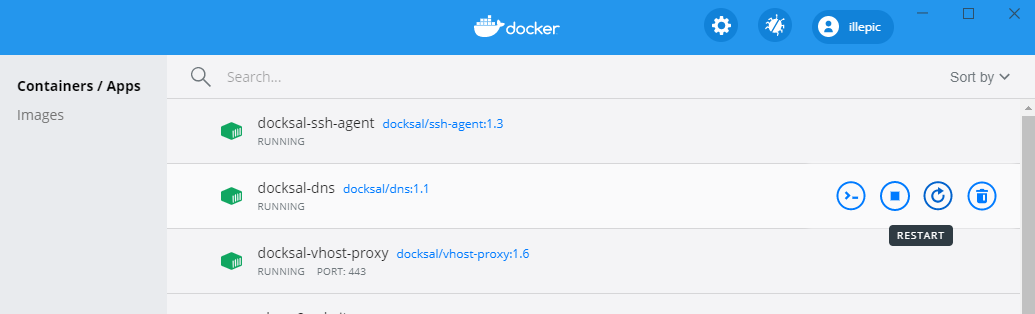
illepic
on 22 Aug 2020
Is this working out of the box at this point? I'd love to be able to switch to WSL2 since I've had some weird intermittent issues with SMB shares.
I noticed the install docs for Windows don't specify WSL1 or 2, and the Microsoft page about it recommends WSL2, so it is de facto the default for new users at this point...
 ethanbb
on 20 Oct 2020
ethanbb
on 20 Oct 2020
@ethanbb We would need a PR that adds automation to the steps listed above. One issue is there is not an easy way to add the needed firewall exceptions via docksal. I would consider that a blocking bug in WSL2, unless we find a way to script it in bash.
See https://github.com/docksal/docksal/issues/1055#issuecomment-550149547 for the most up-to-date steps required.
cybtachyon
on 20 Oct 2020
Any official update on this being fully supported? I'm getting a new machine soon and would love to go with WSL2 for the speed boost.
 gconry18
on 24 Feb 2021
gconry18
on 24 Feb 2021
Work on WSL2 support in Docksal is underway.
lmakarov
on 18 Mar 2021
Also want to confirm that the solution above works and the speed gain is amazing. My main reason for looking into WSL2 is because I was testing out Wingsuit DS for Drupal. With WSL, Webpack (using watch) was taking about 2 minutes to recompile after a file changes. After switching to WSL2, it takes less than a second! Looking forward to this integration in future release of Docksal.
 senhduong
on 19 Apr 2021
senhduong
on 19 Apr 2021
@lmakarov Is there a branch up or a doc tracking what's being done / needs to be done? I'd like to contribute. Here's what I'm aware of as tasks:
- [ ] (5) Decide if we want to require Docker Desktop + WSL2 or just WSL2
- [ ] (1) Fix docksal install to make sure to
mkdir ~/.ssh; touch ~/.ssh/config - [ ] (1) Check for WSL2 and warn if not at least stable (Win 10 v 2004 +)
- [ ] (1) Validate that
sudo usermod -aG docker "${USER}"; sudo service docker starthappen in docksal. - [ ] (1) For WSL2, ensure that
DOCKSAL_VHOST_PROXY_IP="0.0.0.0"by default - [ ] (1) For WSL2, set DOCKSAL_HOST_IP to the IP address provided to WSL. (
printf 'DOCKSAL_HOST_IP="%s"' $(ip route list default | grep -oP '(?<=default via\s)\d+(\.\d+){3}') - [ ] (1) Ensure xdebug is properly set to use DOCKSAL_HOST_IP with
xdebug.client_host - [ ] (1) Add a warning for WSL2 if the project is on
/mntthat performance will suffer and recommend moving to${HOME} - [ ] (8) Automate firewall bridging WSL2 in Windows, whether task scheduler + wslbridge.ps1 or another solution in https://github.com/microsoft/WSL/issues/4150
- [ ] (5) Update
fin hostsfor WSL2 yet so that the project URLs are automatically added to/mnt/c/Windows/System32/drivers/etc/hosts - [ ] (1) Add a WSL2 suggestion to docksal after creating a project to mount WSL2 as a network drive via Windows command prompt:
net use "Z: \\wsl$\Ubuntu 18.04 LTS" /persistent:Yesor install VSCode and runcode .inside the project root dir. - [ ] (1) Add a WSL2 suggestion to make sure you reboot the PC, because it's Windows
- [ ] (1) Update https://docksal.io/installation text "Windows - VirtualBox or Docker Desktop"
- [ ] (1) Update https://docksal.io/installation#windows text "Docker Desktop"
- [ ] (1) Update https://docksal.io/installation#windows-docker-desktop instructions
- [ ] (1) Write up the changelog
cybtachyon
on 23 Apr 2021
Related issues
 mike-potter
·
18Comments
mike-potter
·
18Comments
 sean-e-dietrich
·
48Comments
sean-e-dietrich
·
48Comments
 jajajaime
·
25Comments
lmakarov
·
18Comments
jajajaime
·
25Comments
lmakarov
·
18Comments
 igorlakic
·
30Comments
igorlakic
·
30Comments
Most helpful comment
Noting here that I was able to get this working by doing the following:
mkdir ~/.ssh; touch ~/.ssh/configeither way or Docksal will create it as a directory, which breaks things.bash <(curl -fsSL https://get.docksal.io). If you run into issues installing docker, runsudo usermod -aG docker "${USER}",sudo service docker start, and restart the WSL2 Ubuntu app. Then try installing docksal again.fin config set --global DOCKSAL_VHOST_PROXY_IP="0.0.0.0"fin hostsis not updated for WSL2 yet, add your project URLs to C:\Windows\System32\drivers\etc\hosts127.0.0.1 myproject.docksal. You'll need tofin system resetto pick up all the changes and firewall updates.net use "Z: \\wsl$\Ubuntu 18.04 LTS" /persistent:Yes. For VSCode, you can just use VSCode Remote (runcode .inside the project root dir).DOCKSAL_HOST_IPin .docksal/docksal-local.env to the IP address provided to WSL. (printf 'DOCKSAL_HOST_IP="%s"' $(ip route list default | grep -oP '(?<=default via\s)\d+(\.\d+){3}') >> ./.docksal/docksal-local.env) then runfin project restart._Example port and firewall rules script; run as administrator using Task Scheduler:_
taskschd.mscSee below comment https://github.com/docksal/docksal/issues/1055#issuecomment-624925472 for benchmarks.