Docksal: ARM64 architecture support in Docksal
Apple has been historically a major driver in making something mainstream and pushed to wider audiences.
With Macs switching to the ARM chips, we will have to eventually add support for the ARM64 architecture in our images.
It's not clear whether Docker Desktop will transparently support x86_64 on arm64 (via an emulator). VirtualBox won't do that.
We can start by adding ARM64 image versions of the Docksal system services.
From there, it will be possible to use generic Docker ARM images with custom stack configurations.
Some reads on the topic:
- https://bmalehorn.com/arm-mac/
- https://chriswarrick.com/blog/2020/06/22/what-an-arm-mac-means-for-developers-and-windows-users/
- https://www.docker.com/blog/getting-started-with-docker-for-arm-on-linux/
Related:
ToDos:
- [ ] docksal/vhost-proxy#68
- [ ] docksal/service-ssh-agent#16
- [ ] docksal/service-dns#15
- [ ] docksal/ci-agent#68
- [x] docksal/service-cli#213
- [ ] ...
👍 if you need ARM support in Docksal.
Consider becoming a Github Sponsor ❤️ to Docksal. Any contribution is welcome! Monthly / One-time.
 lmakarov
All 18 comments
But will docksal work on Big Sur on intel mac?
 dstorozhuk
on 12 Nov 2020
dstorozhuk
on 12 Nov 2020
But will docksal work on Big Sur on intel mac?
If Big Sur works on an Intel Mac, then Docksal will work on it as well ;)
_Unless, of course, Apple breaks something in NFS/virtualization/etc. area in Big Sur (as they've done multiple times in the past releases) and we have to figure out workarounds or wait for a hotfix release._
lmakarov
on 13 Nov 2020
It is very unfortunate for us with a brand new M1 machine and there will be more and more ARM Macs.
I think that there are much more layers in this story that needs to be taken into account. Also, there is a lot of confusion and many people write their assumptions which are not exact or aligned with how everything operates.
The main thing about Docksal is not only a solution for one platform (which could be easily done) but to have a solution that runs on multiple systems with same commands, images and configuration.
And while Docker/VirtualBox added a layer of complexity for non-Linux platforms of Mac/Win, people were confused with terms like isolation, hypervisor and just as that was not understood well, here comes emulation.
Virtual box 6.1.18
So the first thing authors of the articles miss is the emulation part. Apple does emulation on the fly for us with Roseta so that is not the issue. The thing is that this is a very specific thing so we are missing some things in emulation and that is VT extension: I managed to install VirtualBox 6.1.18 but it failed to create VM because CPU "lacked" VT-X
Running pre-create checks...
Error with pre-create check: "This computer doesn't have VT-X/AMD-v enabled. Enabling it in the BIOS is mandatory"
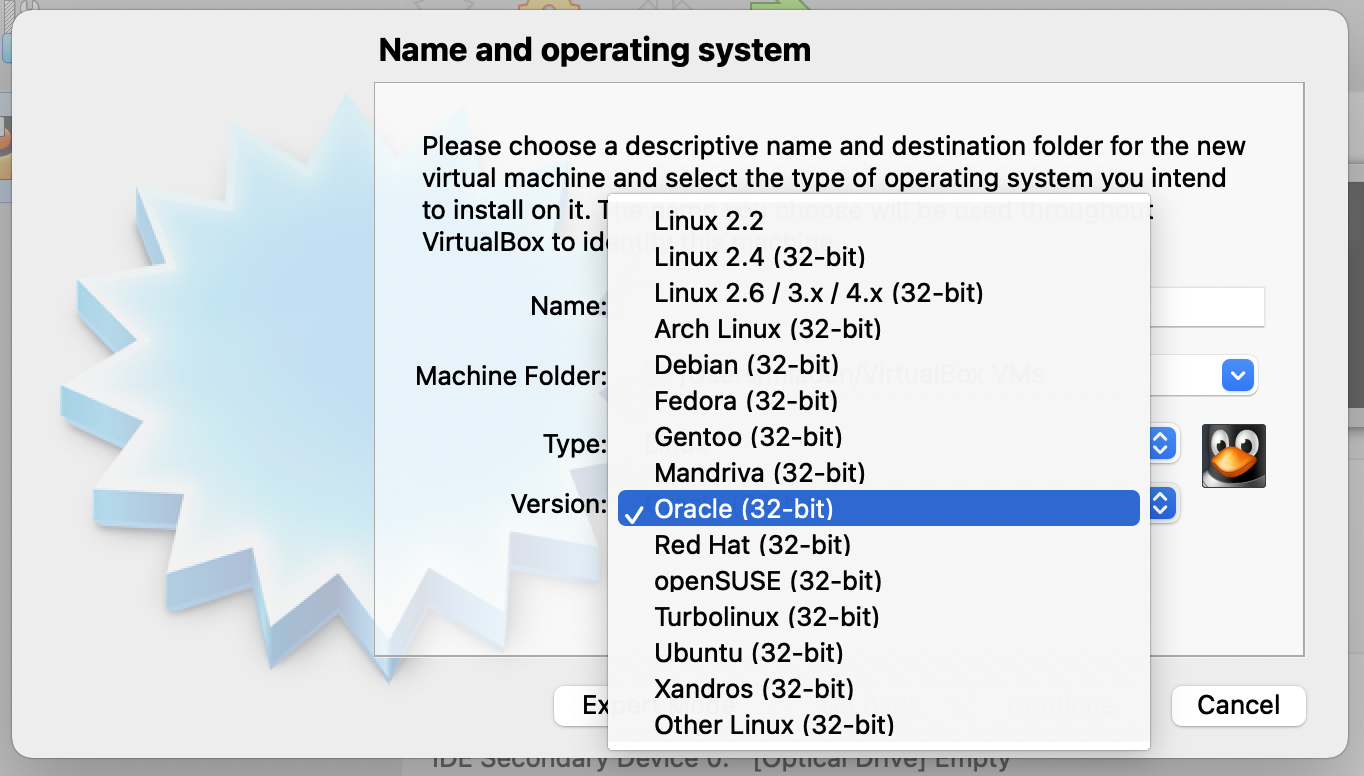
The VirtualBox installed but when I tried to manually create a machine, it allowed only 32-bit machines although it seems that created Ubuntu is 64 bits

Docker for Mac M1 beta
The regular Mac Docker simply does not work. Starting it fails with Wrong CPU.
Docker for Mac M1 preview 7 managed itself to start although Docksal could not use it as images are for intel architecture and that does not get _translated_ (emulated).
Resetting Docksal system services...
 * proxy
WARNING: The requested image's platform (linux/amd64) does not match the detected host platform (linux/arm64/v8) and no specific platform was requested
 * dns
   upstream 192.168.88.1
WARNING: The requested image's platform (linux/amd64) does not match the detected host platform (linux/arm64/v8) and no specific platform was requested
docker: Error response from daemon: Ports are not available: port is already allocated.
 ERROR:  Failed starting the DNS service.
https://www.docker.com/blog/download-and-try-the-tech-preview-of-docker-desktop-for-m1/
Solution
Now we have two architectures (Intel/ARM) and three OSs (Mac/Lin/Win).
Mac obviously is on the path with native Docker to become soon operational and probably VirtualBox will also be able to start ARM Linux images (I'll try and post if Intel binary managed to get booted on VBox).
Are you having M1 machines or are you planing to get one to work/test?
If not, I am free to offer a hand to have this fantastic tool operational on M1 and future Macs.
 macmladen
on 25 Jan 2021
macmladen
on 25 Jan 2021
@macmladen Thank you for offering a hand!
So .. about Docker. Obviously older containers that are used on SLA might be never converted to ARM.
Though for new versions: it feels like all needed containers are available already. See filtered by ARM64:
https://hub.docker.com/search?architecture=arm64&source=verified&type=image
php, mariadb, nodejs, httpd
Ubuntu/Debian are also there.
 AlexNetman
on 9 Feb 2021
AlexNetman
on 9 Feb 2021
It looks like another version of the preview is out for Docker Desktop for Mac.
https://docs.docker.com/docker-for-mac/apple-m1/
Is there a way to tell docksal to try and use the arm containers mentioned above?
When generally running fin commands like "update" or "project create" I'll run into architecture mismatch errors like this:
Status: Downloaded newer image for docksal/cli:2.11-php7.3
WARNING: The requested image's platform (linux/amd64) does not match the detected host platform (linux/arm64/v8) and no specific platform was requested
runtime: failed to create new OS thread (have 2 already; errno=22)
fatal error: newosproc
Big Sur 11.1
MacBook Air (M1, 2020)
fin version: 1.103.0
I can't be of much help in the docker realm as I don't quite get it yet but I'm happy to test things.
 jimmynash
on 14 Feb 2021
jimmynash
on 14 Feb 2021
@jimmynash thanks for pointing to a new Docker M1 release, I tried that and it works finally for me. I suppose there was a problem between macOS release and Docker keeping up (meaning that a developer Mac mini was obviously of little to no use for developers).
So after starting a new Docker it was pretty fast to start and I used it flawlessly to start ddev based project.
They do have ARM-based images and I suppose the same could be done with Docksal images https://www.docker.com/blog/multi-arch-build-and-images-the-simple-way/
macmladen
on 15 Feb 2021
Is there a way to tell docksal to try and use the arm containers mentioned above?
@jimmynash the Docker uses native architecture by default (I suppose) so it will use native ARM once they are made by Docksal team.
While nginx, PHP, mariadb, apache, debian and others are readily available, they should be used to create images for Docksal.
Once they are built, we will be able to spin projects as we do with the current x86.
macmladen
on 15 Feb 2021
If we want to speed up creating of updated images from Docksal - we need to consider to Donate Mac on M1 to @lmakarov !
Not sure if he would prefer Mac Mini or Pro .
Also I guess we have everything to help by our hands.
Here is makefiles for Docksal images:
https://github.com/docksal?q=service
And updating them for ARM should be that simple as changing couple lines in configs.
Smth like change https://github.com/docksal/service-apache/blob/develop/2.4/Makefile . And use arm64v8/httpd:2.4 instead of httpd:2.4.35-alpine .
AlexNetman
on 17 Feb 2021
@AlexNetman There is just a Mac mini M1, no Pro M1 at the moment 🙂
@lmakarov It kinda seems to me that arm architecture images should not be too complicated to produce?
macmladen
on 17 Feb 2021
It kinda seems to me that arm architecture images should not be too complicated to produce?
@macmladen in theory, yes.
Single purpose images will likely be fine, as there is a very high chance that the upstream image already has the ARM variant. Building these images in CI is not an issue either - since CI tooling supports ARM.
For multi-purpose images (docksal/cli), this is a nightmare situation, as not all upstream dependencies (Linux packages) have ARM support.
If we want to speed up creating of updated images from Docksal - we need to consider to Donate Mac on M1 to @lmakarov !
Not sure if he would prefer Mac Mini or Pro .
Luckily, ARM is not exclusive to the new Macs.
A Raspberry Pi4 is an ARM64 device as well and costs an order of magnitude less =)
A real M1 would be necessary for initial development, to test UI/UX and solve complex issues on macOS specifically.
Perpetual manual testing on multiple platforms is very tedious. Long term, we would need a reliable way to run Docksal's automated tests in a Mac environment in CI (both M1 and Intel).
I was thinking about a physical M1 Mini or a cloud based one from Scaleway.
They cost about the same for the first year (considering tax and Apple Care).
The best way to support the project here is to become a Github Sponsor ❤️
lmakarov
on 2 Mar 2021
FWIW, I tried installing Docksal on my M1 MacBook Pro but it threw this error:
...
Configuring network settings...
Configuring NFS shares...
Writing /etc/exports...
Writing /etc/nfs.conf...
Restarting nfsd...
Resetting Docksal system services...
 * proxy
WARNING: The requested image's platform (linux/amd64) does not match the detected host platform (linux/arm64/v8) and no specific platform was requested
 * dns
   upstream 10.0.10.10
WARNING: The requested image's platform (linux/amd64) does not match the detected host platform (linux/arm64/v8) and no specific platform was requested
docker: Error response from daemon: Ports are not available: listen udp 0.0.0.0:53: bind: address already in use.
 ERROR:  Failed starting the DNS service.
However, it did install. I can run the fin command, but it throws the warnings and error when I try anything like fin up or fin system start.
 shawndearmond
on 8 Mar 2021
shawndearmond
on 8 Mar 2021
For the record I'm using Docker Desktop preview 3.1.0
And this "Known Issue" from https://docs.docker.com/docker-for-mac/apple-m1/ is probably relevant:
The HTTP proxy is not enabled.
shawndearmond
on 8 Mar 2021
@shawndearmond I got a little further on an M1 Mac (Docker Desktop Preview 3.1.0 build 60984):
- I also got the "DNS address already in use" error so I switched off DNS according to #1471
- then I ran into NFS mount errors and switched to bind mounts according to #1275
- now the cli image crashes with
cli_1   | runtime: failed to create new OS thread (have 2 already; errno=22)
cli_1   | fatal error: newosproc
cli_1   |
cli_1   | runtime stack:
cli_1   | runtime.throw(0x4cb21f, 0x9)
cli_1   |   /usr/local/go/src/runtime/panic.go:566 +0x95
cli_1   | runtime.newosproc(0xc42002c000, 0xc42003bfc0)
cli_1   |   /usr/local/go/src/runtime/os_linux.go:160 +0x194
cli_1   | runtime.newm(0x4d6db8, 0x0)
cli_1   |   /usr/local/go/src/runtime/proc.go:1572 +0x132
cli_1   | runtime.main.func1()
cli_1   |   /usr/local/go/src/runtime/proc.go:126 +0x36
cli_1   | runtime.systemstack(0x53ae00)
cli_1   |   /usr/local/go/src/runtime/asm_amd64.s:298 +0x79
cli_1   | runtime.mstart()
cli_1   |   /usr/local/go/src/runtime/proc.go:1079
cli_1   |
cli_1   | goroutine 1 [running]:
cli_1   | runtime.systemstack_switch()
cli_1   |   /usr/local/go/src/runtime/asm_amd64.s:252 fp=0xc420026768 sp=0xc420026760
cli_1   | runtime.main()
cli_1   |   /usr/local/go/src/runtime/proc.go:127 +0x6c fp=0xc4200267c0 sp=0xc420026768
cli_1   | runtime.goexit()
cli_1   |   /usr/local/go/src/runtime/asm_amd64.s:2086 +0x1 fp=0xc4200267c8 sp=0xc4200267c0
 robcast
on 18 Mar 2021
robcast
on 18 Mar 2021
Still not working on docker 3.3.0. does anyone know any workarounds in the meantime?
 mediabeastnz
on 24 Mar 2021
mediabeastnz
on 24 Mar 2021
I patched the Dockerfile for the cli-service to get it to compile on an M1 Mac:
https://github.com/robcast/service-cli/blob/mac-arm64/7.3/Dockerfile.arm64
(I have not been able to find a MS-SQL driver for ARM)
You can find the resulting image here:
https://hub.docker.com/r/robcast/docksal-cli
It doesn't crash any more but I still run into problems trying to access the running stack. I have switched from NFS to bind and disabled DNS and now it seems that the vhost-proxy container crashes. Guess I have to rebuild that for ARM too...
robcast
on 31 Mar 2021
I patched the Dockerfile for vhost-proxy too:
https://github.com/robcast/service-vhost-proxy/blob/mac-arm64/Dockerfile.arm64
You can find the resulting image here:
https://hub.docker.com/r/robcast/docksal-vhost-proxy
Now I can get the full stack to run. (Even DNS works since the new QEmu-based Docker-for-mac RC2 :-)
I still get a warning about the ssh container being amd64 but it seems to work anyway. I am using the docksal/mariadb:10.3 image which is already available in arm64.
robcast
on 31 Mar 2021
@lmakarov is there any eta on 1.16.0?
mediabeastnz
on 7 Apr 2021
Is there any eta on 1.16.0?
There are no specific dates for the release at the moment. Hopefully, within the next few weeks.
It all depends on how long more it takes to get the system (vhost-proxy, dns, ssh-agent) and basic stack (apache, mariadb, cli) arm64 images out of the door.
There was a major effort that went into the docksal/cli ARM64 image version due to the complexity of this image. We had to expand our build infrastructure beyond GitHub Actions. The emulated (via QEMU) builds would take hours for docksal/cli on the GitHub infrastructure (which does not support arm64 natively). That is mostly done, but has not been finalized.
At the same time, We are also transitioning from the (now dead) Travis CI infrastructure to GitHub Actions for all of the images.
Just to give you a high level perspective on how much effort supporting M1/ARM64 takes.
lmakarov
on 13 Apr 2021
Related issues
 igorlakic
·
30Comments
igorlakic
·
30Comments
 jajajaime
·
25Comments
jajajaime
·
25Comments
 ArtuGit
·
19Comments
ArtuGit
·
19Comments
 mike-potter
·
18Comments
mike-potter
·
18Comments
 ijf8090
·
69Comments
ijf8090
·
69Comments
Most helpful comment
There are no specific dates for the release at the moment. Hopefully, within the next few weeks.
It all depends on how long more it takes to get the system (vhost-proxy, dns, ssh-agent) and basic stack (apache, mariadb, cli) arm64 images out of the door.
There was a major effort that went into the docksal/cli ARM64 image version due to the complexity of this image. We had to expand our build infrastructure beyond GitHub Actions. The emulated (via QEMU) builds would take hours for docksal/cli on the GitHub infrastructure (which does not support arm64 natively). That is mostly done, but has not been finalized.
At the same time, We are also transitioning from the (now dead) Travis CI infrastructure to GitHub Actions for all of the images.
Just to give you a high level perspective on how much effort supporting M1/ARM64 takes.