Docksal: Best practice for switching Node.js versions?
I want node 10 to be the default for my project. What's the best way to accomplish this? I know that nvm is available OOTB, but I'm not sure of the best way to make it automatically switch to node 10 every time the container is spun up. A start script, perhaps?
 mikecrittenden
All 17 comments
Use an .nvmrc file, I think would be the best way, and prior to running any npm command preface it with nvm use.
 lpeabody
on 11 Oct 2018
lpeabody
on 11 Oct 2018
In other tools similar to Docksal, I've seen them install all the different versions of Node they want to support, and then use an environment variable to select the desired version like this:
nvm alias default $NODE_VERSION
Couldn't the Docksal CLI container do something like that? Not saying it needs to support a lot of versions, but with the current transition of Node-10 moving to "current" status it would at least allow choice between v8 and v10.
(I really don't want to prefix my commands or have to change my existing scripts at all, I just want to set something in docksal.env or docksal.yml to easily switch)
 mike-potter
on 11 Oct 2018
mike-potter
on 11 Oct 2018
There are a few options available in Docksal right away:
- Install the needed version of nodejs via
nvmat runtime
$ node -v
v8.11.3

$ nvm install 10.12.0
Downloading and installing node v10.12.0...
Downloading https://nodejs.org/dist/v10.12.0/node-v10.12.0-linux-x64.tar.xz...
###################################################################################################################################################################### 100.0%
Computing checksum with sha256sum
Checksums matched!
Now using node v10.12.0 (npm v6.4.1)

docker@d54bc21bc6ab:/var/www$ node -v
v10.12.0
You can put nvm install 10.12.0 into the project's init script and have it happen automatically every time you initialize the project with fin init
As @lpeabody suggested, you can also use .nvmrc to set the required nodejs version for the project:
$ echo 10.12.0 > .nvmrc

$ nvm install
Found '/var/www/.nvmrc' with version <10.12.0>
Downloading and installing node v10.12.0...
Downloading https://nodejs.org/dist/v10.12.0/node-v10.12.0-linux-x64.tar.xz...
###################################################################################################################################################################### 100.0%
Computing checksum with sha256sum
Checksums matched!
Now using node v10.12.0 (npm v6.4.1)

$ node -v
v10.12.0
Note, that (as with any dependency installed at run-time), the image will not be immutable and also be internet connection dependent. Every time you reset/re-initialize the project stack, that extra node version will be pulled down from the internet. This may not be a huge deal, but JFYI.
- Follow the Extending stock Docksal images approach
A working example can be found here: https://github.com/docksal/example-nodejs
I've just updated it to demonstrate how to use nvm.
 lmakarov
on 11 Oct 2018
lmakarov
on 11 Oct 2018
@mike-potter, to your points.
In other tools similar to Docksal, I've seen them install all the different versions of Node they want to support
This would bloat the docksal/cli image, which is already quite big (by Docksal standards).
docksal/cli is a universal image with a default version of "a bit of everything" installed. Adding more versions of multiple stacks does not seem fiasable.
I really don't want to prefix my commands or have to change my existing scripts at all, I just want to set something in
docksal.envordocksal.ymlto easily switch
It is a fare ask and switching node versions via an env variable could be baked into docksal/cli relatively easily. However, this would introduce provisioning at runtime - something we a trying to avoid with Docksal. Why? With anything installed at runtime, you are no longer getting an immutable result.
lmakarov
on 11 Oct 2018
OK, then what is the officially policy for updating dependencies like Node in the CLI container? Because while I personally still use Node 8, Node 10 is marked as the "Current" version on the official nodejs.org page, with Node 8 as LTS. They also show their release timeline. So if you don't plan to support both, then you'll need to be open about when you plan to switch and what criterion you use to make that decision so we can plan for the future.
At some point you'll switch to Node 10, and potentially cause issues for people who still need Node 8, at which point you'll get more support requests for how to revert back. Given that Node will always have two "active" versions I'd think it would make sense to support that. I don't believe it really causes that much extra bloat, especially since all of my projects are sharing a single CLI container.
mike-potter
on 11 Oct 2018
@mike-potter we follow the LTS release for NodeJS (as recommended on nodejs.org)

lmakarov
on 11 Oct 2018
OK, great, thanks for the clarification.
mike-potter
on 11 Oct 2018
We will be documenting Docksal specific NodeJS use cases and guidelines in the Docksal docs.
lmakarov
on 31 Oct 2018
@lmakarov I kind of agree with Mike. LTS is great and all, but in JS/NodeJS world LTS is too long to wait for new features really. Things change too rapidly. I think we should deliver LTS and current (at the moment of the image release) Node versions.
 achekulaev
on 8 Nov 2018
achekulaev
on 8 Nov 2018
Let's keep in mind, that docksal/cli is a generic image with lots of things pre-installed out of the box, making the best effort to "make everyone happy". It is PHP focused and biased, so we have tags for 4 different PHP version at the moment (to keep the image size down). Other tools are installed as a convenience and we have to choose a version for them. Choosing a LTS version (where applicable) makes the most sense.
LTS is what NodeJS recommends in their website for most users. There is always an option to to install any other version you want via nvm, if you need a different one.
I would question that having the latest one always available and updated is what will work best. You either stick with LTS or with a specific version. The latest version can change any day and introduce breaking changes/etc. Does it then make sense to have the LTS, the latest and then still have to install the specific one your application is compatible with?
If we start talking about advanced NodeJS development, then there should be a dedicated image for that, with a variety of versions, based on the official NodeJS Docker images.
lmakarov
on 9 Nov 2018
Above I proposed using an environment variable within docksal.env to control the Node version. You mentioned:
However, this would introduce provisioning at runtime - something we a trying to avoid with Docksal.
I'm not sure I understand the difference between doing this and what you already do with things like XDEBUG. The cli container is already provisionable at runtime. And this is quite convenient.
IMHO, Docksal should not be "PHP biased", but should contain the build/cli tools modern developers need to build applications. Having a "dedicated image" for NodeJS projects would have the same problem as you still often need "composer", etc, and when building Drupal sites that have a Node front-end (like React, etc) you would still need drush, console, etc, which would all still need PHP. Also, many of our linting, SASS compiling, and testing tools are Node based these days.
For me, the main reason I started using Docksal was that it's the only Docker-based system for Mac/Windows I found (other than Outrigger) that fully supports the concept of a "build container" (cli) that contains all the tools a multi-dev team needs. I specifically want the cli container to have "all the things". Otherwise I'd just use some other system like Lando or DDev that doesn't have a cli container and do everything with lots of discrete images.
So, while I understand the decision to limit Node, please do not go down the path of a "PHP-specific" and "NodeJS-specific" build containers. Remember that the cli container is all about dev convenience. Once we lose that, I'll just end up having to publish my own cli container that we use in all our projects that contain the tools we need (including stuff like "vi" that I'm amazed is not within the Docksal cli container). I don't want each project to have to do that.
mike-potter
on 9 Nov 2018
@mike-potter
I'm not sure I understand the difference between doing this and what you already do with things like XDEBUG. The cli container is already provisionable at runtime. And this is quite convenient.
It's provisioning (downloading, installing and configuring) vs configuration.
Doing the latter at run-time is totally fine, since it's very predictable and there is virtually no way it will behave differently from one installation/attempt to another.
The former, however, has a very high chance of going out of control, failing, requiring additional intervention, etc.
Now, getting back to the node versions question. We _could_ have a secondary NodeJS versions bundled in cli by default, so you will be able to switch between LTS and the latest, as @achekulaev proposed. BUT, do you and @achekulaev that's what will cover all or even more (by an order of magnitude) version needs?
I believe, that a little extra effort in the beginning, when you set up a project, is a good middle ground between image size, flexibility and convenience.
I'll just end up having to publish my own cli container that we use in all our projects that contain the tools we need (including stuff like "vi" that I'm amazed is not within the Docksal cli container). I don't want each project to have to do that.
There are lots of tools and the same amount of preferences. If you feel docksal/cli is missing a tools that is widely used, please submit a feature request or a PR. Regarding vi (vim actually) specifically - we chose nano a while ago for the size. It was 31MB vs 2MB.
lmakarov
on 9 Nov 2018
Having both the current and LTS available and switching between them with a variable would allow projects to test and upgrade more easily when a new version goes into LTS.
On the nano vs vim issue, the problem is that drush config-edit uses vim. Probably something that can be changed, but all of our devs know vim vs nano. Honestly you probably should have both. 31MB is nothing these days for a single image that is shared across all projects. But yeah, I'll submit a separate issue/PR for that.
Disk space is cheap, time is precious. I know it's a slippery slope of what tools to include so it doesn't become a full linux distro.
mike-potter
on 9 Nov 2018
Related issue https://github.com/docksal/docksal/issues/744
achekulaev
on 4 Dec 2018
@lmakarov We tried to bake node with proper version and gulp into a custom image. In order to not to do it within fin init on builds.
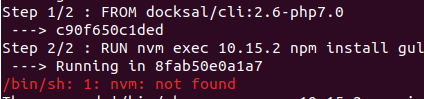
It can be a possible way, cannot it? But nvm is not accessible in RUN command.
 ArtuGit
on 19 Sep 2019
ArtuGit
on 19 Sep 2019
@ArtuGit in your custom Dockerfile you need to ensure that you are running as the docker user. That will expose commands that are only available to that user, such as nvm in this case. The convention for Docksal's CLI images is to run as root. So you basically need this in your Dockerfile:
USER docker

RUN nvm exec ...

USER root
Custom builds need to always switch back to the root user. Essentially, fin exec and fin bash will have you operating as the docker user in the container.
lpeabody
on 19 Sep 2019
@ArtuGit what @lpeabody said.
Docs: https://docs.docksal.io/service/cli/nodejs
If you take the extend stock image path, then see: https://github.com/docksal/example-nodejs
lmakarov
on 19 Sep 2019
Related issues
lpeabody
·
42Comments
lmakarov
·
29Comments
 loopy3025
·
30Comments
loopy3025
·
30Comments
 tbtmuse
·
22Comments
tbtmuse
·
22Comments
 sean-e-dietrich
·
48Comments
sean-e-dietrich
·
48Comments
Most helpful comment
There are a few options available in Docksal right away:
nvmat runtimeYou can put
nvm install 10.12.0into the project'sinitscript and have it happen automatically every time you initialize the project withfin initAs @lpeabody suggested, you can also use
.nvmrcto set the required nodejs version for the project:Note, that (as with any dependency installed at run-time), the image will not be immutable and also be internet connection dependent. Every time you reset/re-initialize the project stack, that extra node version will be pulled down from the internet. This may not be a huge deal, but JFYI.
A working example can be found here: https://github.com/docksal/example-nodejs
I've just updated it to demonstrate how to use
nvm.