Desktop: Latest Nextcloud Mac Client still does not synchronize files in subfolders
Expected behaviour
All files should be synchronized after they were copied or moved into the Nextcloud folder.
Actual behaviour
Files in subfolders are not synchronized.
However, after a restart of the client app the missing files are synchronized. So there should be still a really major bug in the client app!
THIS BUG STILL EXISTS IN v2.6.5 AND v2.7.0 beta2 !!!
I can't believe that. This is such a major bug and it is at least 1,5 years old and still not fixed. :(
Steps to reproduce
Please watch the video I created. It says more than 1000 words.
Client configuration
Latest Version: 2.6.4stable (build 20200303)
Operating system
Latest Version: macOS Catalina 10.15.5
OS language
German
Video to reproduce

 DerHOgi
All 21 comments
@DerHOgi Extra curious b/c I'm a macOS user and never noticed that I just tried to reproduce the behaviour you showed but it didn't work (e.g. everything worked fine). Copied a folder with a subfolder, each also containing several small files, but everything synced immediately. Tested with Client 2.7 beta 3, but I'll also test this with latest stable when I find the time.
In the meantime maybe you can answer some questions:
- Does this happen everytime?
- Where does the "at least for 1.5 years" come from? Did you notice it yourself that long ago?
- Could you please check that the files are really not synchronized (NC web interface login, client activity log and ) and it's not just the Finder extension not updating?
Thanks for reporting!
 DominiqueFuchs
on 17 Jul 2020
DominiqueFuchs
on 17 Jul 2020
Hi Dominique,
first of all, sorry for the late reply. I'm on vacation right now.
- Yes it happens everytime!
- There are bug reports about this error that are older than 1,5 years: https://github.com/nextcloud/desktop/issues/1000
- The files really not synchronize, even not in the web interface.
Maybe you can check the behavior with this files I uploaded for you. That are the same files I used in my video.
http://www.hellwig-online.com/nextcloudbutton.zip
Unzip the files and drop the main folder into the nextcloud folder.
In my case the image files in the subfolder ./images are never synchronized, only after a restart of the nextcloud client.
It would be nice if you can give me a short feedback.
Regards
HOgi
Am Freitag, 17. Juli 2020 um 17:25 schrieb Dominique Fuchs:
@DerHOgi (https://github.com/DerHOgi) Extra curious b/c I'm a macOS user and never noticed that I just tried to reproduce the behaviour you showed but it didn't work (e.g. everything worked fine). Copied a folder with a subfolder, each also containing several small files, but everything synced immediately. Tested with Client 2.7 beta 3, but I'll also test this with latest stable when I find the time.
In the meantime maybe you can answer some questions:
Does this happen everytime?
Where does the "at least for 1.5 years" come from? Did you notice it yourself that long ago?
Could you please check that the files are really not synchronized (NC web interface login, client activity log and ) and it's not just the Finder extension not updating?Thanks for reporting!
—
You are receiving this because you were mentioned.
Reply to this email directly, view it on GitHub (https://github.com/nextcloud/desktop/issues/2176#issuecomment-660168977), or unsubscribe (https://github.com/notifications/unsubscribe-auth/AQFQQNXT5TOB7JXSKUMP6ULR4BUPVANCNFSM4OUYYHGA).
DerHOgi
on 22 Jul 2020
Hi @DerHOgi, You didn't share the logs.
 camilasan
on 3 Aug 2020
camilasan
on 3 Aug 2020
I'm in the same boat.
Besides the described problem, in my case the other way around on the server is more than local. So a subfolder on the server is not pulled locally.

 laborb-sb
on 5 Aug 2020
laborb-sb
on 5 Aug 2020
My Workaround: deactivate Folder within the app settings => confirm => activate same folder.
laborb-sb
on 5 Aug 2020
Hi @laborb-sb can you please share logs so we can try to find out what the problem is? We can't reproduce the issue and without logs there is nothing we can do.
 jospoortvliet
on 6 Aug 2020
jospoortvliet
on 6 Aug 2020
Just to be clear - that is how you can get logs:
https://docs.nextcloud.com/desktop/2.6/troubleshooting.html#log-files
camilasan
on 6 Aug 2020
Hm, it's a productive system. The log files are huge and contain confidential information. I can't just share it. Sorry.
laborb-sb
on 7 Aug 2020
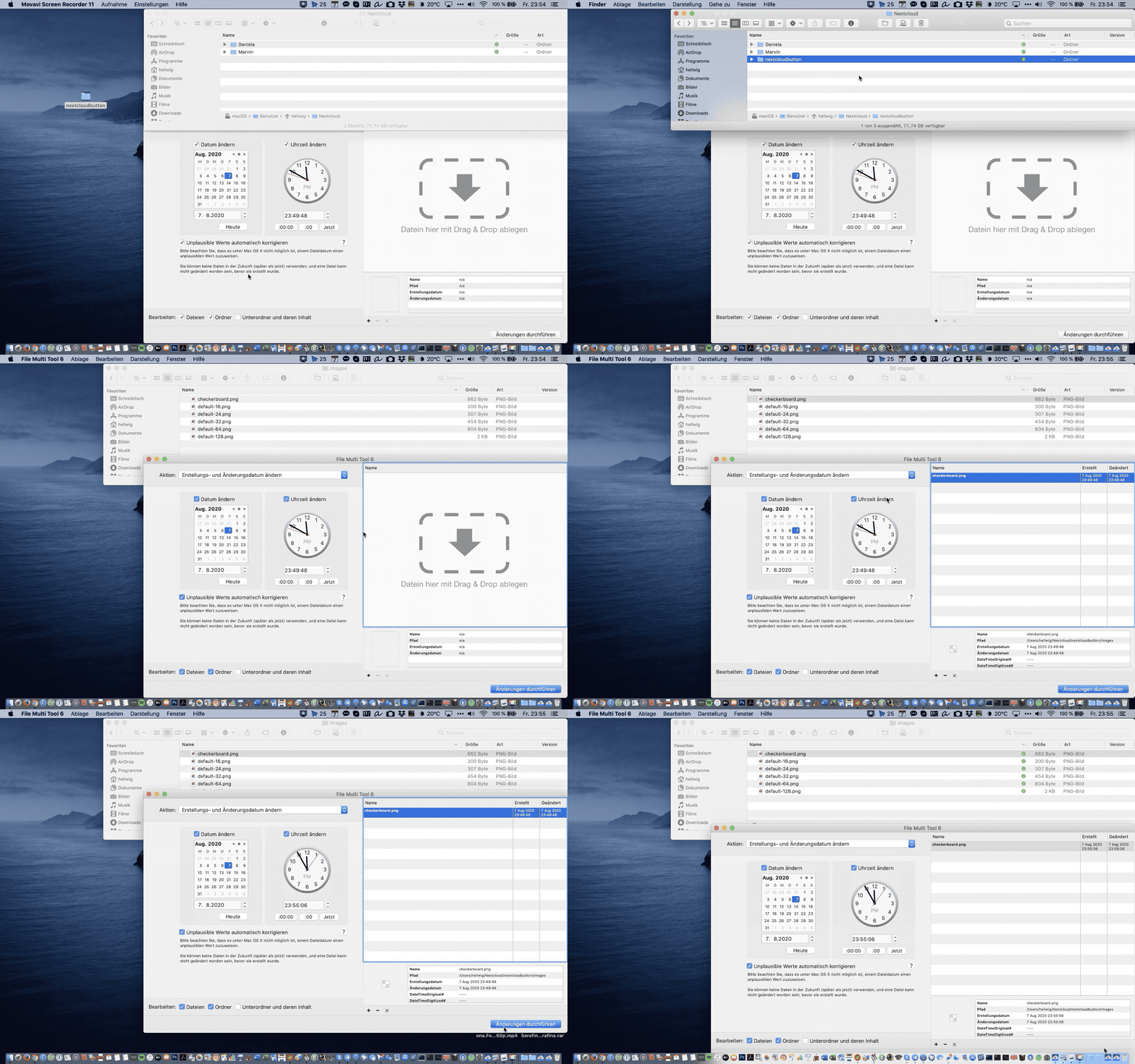
Missing files in the folder "images" will also be synced if I change the date/time (touch) ONE of the files in the folder. This has the same effect as a restart of the client app (see video above).
Log of the Video:
http://www.hellwig-online.com/nextcloud.log.zip
Hope that helps! ;)
DerHOgi
on 8 Aug 2020
Hi @DerHOgi, You didn't share the logs.
done
DerHOgi
on 8 Aug 2020
I also encounter this bug. (And forcing a sync by restarting the desktop client fixes also fixes it for me.)
One additional note: Some macOS files (“packages”) are actually folders under the hood (Pixelmator documents for example). These files are affected by this bug, too – which can be quite surprising at the first moment, because in Finder they look like normal files, and they have the green checkmark showing that they’ve been synced successfully. Only after using “Show package contents” in Finder (or looking at the file in the webinterface) one notices that the actual contents have not been synced.
 noniq
on 10 Aug 2020
noniq
on 10 Aug 2020
I made my own bug report for this back in 2019 (after DerHOgi's original report) and am distressed to find that such a _major_ bug is still in the Mac desktop release.
The method that I use to reliably trigger the bug is to open a terminal window and execute these commands:
mkdir test
echo data > test/file.txt
mkdir test/subdir
echo moredata > test/subdir/missing_file1.txt
echo stillmoredata > test/subdir/missing_file2.txt
mv test /path/to/Nextcloud
...replacing /path/to/Nextcloud with any path within a synced directory. 100% of the time missing_file1.txt and missing_file2.txt will not be synced.
Please fix this bug! It's been a thorn in my side for over a year now.
 briankendall
on 14 Aug 2020
briankendall
on 14 Aug 2020
@briankendall Thank's for your instructions to reproduce the bug.
I sent my test files to 3 friends which have 3 different versions of macOS in use (all with the latest macOS Nextcloud client), and they ALL can reproduce the bug immediately. I have no idea why the devs are not able to reproduce and fix this bug. It's really unbelievable that such a major bug still exists after years!!! Since the files are synchronized after a restart of the client, it can actually not be that difficult to find out what's going on.
@noniq The fact that macOS apps are not synchronized correctly (because in principle they are folders) is another bug and not less big. Maybe you should create your own bug report about this issue.
With this major bugs, Nextcloud is at this state, in my opinion, not usable for Mac users. For the moment, I switched back to dropbox which don't have all this issues. I really hope somebody is able to fix the Mac client in the near future...
DerHOgi
on 14 Aug 2020
I'm on Ubuntu 20.04 using
$ nextcloud --version
Nextcloud version 2.6.2-1build1
Using Qt 5.12.8, built against Qt 5.12.5
Using 'OpenSSL 1.1.1f  31 Mar 2020'
with the same problem.
I create a new folder in the top level of ~/nextcloud, and put a file inside it.
The file never syncs (uploads) until I quit nextcloud client and restart it.
Can someone add a GNU/Linux label? And a critical-bug label?
 cpbl
on 24 Aug 2020
cpbl
on 24 Aug 2020
same happends for one of my customers. When he moves a folder with thousands of 4MB files the folder is created but the files are not immediately synced. After approx. 2 hours the sync of the files starts or if he restarts his Mac or something.
 alexbijma
on 2 Sep 2020
alexbijma
on 2 Sep 2020
The developers wanted videos, logs, examples. They got it all and what happened until today. Nothing. Very disappointing.
DerHOgi
on 11 Sep 2020
- Release Nextcloud 3.0.1 - restarting Client, killing Finder did not result in synchronisation of subdirs.
- Daily Nextcloud-qt5.12.9-3.1.0.20200916daily after install picked up the directories. Let's see if it works onwards.
 kroko
on 16 Sep 2020
kroko
on 16 Sep 2020
The developers wanted videos, logs, examples.
Just for the record: Literally no one demanded videos. Why'd they help? Logs and reproduction steps are enough, but most of the times these are crucial and the more helpful the more there exist.
They got it all and what happened until today. Nothing. Very disappointing.
I'm afraid it's nothing more but boring, not just for myself to rephrase this again but for every reader. Nonetheless: You might rethink your general tone if you want to be of any productive value within communities like these. In general, there are several options when encountering a bug in collaborative open source projects:
- If you're a developer: Fix this bug or help others to do so.
- If you're a customer: Log into the customer portal and file a report there, this might help focus on your problem with paid, available resources.
- If you're neither the one nor the other but still want to push forward: Be a friendly, compatible, and open-minded human, participating in discussion and analysis.
tl;dr: Fix for this is in #2439
DominiqueFuchs
on 16 Sep 2020
I'm delighted to hear a fix is in the works! Someone here reported that this bug affects Linux as well. Does this PR fix that as well? (If not I'm guessing the best thing to do would be to open a new issue for Linux specifically.)
briankendall
on 16 Sep 2020
@DominiqueFuchs
Sorry about my tone! I want to apologize for that, but this bug exists since over a year and is still not fixed. This is really frustrating, because this bug is huge and data can get lost. I'm pleased to hear that a solution is finally in the works.
DerHOgi
on 17 Sep 2020
Someone here reported that this bug affects Linux as well. Does this PR fix that as well? (If not I'm guessing the best thing to do would be to open a new issue for Linux specifically.)
Good point: The PR mentioned above fixes mac-only code. That said, even though the result is coincidentally the same, we are talking about separate bugs code-wise regarding macOS and linux.
It is worth testing the PR @camilasan (#2322) referenced a few weeks ago for the linux side. Apart from that, I'd suggest continuing Linux in another thread as this issue is pretty mac-specific.
DominiqueFuchs
on 17 Sep 2020
Related issues
 Linuxfabrik
·
3Comments
Linuxfabrik
·
3Comments
 Ackis
·
4Comments
Ackis
·
4Comments
 dkebler
·
3Comments
dkebler
·
3Comments
 rguenther-dz
·
3Comments
rguenther-dz
·
3Comments
 DBLouis
·
3Comments
DBLouis
·
3Comments
Most helpful comment
Just for the record: Literally no one demanded videos. Why'd they help? Logs and reproduction steps are enough, but most of the times these are crucial and the more helpful the more there exist.
I'm afraid it's nothing more but boring, not just for myself to rephrase this again but for every reader. Nonetheless: You might rethink your general tone if you want to be of any productive value within communities like these. In general, there are several options when encountering a bug in collaborative open source projects:
tl;dr: Fix for this is in #2439