Desktop: Opening app, then clicking away, "Saving local backup..." gets stuck in footer
Uncaught (in promise) ReferenceError: SFItemParams is not defined
Unfortunately can't replicate in dev, but can replicate in prod.
 mobitar
All 10 comments
I have that problem on Fedora Linux with version 3.3.1. In my case I can trigger the error in the console by clicking the "Download Backup" button under the "Account" menu.

 MorgothSauron
on 12 Feb 2020
MorgothSauron
on 12 Feb 2020
I can trigger the error on macOS Catalina 10.15.3 by giving focus to another application, just like the issue creator. I'm seeing the same stack trace, aside from the different source file location.
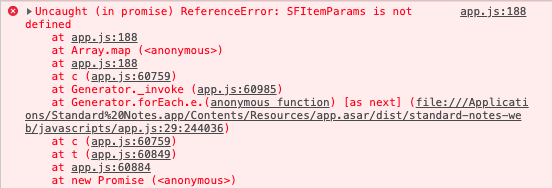
 greveritt
on 12 Feb 2020
greveritt
on 12 Feb 2020
I can trigger the error on macOS Catalina 10.15.3 by giving focus to another application, just like the issue creator. I'm seeing the same stack trace, aside from the different source file location.
I updated SN to 3.3.1 on my work computer running macOS 10.15.3 and I have the same error.
MorgothSauron
on 13 Feb 2020
I have this problem too on Windows 10 (version 3.3.1). I can't save local backup to my hard drive, buttons isn't active. Message "Saving local backup..." in "footer" your program is hung and does not respond...
UPD: i've tested it at Windows 7 too, same error!
 Cookie-or-Cake
on 13 Feb 2020
Cookie-or-Cake
on 13 Feb 2020
+1
Also reproducible on OSX 10.15.3.
Did not have any other version of SN on this machine prior to observing this.
 Coriakin
on 13 Feb 2020
Coriakin
on 13 Feb 2020
+1
 clyso
on 13 Feb 2020
clyso
on 13 Feb 2020
Hey everyone, version 3.3.2 is out and fixes this issue along with a couple of other ones (Release notes are here.) You can either use the app to update (Top menu -> Updates -> Install Update) or if it hangs download the new version from standardnotes.org
 baptiste-grob
on 14 Feb 2020
baptiste-grob
on 14 Feb 2020
@baptiste-grob Ah, thank you! I see my 5 year Extended subscription was a good investment. :-)
greveritt
on 14 Feb 2020
@baptiste-grob I updated to 3.3.2 on macOS and it works now. I'll update it on my Linux system when I'm back from work. Thank you for the quick fix.
MorgothSauron
on 14 Feb 2020
@baptiste-grob I confirm that updating to 3.3.2 on Linux fixed the problem as well.
MorgothSauron
on 14 Feb 2020
Related issues
 xioren
·
5Comments
xioren
·
5Comments
 chanclr
·
5Comments
chanclr
·
5Comments
 MisteryMonster
·
3Comments
MisteryMonster
·
3Comments
 dymdipi
·
5Comments
dymdipi
·
5Comments
 quirkyheadband
·
3Comments
quirkyheadband
·
3Comments
Most helpful comment
@baptiste-grob I confirm that updating to 3.3.2 on Linux fixed the problem as well.