Desktop: [Windows 10]An error occurred while changing your backups directory[bug]
When I sign in to change the location:
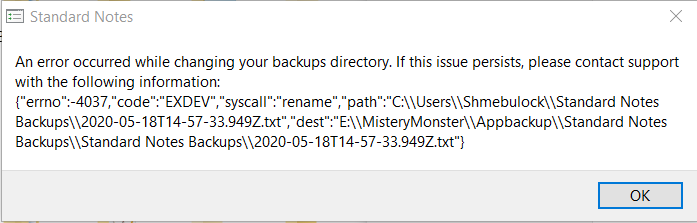
When I log-out, disable sync and deleted the default "C:\Users\mynamedocument\Standard Note Backups" then click " change the location":
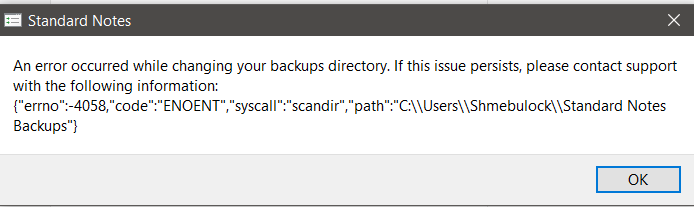
 MisteryMonster
All 3 comments
The only way I success to change is to deleted the ".txt" file under the default "C:\Users\mynamedocument\Standard Note Backups" folder and "change the location".
MisteryMonster
on 18 May 2020
Hi @MisteryMonster,
While I couldn't reproduce the issue on my end, I'm glad that you were able to successfully change the directory! I'm sorry that you were experiencing this issue. I've reported it to our desktop and web app developer (@baptiste-grob) for review.
I would suggest restoring the delete text file and placing it elsewhere, in case you need it in the future.
Please let us know if you run into any other issues or have any questions!
 JaspalSuri
on 19 May 2020
JaspalSuri
on 19 May 2020
Hey @MisteryMonster, we're aware of this issue and it should be fixed in the planned 3.4.2 update! Sorry for the inconvenience.
 baptiste-grob
on 19 May 2020
baptiste-grob
on 19 May 2020
Related issues
 Eduardo06sp
·
5Comments
Eduardo06sp
·
5Comments
 kyletolle
·
4Comments
kyletolle
·
4Comments
 popey
·
3Comments
popey
·
3Comments
 quirkyheadband
·
3Comments
quirkyheadband
·
3Comments
 technotherion
·
6Comments
technotherion
·
6Comments
Most helpful comment
Hey @MisteryMonster, we're aware of this issue and it should be fixed in the planned 3.4.2 update! Sorry for the inconvenience.