Desktop: File won't sync with connection timed out after editing music file's metadata
Expected behaviour
I can edit the file however I like and it still gets synced.
Actual behaviour
Randomly it doesn't and I get a connection time out until I delete the file from the server.
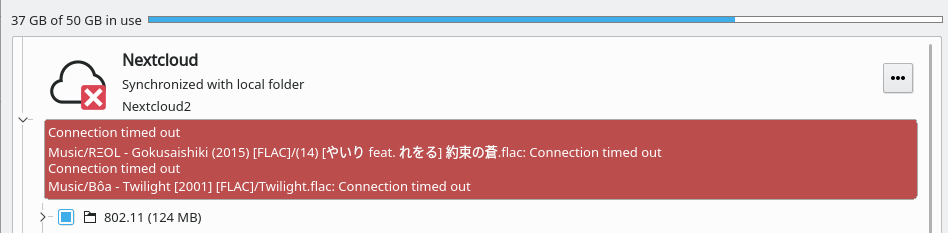
Steps to reproduce
- Have some music (so far only happened with FLACs), use some editor (I used deadbeef) to edit metadata like album name.
- Nextcloud will randomly refuse to work with some files. It seems to be a client error as I can't spot a server error in the logs
Client configuration
Client version: 2.5.1 (git 2018-12-19)
Operating system: Arch Linux
OS language: en_US.UTF-8 UTF-8
Qt version used by client package (Linux only, see also Settings dialog):
Built from Git revision b37cbe on Dec 19 2018, 13:52:15 using Qt 5.12.0, OpenSSL 1.1.1a 20 Nov 2018
Client package (From Nextcloud or distro) (Linux only):
AUR (user repo)
Installation path of client:
Whatever the user repo uses
Server configuration
Operating system: Arch Linux
Database: MariaDB
PHP version: 7.3.1
Nextcloud version: 7.3.1
Storage backend (external storage):
etx4, not external
Logs
Client logfile: https://haste.rys.pw/raw/fuvitewoxi - I have two servers, cloud and cloud2. The cloud2 is the problematic one in the logs. (Although I was able to reproduce on the other server also)
Web server error log:
nginx, empty.Server logfile: nextcloud log (data/nextcloud.log):
https://haste.rys.pw/ecutiyacuc.json
These 4 logs which may or may not be related to the problematic files.
 C0rn3j
All 12 comments
Same here, happens when editing files, randomly.
No info in the server/nginx logs, seems to be a trouble with the client ?
15.0.4, client 2.5.1.
Deleting the file from the web UI seems to fix the issue - the client starts to upload it normally. And the strange part is, that server shows that file was uploaded in some time in the past, so it seems that client sees that local file and remote is equal, but tries reupload it and times out somewhere(?).
 Temtaime
on 16 Feb 2019
Temtaime
on 16 Feb 2019
Happening to me as well NC 16.0.3
 G-Pereira
on 13 Jul 2019
G-Pereira
on 13 Jul 2019
I don't want to delete the files since I have no backup. What should i do?
G-Pereira
on 13 Jul 2019
Same issue for me, with Nextcloud 16.0.3 and a Linux client 2.5.2.
After updating my metadata using picard MusicBrainz, I couldn't upload my music (.mp3 mainly).
What I did was to reupload everything in a separate folder, then to delete the initial one, but you need enough space on the server.
 Victor-Morel
on 2 Sep 2019
Victor-Morel
on 2 Sep 2019
Same for me, is this problem happening with files larger than 10MB?
I have the same problem when editing Word files, but this only happens when I edit files larger than 10MB.
Any solution?
 danimayordm
on 10 Dec 2019
danimayordm
on 10 Dec 2019
+1 same for me. windows 10 with NC 2.6.1stable-build20191105
 jstdoit
on 11 Dec 2019
jstdoit
on 11 Dec 2019
Please fix this - it is really annoying and renders the desktop application useless.
 DanWiseProgramming
on 18 Dec 2019
DanWiseProgramming
on 18 Dec 2019
Same issue. Happened to Powerpoint file as well. Please fix it anyone.
 15110123
on 27 Jan 2020
15110123
on 27 Jan 2020
I also run into this issue with the Nextcloud Desktop client, and I found that it mainly happens when the file is larger than the chunk size specified by the client. My workaround is to choose a bigger chunk size using the environment variable OWNCLOUD_CHUNK_SIZE as documented here. By default it is set to 5MB, and my FLAC files tend to be much bigger than that which leads to timeouts. I basically "disable" chunking by setting it to an arbitrarily large value (500MB), and my FLAC files are uploaded correctly now.
 dangmai
on 27 Jan 2020
dangmai
on 27 Jan 2020
@dangmai Wow. Your solution actually works! I used to have this issue when using Owncloud client before, and spending a whole day researching on Owncloud and Nextcloud forums didn't help much. Thank you! :D
15110123
on 27 Jan 2020
My workaround is to choose a bigger chunk size using the environment variable
OWNCLOUD_CHUNK_SIZEas documented here. By default it is set to 5MB, and my FLAC files tend to be much bigger than that which leads to timeouts. I basically "disable" chunking by setting it to an arbitrarily large value (500MB), and my FLAC files are uploaded correctly now.
Thanks for the valuable hint. I've just setup a new Linux machine and re-used the data partition which had already been used by the previous Linux installation/NC client, i.e. all the files were already synchronized.
However, after I had configured the new, but previously existing connection, the client started to check files, showed lots of errors in the activities, and said it needed 4 days to re-synchronize to the server. :-(
After I had stopped the client and restarted it with OWNCLOUD_CHUNK_SIZE=500MB, the inital synchronization went without errors, and was finished after a couple of minutes. So this really helped.
 mburnicki
on 28 Jan 2020
mburnicki
on 28 Jan 2020
My workaround is to choose a bigger chunk size using the environment variable
OWNCLOUD_CHUNK_SIZEas documented here.
That page also says that it should be possible to add the setting to the client's configuration file, and that this could be done using the _Nextcloud configuration dialog_.
However, I don't see where I can open this dialog. If I just open the settings for a connection, I don't see a way to edit this. Or is this option only available in certain client versions? I'm currently using
client 2.5.3git, which is provided by my Linux Distribution (openSUSE 15.1).
mburnicki
on 28 Jan 2020
Related issues
 Linuxfabrik
·
3Comments
Linuxfabrik
·
3Comments
 despens
·
3Comments
despens
·
3Comments
 Engineer-of-Stuff
·
3Comments
Engineer-of-Stuff
·
3Comments
 dkebler
·
3Comments
dkebler
·
3Comments
 MichaIng
·
3Comments
MichaIng
·
3Comments
Most helpful comment
I also run into this issue with the Nextcloud Desktop client, and I found that it mainly happens when the file is larger than the chunk size specified by the client. My workaround is to choose a bigger chunk size using the environment variable
OWNCLOUD_CHUNK_SIZEas documented here. By default it is set to 5MB, and my FLAC files tend to be much bigger than that which leads to timeouts. I basically "disable" chunking by setting it to an arbitrarily large value (500MB), and my FLAC files are uploaded correctly now.