Desktop: Latest client crashes periodically
Hi, I'm running multiple systems with Windows 10 Enterprise 2016 LTSB and the current stable desktop client version 2.5.0 (build 20181112). I've been noticing that after the system has been running for several days, I return to a dialog titled "Nextcloud" with the header "Nextcloud has stopped working" and text "A problem caused the program to stop working correctly. Please close the program."
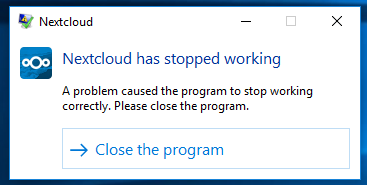
This is the information I found in the windows application error log
Faulting application name: nextcloud.exe, version: 2.5.0.61553, time stamp: 0x5be014a3
Faulting module name: ucrtbase.dll, version: 10.0.14393.2457, time stamp: 0x5b7e2a7e
Exception code: 0xc0000409
Fault offset: 0x000000000006eabe
Faulting process id: 0x3b88
Faulting application start time: 0x01d48b2f5f84295e
Faulting application path: C:\Program Files (x86)\Nextcloud\nextcloud.exe
Faulting module path: C:\Windows\System32\ucrtbase.dll
Report Id: bd28a9a0-00d2-4c3b-b9f0-e99a1fca534f
Faulting package full name:
Faulting package-relative application ID:
I noticed a couple other people seem to have the same issue on a different version of Windows: https://help.nextcloud.com/t/nextcloud-desktop-client-stopped-working-2-5-0-build-20181112-when-trying-to-sync/41177
 linucksrox
All 12 comments
Have a similiar issue.
 GoetheG
on 12 Dec 2018
GoetheG
on 12 Dec 2018
I'm still seeing the issue with the current 2.5.1 version.
linucksrox
on 13 Dec 2018
Just tried again yesterday with the latest daily build 2.5.1.5026 (built January 15, 2019) and it crashed in less than 30 minutes. Installed at 3:56PM and crashed at 4:23PM.
This time it completely locked up Windows and I had to force shutdown. 😢
Application log entry:
The program nextcloud.exe version 2.5.1.5026 stopped interacting with Windows and was closed. To see if more information about the problem is available, check the problem history in the Security and Maintenance control panel.
 Process ID: 1480
 Start Time: 01d4aea714b6dc9e
 Termination Time: 19
 Application Path: C:\Program Files (x86)\Nextcloud\nextcloud.exe
 Report Id: 1638b62f-1a9e-11e9-8791-000c299763b0
 Faulting package full name:
 Faulting package-relative application ID:
To see if more information about the problem is available, check the problem history in the Security and Maintenance control panel.
Could you check for more information?
 rakekniven
on 19 Jan 2019
rakekniven
on 19 Jan 2019
There is nothing listed in there besides a suggestion to enable Windows SmartScreen, and also nothing listed when I look at Archived Messages.
linucksrox
on 21 Jan 2019
I'm still experiencing this issue here. This is a log from yesterday:
Faulting application name: nextcloud.exe, version: 2.6.1.6017, time stamp: 0x5dc0b373
Faulting module name: Qt5Core.dll, version: 5.12.5.0, time stamp: 0x5d6ebdfc
Exception code: 0xc0000409
Fault offset: 0x0000000000028978
Faulting process id: 0x2d44
Faulting application start time: 0x01d59891f78eb53b
Faulting application path: C:\Program Files (x86)\Nextcloud\nextcloud.exe
Faulting module path: C:\Program Files (x86)\Nextcloud\Qt5Core.dll
Report Id: 140416bf-ec3f-4b2c-9785-e12a5009680f
Faulting package full name:
Faulting package-relative application ID:
I get the same issue on the latest version as well.
Faulting application name: nextcloud.exe, version: 2.6.4.15215, time stamp: 0x5e5eb93a
Faulting module name: Qt5Core.dll, version: 5.12.5.0, time stamp: 0x5d6ebdfc
Exception code: 0xc0000409
Fault offset: 0x0000000000028978
Faulting process id: 0x2320
Faulting application start time: 0x01d5f71b26185cce
Faulting application path: C:\Program Files (x86)\Nextcloud\nextcloud.exe
Faulting module path: C:\Program Files (x86)\Nextcloud\Qt5Core.dll
Report Id: fe0be3d3-2f7e-4306-ab7a-6f2a5e4f6636
Faulting package full name:
Faulting package-relative application ID:
XML Details
- <Event xmlns="http://schemas.microsoft.com/win/2004/08/events/event">
- <System>
  <Provider Name="Application Error" />
  <EventID Qualifiers="0">1000</EventID>
  <Level>2</Level>
  <Task>100</Task>
  <Keywords>0x80000000000000</Keywords>
  <TimeCreated SystemTime="2020-03-12T12:13:22.105998500Z" />
  <EventRecordID>10847</EventRecordID>
  <Channel>Application</Channel>
  <Computer>articuno</Computer>
  <Security />
  </System>
- <EventData>
  <Data>nextcloud.exe</Data>
  <Data>2.6.4.15215</Data>
  <Data>5e5eb93a</Data>
  <Data>Qt5Core.dll</Data>
  <Data>5.12.5.0</Data>
  <Data>5d6ebdfc</Data>
  <Data>c0000409</Data>
  <Data>0000000000028978</Data>
  <Data>2320</Data>
  <Data>01d5f71b26185cce</Data>
  <Data>C:\Program Files (x86)\Nextcloud\nextcloud.exe</Data>
  <Data>C:\Program Files (x86)\Nextcloud\Qt5Core.dll</Data>
  <Data>fe0be3d3-2f7e-4306-ab7a-6f2a5e4f6636</Data>
  <Data />
  <Data />
  </EventData>
  </Event>
 Grolown
on 12 Mar 2020
Grolown
on 12 Mar 2020
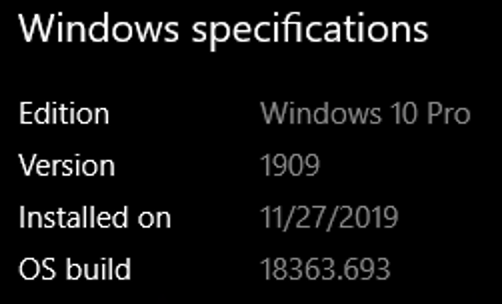
@Grolown are you also running Windows 10 Enterprise 2016 LTSB? I wonder if it's specific to this Windows version or more general.
linucksrox
on 13 Mar 2020
I am running Win10 Pro
Grolown
on 13 Mar 2020
I have the same problem since always
Log Name:      Application
Source:        Application Error
Date:          4/5/2020 11:49:11 PM
Event ID:      1000
Task Category: (100)
Level:         Error
Keywords:      Classic
User:          N/A
Computer:      unknown
Description:
Faulting application name: nextcloud.exe, version: 2.6.4.15215, time stamp: 0x5e5eb93a
Faulting module name: Qt5Core.dll, version: 5.12.5.0, time stamp: 0x5d6ebdfc
Exception code: 0xc0000409
Fault offset: 0x0000000000028978
Faulting process id: 0x1d04
Faulting application start time: 0x01d60ab536f7e6c7
Faulting application path: C:\Program Files (x86)\Nextcloud\nextcloud.exe
Faulting module path: C:\Program Files (x86)\Nextcloud\Qt5Core.dll
Report Id: 9e732a1a-73aa-418f-9e45-051402311914
Faulting package full name:
Faulting package-relative application ID:
Event Xml:
<Event xmlns="http://schemas.microsoft.com/win/2004/08/events/event">
  <System>
    <Provider Name="Application Error" />
    <EventID Qualifiers="0">1000</EventID>
    <Level>2</Level>
    <Task>100</Task>
    <Keywords>0x80000000000000</Keywords>
    <TimeCreated SystemTime="2020-04-05T23:49:11.865447200Z" />
    <EventRecordID>4291944</EventRecordID>
    <Channel>Application</Channel>
    <Computer>unknown</Computer>
    <Security />
  </System>
  <EventData>
    <Data>nextcloud.exe</Data>
    <Data>2.6.4.15215</Data>
    <Data>5e5eb93a</Data>
    <Data>Qt5Core.dll</Data>
    <Data>5.12.5.0</Data>
    <Data>5d6ebdfc</Data>
    <Data>c0000409</Data>
    <Data>0000000000028978</Data>
    <Data>1d04</Data>
    <Data>01d60ab536f7e6c7</Data>
    <Data>C:\Program Files (x86)\Nextcloud\nextcloud.exe</Data>
    <Data>C:\Program Files (x86)\Nextcloud\Qt5Core.dll</Data>
    <Data>9e732a1a-73aa-418f-9e45-051402311914</Data>
    <Data>
    </Data>
    <Data>
    </Data>
  </EventData>
</Event>
 boistordu
on 6 Apr 2020
boistordu
on 6 Apr 2020
And yes it's the latest windows 10 Pro., stable version not insider.
So do we have any lead why after a few days of uptime, sometimes less than 24 hours, nextcloud is crashing ?
Because it's very irritating to not have the ability to trust oue data transfer software
boistordu
on 6 Apr 2020
It's not related to our antivirus or any protection either.
I have those crashes, whcih are maybe different from the first one in 2018.
I have those crashes on all of my hosts. They have some datashare in common so maybe there is a lead there but the security is not one of them since I4have various antivirus protection on my different hosts which goes from trend micro to kaspersky or bitdefender. So there is no interaction with a protection program.
So maybe another kind of program interaction or a crash under specfic condition but we need to determine which ones then....
Does anybody has a lead on this? It's really frustrating to have to connect remotely to be sure that the client is still running.
boistordu
on 7 Apr 2020
Related issues
 Valdiralita
·
3Comments
Valdiralita
·
3Comments
 despens
·
3Comments
despens
·
3Comments
 Linuxfabrik
·
3Comments
Linuxfabrik
·
3Comments
 jospoortvliet
·
4Comments
jospoortvliet
·
4Comments
 Engineer-of-Stuff
·
3Comments
Engineer-of-Stuff
·
3Comments
Most helpful comment
I'm still seeing the issue with the current 2.5.1 version.