Desktop: Network Disabled Error - Qt QNetworkAccessManager
Expected behaviour
No "Network access is disabled." error message
This issue was reported first on the community forum: https://help.nextcloud.com/t/network-disabled-error/33709
the error is coming from networkjobs.cpp:
    07-04 15:27:30:007 [ info sync.engine ]:        Server ""
    07-04 15:27:30:009 [ info sync.csync.csync ]:   ## Starting local discovery ##
    07-04 15:27:30:011 [ info sync.csync.csync ]:   Update detection for local replica took 0.001 seconds walking 0 files
    07-04 15:27:30:012 [ info sync.csync.csync ]:   ## Starting remote discovery ##
    07-04 15:27:30:014 [ info sync.accessmanager ]: 6 "PROPFIND" "http://**********" has X-Request-ID "************"
    07-04 15:27:30:017 [ info sync.networkjob ]:    OCC::LsColJob created for "http:**********" + "" "OCC::DiscoverySingleDirectoryJob"
    07-04 15:27:30:020 [ warning sync.networkjob ]: QNetworkReply::NetworkError(UnknownNetworkError) "Network access is disabled." QVariant(Invalid)
    07-04 15:27:30:022 [ info sync.networkjob.lscol ]:      LSCOL of QUrl("http:**********************/") FINISHED WITH STATUS QNetworkReply::NetworkError(UnknownNetworkError) "Network access is disabled."
    07-04 15:27:30:024 [ warning sync.discovery ]:  LSCOL job error "Network access is disabled." 0 QNetworkReply::NetworkError(UnknownNetworkError)
    07-04 15:27:30:026 [ warning sync.csync.updater ]:      opendir failed for  - errno 5
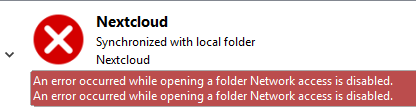
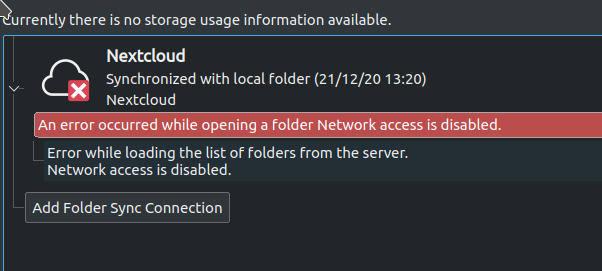
    07-04 15:27:30:027 [ warning sync.engine ]:     ERROR during  csync_update :  "An error occurred while opening a folder Network access is disabled."
    07-04 15:27:30:031 [ info sync.database ]:      Closing DB "*********/._sync_369bd5743963.db"
    07-04 15:27:30:037 [ info sync.engine ]:        CSync run took  32 ms
Actual behaviour
Nextcloud desktop clients stops sync with an "Network access is disabled." error message after a network change.
Steps to reproduce
- Install Nextcloud Desktop Version 2.5.0v2.5.0 (build 20181112)
- Change network (wifi <> wired)
- The error will appear
Client configuration
Client version: Nextcloud Desktop Version 2.5.0v2.5.0 (build 20181112)
Operating system: Windows 10 - 64 bit
OS language: en-US
This issue is also mentioned for owncloud here: https://github.com/owncloud/client/issues/5977
And in bug reports for Qt: https://bugreports.qt.io/browse/QTBUG-55180
According to that conversation a workaround is described here: https://lostdomain.org/2017/06/17/qt-qnetworkaccessmanager-causing-latency-spikes-on-wifi/
Can somebody from the nextcloud devs look into this?
 joephein
All 47 comments
For me this error appears after every standby since Windows client version 2.5.0.
Earlier versions of the client did not show this behavior.
A fix is to quit the client and to start it again. Every thing is fine until the next windows standby.
 get2him
on 20 Nov 2018
get2him
on 20 Nov 2018
same here, it's impossible to sync files, i have always this error, help !
no problem until 2.5.0 on 5 differents servers
 Kaor
on 21 Nov 2018
Kaor
on 21 Nov 2018
I am also seeing this issue after standby on v2.5.0 build 20181112. Updated the client yesterday and today it's refusing to sync.
Pause & resume and force sync did not help, although restarting the client did.
 voxlunch
on 26 Nov 2018
voxlunch
on 26 Nov 2018
I also experience this issue on Linux (Ubuntu 18.04) since upgrading to 2.5.0-20181111.015125~bionic, using the PPA packages.
Also noted that with the AppImage of the same version the problem does _not_ occur.
 mverwijs
on 2 Dec 2018
mverwijs
on 2 Dec 2018
Owncloud is providing an archive location with older builds for the desktop client, does something similar exist with Nextcloud as well? I currently have to restart the Nextcloud Desktop client everytime I wake my laptop from Standby.
https://owncloud.org/download/older-versions/
edit: 2.5.0 client on Windows 10. Just upgraded to 2.5.1 will report back if the issue does not occur there.
 fbartels
on 12 Dec 2018
fbartels
on 12 Dec 2018
Got the same error on 2.5.1final (build 20181204) on Windows 10. This was after regular device hibernate and wake-up the next morning. Didn't recover until restarting the client. Enabled debug and will provide logs next occurrence.
 BdeHeij
on 19 Dec 2018
BdeHeij
on 19 Dec 2018
[OCC::FolderMan::scheduleFolder Sync for folder "XXXX" already scheduled, do not enqueue!
[OCC::WebFlowCredentials::slotFinished request finished
[OCC::WebFlowCredentials::stillValid Still valid?
[OCC::WebFlowCredentials::stillValid QNetworkReply::NetworkError(NoError)
[OCC::WebFlowCredentials::stillValid "Unknown error"
[OCC::JsonApiJob::finished JsonApiJob of QUrl("https://my-nextcloud-host:10443/owncloud/ocs/v2.php/apps/notifications/api/v2/notifications?format=json") FINISHED WITH STATUS "OK"
[OCC::JsonApiJob::finished Nothing changed so nothing to retrieve - status code: 304
[OCC::ServerNotificationHandler::slotNotificationsReceived Status code 304 Not Modified - No new notifications.
[OCC::AccessManager::createRequest 6 "PROPFIND" "https://my-nextcloud-host:10443/owncloud/remote.php/dav/files/bart-sf3/" has X-Request-ID "YYY"
[OCC::AbstractNetworkJob::start OCC::PropfindJob created for "https://my-nextcloud-host/owncloud" + "/" "OCC::QuotaInfo"
[OCC::AbstractNetworkJob::slotTimeout Network job timeout QUrl("ocs/v2.php/core/navigation/apps")
[OCC::AccessManager::createRequest 2 "" "https://my-nextcloud-host:10443/owncloud/ocs/v2.php/apps/notifications/api/v2/notifications?format=json" has X-Request-ID "YYYY"
[OCC::AbstractNetworkJob::start OCC::JsonApiJob created for "https://my-nextcloud-host/owncloud" + "ocs/v2.php/apps/notifications/api/v2/notifications" "OCC::ServerNotificationHandler"
[csync_update ## Starting local discovery ##
[OCC::FolderMan::slotScheduleFolderByTime Scheduling folder "1" because it has been 46792599 ms since the last sync
[OCC::WebFlowCredentials::slotFinished request finished
[OCC::AbstractNetworkJob::slotFinished QNetworkReply::NetworkError(HostNotFoundError) "Host my-nextcloud-host not found" QVariant(Invalid)
[OCC::WebFlowCredentials::stillValid Still valid?
[OCC::WebFlowCredentials::stillValid QNetworkReply::NetworkError(HostNotFoundError)
[OCC::WebFlowCredentials::stillValid "Host my-nextcloud-host not found"
[OCC::PropfindJob::finished PROPFIND of QUrl("https://my-nextcloud-host:10443/owncloud/remote.php/dav/files/bart-sf3/") FINISHED WITH STATUS "HostNotFoundError Host my-nextcloud-host not found"
[OCC::PropfindJob::finished not successful, http result code is 0 ""
[csync_update Update detection for local replica took 7.154 seconds walking 187 files
[csync_update ## Starting remote discovery ##
[OCC::AccessManager::createRequest 6 "PROPFIND" "https://my-nextcloud-host:10443/owncloud/remote.php/dav/files/SOME/DIRECTORY" has X-Request-ID "ZZZZ"
[OCC::AbstractNetworkJob::start OCC::LsColJob created for "https://my-nextcloud-host/owncloud" + "/SOME/DIRECTORY" "OCC::DiscoverySingleDirectoryJob"
[OCC::WebFlowCredentials::slotFinished request finished
[OCC::AbstractNetworkJob::slotFinished QNetworkReply::NetworkError(UnknownNetworkError) "Network access is disabled." QVariant(Invalid)
[OCC::WebFlowCredentials::stillValid Still valid?
[OCC::WebFlowCredentials::stillValid QNetworkReply::NetworkError(UnknownNetworkError)
[OCC::WebFlowCredentials::stillValid "Network access is disabled."
[OCC::LsColJob::finished LSCOL of QUrl("https://my-nextcloud-host:10443/owncloud/remote.php/dav/files/SOME/DIRECTORY") FINISHED WITH STATUS "UnknownNetworkError Network access is disabled."
[OCC::DiscoverySingleDirectoryJob::lsJobFinishedWithErrorSlot LSCOL job error "Network access is disabled." 0 QNetworkReply::NetworkError(UnknownNetworkError)
[csync_ftw opendir failed for - errno 5
[OCC::SyncEngine::handleSyncError ERROR during csync_update : "Er trad een fout op bij het openen van een map Network access is disabled."
[OCC::ActivityWidget::addError Item "SOME/LOCAL/DIRECTORY" retrieved resulted in "Er trad een fout op bij het openen van een map Network access is disabled."
[OCC::ActivityListModel::addErrorToActivityList Error successfully added to the notification list: "Er trad een fout op bij het openen van een map Network access is disabled."
Dutch to english: "Er trad een fout op bij het openen van een map" -> "An error occured while opening a folder"
Limited to the "relevant" messages due to public github and I dind't have the time to review/redact everything. I have the log saved if someone requires it fully. If I understand correctly what I basically see happening and tried to capture in the logs is the following (too bad there aren't any timestamps, this would have made the actual debugging easier)
- There is/was a successful sync;
- A DNS error occurs (probably my wifi hasen't connected yet when returning from hibernate)
- Then the "Network access is disabled" pops up
- Then there is some error about a local directory ( [csync_ftw opendir failed for - errno 5 )
Hit me up if anyone thinks he can distinguish more information from the full logs.
BdeHeij
on 21 Dec 2018
I experienced the same problem after stand-by.
I have build 2.5.1 desktop client, and it says the same error "Network Access is Disabled."
Restarting the desktop client it makes it fixed. it's syncing normally now..... however. Am seriously considering Seafile due to lack of reliabilty of sync in NC lately.
 rwat1
on 24 Dec 2018
rwat1
on 24 Dec 2018
I got the same problem after wake-up on windows 10 - V. 2.5 (Build 20181204)
Change the "Proxy Settings" from "Use system proxy" to "No Proxy" seems to help for me.
 gudbergsen
on 25 Dec 2018
gudbergsen
on 25 Dec 2018
same here
 ad1rie1
on 31 Dec 2018
ad1rie1
on 31 Dec 2018
+1
 yukdumboobumm
on 6 Jan 2019
yukdumboobumm
on 6 Jan 2019
Same problem here. Every time I restore my desktop from standby, I need to manually restart Nextcloud client. Windows 10 1803 x64, Nextcloud client 2.5.1.
 barry-luijten
on 14 Jan 2019
barry-luijten
on 14 Jan 2019
+1, observed on 3 different Win10 machines with the NC client. Upon return from standby, "network access is disabled" and client restart is required.
 mfassier
on 19 Jan 2019
mfassier
on 19 Jan 2019
I got the same problem after wake-up on windows 10 - V. 2.5 (Build 20181204)
Change the "Proxy Settings" from "Use system proxy" to "No Proxy" seems to help for me.
This workaround helped for me as well.
 acheaito
on 19 Jan 2019
acheaito
on 19 Jan 2019
I got the same problem after wake-up on windows 10 - V. 2.5 (Build 20181204)
Change the "Proxy Settings" from "Use system proxy" to "No Proxy" seems to help for me.This workaround helped for me as well.
The workaround helps in that you can avoid restarting the application, but that's all.
"Proxy settings" has always been set to "No Proxy" on my windows 10 client and I still get the error every time the network changes. Then the workaround is
1) Open Network
2) Change from "No Proxy" to "Use system proxy" and then again to "No proxy" in "Proxy settings"
3) Select account (close Network view)
4) Syncronization works again...
Points 2 is probably resetting the internal state pretty much like restarting the application... so...
Still using 2.3.3 which works like charm.
 zizzithefox
on 22 Jan 2019
zizzithefox
on 22 Jan 2019
I got the same problem after wake-up on windows 10 - V. 2.5 (Build 20181204)
Change the "Proxy Settings" from "Use system proxy" to "No Proxy" seems to help for me.
This workaround works perfectly for me - V. 2.5.1final (build 20181204)
 Javinator9889
on 30 Jan 2019
Javinator9889
on 30 Jan 2019
Owncloud is providing an archive location with older builds for the desktop client, does something similar exist with Nextcloud as well? I currently have to restart the Nextcloud Desktop client everytime I wake my laptop from Standby.
I have exactly the same problem. You can download older versions here : https://download.nextcloud.com/desktop/releases/Windows/
I've installed 2.3.3 (build 1) version, and it works.
 Etruchet
on 1 Feb 2019
Etruchet
on 1 Feb 2019
Experiencing the same issue in 2.5.1final (build 20181204). gudbergsen's workaround https://github.com/nextcloud/desktop/issues/865#issuecomment-449818541 works to temporarily fix the problem. However, the "Network Access Disabled" error has happened more than once. It would obviously be better to source the problem so we do not have to keep switching back and forth from "Use system proxy" to "No Proxy"
 mrgswift
on 1 Mar 2019
mrgswift
on 1 Mar 2019
Seems like killing the nextcloud.exe aslo works in windows 10:
- taskmgr
- get-process nextcloud|stop-process -force
- taskkill /im nextcloud.exe /f
It seems to restart it's process and syncing agian.
 aricade
on 26 Mar 2019
aricade
on 26 Mar 2019
Seems like killing the nextcloud.exe aslo works in windows 10:
- taskmgr
- get-process nextcloud|stop-process -force
- taskkill /im nextcloud.exe /f
It seems to restart it's process and syncing agian.
Well, that's actually waaaay overkill (pun intended). Just Shut it down and restart it, no need to shoot and kill. HOWEVER, your solutions makes sense if you put a kill and restart as a scheduled job. Also, you should not need /F.
I'm stil using 2.3.3, by the way, with no problem at all.
zizzithefox
on 26 Mar 2019
Seems like killing the nextcloud.exe aslo works in windows 10:
- taskmgr
- get-process nextcloud|stop-process -force
- taskkill /im nextcloud.exe /f
It seems to restart it's process and syncing agian.
You should try @zizzithefox way, his instructions are here: https://github.com/nextcloud/desktop/issues/865#issuecomment-456451982
It's very fast way to do it 👍
For me, 2.3.3 deleted all my wedding pictures, so that's a no-go. 2.3.3 didn't have this stupid restart problem though :)
rwat1
on 27 Mar 2019
Because the "proxy-switch-trick" does not always work (nextcloud simply crashes) and I got tired of restarting it, I ended up scheduling a task with this trigger:

and this PS script:
$nc = Get-Process -Name nextcloud
$ncPath = $nc.Path
Write-Output 'Found Nextcloud: $ncPath'
Write-Output 'Stopping Nextcloud...'
$nc.Kill()
Write-Output 'Starting Nextcloud...'
Start-Process -FilePath $ncPath
Installed 2.5.2 client on Win 10.
Not 100% sure but I want say it's working much better.. No problems so far.
aricade
on 4 Apr 2019
Installed 2.5.2 client on Win 10.
Not 100% sure but I want say it's working much better.. No problems so far.
Thanks @aricade I have just installed it myself. Let's see what it does ;)
Link:
https://download.nextcloud.com/desktop/releases/Windows/Nextcloud-2.5.2-setup.exe
barry-luijten
on 8 Apr 2019
@barry-luijten sofar so good for me!
aricade
on 8 Apr 2019
Same here! 😃👍
barry-luijten
on 9 Apr 2019
Installed 2.5.2 client on Win 10.
Not 100% sure but I want say it's working much better.. No problems so far.
Used for a week. After several network switches, it seems fine.
zizzithefox
on 17 Apr 2019
Woo! This seems to have solved my problem too!
 jcklpe
on 6 May 2019
jcklpe
on 6 May 2019
I will close this issue since updating to 2.5.2 solves the problem.
 camilasan
on 12 Jun 2019
camilasan
on 12 Jun 2019
This issue is occuring for me on windows 10 v2.6.4
 LuminousPath
on 6 Jul 2020
LuminousPath
on 6 Jul 2020
I am still experiencing this issue on Windows 10, version 3.0.3 :(
 joffotron
on 14 Nov 2020
joffotron
on 14 Nov 2020
The issue has indeed returned in version 3.0.3 :(
barry-luijten
on 17 Nov 2020
I'm also having this problem after upgrading to 3.0.3 (Windows 10).
 edonnachie
on 23 Nov 2020
edonnachie
on 23 Nov 2020
Same here as well, proxy setting change seems to resolve it for now. It only happens sporadically twice a day. Client restart in Windows also solved the problem for a few hours. It only occurred on one or two (out of 3) connections at the time.
OS Name Microsoft Windows 10 Enterprise
Version 10.0.18363 Build 18363
Nextcloud client v3.0.3
Nextcloud server specs:
Arch Linux (kern. 5.9.2-arch1-1) x86_64
Nginx 1.19.3-1
Nextcloud 20.0.1-1
PHP (fpm) 7.4.12-1
MySQL (MariaDB) 10.5.6
php-redis 5.3.2-1
Server side encryption (default encryption module).
Four users.
  'memcache.local' => '\\OC\\Memcache\\APCu',
  'memcache.locking' => '\\OC\\Memcache\\Redis',
  'memcache.distributed' => '\\OC\\Memcache\\Redis',
  'redis' =>
  array (
    'host' => '/run/redis/redis.sock',
    'port' => 0,
    'dbindex' => 0,
    'password' => 'xxxxxx',
    'timeout' => 1.5,
  ),
@camilasan Could you re-open this issue? No need for a new ticket I would say - issue occurs again starting from 3.0.3.
 Broekman
on 10 Dec 2020
Broekman
on 10 Dec 2020
Same problem with kubuntu and nextcloud 3.0.3:
nextcloud-desktop 3.0.3-20201101.082922.78da725ac-1.0~focal1 amd64
Server is a snap running on a Raspberry Pi 3B, but I don't think that matters much:
nextcloud 20.0.3snap1 24942 latest/stable nextcloud✓ -
 nbensa
on 11 Dec 2020
nbensa
on 11 Dec 2020
Same issue over here, Windows 10 and client 3.0.3. Just installed client 3.1.0 and lets wait and see what happens.
 ppoetsma
on 15 Dec 2020
ppoetsma
on 15 Dec 2020
Same issue still with Windows 10 and client 3.1.0 :(
@camilasan: Can we please re-open this issue?
barry-luijten
on 16 Dec 2020
3.1.0 indeed
ppoetsma
on 17 Dec 2020
Same problem on Windows 10 and client 3.1.0.
The workaround for these comments works for me:
https://github.com/nextcloud/desktop/issues/865#issuecomment-449818541
https://github.com/nextcloud/desktop/issues/865#issuecomment-456451982
@camilasan could you please reopen this issue ?
 florian-bellencontre
on 18 Dec 2020
florian-bellencontre
on 18 Dec 2020
The workaround doesn't work for me. I don't use a proxy.
edonnachie
on 18 Dec 2020
Proxy setting is "No proxy" and has been for some time
edonnachie
on 18 Dec 2020
I am experiencing this same issue after Windows 10 hibernates. Desktop client 3.1.0.
 thejungletiger
on 19 Dec 2020
thejungletiger
on 19 Dec 2020
nextcloud-desktop 3.1.0-20201214.180315.7f4ffd0f7-1.0~focal1 amd64 Nextcloud folder synchronization tool
(K)Ubuntu 20.04.1. Kernel 5.4.0-59-generic #65-Ubuntu
Same problem.
Workaround: settings, network, change proxy options (cycle between no proxy / use system proxy).
Please RE OPEN or point us to a more specific bug. Thank you.
nbensa
on 20 Dec 2020
Same here as well, proxy setting change seems to resolve it for now. It only happens sporadically twice a day. Client restart in Windows also solved the problem for a few hours. It only occurred on one or two (out of 3) connections at the time.
OS Name Microsoft Windows 10 Enterprise
Version 10.0.18363 Build 18363
Nextcloud client v3.0.3Nextcloud server specs:
Arch Linux (kern. 5.9.2-arch1-1) x86_64
Nginx 1.19.3-1
Nextcloud 20.0.1-1
PHP (fpm) 7.4.12-1
MySQL (MariaDB) 10.5.6
php-redis 5.3.2-1
Server side encryption (default encryption module).
Four users.'memcache.local' => '\\OC\\Memcache\\APCu', 'memcache.locking' => '\\OC\\Memcache\\Redis', 'memcache.distributed' => '\\OC\\Memcache\\Redis', 'redis' => array ( 'host' => '/run/redis/redis.sock', 'port' => 0, 'dbindex' => 0, 'password' => 'xxxxxx', 'timeout' => 1.5, ),@camilasan Could you re-open this issue? No need for a new ticket I would say - issue occurs again starting from 3.0.3.
The issue is still present after hibernation with proxy setting off however does stay away without hibernation.
Broekman
on 20 Dec 2020
No hibernation in my case. Nextcloud Desktop thinks there's no network from one second to the other.
nbensa
on 21 Dec 2020
I think its best to continue on #482 as that ticket is still open.
Broekman
on 21 Dec 2020
problem still present in v3.1.1
 trvrcr
on 24 Dec 2020
trvrcr
on 24 Dec 2020
Related issues
 linucksrox
·
3Comments
linucksrox
·
3Comments
 Engineer-of-Stuff
·
3Comments
Engineer-of-Stuff
·
3Comments
 jospoortvliet
·
4Comments
jospoortvliet
·
4Comments
 Valdiralita
·
3Comments
Valdiralita
·
3Comments
 Ich5003
·
3Comments
Ich5003
·
3Comments
Most helpful comment
I got the same problem after wake-up on windows 10 - V. 2.5 (Build 20181204)
Change the "Proxy Settings" from "Use system proxy" to "No Proxy" seems to help for me.