Desktop: SSL client certificate broken with new 2.5.0 connection wizard
Expected behaviour
It should be possible to add a new account to the client through the Nextcloud Connection Wizard which has an SSL client certificate in order connect to the Nextcloud server which requires client certificate authentication.
Actual behaviour
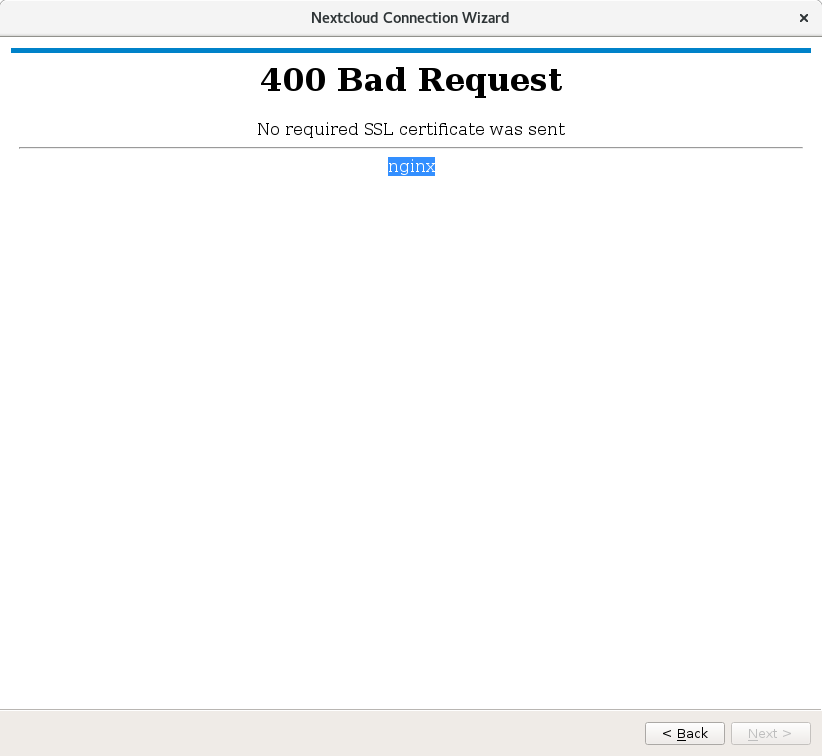
The Nextcloud Connection Wizard can't proceed with the account creation because it shows a 400 bad request error (output below) where the web server does not receive the SSL client certificate. The "Next" button of the wizard stays greyed-out and it is not possible to proceed with adding this account. This used to work fine with the previous 2.3.3 client but now with 2.5.0 it does not work anymore. I guess it has something to do with the new wizard trying to connect to the server before having correctly installed the SSL client certificate.
400 Bad Request

No required SSL certificate was sent
Steps to reproduce
- Add a new account (Account -> Add new)
- Click "Log In" button
- Add Server Address
- Click on "Configure client-side TLS certificate"
- Load pkcs12 client-side cert and enter cert password
- Now appears the error 400 Bad Request - No required SSL certificate was sent
Client configuration
Client version: 2.5.0
Operating system: Debian 9.6
OS language: EN
Qt version used by client package (Linux only, see also Settings dialog): libqt 5.7.1 (Debian 9)
Client package (From Nextcloud or distro) (Linux only): Nextcloud
Installation path of client: /usr/bin/nextcloud
Logs
- Client logfile: Output of
nextcloud --logwindowornextcloud --logfile log.txt
[OCC::AccessManager::createRequest  2 "" "https://cloud.mydomain.org/status.php" has X-Request-ID "2e6a346c-d4a7-4eaa-9eba-1d0ce2eefcae"
[OCC::AbstractNetworkJob::start     OCC::CheckServerJob created for "https://cloud.mydomain.org" + "status.php" "OCC::OwncloudSetupWizard"
[OCC::AbstractNetworkJob::slotFinished  QNetworkReply::NetworkError(ProtocolInvalidOperationError) "Server replied \"400 Bad Request\" to \"GET https://cloud.mydomain.org/status.php\"" QVariant(int, 400)
[OCC::CheckServerJob::finished  error: status.php replied  400 "<html>\r\n<head><title>400 No required SSL certificate was sent</title></head>\r\n<body bgcolor=\"white\">\r\n<center><h1>400 Bad Request</h1></center>\r\n<center>No required SSL certificate was sent</center>\r\n<hr><center>nginx</center>\r\n</body>\r\n</html>\r\n"
- Web server error log:
X.X.X.X - - [20/Nov/2018:09:27:36 +0100] "GET /status.php HTTP/1.1" 400 246 "-" "Mozilla/5.0 (Linux) mirall/2.5.0git (Nextcloud)"
X.X.X.X - - [20/Nov/2018:09:27:36 +0100] "GET / HTTP/1.1" 400 246 "-" "Mozilla/5.0 (Linux) mirall/2.5.0git (Nextcloud)"
X.X.X.X - - [20/Nov/2018:09:27:36 +0100] "GET /status.php HTTP/1.1" 400 246 "-" "Mozilla/5.0 (Linux) mirall/2.5.0git (Nextcloud)"
X.X.X.X - - [20/Nov/2018:09:27:54 +0100] "GET /index.php/login/flow HTTP/1.1" 400 246 "-" "Mozilla/5.0 (Linux) mirall/2.5.0git (Nextcloud)"
X.X.X.X - - [20/Nov/2018:09:27:54 +0100] "GET /favicon.ico HTTP/1.1" 400 246 "https://cloud.mydomain.org/index.php/login/flow" "Mozilla/5.0 (Linux) mirall/2.5.0git (Nextcloud)"
- Server logfile: nextcloud log (data/nextcloud.log): empty nextcloud log
 hostingnuggets
All 26 comments
Would it be possible for you to send me a test account (and cert) to verify?
 rullzer
on 23 Nov 2018
rullzer
on 23 Nov 2018
Unfortunately no this is an internal Nextcloud server not connected to the internet.
hostingnuggets
on 23 Nov 2018
Same problem here (but same issue with windows client). I will create a test instance to reproduce the issue if I have a chance that someone will look at it. Pls send me a private message with a pgp public key :-).
 freebeat
on 30 Nov 2018
freebeat
on 30 Nov 2018
Problem is still present with the current version. Do you have any plan for solving this? Our access through client certificates is enforced, so I can't access nextcloud with desktop clients - however it works with browser. I could organize a temporary client certificate if you need test access.
 danielgrana
on 28 Jan 2019
danielgrana
on 28 Jan 2019
Faced a similar problem:
When creating a new account
I entered the server adress (here "nas.fritz.box/nextcloud") and press "Next"
PopUp appears if I will trust this certificate, what I did. in my case "Let's Encrypt Authority X3" which what I created with my web adress.
Next PopUp just showed a grey box with a blue bar on top and some text above "couldn't login ..." instead of some login possibilities for the Two-factor Authentication (2FA)
solved my issue:
forced https on my web server
changed the certificate on the webserver back to the original from synology
system
client:
OS: Ubuntu 18.04
Nextcloud-client 2.5.1git
server:
Synolgy NAS DS218j
OS: DSM 6.2.1-23824 Update 6
Nextcloud Version: 15.0.4.0
PHP Version: 7.2.13
Database mysql Version: 10.3.7
 tommyhlw
on 27 Feb 2019
tommyhlw
on 27 Feb 2019
@tommyhlw your issue has nothing to do with this issue. In this specific issue we are speaking about SSL _client_ certificates and not SSL "webserver" certificates.
hostingnuggets
on 28 Feb 2019
Also having this issue on macOS. Browser works but Nextcloud client doesn't.
 fhoner
on 1 Mar 2019
fhoner
on 1 Mar 2019
I'm also running into this issue. We run our Nextcloud instance behind a reverse proxy that requires connections to be validated by their Client SSL certificate. This used to work great prior to the 2.5.0 update, now it's completely broken.
Please return support for client side SSL certificates.
 nklock
on 21 Mar 2019
nklock
on 21 Mar 2019
It seems still not to be fixed. We use Version 2.4 which works fine. Is there any progress on this ticket?
 jankowa
on 16 Apr 2019
jankowa
on 16 Apr 2019
Same issue here
 martinspielmann
on 13 May 2019
martinspielmann
on 13 May 2019
I'm also affected. I tried to come up with a solution (or rather workaround), though.
The attached patch adds support to WebFlowCredentials to store and load client certificate and key to keychain analogously to the implementation of HttpCredentials.
The client certificate comes from a pkcs12 file selected via the "Configure client-side TLS certificate" button when setting up a new account which requires a client certificate (no change was needed here).
The WebFlowCredentials are used for the API calls (status query, file upload/download, ...) after the account setup.
The second part of the patch extends WebView to support client certificates. It selects the first matching client certificate/key pair from the Qt system keystore.
This is the part which makes the patch a workaround. In order to make the initial authentication during the setup of a new account work, you have to add your key to the system keystore using
pk12util -i clientcert.p12 -d sql:$HOME/.pki/nssdb
I didn't perform a thorough research on QWebEngineView but it seems client certificates are handled as pet project there since the support was added rather recently (Qt 5.12) and I didn't find a way to specify a custom certificate store yet.
 stephanritscher
on 5 Jun 2019
stephanritscher
on 5 Jun 2019
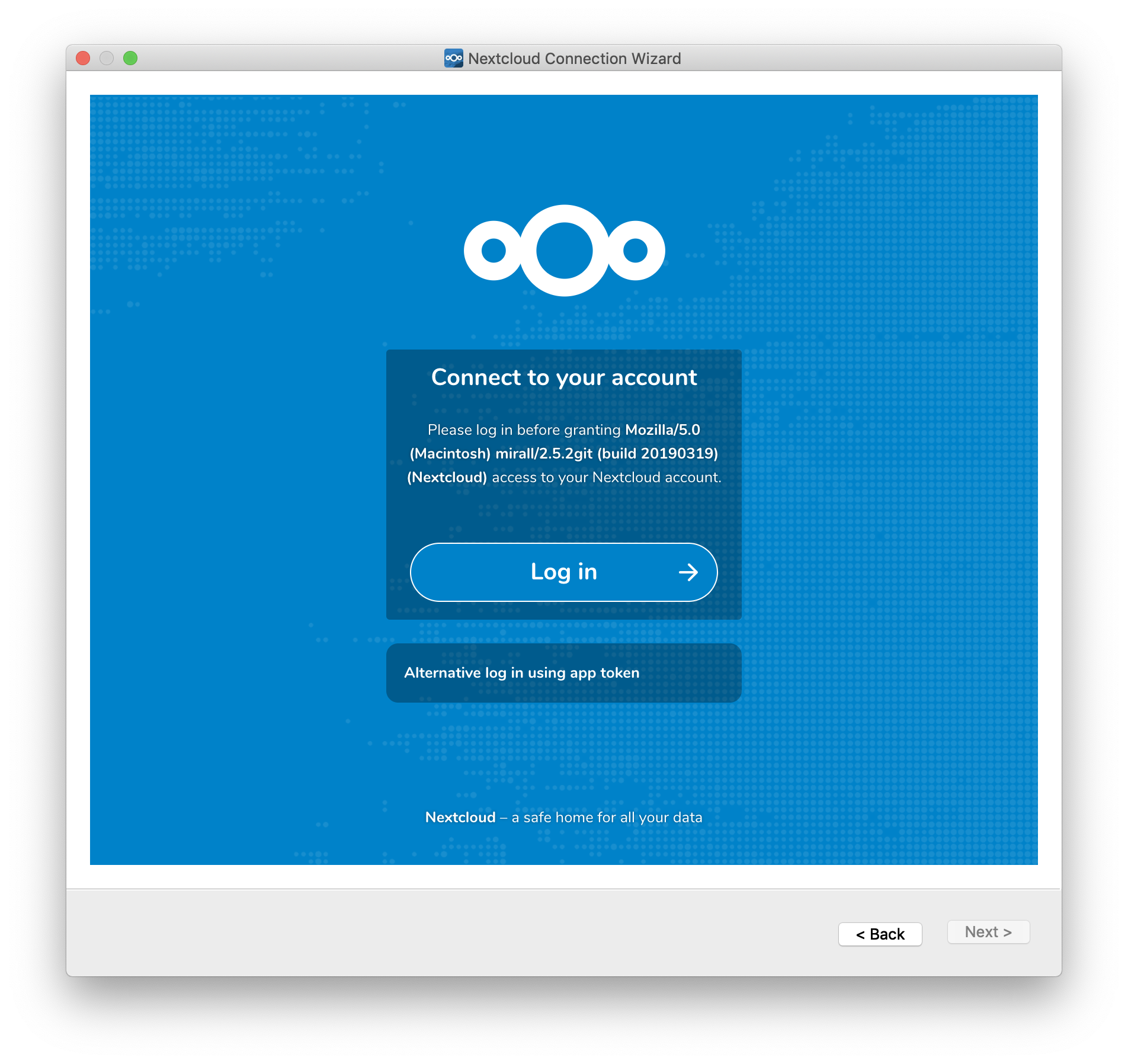
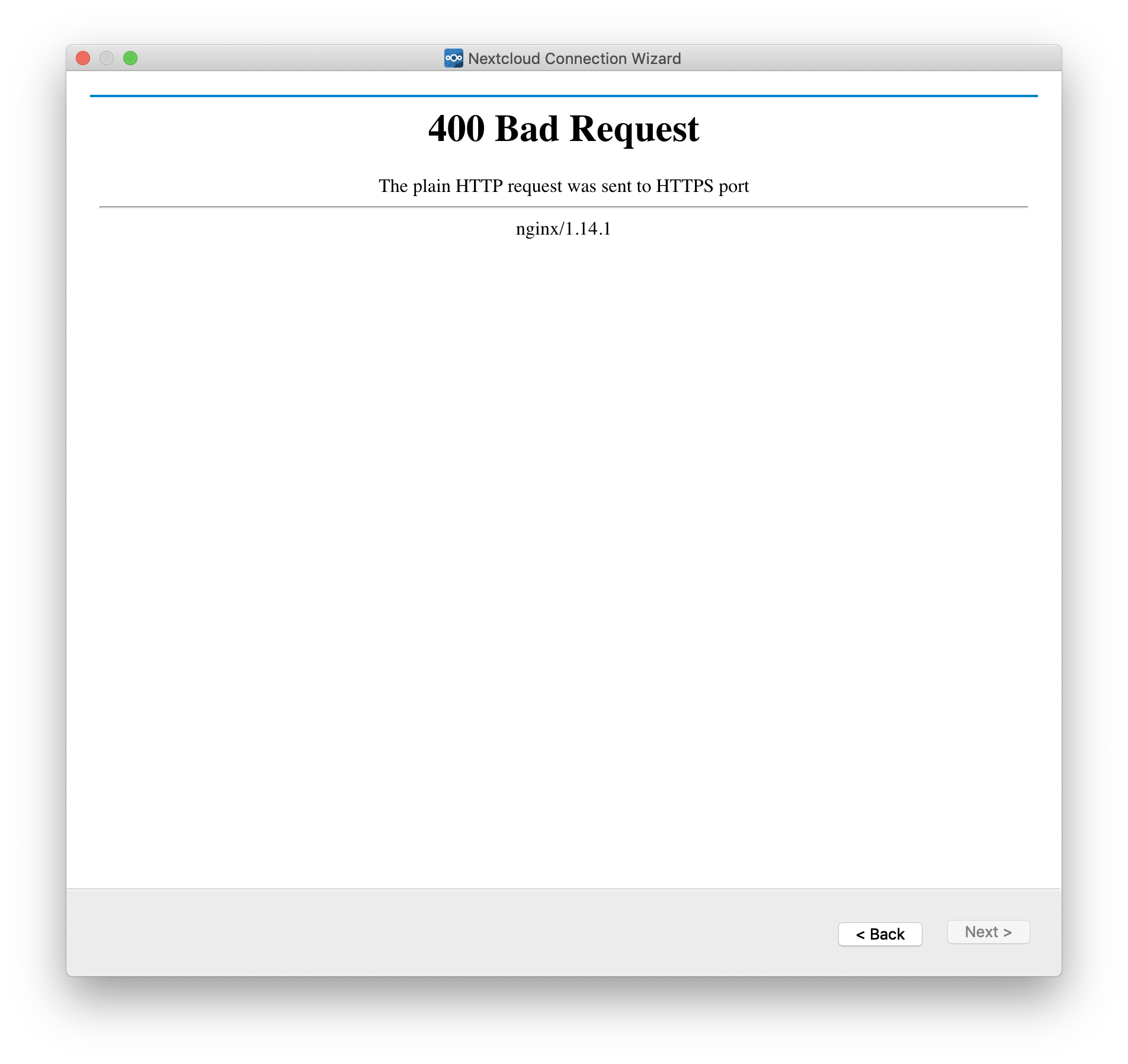
I am running NextCloud on my Mac via Docker. I am unable to log into the Mac client app as it seems to submit the request in HTTP when my server only accepts HTTPS. When I hit the log in button I get a 400 error.
 K-MTG
on 20 Jun 2019
K-MTG
on 20 Jun 2019
Very disappointed to see that SSL client certificate is still broken with the newest Nextcloud 2.6.0 client... It used to work with older Nextcloud clients.
hostingnuggets
on 3 Oct 2019
Hey,
we've just released 2.6.1 RC1 which is built with Qt 5.12.5 and OpenSSL 1.1.1d on all platforms, so it features TLS 1.3 :-)
You may give it a try:
https://github.com/nextcloud/desktop/releases/tag/v2.6.1-rc1
Client SSL certificates support in general was fixed in the 2.6.0 release - but not with the WebView component, shown own your screenshots. Sadly the Qt webview has a lot of issues. That's why we implemented the new Login Flow v2 in v2.6.0 which is supported from NC server 16.x and up.
 misch7
on 19 Oct 2019
misch7
on 19 Oct 2019
Tested the 2.6.1 RC1 client on macOS Catalina with Nextcloud Server 16.0.5 and it works fine. Thank you very much!
fhoner
on 19 Oct 2019
For me it does not work. Nextcloud 16, Windows 10 using client certificates.
As I cannot reopen this issue I am afraid this problem will be ignored.
nextcloud-2.6.1-create-account.txt
nextcloud-2.6.1-after-restart.txt
 wdehoog
on 2 Dec 2019
wdehoog
on 2 Dec 2019
@wdehoog No, you won't get ignored ;-)
I've discovered the following in your logs (very good you provided them 👍):
_nextcloud-2.6.1-create-account.txt, line 1335:_
[OCC::WebFlowCredentials::slotWriteClientCaCertsPEMJobDone Error while writing client CA cert "Credential size exceeds maximum size of 2560"
Upon restart the certs can't be read again because they are not stored, resulting in the error you're facing.
The Windows Credential Store API's have this weird limit of 2560 per entry due to historical assumptions ^^
So you must have a huuuuuuge certificate that exceeds the limit. Can you confirm that? ;)
Anyway it's an interesting case and I'll take another look at the CA cert code in the Client, think I'll add some logic to allow spreading the certs over multiple slots then.
misch7
on 2 Dec 2019
@misch7 thanks for looking into this. Indeed we use 4K keys for our certificates.
wdehoog
on 2 Dec 2019
@misch7 thanks for looking into this. Indeed we use 4K keys for our certificates.
@wdehoog You're welcome (and right on time for this because we may get the fix into 2.6.2 then) :)
Oh my, of course, 4K keys 😹
Really good you do that! 👍 The fact that it worked for everyone else so far just states we all should upgrade our certs to use 4K keys in the future 👍 Not only at the webserver🙈
misch7
on 2 Dec 2019
Fixed by #1664, successfully tested on Windows already :)
The fix will make it into RC1 of the 2.6.2 release.
@wdehoog Thanks again for reporting! 👍
misch7
on 7 Dec 2019
@wdehoog Here's the RC1 of 2.6.2 with the fix for the issue :)
https://github.com/nextcloud/desktop/releases/tag/v2.6.2-rc1
misch7
on 11 Dec 2019
@misch7 I just tried it. Still the same behaviour and errors:
[OCC::WebFlowCredentials::slotWriteClientCaCertsPEMJobDone Error while writing client CA cert "Credential size exceeds maximum size of 2560"
and
[OCC::WebFlowCredentials::slotReadClientCaCertsPEMJobDone Unable to read client CA cert slot "0" "Password entry not found"
This is the version info I found in the log file:
[OCC::AccessManager::createRequest  2 "" "https://updates.nextcloud.org/client/?version=2.6.2.20191209&platform=win32&oem=Nextcloud&versionsuffix=rc1-Win64&channel=beta" has X-Request-ID "df9a185f-52cb-40f7-b1cd-4583454dfbe1"
[OCC::NSISUpdater::versionInfoArrived   Client is on latest version!
@wdehoog Thanks for the feedback, I'll have a look at the code again.
misch7
on 12 Dec 2019
@wdehoog Ho ho ho! 🎅 🎉
Today's 2.6.2 release should fix the issue finally :-)
misch7
on 24 Dec 2019
Ho ho indeed. Impressive work @misch7 . Connection works after restarting nextcloud client.
Thanks a lot!
wdehoog
on 27 Dec 2019
Thanks for your work. But I just tried the latest AppImage for Linux:
Nextcloud-client ask's for client certificate and I can import it successfully. But after that:
400 Bad Request
No required SSL certificate was sent
nginx
On command line I get:
# Nextcloud-2.6.2-x86_64.AppImage --confdir ~/.nctest
sync.configfile: Using custom config dir  "/home/jankowa/.nctest"
[5745:5790:0114/162941.778458:ERROR:nss_util.cc(748)] After loading Root Certs, loaded==false: NSS error code: -8018
Related issues
 DBLouis
·
3Comments
DBLouis
·
3Comments
 Ackis
·
4Comments
Ackis
·
4Comments
 nilsbecker
·
3Comments
nilsbecker
·
3Comments
 despens
·
3Comments
despens
·
3Comments
 rguenther-dz
·
3Comments
rguenther-dz
·
3Comments
Most helpful comment
Hey,
we've just released 2.6.1 RC1 which is built with Qt 5.12.5 and OpenSSL 1.1.1d on all platforms, so it features TLS 1.3 :-)
You may give it a try:
https://github.com/nextcloud/desktop/releases/tag/v2.6.1-rc1
Client SSL certificates support in general was fixed in the 2.6.0 release - but not with the WebView component, shown own your screenshots. Sadly the Qt webview has a lot of issues. That's why we implemented the new Login Flow v2 in v2.6.0 which is supported from NC server 16.x and up.