Desktop: Option to disable custom header bar
I don't have anything against the new custom header bar, but I'd like to be able to disable it and use the native header bar instead because the window button positions of the custom header bar are inconsistent with the window button positions used on the OS I use (elementary OS). (It does also make the app look more alien on my OS compared to native apps.)
To show you what I mean, this is how elementary OS positions the buttons (and the minimize button is not even there by default on elementary OS):

 aljelly
All 12 comments
I'd like to second this, while I like the look of the new header bar, there is functionality provided by my window manager that is removed when this is used.
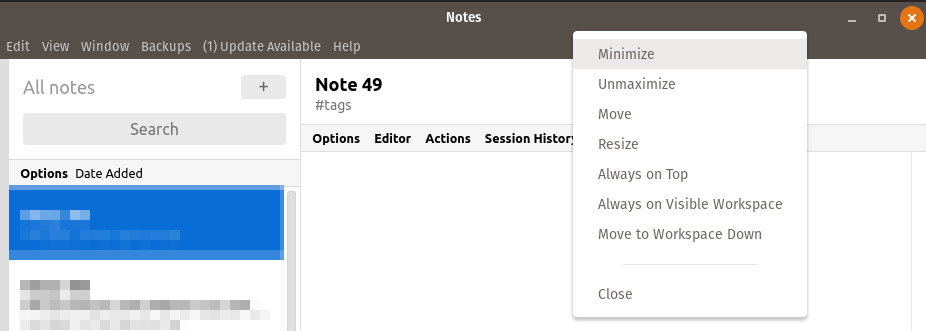
The custom header bar is definitely a good default, and unifies the look of the app across platforms, but it would be good to toggle the use of the client side decorations, and revert to having the operating system handle this (Like is done on Firefox and Chrome for example).
 aden-young
on 28 Oct 2018
aden-young
on 28 Oct 2018
I'd like to have this option as well and suggest enabling it by default. All of my applications use server side decorations, but standardnotes doesn't, making things inconsistent.
 alexbakker
on 28 Oct 2018
alexbakker
on 28 Oct 2018
I request to revert this change or give us an option to disable custom title bar. There is no point of uniformity when we can't do the same for macOS.
 arifzeeshan
on 29 Oct 2018
arifzeeshan
on 29 Oct 2018
Will need to investigate, thanks.
 mobitar
on 29 Oct 2018
mobitar
on 29 Oct 2018
+111
Came hear to create this issue.
It's also messed up and inconsistent in Arch Linux with KDE Breezemite theme. An option to disable the new style would be sufficient.
 rawlife56
on 30 Oct 2018
rawlife56
on 30 Oct 2018
Would really appreciate this as well. I use OSX style min/max/close buttons on the left, now after I updated they are on the right, and not OSX style any more. I am using Ubuntu 18.04
 13xps
on 13 Nov 2018
13xps
on 13 Nov 2018
I think, the reason to mess up the unified approach which is almost a paradox here is just because Linux allows us to doesn't just means you should break it. My every apps are unified expect this with it's ugly header bar.
arifzeeshan
on 15 Jan 2019
I also need this feature. I can't move the window on my touchscreen without it
 alien2003
on 19 Mar 2019
alien2003
on 19 Mar 2019
Inconsistent look is the worst 'feature' of Electron. Why not just support native GTK/Qt theme and implement custom CSS?
alien2003
on 19 Mar 2019
Visual Studio Code made client side decorations on Linux optional and disabled by default recently. Perhaps their work can be used as reference to get the same feature into Standard Notes.
alexbakker
on 19 Mar 2019
The only inconsistent app in my list. Kindly look into this. It shouldn't be hard to revert or offer it as an option.
rawlife56
on 6 Apr 2019
v3.0.8 now has this option under the View menu.
mobitar
on 18 Apr 2019
Related issues
 popey
·
3Comments
popey
·
3Comments
 infosisio
·
3Comments
infosisio
·
3Comments
 Eduardo06sp
·
5Comments
Eduardo06sp
·
5Comments
 xioren
·
5Comments
xioren
·
5Comments
 dergigi
·
4Comments
dergigi
·
4Comments
Most helpful comment
+111
Came hear to create this issue.
It's also messed up and inconsistent in Arch Linux with KDE Breezemite theme. An option to disable the new style would be sufficient.