Desktop: Minimize/close to system tray + launch minimized + global shortcut functionality (feature request)
As the alternative and/or more advanced feature for feature request #102, it would be great if SN had minimize/close to system tray + launch minimized + global shortcut functionality. This will benefit users who routinely use SN for a wide range of tasks.
 llamaqcom
All 15 comments
Can you give me an example of this?
 mobitar
on 12 Oct 2017
mobitar
on 12 Oct 2017
A good example of this behavior is KeepassXC which can be started minimized to tray (settings option), so you just add it to autostart apps. Then when you need it, you just hit global shortcut (for old school guys as I am) and it brings app window instantly upfront. Those who hate keyboard and love "touch-or-click" way, they can use tray bar icon to manipulate program.
llamaqcom
on 12 Oct 2017
I would also like this, a quick access way to notes from the tray.
 billymedia
on 1 Nov 2017
billymedia
on 1 Nov 2017
Just a vote for this feature (on Windows minimize to taskbar). Signal Desktop also uses Electron and they have added this feature with a command line switch when starting the app that is easily added to the normal shortcut. Example from Signal Desktop here starting at line 37: main.js
 cyanfr
on 2 May 2018
cyanfr
on 2 May 2018
So is the tray feature essentially so that the app never quits and always launches quickly? (Mostly a Mac user here). If so, what about minimizing the app instead of quitting it?
mobitar
on 2 May 2018
In Windows, it's a UI convention for apps that you might run in the background all the time but you want to be readily available.
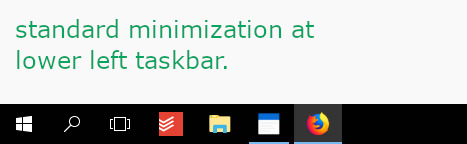
If you just minimize it, it's larger and on the left side of the bottom taskbar. It also is more likely to be closed there by mistake, etc. See image 1.
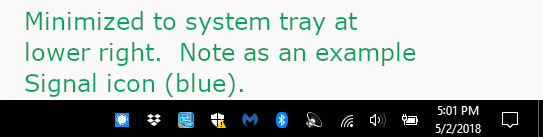
If it can be minimized to task bar, (a la spoitify on windows, drop, etc) it takes up a lot less real estate in the taskbar and has other right-click advantages. See image 2.
Standard minimizing is of course available. On Windows it's just not as elegant, useful, etc.
I realize this may seem like a small thing, but Windows users often expect this.
Spotify implements this as a choice in the settings of their app. Seem image 3. But that's not really necessary. A simpler command line switch is also ok.

cyanfr
on 2 May 2018
Gotcha thanks, that's very helpful. I've made a note of this but don't know yet when I'll be able to get to it.
mobitar
on 3 May 2018
You are based on Electron, aren't you? Have a look at Rocket.Chat, they do it like this :-)
 Anguel
on 14 Sep 2018
Anguel
on 14 Sep 2018
Yes, thanks, will take a look. Had a prototype of this running but encountered a few setbacks. Will need to allocate more time on it.
mobitar
on 15 Sep 2018
Just would like to echo the importance of this. On Windows and Linux, depending on what kind of taskbar you have, not being able to send such an app to the tray can be very frustrating. Open windows take up a lot of space on the taskbar and give the impression "there's to-do with this". Apps that are supposed to keep running in the background but be easily retrievable "belong" to the tray area.
There are some special applications that make any window tray-area-compatible (this is not an elegant solution, but better than nothing), but they don't work with Standard Notes because SN implemented its own minimize/maximize/close buttons in the window header (these apps send the window to tray by right-clicking Minimize). So users are left with a taskbar item which keeps changing position according to how other apps are opened and closed, and this complicates access and work flow.
 leafcutterant
on 20 Nov 2018
leafcutterant
on 20 Nov 2018
Thanks for your thoughts @leafcutterant. We'll be exploring this feature for version 3.0 of Standard Notes, which is currently in ideation.
mobitar
on 21 Nov 2018
Great -- even though it seems it didn't make it to 3.0, I look forward to it!
leafcutterant
on 24 Dec 2018
Would like to revisit this feature request.
This is a well needed feature for an app that is likely to be running most of the time.
Also looking at original request date, this has been first requested in 2017 and is a very simple feature to implement in a windows app. Seems like the team just put this on the back burner I guess.
Please look into adding this in near future. Thanks.
 AlexVPerl
on 11 Mar 2019
AlexVPerl
on 11 Mar 2019
Definitely still on my mind..
mobitar
on 11 Mar 2019
This feature is now available with 3.0.16. It can be enabled via the Window menu.
mobitar
on 12 Sep 2019
Related issues
 dymdipi
·
5Comments
dymdipi
·
5Comments
 niyumard
·
6Comments
niyumard
·
6Comments
 popey
·
3Comments
popey
·
3Comments
 quirkyheadband
·
3Comments
quirkyheadband
·
3Comments
 chanclr
·
5Comments
chanclr
·
5Comments
Most helpful comment
This feature is now available with 3.0.16. It can be enabled via the Window menu.