Desktop: NextCloud client unable to connect to server
Hi, I did try to replace my owncloud by the sexiest nextcloud. I did it pretty easy on all my computer, except on my 2 macs. I got informed that it is not a valid url but and can not reach the status.php in https. Work fine with the web interface (status.php) on that computer, so...
The linux client is working fine and I dont have ant windows to check
Thank for help and considering fixing it
 XtremXpert
All 46 comments
I seem to have the same problem.
I can reach the status URL https://wolke.netzbegruenung.de/status.php just fine.
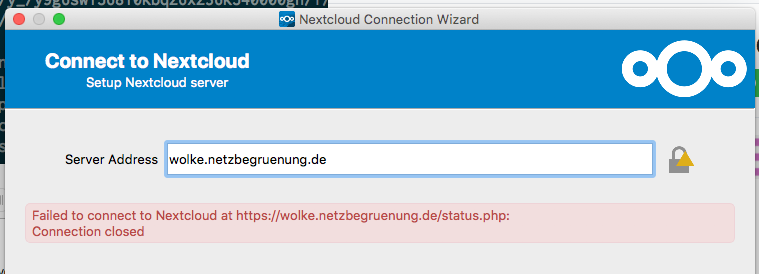
We are using SAML auth, if that is of any importance.
Edit: Also worth noting might be that the host is reachable both on IPv4 and IPv6, but the nextcloud service (AFAIK) is only listening on IPv4.
 marians
on 13 Oct 2017
marians
on 13 Oct 2017
FYI: I have no trouble using the ownclowd client on the same Mac with the same (nextcloud) server.
marians
on 13 Oct 2017
Confirming marians, onwncloud client with nextcloud server fix it
XtremXpert
on 17 Oct 2017
Confirming that this issue affects OSX machines as of client release 2.3.2

FYI: Issue has also been reported on nextcloud.com forums here
 wiserweb
on 28 Oct 2017
wiserweb
on 28 Oct 2017
Please try to add end slash ("/") to your urls
 mgiammarco
on 18 Jan 2018
mgiammarco
on 18 Jan 2018
It doesn't work with a slash either.

marians
on 20 Jan 2018
(Disclaimer: I'm working with the same backend as @marians)
I've tried with the new version and now I get at least to the user credential stage. But this fails for my normal user password and for the app password with the error down below. We have SAML enabled. The current version of ownCloud can login, but does not save the session :(

 gerbsen
on 7 Feb 2018
gerbsen
on 7 Feb 2018
Is there anything we can provide (debug messages) to fix this?
gerbsen
on 12 Feb 2018
Same problem here using MacOS and Version 2.3.3 (build 84)
 raidenn
on 27 Feb 2018
raidenn
on 27 Feb 2018
Are you still having this problem?
 camilasan
on 20 Apr 2018
camilasan
on 20 Apr 2018
Just checked with the current version 2.3.3.84.
I now see a different error:

Edit: which is the same problem @gerbsen reported in https://github.com/nextcloud/client/issues/4#issuecomment-363753262
marians
on 20 Apr 2018
I have the same problem with NextCloud 13 server and Ubuntu 18.04 snap NextCloud client (version 2.3.3.). Can't get past initial screen where it says it can't connect to status.php on server.
SOLVED: The AppImage for Linux from NextCloud (2.3.3) works fine, but I don't like the temporary nature of AppImages so I looked around again and found that the PPA works as well: ppa:nextcloud-devs/client. Just go to https://launchpad.net/~nextcloud-devs/+archive/ubuntu/client. I suppose it must be a later version (it's 2.3.3-20180415.190957) than available from the Ubuntu 18.04 Software Centre.
 peterleerental
on 2 Jun 2018
peterleerental
on 2 Jun 2018
I Have the same problem in my ubuntu 18.04 NextCloud client 2.3.3. and NextCloud 13
 jamlazevedo
on 4 Jun 2018
jamlazevedo
on 4 Jun 2018
I have the same problem (can't even get to the credentials screen) in Ubuntu 16.04, NextCloud client 2.3.3 and NextCloud Server 13.0.2
 Eeemil
on 4 Jun 2018
Eeemil
on 4 Jun 2018
I can connect on neither a Windows 7Pro x64 nor Windows 10Home computer using Nextcloud-2.3.3.1-setup.exe install.
I can connect using ownCloud-2.4.1.9270-setup.exe.
On both computers, I get the error;
Timeout while trying to connect to Nextcloud at https://computercarl.com/cloud/status.php
(it would also be super-nifty to be able to select the error text)
 ComputerCarl
on 6 Jun 2018
ComputerCarl
on 6 Jun 2018
Same problem. Only does it on local network. Works fine from external. NAT problems?
Mobile apps work when on mobile data but do not work when on local LAN WiFi.
 jeremiah-s-putnam
on 16 Jun 2018
jeremiah-s-putnam
on 16 Jun 2018
@jeremiah-s-putnam it doesn't seem like the same issue.
You could probably diagnose by pinging your Nextcloud address from inside and outside the network.
Is your cloud hosted inside your LAN?
ComputerCarl
on 16 Jun 2018
Well, that's wired. This reply went to the wrong post. I don't know what happened.
Ping is fine. The cloud is hosted on a local machine on my LAN. Seems like a redirect problem or something like that.
jeremiah-s-putnam
on 16 Jun 2018
has anyone managed to get this resolved? I have the Same issue on my mac
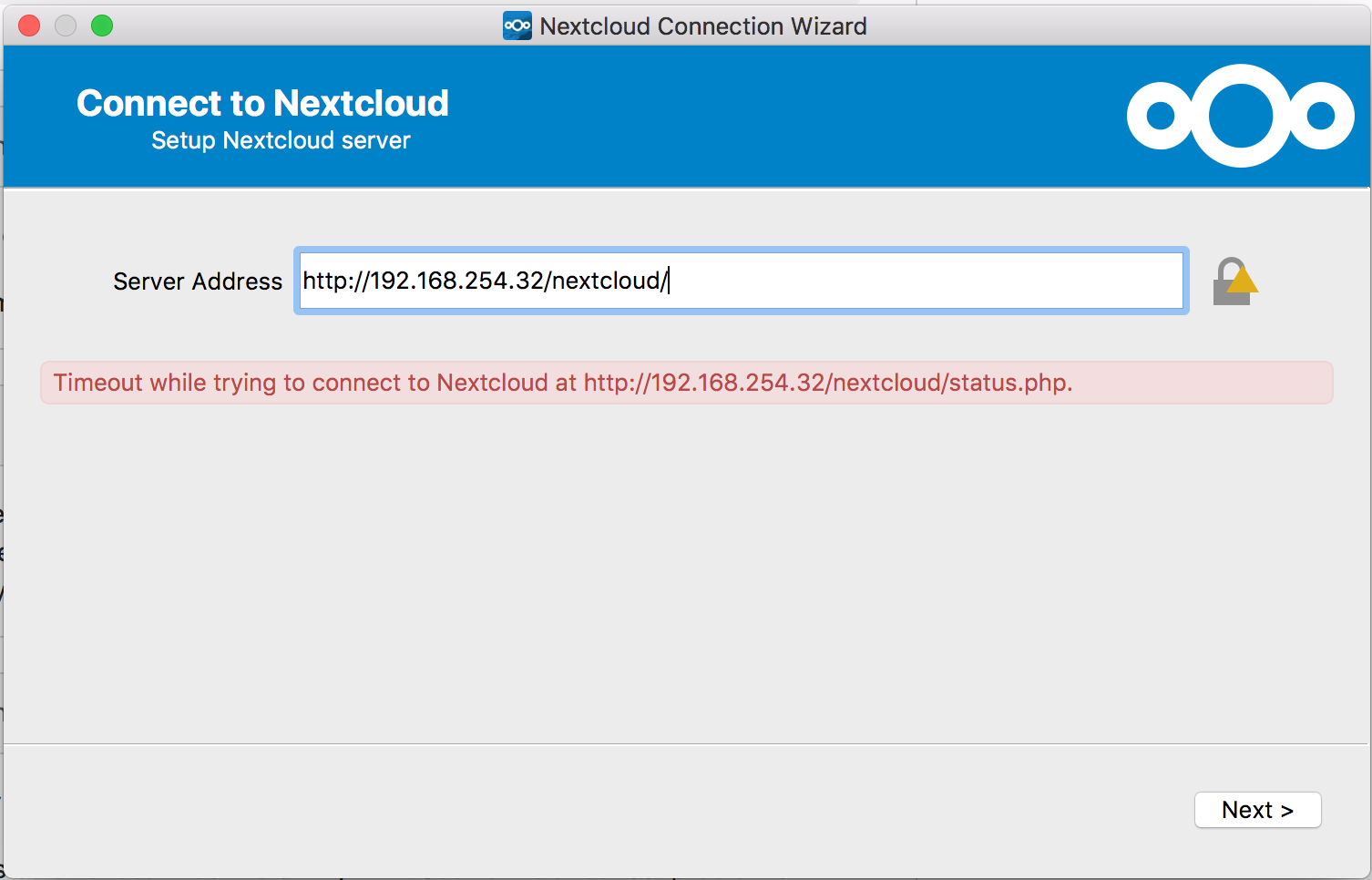
 arthurvanzyl
on 10 Jul 2018
arthurvanzyl
on 10 Jul 2018
@arthurvanzyl We've had this issue as well just now. The current nightly-build seems to work, though: https://download.nextcloud.com/desktop/daily/Mac/Installer/Nextcloud-qt5.9.2-2.5.0.20180710daily.pkg
 ciil
on 10 Jul 2018
ciil
on 10 Jul 2018
thanks @ciil
arthurvanzyl
on 10 Jul 2018
running - version 2.5.0daily (build 20180710)
ok seem sbetter but now I am getting:
The server was unable to complete your request.
If this happens again, please send the technical details below to the server administrator.
More details can be found in the server log.
Technical details
Remote Address: 192.168.254.6
Request ID: IqfivBrqLEFfHbY0ZvHP
arthurvanzyl
on 10 Jul 2018
my problem was due to bruteforce protection. To fix it I had to remove the items from the oc_bruteforce_attempts table. You can find more here: https://help.nextcloud.com/t/solved-bruteforce-detection-blocking-my-ip-but-theres-no-oc-bruteforce-attempts-database/7652/2
 scurrvy2020
on 11 Jul 2018
scurrvy2020
on 11 Jul 2018
Sadly, it's still not working for us. It keeps hanging after I enter my password in some "forwarding" step. The bruteforce stuff, doesn't help either. Does anybody know where I can find logs for the client?
gerbsen
on 11 Jul 2018
Guys,
Still not working on Linux Mint 4.15.0-29.
Fresh client install won't connect to the server with error _server.domain.com can't be found_ or something similar.
Installed OC client for testing and works like a charm.
Any directions on how to resolve or what type of information to provide to help improve the product will be welcome.
 m3lloa
on 7 Aug 2018
m3lloa
on 7 Aug 2018
Same issue on OSX. Can’t connect to the server (Hangs on while trying to redirect....). The windows client works with no problems.
We are using SAML/LDAP SSO (Keycloak) if it helps to identify problem.
 jmike72
on 12 Aug 2018
jmike72
on 12 Aug 2018
Does anybody know where the OS X nextcloud client store it's log files?
gerbsen
on 12 Aug 2018
I was having this problem with every Nextcloud client installed, but long story short I fixed it by clearing out the "oc_bruteforce_attempts" table. One of the clients on my network must've filled this table while I was migrating servers, and nothing could proceed further. The issue cleared up literally within 5 seconds of me clearing this table.
On a nextcloud snap install, here's what I did:
$ nextcloud.mysql-client
use nextcloud;
TRUNCATE TABLE oc_bruteforce_attempts;
commit;
quit
It'd be nice if NextCloud had some kind of notification or warning about this. I was using the web interface just fine, but it would've helped if the security section had something like "Hey, the bruteforce log has a lot of stuff in it from this IP...."
Hope this helps!
 FoxBJK
on 30 Aug 2018
FoxBJK
on 30 Aug 2018
Hi,
I have just freshly installed a Nextcloud client on macos. Same problem here. With Version 2.3.3 and 2.5.0daily (build 20180710).
As I am totally new to all of this could you please elaborate what exactly to do? On server or on client?
My Nextcloud Server is hosted by a provider and the installation is in the /cloud directory.

thanks in advance
 ppaulek
on 12 Sep 2018
ppaulek
on 12 Sep 2018
I have had this problem with 13 and 14. The owncloud client and the nextcloud client. I have tried several fresh installs on Ubuntu 16 and 18. I am not blacklisted the table is currently empty. I start to add files then I get disconnected after a few files have been uploaded and I can't log in again without again, no matter what I do.
 gregf
on 9 Oct 2018
gregf
on 9 Oct 2018
I was having this problem with every Nextcloud client installed, but long story short I fixed it by clearing out the "oc_bruteforce_attempts" table.
Thanks for the tip. I had the same issue and the DB was the culprit, but not the "oc_bruteforce_attempts" table which was empty.
When I wanted to connect to the DB to check the size of this table I got the error message:
mysql -u nextcloud -p
Enter password:
ERROR 2002 (HY000): Can't connect to local MySQL server through socket '/var/run/mysqld/mysqld.sock' (111 "Connection refused")
i.e. I could not connect to the DB although systemctl status claimed it was running. Never mind, I restarted it, which fixed the issue immediately.
So this might be a MySQL /MariaDB problem, after all. It has definitely nothing to do with the NextCloud client (at least in my case).
hope this helps
 aaszodi
on 23 Nov 2018
aaszodi
on 23 Nov 2018
Just tried out the current version 2.5.1 which seems to support SAML and doesn't show the symptoms described above (SSL handshake failed) any more. However it fails during the SAML authorization, but that's a different issue for sure.
I recommend everyone here to check the latest client. https://github.com/nextcloud/desktop/wiki
marians
on 8 Jan 2019
Hey guys, this issue was filed on 3 Oct 2017. Nothing really has happened since then. I'm wondering why there is such a lack of interest in this issue. Our user base is approximately at 70.000. All of which could be possible multipliers for Nextcloud. Also I guess there are other companies/organisations that use SAML login. If you need additional information we are happy to help.
gerbsen
on 21 Jan 2019
Totally agree. This has made my company move away from next cloud because of it. I would love to use it again in the future if this would get looked at more seriously.
gregf
on 21 Jan 2019
Had the same problem. Root-Cause was IPv4/IPv6 hassle.
Try to put the IPv4-address into /etc/hosts as a quickfix.
 toweih
on 19 Mar 2019
toweih
on 19 Mar 2019
I don't see the problem any more in the latest Nextcloud client for Mac.
marians
on 20 Mar 2019
Had the same problem. Ping your server and see which IP it tries to reach. On my machine it tried to reach the IPv6 which was broken. I fixed my connection issues and voila it works from Linux in my local network.
 frauhottelmann
on 3 Jul 2019
frauhottelmann
on 3 Jul 2019
If your Nextcloud instance is behind a proxy you may need to set some config options. I required this in my config.php as I was using a reverse proxy to enforce https:
'overwriteprotocol' => 'https',
you may also need:
'htaccess.RewriteBase' => '/',
 flukejones
on 26 Jul 2019
flukejones
on 26 Jul 2019
I had similar issue today, the problem was DNS v6.
 kbalicki
on 13 Aug 2019
kbalicki
on 13 Aug 2019
This request did not receive an update in the last 4 weeks. Please take a look again and update the issue with new details, otherwise the issue will be automatically closed in 2 weeks. Thank you!
![stale[bot] picture](https://avatars3.githubusercontent.com/in/1724?v=4&s=40) stale[bot]
on 19 Sep 2019
stale[bot]
on 19 Sep 2019
The release candidate for 2.6 has a new login flow: https://download.nextcloud.com/desktop/prereleases/Windows/nextcloud-2.6.0.5818-rc1-20190907.exe
Could you try it?
camilasan
on 19 Sep 2019
same exact issue with the latest client for macos, I have completely disabled ipv6, it loads fine in browser but throws the error in the client.
Edit:
Found the issue, for me it was mod_headers, I had to add the following:
SetEnvIfNoCase ^Authorization$ "(.+)" XAUTHORIZATION=$1
RequestHeader set XAuthorization %{XAUTHORIZATION}e env=XAUTHORIZATION
 trobotham
on 5 Oct 2019
trobotham
on 5 Oct 2019
Not sure what is going on, but I recently tried owncloud server again and the owncloud client and I'm not having this issue. So switching back to owncloud for now.
gregf
on 6 Oct 2019
Have you tried the latest 2.6.0 release, best with NC server 16 or up?
The new Login Flow v2 works from NC 16 on and completely leaves the SAML authorization up to your NC server and standard browser.
Linux:
https://download.nextcloud.com/desktop/releases/Linux/Nextcloud-2.6.0-x86_64.AppImage
Mac:
https://download.nextcloud.com/desktop/releases/Mac/Installer/Nextcloud-2.6.0.20190927.pkg
Windows:
https://download.nextcloud.com/desktop/releases/Windows/Nextcloud-2.6.0-setup.exe
 misch7
on 6 Oct 2019
misch7
on 6 Oct 2019
@misch7 Yes, I was on both the latest client and server.
gregf
on 7 Oct 2019

I have same issue. It's definitely not an error in server config: I tried to short look on demo server: all similar.
IPv6 not used.
 remixoff
on 16 Oct 2019
remixoff
on 16 Oct 2019
Related issues
 despens
·
3Comments
despens
·
3Comments
 andresantacruz
·
3Comments
andresantacruz
·
3Comments
 kaysond
·
3Comments
kaysond
·
3Comments
 linucksrox
·
3Comments
linucksrox
·
3Comments
 RobertZenz
·
3Comments
RobertZenz
·
3Comments
Most helpful comment
Not sure what is going on, but I recently tried owncloud server again and the owncloud client and I'm not having this issue. So switching back to owncloud for now.