Deeplabcut: evaluate_network marking human labels twice
hello! once again, thanks for sharing your code and congratulations on the amazing work :)
i am using aws sagemaker to train DLC and apparently it worked just fine. however, when i tried running the evaluate_network step, apparently the script is marking only the human labels for me? i am getting the '+' marks twice but no dots or Xs. i thought it was some problem with my training process so i tried lowering my pcutoff value to 0.0 to see what it would plot but i still got the same output, only '+' marks.
DLC version: 2.1.8.2
i would highly appreciate if anyone could help me with this. thanks in advance!
 amaanda
All 7 comments
example of what i mean:

actually i am sorry, i don't think the title of the issue is accurate. it looks like one of these labels might be the predicted one but i am having a hard time distinguishing which one.
amaanda
on 27 Aug 2020
Hi - you can pass what you like:
deeplabcut.evaluate_network? you can pick what symbols are plotted.
 MMathisLab
on 28 Aug 2020
MMathisLab
on 28 Aug 2020
@MMathisLab hi! I don't find that option, not even on https://github.com/DeepLabCut/DeepLabCut/blob/master/docs/functionDetails.md#h-evaluate-the-trained-network. I tried editing the config.yaml file but I was only able to change the marker size for both labels (human and predicted), but not the labels itself.
According to the docs, "Note that by default the human labels are plotted as plus (‘+’), DeepLabCut’s predictions either as ‘.’ (for confident predictions with likelihood > p-cutoff) and ’x’ for (likelihood <= pcutoff)." So shouldn't I be getting one + and one x (or dot)?
amaanda
on 28 Aug 2020
yes, that is true. But, it depends on the OS/matplotlib installed on AWS sagemaker - you should check you have matplotlib 3.0.3 or higher. You can see here that it shoudl be +, ., x , so you can try to edit the code if you like, but it is coded correctly: (https://github.com/DeepLabCut/DeepLabCut/blob/651dc5cbd3434b3069d06f7a4b0566c574201ee5/deeplabcut/utils/visualization.py#L29), or perhaps just run on another platform the plotting part (if the pixel error values look okay, you may want to just proceed forward).
MMathisLab
on 5 Sep 2020
I checked the code and it looks fine, I also checked my matplotlib version and it's 3.0.3. I also checked the .h5 output file and it looks okay. I even tried marking points on my own using an example:
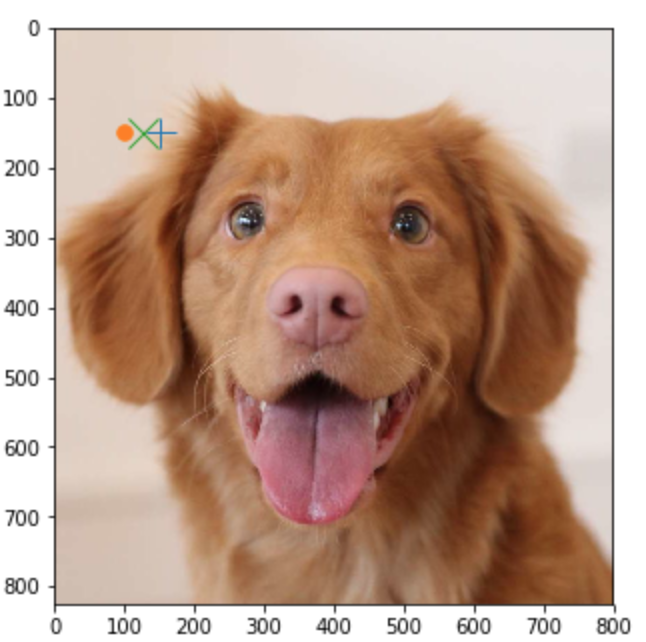
Could it be that the function dlc is calling is not make_labeled_image but make_labeled_images_from_dataframe? for this one, the keypoint which is the marker is defined solely as '+'.
I will move on from this since apparently there is nothing wrong with the error values I am getting.
thanks for your help!
amaanda
on 9 Sep 2020
cute pup ;)
thanks for checking - unfortunately it can be something related to AWS; we saw this on a early version of COLAB, and we never understaood why it did this. but the code outside of this will work, sorry for the hassle.
For the line you ref, we use that for the check_labels but not evaluation, but good to look at the code! nice work!
MMathisLab
on 9 Sep 2020
thanks for helping me clarify this! =)
i will post here in case i find what's causing this.
amaanda
on 11 Sep 2020
Related issues
 monajalal
·
4Comments
monajalal
·
4Comments
monajalal
·
4Comments
monajalal
·
4Comments
 N-Sensho
·
3Comments
N-Sensho
·
3Comments
 guyts
·
3Comments
guyts
·
3Comments
 mschart
·
4Comments
mschart
·
4Comments
Most helpful comment
cute pup ;)
thanks for checking - unfortunately it can be something related to AWS; we saw this on a early version of COLAB, and we never understaood why it did this. but the code outside of this will work, sorry for the hassle.
For the line you ref, we use that for the check_labels but not evaluation, but good to look at the code! nice work!