Deeplabcut: Cannot import my own annotated data--does not appear to have labeled data!
Looking at the other github issues, their solutions didn't work for me. Please let me know if you would like to know more details on my end.
Just a few questions for further clarification:
Is the following correct or does the annotation csv file need to have a specific name?
[jalal@goku labeled-data]$ ls
total 32
drwxr-xr-x. 2 jalal cs-grad    10 Nov 10 21:39 ordered_video
drwxr-xr-x. 6 jalal cs-grad   126 Nov 10 21:40 ..
-rw-r--r--. 1 jalal cs-grad 32154 Nov 10 21:42 Moth_CollectedData_Mona.csv
drwxr-xr-x. 3 jalal cs-grad    74 Nov 10 21:42 .
[jalal@goku labeled-data]$ pwd
/scratch3/3d_pose/animalpose/moth_annotated/Moth_annotations-Mona-2019-11-10/labeled-data
[jalal@goku labeled-data]$ head -20 Moth_CollectedData_Mona.csv
scorer,Mona,Mona,Mona,Mona,Mona,Mona,Mona,Mona
bodyparts,head,head,wingr,wingr,tail,tail,wingl,wingl
coords,x,y,x,y,x,y,x,y
1,494.5551,234.251,711.6219,274.2668,481.7198,299.5598,311.0864,339.5756
2,494.6552,233.6892,698.531,237.2043,478.3979,300.0367,285.5068,300.0367
3,496.0657,234.568,660.4773,182.6485,477.8938,299.0346,279.7346,239.3273
4,498.0948,236.4126,618.2942,142.6347,477.2553,302.2803,298.6309,175.0104
5,499.2109,237.2335,603.7807,120.0112,473.9058,307.5669,323.1914,136.013
6,497.2581,236.8611,616.7132,115.5453,473.4415,309.7994,336.124,123.7323
7,497.2588,237.2343,642.7633,126.7104,471.5815,313.1497,329.7984,132.6645
8,499.12,239.4676,669.9296,159.0866,470.0935,315.7552,312.3086,156.4817
9,498.0675,237.764,703.4297,201.8367,468.7934,317.1588,292.7054,184.0948
10,498.9722,237.7636,718.0843,248.8523,469.6981,316.7149,282.5214,219.1346
11,497.7061,234.7693,713.0226,288.1279,468.5731,317.7061,288.6927,256.3582
12,498.798,234.528,697.1991,312.6272,469.6927,316.5079,305.733,286.4324
13,496.114,233.2197,686.6575,320.3376,472.5106,315.6169,329.1738,304.0298
14,495.6837,232.6953,692.2354,316.8091,475.5136,311.2301,325.7395,309.0844
15,493.538,231.8357,705.11,303.9332,475.9428,313.8037,302.1361,309.5122
16,494.0606,233.7505,709.474,280.9177,476.069,313.4972,280.5923,281.8903
17,494.0631,233.8895,688.5673,233.8895,476.0715,315.5813,277.191,230.972
does the first column elements need to have the .JPEG frame name?
So I have around 800 frames, but only ~400 of them have annotations.
- How can I force DLC to only do the training/test on these 400 frames for which I have annotations?
- How can I generalize it so that it actually trains on the 400 annotated one and use it to test on the ones that are not annotated?
(I am mostly for now interested in 1 because I have expert ground truth).
- Do I have to create a separate AVI video of these 400 ish frames? Otherwise, I wonder how else DLC would know which frame is which. Can we actually give the DLC a folder with images as an input instead of an AVI? my understanding is that for question 1 that I asked, I should create a video that only contains these frames. But I would like to double-check with you and get an expert's opinion on this matter.
Please note that these annotated frames are picked randomly and not necessarily they are in order. For example, 1.JPEG is not annotated by an expert.
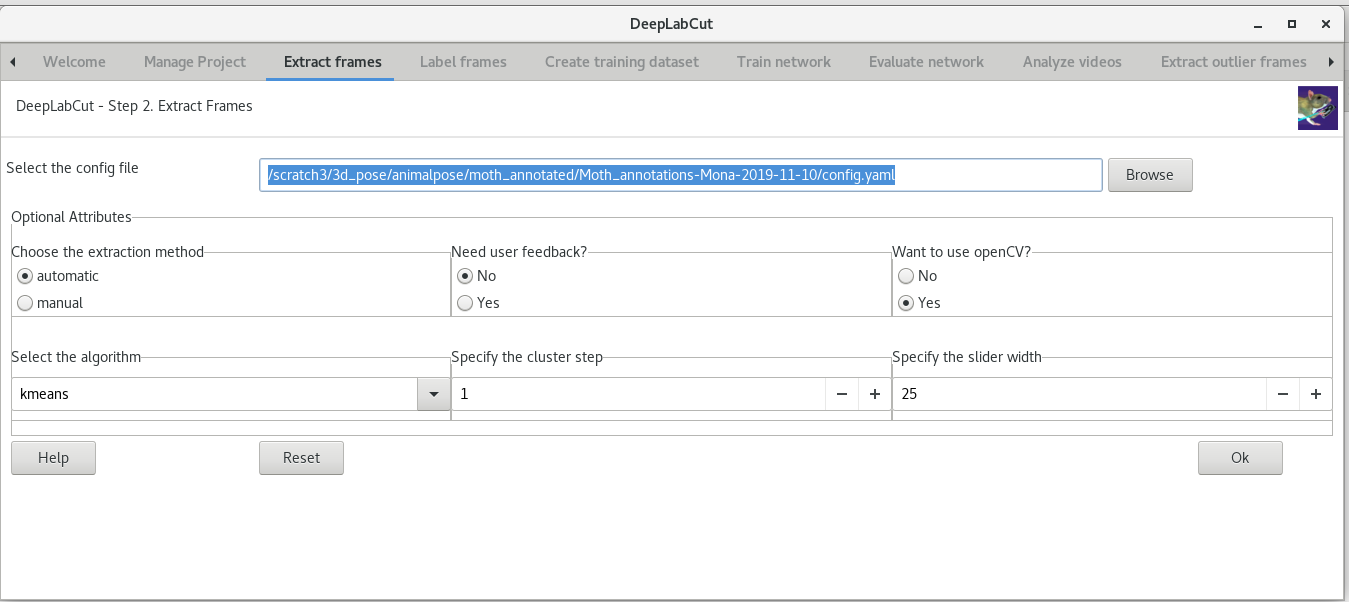
Right now, I am in the above step. I am not sure exactly how to use deeplabcut.convertcsv2h5 for converting my CSV into h5 but that's something I am working on it but I get errors:
[jalal@goku labeled-data]$ cp Moth_CollectedData_Mona.csv  ordered_video/
[jalal@goku labeled-data]$ cd ordered_video/
[jalal@goku ordered_video]$ ls
total 32
drwxr-xr-x. 3 jalal cs-grad    74 Nov 10 21:42 ..
-rw-r--r--. 1 jalal cs-grad 32154 Nov 10 21:56 Moth_CollectedData_Mona.csv
drwxr-xr-x. 2 jalal cs-grad    49 Nov 10 21:56 .


In [2]: deeplabcut.convertcsv2h5("/scratch3/3d_pose/animalpose/moth_annotated/Moth_annotations-Mona-2019-11-10/config.yaml")
Do you want to convert the csv file in folder: /scratch3/3d_pose/animalpose/moth_annotated/Moth_annotations-Mona-2019-11-10/labeled-data/ordered_video ?
yes/noyes
Attention: /scratch3/3d_pose/animalpose/moth_annotated/Moth_annotations-Mona-2019-11-10/labeled-data/ordered_video does not appear to have labeled data!

In [3]: deeplabcut.convertcsv2h5("/scratch3/3d_pose/animalpose/moth_annotated/Moth_annotations-Mona-2019-11-10/config.yaml")
Do you want to convert the csv file in folder: /scratch3/3d_pose/animalpose/moth_annotated/Moth_annotations-Mona-2019-11-10/labeled-data/ordered_video ?
yes/noyes
Attention: /scratch3/3d_pose/animalpose/moth_annotated/Moth_annotations-Mona-2019-11-10/labeled-data/ordered_video does not appear to have labeled data!
Here is my config.yaml file:
[jalal@goku Moth_annotations-Mona-2019-11-10]$ cat config.yaml
# Project definitions (do not edit)
Task: Moth_annotations
scorer: Mona
date: Nov10

# Project path (change when moving around)
project_path: /scratch3/3d_pose/animalpose/moth_annotated/Moth_annotations-Mona-2019-11-10

# Annotation data set configuration (and individual video cropping parameters)
video_sets:
  /scratch3/3d_pose/animalpose/DeepPoseKit/datasets/moth/ordered_video.avi:
    crop: 0, 800, 0, 600
bodyparts:
- head
- wingr
- tail
- wingl
start: 0
stop: 1
numframes2pick: 20

# Plotting configuration
skeleton:
- - bodypart1
  - bodypart2
- - objectA
  - bodypart3
skeleton_color: black
pcutoff: 0.1
dotsize: 12
alphavalue: 0.7
colormap: jet

# Training,Evaluation and Analysis configuration
TrainingFraction:
- 0.95
iteration: 0
resnet:
snapshotindex: -1
batch_size: 8

# Cropping Parameters (for analysis and outlier frame detection)
cropping: false
#if cropping is true for analysis, then set the values here:
x1: 0
x2: 640
y1: 277
y2: 624

# Refinement configuration (parameters from annotation dataset configuration also relevant in this stage)
corner2move2:
- 50
- 50
move2corner: true
default_net_type: resnet_50
default_augmenter: default
[jalal@goku Moth_annotations-Mona-2019-11-10]$
Your Operating system and DeepLabCut version
In [2]: dlc.__version__
Out[2]: '2.1.1'
$ uname -a
Linux goku.bu.edu 3.10.0-1062.1.1.el7.x86_64 #1 SMP Fri Sep 13 22:55:44 UTC 2019 x86_64 x86_64 x86_64 GNU/Linux
$  cat /etc/os-release
NAME="CentOS Linux"
VERSION="7 (Core)"
ID="centos"
ID_LIKE="rhel fedora"
VERSION_ID="7"
PRETTY_NAME="CentOS Linux 7 (Core)"
ANSI_COLOR="0;31"
CPE_NAME="cpe:/o:centos:centos:7"
HOME_URL="https://www.centos.org/"
BUG_REPORT_URL="https://bugs.centos.org/"

CENTOS_MANTISBT_PROJECT="CentOS-7"
CENTOS_MANTISBT_PROJECT_VERSION="7"
REDHAT_SUPPORT_PRODUCT="centos"
REDHAT_SUPPORT_PRODUCT_VERSION="7"
Please state your operating system, env, and which version of DeepLabCut you are using.
Example: Ubuntu 16.04 LTS, with an Anaconda Env, & DeepLabCut1.x or 2.x.
Please complete the following information about your system:
OS: [e.g. iOS, Windows 10, etc]
DeepLabCut Version [e.g. 22] (please check with import deeplabcut, deeplabcut.__version__)
Browser [e.g. chrome, safari]
 monajalal
All 4 comments
Mona, as I sad before, it needs to match the example .csv EXACTLY. Please download and edit the form, including the name of the file needs to follow the correct format.
Also, again, please note that GitHub issues are not best for these questions. We kindly ask users with questions to post on The Image Forum with the tag deeplabcut: https://forum.image.sc/tags/deeplabcut
 MMathisLab
on 13 Nov 2019
MMathisLab
on 13 Nov 2019
Thanks a lot, Dr. Mathis for linking me with the forum. It's a very good resource indeed. I re-ran the Pravan openfield experiment with his labeled data for mouse and eventually was able to understand what was missing based on your comments above.
monajalal
on 14 Nov 2019
I have the following setup:
(deeplabcut)[jalal@scc-x05 moth]$ head moth2Dpose.csv
scorer,Mona,Mona,Mona,Mona,Mona,Mona,Mona,Mona
bodyparts,head,head,rightWingTip,rightWingTip,leftWingTip,leftWingTip,abdomenTip,abdomenTip
coords,x,y,x,y,x,y,x,y
labeled-data/moth/frame001.png,494.2244837,240.7295774,712.0363866,269.7266196,311.2984476,337,477.7910148,292.7525652
labeled-data/moth/frame002.png,494.9006156,240.4824949,695.4159712,234.3256987,286.159703,297.5113911,475.6516914,292.7525652
labeled-data/moth/frame003.png,495.1558141,241.1202971,664.0746166,184.8685298,280.2320841,238.2186337,474.6163777,294.0813382
labeled-data/moth/frame004.png,495.4410572,242.0584384,620.5228669,140.8098868,298.6642961,175.1677438,474.4262156,295.5406691
labeled-data/moth/frame005.png,495.7263003,242.9965797,602.1612651,119.9858157,323.3444567,134.9478643,471.5737844,299.710186
labeled-data/moth/frame006.png,496.12,243.31,617.3570735,115.1268658,340.0202409,124.7100768,469.6721635,302.6288478
labeled-data/moth/frame007.png,496.19,243.74,640.7839446,126.2330371,333.3499272,133.4853233,467.7705427,306.5898889
(deeplabcut)[jalal@scc-x05 moth]$ pwd
/projectnb/ivcgroup/jalal/moth_resnet50/moth-filtered/labeled-data/moth
Here how the png files look like:
(deeplabcut)[jalal@scc-x05 moth]$ ls -l | head
total 153760
-rw-r--r-- 1 jalal ivcgroup 174702 Dec  6 18:15 frame001.png
-rw-r--r-- 1 jalal ivcgroup 174702 Dec  6 18:15 frame002.png
-rw-r--r-- 1 jalal ivcgroup 174702 Dec  6 18:15 frame003.png
-rw-r--r-- 1 jalal ivcgroup 174702 Dec  6 18:15 frame004.png
-rw-r--r-- 1 jalal ivcgroup 174702 Dec  6 18:15 frame005.png
-rw-r--r-- 1 jalal ivcgroup 174702 Dec  6 18:15 frame006.png
-rw-r--r-- 1 jalal ivcgroup 174702 Dec  6 18:15 frame007.png
-rw-r--r-- 1 jalal ivcgroup 174702 Dec  6 18:15 frame008.png
-rw-r--r-- 1 jalal ivcgroup 174702 Dec  6 18:15 frame009.png
(deeplabcut)[jalal@scc-x05 moth]$ pwd
/projectnb/ivcgroup/jalal/moth_resnet50/moth-filtered/labeled-data/moth


(deeplabcut)[jalal@scc-x05 moth-filtered]$ ls
total 163
-rw-r--r-- 1 jalal ivcgroup   334 Dec  6 17:59 moth.qsub
drwxr-sr-x 2 jalal ivcgroup   512 Dec  6 18:03 training-datasets
drwxr-sr-x 2 jalal ivcgroup   512 Dec  6 18:03 evaluation-results
drwxr-sr-x 2 jalal ivcgroup   512 Dec  6 18:03 dlc-models
drwxr-sr-x 3 jalal ivcgroup   512 Dec  6 18:09 ..
drwxr-sr-x 2 jalal ivcgroup 32768 Dec  6 18:27 videos
-rw-r--r-- 1 jalal ivcgroup  1181 Dec  6 18:27 config.yaml
-rw-r--r-- 1 jalal ivcgroup  1254 Dec  6 18:28 moth.py
drwxr-sr-x 7 jalal ivcgroup 32768 Dec  6 18:28 .
drwxr-sr-x 3 jalal ivcgroup 32768 Dec  6 18:37 labeled-data
(deeplabcut)[jalal@scc-x05 moth-filtered]$ pwd
/projectnb/ivcgroup/jalal/moth_resnet50/moth-filtered
(deeplabcut)[jalal@scc-x05 moth-filtered]$ cat config.yaml
# Project definitions (do not edit)
Task: moth-filtered
scorer: Mona
date: Dec6

# Project path (change when moving around)
project_path: /projectnb/ivcgroup/jalal/moth_resnet50/moth-filtered

# Annotation data set configuration (and individual video cropping parameters)
video_sets:
  /projectnb/ivcgroup/jalal/moth_resnet50/moth-filtered/videos/moth.avi:
    crop: 0, 800, 0, 600
bodyparts:
- head
- rightWingTip
- leftWingTip
- abdomenTip
start: 0
stop: 1
numframes2pick: 100

# Plotting configuration
skeleton: [[head, rightWingTip], [head, leftWingTip], [head, abdomenTip], [leftear, rightear]]
skeleton_color: black
pcutoff: 0.1
dotsize: 5
alphavalue: 0.5
colormap: jet

# Training,Evaluation and Analysis configuration
TrainingFraction:
- 0.95
iteration: 0
resnet:
snapshotindex: -1
batch_size: 8

# Cropping Parameters (for analysis and outlier frame detection)
cropping: false
#if cropping is true for analysis, then set the values here:
x1: 0
x2: 640
y1: 277
y2: 624

# Refinement configuration (parameters from annotation dataset configuration also relevant in this stage)
corner2move2:
- 50
- 50
move2corner: true
default_net_type: resnet_50
default_augmenter: default
however, I cannot convert the csv to h5 even though I am following the same exact format as you step by step. Could you please what might be missing?
(deeplabcut)[jalal@scc-x05 moth-filtered]$ python
Python 3.6.7 | packaged by conda-forge | (default, Feb 20 2019, 02:51:38)
[GCC 7.3.0] on linux
Type "help", "copyright", "credits" or "license" for more information.
>>> import deeplabcut
>>> deeplabcut.convertcsv2h5("/projectnb/ivcgroup/jalal/moth_resnet50/moth-filtered/config.yaml")
Do you want to convert the csv file in folder: /projectnb/ivcgroup/jalal/moth_resnet50/moth-filtered/labeled-data/moth ?
yes/noyes
Attention: /projectnb/ivcgroup/jalal/moth_resnet50/moth-filtered/labeled-data/moth does not appear to have labeled data!
Related issues
 dusa2
·
3Comments
dusa2
·
3Comments
 vvolhejn
·
4Comments
vvolhejn
·
4Comments
 Xieyuanting
·
3Comments
Xieyuanting
·
3Comments
 cvKDean
·
4Comments
cvKDean
·
4Comments
 guyts
·
3Comments
guyts
·
3Comments