Deeplabcut: wx._core.wxAssertionError: (wxPython 4.1.x) bug (please use wxPython ~4.0.7 please)
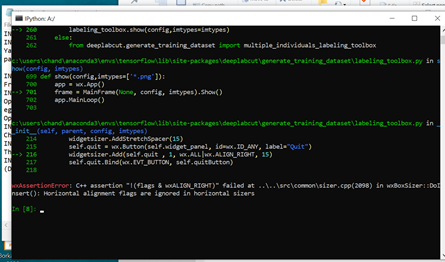
Error in labeling the frames, as depicted in screenshot.
Screenshots
If applicable, add screenshots to help explain your problem.
Additional context
Add any other context about the problem here.
 chanduborkar
All 27 comments
@chanduborkar - Please fill out the template completely.
 MMathisLab
on 9 May 2020
MMathisLab
on 9 May 2020
Error while using label frames option of deeplabcut
OS: Windows 10
DeepLabCut Version: Deeplabcut '2.1.7.1'
Anaconda env DLC-CPU
Browser: chrome
Problem description
AssertionError while labeling frames. No option for 'loading frame' as shown in demo video
I tried through command prompt
cd
activate DLC-CPU
ipython
import deeplabcut
deeplabcut.launch_dlc()
Created project- and edited yalm file
Extracted frames-successfully extracted
Tried to label frames but got the following error in the attached screenshot.
I also tried to do the same procedure in ipython (without using GUI function) using command/functions of deeplabcut, but got the same error. I used the following commands.
IN: Import deeplabcut
IN: deeplabcut.create_new_project ('demo','chandu', ['A:\Test\Recall.mp4'])
Yaml file is generated---edited that file
path_config = 'A:\\DeepLabCut-master\\conda-environments\\demo-chandu-2020-05-09\\config.yaml'
IN: deeplabcut.extract_frames (path_config, 'automatic', 'kmeans')
Frames are extracted and you can label them using the function ‘lable_frames’
IN: deeplabcut.label_frames (path_config)
Screenshots
If applicable, add screenshots to help explain your problem.

chanduborkar
on 9 May 2020
what version of wxPython are you using? Also, it would be much easier for you to copy / paste the code directly; your comment above is full of many mistakes, but I cant' tell if you really typed that exactly, or you typed it here incorrectly.
MMathisLab
on 10 May 2020
I have the same problem, I could not label the frame using GUI

 alisonsin
on 10 May 2020
alisonsin
on 10 May 2020

This was the error message that I got
alisonsin
on 10 May 2020
@alisonsin could you please copy/paste the full terminal output so I can assess the error, thanks!
MMathisLab
on 10 May 2020
because here is my test of the 2.1.7.1 code: (i.e. I cannot re-produce this error).
Successfully installed deeplabcut-2.1.7.1
(DLC-CPU) mwmathis@Mackenzies-MacBook-Pro DeepLabCut % pythonw -m deeplabcut
Starting GUI...
Created "/Users/mwmathis/Desktop/teste-dsvd-2020-05-09/videos"
Created "/Users/mwmathis/Desktop/teste-dsvd-2020-05-09/labeled-data"
Created "/Users/mwmathis/Desktop/teste-dsvd-2020-05-09/training-datasets"
Created "/Users/mwmathis/Desktop/teste-dsvd-2020-05-09/dlc-models"
Copying the videos
/Users/mwmathis/Desktop/teste-dsvd-2020-05-09/videos/m3v1mp4short.mp4
Generated "/Users/mwmathis/Desktop/teste-dsvd-2020-05-09/config.yaml"

A new project with name teste-dsvd-2020-05-09 is created at /Users/mwmathis/Desktop and a configurable file (config.yaml) is stored there. Change the parameters in this file to adapt to your project's needs.
 Once you have changed the configuration file, use the function 'extract_frames' to select frames for labeling.
. [OPTIONAL] Use the function 'add_new_videos' to add new videos to your project (at any stage).
Config file read successfully.
Extracting frames based on kmeans ...
Kmeans-quantization based extracting of frames from 0.0  seconds to 10.03  seconds.
Extracting and downsampling... 301  frames from the video.
301it [00:00, 710.29it/s]
Kmeans clustering ... (this might take a while)
Frames were successfully extracted.

You can now label the frames using the function 'label_frames' (if you extracted enough frames for all videos).

You can check also which version of wxPython you have by running:
import wx
wx.__version__
i.e. for me:
>>> import wx
>>> wx.__version__
'4.0.7.post2'
>>> deeplabcut.launch_dlc()
Traceback (most recent call last):
  File "/Applications/anaconda3/envs/DLC-CPU/lib/python3.7/site-packages/matplotlib/backends/backend_wx.py", line 844, in _onSize
    self.bitmap = wx.Bitmap(self._width, self._height)
wx._core.wxAssertionError: C++ assertion ""w > 0 && h > 0"" failed at /Users/robind/projects/bb2/dist-osx-py37/build/ext/wxWidgets/src/osx/core/bitmap.cpp(1008) in Create(): invalid bitmap size
Traceback (most recent call last):
  File "/Applications/anaconda3/envs/DLC-CPU/lib/python3.7/site-packages/deeplabcut/gui/label_frames.py", line 102, in label_frames
    deeplabcut.label_frames(self.config)
  File "/Applications/anaconda3/envs/DLC-CPU/lib/python3.7/site-packages/deeplabcut/generate_training_dataset/trainingsetmanipulation.py", line 260, in label_frames
    labeling_toolbox.show(config,imtypes=imtypes)
  File "/Applications/anaconda3/envs/DLC-CPU/lib/python3.7/site-packages/deeplabcut/generate_training_dataset/labeling_toolbox.py", line 701, in show
    frame = MainFrame(None, config, imtypes).Show()
  File "/Applications/anaconda3/envs/DLC-CPU/lib/python3.7/site-packages/deeplabcut/generate_training_dataset/labeling_toolbox.py", line 216, in __init__
    widgetsizer.Add(self.quit , 1, wx.ALL|wx.ALIGN_RIGHT, 15)
wx._core.wxAssertionError: C++ assertion "!(flags & wxALIGN_RIGHT)" failed at /Users/robind/projects/bb2/dist-osx-py37/build/ext/wxWidgets/src/common/sizer.cpp(2098) in DoInsert(): Horizontal alignment flags are ignored in horizontal sizers
@MMathisLab thank you very much
alisonsin
on 10 May 2020
it looks like you are on MacOS? can you run:
pythonw -m deeplabcut
and see if the error persists? it may be that wxpython is not installed in ipython the same way...
MMathisLab
on 10 May 2020
(base) alison:~ alisonsinn4all$ pythonw -m deeplabcut
Traceback (most recent call last):
  File "/Applications/anaconda3/lib/python3.7/runpy.py", line 183, in _run_module_as_main
    mod_name, mod_spec, code = _get_module_details(mod_name, _Error)
  File "/Applications/anaconda3/lib/python3.7/runpy.py", line 142, in _get_module_details
    return _get_module_details(pkg_main_name, error)
  File "/Applications/anaconda3/lib/python3.7/runpy.py", line 109, in _get_module_details
    __import__(pkg_name)
  File "/Applications/anaconda3/lib/python3.7/site-packages/deeplabcut/__init__.py", line 30, in <module>
    from deeplabcut import generate_training_dataset
  File "/Applications/anaconda3/lib/python3.7/site-packages/deeplabcut/generate_training_dataset/__init__.py", line 19, in <module>
    from deeplabcut.generate_training_dataset.labeling_toolbox import *
  File "/Applications/anaconda3/lib/python3.7/site-packages/deeplabcut/generate_training_dataset/labeling_toolbox.py", line 27, in <module>
    from deeplabcut.utils import auxiliaryfunctions
  File "/Applications/anaconda3/lib/python3.7/site-packages/deeplabcut/utils/__init__.py", line 1, in <module>
    from deeplabcut.utils.make_labeled_video import *
  File "/Applications/anaconda3/lib/python3.7/site-packages/deeplabcut/utils/make_labeled_video.py", line 38, in <module>
    from deeplabcut.pose_estimation_tensorflow.config import load_config
  File "/Applications/anaconda3/lib/python3.7/site-packages/deeplabcut/pose_estimation_tensorflow/__init__.py", line 21, in <module>
    from deeplabcut.pose_estimation_tensorflow.test import *
  File "/Applications/anaconda3/lib/python3.7/site-packages/deeplabcut/pose_estimation_tensorflow/test.py", line 12, in <module>
    import scipy.ndimage
ModuleNotFoundError: No module named 'scipy.ndimage'
(base) alison:~ alisonsinn4all$
This is what I got if I do that
alisonsin
on 10 May 2020
awe, looks like you didn't activate your env first, i.e. run
source activate DLC-CPU
then pythonw -m deepabcut
MMathisLab
on 10 May 2020
or if you're not on MacOS, source activate DLC-CPU then python -m deeplabcut
MMathisLab
on 10 May 2020
(DLC-CPU) alison:~ alisonsinn4all$ pythonw -m deeplabcut
Starting GUI...
Traceback (most recent call last):
  File "/Applications/anaconda3/envs/DLC-CPU/lib/python3.7/site-packages/matplotlib/backends/backend_wx.py", line 844, in _onSize
    self.bitmap = wx.Bitmap(self._width, self._height)
wx._core.wxAssertionError: C++ assertion ""w > 0 && h > 0"" failed at /Users/robind/projects/bb2/dist-osx-py37/build/ext/wxWidgets/src/osx/core/bitmap.cpp(1008) in Create(): invalid bitmap size
Traceback (most recent call last):
  File "/Applications/anaconda3/envs/DLC-CPU/lib/python3.7/site-packages/deeplabcut/gui/label_frames.py", line 102, in label_frames
    deeplabcut.label_frames(self.config)
  File "/Applications/anaconda3/envs/DLC-CPU/lib/python3.7/site-packages/deeplabcut/generate_training_dataset/trainingsetmanipulation.py", line 260, in label_frames
    labeling_toolbox.show(config,imtypes=imtypes)
  File "/Applications/anaconda3/envs/DLC-CPU/lib/python3.7/site-packages/deeplabcut/generate_training_dataset/labeling_toolbox.py", line 701, in show
    frame = MainFrame(None, config, imtypes).Show()
  File "/Applications/anaconda3/envs/DLC-CPU/lib/python3.7/site-packages/deeplabcut/generate_training_dataset/labeling_toolbox.py", line 216, in __init__
    widgetsizer.Add(self.quit , 1, wx.ALL|wx.ALIGN_RIGHT, 15)
wx._core.wxAssertionError: C++ assertion "!(flags & wxALIGN_RIGHT)" failed at /Users/robind/projects/bb2/dist-osx-py37/build/ext/wxWidgets/src/common/sizer.cpp(2098) in DoInsert(): Horizontal alignment flags are ignored in horizontal sizers
Creating images with labels by test1.
Attention: /Users/alisonsinn4all/Desktop/Deep/alison-test1-2020-05-09/labeled-data/studW-G4_side_2020-04-10-142341-0000 does not appear to have labeled data!
If all the labels are ok, then use the function 'create_training_dataset' to create the training dataset!
objc[19701]: autorelease pool page 0x7fb086fc8000 corrupted
  magic     0x331d7000 0x62000010 0x003f0019 0x0000007f
  should be 0xa1a1a1a1 0x4f545541 0x454c4552 0x21455341
  pthread   0x977000000000000
  should be 0x11aae4dc0

/Applications/anaconda3/envs/DLC-CPU/bin/pythonw: line 3: 19701 Abort trap: 6           /Applications/anaconda3/envs/DLC-CPU/python.app/Contents/MacOS/python "$@"
(DLC-CPU) alison:~ alisonsinn4all$
I saw that in the label_frame subfolder, there's another subfolder created in which I saw images of frames-extracted in it. However, they are not labeled.
alisonsin
on 10 May 2020
Hi sorry for the typos here. However, I am sure that I did the correct command in cmd. I am using wx.__version: '4.1.0'
chanduborkar
on 10 May 2020
@alisonsin looks like xcode needs updated. https://github.com/AlexEMG/DeepLabCut/wiki/Troubleshooting-Tips
These errors often occur after updating MacOS. The fix is to upgrade the Xcode toolkit as follows.
Open Terminal, and runxcode-select --install, followed byxcode-select --reset. Restart Terminal for changes to take effect. If the error persists, enter the command sudo xcode-select -switch /Library/Developer/CommandLineTools. Terminal will ask for your password; note that the password is not shown as you type.
MMathisLab
on 10 May 2020
I saw that in the label_frame subfolder, there's another subfolder created in which I saw images of frames-extracted in it. However, they are not labeled.
^that is the expected behavior before you start labeling.
MMathisLab
on 10 May 2020
(base) C:\WINDOWS\system32>A:

(base) A:\>activate DLC-CPU

(DLC-CPU) A:\>pythonw -m deepabcut

(DLC-CPU) A:\>ipython
Python 3.7.7 (default, Apr 15 2020, 05:09:04) [MSC v.1916 64 bit (AMD64)]
Type 'copyright', 'credits' or 'license' for more information
IPython 7.13.0 -- An enhanced Interactive Python. Type '?' for help.

In [1]: import deeplabcut

In [2]: deeplabcut.launch_dlc()
Created "A:\demo-chandu-2020-05-09\videos"
Created "A:\demo-chandu-2020-05-09\labeled-data"
Created "A:\demo-chandu-2020-05-09\training-datasets"
Created "A:\demo-chandu-2020-05-09\dlc-models"
Attempting to create a symbolic link of the video ...
Created the symlink of A:\Test\Recall.mp4 to A:\demo-chandu-2020-05-09\videos\Recall.mp4
A:\demo-chandu-2020-05-09\videos\Recall.mp4
Generated "A:\demo-chandu-2020-05-09\config.yaml"

A new project with name demo-chandu-2020-05-09 is created at A:\ and a configurable file (config.yaml) is stored there. Change the parameters in this file to adapt to your project's needs.
 Once you have changed the configuration file, use the function 'extract_frames' to select frames for labeling.
. [OPTIONAL] Use the function 'add_new_videos' to add new videos to your project (at any stage).
Config file read successfully.
Extracting frames based on kmeans ...
Kmeans-quantization based extracting of frames from 0.0  seconds to 935.9  seconds.
Extracting and downsampling... 28077  frames from the video.
28077it [00:15, 1841.79it/s]
Kmeans clustering ... (this might take a while)
Frames were successfully extracted.

You can now label the frames using the function 'label_frames' (if you extracted enough frames for all videos).
---------------------------------------------------------------------------
wxAssertionError                          Traceback (most recent call last)
~\anaconda3\envs\DLC-CPU\lib\site-packages\deeplabcut\gui\label_frames.py in label_frames(self, event)
    100
    101     def label_frames(self,event):
--> 102         deeplabcut.label_frames(self.config)
    103
    104     def reset_label_frames(self,event):

~\anaconda3\envs\DLC-CPU\lib\site-packages\deeplabcut\generate_training_dataset\trainingsetmanipulation.py in label_frames(config, multiple, imtypes)
    258
    259         # labeling_toolbox.show(config,Screens,scale_w,scale_h, winHack, img_scale)
--> 260         labeling_toolbox.show(config,imtypes=imtypes)
    261     else:
    262         from deeplabcut.generate_training_dataset import multiple_individuals_labeling_toolbox

~\anaconda3\envs\DLC-CPU\lib\site-packages\deeplabcut\generate_training_dataset\labeling_toolbox.py in show(config, imtypes)
    699 def show(config,imtypes=['*.png']):
    700     app = wx.App()
--> 701     frame = MainFrame(None, config, imtypes).Show()
    702     app.MainLoop()
    703

~\anaconda3\envs\DLC-CPU\lib\site-packages\deeplabcut\generate_training_dataset\labeling_toolbox.py in __init__(self, parent, config, imtypes)
    214         widgetsizer.AddStretchSpacer(15)
    215         self.quit = wx.Button(self.widget_panel, id=wx.ID_ANY, label="Quit")
--> 216         widgetsizer.Add(self.quit , 1, wx.ALL|wx.ALIGN_RIGHT, 15)
    217         self.quit.Bind(wx.EVT_BUTTON, self.quitButton)
    218

wxAssertionError: C++ assertion "!(flags & wxALIGN_RIGHT)" failed at ..\..\src\common\sizer.cpp(2098) in wxBoxSizer::DoInsert(): Horizontal alignment flags are ignored in horizontal sizers
---------------------------------------------------------------------------
wxAssertionError                          Traceback (most recent call last)
wxAssertionError: C++ assertion "!(flags & wxALIGN_RIGHT)" failed at ..\..\src\common\sizer.cpp(2098) in wxBoxSizer::DoInsert(): Horizontal alignment flags are ignored in horizontal sizers

The above exception was the direct cause of the following exception:

SystemError                               Traceback (most recent call last)
SystemError: <class 'wx._core.SizeEvent'> returned a result with an error set

(DLC-CPU) A:\>
@MMathisLab I did that, but the error still persisted. Thank you though
(base) alison:~ alisonsinn4all$ sudo xcode-select -switch /Library/Developer/CommandLineTools
Password:
(base) alison:~ alisonsinn4all$ conda activate DLC-CPU
(DLC-CPU) alison:~ alisonsinn4all$ python -m deeplabcut
Starting GUI...
This program needs access to the screen. Please run with a
Framework build of python, and only when you are logged in
on the main display of your Mac.
(DLC-CPU) alison:~ alisonsinn4all$ pythonw -m deeplabcut
Starting GUI...
Traceback (most recent call last):
  File "/Applications/anaconda3/envs/DLC-CPU/lib/python3.7/site-packages/matplotlib/backends/backend_wx.py", line 844, in _onSize
    self.bitmap = wx.Bitmap(self._width, self._height)
wx._core.wxAssertionError: C++ assertion ""w > 0 && h > 0"" failed at /Users/robind/projects/bb2/dist-osx-py37/build/ext/wxWidgets/src/osx/core/bitmap.cpp(1008) in Create(): invalid bitmap size
Traceback (most recent call last):
  File "/Applications/anaconda3/envs/DLC-CPU/lib/python3.7/site-packages/deeplabcut/gui/label_frames.py", line 102, in label_frames
    deeplabcut.label_frames(self.config)
  File "/Applications/anaconda3/envs/DLC-CPU/lib/python3.7/site-packages/deeplabcut/generate_training_dataset/trainingsetmanipulation.py", line 260, in label_frames
    labeling_toolbox.show(config,imtypes=imtypes)
  File "/Applications/anaconda3/envs/DLC-CPU/lib/python3.7/site-packages/deeplabcut/generate_training_dataset/labeling_toolbox.py", line 701, in show
    frame = MainFrame(None, config, imtypes).Show()
  File "/Applications/anaconda3/envs/DLC-CPU/lib/python3.7/site-packages/deeplabcut/generate_training_dataset/labeling_toolbox.py", line 216, in __init__
    widgetsizer.Add(self.quit , 1, wx.ALL|wx.ALIGN_RIGHT, 15)
wx._core.wxAssertionError: C++ assertion "!(flags & wxALIGN_RIGHT)" failed at /Users/robind/projects/bb2/dist-osx-py37/build/ext/wxWidgets/src/common/sizer.cpp(2098) in DoIn
@MMathisLab the error still persists. Did you find if any mistake I am doing? Thanks for your help!
chanduborkar
on 10 May 2020
hi,
I also have the same error, and my version of wx is 4.1.0 as well. My OS is ubuntu 16.04 (in fact a virtual ubuntu running on mac os x) . I will try to downgrade wx to '4.0.7.post2' and see if I still have the issue
 doursand
on 12 May 2020
doursand
on 12 May 2020
Ok I confirm that the problem is solved for me if I install wxpython 4.0.7.post2 (instead of the latest release).
To do so, I downloaded the whl corresponding to my ubuntu version (16.04) from https://extras.wxpython.org/wxPython4/extras/linux/gtk3/ubuntu-16.04/
So for python 3.6, that was https://extras.wxpython.org/wxPython4/extras/linux/gtk3/ubuntu-16.04/wxPython-4.0.7.post2-cp36-cp36m-linux_x86_64.whl
Then in the folder where the whl file was downloaded, i simply did a
pip install wxPython-4.0.7.post2-cp36-cp36m-linux_x86_64.whl
after that i can open without any issue th GUI
doursand
on 12 May 2020
@alisonsin @chanduborkar could you both, inside the DLC environment:
pip install -U wxPython==4.0.7.post2
MMathisLab
on 12 May 2020
@MMathisLab It worked! Thank you very much!!
alisonsin
on 12 May 2020
I opened an issue - one of many - on their github (see link above); for now I pinned wxPython to an earlier version such that if one downloads the conda env again it should be fine for windows/macOS (https://github.com/AlexEMG/DeepLabCut/commit/da3908589e4bc97a258d65bca65da12fcd4dba24 / https://github.com/AlexEMG/DeepLabCut/commit/8e151c445b090061650596ea1aab2ac94380fa25). Ubuntu users, etc should continue to build from the appropriate wheel for now.
MMathisLab
on 12 May 2020
@MMathisLab Thank you! It works!
chanduborkar
on 12 May 2020
Related issues
 dusa2
·
3Comments
dusa2
·
3Comments
 Jonathan-Oehley
·
4Comments
Jonathan-Oehley
·
4Comments
 lauritk
·
3Comments
lauritk
·
3Comments
 monajalal
·
4Comments
monajalal
·
4Comments
 cvKDean
·
4Comments
cvKDean
·
4Comments