Deeplabcut: Using my own dataset that has also annotations
Hello, Thanks for the amazing work.
I want to use a dataset of moth which has 4 keypoints. I am not sure which notebook I should use first as there is so many and I am kinda lost as a starter.
- I have expert annotations for my dataset. I am wondering how I could directly feed them into training rather than annotating the dataset myself?
- How can I also not use any expert annotation and say annotate 10 frames on my own so that the DeepLabCut could use them for training?
Here is the keypoint file: http://www.cs.bu.edu/~betke/research/HRMF/cam1_annotations_pts.txt Here is the images in PNG format: http://www.cs.bu.edu/~betke/research/HRMF/Cam1_Images.zip
Each line of my annotated data is like:
1.0000 494.5551 234.2510 711.6219 274.2668 481.7198 299.5598 311.0864 339.5756
where 1.0000 represents the frame number, followed by x and y for 4 key points of a moth.
Please let me know if you might have any questions.
Right now I am running Colab_DEMO_mouse_openfield.ipynb in Google Colab but I don't honestly need to use Cloud GPU/TPUs as I have my own deep learning server. As long as I can figure how to go with annotating my own data would be awesome. I have my data both in JPEG and png format as well as a video in AVI format.
 monajalal
All 27 comments
Hi @monajalal - we recommend to start by reading this paper, which gives you an overview of the entire pipeline: https://rdcu.be/bHpHN
Then, the easiest way to start is using our toolbox to annotate your data.
If you open terminal, activate the conda environment, then instead of running jupyter notebook, please run:
import deeplabcut
deeplabcut.launch_dlc()
This launches the process for you to get started. You just need your video to get going!
Here are more details and videos to show you how: https://github.com/AlexEMG/DeepLabCut/blob/master/docs/PROJECT_GUI.md
I would do that first.
Then, if you want to put your data into the correct format, just format your data exactly like it is in the openfield project you have been working with, you can do this in excel (i.e. download this and edit it).
Then, create a new project with the exact same bodypart names, and experimenter name (scorer name in the excel!), place your excel file inside labeled-data, then you can convert the csv file into h5 using: deeplabcut.convertcsv2h5
 MMathisLab
on 29 Oct 2019
MMathisLab
on 29 Oct 2019
Thank you but I am noticing that the GUI is not starting.
$ ipython
Python 3.6.7 | packaged by conda-forge | (default, Nov 21 2018, 02:32:25)
Type 'copyright', 'credits' or 'license' for more information
IPython 6.0.0 -- An enhanced Interactive Python. Type '?' for help.

In [1]: import deeplabcut
   ...: deeplabcut.launch_dlc()
   ...:
$ uname -a
Linux goku.bu.edu 3.10.0-1062.1.1.el7.x86_64 #1 SMP Fri Sep 13 22:55:44 UTC 2019 x86_64 x86_64 x86_64 GNU/Linux

$ python
Python 3.6.7 | packaged by conda-forge | (default, Nov 21 2018, 02:32:25)
[GCC 4.8.2 20140120 (Red Hat 4.8.2-15)] on linux
Type "help", "copyright", "credits" or "license" for more information.
So I used the normal Python, but I get this error:
>>> import deeplabcut
/home/grad3/jalal/.local/lib/python3.6/site-packages/tensorflow/python/framework/dtypes.py:523: FutureWarning: Passing (type, 1) or '1type' as a synonym of type is deprecated; in a future version of numpy, it will be understood as (type, (1,)) / '(1,)type'.
  _np_qint8 = np.dtype([("qint8", np.int8, 1)])
/home/grad3/jalal/.local/lib/python3.6/site-packages/tensorflow/python/framework/dtypes.py:524: FutureWarning: Passing (type, 1) or '1type' as a synonym of type is deprecated; in a future version of numpy, it will be understood as (type, (1,)) / '(1,)type'.
  _np_quint8 = np.dtype([("quint8", np.uint8, 1)])
/home/grad3/jalal/.local/lib/python3.6/site-packages/tensorflow/python/framework/dtypes.py:525: FutureWarning: Passing (type, 1) or '1type' as a synonym of type is deprecated; in a future version of numpy, it will be understood as (type, (1,)) / '(1,)type'.
  _np_qint16 = np.dtype([("qint16", np.int16, 1)])
/home/grad3/jalal/.local/lib/python3.6/site-packages/tensorflow/python/framework/dtypes.py:526: FutureWarning: Passing (type, 1) or '1type' as a synonym of type is deprecated; in a future version of numpy, it will be understood as (type, (1,)) / '(1,)type'.
  _np_quint16 = np.dtype([("quint16", np.uint16, 1)])
/home/grad3/jalal/.local/lib/python3.6/site-packages/tensorflow/python/framework/dtypes.py:527: FutureWarning: Passing (type, 1) or '1type' as a synonym of type is deprecated; in a future version of numpy, it will be understood as (type, (1,)) / '(1,)type'.
  _np_qint32 = np.dtype([("qint32", np.int32, 1)])
/home/grad3/jalal/.local/lib/python3.6/site-packages/tensorflow/python/framework/dtypes.py:532: FutureWarning: Passing (type, 1) or '1type' as a synonym of type is deprecated; in a future version of numpy, it will be understood as (type, (1,)) / '(1,)type'.
  np_resource = np.dtype([("resource", np.ubyte, 1)])
/scratch/sjn-p3/anaconda/anaconda3/lib/python3.6/site-packages/h5py/__init__.py:36: FutureWarning: Conversion of the second argument of issubdtype from `float` to `np.floating` is deprecated. In future, it will be treated as `np.float64 == np.dtype(float).type`.
  from ._conv import register_converters as _register_converters
>>> deeplabcut.launch_dlc()
Traceback (most recent call last):
  File "<stdin>", line 1, in <module>
AttributeError: module 'deeplabcut' has no attribute 'launch_dlc'
then you might have an old version installed. Can you please
import deeplabcut
deeplabcut.__version__
>>> deeplabcut.__version__
'2.0.8'
Thanks a lot for the response.
I was also going to ask how I can check if I installed using pip or otherwise as I did this around September and cannot clearly remember how I installed it. Could you please give any hint how to check the way I have installed it? e.g. make install or pip/conda install
monajalal
on 29 Oct 2019
This GUI was introduced in DLC 2.1, so please update
 AlexEMG
on 29 Oct 2019
AlexEMG
on 29 Oct 2019
Hi @monajalal okay so then you can just run pip install deeplabcut==2.1.1 then try again in ipython, etc.
MMathisLab
on 29 Oct 2019
.
monajalal
on 29 Oct 2019
Glad you got it launched. Please please read the user guide - before you label YOU need to click "edit config file" to set what body parts you want to label! It is under the "manage project tab"
MMathisLab
on 29 Oct 2019
Thanks for helping. I annotated a couple of frames (~10). And now the GUI is not responsive. I click on "wait" and it keeps asking me the same question.
Did it already die or should I "wait" without clicking on "wait"?
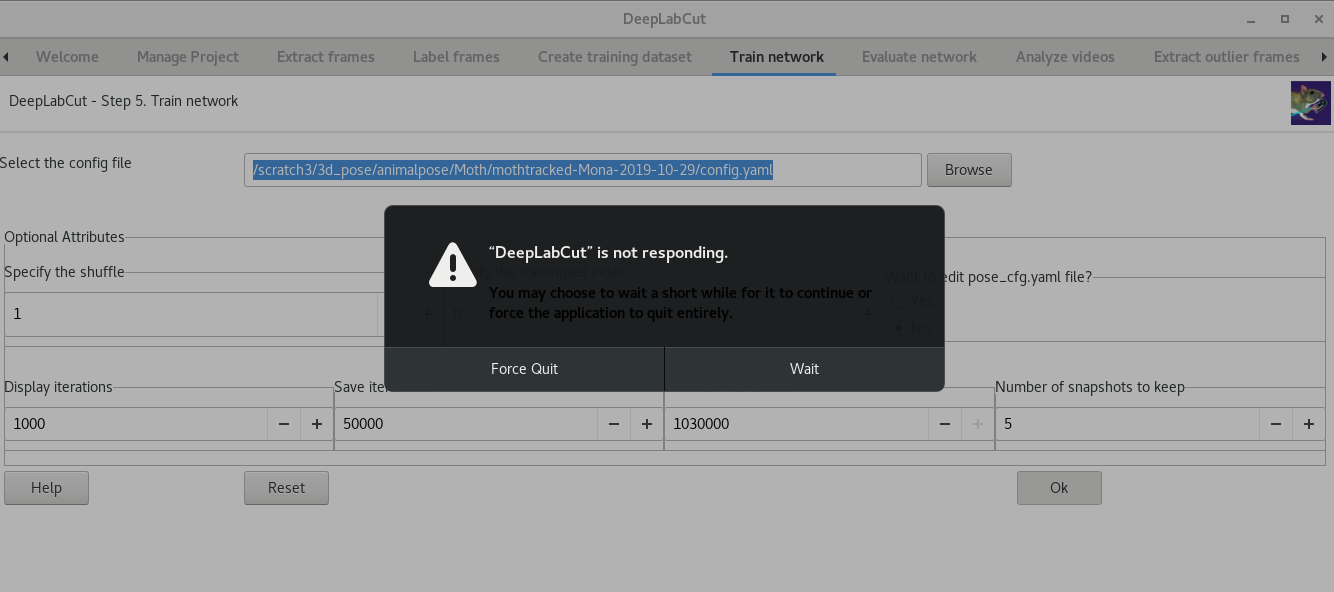
This is what I see in the Terminal:
In [3]: deeplabcut.launch_dlc()
Config file read successfully.
Extracting frames based on kmeans ...
Kmeans-quantization based extracting of frames from 0.0  seconds to 31.88  seconds.
Extracting and downsampling... 797  frames from the video.
797it [00:00, 1066.06it/s]
Kmeans clustering ... (this might take a while)

Frames were selected.
You can now label the frames using the function 'label_frames' (if you extracted enough frames for all videos).
Config file read successfully.
Extracting frames based on kmeans ...
Kmeans-quantization based extracting of frames from 0.0  seconds to 31.88  seconds.
Extracting and downsampling... 797  frames from the video.
797it [00:00, 1162.35it/s]
Kmeans clustering ... (this might take a while)

Frames were selected.
You can now label the frames using the function 'label_frames' (if you extracted enough frames for all videos).

(ipython:31013): Gtk-WARNING **: Negative content height -9 (allocation 1, extents 5x5) while allocating gadget (node button, owner GtkToggleButton)

(ipython:31013): Gtk-WARNING **: Negative content height -9 (allocation 1, extents 5x5) while allocating gadget (node button, owner GtkToggleButton)

(ipython:31013): Gtk-WARNING **: Negative content height -9 (allocation 1, extents 5x5) while allocating gadget (node button, owner GtkToggleButton)

(ipython:31013): Gtk-WARNING **: Negative content height -9 (allocation 1, extents 5x5) while allocating gadget (node button, owner GtkToggleButton)

(ipython:31013): Gtk-WARNING **: Negative content height -9 (allocation 1, extents 5x5) while allocating gadget (node button, owner GtkToggleButton)

(ipython:31013): Gtk-WARNING **: Negative content height -9 (allocation 1, extents 5x5) while allocating gadget (node button, owner GtkToggleButton)

(ipython:31013): Gtk-WARNING **: Negative content height -9 (allocation 1, extents 5x5) while allocating gadget (node button, owner GtkToggleButton)

(ipython:31013): Gtk-WARNING **: Negative content height -9 (allocation 1, extents 5x5) while allocating gadget (node button, owner GtkToggleButton)
You can now check the labels, using 'check_labels' before proceeding. Then, you can use the function 'create_training_dataset' to create the training dataset.
Downloading a ImageNet-pretrained model from http://download.tensorflow.org/models/resnet_v1_50_2016_08_28.tar.gz....
The training dataset is successfully created. Use the function 'train_network' to start training. Happy training!
/scratch3/3d_pose/animalpose/Moth/mothtracked-Mona-2019-10-29/training-datasets/iteration-0/UnaugmentedDataSet_mothtrackedOct29  already exists!
/scratch3/3d_pose/animalpose/Moth/mothtracked-Mona-2019-10-29/dlc-models/iteration-0/mothtrackedOct29-trainset95shuffle1  already exists!
/scratch3/3d_pose/animalpose/Moth/mothtracked-Mona-2019-10-29/dlc-models/iteration-0/mothtrackedOct29-trainset95shuffle1//train  already exists!
/scratch3/3d_pose/animalpose/Moth/mothtracked-Mona-2019-10-29/dlc-models/iteration-0/mothtrackedOct29-trainset95shuffle1//test  already exists!
The training dataset is successfully created. Use the function 'train_network' to start training. Happy training!
Config:
{'all_joints': [[0], [1], [2], [3]],
 'all_joints_names': ['head', 'right wing', 'left wing', 'tail'],
 'batch_size': 1,
 'bottomheight': 400,
 'crop': True,
 'crop_pad': 0,
 'cropratio': 0.4,
 'dataset': 'training-datasets/iteration-0/UnaugmentedDataSet_mothtrackedOct29/mothtracked_Mona95shuffle1.mat',
 'dataset_type': 'default',
 'deterministic': False,
 'display_iters': 1000,
 'fg_fraction': 0.25,
 'global_scale': 0.8,
 'init_weights': '/scratch/sjn-p3/anaconda/anaconda3/lib/python3.6/site-packages/deeplabcut/pose_estimation_tensorflow/models/pretrained/resnet_v1_50.ckpt',
 'intermediate_supervision': False,
 'intermediate_supervision_layer': 12,
 'leftwidth': 400,
 'location_refinement': True,
 'locref_huber_loss': True,
 'locref_loss_weight': 0.05,
 'locref_stdev': 7.2801,
 'log_dir': 'log',
 'max_input_size': 1500,
 'mean_pixel': [123.68, 116.779, 103.939],
 'metadataset': 'training-datasets/iteration-0/UnaugmentedDataSet_mothtrackedOct29/Documentation_data-mothtracked_95shuffle1.pickle',
 'min_input_size': 64,
 'minsize': 100,
 'mirror': False,
 'multi_step': [[0.005, 10000],
                [0.02, 430000],
                [0.002, 730000],
                [0.001, 1030000]],
 'net_type': 'resnet_50',
 'num_joints': 4,
 'optimizer': 'sgd',
 'pos_dist_thresh': 17,
 'project_path': '/scratch3/3d_pose/animalpose/Moth/mothtracked-Mona-2019-10-29',
 'regularize': False,
 'rightwidth': 400,
 'save_iters': 50000,
 'scale_jitter_lo': 0.5,
 'scale_jitter_up': 1.25,
 'scoremap_dir': 'test',
 'shuffle': True,
 'snapshot_prefix': '/scratch3/3d_pose/animalpose/Moth/mothtracked-Mona-2019-10-29/dlc-models/iteration-0/mothtrackedOct29-trainset95shuffle1/train/snapshot',
 'stride': 8.0,
 'topheight': 400,
 'weigh_negatives': False,
 'weigh_only_present_joints': False,
 'weigh_part_predictions': False,
 'weight_decay': 0.0001}
Switching batchsize to 1, as default/tensorpack/deterministic loaders do not support batches >1. Use imgaug loader.
Starting with standard pose-dataset loader.
Initializing ResNet
Loading ImageNet-pretrained resnet_50
INFO:tensorflow:Restoring parameters from /scratch/sjn-p3/anaconda/anaconda3/lib/python3.6/site-packages/deeplabcut/pose_estimation_tensorflow/models/pretrained/resnet_v1_50.ckpt
Max_iters overwritten as 1030000
Display_iters overwritten as 1000
Save_iters overwritten as 50000
Training parameter:
{'stride': 8.0, 'weigh_part_predictions': False, 'weigh_negatives': False, 'fg_fraction': 0.25, 'weigh_only_present_joints': False, 'mean_pixel': [123.68, 116.779, 103.939], 'shuffle': True, 'snapshot_prefix': '/scratch3/3d_pose/animalpose/Moth/mothtracked-Mona-2019-10-29/dlc-models/iteration-0/mothtrackedOct29-trainset95shuffle1/train/snapshot', 'log_dir': 'log', 'global_scale': 0.8, 'location_refinement': True, 'locref_stdev': 7.2801, 'locref_loss_weight': 0.05, 'locref_huber_loss': True, 'optimizer': 'sgd', 'intermediate_supervision': False, 'intermediate_supervision_layer': 12, 'regularize': False, 'weight_decay': 0.0001, 'mirror': False, 'crop_pad': 0, 'scoremap_dir': 'test', 'batch_size': 1, 'dataset_type': 'default', 'deterministic': False, 'crop': True, 'cropratio': 0.4, 'minsize': 100, 'leftwidth': 400, 'rightwidth': 400, 'topheight': 400, 'bottomheight': 400, 'all_joints': [[0], [1], [2], [3]], 'all_joints_names': ['head', 'right wing', 'left wing', 'tail'], 'dataset': 'training-datasets/iteration-0/UnaugmentedDataSet_mothtrackedOct29/mothtracked_Mona95shuffle1.mat', 'display_iters': 1000, 'init_weights': '/scratch/sjn-p3/anaconda/anaconda3/lib/python3.6/site-packages/deeplabcut/pose_estimation_tensorflow/models/pretrained/resnet_v1_50.ckpt', 'max_input_size': 1500, 'metadataset': 'training-datasets/iteration-0/UnaugmentedDataSet_mothtrackedOct29/Documentation_data-mothtracked_95shuffle1.pickle', 'min_input_size': 64, 'multi_step': [[0.005, 10000], [0.02, 430000], [0.002, 730000], [0.001, 1030000]], 'net_type': 'resnet_50', 'num_joints': 4, 'pos_dist_thresh': 17, 'project_path': '/scratch3/3d_pose/animalpose/Moth/mothtracked-Mona-2019-10-29', 'save_iters': 50000, 'scale_jitter_lo': 0.5, 'scale_jitter_up': 1.25, 'output_stride': 16, 'deconvolutionstride': 2}
Starting training....
Because it is training... this might take a while (check the command line, where you will see # iterations and loss etc.)
AlexEMG
on 29 Oct 2019
yes, I understand that this is training. I however think the pop-up not responding window is perhaps a bug that needs not to be shown.
monajalal
on 29 Oct 2019
I am not sure what part I missed (I followed the nature paper and vid tutorial) but no images are created in the evaluation-results dir.
[jalal@goku evaluation-results]$ tree .
.
└── iteration-0
    └── mothtrackedOct29-trainset95shuffle1
        ├── DLC_resnet50_mothtrackedOct29shuffle1_1000-results.csv
        ├── DLC_resnet50_mothtrackedOct29shuffle1_1000-results.h5
        └── DLC_resnet50_mothtrackedOct29shuffle1_1000-snapshot-1000.h5

2 directories, 3 files
[jalal@goku evaluation-results]$ cat iteration-0/mothtrackedOct29-trainset95shuffle1/DLC_resnet50_mothtrackedOct29shuffle1_1000-results.csv
,Training iterations:,%Training dataset,Shuffle number, Train error(px), Test error(px),p-cutoff used,Train error with p-cutoff,Test error with p-cutoff
0,1000,95,1,,,0.1,,


md5-29fce5383eacaa66ebc442ca008d1628


# Project definitions (do not edit)
Task: mothtracked
scorer: Mona
date: Oct29

# Project path (change when moving around)
project_path: /scratch3/3d_pose/animalpose/Moth/mothtracked-Mona-2019-10-29

# Annotation data set configuration (and individual video cropping parameters)
video_sets:
  /scratch3/3d_pose/animalpose/DeepPoseKit/datasets/moth/better_output.avi:
    crop: 0, 800, 0, 600
bodyparts:
- head
- right wing
- left wing
- tail
start: 0
stop: 1
numframes2pick: 20

# Plotting configuration
skeleton:
- - bodypart1
  - bodypart2
- - objectA
  - bodypart3
skeleton_color: black
pcutoff: 0.1
dotsize: 12
alphavalue: 0.7
colormap: jet

# Training,Evaluation and Analysis configuration
TrainingFraction:
- 0.95
iteration: 0
resnet:
snapshotindex: -1
batch_size: 8

# Cropping Parameters (for analysis and outlier frame detection)
cropping: false
#if cropping is true for analysis, then set the values here:
x1: 0
x2: 640
y1: 277
y2: 624

# Refinement configuration (parameters from annotation dataset configuration also relevant in this stage)
corner2move2:
- 50
- 50
move2corner: true
default_net_type: resnet_50
default_augmenter: default


md5-fb5bfee832b9524de13b0bde77b8d6a0


In [2]: deeplabcut.launch_dlc()
GLib-GIO-Message: Using the 'memory' GSettings backend.  Your settings will not be saved or shared with other applications.
Config:
{'all_joints': [[0], [1], [2], [3]],
 'all_joints_names': ['head', 'right wing', 'left wing', 'tail'],
 'batch_size': 1,
 'bottomheight': 400,
 'crop': True,
 'crop_pad': 0,
 'cropratio': 0.4,
 'dataset': 'training-datasets/iteration-0/UnaugmentedDataSet_mothtrackedOct29/mothtracked_Mona95shuffle1.mat',
 'dataset_type': 'default',
 'deterministic': False,
 'display_iters': 1000,
 'fg_fraction': 0.25,
 'global_scale': 0.8,
 'init_weights': '/scratch/sjn-p3/anaconda/anaconda3/lib/python3.6/site-packages/deeplabcut/pose_estimation_tensorflow/models/pretrained/resnet_v1_50.ckpt',
 'intermediate_supervision': False,
 'intermediate_supervision_layer': 12,
 'leftwidth': 400,
 'location_refinement': True,
 'locref_huber_loss': True,
 'locref_loss_weight': 0.05,
 'locref_stdev': 7.2801,
 'log_dir': 'log',
 'max_input_size': 1500,
 'mean_pixel': [123.68, 116.779, 103.939],
 'metadataset': 'training-datasets/iteration-0/UnaugmentedDataSet_mothtrackedOct29/Documentation_data-mothtracked_95shuffle1.pickle',
 'min_input_size': 64,
 'minsize': 100,
 'mirror': False,
 'multi_step': [[0.005, 10000],
                [0.02, 430000],
                [0.002, 730000],
                [0.001, 1030000]],
 'net_type': 'resnet_50',
 'num_joints': 4,
 'optimizer': 'sgd',
 'pos_dist_thresh': 17,
 'project_path': '/scratch3/3d_pose/animalpose/Moth/mothtracked-Mona-2019-10-29',
 'regularize': False,
 'rightwidth': 400,
 'save_iters': 50000,
 'scale_jitter_lo': 0.5,
 'scale_jitter_up': 1.25,
 'scoremap_dir': 'test',
 'shuffle': True,
 'snapshot_prefix': '/scratch3/3d_pose/animalpose/Moth/mothtracked-Mona-2019-10-29/dlc-models/iteration-0/mothtrackedOct29-trainset95shuffle1/train/snapshot',
 'stride': 8.0,
 'topheight': 400,
 'weigh_negatives': False,
 'weigh_only_present_joints': False,
 'weigh_part_predictions': False,
 'weight_decay': 0.0001}
Switching batchsize to 1, as default/tensorpack/deterministic loaders do not support batches >1. Use imgaug loader.
Starting with standard pose-dataset loader.
Initializing ResNet
Loading ImageNet-pretrained resnet_50
INFO:tensorflow:Restoring parameters from /scratch/sjn-p3/anaconda/anaconda3/lib/python3.6/site-packages/deeplabcut/pose_estimation_tensorflow/models/pretrained/resnet_v1_50.ckpt
Max_iters overwritten as 1000
Display_iters overwritten as 1000
Save_iters overwritten as 1000
Training parameter:
{'stride': 8.0, 'weigh_part_predictions': False, 'weigh_negatives': False, 'fg_fraction': 0.25, 'weigh_only_present_joints': False, 'mean_pixel': [123.68, 116.779, 103.939], 'shuffle': True, 'snapshot_prefix': '/scratch3/3d_pose/animalpose/Moth/mothtracked-Mona-2019-10-29/dlc-models/iteration-0/mothtrackedOct29-trainset95shuffle1/train/snapshot', 'log_dir': 'log', 'global_scale': 0.8, 'location_refinement': True, 'locref_stdev': 7.2801, 'locref_loss_weight': 0.05, 'locref_huber_loss': True, 'optimizer': 'sgd', 'intermediate_supervision': False, 'intermediate_supervision_layer': 12, 'regularize': False, 'weight_decay': 0.0001, 'mirror': False, 'crop_pad': 0, 'scoremap_dir': 'test', 'batch_size': 1, 'dataset_type': 'default', 'deterministic': False, 'crop': True, 'cropratio': 0.4, 'minsize': 100, 'leftwidth': 400, 'rightwidth': 400, 'topheight': 400, 'bottomheight': 400, 'all_joints': [[0], [1], [2], [3]], 'all_joints_names': ['head', 'right wing', 'left wing', 'tail'], 'dataset': 'training-datasets/iteration-0/UnaugmentedDataSet_mothtrackedOct29/mothtracked_Mona95shuffle1.mat', 'display_iters': 1000, 'init_weights': '/scratch/sjn-p3/anaconda/anaconda3/lib/python3.6/site-packages/deeplabcut/pose_estimation_tensorflow/models/pretrained/resnet_v1_50.ckpt', 'max_input_size': 1500, 'metadataset': 'training-datasets/iteration-0/UnaugmentedDataSet_mothtrackedOct29/Documentation_data-mothtracked_95shuffle1.pickle', 'min_input_size': 64, 'multi_step': [[0.005, 10000], [0.02, 430000], [0.002, 730000], [0.001, 1030000]], 'net_type': 'resnet_50', 'num_joints': 4, 'pos_dist_thresh': 17, 'project_path': '/scratch3/3d_pose/animalpose/Moth/mothtracked-Mona-2019-10-29', 'save_iters': 50000, 'scale_jitter_lo': 0.5, 'scale_jitter_up': 1.25, 'output_stride': 16, 'deconvolutionstride': 2}
Starting training....
iteration: 1000 loss: 0.0147 lr: 0.005
Exception in thread Thread-21:
Traceback (most recent call last):
  File "/home/grad3/jalal/.local/lib/python3.6/site-packages/tensorflow/python/client/session.py", line 1292, in _do_call
    return fn(*args)
  File "/home/grad3/jalal/.local/lib/python3.6/site-packages/tensorflow/python/client/session.py", line 1277, in _run_fn
    options, feed_dict, fetch_list, target_list, run_metadata)
  File "/home/grad3/jalal/.local/lib/python3.6/site-packages/tensorflow/python/client/session.py", line 1367, in _call_tf_sessionrun
    run_metadata)
tensorflow.python.framework.errors_impl.CancelledError: Enqueue operation was cancelled
     [[{{node fifo_queue_enqueue}} = QueueEnqueueV2[Tcomponents=[DT_FLOAT, DT_FLOAT, DT_FLOAT, DT_FLOAT, DT_FLOAT], timeout_ms=-1, _device="/job:localhost/replica:0/task:0/device:CPU:0"](fifo_queue, _arg_Placeholder_0_0, _arg_Placeholder_1_0_1, _arg_Placeholder_2_0_2, _arg_Placeholder_3_0_3, _arg_Placeholder_4_0_4)]]

During handling of the above exception, another exception occurred:

Traceback (most recent call last):
  File "/scratch/sjn-p3/anaconda/anaconda3/lib/python3.6/threading.py", line 916, in _bootstrap_inner
    self.run()
  File "/scratch/sjn-p3/anaconda/anaconda3/lib/python3.6/threading.py", line 864, in run
    self._target(*self._args, **self._kwargs)
  File "/scratch/sjn-p3/anaconda/anaconda3/lib/python3.6/site-packages/deeplabcut/pose_estimation_tensorflow/train.py", line 69, in load_and_enqueue
    sess.run(enqueue_op, feed_dict=food)
  File "/home/grad3/jalal/.local/lib/python3.6/site-packages/tensorflow/python/client/session.py", line 887, in run
    run_metadata_ptr)
  File "/home/grad3/jalal/.local/lib/python3.6/site-packages/tensorflow/python/client/session.py", line 1110, in _run
    feed_dict_tensor, options, run_metadata)
  File "/home/grad3/jalal/.local/lib/python3.6/site-packages/tensorflow/python/client/session.py", line 1286, in _do_run
    run_metadata)
  File "/home/grad3/jalal/.local/lib/python3.6/site-packages/tensorflow/python/client/session.py", line 1308, in _do_call
    raise type(e)(node_def, op, message)
tensorflow.python.framework.errors_impl.CancelledError: Enqueue operation was cancelled
     [[{{node fifo_queue_enqueue}} = QueueEnqueueV2[Tcomponents=[DT_FLOAT, DT_FLOAT, DT_FLOAT, DT_FLOAT, DT_FLOAT], timeout_ms=-1, _device="/job:localhost/replica:0/task:0/device:CPU:0"](fifo_queue, _arg_Placeholder_0_0, _arg_Placeholder_1_0_1, _arg_Placeholder_2_0_2, _arg_Placeholder_3_0_3, _arg_Placeholder_4_0_4)]]

Caused by op 'fifo_queue_enqueue', defined at:
  File "/home/grad3/jalal/.local/bin/ipython", line 10, in <module>
    sys.exit(start_ipython())
  File "/home/grad3/jalal/.local/lib/python3.6/site-packages/IPython/__init__.py", line 125, in start_ipython
    return launch_new_instance(argv=argv, **kwargs)
  File "/scratch/sjn-p3/anaconda/anaconda3/lib/python3.6/site-packages/traitlets/config/application.py", line 658, in launch_instance
    app.start()
  File "/home/grad3/jalal/.local/lib/python3.6/site-packages/IPython/terminal/ipapp.py", line 353, in start
    self.shell.mainloop()
  File "/home/grad3/jalal/.local/lib/python3.6/site-packages/IPython/terminal/interactiveshell.py", line 459, in mainloop
    self.interact()
  File "/home/grad3/jalal/.local/lib/python3.6/site-packages/IPython/terminal/interactiveshell.py", line 450, in interact
    self.run_cell(code, store_history=True)
  File "/home/grad3/jalal/.local/lib/python3.6/site-packages/IPython/core/interactiveshell.py", line 2683, in run_cell
    interactivity=interactivity, compiler=compiler, result=result)
  File "/home/grad3/jalal/.local/lib/python3.6/site-packages/IPython/core/interactiveshell.py", line 2793, in run_ast_nodes
    if self.run_code(code, result):
  File "/home/grad3/jalal/.local/lib/python3.6/site-packages/IPython/core/interactiveshell.py", line 2847, in run_code
    exec(code_obj, self.user_global_ns, self.user_ns)
  File "<ipython-input-2-fb9650e93eb5>", line 1, in <module>
    deeplabcut.launch_dlc()
  File "/scratch/sjn-p3/anaconda/anaconda3/lib/python3.6/site-packages/deeplabcut/gui/launch_script.py", line 45, in launch_dlc
    app.MainLoop()
  File "/home/grad3/jalal/.local/lib/python3.6/site-packages/wx/core.py", line 2166, in MainLoop
    rv = wx.PyApp.MainLoop(self)
  File "/scratch/sjn-p3/anaconda/anaconda3/lib/python3.6/site-packages/deeplabcut/gui/train_network.py", line 246, in train_network
    maxiters=maxiters)
  File "/scratch/sjn-p3/anaconda/anaconda3/lib/python3.6/site-packages/deeplabcut/pose_estimation_tensorflow/training.py", line 127, in train_network
    train(str(poseconfigfile),displayiters,saveiters,maxiters,max_to_keep=max_snapshots_to_keep,keepdeconvweights=keepdeconvweights) #pass on path and file name for pose_cfg.yaml!
  File "/scratch/sjn-p3/anaconda/anaconda3/lib/python3.6/site-packages/deeplabcut/pose_estimation_tensorflow/train.py", line 107, in train
    batch, enqueue_op, placeholders = setup_preloading(batch_spec)
  File "/scratch/sjn-p3/anaconda/anaconda3/lib/python3.6/site-packages/deeplabcut/pose_estimation_tensorflow/train.py", line 55, in setup_preloading
    enqueue_op = q.enqueue(placeholders_list)
  File "/home/grad3/jalal/.local/lib/python3.6/site-packages/tensorflow/python/ops/data_flow_ops.py", line 339, in enqueue
    self._queue_ref, vals, name=scope)
  File "/home/grad3/jalal/.local/lib/python3.6/site-packages/tensorflow/python/ops/gen_data_flow_ops.py", line 3978, in queue_enqueue_v2
    timeout_ms=timeout_ms, name=name)
  File "/home/grad3/jalal/.local/lib/python3.6/site-packages/tensorflow/python/framework/op_def_library.py", line 787, in _apply_op_helper
    op_def=op_def)
  File "/home/grad3/jalal/.local/lib/python3.6/site-packages/tensorflow/python/util/deprecation.py", line 488, in new_func
    return func(*args, **kwargs)
  File "/home/grad3/jalal/.local/lib/python3.6/site-packages/tensorflow/python/framework/ops.py", line 3272, in create_op
    op_def=op_def)
  File "/home/grad3/jalal/.local/lib/python3.6/site-packages/tensorflow/python/framework/ops.py", line 1768, in __init__
    self._traceback = tf_stack.extract_stack()

CancelledError (see above for traceback): Enqueue operation was cancelled
     [[{{node fifo_queue_enqueue}} = QueueEnqueueV2[Tcomponents=[DT_FLOAT, DT_FLOAT, DT_FLOAT, DT_FLOAT, DT_FLOAT], timeout_ms=-1, _device="/job:localhost/replica:0/task:0/device:CPU:0"](fifo_queue, _arg_Placeholder_0_0, _arg_Placeholder_1_0_1, _arg_Placeholder_2_0_2, _arg_Placeholder_3_0_3, _arg_Placeholder_4_0_4)]]


The network is now trained and ready to evaluate. Use the function 'evaluate_network' to evaluate the network.
[]
Config:
{'all_joints': [[0], [1], [2], [3]],
 'all_joints_names': ['head', 'right wing', 'left wing', 'tail'],
 'batch_size': 1,
 'bottomheight': 400,
 'crop': True,
 'crop_pad': 0,
 'cropratio': 0.4,
 'dataset': 'training-datasets/iteration-0/UnaugmentedDataSet_mothtrackedOct29/mothtracked_Mona95shuffle1.mat',
 'dataset_type': 'default',
 'deconvolutionstride': 2,
 'deterministic': False,
 'display_iters': 1000,
 'fg_fraction': 0.25,
 'global_scale': 0.8,
 'init_weights': '/scratch/sjn-p3/anaconda/anaconda3/lib/python3.6/site-packages/deeplabcut/pose_estimation_tensorflow/models/pretrained/resnet_v1_50.ckpt',
 'intermediate_supervision': False,
 'intermediate_supervision_layer': 12,
 'leftwidth': 400,
 'location_refinement': True,
 'locref_huber_loss': True,
 'locref_loss_weight': 0.05,
 'locref_stdev': 7.2801,
 'log_dir': 'log',
 'max_input_size': 1500,
 'mean_pixel': [123.68, 116.779, 103.939],
 'metadataset': 'training-datasets/iteration-0/UnaugmentedDataSet_mothtrackedOct29/Documentation_data-mothtracked_95shuffle1.pickle',
 'min_input_size': 64,
 'minsize': 100,
 'mirror': False,
 'multi_step': [[0.005, 10000],
                [0.02, 430000],
                [0.002, 730000],
                [0.001, 1030000]],
 'net_type': 'resnet_50',
 'num_joints': 4,
 'optimizer': 'sgd',
 'output_stride': 16,
 'pos_dist_thresh': 17,
 'project_path': '/scratch3/3d_pose/animalpose/Moth/mothtracked-Mona-2019-10-29',
 'regularize': False,
 'rightwidth': 400,
 'save_iters': 50000,
 'scale_jitter_lo': 0.5,
 'scale_jitter_up': 1.25,
 'scoremap_dir': 'test',
 'shuffle': True,
 'snapshot_prefix': '/scratch3/3d_pose/animalpose/Moth/mothtracked-Mona-2019-10-29/dlc-models/iteration-0/mothtrackedOct29-trainset95shuffle1/test/snapshot',
 'stride': 8.0,
 'topheight': 400,
 'weigh_negatives': False,
 'weigh_only_present_joints': False,
 'weigh_part_predictions': False,
 'weight_decay': 0.0001}
Running  DLC_resnet50_mothtrackedOct29shuffle1_1000  with # of trainingiterations: 1000
Initializing ResNet
INFO:tensorflow:Restoring parameters from /scratch3/3d_pose/animalpose/Moth/mothtracked-Mona-2019-10-29/dlc-models/iteration-0/mothtrackedOct29-trainset95shuffle1/train/snapshot-1000
Analyzing data...
38it [00:22,  1.78it/s]
Done and results stored for snapshot:  snapshot-1000
/scratch/sjn-p3/anaconda/anaconda3/lib/python3.6/site-packages/deeplabcut/pose_estimation_tensorflow/evaluate.py:368: RuntimeWarning: Mean of empty slice
  testerror = np.nanmean(RMSE.iloc[testIndices].values.flatten())
/scratch/sjn-p3/anaconda/anaconda3/lib/python3.6/site-packages/deeplabcut/pose_estimation_tensorflow/evaluate.py:369: RuntimeWarning: Mean of empty slice
  trainerror = np.nanmean(RMSE.iloc[trainIndices].values.flatten())
/scratch/sjn-p3/anaconda/anaconda3/lib/python3.6/site-packages/deeplabcut/pose_estimation_tensorflow/evaluate.py:370: RuntimeWarning: Mean of empty slice
  testerrorpcutoff = np.nanmean(RMSEpcutoff.iloc[testIndices].values.flatten())
/scratch/sjn-p3/anaconda/anaconda3/lib/python3.6/site-packages/deeplabcut/pose_estimation_tensorflow/evaluate.py:371: RuntimeWarning: Mean of empty slice
  trainerrorpcutoff = np.nanmean(RMSEpcutoff.iloc[trainIndices].values.flatten())
Results for 1000  training iterations: 95 1 train error: nan pixels. Test error: nan  pixels.
With pcutoff of 0.1  train error: nan pixels. Test error: nan pixels
Thereby, the errors are given by the average distances between the labels by DLC and the scorer.
The network is evaluated and the results are stored in the subdirectory 'evaluation_results'.
If it generalizes well, choose the best model for prediction and update the config file with the appropriate index for the 'snapshotindex'.
Use the function 'analyze_video' to make predictions on new videos.
Otherwise consider retraining the network (see DeepLabCut workflow Fig 2)
Config:
{'all_joints': [[0], [1], [2], [3]],
 'all_joints_names': ['head', 'right wing', 'left wing', 'tail'],
 'batch_size': 1,
 'bottomheight': 400,
 'crop': True,
 'crop_pad': 0,
 'cropratio': 0.4,
 'dataset': 'training-datasets/iteration-0/UnaugmentedDataSet_mothtrackedOct29/mothtracked_Mona95shuffle1.mat',
 'dataset_type': 'default',
 'deconvolutionstride': 2,
 'deterministic': False,
 'display_iters': 1000,
 'fg_fraction': 0.25,
 'global_scale': 0.8,
 'init_weights': '/scratch/sjn-p3/anaconda/anaconda3/lib/python3.6/site-packages/deeplabcut/pose_estimation_tensorflow/models/pretrained/resnet_v1_50.ckpt',
 'intermediate_supervision': False,
 'intermediate_supervision_layer': 12,
 'leftwidth': 400,
 'location_refinement': True,
 'locref_huber_loss': True,
 'locref_loss_weight': 0.05,
 'locref_stdev': 7.2801,
 'log_dir': 'log',
 'max_input_size': 1500,
 'mean_pixel': [123.68, 116.779, 103.939],
 'metadataset': 'training-datasets/iteration-0/UnaugmentedDataSet_mothtrackedOct29/Documentation_data-mothtracked_95shuffle1.pickle',
 'min_input_size': 64,
 'minsize': 100,
 'mirror': False,
 'multi_step': [[0.005, 10000],
                [0.02, 430000],
                [0.002, 730000],
                [0.001, 1030000]],
 'net_type': 'resnet_50',
 'num_joints': 4,
 'optimizer': 'sgd',
 'output_stride': 16,
 'pos_dist_thresh': 17,
 'project_path': '/scratch3/3d_pose/animalpose/Moth/mothtracked-Mona-2019-10-29',
 'regularize': False,
 'rightwidth': 400,
 'save_iters': 50000,
 'scale_jitter_lo': 0.5,
 'scale_jitter_up': 1.25,
 'scoremap_dir': 'test',
 'shuffle': True,
 'snapshot_prefix': '/scratch3/3d_pose/animalpose/Moth/mothtracked-Mona-2019-10-29/dlc-models/iteration-0/mothtrackedOct29-trainset95shuffle1/test/snapshot',
 'stride': 8.0,
 'topheight': 400,
 'weigh_negatives': False,
 'weigh_only_present_joints': False,
 'weigh_part_predictions': False,
 'weight_decay': 0.0001}
Using snapshot-1000 for model /scratch3/3d_pose/animalpose/Moth/mothtracked-Mona-2019-10-29/dlc-models/iteration-0/mothtrackedOct29-trainset95shuffle1
Initializing ResNet
INFO:tensorflow:Restoring parameters from /scratch3/3d_pose/animalpose/Moth/mothtracked-Mona-2019-10-29/dlc-models/iteration-0/mothtrackedOct29-trainset95shuffle1/train/snapshot-1000
Starting to analyze %  /scratch3/3d_pose/animalpose/DeepPoseKit/datasets/moth/better_output.avi
Loading  /scratch3/3d_pose/animalpose/DeepPoseKit/datasets/moth/better_output.avi
Duration of video [s]:  31.88 , recorded with  25.0 fps!
Overall # of frames:  797  found with (before cropping) frame dimensions:  800 600
Starting to extract posture
800it [07:30,  1.85it/s]                                                                                                                                                 Detected frames:  797

Saving results in /scratch3/3d_pose/animalpose/DeepPoseKit/datasets/moth...
The videos are analyzed. Now your research can truly start!
 You can create labeled videos with 'create_labeled_video'.
If the tracking is not satisfactory for some videos, consider expanding the training set. You can use the function 'extract_outlier_frames' to extract any outlier frames!
Linux
No machinelabels file found!
---------------------------------------------------------------------------
AttributeError                            Traceback (most recent call last)
/scratch/sjn-p3/anaconda/anaconda3/lib/python3.6/site-packages/deeplabcut/refine_training_dataset/refinement.py in browseDir(self, event)
    384             print("No machinelabels file found!")
    385             self.Destroy()
--> 386         self.statusbar.SetStatusText('Working on folder: {}'.format(os.path.split(str(self.dir))[-1]))
    387         self.preview = True
    388         self.iter = 0

AttributeError: 'MainFrame' object has no attribute 'dir'
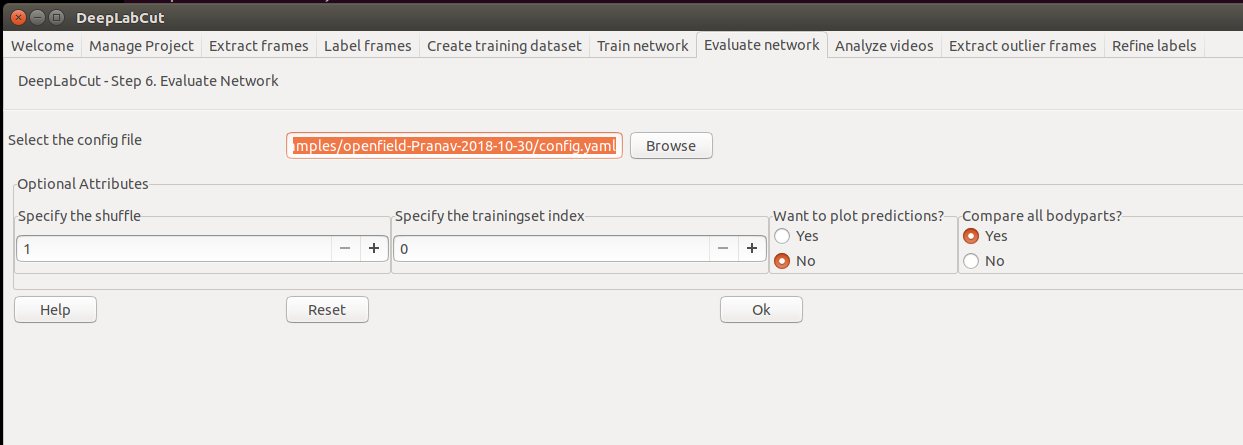
You should visually check the labeled test (and training) images that are created in the ‘evaluation-results’ directory"
Did you select "do you want to plot the predictions?":
MMathisLab
on 30 Oct 2019
awesome thank you :)

monajalal
on 30 Oct 2019
glad it worked for you, stars appreciated ;) <3
MMathisLab
on 30 Oct 2019
do you provide any tracking mechanism like optical flow or kalman filter to improve the predicted annotations? How are you taking advantage of the fact that the input is a video?
monajalal
on 10 Nov 2019
https://github.com/AlexEMG/DeepLabCut/blob/53a784b95a0d31b403deab0541b4770fd001448f/docs/functionDetails.md#i-novel-video-analysis-extra-features
AlexEMG
on 10 Nov 2019
Thanks a lot for sharing the link @AlexEMG
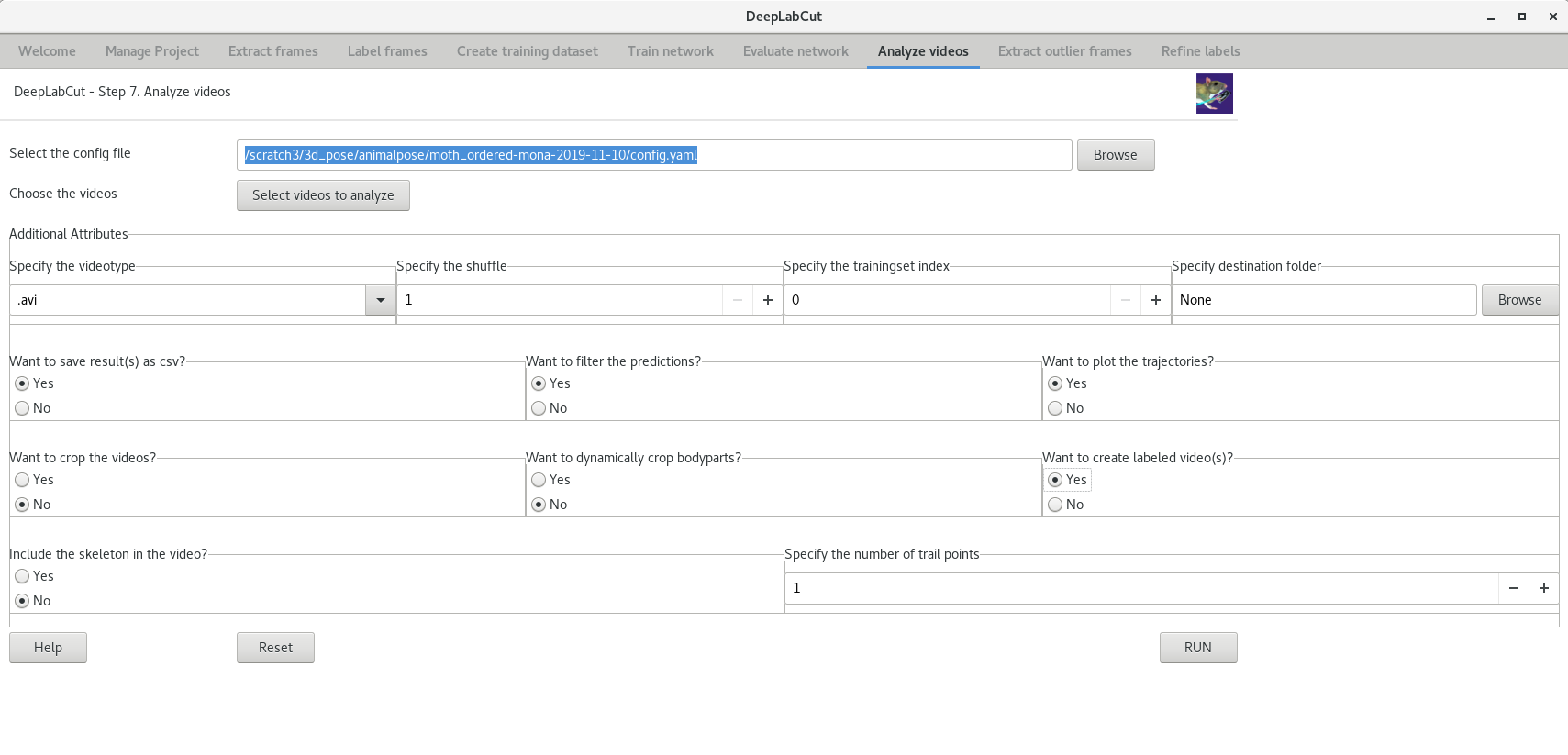
I also notice that the GUI has filtering. Is it the same? I am interested in downloading the results with and without filtering.
monajalal
on 11 Nov 2019
Yep, same, although in the terminal you have a few more options (see link below). But if you say yes to filter you get both output files, with and without filtering.
https://github.com/AlexEMG/DeepLabCut/wiki/DOCSTRINGS#filterpredictions
MMathisLab
on 11 Nov 2019
Thanks a lot. I get the followings:
filtered:
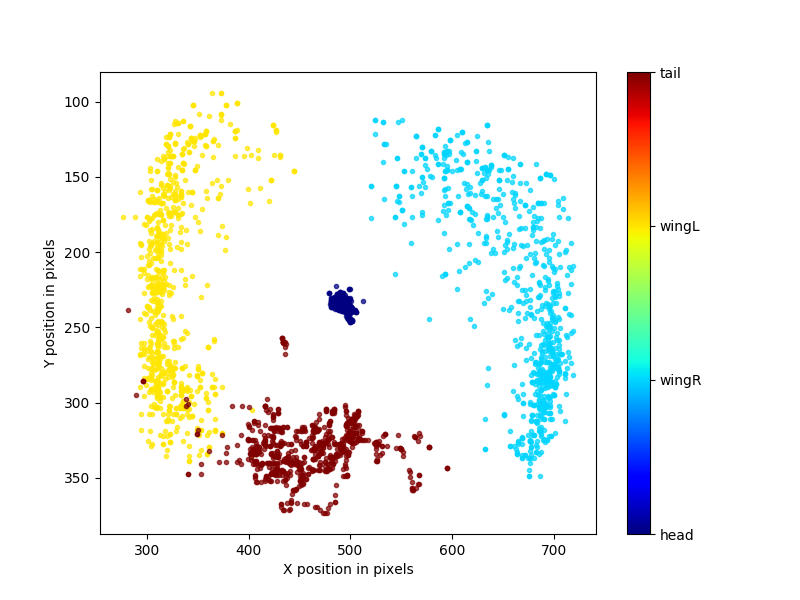
unfiltered:
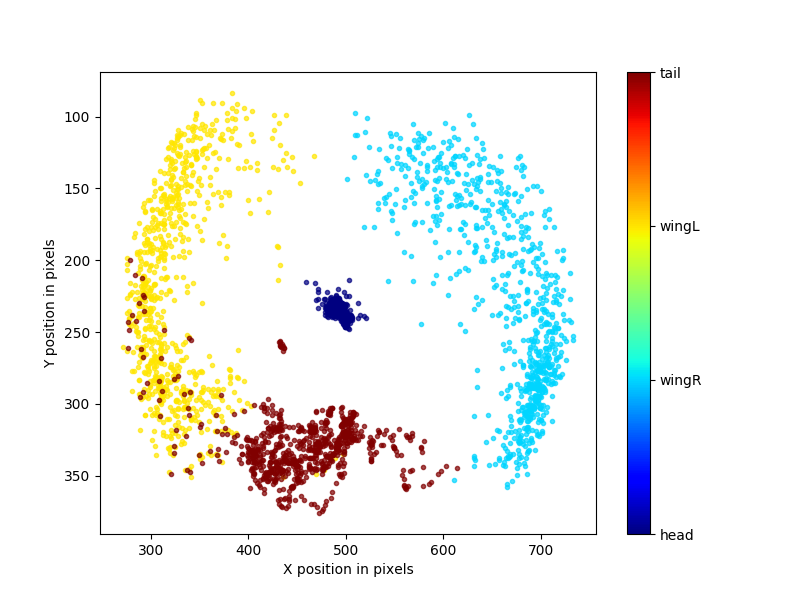
Based on the trajectories we output, what can we infer from the filtered and unfiltered plots? Does it mean that the unfiltered one is less precise because it has more variance? How do you scientifically describe the difference between these two plots?
monajalal
on 11 Nov 2019
Looking at the other github issues, their solutions didn't work for me. Please let me know if you would like to know more details on my end.
Just a few questions for further clarification:
Is the following correct or does the annotation csv file need to have a specific name?
[jalal@goku labeled-data]$ ls
total 32
drwxr-xr-x. 2 jalal cs-grad    10 Nov 10 21:39 ordered_video
drwxr-xr-x. 6 jalal cs-grad   126 Nov 10 21:40 ..
-rw-r--r--. 1 jalal cs-grad 32154 Nov 10 21:42 Moth_CollectedData_Mona.csv
drwxr-xr-x. 3 jalal cs-grad    74 Nov 10 21:42 .
[jalal@goku labeled-data]$ pwd
/scratch3/3d_pose/animalpose/moth_annotated/Moth_annotations-Mona-2019-11-10/labeled-data
[jalal@goku labeled-data]$ head -20 Moth_CollectedData_Mona.csv
scorer,Mona,Mona,Mona,Mona,Mona,Mona,Mona,Mona
bodyparts,head,head,wingr,wingr,tail,tail,wingl,wingl
coords,x,y,x,y,x,y,x,y
1,494.5551,234.251,711.6219,274.2668,481.7198,299.5598,311.0864,339.5756
2,494.6552,233.6892,698.531,237.2043,478.3979,300.0367,285.5068,300.0367
3,496.0657,234.568,660.4773,182.6485,477.8938,299.0346,279.7346,239.3273
4,498.0948,236.4126,618.2942,142.6347,477.2553,302.2803,298.6309,175.0104
5,499.2109,237.2335,603.7807,120.0112,473.9058,307.5669,323.1914,136.013
6,497.2581,236.8611,616.7132,115.5453,473.4415,309.7994,336.124,123.7323
7,497.2588,237.2343,642.7633,126.7104,471.5815,313.1497,329.7984,132.6645
8,499.12,239.4676,669.9296,159.0866,470.0935,315.7552,312.3086,156.4817
9,498.0675,237.764,703.4297,201.8367,468.7934,317.1588,292.7054,184.0948
10,498.9722,237.7636,718.0843,248.8523,469.6981,316.7149,282.5214,219.1346
11,497.7061,234.7693,713.0226,288.1279,468.5731,317.7061,288.6927,256.3582
12,498.798,234.528,697.1991,312.6272,469.6927,316.5079,305.733,286.4324
13,496.114,233.2197,686.6575,320.3376,472.5106,315.6169,329.1738,304.0298
14,495.6837,232.6953,692.2354,316.8091,475.5136,311.2301,325.7395,309.0844
15,493.538,231.8357,705.11,303.9332,475.9428,313.8037,302.1361,309.5122
16,494.0606,233.7505,709.474,280.9177,476.069,313.4972,280.5923,281.8903
17,494.0631,233.8895,688.5673,233.8895,476.0715,315.5813,277.191,230.972
does the first column elements need to have the .JPEG frame name?
So I have around 800 frames, but only ~400 of them have annotations.
- How can I force DLC to only do the training/test on these 400 frames for which I have annotations?
- How can I generalize it so that it actually trains on the 400 annotated one and use it to test on the ones that are not annotated?
(I am mostly for now interested in 1 because I have expert ground truth).
- Do I have to create a separate AVI video of these 400 ish frames? Otherwise, I wonder how else DLC would know which frame is which. Can we actually give the DLC a folder with images as an input instead of an AVI? my understanding is that for question 1 that I asked, I should create a video that only contains these frames. But I would like to double-check with you and get an expert's opinion on this matter.
Please note that these annotated frames are picked randomly and not necessarily they are in order. For example, 1.JPEG is not annotated by an expert.
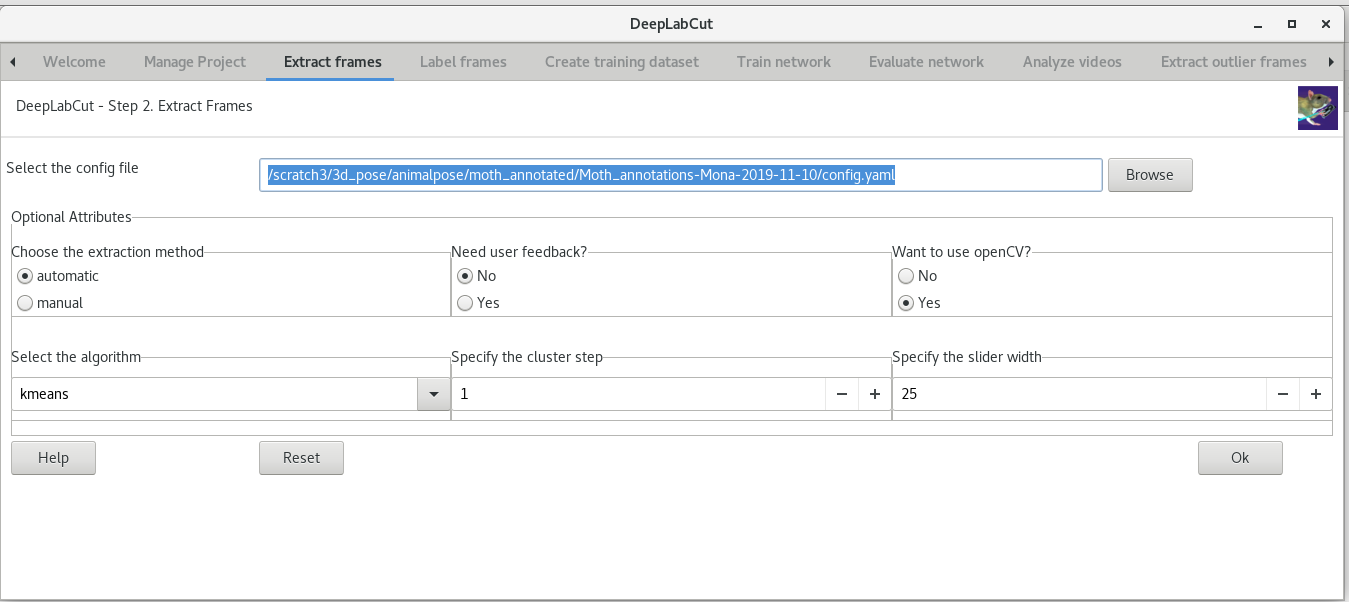
Right now, I am in the above step. I am not sure exactly how to use deeplabcut.convertcsv2h5 for converting my CSV into h5 but that's something I am working on it but I get errors:
[jalal@goku labeled-data]$ cp Moth_CollectedData_Mona.csv  ordered_video/
[jalal@goku labeled-data]$ cd ordered_video/
[jalal@goku ordered_video]$ ls
total 32
drwxr-xr-x. 3 jalal cs-grad    74 Nov 10 21:42 ..
-rw-r--r--. 1 jalal cs-grad 32154 Nov 10 21:56 Moth_CollectedData_Mona.csv
drwxr-xr-x. 2 jalal cs-grad    49 Nov 10 21:56 .


In [2]: deeplabcut.convertcsv2h5("/scratch3/3d_pose/animalpose/moth_annotated/Moth_annotations-Mona-2019-11-10/config.yaml")
Do you want to convert the csv file in folder: /scratch3/3d_pose/animalpose/moth_annotated/Moth_annotations-Mona-2019-11-10/labeled-data/ordered_video ?
yes/noyes
Attention: /scratch3/3d_pose/animalpose/moth_annotated/Moth_annotations-Mona-2019-11-10/labeled-data/ordered_video does not appear to have labeled data!

In [3]: deeplabcut.convertcsv2h5("/scratch3/3d_pose/animalpose/moth_annotated/Moth_annotations-Mona-2019-11-10/config.yaml")
Do you want to convert the csv file in folder: /scratch3/3d_pose/animalpose/moth_annotated/Moth_annotations-Mona-2019-11-10/labeled-data/ordered_video ?
yes/noyes
Attention: /scratch3/3d_pose/animalpose/moth_annotated/Moth_annotations-Mona-2019-11-10/labeled-data/ordered_video does not appear to have labeled data!
Here is my config.yaml file:
[jalal@goku Moth_annotations-Mona-2019-11-10]$ cat config.yaml
# Project definitions (do not edit)
Task: Moth_annotations
scorer: Mona
date: Nov10

# Project path (change when moving around)
project_path: /scratch3/3d_pose/animalpose/moth_annotated/Moth_annotations-Mona-2019-11-10

# Annotation data set configuration (and individual video cropping parameters)
video_sets:
  /scratch3/3d_pose/animalpose/DeepPoseKit/datasets/moth/ordered_video.avi:
    crop: 0, 800, 0, 600
bodyparts:
- head
- wingr
- tail
- wingl
start: 0
stop: 1
numframes2pick: 20

# Plotting configuration
skeleton:
- - bodypart1
  - bodypart2
- - objectA
  - bodypart3
skeleton_color: black
pcutoff: 0.1
dotsize: 12
alphavalue: 0.7
colormap: jet

# Training,Evaluation and Analysis configuration
TrainingFraction:
- 0.95
iteration: 0
resnet:
snapshotindex: -1
batch_size: 8

# Cropping Parameters (for analysis and outlier frame detection)
cropping: false
#if cropping is true for analysis, then set the values here:
x1: 0
x2: 640
y1: 277
y2: 624

# Refinement configuration (parameters from annotation dataset configuration also relevant in this stage)
corner2move2:
- 50
- 50
move2corner: true
default_net_type: resnet_50
default_augmenter: default
[jalal@goku Moth_annotations-Mona-2019-11-10]$
is DLC not compatible with Python 3.7.5?
[jalal@scc2 ani3d]$ which pip
/share/pkg.7/python3/3.7.5/install/bin/pip
[jalal@scc2 ani3d]$ pip install deeplabcut
Collecting deeplabcut
  Downloading https://files.pythonhosted.org/packages/87/70/496226dbc1d22ab5e5af396d483910522b583389d5948e75db9ac4a7ef9c/deeplabcut-2.1.4-py3-none-any.whl (382kB)
     |████████████████████████████████| 389kB 4.8MB/s
Requirement already satisfied: requests in /share/pkg.7/python3/3.7.5/install/lib/python3.7/site-packages (from deeplabcut) (2.22.0)
Requirement already satisfied: scikit-image in /share/pkg.7/python3/3.7.5/install/lib/python3.7/site-packages (from deeplabcut) (0.16.2)
Requirement already satisfied: click in /share/pkg.7/python3/3.7.5/install/lib/python3.7/site-packages (from deeplabcut) (7.0)
Requirement already satisfied: h5py~=2.7 in /share/pkg.7/python3/3.7.5/install/lib/python3.7/site-packages (from deeplabcut) (2.10.0)
Collecting imgaug
  Downloading https://files.pythonhosted.org/packages/11/df/5a3bba95b4600d5ca7aff072082ef0d9837056dd28cc4e738e7ce88dd8f8/imgaug-0.3.0-py2.py3-none-any.whl (819kB)
     |████████████████████████████████| 829kB 60.4MB/s
Requirement already satisfied: setuptools in /share/pkg.7/python3/3.7.5/install/lib/python3.7/site-packages (from deeplabcut) (41.4.0)
Requirement already satisfied: numpy>=1.16.4 in /share/pkg.7/python3/3.7.5/install/lib/python3.7/site-packages/numpy-1.17.2-py3.7-linux-x86_64.egg (from deeplabcut) (1.17.2)
Requirement already satisfied: chardet in /share/pkg.7/python3/3.7.5/install/lib/python3.7/site-packages (from deeplabcut) (3.0.4)
Collecting tensorpack>=0.9.7.1
  Downloading https://files.pythonhosted.org/packages/a8/cb/62dc9115722a0b4fbeca6275ffbe47118149171ffafa7d1db6e295453aae/tensorpack-0.9.8-py2.py3-none-any.whl (288kB)
     |████████████████████████████████| 296kB 59.9MB/s
Requirement already satisfied: patsy in /share/pkg.7/python3/3.7.5/install/lib/python3.7/site-packages (from deeplabcut) (0.5.1)
Requirement already satisfied: scipy in /share/pkg.7/python3/3.7.5/install/lib/python3.7/site-packages (from deeplabcut) (1.3.1)
Collecting opencv-python~=3.4
  Downloading https://files.pythonhosted.org/packages/8c/77/4e436f24cf2f085693c436a23fb67a3dfb01ccfb1791e75908928f594452/opencv_python-3.4.8.29-cp37-cp37m-manylinux1_x86_64.whl (28.3MB)
     |████████████████████████████████| 28.3MB 39.2MB/s
Requirement already satisfied: six in /share/pkg.7/python3/3.7.5/install/lib/python3.7/site-packages (from deeplabcut) (1.12.0)
Requirement already satisfied: python-dateutil in /share/pkg.7/python3/3.7.5/install/lib/python3.7/site-packages (from deeplabcut) (2.8.0)
Collecting intel-openmp
  Downloading https://files.pythonhosted.org/packages/fe/eb/85eac048aec9c45f0fdf6a9255ff18095827b465d216d49aa44f942589f4/intel_openmp-2020.0.133-py2.py3-none-manylinux1_x86_64.whl (919kB)
     |████████████████████████████████| 921kB 34.9MB/s
Collecting tables==3.4.3
  Downloading https://files.pythonhosted.org/packages/98/bb/0192955689d2e5972e2714300433eff57e5bef4147248cb15c7b6f04ae9e/tables-3.4.3.tar.gz (4.6MB)
     |████████████████████████████████| 4.6MB 38.2MB/s
    ERROR: Command errored out with exit status 1:
     command: /share/pkg.7/python3/3.7.5/install/bin/python3.7 -c 'import sys, setuptools, tokenize; sys.argv[0] = '"'"'/scratch/pip-install-ba9zp6w2/tables/setup.py'"'"'; __file__='"'"'/scratch/pip-install-ba9zp6w2/tables/setup.py'"'"';f=getattr(tokenize, '"'"'open'"'"', open)(__file__);code=f.read().replace('"'"'\r\n'"'"', '"'"'\n'"'"');f.close();exec(compile(code, __file__, '"'"'exec'"'"'))' egg_info --egg-base /scratch/pip-install-ba9zp6w2/tables/pip-egg-info
         cwd: /scratch/pip-install-ba9zp6w2/tables/
    Complete output (9 lines):
    * Using Python 3.7.5 (default, Oct 23 2019, 16:01:01)
    * USE_PKGCONFIG: True
    Traceback (most recent call last):
      File "<string>", line 1, in <module>
      File "/scratch/pip-install-ba9zp6w2/tables/setup.py", line 597, in <module>
        hdf5_version = get_hdf5_version(hdf5_header)
      File "/scratch/pip-install-ba9zp6w2/tables/setup.py", line 350, in get_hdf5_version
        major_version = int(re.split("\s*", line)[2])
    ValueError: invalid literal for int() with base 10: 'd'
    ----------------------------------------
ERROR: Command errored out with exit status 1: python setup.py egg_info Check the logs for full command output.
No, as we have in the user guide, currently only 3.6 is supported. We recommend using the supplied conda files to install
MMathisLab
on 2 Dec 2019
is there a way you would suggest to make the training say for 100K or 1M iteration faster if I have access to more than one GPU?
Also, GPU is not used very efficiently if I am not wrong in my understanding:
(base) [jalal@goku openfield-Pranav-2018-10-30]$ nvidia-smi
Wed Dec  4 01:01:57 2019
+-----------------------------------------------------------------------------+
| NVIDIA-SMI 418.67       Driver Version: 418.67       CUDA Version: 10.1     |
|-------------------------------+----------------------+----------------------+
| GPU  Name        Persistence-M| Bus-Id        Disp.A | Volatile Uncorr. ECC |
| Fan  Temp  Perf  Pwr:Usage/Cap|         Memory-Usage | GPU-Util  Compute M. |
|===============================+======================+======================|
|   0  GeForce GTX 108...  Off  | 00000000:05:00.0  On |                  N/A |
|  0%   28C    P5    16W / 250W |   1315MiB / 11178MiB |      1%      Default |
+-------------------------------+----------------------+----------------------+
|   1  GeForce GTX 108...  Off  | 00000000:06:00.0 Off |                  N/A |
|  0%   29C    P8    12W / 250W |      2MiB / 11178MiB |      0%      Default |
+-------------------------------+----------------------+----------------------+

+-----------------------------------------------------------------------------+
| Processes:                                                       GPU Memory |
|  GPU       PID   Type   Process name                             Usage      |
|=============================================================================|
|    0      3191      G   ...uest-channel-token=17560669440085627393   646MiB |
|    0      5315      G   /usr/bin/X                                   461MiB |
|    0     22728      G   ...common/IT/matlab-9.4/bin/glnxa64/MATLAB     2MiB |
|    0     28729      G   /usr/bin/gnome-shell                         201MiB |
+-----------------------------------------------------------------------------+
Generally use imgaug loader as it is much faster. Tensorflow supports multi gpu training....
From: Mona Jalal notifications@github.com
Sent: Wednesday, December 4, 2019 12:57:56 AM
To: AlexEMG/DeepLabCut DeepLabCut@noreply.github.com
Cc: Mathis, Alexander Thomas amathis@fas.harvard.edu; Mention mention@noreply.github.com
Subject: Re: [AlexEMG/DeepLabCut] Using my own dataset that has also annotations (#465)
is there a way you would suggest to make the training say for 100K or 1M iteration faster if I have access to more than one GPU?
—
You are receiving this because you were mentioned.
Reply to this email directly, view it on GitHubhttps://urldefense.proofpoint.com/v2/url?u=https-3A__github.com_AlexEMG_DeepLabCut_issues_465-3Femail-5Fsource-3Dnotifications-26email-5Ftoken-3DAE7CMXSWVU7FUCW5JHZ7JXDQW5BGJA5CNFSM4JGOBAZ2YY3PNVWWK3TUL52HS4DFVREXG43VMVBW63LNMVXHJKTDN5WW2ZLOORPWSZGOEF32R2Q-23issuecomment-2D561490154&d=DwMCaQ&c=WO-RGvefibhHBZq3fL85hQ&r=11wEEDBv3Ke3n3b8dICjuQC5vgZ23dfGPax018VOZ2g&m=xZ5QdSB0CnB0xJdCwt3zSBRPx5lTckfV0_dKkHVvHnI&s=M8igce6YqTosRbEJ7wBtdhqpHoYGFq2CslRP_0eFCHc&e=, or unsubscribehttps://urldefense.proofpoint.com/v2/url?u=https-3A__github.com_notifications_unsubscribe-2Dauth_AE7CMXWX5FXD22DOVXNWAVLQW5BGJANCNFSM4JGOBAZQ&d=DwMCaQ&c=WO-RGvefibhHBZq3fL85hQ&r=11wEEDBv3Ke3n3b8dICjuQC5vgZ23dfGPax018VOZ2g&m=xZ5QdSB0CnB0xJdCwt3zSBRPx5lTckfV0_dKkHVvHnI&s=8owXGpYn8SQ6awT3R-2lRFBZ_15eWv6jwsXxNvH_6SI&e=.
AlexEMG
on 4 Dec 2019
@AlexEMG thank you. If the code is like below, how can I use multiple GPUs for it (hopefully more than 2)
import os
os.environ["DLClight"]="True"
import deeplabcut

path_config_file = "/scratch3/3d_pose/animalpose/mouse10k/openfield-Pranav-2019-12-04/config.yaml"
deeplabcut.load_demo_data(path_config_file)

deeplabcut.train_network(path_config_file, shuffle=1, displayiters=10,saveiters=100)
%matplotlib notebook
deeplabcut.evaluate_network(path_config_file,plotting=True)
videofile_path = ['/scratch3/3d_pose/animalpose/mouse10k/openfield-Pranav-2019-12-04/videos/m3v1mp4.mp4'] #Enter the list of videos to analyze.
deeplabcut.analyze_videos(path_config_file,videofile_path, videotype='.mp4')
deeplabcut.create_labeled_video(path_config_file,videofile_path)
deeplabcut.plot_trajectories(path_config_file,videofile_path)
You are not directly using tensorflow in your API calls so I am not sure how I can set the number of GPUs to be used for your code.
From your code I know if I set gputouse=0 or gputouse=1 it would use gpu0 or gpu1. How can I change it such that it would use two GPUs?
monajalal
on 4 Dec 2019
.
monajalal
on 5 Dec 2019
Related issues
 HaixinLiuNeuro
·
4Comments
monajalal
·
4Comments
HaixinLiuNeuro
·
4Comments
monajalal
·
4Comments
 haofanglee
·
3Comments
haofanglee
·
3Comments
 cathy-liu23
·
3Comments
cathy-liu23
·
3Comments
 N-Sensho
·
3Comments
N-Sensho
·
3Comments
Most helpful comment
Yep, same, although in the terminal you have a few more options (see link below). But if you say yes to filter you get both output files, with and without filtering.
https://github.com/AlexEMG/DeepLabCut/wiki/DOCSTRINGS#filterpredictions