Deck: Upcoming cards: Move cards by drag and drop
Deck will have a new Card Overview soon:
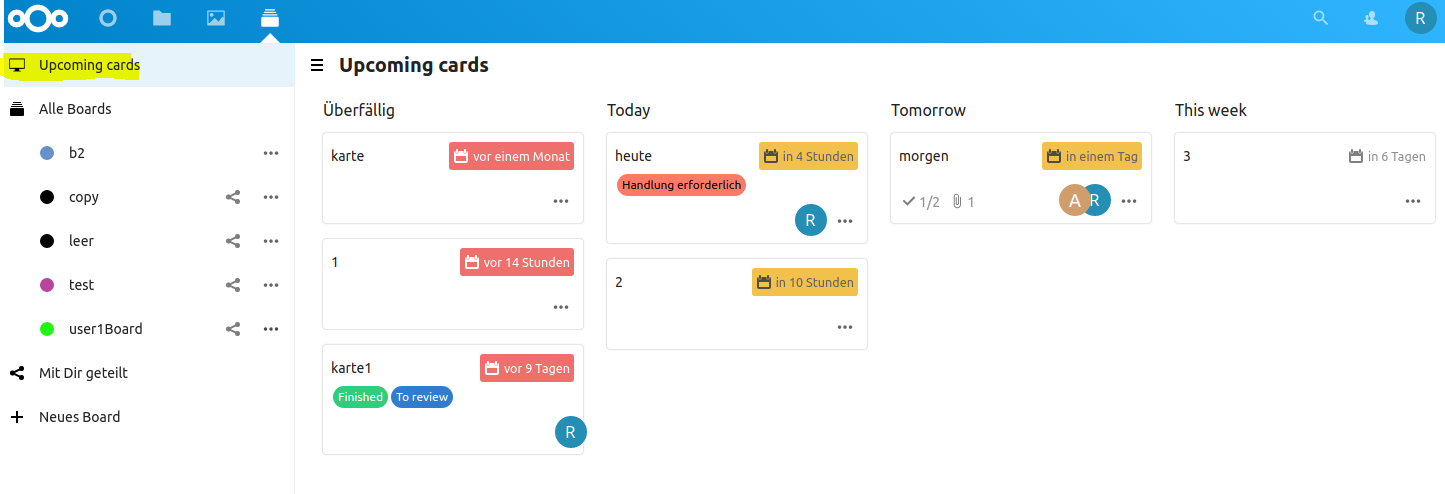
On shared boards my assigned cards are shown and on non shared boards all cards with due dates.
The question is, what should happen to the due date if the card is moved to another column:
My suggestion:
- Overdue: now
- Today: now + 12h
- Tomorrow: now + 1d
- This week: now + 1w
- Later: now +1m
 jakobroehrl
All 7 comments
@nextcloud/designers @nextcloud/deck
 juliushaertl
on 25 Aug 2020
juliushaertl
on 25 Aug 2020
My suggestion: On drop open a modal asking for a new due date. Your suggestions should be preselected.
 stefan-niedermann
on 25 Aug 2020
stefan-niedermann
on 25 Aug 2020
For Today, Tomorrow and This week: Shouldn't it be the last minute of the actual naming?
Ex. Guess it's 18 o'clock, with your proposal moving a card to today will make it due at 06 o'clock tomorrow, which is confusing. Would be much better to make it due at 23:59 of today. Analog to tomorrow and this week (sunday 23:39 for most countries, but depending)
 Dubidubiduu
on 25 Aug 2020
Dubidubiduu
on 25 Aug 2020
Maybe it would be nice, to have in the every card sidebar the possibility to quickly change the due date to: Today, Tomorrow, this week. This should change the due date as when drag and drop a card in this Upcoming cards View
jakobroehrl
on 23 Sep 2020
Something for a separate issue, but yes :)
juliushaertl
on 28 Sep 2020
Something for a separate issue, but yes :)
-> https://github.com/nextcloud/deck/pull/2323
jakobroehrl
on 28 Sep 2020
@Dubidubiduu : now that there are calendars linked to the cards, if we set time at 23:59, it wont be visible on calendar without scrolling down. So I would suggest to keep the time of the day when moving a card to today, tomorrow etc..., just changing the day.
For example, if a card was set yesterday at 9:00 am, moving it to today will set the date to today at 9:00 am, moving it to next week will set the date to next tuesday at 9:00.
And with @stefan-niedermann 's idea it would be possible to easily change it if necessary.
 tomdereub
on 6 Oct 2020
tomdereub
on 6 Oct 2020
Related issues
 armaccloud
·
3Comments
armaccloud
·
3Comments
 woosting
·
3Comments
woosting
·
3Comments
 wdfee
·
4Comments
wdfee
·
4Comments
 reox
·
4Comments
reox
·
4Comments
 fkaup
·
4Comments
fkaup
·
4Comments
Most helpful comment
For Today, Tomorrow and This week: Shouldn't it be the last minute of the actual naming?
Ex. Guess it's 18 o'clock, with your proposal moving a card to today will make it due at 06 o'clock tomorrow, which is confusing. Would be much better to make it due at 23:59 of today. Analog to tomorrow and this week (sunday 23:39 for most countries, but depending)