Deck: Tag creation not working inside the tag selector
Describe the bug
Entered tags do not show up / are not saved.
To Reproduce
Steps to reproduce the behavior:
- Go to a card's details view
- Enter a new own tag into tags field
- click enter
- an empty label is added to tags field, no tag is added to card
Expected behavior
An label with the entered tag is created and added to the card.
 wdfee
wdfee
All 4 comments
Uh, I just figured out that tags have to be created in the board settings, not in the input field of a card. So this is no real bug, but maybe it needs some attention to avoid some confusion like this. There should not be an empty tag created at all.
It would be nice if a tag could be created in the card's input field, too. But if not, there should be some advice for users who try that.
wdfee
on 19 Jan 2020
I've just flagged the same thing. On the Android app you can create tags, new tags, it even randomly pics a colour for you. The newly created tag is sync'ed to the web version but it appears you cant create a new tag the same way from the web browser. Unless I've missed somethig?
 deljones
on 8 May 2020
deljones
on 8 May 2020
Uh, I just figured out that tags have to be created in the board settings
Where are the board setting?? Can someone please tell me. I can't find them anywhere. :cry:
P.S. I'm using Deck through a web browser, and have tried:
- Selecting the '...' next to the Board name in the left sidebar and choosing "Board details" then in the right hand side bar choosing "Tags" and "+ Add a new Tag". I then type a tag name and press 'Enter', or click the '-->' arrow, or click the "+ Add a new Tag" button again.
- Selecting a card and in the right hand side bar choosing "Details" and Typing a tag name into the "Assign a tag to this card..." text box, then pressing the '+' that appears, or pressing the 'Enter' key
Both of the above two attempts result in the tag name I enter vanishing and no change being applied.
- I also went to the Nextcloud Settings, and under the 'Administration' 'Basic Settings' section found 'Collaborative tags'. I have created several 'Collaborative tags' and set them to be 'Public'. I can assign these tags to Document files but they are not available anywhere in Deck.
 storyjesse
on 10 Sep 2020
storyjesse
on 10 Sep 2020
Hello,
Follow these steps:
Click here
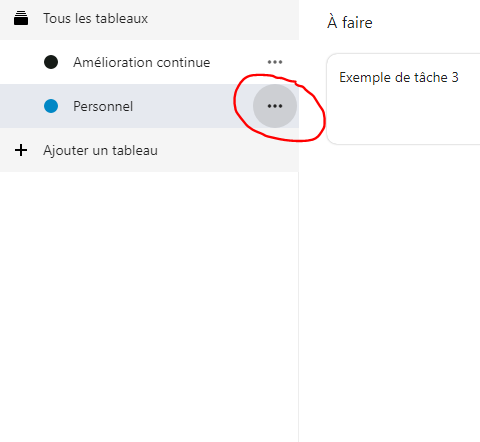
After "Details..."
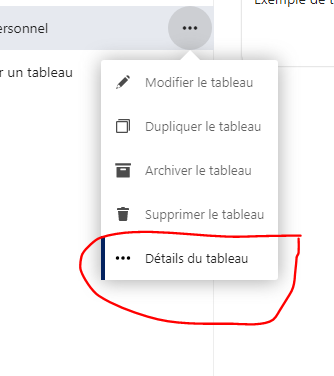
And on the right
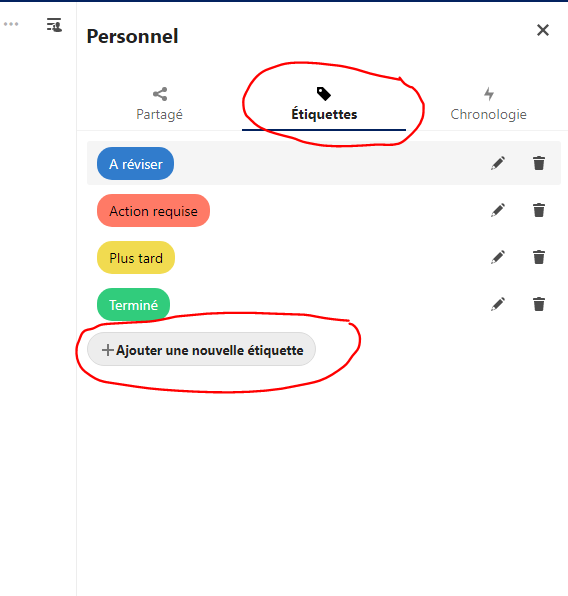
You can create tag here. When you create a tag it is assigned and usable only to its own table.
 xdaftcraft
on 8 Oct 2020
xdaftcraft
on 8 Oct 2020
Related issues
 poVoq
·
4Comments
poVoq
·
4Comments
 fkaup
·
4Comments
fkaup
·
4Comments
 desperateCoder
·
3Comments
desperateCoder
·
3Comments
 juliushaertl
·
4Comments
juliushaertl
·
4Comments
 jbonlinea
·
4Comments
jbonlinea
·
4Comments
Most helpful comment
Uh, I just figured out that tags have to be created in the board settings, not in the input field of a card. So this is no real bug, but maybe it needs some attention to avoid some confusion like this. There should not be an empty tag created at all.
It would be nice if a tag could be created in the card's input field, too. But if not, there should be some advice for users who try that.