Deck.gl: Interleaving DeckGL layers with a base map
Hello, this is just a continuation #4529. After successfully integrating harp.gl's map with deck.gl, I was experimenting with things and found my Icon Layer laid on top of the buildings of the map.
Normally in mapbox this could be solved by using the mapboxLayer and adding the icon layer beneath the building layer but harp.gl doesn't provide that sort of functionality.
In essence deckgl is just drawing to an overlay canvas which is laid on top of the base canvas (harpgl's map in this case) if I understood correct. Is there any way to inform the overlay canvas of the depth buffer of the base canvas so everything renders correctly?
An example screen. the red circles show where the icon should be behind the buildings.

Thanks.
 gallickgunner
All 61 comments
To do that you need to have both deck and harp.gl render into the same WebGLContext. Does harp.gl support third-party renderers?
 Pessimistress
on 20 May 2020
Pessimistress
on 20 May 2020
Harp.gl is completely built upon Three.js afaik. I've looked into it's source and there definitely is Threejs running in the background. I have experience with three.js a bit and I know that you can construct a WebGLRenderer out of an existing context.
So do we provide the context created by Deck to harp or the one created by harp to deck? In both cases, what's the procedure for extracting or feeding in the context to deckgl?
Also harp.gl doesn't expose this functionality so I'll have to basically modify it's source, but if I can get this working, I'll open a PR on their site, maybe they'll accept it. Thanks.
gallickgunner
on 20 May 2020
If you can get the WebGLRenderingContext out of harp.gl, then construct Deck with gl as a prop.
If harp.gl accepts an external WebGLRenderingContext, then you can construct Deck first and use deckInstance.gl.
Then the trick is that whenever deck or the base map is updated, both need to redraw. This can be done with (pseudocode):
baseMap.on('render', () => deckInstance.redraw('basemap redrawn', true));

deckInstance.setProps({
  // Normally, when deck renders to the canvas, it will wipe the existing content and draw all layers.
  // This callback overrides the default behavior
  _customRender: redrawReason => {
    if (redrawReason === 'basemap redrawn') {
     // base map just redrew, due to e.g. tiles being loaded
     // render all layers without clearing the canvas
     deckInstance._drawLayers(redrawReason, {clearCanvas: false});
   } else {
     // Triggered by other reasons - layer update, view state change, transition, etc.
     // Tell the base map to redraw first
     baseMap.render();
   }
  }
})
You can see how it works in the arcgis module:
And the mapbox module:
Pessimistress
on 20 May 2020
@Pessimistress - Ok. I looked into it and managed to get most of the part done but there's a problem. I'm using React and when I looked into the source for the react component of the deck, there is already a custom render function bound. I think this will pose problem but I'm not sure as I'm new to JS/React (more experienced with C++) Any way to circumvent this?
Update:- I went on with your approach neverthless. And I have some intermediary results. The icons are being obscured now but I don't understand how its working.
First the green marked should be above that building.
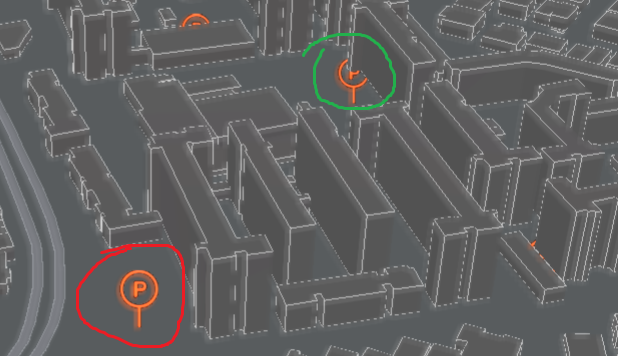
The color marked in the previous image and in the below image are the same icons. Since the icons are in front of the building in the angle in the below image, this should not get obscured by the building.
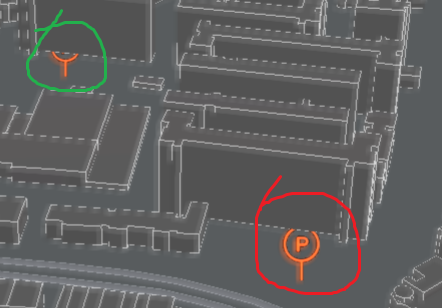
Secondly, I start getting this error as soon as I pass in the webgl context of the harpgl's map canvas to deckgl. I searched on the net and found this is related to undefined behaviours caused by simultaneous reads/writes to the same fbo and stuff like that. So maybe deckgl and harpgl are accessing the same texture/fbo and aren't synced, prolly. Gonna look into it more.

The key code for getting it going is,
initMapView = () => {
    const mapCanvas = document.getElementById( 'mapCanvas' );
    const contextAttributes = {
            alpha: false,
            depth: true,
            stencil: true,
            antialias: false,
            premultipliedAlpha: true,
            preserveDrawingBuffer: false,
            powerPreference: 'default',
            failIfMajorPerformanceCaveat: false,
            xrCompatible: true,
        };
    this.webglContext = mapCanvas.getContext( 'webgl', contextAttributes );
    // Create Mapview
    this.mapView.addEventListener( MapViewEventNames.Render, () => {
      if ( this.deck ) { this.deck.redraw( 'basemap redrawn', true ); }
    } );
}

onDeckGlLoad = () => {
    this.deck.setProps( {
      _customRender: redrawReason => {
        if ( redrawReason === 'basemap redrawn' )
          this.deck._drawLayers( redrawReason, { clearCanvas: false } );
        else
          this.mapView.update();
      },
    } );
}

render() {
    ...
    ...

    <DeckGL
      ref={ ref => { this.deck = ref && ref.deck; } }
      onLoad={ this.onDeckGlLoad }
      gl={ this.webglContext }
    />
    ...
    ..

}
@Pessimistress - So according to Nicol here the feedback loop error arises even if you try to read from a texture attached to the framebuffer, meaning it's the active one. So it doesn't matter if you are writing to it currently, as long as it's active you'll get the error. Does this ring any bells for you? Just asking if you know anything similar coded in deckgl.
gallickgunner
on 25 May 2020
The depth issue is likely caused by the basemap and deck.gl using different near/far planes. If you can figure out how harp.gl is calculating its near/far we can try match deck's viewport to that.
Looks like harp.gl is rendering into a FBO, and did not reset the context afterwards. You can force deck to render into the screen buffer by setting:
deck.setProps({
  parameters: {framebuffer: null}
});
Alternatively, you can try the approach used by @deck.gl/arcgis, which renders into a custom FBO and then composite it with the basemap.
Pessimistress
on 27 May 2020
@Pessimistress - Sorry for the late response and I appreciate your help for such a specific case, thanks. I was actually testing this whole thing with a post-processing effect applied to the deck. When I removed it, the error regarding the feedback loop disappeared. As far as I remembered post-processing does introduce an intermediary framebuffer and maybe that's what's causing it. Anyways leaving this for now, I've info regarding the near/far setting.
Harpgl had default far plane setting to a very high number. I tried changing it to 1000 as deck uses 1000 if I'm correct. But nothing happened. Next I found that harpgl has a number of ways to calculate the clip planes. Some of these are ElevationBased, Interpolated, TiltViewBased, Fixed, etc. I guess this has something to do with GetFrustumPlanes perhaps in the math-utils but I couldn't understand which one is deck using or what's the closest thing that matches the above ones. By default harpgl uses the TiltView one. Here's the code for that, if that makes any sense. I've also tried trying all of these but it doesn't do anything to help solve the problem. Maybe we need to tweak or match the settings with deck.
gallickgunner
on 2 Jun 2020
@Pessimistress - anything you found out from the above info?
gallickgunner
on 14 Jun 2020
@gallickgunner, I'm a developer on harp.gl and awesome that you are trying to integrate with deck.gl, we tried a small prototype internally with deck.gl, but we didn't do anything as complicated as you mention.
In harp.gl, the near/far plane changes based on the tilt (at least when using the default TiltView as you mentioned), so I guess that would cause problems with the integration.
You could try to use FixedClipPlanesEvaluator and then fix it to some constant value which is synced with deck.gl, does that help?
 nzjony
on 17 Jun 2020
nzjony
on 17 Jun 2020
@nzjony Thanks for the insight!
@gallickgunner You can retrieve the projection parameters from deck like this:
deck.setProps({viewState});
const viewport = deck.getViewports()[0];
const {near, far, fovyRadians} = viewport.projectionProps;
@nzjony - Hey, thanks for the support.
@Pessimistress - Ok, I'll see what I can do with this info and update here with any results I get.
Thanks, you two.
gallickgunner
on 20 Jun 2020
@Pessimistress - Sorry for the delay, I was sick for a couple of days. Anyways bad news is, we are back to ground zero.
I did a fresh code up of the above test scenario and I can't seem to get the intermediate result I posted earlier, no matter what I try. I've uploaded the working test case here in case you want to try running it yourself.
So there seems to be no change if I render both harp and deck into the same context. Also, I've tried passing harpgl the webgl context created by deck by modifying the source of MapView in harp and it throws errors. Note sure what causes these maybe @nzjony can give me some pointers?.
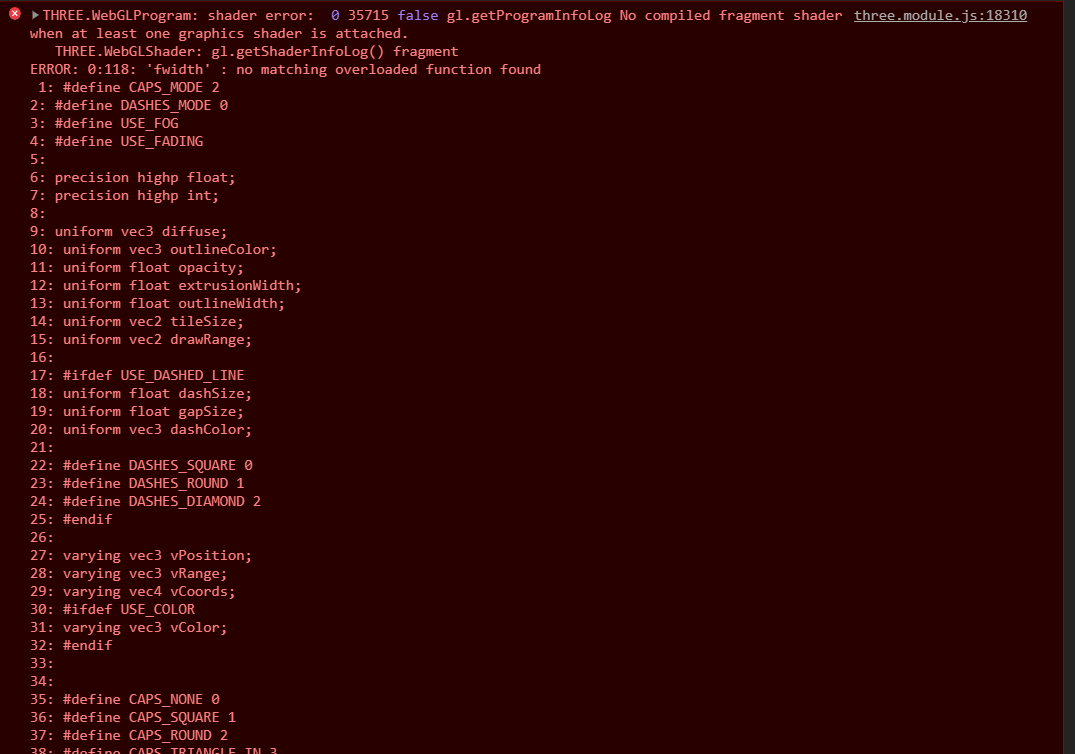
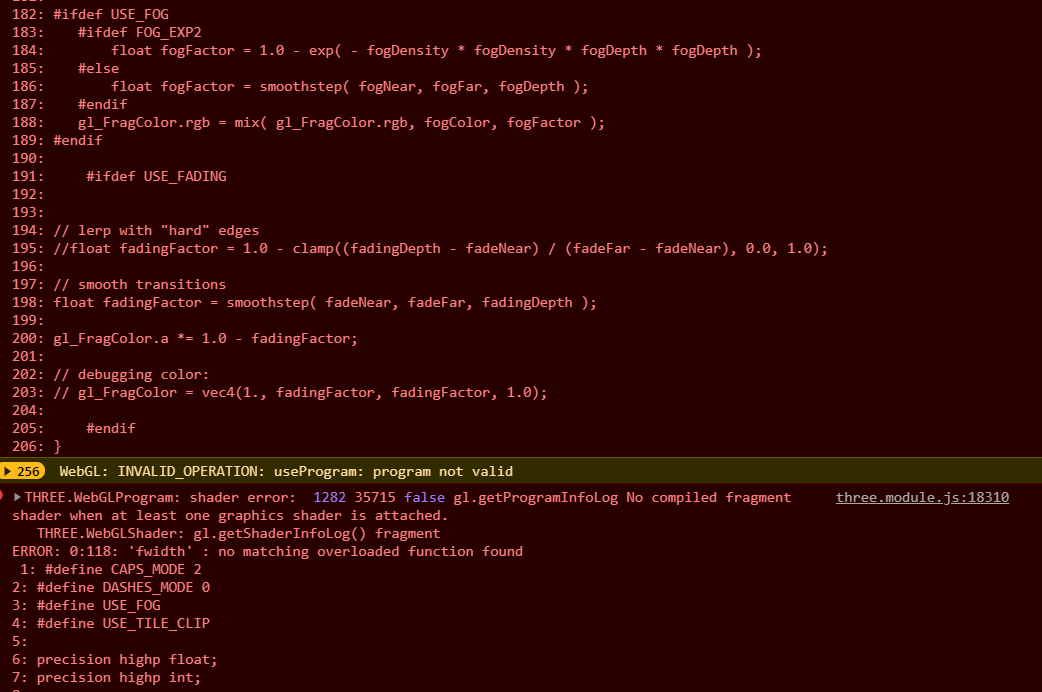
I'll keep trying and see if I can get those intermediate results back. Don't know how or what caused those. Sadly I didn't had the chance to commit that and had to install a fresh copy of OS :(
gallickgunner
on 28 Jun 2020
@gallickgunner , thanks for mentioning the issue, which browser are you using?
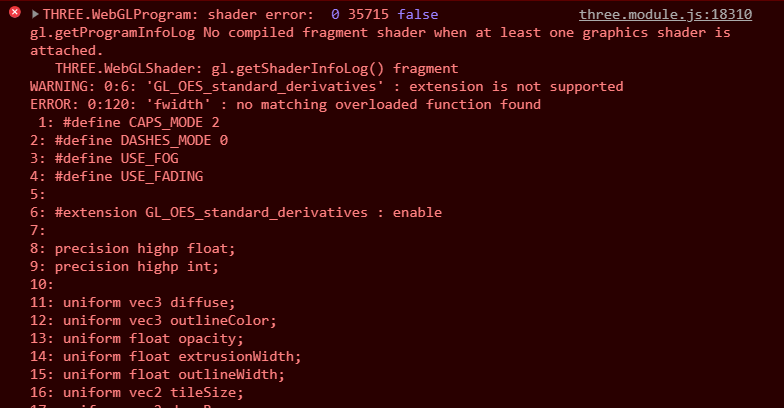
I have an idea how to fix it, can you try https://github.com/heremaps/harp.gl/pull/1651 ? It seems that on some browsers, we need to enable this to access the function fwidth
nzjony
on 29 Jun 2020
@gallickgunner , thanks for mentioning the issue, which browser are you using?
I have an idea how to fix it, can you try heremaps/harp.gl#1651 ? It seems that on some browsers, we need to enable this to access the function
fwidth
I guess this is a browser issue. I tried enabling the extension and it says extension not supported. I'm using Chrome Version 83.0.4103.116 (Official Build) (64-bit)
gallickgunner
on 29 Jun 2020
@gallickgunner , what GPU are you using? It could be because your GPU doesn't support these functions? At least the error message says that the extension isn't supported.
Here is another link: https://github.com/Chlumsky/msdfgen/issues/33 which mentions about the use of fwidth.
Can you get access to a PC with a discrete GPU and try again?
nzjony
on 29 Jun 2020
@nzjony - Sorry for the delay as I found some other useful info and sorry for not mentioning these details in the OP. My machine specs are
Windows 10,
Ryzen 3600
Nvidia GTX 1660
Chrome 83.0.4103.116 (Official Build) (64-bit)
Anyways I think I found what's causing this error. I just found out that when passing the context from harp's canvas to deckgl, I was asking for a webgl1 context. I corrected that by doing
mapCanvas.getContext( 'webgl2', contextAttributes );
And threejs throwed an error immediately. I was using three.sj 0.114 and it was trying to create webgl1 context by default.

After I updated to the latest 0.118 release which was released a few days ago, it fixed this by trying to create a webgl2 context by default. However now, I got the same shader error as above. So I guess the reason why I was getting the shader error above when passing deck's initialized context to harp was because deckgl was creating a webgl2 context which I was then passing to threejs through harp. On the contrary, since I wasn't passing a webgl2 context to deck when accessing the context through harp's canvas (mapCanvas in above code), I wasn't getting the error then.
So, in short the above shader error occurs due to passing webgl2 context. Using webgl1 removes the error.
Secondly, I tried updating harpgl as well to 0.17 I was using 0.14. And now, I'm getting some depth results.
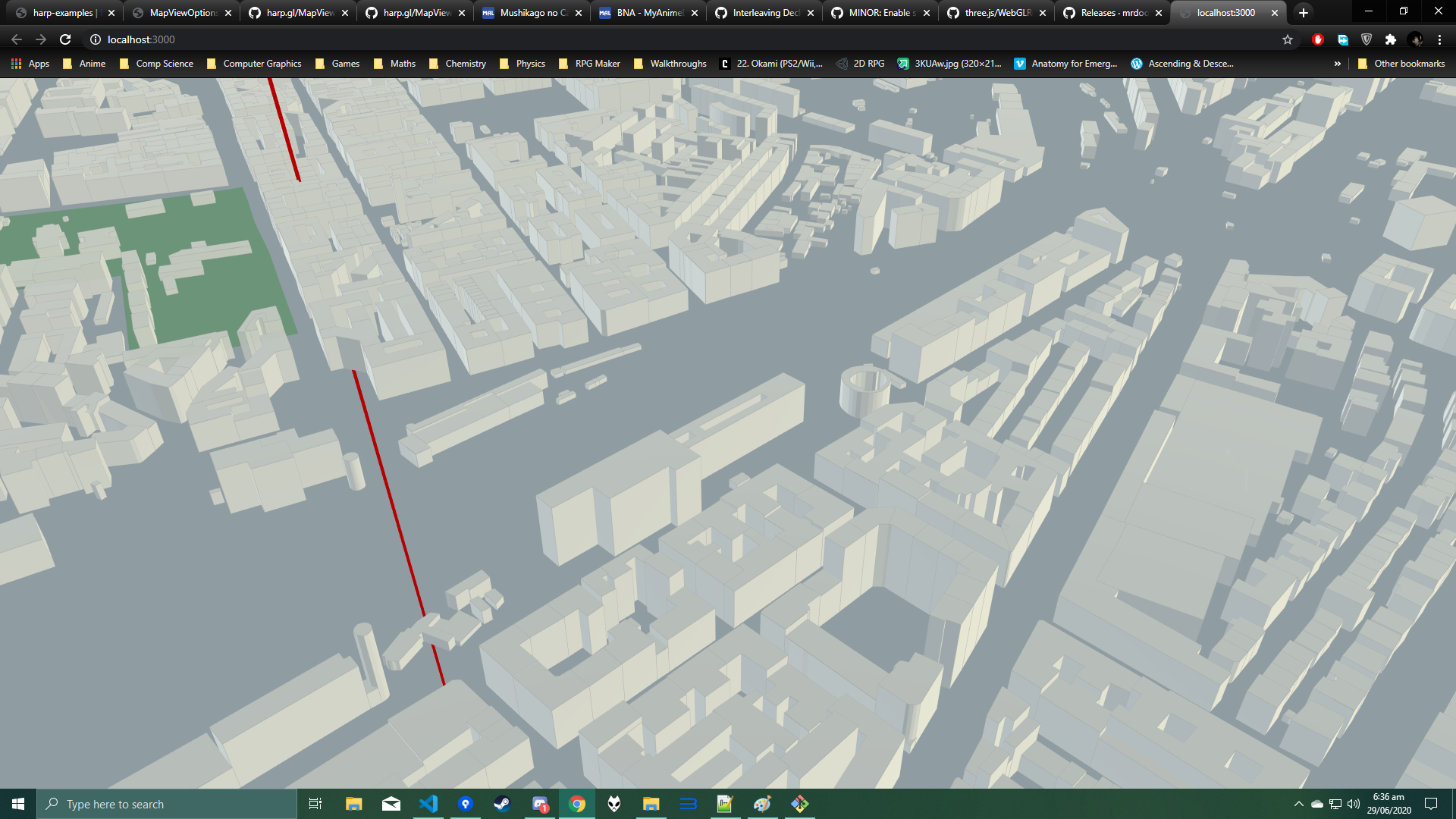
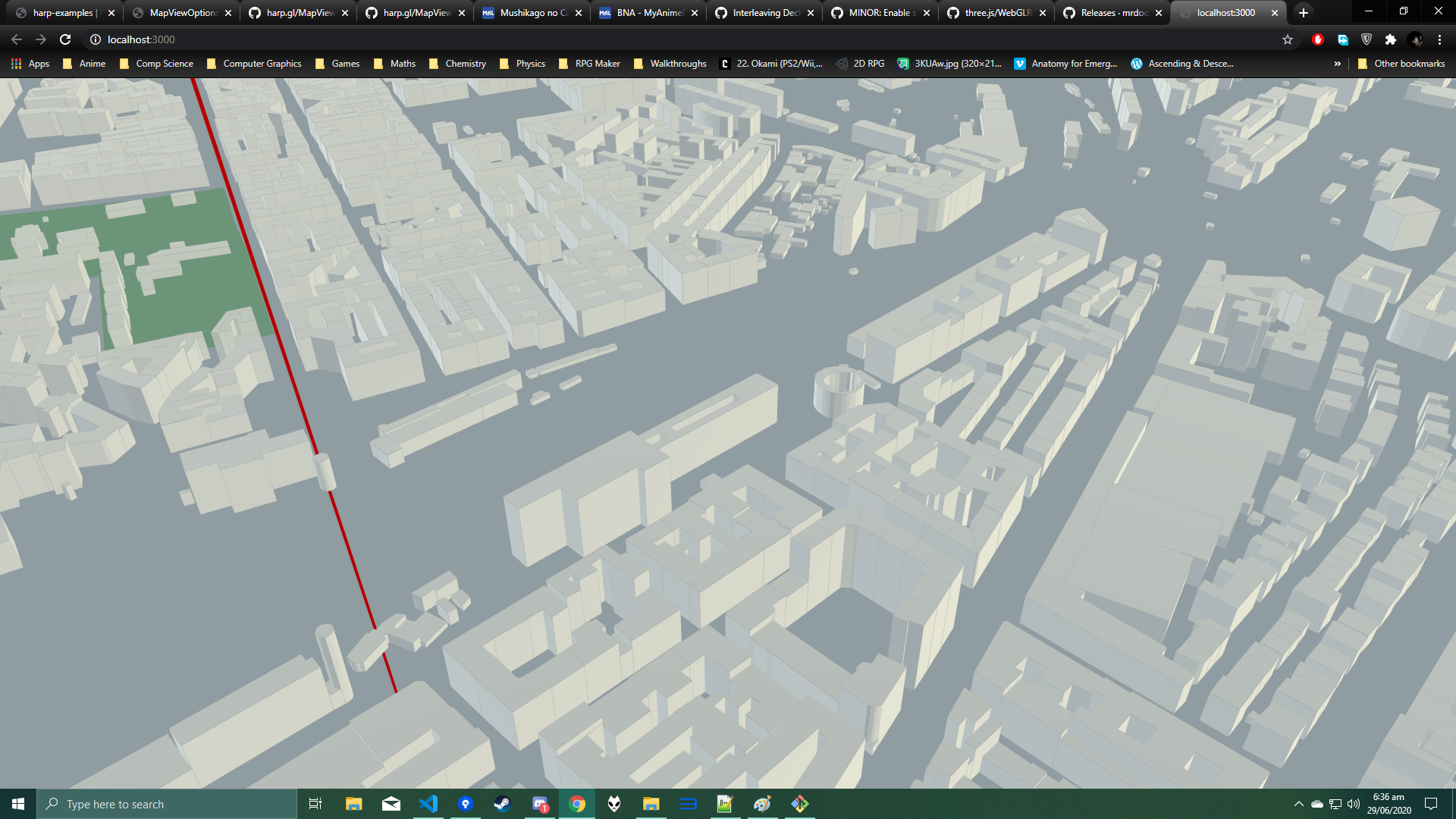
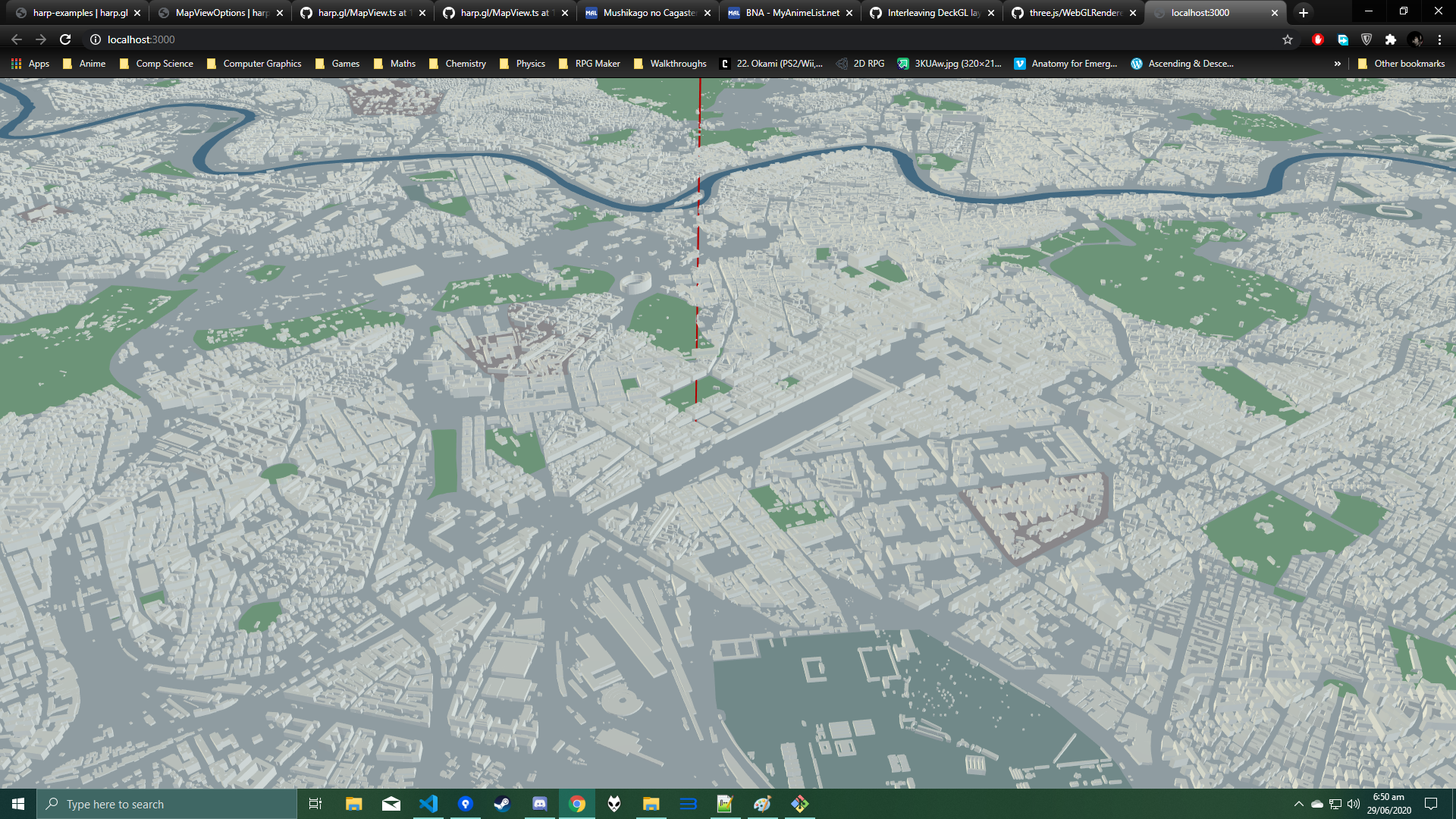

It's as if the buildings are rendered on top of any deckgl layer without any sort of depth testing. So I think now I can try the clipping thing you guys mentioned. Will update with the results.
UPDATE:- Tried fixed planes evaluator and it's throwing error,

Also note that the deck's far plane is also dynamic i.e. changes with the orientation of the camera. Near is fixed to 0.1. I've also tried initializing the TiltViewClipPlanesEvaluator with 0.1 as the near plane but there is no difference.
gallickgunner
on 29 Jun 2020
@gallickgunner , thanks for the update, and glad you managed to figure it out with the different contexts.
We haven't yet upgraded to 0.118 internally, so maybe there is some issues we need to fix, I will try to do this soon. Can you try with 0.117 for now?
Ok, if deck's far plane is dynamic, then you will probably need to implement a new ClipPlaneEvaluator with the exact same formula for it to work. Otherwise you will always have some issues. Actually, feel free to create a PR so others who want to integrate with deck.gl can use the same ClipPlaneEvaluator.
nzjony
on 30 Jun 2020
@nzjony - Hmm, do we really have to re-implement the whole formula? I mean we can just have a new ClipPlaneEvaluator where we just pass near/far from deck. That was the intention in using the FixedPlanesEvaluator but it makes the far plane fixed and don't know why but throws an error. We just need a way to pass the near/far on every viewState change I guess.
Also don't you think coordinate spaces might matter? Deckgl extracts all the frustum information in common space which according to the docs is a left-handed space with y pointing downward. I don't found any info on the space used in harpgl.
Also what's minNear and minFar used for?
gallickgunner
on 1 Jul 2020
@gallickgunner , small update, I upgraded harp.gl to support three 0.118, the problem is that that version creates a Web GL 2 context by default and we have some raw shaders which don't yet support web GL 2, we will fix these soon. As a work around, I create by default a WebGL1Renderer for all examples, this explains the problems you were having with fwidth as you mentioned above.
Yes, that should work fine, I didn't catch that you want to update it each frame, but of course that should work.
I don't think the coordinate spaces will matter because you are only interested in the depth values being comparable right? Unless I miss something?
I don't fully understand what minNear and minFar are doing, from reading the code it seems they ensure that the range of the near / far plane doesn't reduce beyond this limit, the defaults are probably ok in your case.
nzjony
on 1 Jul 2020
Ok thanks for the info. I'll try creating a new one or maybe modify the fixedplane one by passing deck's dynamic far plane every frame. Let's see what happens.
gallickgunner
on 1 Jul 2020
@nzjony - It seems something is broken in the clip planes evaluators. I've tried using the Fixed and TopView evaluators. The fixed one gives errors, The TopView one just shows the arcs with a base blue background without any map tiles.
I also tried passing values from deckgl to harp and it throws the same errors as Fixed evaluator. So I think there is a problem with passing hardcoded or fixed values. I'll try removing deckgl integration and see if the Fixed evaluator works on its own. If not, then there is definitely an issue with harp.
These are the errors I get using Fixed or passing values from deck.

Secondly, I tried using InterpolatedClipPlanesEvaluator and this fixes the depth problem on some angles. As far as I managed to understand, this one calculates near/far based on ground distances? I've yet to figure out what exactly does it do that solves the problem. The depth issue comes back again at varius tilt angles though. I guess this is a hint that we need to do modify the Interpolated evaluator to keep working with tilt changes. Any ideas or pointers would be helpful.
Here's a gif to show the issue coming back at various angles.
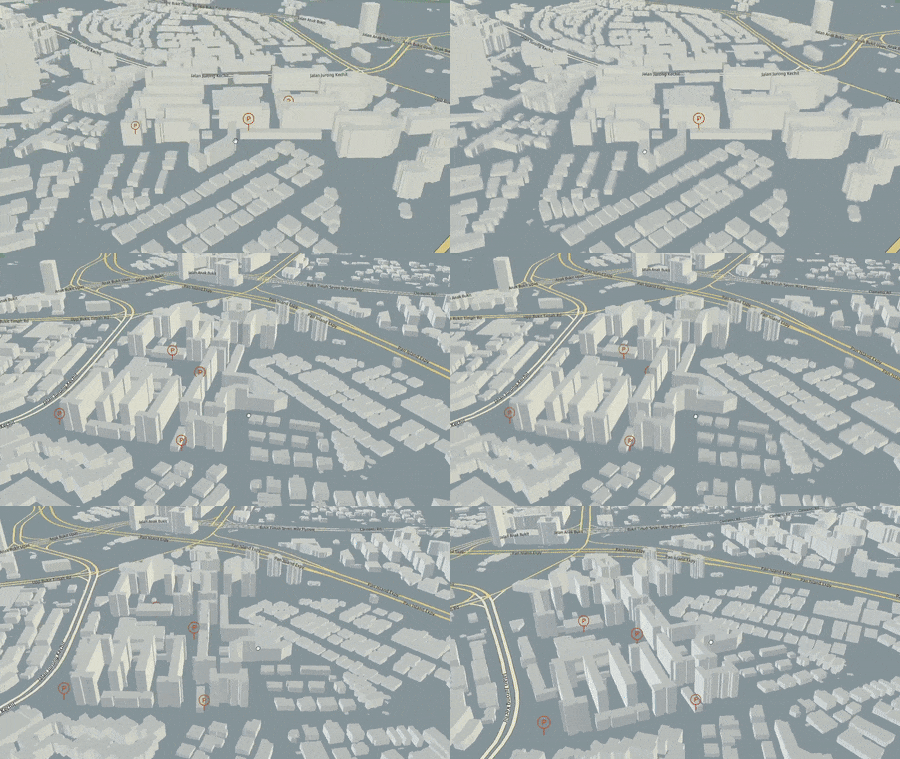
gallickgunner
on 3 Jul 2020
@gallickgunner There are multiple things that could result in this. You may want to control harp.gl's FOV as well. Can you also try multiplying deck's near and far with the viewport's height?
Pessimistress
on 6 Jul 2020
@gallickgunner There are multiple things that could result in this. You may want to control harp.gl's FOV as well. Can you also try multiplying deck's
nearandfarwith the viewport's height?
FOV was already set when initializing the mapView. I'll try multiplying the near/far with the viewport height, but I doubt it's gonna work, seems something wrong with using hardcoded/fixed values.
gallickgunner
on 7 Jul 2020
Are you updating the values on every render? Deck’s far plane is dependent on pitch.
Pessimistress
on 7 Jul 2020
Are you updating the values on every render? Deck’s far plane is dependent on pitch.
Yeap. It's just, trying to set any value causes errors as mentioned above. Might be some bugs with harpgl.
gallickgunner
on 7 Jul 2020
@gallickgunner , sorry for the late reply.
Setting the near / far plane for the FixedClipPlanesEvaluator should work fine.
The error messages you are getting is very strange. I can't see how changing the near / far plane would cause such an issue. Can you open up the error message and see what the stack trace is?
nzjony
on 7 Jul 2020
Sorry for the late reply.
@Pessimistress - multiplying by viewport didn't change anything, still getting those errors.
@nzjony - This is the stack trace for the error that appears when you scroll. If you don't do anything the initial error is the one about "No element array buffer....". That one has no stack trace.
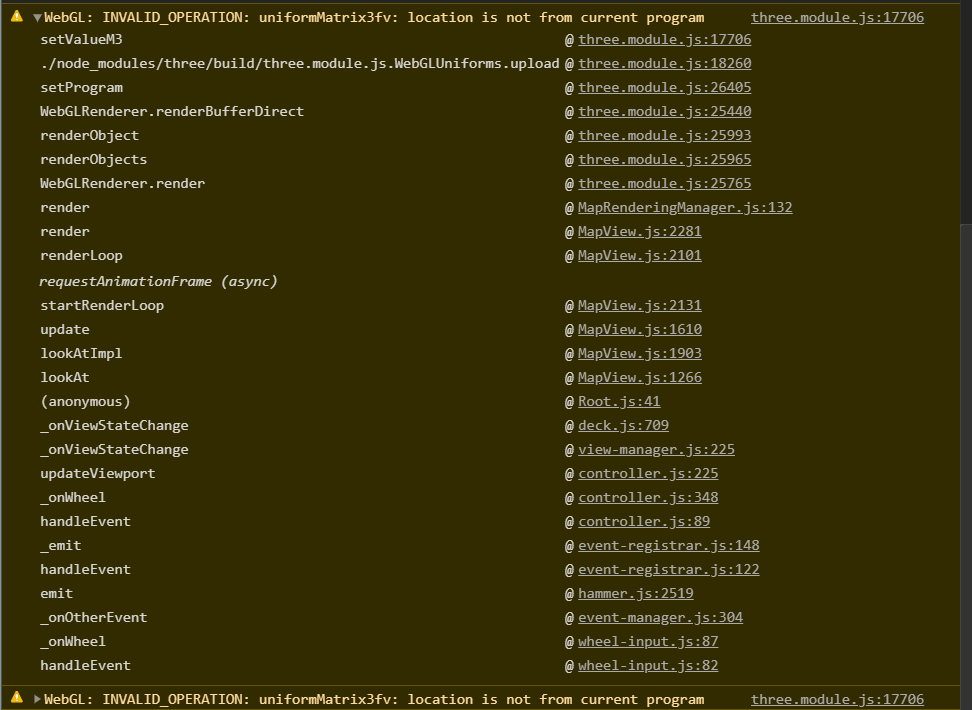
Can you check on your end if using FixedPlaneEvaluator is posing problems without the deckgl integration? If it's working fine then it should work here as well.
gallickgunner
on 11 Jul 2020
@gallickgunner , that is a very strange issue.
I made a small test project using the FixedPlaneEvaluator, can you take a look: https://github.com/nzjony/harpglclipplanetest and see if you can somehow tweak it to recreate the problem
nzjony
on 14 Jul 2020
@gallickgunner , that is a very strange issue.
I made a small test project using the
FixedPlaneEvaluator, can you take a look: https://github.com/nzjony/harpglclipplanetest and see if you can somehow tweak it to recreate the problem
Thanks. I'll look into it and see what's the trigger for causing this.
gallickgunner
on 15 Jul 2020
@Pessimistress @nzjony
So I found that the errors don't arise when you aren't using a shared context between deck and harp. When using a shared context the trigger for the error is passing any layer to deckgl. As long as deckgl doesn't draw any layer there are no errors.
So I think the "No Element Array Buffer..." error is from deckgl. And this leads harpgl to throw the other webgl error regarding "UniformMat` when scrolling.
Secondly, regarding the clip planes, the FixedClipPlanes tends to show a blue plane obstructing the map view at different values usually at lower far values. The blue plane that shows up at random positions horizontally. It also changes its positions based on zoom/orientation. For very small values 2-3 as deckgl's far plane value comes out to be, no matter how far you zoom in/out the blue plane doesn't go away.
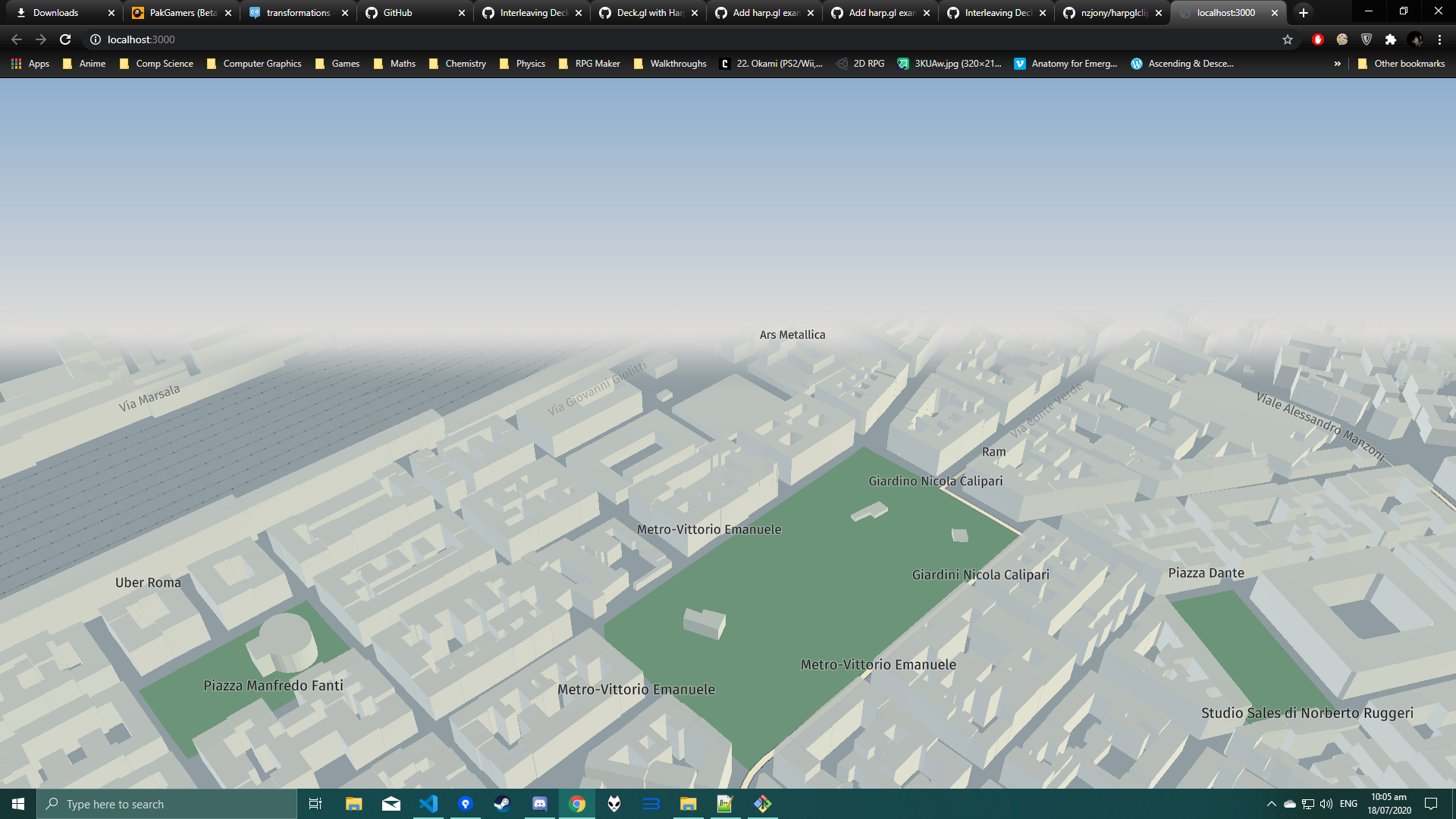
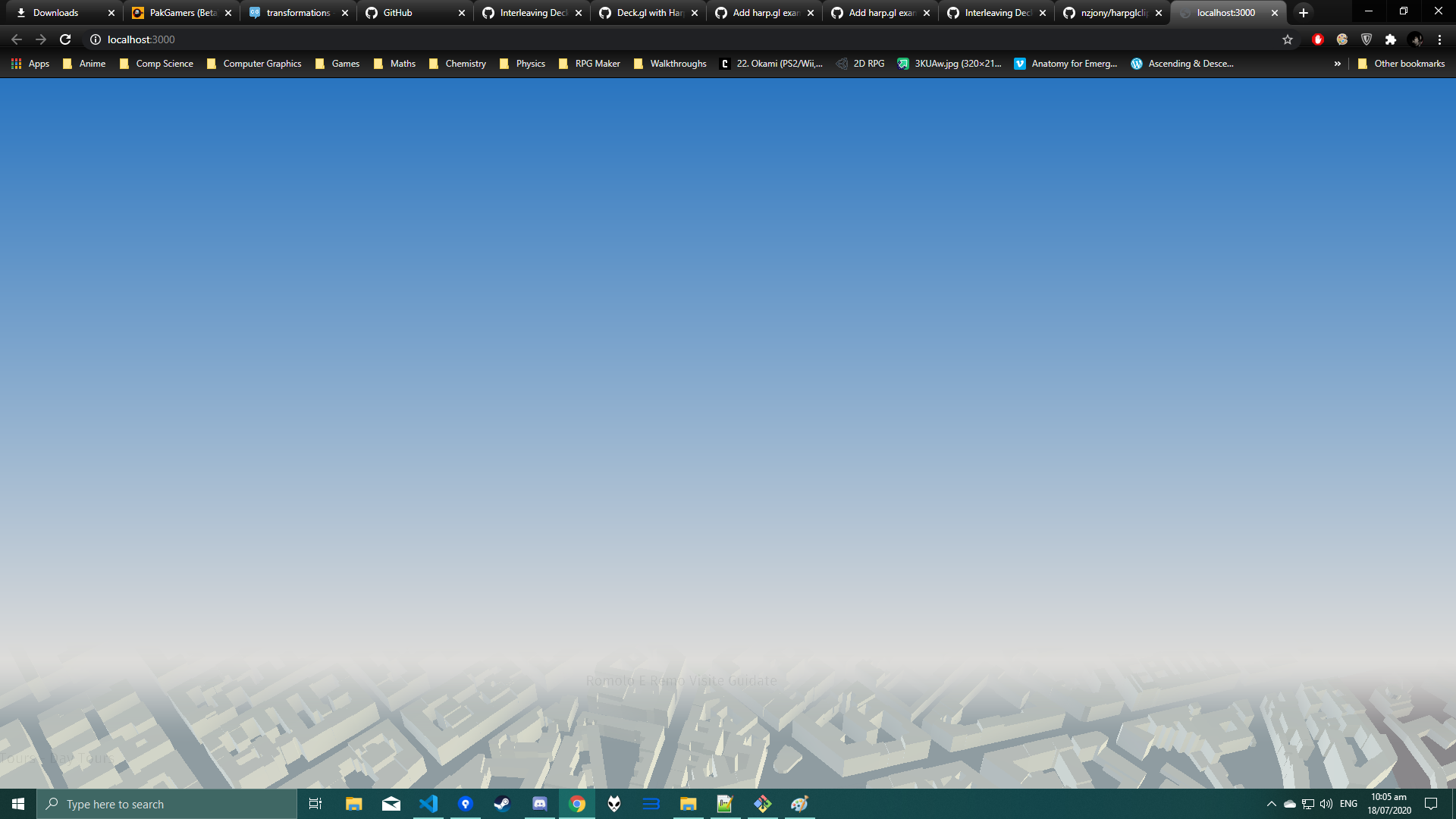
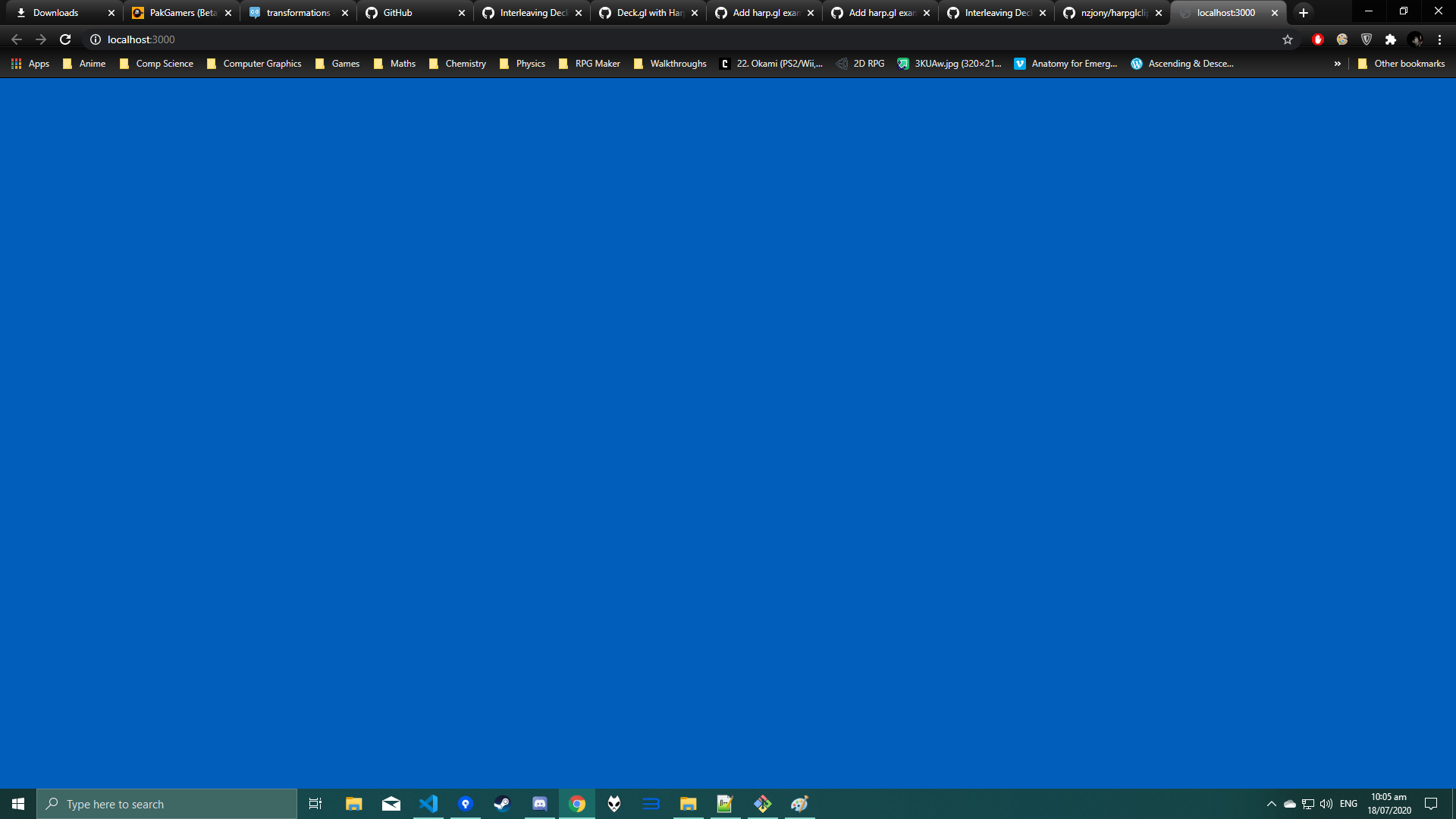
@nzjony - The lines you coded in your project,
// Edit the fixed clip plane evaluator at run time.
mapView.addEventListener(MapViewEventNames.Render, (_) => {
  cpe.farPlane *= 1.001;
});
tend to move this blue plane upwards like its animating. This only happens however if the plane is partial like in pic 1 or 2. If you provide a value such that the plane is like in pic 1, then it doesn't clear up (moves upwards) on its own.
gallickgunner
on 18 Jul 2020
@gallickgunner , sorry for the confusion, that line is adjusting the far plane, I did that just to test that changing the far plane at run time works, and that it doesn't cause the issue you mentioned with the No element array buffer..... This is not to demonstrate any valid real world use case.
What units does deck.gl use for world space? In harp.gl, 1 world unit is equal to one meter, that is why, when you zoom out, you see the blue plane sooner, because each zoom level requires a bigger near / far plane range.
nzjony
on 20 Jul 2020
What units does deck.gl use for world space? In harp.gl, 1 world unit is equal to one meter, that is why, when you zoom out, you see the blue plane sooner, because each zoom level requires a bigger near / far plane range.
As far as I know deck uses lng lat and meters as the default coordinate system. According to the docs
deck.gl's common space plays the role of standard "world space", but there are a few important differences. The y axis is inverted, which means it's a left-handed coordinate system. The mercator "zoom" factor is applied as a common space transform (rather than in the view or projection transforms).
gallickgunner
on 20 Jul 2020
@gallickgunner , ok thanks for the clarification.
Regarding the images above, are these generated from my demo? Or are they generated when passing the near / far plane values from deck.gl to harp.gl?
nzjony
on 20 Jul 2020
@gallickgunner , ok thanks for the clarification.
Regarding the images above, are these generated from my demo? Or are they generated when passing the near / far plane values from deck.gl to harp.gl?
Both, it's possible to generate these images from your demo as well. Much easier to see if you pass very small values as far plane (under 200).
gallickgunner
on 20 Jul 2020
@gallickgunner, ok, strange. Yes, my demo does that my design, but with deck.gl, that is werid. Do you have some project I can take a look at to see how it is set?
nzjony
on 20 Jul 2020
@nzjony - I don't have a functional one currently. But I can set it up. It's the same thing as your demo though, the blue planes occur regardless of whether you pass values from deck to harp or pass hardcoded values like 3,10,100,...
gallickgunner
on 20 Jul 2020
@gallickgunner, most peculiar. I guess then the world units are different between harp.gl and deck.gl, but I guess we need to see a demo to check that out.
nzjony
on 20 Jul 2020
@gallickgunner, most peculiar. I guess then the world units are different between harp.gl and deck.gl, but I guess we need to see a demo to check that out.
Hmm, what exactly do you want to check out btw? If the blue planes are occurring without deck integrated then shouldn't we fix that first since this is only related to harp? I've lost track of what the actual problem is here.
1) I still don't understand what these blue planes actually are and "why" do they show up.
2) If they are supposed to show up, why do they get stuck when we pass really small fixed values (2/3). As I mentioned earlier, no amount of zooming tends to remove these.
gallickgunner
on 20 Jul 2020
@gallickgunner , the blue plane is simple where no geometry is rendered (just the background clear color is shown, with some fog).
I.e. if you have the far plane closer than the geometry, then the geometry won't be rendered. Check out: http://learnwebgl.brown37.net/08_projections/projections_perspective.html it also has some demo which shows playing around with the far plane.
Normally, the default clip plane evaluator in harp is TiltViewClipPlanesEvaluator, i.e. the near / far planes are calculated based on the height of the camera above the earth etc.
However in your case, you need to match the far plane with that of deck.gl, hence using the FixedClipPlaneEvaluator. Note, if you zoom out, but use the FixedClipPlaneEvaluator, then the far plane has to be updated, because there is more world that can be seen.
If you are seeing blue, then the far plane is too close and it should be extended.
Does that help?
nzjony
on 20 Jul 2020
@nzjony
Okay now I get it. Then this means, as you were asking earlier, that there is likely a unit mismatch between deck and harp. Since values like 2,3 are very small and show these planes in harp where as everything works fine in deckgl with the same values.
@Pessimistress - your intake on this?
gallickgunner
on 20 Jul 2020
deck.gl's geospatial "common space" is 512x512, so at {lng:0, lat:0} the earth's circumference (~4e7m) maps to 512 pixels. Because web mercator projection is non-linear, pixels/meter changes with the latitude of the viewport center. You can access this ratio via viewport.metersPerPixel.
When zooming in/out, the camera (projection matrix) does not change. The view matrix scales the model by 2**zoom.
The far plane you are looking for is probably some combination of the following parameters:
viewport.projectionProps.far * viewport.height / (2 ** viewport.zoom) / viewport.metersPerPixel
@Pessimistress , do you know what the units are in world / camera space, i.e. before the projection matrix is applied?
nzjony
on 21 Jul 2020
Sorry for the late response, was busy with another thing.
@Pessimistress - So I tried messing around with those paramteres but couldn't manage to fully synchronize with harp.
@nzjony - I think we should ditch the FixedPlaneEvaluator and start working with the Interpolated one as this one's atleast giving results and we can improve this with trial and error. Here is a picture after tweaking some parameters.
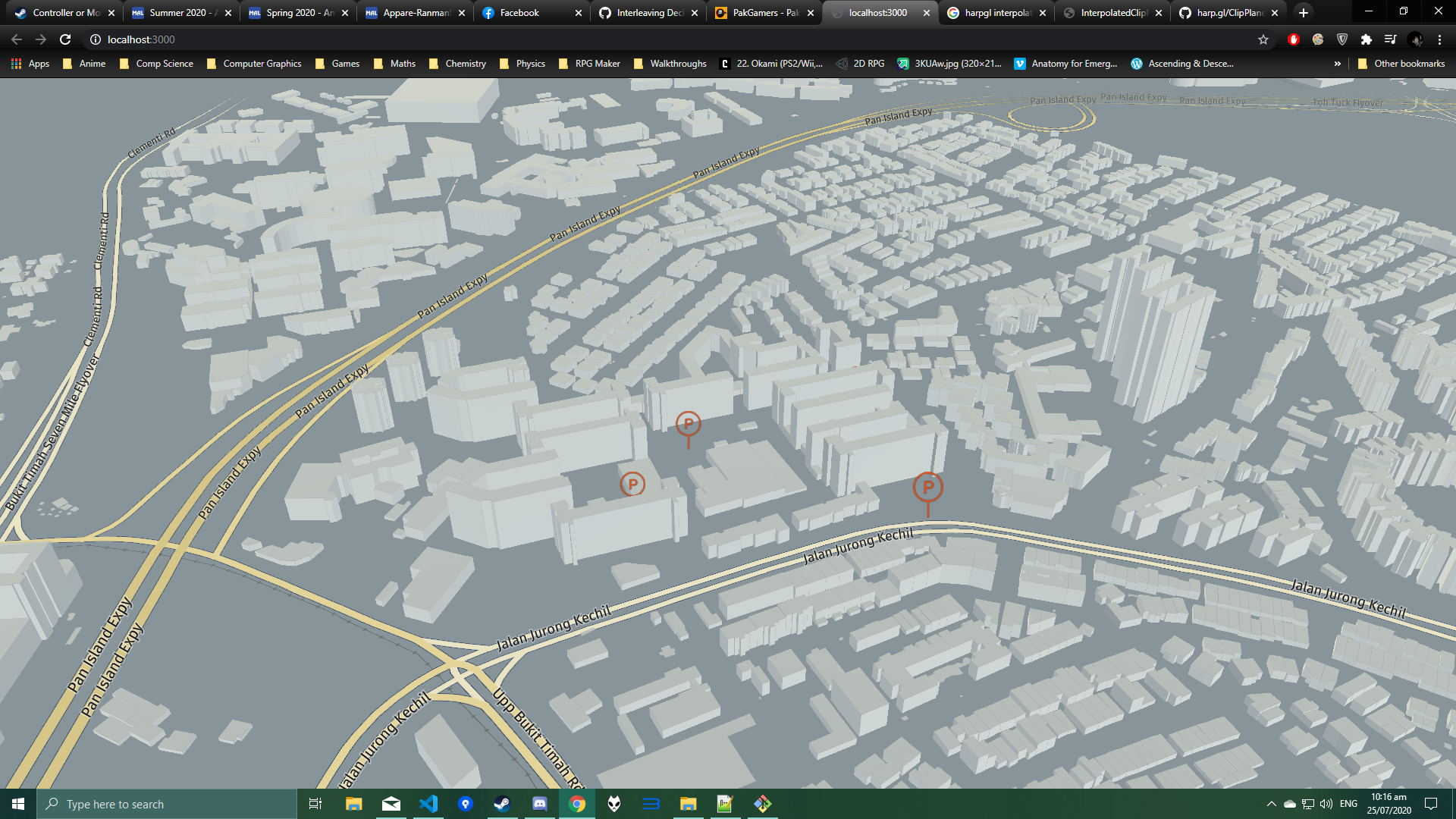
The parameters to tweak here are definitely the ones related farplane i.e. nearFarMultiplier and FarOffset. The problem is that changing the orientation of the map (bearing/pitch/zoom) causes the far plane values to change automatically and the results are lost. So it's definitely the far plane synchronization issue.
We need to have a better understanding of how both deck and harp are calculating these far values in order to properly synchronize them. Hope we will get this going.
gallickgunner
on 25 Jul 2020
@gallickgunner , it would be good to know why passing the values from deck.gl to the harp.gl's FixedPlaneEvaluator doesn't work. That would only be the case where the units in deck.gl are different, I read: https://deck.gl/docs/developer-guide/coordinate-systems and it says that the default units are meters, are you perhaps using a different coordinate system?
nzjony
on 28 Jul 2020
I read: https://deck.gl/docs/developer-guide/coordinate-systems and it says that the default units are meters, are you perhaps using a different coordinate system?
No I'm using the default.
@gallickgunner , it would be good to know why passing the values from deck.gl to the harp.gl's
FixedPlaneEvaluatordoesn't work. That would only be the case where the units in deck.gl are different
True, what I actually meant when I said that we should ditch the FixedPlanesEvaluator was that we should try and come up with a formula or something so the InterpolatedEvaluator works at all angles and zoom levels since we can verify that. If we manage to achieve that then we can reverse engineer and find the missing factors that are required for passing values between deck/harp.
gallickgunner
on 28 Jul 2020
@gallickgunner , do you have a demo application I can take a look at.
I don't quite understand the need to reverse engineer, the far / near planes should be compatible between harp.gl / deck.gl in theory. I think I need to see a working demo to help any further unfortunately because otherwise I am just speculating.
nzjony
on 28 Jul 2020
do you know what the units are in world / camera space, i.e. before the projection matrix is applied?
@nzjony The unit is zoom-dependent, and equals to filling the whole Mercator world ([-180, -85], [180, 85]) with 512 * Math.pow(2, zoom) units. I do not quite understand your statement that "in harp.gl, 1 world unit is equal to one meter", as Web Mercator projection is nonlinear.
I agree that it'll be the easiest to debug if @gallickgunner can share the working code.
Pessimistress
on 28 Jul 2020
@nzjony @Pessimistress
Sorry for the delay, I was trying to setup a mock dataset as I wasn't allowed to push the original one. You can find the worknig demo here.
gallickgunner
on 29 Jul 2020
Any issues in running the demo from the repo guys? Sorry was a little busy the past 1-2 weeks.
gallickgunner
on 8 Aug 2020
@gallickgunner , sorry, I was away. If I get some time this week I will take a look
nzjony
on 10 Aug 2020
@gallickgunner , I played a round with your demo a bit yesterday, but didn't get so far. I did notice however that the far plane stays constant when zooming out, see: https://github.com/nzjony/Deckgl-Experiments/commit/d6b6ed725d610943376117d91cdffc3e9b39f937 Why does the far plane not change when zooming out?
I also saw here: https://deck.gl/docs/api-reference/core/web-mercator-viewport that they recommend subclassing the WebMercatorViewport class so that it matches our internal web mercator projection.
I also looked into how mapbox does their world space and it seems (if I understood correctly) that they have their world coordinates between 0 and 360 degrees, i.e. it is just a shift from the longitude, see: https://github.com/mapbox/mapbox-gl-js/blob/main/src/geo/mercator_coordinate.js.
I think your best bet is to subclass and make sure that the functions to convert from mercator to world space match our projection class.
nzjony
on 11 Aug 2020
@nzjony -
Okay, I'll wait for @Pessimistress ' response to most of the questions.
I think your best bet is to subclass and make sure that the functions to convert from mercator to world space match our projection class.
If I understood correct you mean to do a ditto conversion like in harp here inside deck by extending the WebMercatorViewport.
If I'm correct again, then I think I need to change these. Hoping to get some input from Pessimistress. I'll try doing that on my end in the meantime though.
gallickgunner
on 11 Aug 2020
Hi, sorry for the late reply. I couldn't get the demo to run with the base map (WorkerService: [worker-service-manager]: Invalid message initialized).
Pessimistress
on 23 Sep 2020
WorkerService: [worker-service-manager]: Invalid message initialized)
Hey, I forgot about this issue too, got completely wrapped up with other projects. Don't know why the error occurs but you aren't seeing the map because I set it initially to show the problem that FixedPlaneEvaluator throws errors regarding webgl and uniform matrices. Just change this line to any other evaluator (like the commented one below it) or increase the far plane to high values like 1000+ as mentioned in the comment.
gallickgunner
on 24 Sep 2020
So you can't call mapView.updateCameras() because that gets overriden later during mapView.render(). You need to update the clipPlanesEvaluator:
  getClipPlaneEvaluator(viewState) {
    const viewport = new WebMercatorViewport(viewState);
    const height = viewport.height;
    let {near, far} = viewport.projectionProps;
    near *= height * viewport.metersPerPixel;
    far *= height * viewport.metersPerPixel;
    return new FixedClipPlanesEvaluator(near, far - near);
  }

  onViewStateChange = ( { viewState } ) => {
    const coords = new GeoCoordinates( viewState.latitude, viewState.longitude );
    this.mapView.lookAt( coords, MapViewUtils.calculateDistanceFromZoomLevel( { focalLength: this.mapView.focalLength }, viewState.zoom + 1 ), viewState.pitch, viewState.bearing );
    this.mapView.zoomLevel = viewState.zoom + 1;
    this.mapView.clipPlanesEvaluator = this.getClipPlaneEvaluator(viewState);

    this.setState( { viewState } );
  }
I tried setting clipPlanesEvaluator during MapView's initialization. It doesn't crash but it doesn't render either. There might be a bug in harp?
Pessimistress
on 24 Sep 2020
So you can't call
mapView.updateCameras()because that gets overriden later duringmapView.render(). You need to update theclipPlanesEvaluator:getClipPlaneEvaluator(viewState) { const viewport = new WebMercatorViewport(viewState); const height = viewport.height; let {near, far} = viewport.projectionProps; near *= height * viewport.metersPerPixel; far *= height * viewport.metersPerPixel; return new FixedClipPlanesEvaluator(near, far - near); } onViewStateChange = ( { viewState } ) => { const coords = new GeoCoordinates( viewState.latitude, viewState.longitude ); this.mapView.lookAt( coords, MapViewUtils.calculateDistanceFromZoomLevel( { focalLength: this.mapView.focalLength }, viewState.zoom + 1 ), viewState.pitch, viewState.bearing ); this.mapView.zoomLevel = viewState.zoom + 1; this.mapView.clipPlanesEvaluator = this.getClipPlaneEvaluator(viewState); this.setState( { viewState } ); }I tried setting
clipPlanesEvaluatorduring MapView's initialization. It doesn't crash but it doesn't render either. There might be a bug in harp?
I tried your snippet and it's working on my end. Not getting any error or rendering issue. Tried logging the far value both on the deckgl side and inside MapView.js and it prints the same value too.

The only problem remaining is the original one, icons being blocked by buildings when they should be in front. There is also a whitish plane coming from the top at certaing angles, maybe another near/far plane mismanagment between the 2 apis I guess.
gallickgunner
on 24 Sep 2020
Your icons are anchored at the center instead of the base of the pin. You need to assign anchorY to the icon descriptor:
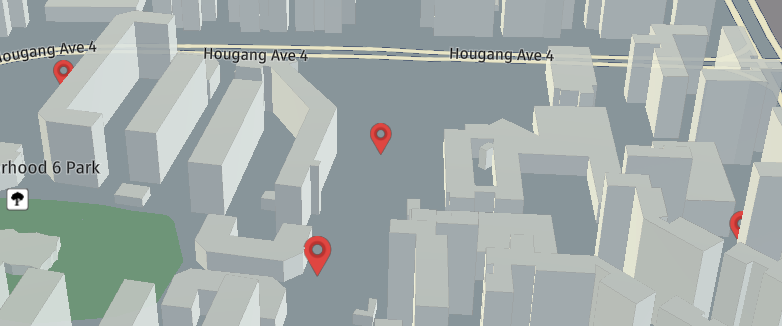
You can push the far plane further away by specifying farZMultiplier in Deck's view state. The default is 1.01.
Pessimistress
on 27 Sep 2020
@Pessimistress - Tried achorY with value 0 and equal to height but it doesn't seem to fully solve the issue.
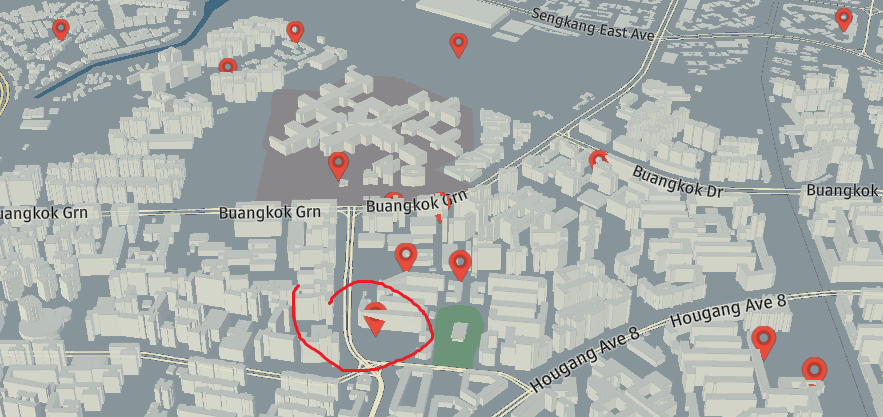
Depth checking goes haywire at the top of the icon when it's clearly in front but works for the bottom part of the icon. What's the actual reason for this? Is far plane mismatching the root cause for these type of issues?
Now I don't know how icons are working internally, but I'm guessing that when we are using them as always face to the camera, the 2D icons stand upright and coincide with the altitude axis. If they don't and are titled, then that will explain why some part of the icon go inside the building. If the buildings and everything stand upright or if they are tilted then if everything (icons + buildings) is tilted at the same angle, I don't get why some things or parts go inside the buildings.
Edit:- Wait, I think I got it after staring at the pic for like 2 minutes xD The building is placed diagonally and if the icon is standing upright, then the building will continue to increase/decrease in the depth dimension which causes the above issue circled in red. Prolly the reason why building obstructs more of the icon towards the right when it's nearer. Any way to avoid this?
The only thing I can think of is for the depth testing to work so that it uses a single anchor point of the icon for e.g the top or the base as a reference to decide whether to render the whole icon at the top or the building. Not to well versed in these topics but I think games avoid these kind of things using collision detection, I guess.
gallickgunner
on 27 Sep 2020
Yep you got it. The icon layer renders as billboards, i.e. all icons are drawn facing the camera at the depth of their anchor.
To draw them in real 3D you need each icon's rectangle in the world space instead of the clip space. You may switch to the SimpleMeshLayer with texture, or you can subclass the IconLayer and modify its billboard: false mode.
Edit: looks like the original issue (depth matching with harp.gl) is solved? We can move the icon rendering discussion to a different thread.
Pessimistress
on 27 Sep 2020
Yep you got it. The icon layer renders as billboards, i.e. all icons are drawn facing the camera at the depth of their anchor.
To draw them in real 3D you need each icon's rectangle in the world space instead of the clip space. You may switch to the SimpleMeshLayer with texture, or you can subclass the IconLayer and modify its
billboard: falsemode.Edit: looks like the original issue (depth matching with harp.gl) is solved? We can move the icon rendering discussion to a different thread.
Hmm, I'll try that. And yes I think this was the main issue all along. So depth matching with harp.gl works already, I guess. There might be issues with far plane mismatching which give those yellowish/blue planes but more or less they can be avoided or tweaked.
I'll open a new thread regarding icon rendering when I'm back on this. Thanks for the continued support, appreciate it.
gallickgunner
on 27 Sep 2020
@gallickgunner , congratulations! Glad to hear you got it working, and thanks @Pessimistress also for your help!
nzjony
on 28 Sep 2020
Related issues
 heumsi
·
4Comments
heumsi
·
4Comments
 RELNO
·
4Comments
RELNO
·
4Comments
 flowsipher
·
3Comments
flowsipher
·
3Comments
 rjimenezda
·
3Comments
rjimenezda
·
3Comments
 jianhuang01
·
3Comments
jianhuang01
·
3Comments
Most helpful comment
Hmm, I'll try that. And yes I think this was the main issue all along. So depth matching with harp.gl works already, I guess. There might be issues with far plane mismatching which give those yellowish/blue planes but more or less they can be avoided or tweaked.
I'll open a new thread regarding icon rendering when I'm back on this. Thanks for the continued support, appreciate it.