Deck.gl: GeoJson layers with sub 1 opacity doesn't render other GeoJson layers seen through it.
Description
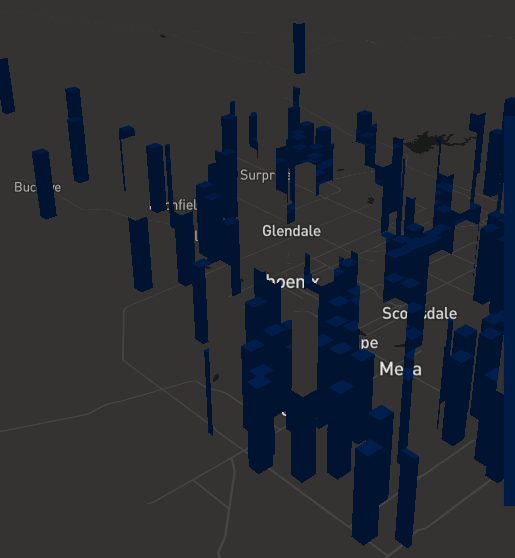
I have two geojson layers that I am toggling between by toggling the opacity of each other from 1 to 0. However, some of my polygons may be in the sight line of a the other layers polygon, and the polygon behind the other, opaque polygon is not rendered. It appears this is only an issue for layer with ID gj2. So the first layer doesn't have this issue, but the second does. For ex:
Repro Steps
Here's my layer render code.
return [new GeoJsonLayer({
    id: 'gj1',
    data: this.props.layers.gj1data,
    getFillColor:  x=>this.props.layers.gj1color,
    opacity: this.props.gj1op,
    filled: true,
    extruded: true,
    hightlight: true,
    material,
    getElevation: 200,
    visible: this.props.layers.gj1data !== 'na',
    elevationScale: this.props.escale
  }),
  new GeoJsonLayer({
    id: 'gj2',
    data: this.props.layers.gj2data,
    getFillColor: x=>this.props.layers.gj2color,
    stroked: true,
    material,
    opacity: this.props.gj2op,
    filled: true,
    hightlight: true,
    extruded: true,
    visible: this.props.layers.gj2data !== 'na',
    getElevation: 100,
    elevationScale: this.props.escale
  })
]
Environment (please complete the following information):
- Framework Version:Framework Version: "deck.gl": "^7.0.3", "react": "^16.8.6",
- Browser Version: Chrome 74.0.3729.108
- OS: ChromeOS 73
Logs
Don't see any logs behind webanimationframe warnings.
 flowsipher
All 3 comments
The reason is that even if they are completely transparent the fragment shader still renders the distance of each pixel into the "Z buffer". In some layer shaders we discard the pixel completely if the opacity is exactly 0 we could do potentially do that for polygons as well. This would only handle the 0 opacity case though.
It doesn't help you right now, but we are doing background work on better solutions for transparent layers. Good transparency support is one of the trickier things to implement well in WebGL/OpenGL. @tsherif @georgios-uber
 ibgreen
on 1 May 2019
ibgreen
on 1 May 2019
Try settings parameters: { depthMask: false }
 georgios-uber
on 1 May 2019
georgios-uber
on 1 May 2019
@georgios-uber Worked perfectly! Thanks so much for the quick response guys. Your teams doing really cool work on this. I'm using it for a project right now that I'm really excited about.
Best of luck in future development.
flowsipher
on 1 May 2019
Related issues
 rjimenezda
·
3Comments
rjimenezda
·
3Comments
 ctriley
·
3Comments
ctriley
·
3Comments
 jianhuang01
·
3Comments
jianhuang01
·
3Comments
 TareqAlqutami
·
3Comments
TareqAlqutami
·
3Comments
 patilvikram
·
3Comments
patilvikram
·
3Comments