Deck.gl: Add color scheme to bitmap layer when passing a grayscale image
Hello,
Q: Is it possible to add a color scheme to the bitmap image?
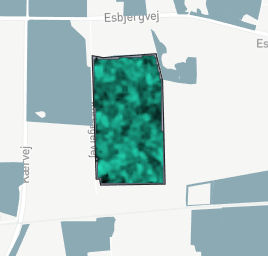
At the moment I am adding a grayscale image as a bitmap layer and I am setting the tintColor to a specific color (RGB), hence obtaining the result below. What I want is that the darkest pixel (low value pixels) have a pale yellow color.
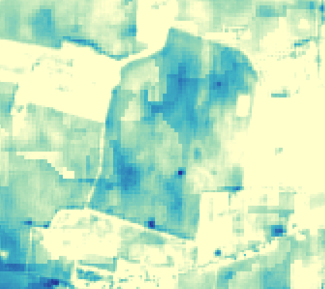
I want to achieve something like below, going from pale yellow (low value pixels) to light blue (high value pixels).
Cheers!
 Robert-OP
All 9 comments
Without adding too many case-specific APIs, we could consider adding a new prop colorTransform that takes a 4x4 matrix and apply it to the pixel color's RGB. Then in your use case, if your target color for white is [R0, G0, B0, A0] and color for black is [R1, G1, B1, A1], the transform will be
new Matrix4().scale([R1 - R0, G1 - G0, B1 - B0]).translate([R0, G0, B0])
Existing props tint and desaturate can be represented by a transform matrix.
@xintongxia
 Pessimistress
on 22 Feb 2020
Pessimistress
on 22 Feb 2020
Thanks for the answer and possible solution @Pessimistress!
Robert-OP
on 25 Feb 2020
Also, @Pessimistress if I have a bit of guidance, I can help out to implement this extra prop in the Bitmap Layer. Would that be possible? Cheers
Robert-OP
on 27 Feb 2020
For sure!
First, add the new prop to BitmapLayer's defaultProps. The prop types system is documentated here. You'd have something similar to this prop.
In the layer's updateState method, check if any of colorTransform, desaturate or tintColor has changed. If so, we need to compose the transform matrix and save it in the layer's state.
tintColor[r, g, b] should become[r/255, 0, 0, 0, 0, g/255, 0, 0, 0, 0, b/255, 0, 0, 0, 1]desaturated should become[1-d*2/3, d/3, d/3, 0, d/3, 1-d*2/3, d/3, 0, d/3, d/3, 1-d*2/3, 0, 0, 0, 1]
You can import Matrix4 from math.gl to help with the calculation.
In the layer's draw method, instead of desaturate and tintColor, we'll send colorTransform as a uniform.
In the vertex shader, instead of color_tint(color_desaturate(bitmapColor.rgb)), well use colorTransform * bitmapColor.
Pessimistress
on 28 Feb 2020
Alright, thank you @Pessimistress !
How do I run this locally in order to test out the modules when developing?
Nevermind, just found it.
Robert-OP
on 1 Mar 2020
@Pessimistress - I want to get a good understanding of what I am doing and know if I am on a right path.
I guess the defaultProp for the color scheme should be consistent with the other layer, I see that in the heatmap-layer there is this colorRange which is an array of RGB values that paints.
Q0: Did you miss a 0 in both arrays / matrices for tintColor & desaturate?
tintColor [r, g, b] --> [r/255, 0, 0, 0, 0, g/255, 0, 0, 0, 0, b/255, **0**, 0, 0, 0, 1]
desaturate [d] --> [1-d*2/3, d/3, d/3, 0, d/3, 1-d*2/3, d/3, 0, d/3, d/3, 1-d*2/3, **0**, 0, 0, 0, 1]
Q1: Should I use colorRange for the prop?
Q2: Did you mean something else with colorTransform? Is colorTransform the product/composition of colorRange, tintColor and desaturate?
Cheers
Robert-OP
on 4 Mar 2020
Q0: Did you miss a 0 in both arrays / matrices for
tintColor&desaturate?
I think so because a mat4 should have 16 values.
Q1: Should I use
colorRangefor the prop?
I think colorRange is used with discrete bins, and I think the proposal here was to use a continuous color range between the minimum and maximum rgb values, so I would guess it doesn't apply.
Q2: Did you mean something else with
colorTransform? IscolorTransformthe product/composition ofcolorRange,tintColoranddesaturate?
As I understand it, since colorTransform defines an arbitrary mat4, it can define _any_ linear transformation of colors. So tintColor and desaturate are instances of such a colorTransform. I would guess that the added prop would be the colorTransform directly. So if colorTransform is passed, tintColor and desaturate would be ignored, but otherwise colorTransform = tintColor * desaturate.
 kylebarron
on 18 Apr 2020
kylebarron
on 18 Apr 2020
Cheers @kylebarron - thank you for the response!
Robert-OP
on 18 Apr 2020
Here is a notebook showing how you can implement similar features:
https://observablehq.com/@pessimistress/deck-gl-shader-injection
Pessimistress
on 16 Oct 2020
Related issues
 heumsi
·
4Comments
heumsi
·
4Comments
 FilipHusnjak
·
3Comments
FilipHusnjak
·
3Comments
 mayteio
·
3Comments
mayteio
·
3Comments
 Dieegho
·
3Comments
Dieegho
·
3Comments
 SymbolixAU
·
4Comments
SymbolixAU
·
4Comments
Most helpful comment
For sure!
First, add the new prop to BitmapLayer's
defaultProps. The prop types system is documentated here. You'd have something similar to this prop.In the layer's
updateStatemethod, check if any ofcolorTransform,desaturateortintColorhas changed. If so, we need to compose the transform matrix and save it in the layer's state.tintColor[r, g, b] should become[r/255, 0, 0, 0, 0, g/255, 0, 0, 0, 0, b/255, 0, 0, 0, 1]desaturated should become[1-d*2/3, d/3, d/3, 0, d/3, 1-d*2/3, d/3, 0, d/3, d/3, 1-d*2/3, 0, 0, 0, 1]You can import
Matrix4frommath.glto help with the calculation.In the layer's
drawmethod, instead ofdesaturateandtintColor, we'll sendcolorTransformas a uniform.In the vertex shader, instead of
color_tint(color_desaturate(bitmapColor.rgb)), well usecolorTransform * bitmapColor.