Deck.gl: DeckGL Component mounted over other component
Hi! I'm struggling with this problem. I have DeckGL component with StaticMap and I want to place it below of my form.
This is the form:
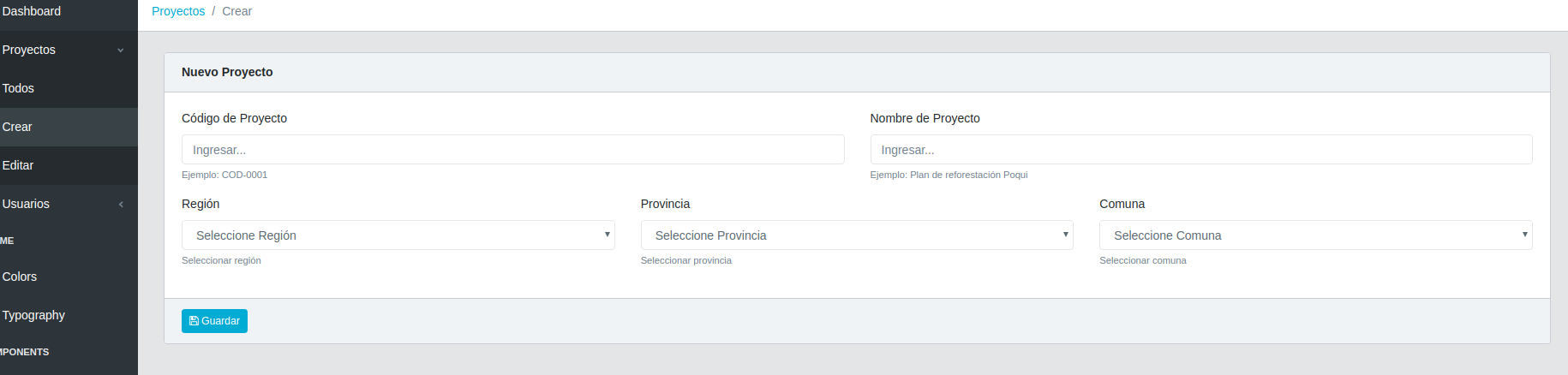
This is what happens
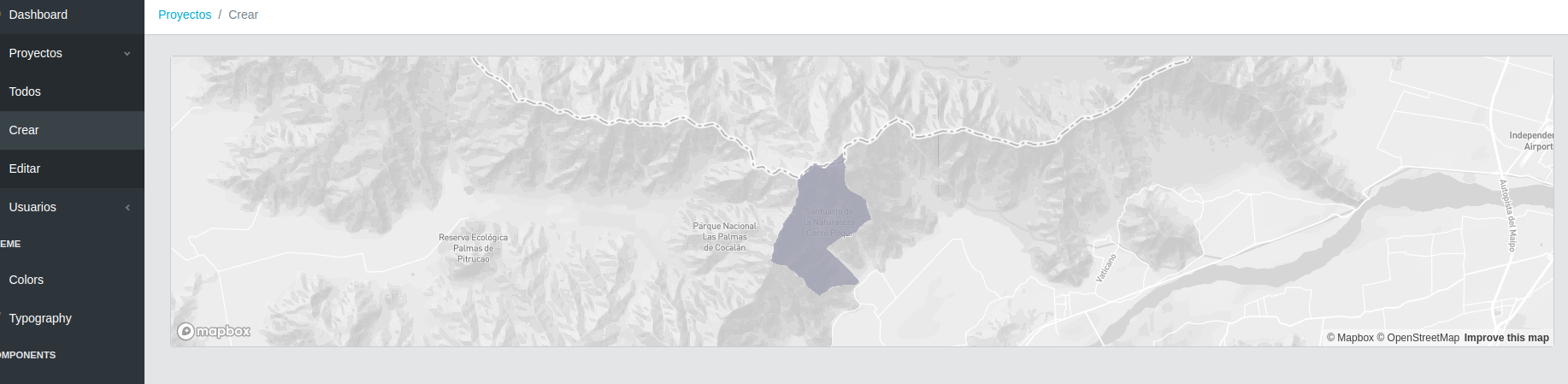
The parent code:
render() {
    return (
      <div>
        <Card>
          <CardHeader>
            <strong>Nuevo Proyecto</strong>
          </CardHeader>
          <CardBody>
            <InitalForm />
            <Map />
          </CardBody>
          <CardFooter>
            <Button size="sm" color="primary" onClick={this.handleSave}>
              <i className="fa fa-save"></i> Guardar
            </Button>
          </CardFooter>
        </Card>
      </div>
    );
  }
The childen code (Map Component):
import React, { Component } from "react";
import DeckGL from "@deck.gl/react";
import StaticMap from "react-map-gl";
import { renderLayers } from "./Layers";
import {
  Button,
  Modal,
  ModalBody,
  ModalFooter,
  ModalHeader,
  Container
} from "reactstrap";

import poquiData from "../../../../poqui";

// Set your mapbox access token here
const MAPBOX_ACCESS_TOKEN = "TOKEN";

const INITIAL_VIEW_STATE = {
  longitude: -71.053166513,
  latitude: -34.181195119,
  zoom: 11,
  pitch: 0,
  bearing: 0
};

class Map extends Component {
  state = {
    data: poquiData,
    style: "mapbox://styles/mapbox/light-v9"
  };

  getTooltip = ({ object }) => {
    return (
      object &&
      `Nombre: ${object.properties.gid}
      HA: ${object.properties.ha}`
    );
  };

  render() {
    return (
      <div>
        <DeckGL
          layers={renderLayers({
            data: this.state.data
          })}
          initialViewState={INITIAL_VIEW_STATE}
          controller
          getTooltip={this.getTooltip}
        >
          <StaticMap mapboxApiAccessToken={MAPBOX_ACCESS_TOKEN} />
        </DeckGL>
      </div>
    );
  }
}

export default Map;
Can anyone help me please, I don't know how to keep going :(
question
 Dieegho
All 3 comments
Add style={{position: 'relative', width: '100%', height: <map_height>}} to the <div> that contains DeckGL.
 Pessimistress
on 11 Feb 2020
Pessimistress
on 11 Feb 2020
👍2
Add
style={{position: 'relative', width: '100%', height: <map_height>}}to the<div>that containsDeckGL.
Thank you very much!!! That worked!
Dieegho
on 11 Feb 2020
@Pessimistress this also worked for me thankyou!
 timcash
on 2 Aug 2020
timcash
on 2 Aug 2020
Was this page helpful?
0 / 5 - 0 ratings
Related issues
 mayteio
·
3Comments
mayteio
·
3Comments
 FilipHusnjak
·
3Comments
FilipHusnjak
·
3Comments
 jfuehner
·
3Comments
jfuehner
·
3Comments
 SymbolixAU
·
4Comments
SymbolixAU
·
4Comments
 heumsi
·
4Comments
heumsi
·
4Comments
Most helpful comment
Add
style={{position: 'relative', width: '100%', height: <map_height>}}to the<div>that containsDeckGL.