Dbeaver: Context menu in database navigator
When I right-clic on an item in the database navigator I cannot see the context menu. I'm using DBeaver 6.1.4 on Linux Mint 19.1 Cinnamon . In DBeaver 6.1.3 I can see the menu.
 cldscchttn
All 53 comments
Can't reproduce.
Please check error/debug logs, maybe there is something that will explain this.
https://github.com/dbeaver/dbeaver/wiki/Log-files
 serge-rider
on 10 Aug 2019
serge-rider
on 10 Aug 2019
I have the same problem too, i'm using DBeaver 6.1.4 on Ubuntu 18.04. This error happens after i upgraded from 6.1.3 to 6.1.4. Just tried to remove dbeaver entirely and reinstall it but the the problem still remains. Besides, there is nothing in the log file too.
 ngocthienvnn
on 12 Aug 2019
ngocthienvnn
on 12 Aug 2019
Does this happen with any navigator items or only with some?
Please check debug log as well.
serge-rider
on 13 Aug 2019
Any item.
I don't have the folder $XDG_DATA_HOME/DBeaverData so I cannot find any log file
cldscchttn
on 13 Aug 2019
What about ~/.local/share/DBeaverData ?
serge-rider
on 13 Aug 2019
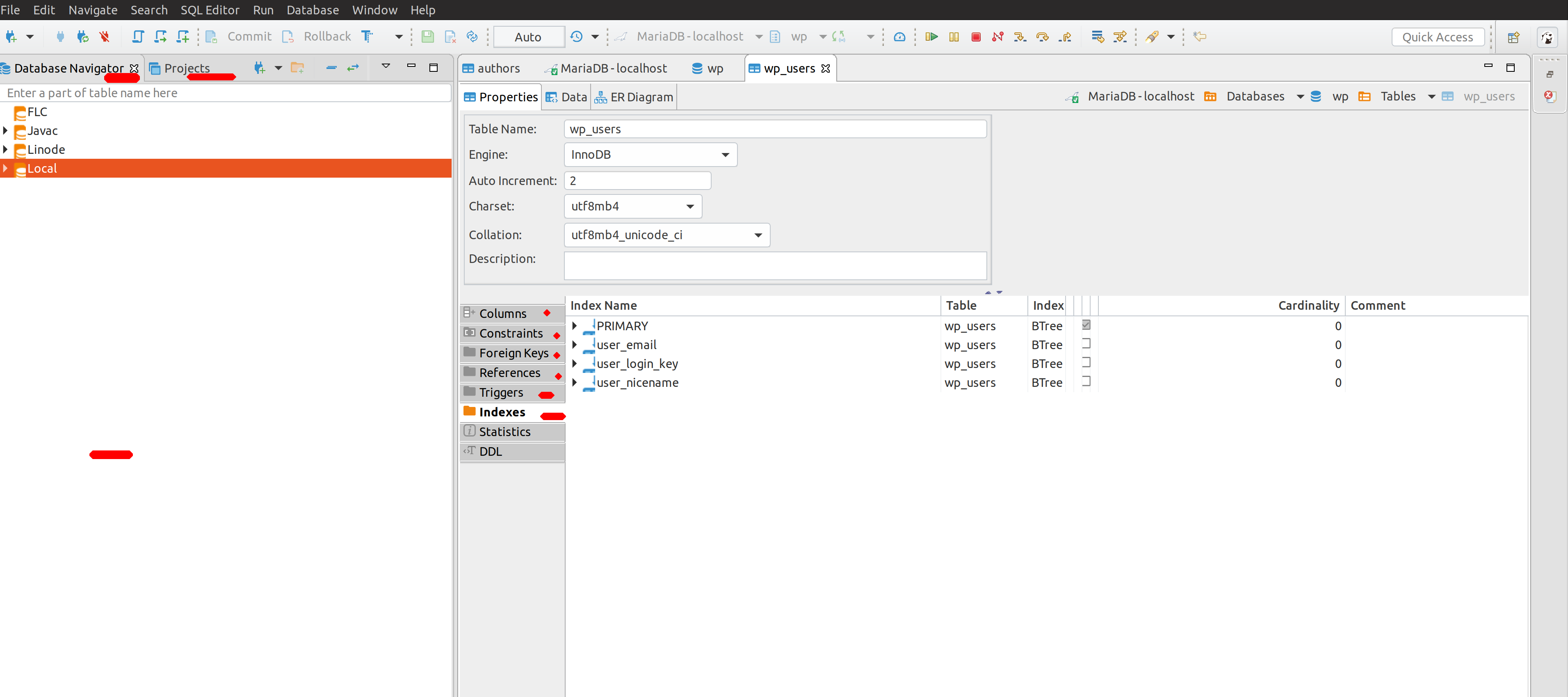
Please see my screenshot, those have red line that can not use right-click context menu, only DLL and Statistic tab can use right-click context menu
ngocthienvnn
on 13 Aug 2019
Log files are in ~/.local/share/.DBeaverData folder (.DbeaverData with point)
I have three data sources: Ms Access, MySql and PostgreSQL. When I right clic on tables in MS Access and MySql I don't get any log (context menu does not appear). But when I clic on postgreSQL tables I have the following log lines ("avvertenza" in italian means "warning")
ago 13, 2019 5:52:58 PM org.apache.commons.jexl2.JexlEngine unknownVariable
AVVERTENZA: org.jkiss.dbeaver.model.impl.AbstractDescriptor.parseExpression@58![0,14]: 'object.utility || object.external;' inaccessible or unknown property object
ago 13, 2019 5:52:58 PM org.apache.commons.jexl2.JexlEngine unknownVariable
AVVERTENZA: org.jkiss.dbeaver.model.impl.AbstractDescriptor.parseExpression@58![18,33]: 'object.utility || object.external;' inaccessible or unknown property object
ago 13, 2019 5:52:58 PM org.apache.commons.jexl2.JexlEngine unknownVariable
AVVERTENZA: org.jkiss.dbeaver.model.impl.AbstractDescriptor.parseExpression@58![0,13]: 'object.system;' inaccessible or unknown property object
ago 13, 2019 5:52:58 PM org.apache.commons.jexl2.JexlEngine unknownVariable
AVVERTENZA: org.jkiss.dbeaver.model.impl.AbstractDescriptor.parseExpression@58![1,16]: '!object.canLogin;' inaccessible or unknown property object
ago 13, 2019 5:52:58 PM org.apache.commons.jexl2.JexlEngine unknownVariable
AVVERTENZA: org.jkiss.dbeaver.model.impl.AbstractDescriptor.parseExpression@58![0,14]: 'object.utility || object.external;' inaccessible or unknown property object
ago 13, 2019 5:52:58 PM org.apache.commons.jexl2.JexlEngine unknownVariable
AVVERTENZA: org.jkiss.dbeaver.model.impl.AbstractDescriptor.parseExpression@58![18,33]: 'object.utility || object.external;' inaccessible or unknown property object
ago 13, 2019 5:52:58 PM org.apache.commons.jexl2.JexlEngine unknownVariable
AVVERTENZA: org.jkiss.dbeaver.model.impl.AbstractDescriptor.parseExpression@58![0,13]: 'object.system;' inaccessible or unknown property object
ago 13, 2019 5:52:59 PM org.apache.commons.jexl2.JexlEngine unknownVariable
AVVERTENZA: org.jkiss.dbeaver.model.impl.AbstractDescriptor.parseExpression@58![1,16]: '!object.canLogin;' inaccessible or unknown property object
ago 13, 2019 5:52:59 PM org.apache.commons.jexl2.JexlEngine unknownVariable
AVVERTENZA: org.jkiss.dbeaver.model.impl.AbstractDescriptor.parseExpression@58![0,14]: 'object.utility || object.external;' inaccessible or unknown property object
ago 13, 2019 5:52:59 PM org.apache.commons.jexl2.JexlEngine unknownVariable
AVVERTENZA: org.jkiss.dbeaver.model.impl.AbstractDescriptor.parseExpression@58![18,33]: 'object.utility || object.external;' inaccessible or unknown property object
ago 13, 2019 5:52:59 PM org.apache.commons.jexl2.JexlEngine unknownVariable
AVVERTENZA: org.jkiss.dbeaver.model.impl.AbstractDescriptor.parseExpression@58![0,13]: 'object.system;' inaccessible or unknown property object
ago 13, 2019 5:52:59 PM org.apache.commons.jexl2.JexlEngine unknownVariable
AVVERTENZA: org.jkiss.dbeaver.model.impl.AbstractDescriptor.parseExpression@58![1,16]: '!object.canLogin;' inaccessible or unknown property object
cldscchttn
on 13 Aug 2019
Did I understand correctly that context menu still works in some controls. E.g. SQL editor, data editor, some text controls?
serge-rider
on 13 Aug 2019
Yes, it does
cldscchttn
on 13 Aug 2019
I am also having this issue. Just upgraded from 6.1.3 to 6.1.4 on Manjaro. I was asked, and agreed, to convert my settings upon first opening after the upgrade.
I have a workaround at the moment by changing the key binding for context menu in preferences.
Window -> Preferences -> Keys. Search for context menu. Bind Ctrl+F12 In Dialogs and Windows.
This now shows the context menu when triggered using Ctl+F12 in the Database Navigator window.
The issues appears to be the relationship between right click and showing the context menu, and not that context menu just isn't showing in general.
It is not obvious if I can create the right click binding myself.
 ianhmh
on 13 Aug 2019
ianhmh
on 13 Aug 2019
workaround works well
cldscchttn
on 14 Aug 2019
I found another workaround.
In Dbeaver if you want rename a table you have to clic on the table with left-clic, just wait same time and re-left-clic. Same steps you can use to rename files in windows.
If you use these steps changing left-clic with right clic, you can open context menu
cldscchttn
on 14 Aug 2019
Have the same issue. And I don't have any "Context Menu" in "Window -> Preferences -> Keys"
 Phr0ztByte
on 16 Aug 2019
Phr0ztByte
on 16 Aug 2019
Me too.
I have this issue since I updated to version 6.1.5.
The right click context menu only shows randomly and rarely. I couldn't identify the reason why.
It's frustrating, and it's kind of a deal breaker actually, but everything else seems fine so I will try some key binding workaround.
 Mizar01
on 20 Aug 2019
Mizar01
on 20 Aug 2019
Same here. I am able to access the context menu with a keyboard key (next to alt gr on my keyboard) or as described in https://github.com/dbeaver/dbeaver/issues/6489#issuecomment-521135007 ... left click, with some delay, twice, so that I could edit the name. Then I am able to right click.
This applies to all entries in DB-Navigator and Projects.
Version: 6.1.4
System: Arch Linux / Gnome 3.32.2
 schmunk42
on 21 Aug 2019
schmunk42
on 21 Aug 2019
in 6.1.5 version the problem still remains.
cldscchttn
on 27 Aug 2019
I have downgraded to 6.1.13 on Linux where the problem does not exist. Can confirm that both 6.1.4 and 6.1.5 has the issue.
Phr0ztByte
on 28 Aug 2019
Still can't reproduce it on any of our test linuxes.
Is there anything in log files (https://github.com/dbeaver/dbeaver/wiki/Log-files) ?
Please send debug log to [email protected].
serge-rider
on 28 Aug 2019
Right click and then right click again in the same place does the job for me, 6.1.15,
no logs either in Window -> Show view -> Error log or log directory.
Ubuntu 16.04.6 LTS, Linux 4.15.0-60-generic x86_64
 megabyte0
on 5 Sep 2019
megabyte0
on 5 Sep 2019
not sure is it related, but:
DBeaverCommunity 6.1.5
when connect via freerdp (windows to linux) - all menu didn't work,
on local machine - all menu works
 Alexqwesa
on 6 Sep 2019
Alexqwesa
on 6 Sep 2019
I found another workaround.
In Dbeaver if you want rename a table you have to clic on the table with left-clic, just wait same time and re-left-clic. Same steps you can use to rename files in windows.
If you use these steps changing left-clic with right clic, you can open context menu
I think this should give the devs some hint about what is going wrong. It seems to be related to handling the mouse click event and timing. If you right-click for the second time too quickly it doesn't work. In any case, I can confirm that this workaround works. It is still pretty annoying as I use the context menu very often and 3 seconds waiting time often feels like ages.
 eborremans
on 9 Sep 2019
eborremans
on 9 Sep 2019
It still happens. I have reinstalled my system(Ubuntu 18.04) and installed DBeaver(6.2) via this link: https://dbeaver.io/files/dbeaver-ce_latest_amd64.deb and still can not use right click context menu.
ngocthienvnn
on 11 Sep 2019
Yes this only happen when you right click too fast ? if you hold right click for a moment, the context menu will appear.
 felangga
on 19 Sep 2019
felangga
on 19 Sep 2019
Yes this only happen when you right click too fast ? if you hold right click for a moment, the context menu will appear.
felangga, you are a life saver! You are right, holding the right mouse button is a pretty decent workaround. It is a strange bug and I am pretty sure, it should not work like this, but once you know this workaround the irritation level drops drastically!
eborremans
on 20 Sep 2019
Yes this only happen when you right click too fast ? if you hold right click for a moment, the context menu will appear.
You are right, but it doesn't work with Touchpad
ngocthienvnn
on 20 Sep 2019
I keep right clicking continuously and it sometimes works. Now instead of right-clicking on db , I click and then press f4 for edit connection and f3 to open new sql editor.
But this is annoying.
 aseem-hegshetye
on 22 Sep 2019
aseem-hegshetye
on 22 Sep 2019
Still not fixed in 6.2.1 :(
Felix Angga
E: [email protected] (https://link.getmailspring.com/link/[email protected]/0?redirect=mailto%3Afelangga%40gmail.com&recipient=cmVwbHkrQURSQTZDQUNSUjNWV1NONzRFTlU0Uk4zU1VPQUhFVkJOSEhCWkVGTUU0QHJlcGx5LmdpdGh1Yi5jb20%3D)
W: http://felangga.blogspot.com (https://link.getmailspring.com/link/[email protected]/1?redirect=http%3A%2F%2Ffelangga.blogspot.com&recipient=cmVwbHkrQURSQTZDQUNSUjNWV1NONzRFTlU0Uk4zU1VPQUhFVkJOSEhCWkVGTUU0QHJlcGx5LmdpdGh1Yi5jb20%3D)
On Sep 23 2019, at 3:37 am, Aseem notifications@github.com wrote:
I keep right clicking continuously and it sometimes works. Now instead of right-clicking on db , I click and then press f4 for edit connection and f3 to open new sql editor.
But this is annoying.—
You are receiving this because you commented.
Reply to this email directly, view it on GitHub (https://link.getmailspring.com/link/[email protected]/2?redirect=https%3A%2F%2Fgithub.com%2Fdbeaver%2Fdbeaver%2Fissues%2F6489%3Femail_source%3Dnotifications%26email_token%3DADRA6CHVFQNGEU6CLDCUKV3QK7JPHA5CNFSM4IKY5QLKYY3PNVWWK3TUL52HS4DFVREXG43VMVBW63LNMVXHJKTDN5WW2ZLOORPWSZGOD7JOWNY%23issuecomment-533916471&recipient=cmVwbHkrQURSQTZDQUNSUjNWV1NONzRFTlU0Uk4zU1VPQUhFVkJOSEhCWkVGTUU0QHJlcGx5LmdpdGh1Yi5jb20%3D), or mute the thread (https://link.getmailspring.com/link/[email protected]/3?redirect=https%3A%2F%2Fgithub.com%2Fnotifications%2Funsubscribe-auth%2FADRA6CABFJTVIWXO37FT3GTQK7JPHANCNFSM4IKY5QLA&recipient=cmVwbHkrQURSQTZDQUNSUjNWV1NONzRFTlU0Uk4zU1VPQUhFVkJOSEhCWkVGTUU0QHJlcGx5LmdpdGh1Yi5jb20%3D).
felangga
on 23 Sep 2019
@felangga It is not.
We still can't reproduce it on our side. And I can't figure out what GTK settings cause this issue.
This glitch appeared after our upgrade to Eclipse platform 2019-06. So I believe it is some bug in SWT-GTK support. Hopefully it'll be fixed in 2019-09 version.
However, we keep trying to localize this bug.
serge-rider
on 23 Sep 2019
Thank you for the response.
Maybe I can help to provide some information ?
Felix Angga
E: [email protected] (https://link.getmailspring.com/link/[email protected]/0?redirect=mailto%3Afelangga%40gmail.com&recipient=cmVwbHkrQURSQTZDRElOVFdUWExWN1hLQUVSMzUzU1dXWDdFVkJOSEhCWkVGTUU0QHJlcGx5LmdpdGh1Yi5jb20%3D)
W: http://felangga.blogspot.com (https://link.getmailspring.com/link/[email protected]/1?redirect=http%3A%2F%2Ffelangga.blogspot.com&recipient=cmVwbHkrQURSQTZDRElOVFdUWExWN1hLQUVSMzUzU1dXWDdFVkJOSEhCWkVGTUU0QHJlcGx5LmdpdGh1Yi5jb20%3D)
On Sep 23 2019, at 2:57 pm, Serge Rider notifications@github.com wrote:
@felangga (https://link.getmailspring.com/link/[email protected]/2?redirect=https%3A%2F%2Fgithub.com%2Ffelangga&recipient=cmVwbHkrQURSQTZDRElOVFdUWExWN1hLQUVSMzUzU1dXWDdFVkJOSEhCWkVGTUU0QHJlcGx5LmdpdGh1Yi5jb20%3D) It is not.
We still can't reproduce it on our side. And I can't figure out what GTK settings cause this issue.This glitch appeared after our upgrade to Eclipse platform 2019-06. So I believe it is some bug in SWT-GTK support. Hopefully it'll be fixed in 2019-09 version.
However, we keep trying to localize this bug.
—
You are receiving this because you were mentioned.
Reply to this email directly, view it on GitHub (https://link.getmailspring.com/link/[email protected]/3?redirect=https%3A%2F%2Fgithub.com%2Fdbeaver%2Fdbeaver%2Fissues%2F6489%3Femail_source%3Dnotifications%26email_token%3DADRA6CFGALZWJ3E2WFO6KKTQLBZH7A5CNFSM4IKY5QLKYY3PNVWWK3TUL52HS4DFVREXG43VMVBW63LNMVXHJKTDN5WW2ZLOORPWSZGOD7KCA2Y%23issuecomment-533995627&recipient=cmVwbHkrQURSQTZDRElOVFdUWExWN1hLQUVSMzUzU1dXWDdFVkJOSEhCWkVGTUU0QHJlcGx5LmdpdGh1Yi5jb20%3D), or mute the thread (https://link.getmailspring.com/link/[email protected]/4?redirect=https%3A%2F%2Fgithub.com%2Fnotifications%2Funsubscribe-auth%2FADRA6CGI4B53OTQH7DFJ4YLQLBZH7ANCNFSM4IKY5QLA&recipient=cmVwbHkrQURSQTZDRElOVFdUWExWN1hLQUVSMzUzU1dXWDdFVkJOSEhCWkVGTUU0QHJlcGx5LmdpdGh1Yi5jb20%3D).
felangga
on 23 Sep 2019
@serge-rider
I run DBeaver both from windows - where the problem doesn't seem to occur, and in an Oracle Virtualbox (6.0.0 r127566 (Qt5.6.2)) running centos - where is DOES occur. For what it is worth, it may be related to keymappings/interception that take place in the VM. I also assume the VM is much slower and so mouse event timing may also be an influence.
The reason I am mentioning this is because keeping the right mousebutton pressed DOES show the menu. So I can imagine that the duration for which the mouse needs to be pressed is longer on the vm (due to its relative slowness) than on a native system. Of course showing the context menu should not be mapped to mousedown+duration but just to mousedown (or mouseup?). I don't know how this is implemented in eclipse, but it may give you a hint for where to look next. My apologies for not having more detailed info, but in my experience as tester, when having trouble reproducing issues, at some point you learn to analyse even unlikely possibilities.
eborremans
on 23 Sep 2019
@eborremans I am running it on my main workstation with Ubuntu on it. No slowdown.
Phr0ztByte
on 24 Sep 2019
What DE you use ? Unity ?
Felix Angga
E: [email protected] (mailto:[email protected])
W: http://felangga.blogspot.com
On Sep 24 2019, at 3:14 pm, Thomas Frederiksen notifications@github.com wrote:
@eborremans (https://github.com/eborremans) I am running it on my main workstation with Ubuntu on it. No slowdown.
—
You are receiving this because you were mentioned.
Reply to this email directly, view it on GitHub (https://github.com/dbeaver/dbeaver/issues/6489?email_source=notifications&email_token=ADRA6CEBNIPMGNYZRBO7NIDQLHD43A5CNFSM4IKY5QLKYY3PNVWWK3TUL52HS4DFVREXG43VMVBW63LNMVXHJKTDN5WW2ZLOORPWSZGOD7NQAAY#issuecomment-534446083), or mute the thread (https://github.com/notifications/unsubscribe-auth/ADRA6CB74VWWC5C764KX33LQLHD43ANCNFSM4IKY5QLA).
felangga
on 25 Sep 2019
Please try latest Early Access version (https://dbeaver.io/files/ea/)
It is build on new Eclipse platform. Perhaps this issue will be resolved (at least on some Linuxes).
serge-rider
on 28 Sep 2019
Just installed the EA build on Pop_OS! 19.04 and right click works with a mouse, but not a touchpad. I think this seems to confirm some of the earlier comments that this may be related to the duration of the right click event. The mouse right click works, but a two-finger tap doesn't open the menu for me.
 bneff84
on 2 Oct 2019
bneff84
on 2 Oct 2019
@bneff84 I am using touchpad, and it is not working for me. So that makes perfect sense :)
Phr0ztByte
on 2 Oct 2019
Regarding https://github.com/dbeaver/dbeaver/issues/6489#issuecomment-523415302 ... I am also using a touch- or track-pad.
schmunk42
on 2 Oct 2019
After doing some testing. When using a trackpad set up for 2-finger tap = secondary click the context menu does not come up. When I have used an external mouse, the secondary click to trigger the context menu does work. This is on manjaro linux. If it would be useful for me to dig into any of my trackpad/mouse settings, please let me know. This is not may area of expertise, so any guidance would be useful.
ianhmh
on 2 Oct 2019
I've reproduced this on CentOS 7 on VM.
Context menu is triggered by mouse down event there. Longer mouse down (for 1 second or so) shows menu.
Trying to localize the problem..
serge-rider
on 5 Oct 2019
Similar issue on Mac Mojave 10.14, DBeaver Version 6.2.2.201910061950. Can't right click in the Properties panel of a table with trackpad. Can right-click other places.
 clhefton
on 11 Oct 2019
clhefton
on 11 Oct 2019
Same problem. Kubuntu 18.04 + i3 windows manager.
If I select connection and press F4, it let me edit the connection and since then I can also right click and it displays the menu.
 webian
on 24 Oct 2019
webian
on 24 Oct 2019
Confirmed on RHEL 7.7 and CentOS 7.7 and RHEL8 on version 6.15 up to newest version. Is there anyway or work arround? It doesn't respond at all.. so sad..
 benyaminl
on 4 Nov 2019
benyaminl
on 4 Nov 2019
@benyaminl did you try keeping the right mouse button pressed until the menu shows? That currently seems to be a workaround.
eborremans
on 4 Nov 2019
Yeah but it will destroy my touch pad. Hahaha.. i have work arround to set the default database ctrl+shift+a
On November 4, 2019 4:01:35 PM GMT+07:00, eborremans notifications@github.com wrote:
@benyaminl did you try keeping the right mouse button pressed until the
menu shows? That currently seems to be a workaround.--
You are receiving this because you were mentioned.
Reply to this email directly or view it on GitHub:
https://github.com/dbeaver/dbeaver/issues/6489#issuecomment-549267009
--
Sent from my ASUS Pegasus X005 with K-9 Mail.
benyaminl
on 4 Nov 2019
Same problem on Linux Mint 19.1 Mate.
I need to make a long press on right click button for the context menu to appear.
 Salamafet
on 6 Nov 2019
Salamafet
on 6 Nov 2019
It's still not work on Ubuntu 18.04, i'm using touchpad and can not use right click(two fingers press) to show context menu.
ngocthienvnn
on 6 Nov 2019
yeah me too but I think only set as active that doesn't work, Or you can open it on new windows and right click on the window, it will work anyway. It can be the work arround for now I think
On Tue, 05 Nov 2019 23:42:09 -0800
ngocthienvnn notifications@github.com wrote:
It's still not work on Ubuntu 18.04, i'm using touchpad and can not
use right click(two fingers press) to show context menu.--
You are receiving this because you were mentioned.
Reply to this email directly or view it on GitHub:
https://github.com/dbeaver/dbeaver/issues/6489#issuecomment-550186368yea
--
Benyamin Limanto
sent from ThinkPad X240 with Claws Mail
benyaminl
on 6 Nov 2019
yeah me too but I think only set as active that doesn't work, Or you can open it on new windows and right click on the window, it will work anyway. It can be the work arround for now
On Tue, 05 Nov 2019 23:42:09 -0800
ngocthienvnn notifications@github.com wrote:
It's still not work on Ubuntu 18.04, i'm using touchpad and can not
use right click(two fingers press) to show context menu.--
You are receiving this because you were mentioned.
Reply to this email directly or view it on GitHub:
https://github.com/dbeaver/dbeaver/issues/6489#issuecomment-550186368yea
--
Benyamin Limanto
sent from ThinkPad X240 with Claws Mail
benyaminl
on 7 Nov 2019
I found the problem eventually. It was caused by clipboard interactions during context menu population.
In some cases it produced a mess in GTK message queue and broke menu popup.
Thanks to everyone for help and workaround proposals.
The fix can be tested in Early Access version (https://dbeaver.io/files/ea). Or just wait for 6.2.5 version release.
serge-rider
on 16 Nov 2019
@serge-rider just tested 6.2.5 and it works, thanks a lot!
(Kubuntu 18.04 + i3)
webian
on 16 Nov 2019
verified (ubuntu 18.10)
 uslss
on 17 Nov 2019
uslss
on 17 Nov 2019
you can hold right mouse button longer to show context menu
it is temp method until new patch released
 bc67da8d
on 25 Nov 2019
bc67da8d
on 25 Nov 2019
you can hold right mouse button longer to show context menu
it is temp method until new patch released
already fixed on 6.2.5 ea
felangga
on 26 Nov 2019
you can hold right mouse button longer to show context menu
it is temp method until new patch releasedalready fixed on 6.2.5 ea
that's right :+1:
bc67da8d
on 26 Nov 2019
Related issues
 levtol
·
31Comments
levtol
·
31Comments
 dmlogic
·
36Comments
dmlogic
·
36Comments
 Chrisfufu
·
28Comments
Chrisfufu
·
28Comments
 antonyr
·
49Comments
antonyr
·
49Comments
 ajpuerta
·
65Comments
ajpuerta
·
65Comments
Most helpful comment
I found the problem eventually. It was caused by clipboard interactions during context menu population.
In some cases it produced a mess in GTK message queue and broke menu popup.
Thanks to everyone for help and workaround proposals.
The fix can be tested in Early Access version (https://dbeaver.io/files/ea). Or just wait for 6.2.5 version release.