Dashboard: Patch/Finish buttons when creating a secret do the same thing
Expected behavior
When creating a secret, I can either select no service accounts to patch and press finish, creating the secret as intended, or I can select service accounts to patch and press patch, which patches the service accounts selected to the secret. This patch button also finishes the process of creating the secret, and so renders the finish button redundant.
Actual behaviour
I would suggest that there should instead be just one button, that will carry out the behaviour of patching service accounts or not depending on what the user has chosen to do, and then finish the process of creating the secret.
Environment
Kubernetes Platform:
Tekton Pipelines version:
Tekton Triggers version:
Tekton Dashboard version:
Additional Info
 Megan-Wright
All 13 comments
I would suggest that there should instead be just one button, that will carry out the behaviour of patching service accounts or not depending on what the user has chosen to do, and then finish the process of creating the secret.
+1, just the one button makes more sense to me
 a-roberts
on 3 Mar 2020
a-roberts
on 3 Mar 2020
The 'Patch' button is only displayed when (potentially multiple) service accounts are selected in the table, it would be odd and against Carbon guidelines to display the table action header with no rows selected.
Additionally, we cannot easily access details of the selected rows from outside the table component without resorting to hacks. The DataTable is responsible for performing actions related to the data it displays and does not expose (by design) an API for external components to access / manipulate that data.
 AlanGreene
on 3 Mar 2020
AlanGreene
on 3 Mar 2020
The 'Patch' button is only displayed when (potentially multiple) service accounts are selected in the table, it would be odd and against Carbon guidelines to display the table action header with no rows selected.
Additionally, we cannot easily access details of the selected rows from outside the table component without resorting to hacks. The DataTable is responsible for performing actions related to the data it displays and does not expose (by design) an API for external components to access / manipulate that data.
Yeah, true actually, so the real question is
This patch button also finishes the process of creating the secret, and so renders the finish button redundant.
when clicking patch, the modal does go away (so finish does happen), so I'm gonna close this one off (it'd be weird if things were patched and then you had the option to finish, would do nothing)
a-roberts
on 3 Mar 2020
@a-roberts I agree that it will be good to have just Finish button. If a user selected sa accounts that cab be applied otherwise just create the secret without sa. Current design is confusing and most users are select sa account which does not get associated with the secret as patch is not noticed. I discussed with some other team member who have used secret and they seem to agree with having one "Finish" button approach. Can we open this issue to consider making it less prone to user error?
 mtamboli
on 14 Apr 2020
mtamboli
on 14 Apr 2020
@mtamboli yeah, I think it's right to have another go around the loop for this given the amount of times we've had reports, so let's open this up for any design discussions in particular around how we can improve on this while still abiding by the Carbon guidelines where it makes sense to
@AlanGreene FYI, I know you've left a comment above but I'm wondering if there's something we can display that makes things really obvious what's happening from a usability perspective
a-roberts
on 15 Apr 2020
I'm not aware of any way to get access to the selected rows from outside the DataTable component so if our goal is to make sure there's only 1 primary action on the page I think our only option is to move the finish button down to the table header as a regular toolbar action, which would be replaced by the batch actions toolbar when rows are selected.
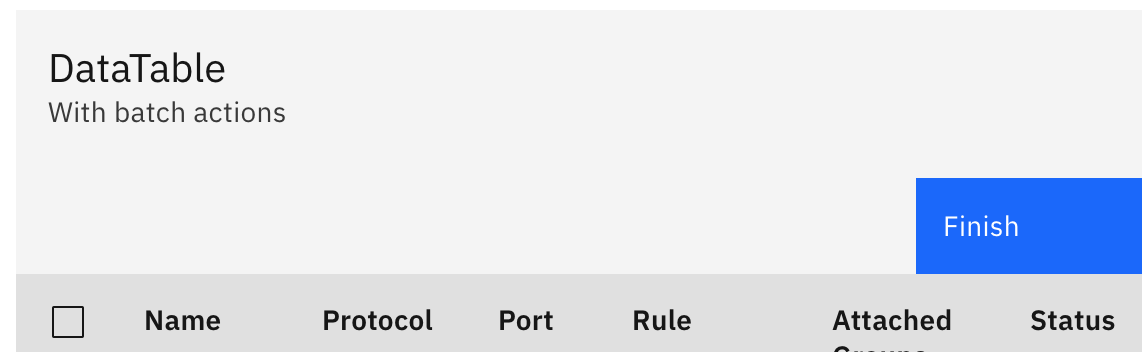
User could click Finish here to skip patching and close the create UI.
If they select any service accounts in the table, the Finish button is hidden by the table batch actions toolbar. Clicking patch would act as it does today, also closing the create UI. This way there's only ever 1 primary action displayed on the page at any given time.
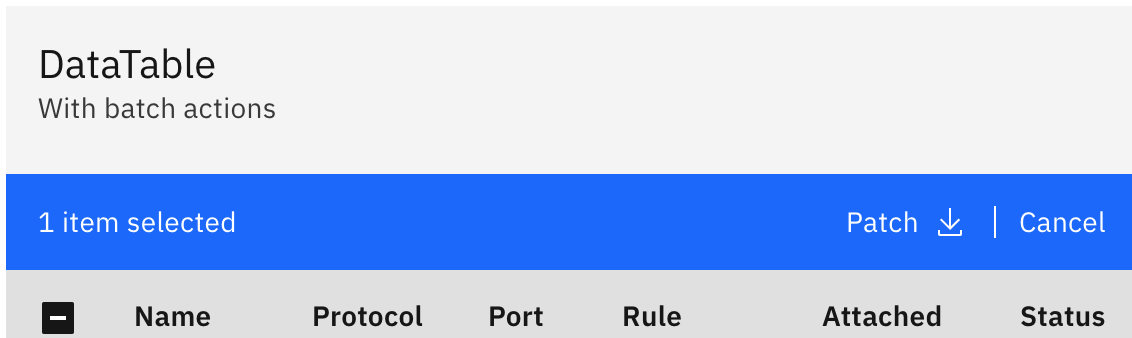
I'm not sure it'd be obvious that the user needs to click the Finish button on the table though since they're expecting the button in the top right corner from the previous page.
Another option might be to include a checkbox on the first page allowing the user to explicitly opt in to the patching... so by default the primary action in the top right of the first screen would be 'Finish', and if the user checks the checkbox the button changes to 'Next' and clicking it brings them to the patch UI instead of closing. We would still need to figure out the UI for the patch case, same issue as described above with the button placement / user expectations.
AlanGreene
on 15 Apr 2020
@AlanGreene Having only one action after sa accounts are selected will help. Can we rename "Patch" to "Finish" in that case too?
If you go for the 2nd option, it would be good to have the default to select the checkbox to associate the service accounts. Dashboard does not allow you to associate secrets to the service accounts afterwards so it is better if used does not miss this option.
Another option might be to include a checkbox on the first page allowing the user to explicitly opt in to the patching... so by default the primary action in the top right of the first screen would be 'Finish', and if the user checks the checkbox the button changes to 'Next' and clicking it brings them to the patch UI instead of closing. We would still need to figure out the UI for the patch case, same issue as described above with the button placement / user expectations
mtamboli
on 15 Apr 2020
Code change ideas (to discuss on today's Dash WG call, and I'll edit this comment with feedback), I've added a few
1) move the finish button down to the table header as a regular toolbar action, which would be replaced by the batch actions toolbar when rows are selected (details in Al's comment)
2) Opt in to patch or not (details in Al's comment)
3) Make it mandatory to patch (since we don't have the ability to patch/unpatch through the dashboard, and I don't see that being implemented anytime soon)
4) Remove finish button altogether (it's just "Take me back to secrets" - really necessary?)
5) Figure out a way (on selected row handler for every item in the data table?) to have the toolbar button be patch or finish based on the number of items selected being greater than zero or not
a-roberts
on 20 Apr 2020
Discussed on WG:
Vote for 1, provides cleanest experience of these options and simple to implement.
Maybe worth reviewing 3 at a later stage for further improvement.
AlanGreene
on 20 Apr 2020
/assign
Megan-Wright
on 21 Apr 2020
Had discussion with @a-roberts with Solution 1) approach. Personally, I would have liked the "Finish" button after selecting sa accounts too. But I understand that "Patch" is more appropriate to match the underlying action. Since we are removing the "Finish" in case of selecting sa accounts, there should not be confusion for the user as there is only one action (Click "Patch") to complete the task. Thanks for fixing this issue.
mtamboli
on 21 Apr 2020
/close
Megan-Wright
on 28 Apr 2020
@Megan-Wright: Closing this issue.
In response to this:
/close
Instructions for interacting with me using PR comments are available here. If you have questions or suggestions related to my behavior, please file an issue against the kubernetes/test-infra repository.
 tekton-robot
on 28 Apr 2020
tekton-robot
on 28 Apr 2020
Related issues
 Fabian-K
·
4Comments
Fabian-K
·
4Comments
 adunderwood
·
3Comments
adunderwood
·
3Comments
 jbarrick-mesosphere
·
6Comments
Fabian-K
·
3Comments
jbarrick-mesosphere
·
6Comments
Fabian-K
·
3Comments
 ncskier
·
3Comments
ncskier
·
3Comments
Most helpful comment
Had discussion with @a-roberts with Solution 1) approach. Personally, I would have liked the "Finish" button after selecting sa accounts too. But I understand that "Patch" is more appropriate to match the underlying action. Since we are removing the "Finish" in case of selecting sa accounts, there should not be confusion for the user as there is only one action (Click "Patch") to complete the task. Thanks for fixing this issue.