Dash-to-panel: Lock screen is broken after lock or suspend
Describe the bug
Lock screen is broken after lock or suspend (no matter from keyboard or menu item click)
Linux distribution and version
Ubuntu 20.04 LTS (focal)
GNOME Shell version
GNOME Shell 3.36.2
Dash-to-Panel version
37
Where was Dash-to-Panel installed from?
The GNOME extensions website
 ConeyIsland
All 64 comments
Same thing happened on Pop!_OS 20.04. Lock Screen is broken and gnome-shell got a segmentation fault.
 talesgomes27
on 28 May 2020
talesgomes27
on 28 May 2020
Yes, gnome-shell made some changes to optimize the ST styling and they're still working on fixing the fallout. See #976, #981, #996, #1002, #1019, #1020.
Let's leave this one opened until Ubuntu pushes the gnome-shell fix, as people clearly don't look at closed issues before posting. Thanks!
 charlesg99
on 28 May 2020
charlesg99
on 28 May 2020
this seems to be the same as this https://bugs.launchpad.net/ubuntu/+source/gnome-shell/+bug/1880337
 yuriw
on 29 May 2020
yuriw
on 29 May 2020
I'm having this error :
JS WARNING: [/usr/share/gnome-shell/extensions/[email protected]/appIcons.js 694]: reference to undefined property "_tweeningToSize"
from gnome-shell when trying to lock my screen with dash to panel extension enabled
Maybe this could help :
When enabling intellihide, if the panel is hide the lock screen is working perfectly.
So as a temporary fix you can enable intellihide and lock your screen when the panel is not shown
 theo-mazars
on 29 May 2020
theo-mazars
on 29 May 2020
Maybe this could help :
When enabling intellihide, if the panel is hide the lock screen is working perfectly.So as a temporary fix you can enable intellihide and lock your screen when the panel is not shown
I can confirm that this workaround works on Pop!_OS 20.04. I enabled Intellihide, and enabled "Require pressure at the edge of the screen to reveal the panel" option. Now, the screen locks after my 15 min interval.
 mcajina74
on 30 May 2020
mcajina74
on 30 May 2020
I'm having this error :
JS WARNING: [/usr/share/gnome-shell/extensions/[email protected]/appIcons.js 694]: reference to undefined property "_tweeningToSize"
fromgnome-shellwhen trying to lock my screen with dash to panel extension enabledMaybe this could help :
When enabling intellihide, if the panel is hide the lock screen is working perfectly.So as a temporary fix you can enable intellihide and lock your screen when the panel is not shown
Thanks a lot!!! You solved the problem.
You are right. There is a bug related to Intellihide.
In Gnome Tweak tool, inside "Dash to panel" settings, I enabled Intellihide, then the screen lock (Super+L shortcut) worked! Then I disabled Intellihide...and the screen lock still works for me!
(tested on Ubuntu 20.04 LTS)
 marceloortolani
on 30 May 2020
marceloortolani
on 30 May 2020
@marceloortolani unfortunately I can't confirm this. Still have the problem.
 AykutCevik
on 30 May 2020
AykutCevik
on 30 May 2020
I've juste installed the last version of the project (7eb8ae22c2e4f15644dca649059ff3b37fe79caa)
The lockscreen is working perfectly on Gnome 3.36.2
You can :
- Wait for an update from apt
- Clone this repository and compile it in
$HOME/.local/share/gnome-shell/extensionsor/usr/share/gnome-shell/extensions
theo-mazars
on 30 May 2020
@theo-mazars is it enough to clone master and run make install?
so far I don't see it fixed.
yuriw
on 30 May 2020
@yuriw I removed the apt packet, then installed the cloned repository in my home folder.
Then run Alt + f2 and type r
This should work.
If it doesn't work, verify where the extension has been compiled and if it's activated.
My computer runs Ubuntu 20.04 with Gnome 3.36.2. Maybe it helps idk..
theo-mazars
on 30 May 2020
@marceloortolani unfortunately I can't confirm this. Still have the problem.
I enable Intellihide, wait for the panel to hide. Then I can lock the screen without problems! If I disable Intellihide, I can lock the screen as well...until next reboot! Unfortunately, today I found that I need to do this trick at least one time after a reboot (or session restart). Anyway it's just a workaround for now, while the bug isn't fixed by the developers.
marceloortolani
on 31 May 2020
I've juste installed the last version of the project (
7eb8ae22c2e4f15644dca649059ff3b37fe79caa)The lockscreen is working perfectly on Gnome 3.36.2
You can :
1. Wait for an update from apt

2. Clone this repository and compile it in `$HOME/.local/share/gnome-shell/extensions` or `/usr/share/gnome-shell/extensions`
After this installation, does lockscreen still work even after reboot and without Intellihide?
marceloortolani
on 31 May 2020
I don't have problems after reboot or multiple lock.
My lockscreen is working perfectly
theo-mazars
on 31 May 2020
no luck :(
yuriw
on 31 May 2020
It works fine now.
I had disabled all the extensions and done update && upgrade.
Enable extension and run Alt + f2 and r for all the disable extensions.
 harshakp06
on 31 May 2020
harshakp06
on 31 May 2020
Compiling from source doesn't work for me either. Pop_OS 20.04
Steps:
- Clone git
- Compile (make, make install)
- Restart shell (Alt+F2 , r)
- Extension appears on extension app, enable
- Super+Escape locks screen (very promising, this is where shell crashes).
- Reboot
- Super+Escape, shell crashes.
- Remove dash-to-panel, back to dash-to-dock.
 spxak1
on 1 Jun 2020
spxak1
on 1 Jun 2020
It works fine now.
I had disabled all the extensions and doneupdate && upgrade.
Enable extension and runAlt + f2andrfor all the disable extensions.
I've attempted this before. The problem emerged again following system restart.
For now, enabling intellihide has been the easiest workaround.
 rached-97
on 1 Jun 2020
rached-97
on 1 Jun 2020
enabling intellihide does not for for me and seems like has an undesirable side-effect - my windows stopped being able to move between multiple monitors when enabled, maybe an unrelated bug.
yuriw
on 1 Jun 2020
Can confirm, this issue is happening to me as well on Pop!_OS 20.04 with Gnome 3.36.2. I tested this with kernel 5.4, and 5.6. This issue occurs on both these kernels, and I am assuming all other kernels as well.
This is a major bug, and security risk since this bug completely overrides the lock screen, and allows anyone to use the computer without a password.
Hopefully this bug can be fixed in a timely manner.
Unfortunately, enabling _intellihide_ does not solve this issue. Until this issue is fixed, I cannot use Dash to Panel as the security risk is to great.
 ghost
on 2 Jun 2020
ghost
on 2 Jun 2020
Hi! I've been trying to resolve this issue for a long time cause I want to support this amazing extension and help the community. I made many tests (cause every change has to be alongside a reboot, because the lock is tricky and it seems to work from time to time.)
So I couldn't get to understad the option of installing it like a github repo (I tried installing it with apt but without success on the lockscreen issue) and my working solution was enabling the "Require Pressure" option inside of the "Intellihide" configuration.
I can confirm that I rebooted my computer and is still locking with Super+L and with the automatic lock.
Hope it helps somebody else.
(I set the pressure to 50px and 500ms to make it more confortable)
Ubuntu 20.04 with Gnome 3.36.2
 santiagoanaya
on 2 Jun 2020
santiagoanaya
on 2 Jun 2020
also got Pop_OS 20.04. Unfortunately Intellihide (even with "Require pressure") or Dash to panel installed from GitHub doesnt work for me :(
Only disabling the extention by gnome-extensions disable "[email protected]" works. I hope devs will fix it soon
 jozso39
on 2 Jun 2020
jozso39
on 2 Jun 2020
Oh No! My one and only must have extension is botched? IMHO the dash and panel at the bottom gives the best workspace real estate. .... Dash-to-Panel extension should be integrated into the main Ubuntu development channels!
 rmkimathi
on 2 Jun 2020
rmkimathi
on 2 Jun 2020
On Ubuntu 20.04 the problem started when updating gnome-shell to 3.36.2-1ubuntu1, then you could downgrade:
sudo apt install gnome-shell=3.36.1-5ubuntu1 gnome-shell-common=3.36.1-5ubuntu1
Do it at your own risk.
 4ndt3s
on 2 Jun 2020
4ndt3s
on 2 Jun 2020
I found another workaround:
I use it on Pop OS 20.04 LTS
- install gnome-screensaver if you dont have it
sudo apt install gnome-screensaver - for locking, use command
gnome-screensaver-command -l - map this command to your usual lock screen keyboard shortcut (for me its Super+L)
jozso39
on 2 Jun 2020
I found another workaround:
I use it on Pop OS 20.04 LTS
- install gnome-screensaver if you dont have it
sudo apt install gnome-screensaver- for locking, use command
gnome-screensaver-command -l- map this command to your usual lock screen keyboard shortcut (for me its Super+L)
it didn't work for me (Pop!_OS 20.04 LTS, Gnome 3.36.2)
 MindPhaser34
on 2 Jun 2020
MindPhaser34
on 2 Jun 2020
The only workaround that will work is to downgrade to gnome-shell 3.36.1 (as mentioned by @4ndt3s) until 3.36.3 is released and pushed by Ubuntu. It was due on May 30th, ~but it isn't tagged yet~, so soon hopefully.
This is a fixed gnome-shell (ST) bug, not a dash to panel one and many extensions are affected. Sorry about the inconvenience, but aside from removing our stylesheet, we can't do much unfortunately.
charlesg99
on 2 Jun 2020
this workaround works for me - after restart, goes into gnome tweak tool, turn off and on the dash to panel extension.
 hengsin
on 3 Jun 2020
hengsin
on 3 Jun 2020
this workaround works for me - after restart, goes into gnome tweak tool, turn off and on the dash to panel extension.
This does not persist after reboot (or even after reloading the shell. Similarly the lock screen works if you don't reboot/restart the shell after first installation.
It does add up to the complexity of the issue.
spxak1
on 3 Jun 2020
The problem stops if you also run Dash to dock! So keep dash to dock hidden. This persists after reboot and shell restart.
spxak1
on 3 Jun 2020
Hi, I can confirm the issue. The same problem in Ubuntu 20.04. Here is also reported and described issue: https://gitlab.gnome.org/World/ShellExtensions/desktop-icons/-/issues/201
 xnosek00
on 5 Jun 2020
xnosek00
on 5 Jun 2020
@spxak1 it initially worked but after a few locks it breaks again. Thanks for the suggestion though!
 BNolet
on 7 Jun 2020
BNolet
on 7 Jun 2020
Temporary fix until newer version is released for either D2P or gnome-shell 3.36.3, you can downgrade to 3.36.1 of gnome-shell. I did it like this:
sudo apt install gnome-shell=3.36.1-5ubuntu1 gnome-shell-common=3.36.1-5ubuntu1
Your downgrade version name for 3.36.1 may be different, you can use sudo apt-cache madison gnome-shell to find the corresponding versions for your install.
BNolet
on 7 Jun 2020
rmkimathi
on 8 Jun 2020
I can confirm the issue :(
I hope ubuntu's fix will be out soon:
https://bugs.launchpad.net/ubuntu/+source/gnome-shell/+bug/1877774
A really simple fix is disabling the extension before locking the computer.
 slavoroi
on 10 Jun 2020
slavoroi
on 10 Jun 2020
GNOME 3.36.3 has been released: https://launchpad.net/ubuntu/+source/gnome-shell/3.36.3-1ubuntu2
 cguertin14
on 10 Jun 2020
cguertin14
on 10 Jun 2020
GNOME 3.36.3 has been released: https://launchpad.net/ubuntu/+source/gnome-shell/3.36.3-1ubuntu2
Anybody tried it?
It's not out for focal yet. We'll wait until it appears on focal's repositories.
spxak1
on 10 Jun 2020
GNOME 3.36.3 has been released: https://launchpad.net/ubuntu/+source/gnome-shell/3.36.3-1ubuntu2
Anybody tried it?
It's not out for focal yet. We'll wait until it appears on focal's repositories.
Lol I was gonna say that... it is released but not on focal, good catch.
cguertin14
on 10 Jun 2020
I manually downloaded and installed the debs for the updated package, the issue seems to be fixed. Logged out and logged in, locking works with D2P active
BNolet
on 11 Jun 2020
Similarly, I compiled it on my focal machine to create a Debian package of the update. I installed and it works just fine now. No more gnome-shell crash on locking the screen with dash-to-panel installed. Either wait for focal to update or else:
    $ wajig builddeps gnome-shell
    $ wget http://archive.ubuntu.com/ubuntu/pool/main/g/gnome-shell/gnome-shell_3.36.3.orig.tar.xz
    $ wget http://archive.ubuntu.com/ubuntu/pool/main/g/gnome-shell/gnome-shell_3.36.3-1ubuntu2.debian.tar.xz
    $ tar xvf gnome-shell_3.36.3.orig.tar.xz
    $ cd gnome-shell_3.36.3
    $ tar xvf ../gnome-shell_3.36.3-1ubuntu2.debian.tar.xz
    $ dpkg-buildpackage -us -uc -nc
    $ cd ..
    $ wajig install gnome-shell_3.36.3-1ubuntu2_amd64.deb gnome-shell-common_3.36.3-1ubuntu2_all.deb  gnome-shell-extension-prefs_3.36.3-1ubuntu2_amd64.deb
Then Alt-F2 r (restart gnome-shell) and test with Meta-L (Lockscreen)
 gjwgit
on 11 Jun 2020
gjwgit
on 11 Jun 2020
Or manually download and install the debs:
http://launchpadlibrarian.net/483004869/gnome-shell_3.36.3-1ubuntu2_amd64.deb
http://launchpadlibrarian.net/483004865/gnome-shell-common_3.36.3-1ubuntu2_all.deb
http://launchpadlibrarian.net/483004868/gnome-shell-extension-prefs_3.36.3-1ubuntu2_amd64.deb
BNolet
on 11 Jun 2020
Similarly, I compiled it on my focal machine to create a Debian package of the update. I installed and it works just fine now. No more gnome-shell crash on locking the screen with dash-to-panel installed. Either wait for focal to update or else:
    $ wajig builddeps gnome-shell
    $ wget http://archive.ubuntu.com/ubuntu/pool/main/g/gnome-shell/gnome-shell_3.36.3.orig.tar.xz
    $ wget http://archive.ubuntu.com/ubuntu/pool/main/g/gnome-shell/gnome-shell_3.36.3-1ubuntu2.debian.tar.xz
    $ tar xvf gnome-shell_3.36.3.orig.tar.xz
    $ cd gnome-shell_3.36.3
    $ tar xvf ../gnome-shell_3.36.3-1ubuntu2.debian.tar.xz
    $ dpkg-buildpackage -us -uc -nc
    $ cd ..
    $ wajig install gnome-shell_3.36.3-1ubuntu2_amd64.deb gnome-shell-common_3.36.3-1ubuntu2_all.deb  gnome-shell-extension-prefs_3.36.3-1ubuntu2_amd64.deb
Then
Alt-F2 r(restart gnome-shell) and test withMeta-L(Lockscreen)
Thanks, this worked great.
spxak1
on 11 Jun 2020
Similarly, I compiled it on my focal machine to create a Debian package of the update. I installed and it works just fine now. No more gnome-shell crash on locking the screen with dash-to-panel installed. Either wait for focal to update or else:
    $ wajig builddeps gnome-shell
    $ wget http://archive.ubuntu.com/ubuntu/pool/main/g/gnome-shell/gnome-shell_3.36.3.orig.tar.xz
    $ wget http://archive.ubuntu.com/ubuntu/pool/main/g/gnome-shell/gnome-shell_3.36.3-1ubuntu2.debian.tar.xz
    $ tar xvf gnome-shell_3.36.3.orig.tar.xz
    $ cd gnome-shell_3.36.3
    $ tar xvf ../gnome-shell_3.36.3-1ubuntu2.debian.tar.xz
    $ dpkg-buildpackage -us -uc -nc
    $ cd ..
    $ wajig install gnome-shell_3.36.3-1ubuntu2_amd64.deb gnome-shell-common_3.36.3-1ubuntu2_all.deb  gnome-shell-extension-prefs_3.36.3-1ubuntu2_amd64.deb
Then
Alt-F2 r(restart gnome-shell) and test withMeta-L(Lockscreen)
Is it work on Pop_OS 20.04?
MindPhaser34
on 16 Jun 2020
Is it work on Pop_OS 20.04?
@MindPhaser34
Pop 20.04 here. The instructions above work fine to compile 3.36.3. Go ahead.
spxak1
on 16 Jun 2020
Or manually download and install the debs: http://launchpadlibrarian.net/483004869/gnome-shell_3.36.3-1ubuntu2_amd64.deb http://launchpadlibrarian.net/483004865/gnome-shell-common_3.36.3-1ubuntu2_all.deb http://launchpadlibrarian.net/483004868/gnome-shell-extension-prefs_3.36.3-1ubuntu2_amd64.deb
@BNolet
What is the correct way to apply these ?
I installed in random order and actually saw the problem fixed (:+1: ), but then my Software Updater was not happy and and had to run sudo apt-get install -f and then reinstall gnome and the extensions prefs. Assuming I did something wrong :(
yuriw
on 19 Jun 2020
@yuriw I don't believe there's a specific order but what I did was sudo apt install ~/Downloads/gnome-shell*.deb and this installed them all at once (be careful that there are no other files that match that glob in the same path as these debs, to prevent the wrong ones from installing)
The need for running sudo apt-get install -f may have been something from before installing the packages. I did not encounter the same error so I can't really say for sure what caused it.
BNolet
on 19 Jun 2020
@BNolet
hmm I used sudo dpkg -i ...
and you used sudo apt install ~/Downloads/gnome-shell*.deb ?
yuriw
on 19 Jun 2020
That may be the problem. Apt will automatically install any dependencies
necessary if available.
On Thu., Jun. 18, 2020, 8:46 p.m. Yuri Weinstein, notifications@github.com
wrote:
@BNolet https://github.com/BNolet
hmm I used sudo dpkg -i ...
and you used sudo apt install ~/Downloads/gnome-shell*.deb ?—
You are receiving this because you were mentioned.
Reply to this email directly, view it on GitHub
https://github.com/home-sweet-gnome/dash-to-panel/issues/1026#issuecomment-646375033,
or unsubscribe
https://github.com/notifications/unsubscribe-auth/ACNZ3VH7KTFOA25I25OTIGLRXKYPRANCNFSM4NMUSRZA
.
BNolet
on 19 Jun 2020
@BNolet that actually worked perfectly, thx
And my screen lock is back working !
yuriw
on 19 Jun 2020
@BNolet
hmm I usedsudo dpkg -i ...
and you usedsudo apt install ~/Downloads/gnome-shell*.deb?
I also used sudo dpkg install and it works for me well on both of my computers
 arxeiss
on 19 Jun 2020
arxeiss
on 19 Jun 2020
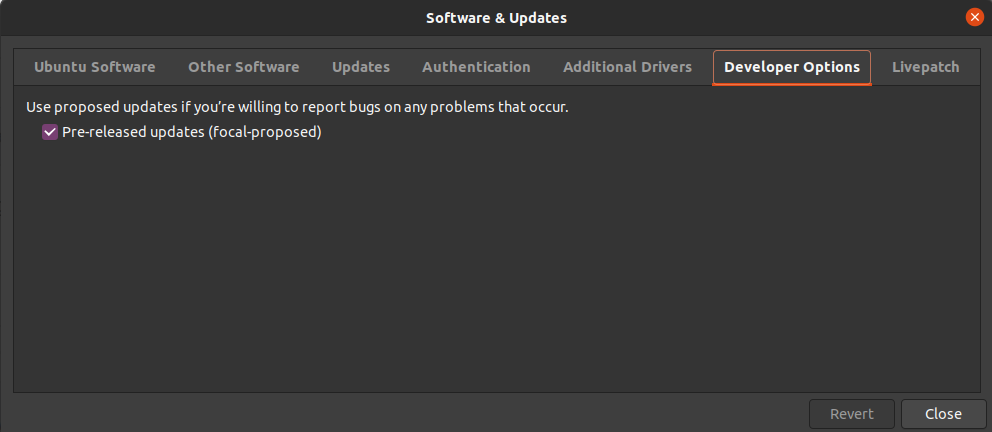
For Ubuntu 20.04 the fixed gnome-shell 3.36.3 is now available in the -proposed repository (see Bug #1877774, #19).
 hfs
on 19 Jun 2020
hfs
on 19 Jun 2020
The proposed version gnome-shell 3.36.3 fixes it for me. Good stuff!
For the ones wondering how to get the proposed package: https://wiki.ubuntu.com/Testing/EnableProposed
You can choose only to update gnome-shell from proposed by following the instructions.
 krulkrul
on 19 Jun 2020
krulkrul
on 19 Jun 2020
Or manually download and install the debs: http://launchpadlibrarian.net/483004869/gnome-shell_3.36.3-1ubuntu2_amd64.deb http://launchpadlibrarian.net/483004865/gnome-shell-common_3.36.3-1ubuntu2_all.deb http://launchpadlibrarian.net/483004868/gnome-shell-extension-prefs_3.36.3-1ubuntu2_amd64.deb
this works perfectly using: sudo dpkg -i ./*.deb.
cguertin14
on 20 Jun 2020
For anybody looking for a simple temporary "solution" until the update with the fix arrives, if I disable and then reenable dash-to-panel, the lockscreen starts working until the next restart.
 daviddostal
on 20 Jun 2020
daviddostal
on 20 Jun 2020
Installing pre-released versions fixed it for me (one of the updates was gnome-shell 3.36.3)
:)
slavoroi
on 21 Jun 2020
Updated to "gnome-shell 3.36.3" and this issue has been fixed.
 Abdelwahab07
on 22 Jun 2020
Abdelwahab07
on 22 Jun 2020
Installing pre-released versions fixed it for me (one of the updates was gnome-shell 3.36.3)
:)
Excellent!
rmkimathi
on 24 Jun 2020
If I enable pre - released updates then run $ sudo apt update it shows 123 packages are upgradable.
But I only want to update the gnome shell pre-released version 3.36.3-1ubuntu2. How can I do so?
 Santho07
on 30 Jun 2020
Santho07
on 30 Jun 2020
Read @krulkrul comment.
4ndt3s
on 30 Jun 2020
3.36.3 has finally been released by Ubuntu.
charlesg99
on 2 Jul 2020
Yeah confirmed that with Gnome 3.36.3 with Dash-to-Panel v37 it's fixed. Just "sudo apt upgrade" and "alt + f2" hit "r" to restart the Shell or even reboot your machine.
 brunofunnie
on 5 Jul 2020
brunofunnie
on 5 Jul 2020
I still have the same problem with GNOME Shell 3.36.3. Could anyone help me out?
 diego-G
on 7 Jul 2020
diego-G
on 7 Jul 2020
I still have the same problem with
GNOME Shell 3.36.3. Could anyone help me out?
My best guess would be to remove all extensions and test it one by one or even reinstalling Dash to Panel, I've just installed Ubuntu 20.04 on a VM and it's working out of the box (running sudo apt update; sudo apt upgrade first). So I think it can be something that is in conflict with the extension.
brunofunnie
on 7 Jul 2020
I've fixed it installing dconf-editor and modifying /org/gnome/desktop/lockdown value to disabled.
diego-G
on 8 Jul 2020
D2P cured my "distro hopping". Rock solid after gnome-shell 3.36.3 fix. ... The only extension I install on Ubuntu.

rmkimathi
on 8 Jul 2020
Related issues
 andrewgazelka
·
6Comments
andrewgazelka
·
6Comments
 bmccorm2
·
5Comments
bmccorm2
·
5Comments
 ktamp
·
5Comments
ktamp
·
5Comments
 MicleBrick
·
6Comments
MicleBrick
·
6Comments
 amivaleo
·
5Comments
amivaleo
·
5Comments
Most helpful comment
On Ubuntu 20.04 the problem started when updating gnome-shell to 3.36.2-1ubuntu1, then you could downgrade:
sudo apt install gnome-shell=3.36.1-5ubuntu1 gnome-shell-common=3.36.1-5ubuntu1Do it at your own risk.