Dash-to-panel: Touching the apps icon on a notebook with touchscreen freezes the system
My laptop has a touchscreen, reason why I installed Gnome, which is by far the distro that offers the best support for it (in terms of interaction).
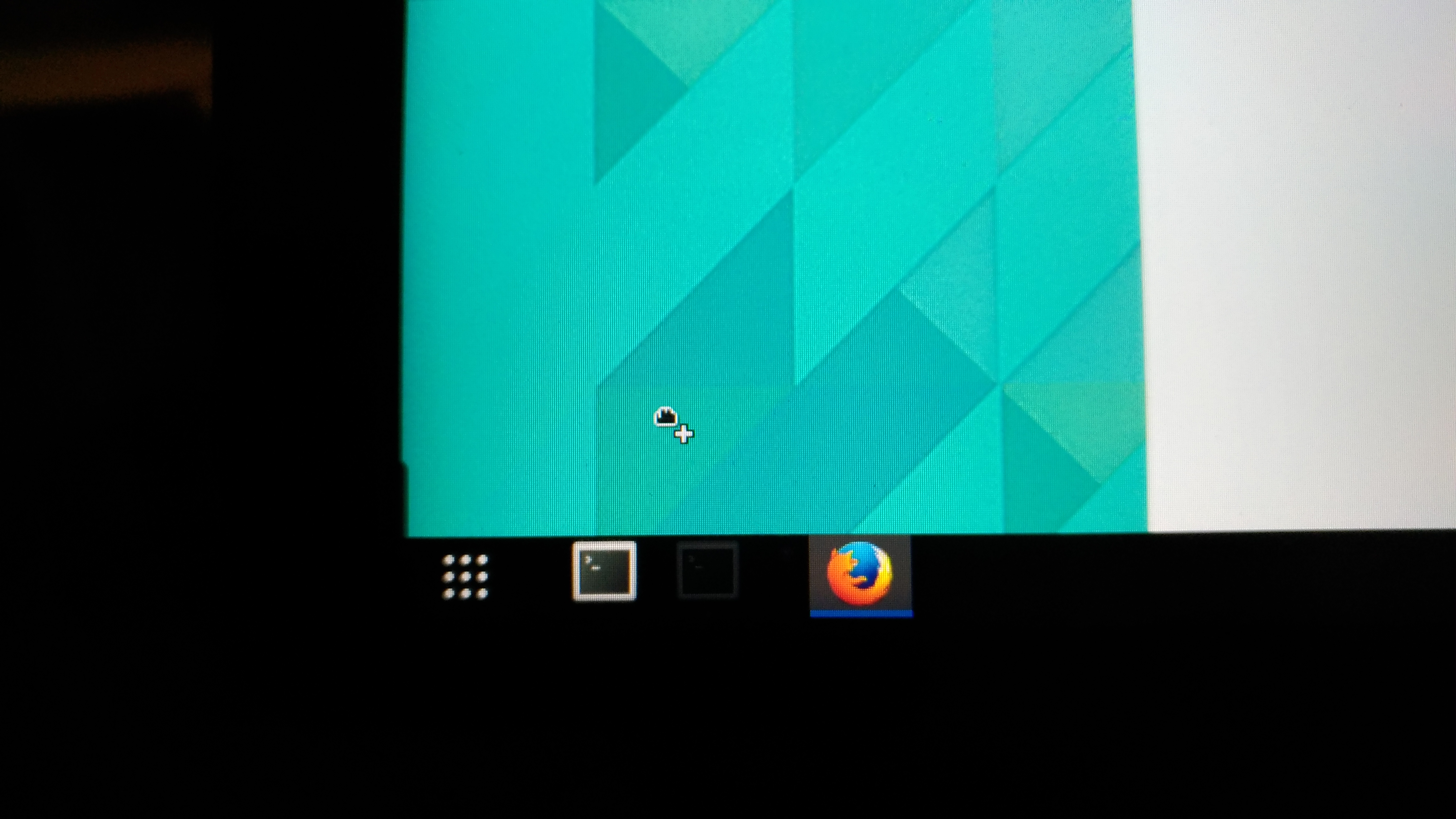
However, when I touch the dash-to-panel application icons, for example to maximize a windows, the entire gnome interface freezes. The mouse arrow icon turn into that dragging hand icon, and no clicks neither keiboard work again after that. Had to restart to get it working again.
I'm running the version I just cloned.
Unfortunate, because your extension is great, and actually makes Ubuntu Gnome almost my favorite distro.
This is how it looks when it freezes:
 joaofl
All 14 comments
Thank you for reporting this. Is it the same behavior as described in #108?
 jderose9
on 12 Sep 2017
jderose9
on 12 Sep 2017
I would say it is a related issue, but not exactly the same. They are both relate to not handling very well the touch actions, but happen in different circumstances.
joaofl
on 13 Sep 2017
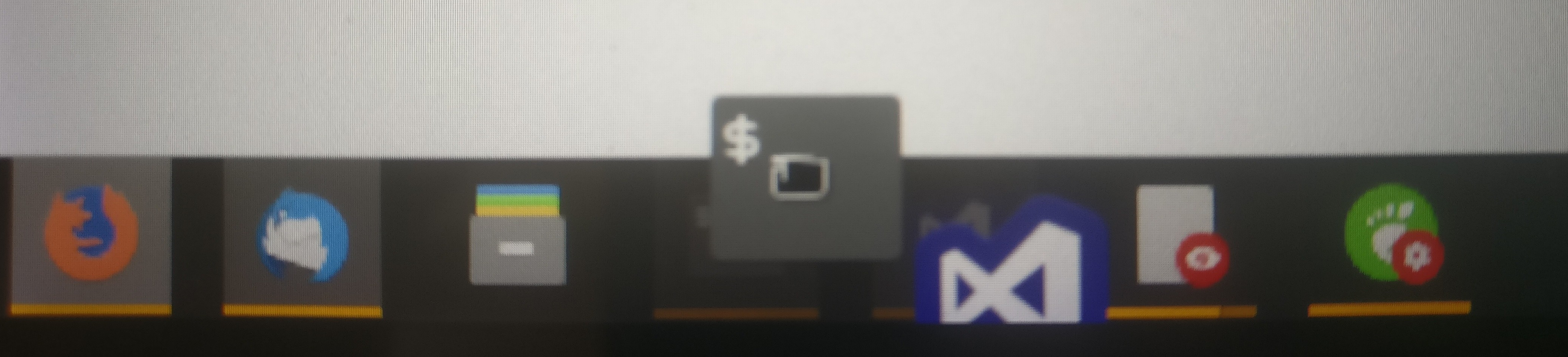
For me, touching an icon grabs the icon which leads to it being stuck to my finger/mouse (sometimes only after I move the mouse using the touchpad) and not being able to do do anything, leading to an effectively frozen system that in most cases can be unfrozen by either using the Escape key or touching/clicking various places in the panel again.
As the apps icon is not draggable, the issue is a bit different to #108, but I guess the reason could be similar.
This is how the weirdly dragged icons look for me:
The issue often continues until disabling and re-enabling the extension and occurs in Wayland and X.
 moqmar
on 16 Nov 2017
moqmar
on 16 Nov 2017
For sanity reasons I just checked: it also sometimes occurs with the Ubuntu Dock, which means that this is not only an issue with this extension. I also found an issue for dash-to-dock: micheleg/dash-to-dock#534.
It does not occur in the default dash on the Activities screen though.
moqmar
on 16 Nov 2017
Alright, I finally found the issue: https://github.com/GNOME/gnome-shell/blob/3b1330880fbaa1c1f98c912d6d41fe14af18e3eb/js/ui/appDisplay.js#L1710 is called, but never does anything except maybe opening the popup (which it also doesn't, probably because it's propagating to the drag-begin event which removes the timeout again). It should activate the application though instead. I'm currently working on a quick fix for that, will send in a pull request soon.
moqmar
on 5 Mar 2018
Thank you so much, I had completely given up on that button. Dash to Dock has the exact same issue with it. I'm testing it with right now.
 thebunnyrules
on 10 Mar 2018
thebunnyrules
on 10 Mar 2018
@moqmar I don't used Dash to Panel anymore but I thought I'd help you guys out in touch screen related testing. I re-installed dash to panel, applied your fix, logged out and logged in: fix doesn't seem to resolve the sticky icon issues and the appicon still had problems opening the drawer.
Strangely enough, AppIcon performance in Ubuntu Dock has improved greatly after applying your patch to: /usr/share/gnome-shell/extensions/[email protected]/appIcons.js . Fix is not perfect, I've noticed that the AppIcon still fails but it's improved from almost never working to almost always working.
That being said: I think that although there are definitely issues with AppIcon not working with touch screens, touch problem in the Dash to Something family extend far beyond that single feature. Ubuntu Dock was also quite unstable out of the box, with similar issues of sticky icons after touch, faulty appicon that never open app drawers after touch etc. I managed to improve dock's touch stability greatly by disabling this extension: /usr/share/gnome-shell/extensions/[email protected] (you can do so by deleting it's entry in: /usr/share/gnome-shell/modes/ubuntu.json). The improvements were not perfect: appicon was still unusable (though it does work now thanks to you) and I still had some sticky icon issues that cropped up once in a while but the sticky icon issues were nowhere near as frequent as before I disabled appindicators extension. Not sure what this extension does but if dash to panel shares any commonality with it, it may be a nice place to start looking for problems.
thebunnyrules
on 10 Mar 2018
Hm, this is weird, there should be no sticky (draggable) icons with my fix (I'm on Gnome 3.26.2 with Wayland and Ubuntu AppIndicators enabled), as I'm completely disabling event propagation. It should be impossible to drag the icons at all using the touch screen.
What do you mean by "opening the drawer"? If you mean the popup menu, touching the icon immediately started/activated the application on touch in that commit and only then opens the popup menu if the touch isn't released, that was fixed in a later commit though (https://github.com/jderose9/dash-to-panel/pull/350).
But yeah, in the end this seems like an issue caused by the JavaScript implementation of the AppIcon class in GNOME itself, and probably should be fixed there directly at some point.
moqmar
on 10 Mar 2018
I don't know. I just applied this fix https://github.com/moqmar/dash-to-panel/commit/813b3ba1ea3851d8b7031e8e0780c07a793cdeea to both dash2panel and my copy of ubuntu dock. I didn't see any improvements in d2p but maybe I did something wrong. I haven't tried your fix in #350 though. I'll give it a try.
thebunnyrules
on 12 Mar 2018
Weird, I tried the fixed d2p again today. It seems to be much better, no sticky icons at all. I must have done something wrong the first time around. I'll keep testing it for a day or so to see if the sticky issue crops up again.
By App Drawer, I was just referring to the Show Application icon (the little icon that's made of 9 dots) and the list of applications that comes out when you press it. I think I had mis-understood what appIcon.js does. I thought it dealt with the Show Applications icon, so I thought it would fix it's issues. I didn't realize appicons.js was referring to the actual individual application icons on the panel.
Do you use the Show Applications icon? Have you had any issues with it? With d2p, I can't get it to show the applications when I touch it. I know there's the left edge swipe gesture that brings out the apps as well but since I alternate between kb/mouse and touch all the time, I tend to always click on that icon instead of doing the edge swipe.
thebunnyrules
on 12 Mar 2018
I don't use the applications icon, but as I understand it it's not an AppIcon. but an AppMenuButton, that extends PanelMenu.Button, which should react to touch events, so it seems like that's not caused by the same bug... :(
Update: When enabling the app menu, I do have the same issue - it opens after tapping the icon about 10 times. The activities button shares that behaviour though, although way more rarely so it's actually usable. Seems like maybe the event event is not always fired on TOUCH_BEGIN?
moqmar
on 13 Mar 2018
@moqmar I've tested it for a day. not a single sticky icon issue. touch functionality is as smooth as butter with your fixes. smoothness is way better than my hacked ubuntu dock, so I'm probably going to switch back to dash2panel. thanks alot, it's really nice to be able to use this extension again.
thebunnyrules
on 13 Mar 2018
Merged and closing.. Let me know if there are any outstanding issues and I can re-open. Thanks so much to both of you!
jderose9
on 14 Mar 2018
Running into this with a fresh install of Manjaro... GNOME 3.38.4, Wayland, Dash to Panel 40. Touching the app icons freezes the entire desktop, sometimes it attempts to drag the icon before it freezes like in the original picture. Have to use Ctrl+Alt+F2 to kill gnome shell, one time even that didn't work and I had to force-shutdown the whole computer.
 chylex
on 7 Apr 2021
chylex
on 7 Apr 2021
Related issues
 ghost
·
5Comments
ghost
·
5Comments
 jamesiri
·
4Comments
jamesiri
·
4Comments
 Pointedstick
·
6Comments
Pointedstick
·
6Comments
 LeeGDavis
·
6Comments
LeeGDavis
·
6Comments
 Rawleenc
·
6Comments
Rawleenc
·
6Comments
Most helpful comment
Alright, I finally found the issue: https://github.com/GNOME/gnome-shell/blob/3b1330880fbaa1c1f98c912d6d41fe14af18e3eb/js/ui/appDisplay.js#L1710 is called, but never does anything except maybe opening the popup (which it also doesn't, probably because it's propagating to the
drag-beginevent which removes the timeout again). It should activate the application though instead. I'm currently working on a quick fix for that, will send in a pull request soon.