Dash-to-panel: Ungroup Applications on TaskBar Panel?
github.com/zpydr/gnome-shell-extension-taskbar
Like the taskbar addon above would it be possible to ungroup applications so they have a separate individual icons showing on the panel like a classic taskbar instead of having a single icon with everything grouped together?
For example the default gnome setting for having all Firefox windows in one tab and having to scroll through them is highly annoying and would make life a lot easier if you could just run across the bottom panel with your mouse and preview each one like Windows or Mint?
Then your extension would be 100% perfect for me. :)
Thanks
 Bindea
All 38 comments
Just to make sure I understand- this isn't specific to Firefox, right? You just want to be able to have multiple instances of an application have separate icons on the taskbar? Thanks!
 jderose9
on 22 Jul 2017
jderose9
on 22 Jul 2017
Thanks jderose9 you are correct , Multiple instances of an application to have separate icons on the taskbar instead of being grouped together.
Sorry to confuse things , lucky you understood what i meant so i've changed the topic. :)
Bindea
on 22 Jul 2017
Any thoughts on this jderose9 ?
Bindea
on 25 Jul 2017
I think that sounds like a good idea..
jderose9
on 25 Jul 2017
Don't make it a default thing please. I ran across this in budgie's taskbar and it was awful for me.
 ghost
on 25 Jul 2017
ghost
on 25 Jul 2017
@jderose9 , Thank you for the consideration.
@skullscream , Yeah optional just for those that don't like the default grouping.
Bindea
on 26 Jul 2017
If this would be implemented it would remove one of the last points that keeps me from switching to linux. In Windows you can set the taskbar so it doesn't group. All the windows of an application are beside each other. In Windows the taskbar also has the title of the Window which is really helpful if you have multiple Writer documents open for example.
Speaking of Writer: When I open multiple Writer windows in with this extension on Wayland it doesn't get stacked but there are separate icons in the taskbar. Since they have no title it is not helpful that way however (I'm note sure if that is the intended behavior on Wayland). Another difference to Windows is that the Icons are separate from the application icon (they are on the right if the favorites bar).
 voidray
on 31 Jul 2017
voidray
on 31 Jul 2017
@jderose9
Did you look into this to see if it can be done?
Thanks
Bindea
on 23 Sep 2017
This enhancement would make me soooo happy.
 btm6084
on 23 Oct 2017
btm6084
on 23 Oct 2017
I'm not clear how multiple icons for the same application are differentiated? Is the expectation that the open windows will be labeled? (As requested in #115)
Are icons displayed in the order they were launched or grouped together with other instances of the same application?
If I open two instances of an application that exists in my favorites, does one of them go after the favorites and the other re-uses the pinned favorite icon?
jderose9
on 24 Oct 2017
Mint taskbar
linuxmint.com/tmp/blog/1851/linuxmint12-preview.png
You can see on the bottom taskbar just right of centre that Clem the developer has 2 terminal windows open and they are separate on the panel rather than being grouped together into a single panel icon.
You can see what every application is doing by hovering your mouse across the task bar with a single preview for each rather than a preview of all in a group.
Maybe you could load up Linux Mint in a Virtual Box and open loads of FireFox windows so you can see how it looks when they are not grouped together.
Bindea
on 25 Oct 2017
@Bindea
I guess what you want is something that behaves like the window-list extension:
https://extensions.gnome.org/extension/25/window-list/
 lexruee
on 25 Oct 2017
lexruee
on 25 Oct 2017
@lexruee
I've not tried that extension and the user comments says errors so the code must be out of date , so i don't know if it acts like a normal task bar.
This extension called TaskBar acts like a normal task bar without groups
https://extensions.gnome.org/extension/584/taskbar/
So for example If click the Firefox launch icon 3 times then you will be shown 3 separate firefox icons for each website on the taskbar.
Bindea
on 25 Oct 2017
Can anyone else that is interested in this do a better job of explaining a standard panel taskbar without grouping as i'm not technically minded and i might be making this more confusing than it needs to be plus i have a lot going on here that i might not be active for a couple of weeks.
Thanks
Bindea
on 25 Oct 2017
Ok, for now let's assume this work order is for allowing multiple instances of icons and is a pre-requisite for #115 to allow titles to be added to those ungrouped icons.
jderose9
on 25 Oct 2017
Don't know about anyone else but i'm equally happy with either Icons or Windows on the taskbar to separate applications , apart from the visual aspect does it make any difference to how it might function that i might not be understanding correctly?
As long things are not grouped together i think i can live whatever you think is best , i trust your judgement as everything else about dash to panel looks great. 😃 👍
Thank you kindly for tagging this as approved.
Bindea
on 27 Oct 2017
Come to think of it square window type indicators along the taskbar would be better to differentiate running applications from the favourites on the left otherwise it would need a defined gap or separator bar which could look ugly.
Bindea
on 29 Oct 2017
That would be very good
 mateusclopes
on 1 Nov 2017
mateusclopes
on 1 Nov 2017
I kinda moved to Ubuntu on my laptop recently and spend a lot of time customizing it so it would be as comfortable for me as Windows. This extension was very helpful, but the described feature is the last missing piece.
To answer jderose9's questions about how exactly that works with multiple instances of the same application, I've decided to look how it works in Windows. First of all, yes, "Never combine" mode automatically leads to showing labels.
No applications launched, only favorites shown:

Two Firefox windows launched and one non-favorite application:

Lots of applications launched:

So, non-favorite application icons are shown in order they were launched (though still grouped by application, like if you launch Paint-VirtualBox-Paint, they would be grouped as Paint-Paint, then VirtualBox).
Launched favorite applications reuse pinned icon and then other instances go right near it (not after all the favorites).
Finally, if there are a lot of applications launched, labels widths are automatically decreased to fit all. When there are too much applications running, it just shows multiple icons to indicate multiple instances, but does not show label near it. If even icons do not fit in one line, it shows a small up and down buttons.
Icons+labels:

Too much Firefox:

Up/down buttons (1):

Up/down buttons (2):

I think that the last two cases are quite rare, and I personally would be glad to have at least multiple icons (and then, icons + labels with autodecreasing width).
 Tkachov
on 7 Nov 2017
Tkachov
on 7 Nov 2017
Yessss. This is what I'd like.
btm6084
on 7 Nov 2017
@Tkachov thanks for the screenshots. Just to clarify, you have multiple instances of firefox open in those examples, not one firefox instance with multiple tabs. On Windows the tabs would then display as preview if you hover over one of the Firefox taskbar items.
This would be great to have. For me it is also one of the "missing pieces" on Linux.
voidray
on 8 Nov 2017
@voidray, yes, those are different windows, and each of them could contain a lot of tabs. As a matter of fact, I've never seen a browser which shows its tabs as separate panel items (and I hope I never will).
Tkachov
on 8 Nov 2017
@Tkachov, yes, I just wanted to make it 100% clear to everyone who sees the screenshots, because in the discussions here I got the impression that for some it was not clear how the result should look like.
voidray
on 8 Nov 2017
New year's resolution! I started working on this issue because, since I moved to Linux a year ago, I still shamelessly miss some of the windows 7 taskbar features.
Stuff in the oven (while trying not to break the existing):
- Ungrouping the application instances, keeping them grouped by application.
- Setting to merge application launchers with the running applications, or keep them separate.
- Setting to customise the font size of the application titles.
- Setting to customise the width of the application titles.
- Setting to customise if the application titles should all have the same width or not (if some application titles are smaller than the defined width, they wouldn't extend and waste space).
- Shrinking the application titles when many instances are running. If too many icons need to be displayed, use the current extension's scrollview.
Anyone's wishlist not met? Any unneeded features in my list?
edit:
pull request submitted #312
 charlesg99
on 8 Jan 2018
charlesg99
on 8 Jan 2018
@charlesg99
WOW , this is amazing as i was starting to think it would never happen or wasn't possible. :)
This will make Dash to Panel the number one addon as loads of people have swapped Ubuntu over to Cinnamon but there will be no need now with this.
Thanks ever so much.
Bindea
on 20 Jan 2018
@charlesg99
Is it possible to add settings for: when ungrouped, do not display the window titles?
Grate work, thank you.
 IKrupaUA
on 20 Jan 2018
IKrupaUA
on 20 Jan 2018
@IKrupaUA
I don't think I would add a dedicated setting to hide the window titles, but you could get the desired result with the current settings:
Setting the titles maximum width to 0:
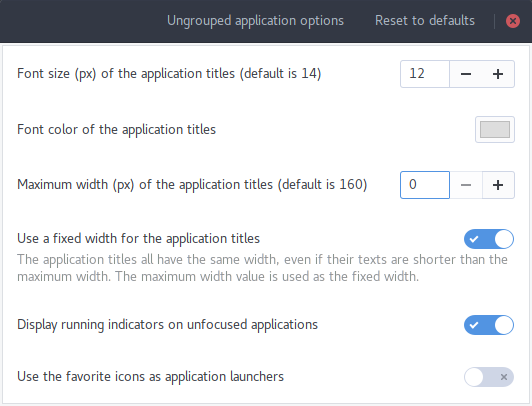
Which would result in this visual:
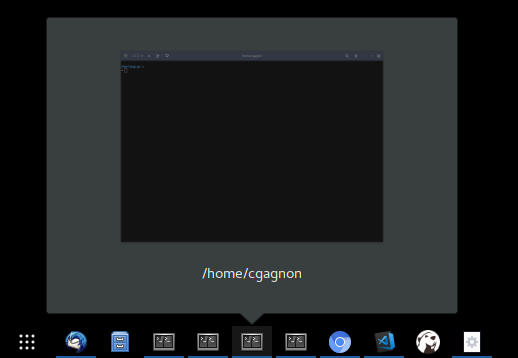
Is this what you want? If so I'll just add this to the pull request.
charlesg99
on 20 Jan 2018
@charlesg99
Yes, that's exactly what i want, thank you!
IKrupaUA
on 21 Jan 2018
Thanks so much to @charlesg99 for completing this!
jderose9
on 2 Feb 2018
Great work!
Any chance this would soon make it into a new release available on GNOME Extensions?
 spantaleev
on 2 Feb 2018
spantaleev
on 2 Feb 2018
@jderose9
@charlesg99
It's been working great , thanks ever so much again as even the elders in my family now find it easy to use gnome without the confusion of groups.
I'm surprised this update hasn't been mentioned websites such as omgubuntu or phoronix. :)
Bindea
on 2 Feb 2018
I'd like to add a screenshot to the README with this feature enabled. @LinxGem33 would you mind to take a quick one, or send me the vector mountain background you used for the other? I was thinking it could fit somewhere under the window previews gif.. Thanks!!
jderose9
on 2 Feb 2018
@jderose9
yeah sure just send me a screen shot of the dash to panel with the before and after, with this feature enabled and ill make a nice screen with the background you requested as I'm currently developing in VM's. if you want to do it I've left the background in a zip file below.
#
vector mountain background (if you want to do it)
#
P.s
if you want me to do it ill need just a screen shot of the panel only
with app icons etc in png format. 👍
you can leave the zip link [here] on this issue just ping my username
i also want to rework the indicator icons section and tidy it up with better icon
illustrations if your ok with that.
ghost
on 2 Feb 2018
Hey designer here (not a full dev yet, so please bear with me). Just wanted to check and see if I understood a couple of things correctly. I'm coming to this from a google search.
This extension is only for Gnome correct? I can not use this on Ubuntu correct? I have Ubuntu 16. I do remember hearing that Ubuntu is moving to Gnome Shell for 18 though so that means this extension might work for Ubuntu in the future?
 jcklpe
on 19 Mar 2018
jcklpe
on 19 Mar 2018
@thedonquixotic this is extension for Gnome Shell.
From Ubuntu site:
Ubuntu 17.10
In April 2018, the next long-term support (LTS) release of Ubuntu will come with GNOME Shell as default. Ubuntu 17.10 is the first release to include the new shell, so it’s a great way to preview the future of Ubuntu.
But you can install Gnome Shell on your Ubuntu as well, just google some instructions, should be pretty simple. You can also upgrade to the Ubuntu 17 or wait for 18 to come out.
Tkachov
on 19 Mar 2018
@Tkachov Excellent. And installing the Gnome Shell won't like totally screw up my neural networks or anything right? It's just effecting the frontend of the OS right? Sorry if that's a silly question but I just want to make sure. One reason I'm not upgrading to 17 is because of the limited compatibility of the neural networks etc.
jcklpe
on 19 Mar 2018
@thedonquixotic well, yeah, that's effecting the frontend. It changes not only look though, but also a feel part of it: IIRC, Gnome handles user input differently, has other keyboard shortcuts, etc.
You can install Gnome alongside Unity and switch between them through login screen, so if you won't like Gnome, you can just get back to Unity. Just make sure not to remove it while installing Gnome (I guess some instructions may include such step as cleaning up).
Tkachov
on 20 Mar 2018
Thanks!
On Tue, Mar 20, 2018 4:25 AM, Alexander [email protected] wrote:
@thedonquixotic well, yeah, that's effecting the frontend. It changes not only
look though, but also a feel part of it: IIRC, Gnome handles user input
differently, has other keyboard shortcuts, etc.
You can install Gnome alongside Unity and switch between them through login
screen, so if you won't like Gnome, you can just get back to Unity. Just make
sure not to remove it while installing Gnome (I guess some instructions may
include such step as cleaning up).
—
You are receiving this because you were mentioned.
Reply to this email directly, view it on GitHub, or mute the thread.
jcklpe
on 20 Mar 2018
Related issues
 BoQsc
·
4Comments
BoQsc
·
4Comments
 andrewgazelka
·
6Comments
andrewgazelka
·
6Comments
 amivaleo
·
5Comments
amivaleo
·
5Comments
 ningacoding
·
6Comments
ningacoding
·
6Comments
 Pointedstick
·
6Comments
Pointedstick
·
6Comments
Most helpful comment
New year's resolution! I started working on this issue because, since I moved to Linux a year ago, I still shamelessly miss some of the windows 7 taskbar features.
Stuff in the oven (while trying not to break the existing):
Anyone's wishlist not met? Any unneeded features in my list?
edit:
pull request submitted #312