Dash-to-panel: Option to Move Panel to Left or Right / Vertical Panel
In today's world where 16x9 1080p monitors are ubiquitous, vertical real estate is precious. Unity defaults to one. Windows 10, KDE, and Dash-to-Dock(which this is based on) allows vertical panels. Please consider enabling this option for your widescreen users.
 slacka
All 45 comments
I definitely see the value! Unfortunately, I don't think this is possible within this extension. Dash-to-dock only contains items in its panel which were created within the extension itself. Dash-to-panel has to contain all of the gnome shell widgets (Activities button, clock, status menu), as well as countless other 3rd party extensions, none of which have been designed for display in a vertical layout. Some of these widgets use absolute positioning to align their contents horizontally, or assign horizontal padding that you wouldn't want in a vertical presentation. The panel would need to be very wide or the font size extremely small to accommodate each widget on a single line in the vertical panel.
I'm open to suggestions, but I think this would need to start at the gnome shell level in a future major revision.
 jderose9
on 8 Jan 2017
jderose9
on 8 Jan 2017
I'm going to close for now. If there's any new info or suggestions to lead to a possible solution, we can re-open.. Sorry :(
jderose9
on 8 Jan 2017
(Activities button, clock, status menu), as well as countless other 3rd party extensions,
If the button, clock and status menu were a little kludgy, it's a trade-off I would gladly accept. As far as other extensions, I don't use any so it's not an issue for me and probably many other users that would appreciate this customizability.
You could make this a "alpha" feature with warnings/disclaimer, before it was enabled.
I think this would need to start at the gnome shell level
Have you messaged the Gnome dev list or filed a bug report / feature request?
slacka
on 12 Jan 2017
Given the number of eyes on this extension now, I'm going to open this back up. Volunteers to research this further would be great! Thanks.
jderose9
on 23 Oct 2017
+1
 febcrash
on 18 Dec 2017
febcrash
on 18 Dec 2017
If Ubuntu dock is a fork from this project (and it has this feature) should'nt it be easy to port it here?
 marcinciarka
on 4 Jan 2018
marcinciarka
on 4 Jan 2018
would also really love to see that feature.
missing vertical panel is the main reason i won't give gnome a real try...
 dwuttke90
on 10 Feb 2018
dwuttke90
on 10 Feb 2018
It would ever be enough to have only vertical dock with the extension. I really like Dash to Panel for ability to click on icon multiple times and navigate windows, the last click minimizes all windows (of the same application).
 Tarik02
on 14 Mar 2018
Tarik02
on 14 Mar 2018
The vertical dock is essential! We users can disable the "abnormal widgets" which dosen't work well in vertical "dash-to-panel", so just give us users a choice to put the panel on the left(or right) of screen!
 colben
on 23 May 2018
colben
on 23 May 2018
Would also love to see that feature!
 geworfener
on 23 May 2018
geworfener
on 23 May 2018
I really need that
my ideal workspace is:
everything on left side
1 top left is show-applications then below it comes apps
2 bottom left is show-desktop button then above should be the applets
3 top right corner simply close button for maximized apps (this will spoil you)
4 lastly bottom right should be a hot-corner to show active apps
 h4xw4r
on 25 May 2018
h4xw4r
on 25 May 2018
i have been waiting for so long :(
h4xw4r
on 15 Jul 2018
+1
 uocxp
on 21 Nov 2018
uocxp
on 21 Nov 2018
Would love to see this option! Cheers
 tiotrom
on 7 Dec 2018
tiotrom
on 7 Dec 2018
Much more easier to have a panel on left side.
 MuhammedKpln
on 24 Jan 2019
MuhammedKpln
on 24 Jan 2019
Is there no update? I have been waiting for so long time.
 rikusen0335
on 24 Mar 2019
rikusen0335
on 24 Mar 2019
how is the progress on this doing? :)
 olealgoritme
on 14 May 2019
olealgoritme
on 14 May 2019
There is a new Gnome shell extension that managed to put the shell widgets on the left side. Maybe it would be possible to research the code and reuse some bits.
 claderoki
on 4 Jul 2019
claderoki
on 4 Jul 2019
If Ubuntu dock is a fork from this project (and it has this feature) should'nt it be easy to port it here?
@dreszczyk no, Ubuntu Dock is a soft fork of Dash to Dock (it has a branch in Dash to Dock's GitHub repository)
how is the progress on this doing? :)
@olealgoritme no progress until someone steps up and implements this feature, do you know of anyone who can? Unless someone steps up, it's not going to happen, don't assume it will! :)
 Ads20000
on 31 Aug 2019
Ads20000
on 31 Aug 2019
Hello, I started working on this and it is going better than I thought it would. Of course it still needs some fiddling and some setting refinements, but please be ready for some soonish testing (going to need a lot of that). Thanks!
 charlesg99
on 7 Sep 2019
charlesg99
on 7 Sep 2019
Alright, the first version of the vertical panel is now available on branch vertical-panel. This is still a work in progress that has only been tested on 3.32, but it should be more than usable and testing/feedback is welcome. To install it:
git clone https://github.com/home-sweet-gnome/dash-to-panel.git
cd dash-to-panel
git checkout vertical-panel
make install
Then restart GNOME Shell by entering the r command after pressing Alt+F2, or log out/in if on Wayland.
Thanks!
charlesg99
on 8 Sep 2019
Just installed the vertical panel branch. So far working very well. Three issues/comments/requests:
- With vertical panel comes a bit less space (vertically). However, if you increase the width of the panel, you quickly run into padding issues. So I wonder if we could have a setting for vertical and horizontal padding (and maybe the margins) although that might be nasty to implement.
- As of now, the Skype icon (appindicator) is being squished. Not sure where that comes from.
- The clock indeed is a tad bit of an issue. Could we dynamically scale the font size with the width of the dock? Happy to contribute in any way I can.

 wpieterson
on 9 Sep 2019
wpieterson
on 9 Sep 2019
Hey wpieterson, thanks for the feedback! I just updated the branch and that should take care of the squished tray icons (I'm using TopIcons plus but that should work for appindicator as well).
I'll try to see if we could keep the elements horizontal when they fit in a wider panel... I would keep them on separate lines though, as I already tried stacking them next to each other and this isn't very usable.
charlesg99
on 10 Sep 2019
Hey Charles, can confirm that the squished icons are fixed. Thanks for doing that.
I do agree with the elements on separate lines, I tried stacking side by side on KDE a while ago and that just felt weird (for me). Keep up the good work. Happy to continue testing and/or provide input.
[edit (9/11)]
- Also noticed that dynamic background opacity stopped working
- Same with the padding items under fine-tune (but seems to be expected)
- Been looking at the code for the clock too, mostly the _formatVerticalClock bit and was wondering if it possible to make the split dependent on width. I found that there is no need to have the line breaks with a panel size >56px (which is what I have, thus I have removed that bit of code). Happy to start diving into that bit more, and see if I can figure out a way to code this (big warning: not a coder).

wpieterson
on 10 Sep 2019
@charlesg99
I get this on make install
$ make install
glib-compile-schemas ./schemas/
msgfmt -c po/de.po -o po/de.mo
make: msgfmt: Command not found
make: * [Makefile:53: po/de.mo] Error 127
Gnome shell 3.33.91
 chdslv
on 11 Sep 2019
chdslv
on 11 Sep 2019
Hello @chdslv, you'll need to install the "make" command (and possibly some text tools) using your distribution's package manager. Let us know if you need more help!
@wpieterson Thanks again for the help. The dynamic transparency and the fine-tune padding should now work as expected. Dynamically resizing the items (including the clock) according to the panel size is the last thing on my todo list, but feel free to try your hand at it :) Also, please post a new comment instead of editing your previous one, so I'll receive a Github notification (we don't get one when it's an edit).
Thanks!
charlesg99
on 11 Sep 2019
@charlesg99

The clock is not showing well. But, that's all right as I can see the time correctly. Width is 38px.
Can the whole bottom section moved up, and top section down, so the "Show Applications" and the app icons start from the bottom?
chdslv
on 11 Sep 2019
@chdslv Thanks for the feedback!
The clock is not showing well.
Care to elaborate on how you would display the clock with a panel of this width? On your screenshot, it is displaying exactly the way I intended, but I'm opened to suggestions...
Can the whole bottom section moved up
Not at the moment, you can play with the available positioning in the "Position" tab of the settings.
charlesg99
on 11 Sep 2019
I understood your point on the clock matter. And, the other matter too. Thanks!
chdslv
on 11 Sep 2019
Can confirm all settings seem to work now (except for the two LeftBox items under finetuning, but I have no idea what they are supposed to do anyway. I will start diving into the code a bit more to see what it does and see if I can come up with something for the clock. No guarantees though ;-)
wpieterson
on 11 Sep 2019
[image: image.png]
This is the only feature keeping me on Windows desktop
On Wed, Sep 11, 2019 at 2:01 PM Charles Gagnon notifications@github.com
wrote:
@chdslv https://github.com/chdslv Thanks for the feedback!
The clock is not showing well.
Care to elaborate on how you would display the clock with a panel of this
width? On your screenshot, it is displaying exactly the way I intended, but
I'm opened to suggestions...Can the whole bottom section moved up
Not at the moment, you can play with the available positioning in the
"Position" tab of the settings.—
You are receiving this because you are subscribed to this thread.
Reply to this email directly, view it on GitHub
https://github.com/home-sweet-gnome/dash-to-panel/issues/3?email_source=notifications&email_token=ABNSPNDIO3FDXPYDFFZT7LTQJEXAJA5CNFSM4C3WRRV2YY3PNVWWK3TUL52HS4DFVREXG43VMVBW63LNMVXHJKTDN5WW2ZLOORPWSZGOD6PLS7A#issuecomment-530495868,
or mute the thread
https://github.com/notifications/unsubscribe-auth/ABNSPNHA5PMZAD5X5SES3CDQJEXAJANCNFSM4C3WRRVQ
.
 mbazdell
on 12 Sep 2019
mbazdell
on 12 Sep 2019
@wpieterson Just a heads up, the dynamic sizing of the clock was added, now the only thing remaining is the dynamic sizing of the panel buttons. We'll get there :)
@chdslv The two dots separating the hours from the minutes when the clock is stacked were changed... I personally like it much better now:

charlesg99
on 12 Sep 2019
@charlesg99
What do I have to change, what file or what part in that file to get those two dots that way? It looks nice.
chdslv
on 12 Sep 2019
You just need to update the branch using the git command.
cd dash-to-panel
git pull origin vertical-panel
make install
Then restart GNOME Shell (same way as when you first installed it).
Thanks!
charlesg99
on 12 Sep 2019
I couldn't install it the make install way, so I replaced the files from here.
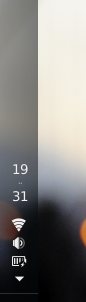
Replaced the files and the compiled schemas. The result is above. Clock is now much better!
Note: the clock takes a bit to appear, just a few seconds.
This is on Ubuntu Eoan.
On the bottom, the clock looks like this,
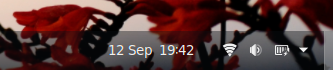
I am not asking you to have the same clock look in the vertical panel, but if you can divide the "12 Sep" and make it appear above the clock would be nice. Not demanding anything. Thank you for your work!
chdslv
on 12 Sep 2019
just updated and yes it works brilliantly. This is absolutely fantastic work and so for it works flawlessly and looks great. Thanks so much for doing this.
wpieterson
on 13 Sep 2019
Thanks for this change, its working great so far. One slight issue is that enabling "Show Activities button" messes the layout. A "..." button is added to the left of the taskbar buttons - pushing them outside the panel. I'm guessing tis button should be added to the top, or bottom, somewhere.
[Edit] And perhaps the "system indicators" arrow should point right/left instead of down? Or, just hidden?
 CDrummond
on 13 Sep 2019
CDrummond
on 13 Sep 2019
@wpieterson Great! Glad it is working well!
@CDrummond Thanks, the Activities button should now be displayed on top of the taskbar. Not too sure about what to do with the system indicators arrow... Maybe some people would mind if we removed it? I'll start by making it point in the right direction.
charlesg99
on 13 Sep 2019
@CDrummond The orientation of the arrow should now be fixed. I noticed that the Arc theme hides the arrow when the panel is at the bottom/top, but not when it is on the side... To fix this they would need to set the height to 0 as well as the width in their css rule:
  #panel .popup-menu-arrow {
    width: 0; }
I think it is better to let the theme hide the arrow or not.
Thanks!
charlesg99
on 14 Sep 2019
@chdslv
if you can divide the "12 Sep" and make it appear above the clock would be nice
I agree that it would be ideal, but it might be hard to accommodate everyone's locale... I'll see what we can do.
charlesg99
on 14 Sep 2019
I have a suggestion, based on what existing vertical taskbars do. Retain _horizontal_ alignment for status icons, etc, within the vertical panel. In other words, don't put them in a single column; put them in rows.
Optional: for ease of implementation, constrain available panel widths to 1 status icon wide, or 2, or 3, or 4, etc. From my experiments, 5 is the maximum you might reasonably want. XFCE permits a max of 6 in its "deskbar" mode.
Windows has arranged controls and other panel items like this since Win95 when the taskbar was first introduced.
LXDE and LXQt are less customisable but also support it. I suggest trying all 3 in VMs to get a feel for how it works.
Some screenshots to illustrate what I mean: https://imgur.com/gallery/fLeAy
 lproven
on 19 Sep 2019
lproven
on 19 Sep 2019
Hello @Iproven, thanks for the input. It is already possible to keep the horizontal alignment, in fact we only display the items vertically when the panel can't accommodate their original widths. Not sure if it is possible on other DE to change the width of the vertical panel, but if so, how do they handle a very narrow taskbar?
Ungrouped (original width) :
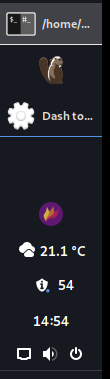
Grouped, large icons (original width):
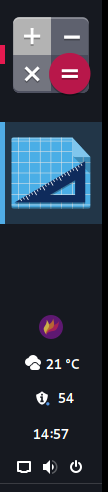
Grouped, smaller icons (set them vertically if doesn't fit):

charlesg99
on 19 Sep 2019
Hello @iPrOveN, thanks for the input.
NP. I am a big fan of vertical taskbars and use them everywhere. It's the main reason I don't use MATE, Cinnamon and currently GNOME 3.
BTW, it's @LPROVEN. :-)
Not sure if it is possible on other DE to change the width of the vertical panel
On all the ones I mentioned, yes.
but if so, how do they handle a very narrow taskbar?
As far as I know, the minimum possible width is the width of the smallest panel item. So if it's a single program icon, it's that; if those can shrink to the size of a launcher or status icon, it's that.
lproven
on 20 Sep 2019
BTW, it's @lproven. :-)
Whoopsy, my bad :joy:
As far as I know, the minimum possible width is the width of the smallest panel item.
Makes sense. In our case I don't think it's needed to restrict the width of the panel as the user can simply make it wider if he doesn't like the "verticalized" panel items. Since it is already implemented, I would leave it like this, so the user also have the option to get a narrow panel. What do you think?
charlesg99
on 20 Sep 2019
This feature is now on master! Please try it out and open new issues if need be. Thanks!
charlesg99
on 23 Sep 2019
Related issues
 Rawleenc
·
6Comments
Rawleenc
·
6Comments
 bmccorm2
·
5Comments
bmccorm2
·
5Comments
 LeeGDavis
·
6Comments
LeeGDavis
·
6Comments
 Steps65
·
5Comments
Steps65
·
5Comments
 BoQsc
·
4Comments
BoQsc
·
4Comments
Most helpful comment
Given the number of eyes on this extension now, I'm going to open this back up. Volunteers to research this further would be great! Thanks.