Dash-to-dock: Error loading extension on Ubuntu 20.04 beta
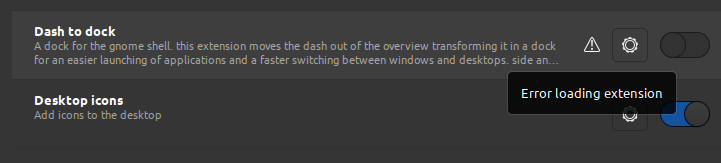
I use installation from source
 aplab
aplab
All 27 comments
Hello,
same issue here for I upgraded my Ubuntu to 20.04.
Thank you for your help.
 legluondunet
on 9 Apr 2020
legluondunet
on 9 Apr 2020
yeah same here
 advaithm
on 9 Apr 2020
advaithm
on 9 Apr 2020
same here
 totof1169
on 9 Apr 2020
totof1169
on 9 Apr 2020
I'm having the same issue - and I have installed the extension from source.
I'm not sure if this is the issue - but when I check journalctl I see the following errors:
sudo journalctl /usr/bin/gnome-shell | grep 'dash-to-dock'
gnome-shell[1872]: JS WARNING: [/home/jason/.local/share/gnome-shell/extensions/[email protected]/appIcons.js 1051]: reference to undefined property "_onLeaveEvent"
gnome-shell[1872]: JS ERROR: Extension [email protected]: TypeError: appIconPrototype._onLeaveEvent is undefined
Unfortunately I don't know enough about gnome extensions to tell if this is actually what's breaking the extension. I'd be happy to try out a bug fix if you come up with one though.
 jsco2t
on 12 Apr 2020
jsco2t
on 12 Apr 2020
I'm trying to make next steps:
create empty catalog and enter it
git clone https://github.com/micheleg/dash-to-dock.git
cd dash-to-dock
git fetch --all
git checkout origin/gnome-3-36
make
make install
then press
<alt>+<f2> r
to restart, and it works fine!

aplab
on 12 Apr 2020
thank you
 yoshieki1992
on 12 Apr 2020
yoshieki1992
on 12 Apr 2020
I think that the branch temp/gnome3.36 needs to be removed
advaithm
on 13 Apr 2020
I think that the branch temp/gnome3.36 needs to be removed
I used branch origin/gnome-3-36 but not tmp/gnome-3-36
aplab
on 13 Apr 2020
I have used origin/gnome-3-36. it works well. occasionally it does crash but reloding the gnome shell does fix it.
advaithm
on 13 Apr 2020
I'm trying to make next steps:
create empty catalog and enter it
git clone https://github.com/micheleg/dash-to-dock.git
cd dash-to-dock
git fetch --all
git checkout origin/gnome-3-36
make
make install
then press
<alt>+<f2> rto restart, and it works fine!
Didn't work for me, it doesn't appear in gnome-tweaks, thanks.
 quique-rgb
on 15 Apr 2020
quique-rgb
on 15 Apr 2020
Well, finally made it to work, many thanks, I put the folder inside ~/.local/share/gnome-shell/extensions, many thanks
quique-rgb
on 16 Apr 2020
I'm trying to make next steps:
create empty catalog and enter it
git clone https://github.com/micheleg/dash-to-dock.git
cd dash-to-dock
git fetch --all
git checkout origin/gnome-3-36
make
make install
then press
<alt>+<f2> rto restart, and it works fine!
It does work for me, thank you :D
 HenglyEver
on 16 Apr 2020
HenglyEver
on 16 Apr 2020
Closed by #1097.
 micheleg
on 19 Apr 2020
micheleg
on 19 Apr 2020
its work for me.
 PratikGandole
on 6 Aug 2020
PratikGandole
on 6 Aug 2020
I'm trying to make next steps:
create empty catalog and enter it
git clone https://github.com/micheleg/dash-to-dock.git
cd dash-to-dock
git fetch --all
git checkout origin/gnome-3-36
make
make install
then press
<alt>+<f2> rto restart, and it works fine!
When i type git checkout origin/gnome-3-36 It's show me this message
error: pathspec 'origin/gnome-3-36' did not match any file(s) known to git
 moghaazi
on 5 Oct 2020
moghaazi
on 5 Oct 2020
I'm trying to make next steps:
create empty catalog and enter itgit clone https://github.com/micheleg/dash-to-dock.git cd dash-to-dock git fetch --all git checkout origin/gnome-3-36 make make installthen press
<alt>+<f2> rto restart, and it works fine!
When i type
git checkout origin/gnome-3-36It's show me this message
error: pathspec 'origin/gnome-3-36' did not match any file(s) known to git
Branch "origin/gnome-3-36" was removed. Try "git checkout master"
aplab
on 5 Oct 2020
@aplab Can you type the full line of code
moghaazi
on 5 Oct 2020
@aplab Can you type the full line of code
git clone https://github.com/micheleg/dash-to-dock.git
cd dash-to-dock
git checkout master
make
make install
aplab
on 5 Oct 2020
ok but i've got another error when i type make it show me this message
msgfmt -c po/hu.po -o po/hu.mo
make: msgfmt: Command not found
make: *** [Makefile:54: po/hu.mo] Error 127
@aplab
moghaazi
on 5 Oct 2020
ok but i've got another error when i type
makeit show me this message
msgfmt -c po/hu.po -o po/hu.mo make: msgfmt: Command not found make: *** [Makefile:54: po/hu.mo] Error 127@aplab
Try it
sudo apt-get install build-essential
sudo apt-get install make
aplab
on 5 Oct 2020
its "git clone" works, first i try download then it doesn't work...
 DandelionFs
on 8 Oct 2020
DandelionFs
on 8 Oct 2020
What are you trying to download?
its "git clone" works, first i try download then it doesn't work...
aplab
on 8 Oct 2020
I restarted the PC, and everything came back to normal.
moghaazi
on 12 Oct 2020
ok but i've got another error when i type
makeit show me this message
msgfmt -c po/hu.po -o po/hu.mo make: msgfmt: Command not found make: *** [Makefile:54: po/hu.mo] Error 127@aplabTry it
sudo apt-get install build-essential
sudo apt-get install make
I have tried it, but it did not work.
 xi2oh2co3
on 2 Nov 2020
xi2oh2co3
on 2 Nov 2020
ok but i've got another error when i type
makeit show me this message
msgfmt -c po/hu.po -o po/hu.mo make: msgfmt: Command not found make: *** [Makefile:54: po/hu.mo] Error 127@aplabTry it
sudo apt-get install build-essential
sudo apt-get install makeI have tried it, but it did not work.
Try it
sudo apt-get install gettext
 nesso99
on 2 Nov 2020
nesso99
on 2 Nov 2020
I'm trying to make next steps:
create empty catalog and enter itgit clone https://github.com/micheleg/dash-to-dock.git cd dash-to-dock git fetch --all git checkout origin/gnome-3-36 make make installthen press
<alt>+<f2> rto restart, and it works fine!
When i type
git checkout origin/gnome-3-36It's show me this message
error: pathspec 'origin/gnome-3-36' did not match any file(s) known to git
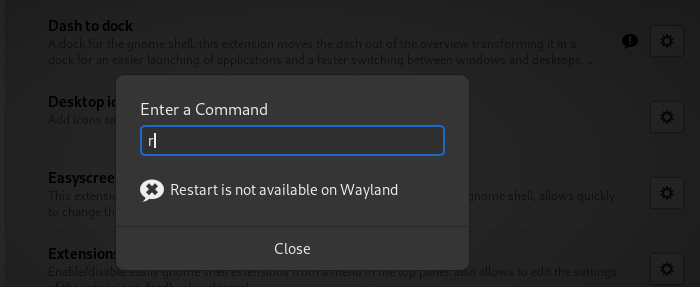
Thanks for this, all the above commands work in terminal but when I do 'Alt+F2 then r' I get an error 'Restart is not available on Wayland'
Basically I've still got the initial issue in Extensions 'Error Loading Extension'
Any help would be grateful on this.
Thanks
 blankah2
on 12 Jan 2021
blankah2
on 12 Jan 2021
I Had a double dock problem and used Hide dash X to hide the dock in Overview but now after following @aplab 's solution i was able to install properly but now i cannot see the application dock at all. If i disable Hidedash X then i can see the dock in overview.
Any help would be appreciated. Thankyou
@aplab Can you type the full line of code
git clone https://github.com/micheleg/dash-to-dock.git
cd dash-to-dock
git checkout master
make
make install
 pranay-sama
on 16 Jan 2021
pranay-sama
on 16 Jan 2021
Related issues
 guenter-r
·
6Comments
guenter-r
·
6Comments
 sethen
·
4Comments
sethen
·
4Comments
 pieplu
·
7Comments
pieplu
·
7Comments
 Edenhofer
·
7Comments
Edenhofer
·
7Comments
 fealv
·
6Comments
fealv
·
6Comments
Most helpful comment
I'm trying to make next steps:
create empty catalog and enter it
then press
to restart, and it works fine!