Dash-to-dock: Weird icon move on hover, since v66 / gnome 32
Gnome version: 3.32
Dash to dock version: 66
Os: Arch Linux

 pieplu
All 7 comments
Can confirm. Same OS, same version.
 Saend
on 8 Apr 2019
Saend
on 8 Apr 2019
I have the same problem - however, this only appears when I'm using the Arc-Dark shell theme (latest from AUR). It could be some interference from shared/overriding CSS files.
 xiaoyue
on 15 Apr 2019
xiaoyue
on 15 Apr 2019
Same thing happening here
 Vixtron
on 19 Apr 2019
Vixtron
on 19 Apr 2019
Enabling the 'Shrink the dash' option in the 'Appearance' tab of the Dash to Dock settings stopped the behavior for me. I'm using the Arc-Dark application theme as well.
Obviously this does change the appearance of the dock, but I use the intelligent autohide option anyway.
 purpleshell
on 23 Apr 2019
purpleshell
on 23 Apr 2019
@purpleshell it's a good workaround, but not always pretty:
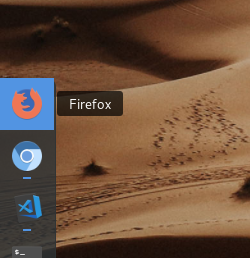
An other workarround is to maximize the dock, like ubuntu style
pieplu
on 23 Apr 2019
I have the same problem - however, this only appears when I'm using the Arc-Dark shell theme (latest from AUR). It could be some interference from shared/overriding CSS files.
It happens to me while using regular Arc too
 xTeixeira
on 6 Jun 2019
xTeixeira
on 6 Jun 2019
I can confirm this is still happening here, same OS, same theme...
 flyingrub
on 21 Aug 2019
flyingrub
on 21 Aug 2019
Related issues
 amansharma07
·
4Comments
amansharma07
·
4Comments
 k0rbendallas
·
7Comments
k0rbendallas
·
7Comments
 yingw787
·
3Comments
yingw787
·
3Comments
 sethen
·
4Comments
sethen
·
4Comments
 ynx1800
·
6Comments
ynx1800
·
6Comments
Most helpful comment
Enabling the 'Shrink the dash' option in the 'Appearance' tab of the Dash to Dock settings stopped the behavior for me. I'm using the Arc-Dark application theme as well.
Obviously this does change the appearance of the dock, but I use the intelligent autohide option anyway.