Dash-to-dock: Not working on gnome 3.36 Ubuntu 20.04 Beta.
Not working on gnome 3.36 Ubuntu 20.04 Beta.
 jcarmona1050
All 12 comments
not working in arch gnome 3.36 wayland too
 neptu39701
on 21 Mar 2020
neptu39701
on 21 Mar 2020
not working in arch gnome 3.36 wayland too
same problem, i hope is cooking.
 hachiimam
on 22 Mar 2020
hachiimam
on 22 Mar 2020
Same problem gnome-shell 3.36.0 manjaro linux.
The error in looking glass is:
TypeError: appIconPrototype._onLeaveEvent is undefined
 githubgeeker
on 22 Mar 2020
githubgeeker
on 22 Mar 2020
The gnome-3-36 branch should work https://github.com/micheleg/dash-to-dock/tree/gnome-3-36 (it works for me using Arch Linux).
You only need to:
$ git clone https://github.com/micheleg/dash-to-dock.git -b gnome-3-36
$ cd dash-to-dock/
$ make
$ make install
And then just restart gnome shell
ALT + F2 and then type 'r' and enter
As for the time of this comment, everything is working except drag and drop of icons which is somehow messy, but its a WIP that should be integrated soon into a final release (I hope).
 aliasbody
on 22 Mar 2020
aliasbody
on 22 Mar 2020
Hi, I have tried but not working
Il dom 22 mar 2020, 12:00 Luis Manuel Ramos Da Costa <
[email protected]> ha scritto:
The gnome-3-36 branch should work
https://github.com/micheleg/dash-to-dock/tree/gnome-3-36 (it works for me
using Arch Linux).You only need to:
$ git clone https://github.com/micheleg/dash-to-dock.git -b gnome-3-36
$ cd dash-to-dock/
$ make
$ make install
And then just restart gnome shell
ALT + F2 and then type 'r' and enter
As for the time of this comment, everything is working except drag and
drop of icons which is somehow messy, but its a WIP that should be
integrated soon into a final release (I hope).—
You are receiving this because you commented.
Reply to this email directly, view it on GitHub
https://github.com/micheleg/dash-to-dock/issues/1130#issuecomment-602181078,
or unsubscribe
https://github.com/notifications/unsubscribe-auth/ACR56KWGOZMEZ2J3LYZWZ4LRIXVTXANCNFSM4LQTS5PQ
.
githubgeeker
on 22 Mar 2020
@githubgeeker What is the error you're having? Maybe I can help.
aliasbody
on 22 Mar 2020
I've try again with your suggest option "-b gnome-3-36" and works great!
Thanks man!!!!!
Il giorno dom 22 mar 2020 alle ore 12:00 Luis Manuel Ramos Da Costa <
[email protected]> ha scritto:
The gnome-3-36 branch should work
https://github.com/micheleg/dash-to-dock/tree/gnome-3-36 (it works for me
using Arch Linux).You only need to:
$ git clone https://github.com/micheleg/dash-to-dock.git -b gnome-3-36
$ cd dash-to-dock/
$ make
$ make install
And then just restart gnome shell
ALT + F2 and then type 'r' and enter
As for the time of this comment, everything is working except drag and
drop of icons which is somehow messy, but its a WIP that should be
integrated soon into a final release (I hope).—
You are receiving this because you commented.
Reply to this email directly, view it on GitHub
https://github.com/micheleg/dash-to-dock/issues/1130#issuecomment-602181078,
or unsubscribe
https://github.com/notifications/unsubscribe-auth/ACR56KWGOZMEZ2J3LYZWZ4LRIXVTXANCNFSM4LQTS5PQ
.
githubgeeker
on 22 Mar 2020
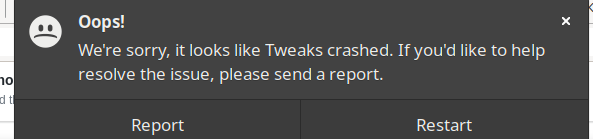
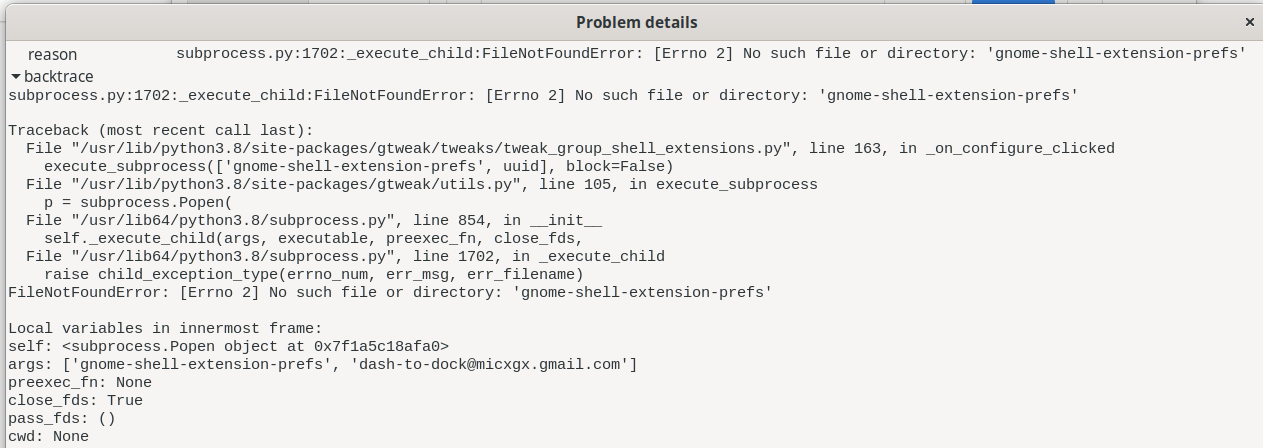
Hi, with gnome-3-36 branch its work on fedora 32 beta but cant open extension settings:
 avbor
on 23 Mar 2020
avbor
on 23 Mar 2020
a
Fixed for me by installing gnome-extensions-app =)
avbor
on 23 Mar 2020
The gnome-3-36 branch should work https://github.com/micheleg/dash-to-dock/tree/gnome-3-36 (it works for me using Arch Linux).
You only need to:
$ git clone https://github.com/micheleg/dash-to-dock.git -b gnome-3-36
$ cd dash-to-dock/
$ make
$ make install
And then just restart gnome shell
ALT + F2 and then type 'r' and enterAs for the time of this comment, everything is working except drag and drop of icons which is somehow messy, but its a WIP that should be integrated soon into a final release (I hope).
@aliasbody worked like a charm! thank you.
 vageliskatsiotis
on 23 Mar 2020
vageliskatsiotis
on 23 Mar 2020
Duplicate of #1123
 3v1n0
on 26 Mar 2020
3v1n0
on 26 Mar 2020
a
The gnome-3-36 branch should work https://github.com/micheleg/dash-to-dock/tree/gnome-3-36 (it works for me using Arch Linux).
You only need to:$ git clone https://github.com/micheleg/dash-to-dock.git -b gnome-3-36 $ cd dash-to-dock/ $ make $ make installAnd then just restart gnome shell
ALT + F2 and then type 'r' and enterAs for the time of this comment, everything is working except drag and drop of icons which is somehow messy, but its a WIP that should be integrated soon into a final release (I hope).
@aliasbody worked like a charm! thank you.
It did work like a charm. Excellent work, thank you!
 radumiron
on 27 May 2020
radumiron
on 27 May 2020
Related issues
 kauanmocelin
·
3Comments
kauanmocelin
·
3Comments
 yingw787
·
3Comments
yingw787
·
3Comments
 NikSays
·
5Comments
NikSays
·
5Comments
 amansharma07
·
4Comments
amansharma07
·
4Comments
 nana-4
·
3Comments
nana-4
·
3Comments
Most helpful comment
The gnome-3-36 branch should work https://github.com/micheleg/dash-to-dock/tree/gnome-3-36 (it works for me using Arch Linux).
You only need to:
And then just restart gnome shell
As for the time of this comment, everything is working except drag and drop of icons which is somehow messy, but its a WIP that should be integrated soon into a final release (I hope).