Dash-to-dock: Dock persists on lock screen
Ussing: NOME Shell 3.28.1 (ubuntu-communitheme mode)
GTK+ 3.22.30
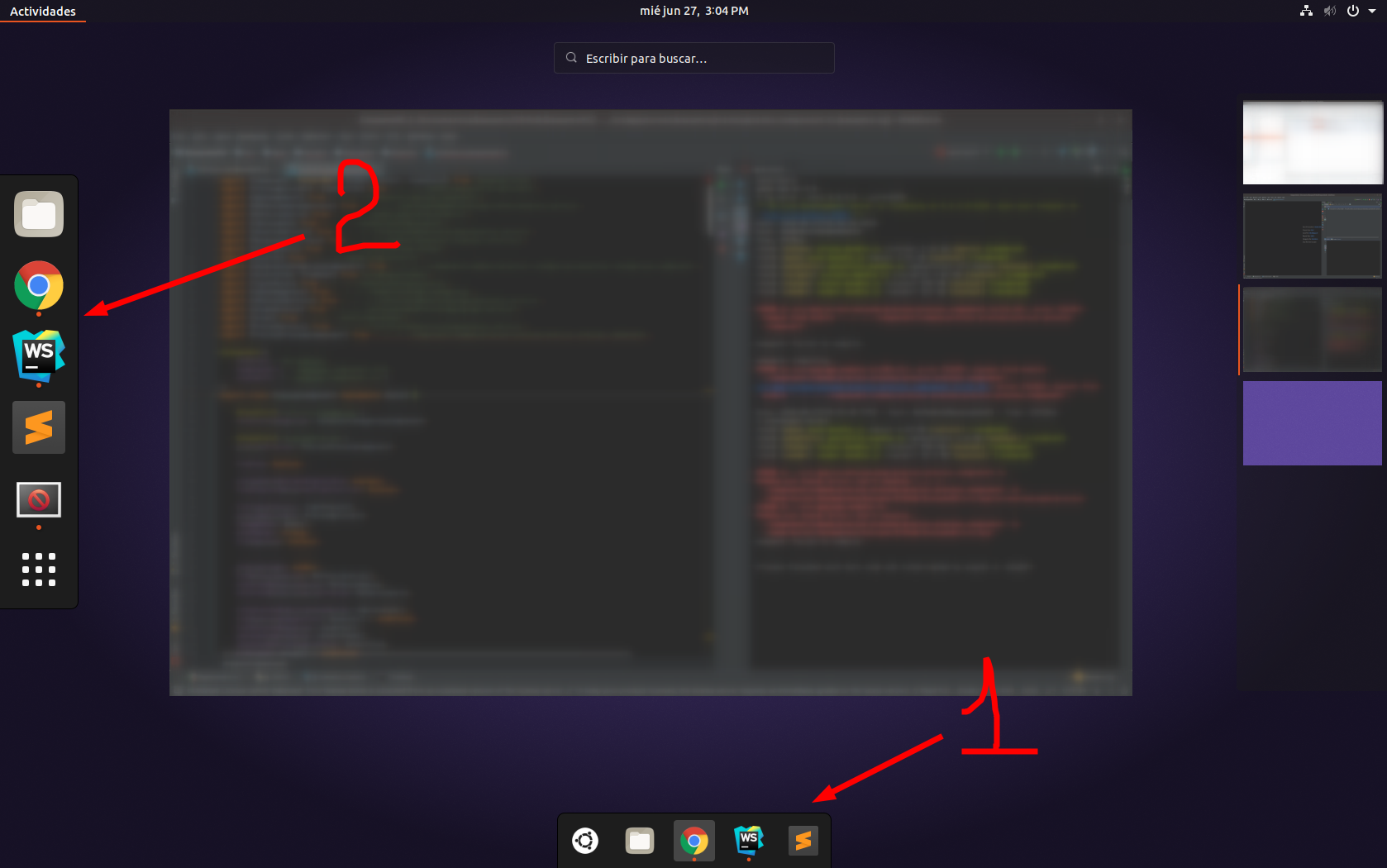
The configuration is "show at the bottom of screen" but showing also a dock in the left side of screen.
 ningacoding
All 18 comments
Same issue here, only seems to happen after suspend for me.
 scurrvy2020
on 29 Jun 2018
scurrvy2020
on 29 Jun 2018
I think this is a duplicate of https://github.com/micheleg/dash-to-dock/issues/739
scurrvy2020
on 29 Jun 2018
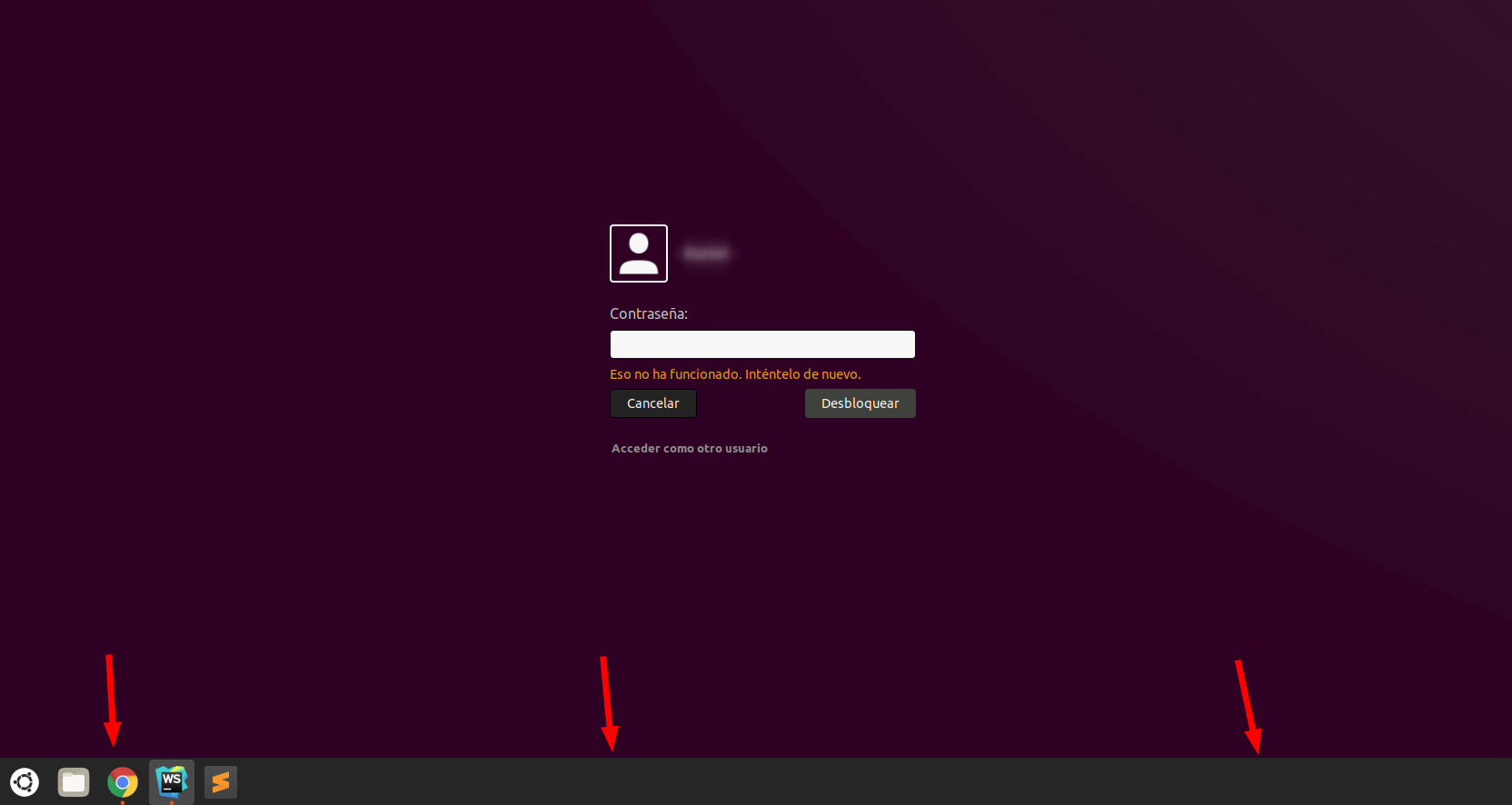
Thank you @scurrvy2020 , after trying to replicate "happen after suspend for me", i noticed that dock persists in lock screen:
ningacoding
on 29 Jun 2018
Is there any progress on this issue or plans on fixing it? Not sure where the priority for this sits in the list of issues.
 betsegaw
on 2 Jul 2018
betsegaw
on 2 Jul 2018
Same issue.
Ubuntu 18.04 LTS, Gnome 3.28.1.
$ dconf dump /org/gnome/shell/extensions/dash-to-dock/
[/]
autohide-in-fullscreen=false
animate-show-apps=true
shift-click-action='minimize'
shift-middle-click-action='launch'
extend-height=false
dock-fixed=false
force-straight-corner=false
click-action='previews'
intellihide-mode='FOCUS_APPLICATION_WINDOWS'
show-apps-at-top=false
max-alpha=0.80000000000000004
multi-monitor=true
scroll-action='do-nothing'
show-show-apps-button=true
require-pressure-to-show=true
apply-custom-theme=false
dock-position='BOTTOM'
custom-theme-shrink=false
icon-size-fixed=false
running-indicator-style='DASHES'
dash-max-icon-size=64
middle-click-action='launch'
preferred-monitor=0
transparency-mode='ADAPTIVE'
 alex-q
on 10 Jul 2018
alex-q
on 10 Jul 2018
What i noticed is that i can disable dash to dock, but still use it to change settings of ubuntu dock. Then i do not have a problem where two docks are present.
scurrvy2020
on 10 Jul 2018
Dock persists on lock screen just the same as the picture above (ningacoding post).
Ubuntu 18.04, Gnome 3.38.2
 ultraUser76
on 13 Jul 2018
ultraUser76
on 13 Jul 2018
This happens to me also..On lock screen the dock is visible and this happens even if i restart my computer and lock the screen (super + L)...
 vsimitsis
on 19 Jul 2018
vsimitsis
on 19 Jul 2018
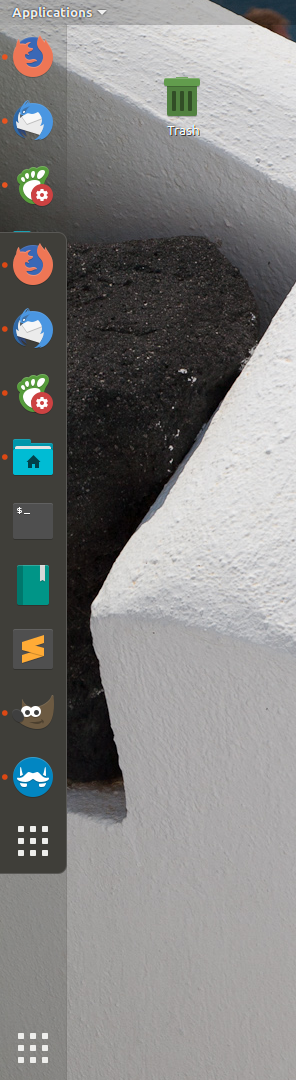
I have the same or similar problem. Also, further, occasionally after I login the native dock merges wish the custom dock:
 mdagtek
on 22 Jul 2018
mdagtek
on 22 Jul 2018
the same problem~:(
 sumic
on 23 Jul 2018
sumic
on 23 Jul 2018
Looks like a duplicate of #649
 ianrobrien
on 24 Jul 2018
ianrobrien
on 24 Jul 2018
I believe this is due to incompatibilities/version mismatch with ubuntu-dock. Can you try uninstalling/disabling it? Have a look at the discussion in #649.
 micheleg
on 29 Jul 2018
micheleg
on 29 Jul 2018
Issue still exists after the workaround on #649 applied. Just that now icons are randomly and not always showing up on Ubuntu 17.10 with the compatible dock installed.
Please, don't close this one, all the others are now closed and just looping back to each other. Thank you.
 szemet1
on 2 Aug 2018
szemet1
on 2 Aug 2018
I have observe that if the dconf Editor is open, the persists Dock does not show up in the lock screen. I'm running ubuntu 18.04
 Puthika
on 4 Aug 2018
Puthika
on 4 Aug 2018
I find the solution. "the two dock and dock in lock screen" is the conflict between ubuntu dock and dash to dock. What we need do is to close the dash to dock. What's more, the setting of dash to dock is still useful. But actually you need to set once more to make the settings effective.
 qingju32
on 11 Aug 2018
qingju32
on 11 Aug 2018
I don't know if this exactly the same issue, but the symptom is the same. And since I'm running Fedora I don't think the Ubuntu Dock is the culprit here ;).
Fedora 29
Gnome Version 3.30.1 (on Wayland)
Dash to Dock v64
[/]
shift-click-action='minimize'
shift-middle-click-action='launch'
customize-alphas=false
extend-height=true
dock-fixed=true
intellihide-mode='FOCUS_APPLICATION_WINDOWS'
click-action='previews'
max-alpha=0.81000000000000005
show-show-apps-button=false
multi-monitor=true
apply-custom-theme=false
isolate-monitors=true
custom-theme-shrink=true
preferred-monitor=0
min-alpha=0.40000000000000002
dash-max-icon-size=32
middle-click-action='launch'
running-indicator-style='DEFAULT'
isolate-workspaces=true
transparency-mode='ADAPTIVE'
EDIT: Running on Xorg seems to fix this for me :thinking:
 atomicptr
on 1 Nov 2018
atomicptr
on 1 Nov 2018
Closing as duplicate of #641.
micheleg
on 2 Dec 2018
I done the following operations:
sudo mv /usr/share/gnome-shell/extensions/[email protected] /~
sudo reboot
after restarting my computer I took back the file and restart it again. It's working since one week without any problem
 kamdoumloich
on 24 Jan 2019
kamdoumloich
on 24 Jan 2019
Related issues
 yingw787
·
3Comments
yingw787
·
3Comments
 k0rbendallas
·
7Comments
k0rbendallas
·
7Comments
 omi10859
·
3Comments
omi10859
·
3Comments
 guenter-r
·
6Comments
guenter-r
·
6Comments
 ynx1800
·
6Comments
ynx1800
·
6Comments
Most helpful comment
What i noticed is that i can disable dash to dock, but still use it to change settings of ubuntu dock. Then i do not have a problem where two docks are present.