Darktable: OpenCL + Filmic result in incorrect color in preview and export, dt 3.3 git AMD GPU
Describe the bug
When OpenCL is activated, Filmic module produces greenish/cyanish and desaturated image, both the preview and the final exported image have the incorrect tone. Zooming in and out and panning flashes the correct color.
To Reproduce
Scene-referred workflow, OpenCL on ->import image ->check the preview colors -> export -> check the export colors
Expected behavior
The produced color is not greenish and desaturated.
Screencasts
OCL on
https://streamable.com/ehg2bc
OCL off
https://streamable.com/l5pffc
Platform (please complete the following information):
- Darktable Version: 3.3.0 git1680
- OS: Linux, Fedora 33, GNOME 3.38
- OCL on
- Radeon RX 560, open source amdgpu driver + ocl bits from amd pro driver
Additional context
I'm using the OBS build, as far as commits go, this started happening today, yesterday's build worked fine.
 jpenala
All 17 comments
I did a very quick test and with nvidia-drivers I cannot reproduce. Hence might be AMD specific. Maybe a good idea to amend this to the title of this issue?
 AxelG-DE
on 17 Nov 2020
AxelG-DE
on 17 Nov 2020
Same issue here with a radeon rx580.
I haven't seen any error with OpenCL debug enabled. If a log file is needed I can provide it.
Just in case, it helps for bisect, Darktable installed from OBS packages:
- darktable_3.3.0~git1631.495c66681_amd64.deb worked right
- darktable_3.3.0~git1688.cd70c5754_amd64.deb started greenish and desaturated effect
Thanks
 rgo
on 17 Nov 2020
rgo
on 17 Nov 2020
@rgo: yep, expected as the diff between the two version you list is the OpenCL implementation in filmic :) Now we need a user on AMD debugging this.
 TurboGit
on 17 Nov 2020
TurboGit
on 17 Nov 2020
If one of you can debug this it would be nice.
TurboGit
on 17 Nov 2020
@TurboGit I'm having English right now, once I finish I'll look for you in IRC or here to try to debug it.
rgo
on 17 Nov 2020
I probably won't be available later (never on IRC btw) today. A first question would be to know if you have use the high quality reconstruction ? What you could do is try different parameters and see what happens and if one is responsible of the issue. This will actually help to pinpoint the culprit.
TurboGit
on 17 Nov 2020
Last note, I'm certainly not the best to debug that as this is Aurélien's work.
TurboGit
on 17 Nov 2020
@TurboGit You're right concerning high quality reconstruction. By default, it's set to 1 when I changed it to 0, it is not greenish and desaturated anymore.
rgo
on 17 Nov 2020
I can confirm the hq reconstruction setting at 0 fixing the issue. Setting it to max gives almost grayscale image.
jpenala
on 17 Nov 2020
OUCH!
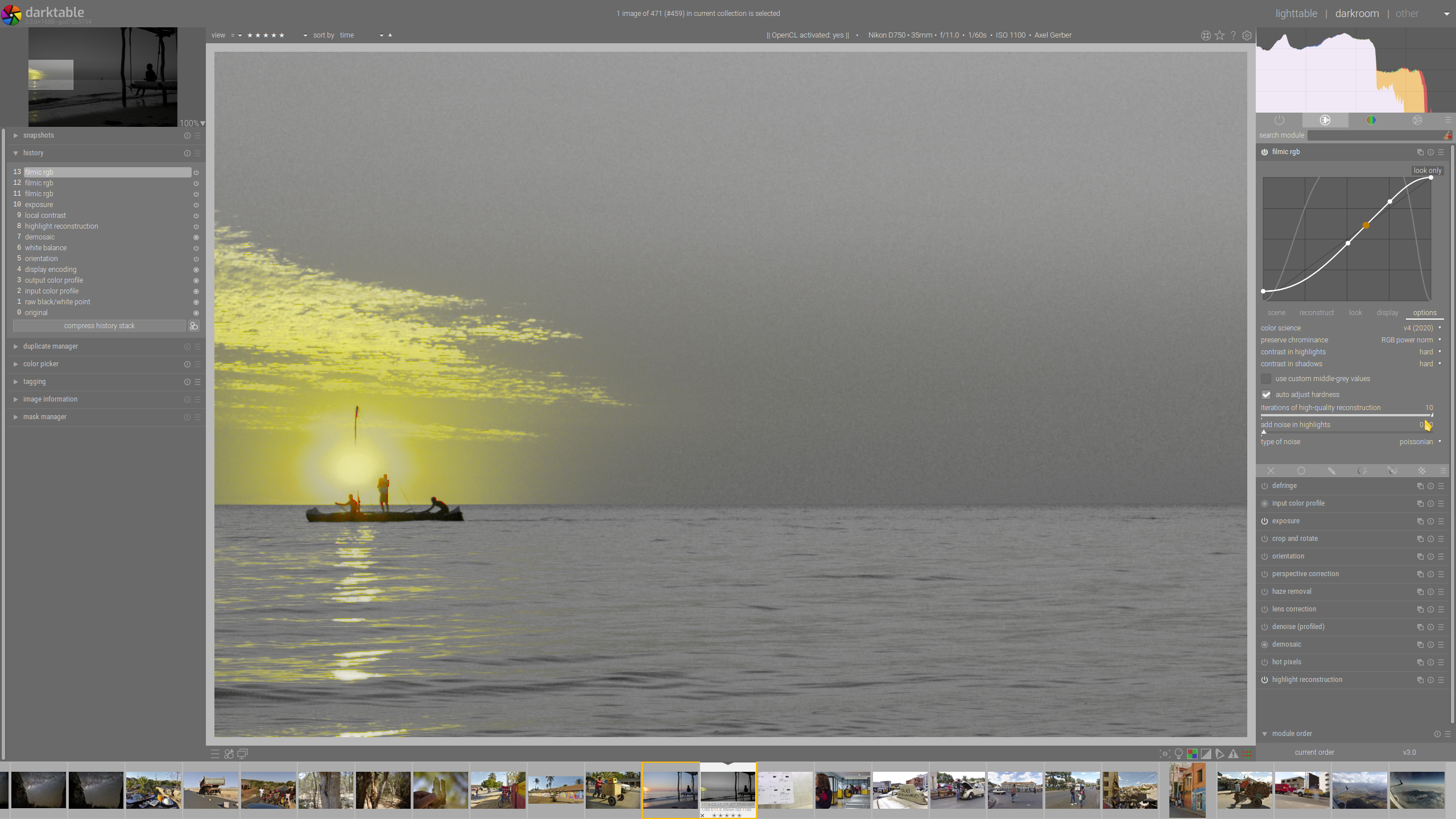
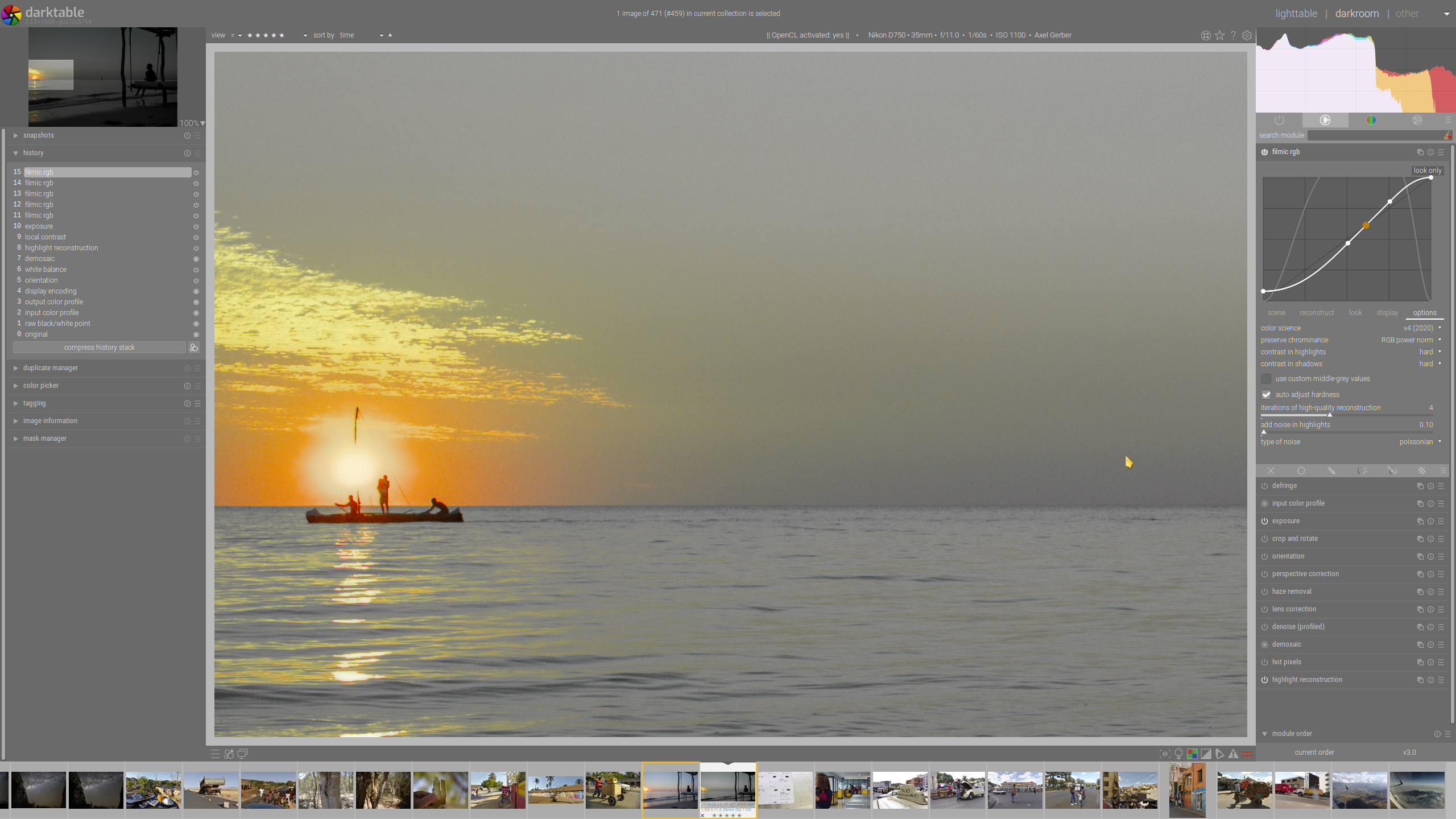
Now I have to confirm it also for nvidia-drivers, once someone increase HQ Reconstr. with and w/o OpenCL gives different results
HQ Resconstr. = 1 no OpenCL
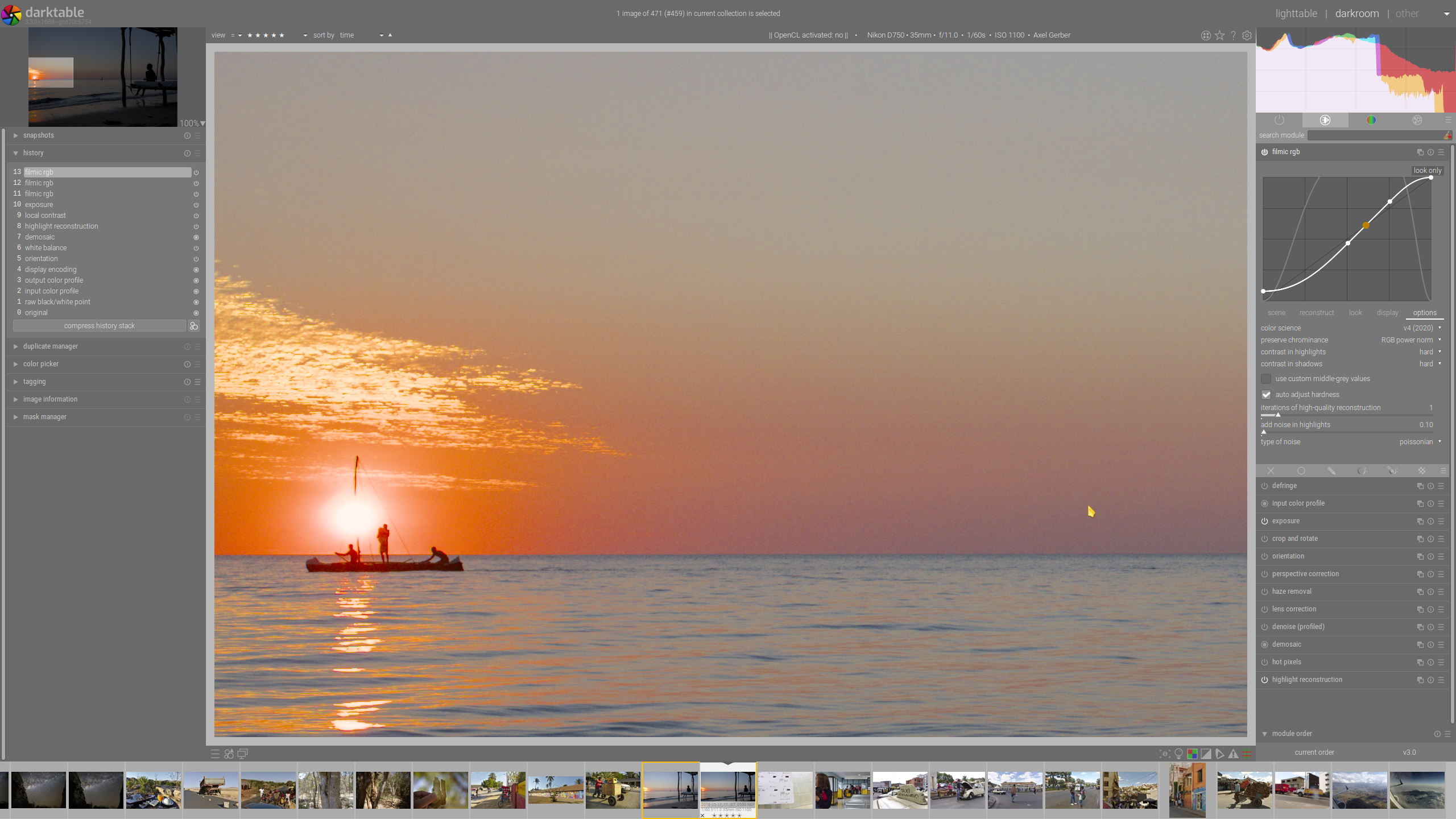
HQ Resconstr. = 10 no OpenCL
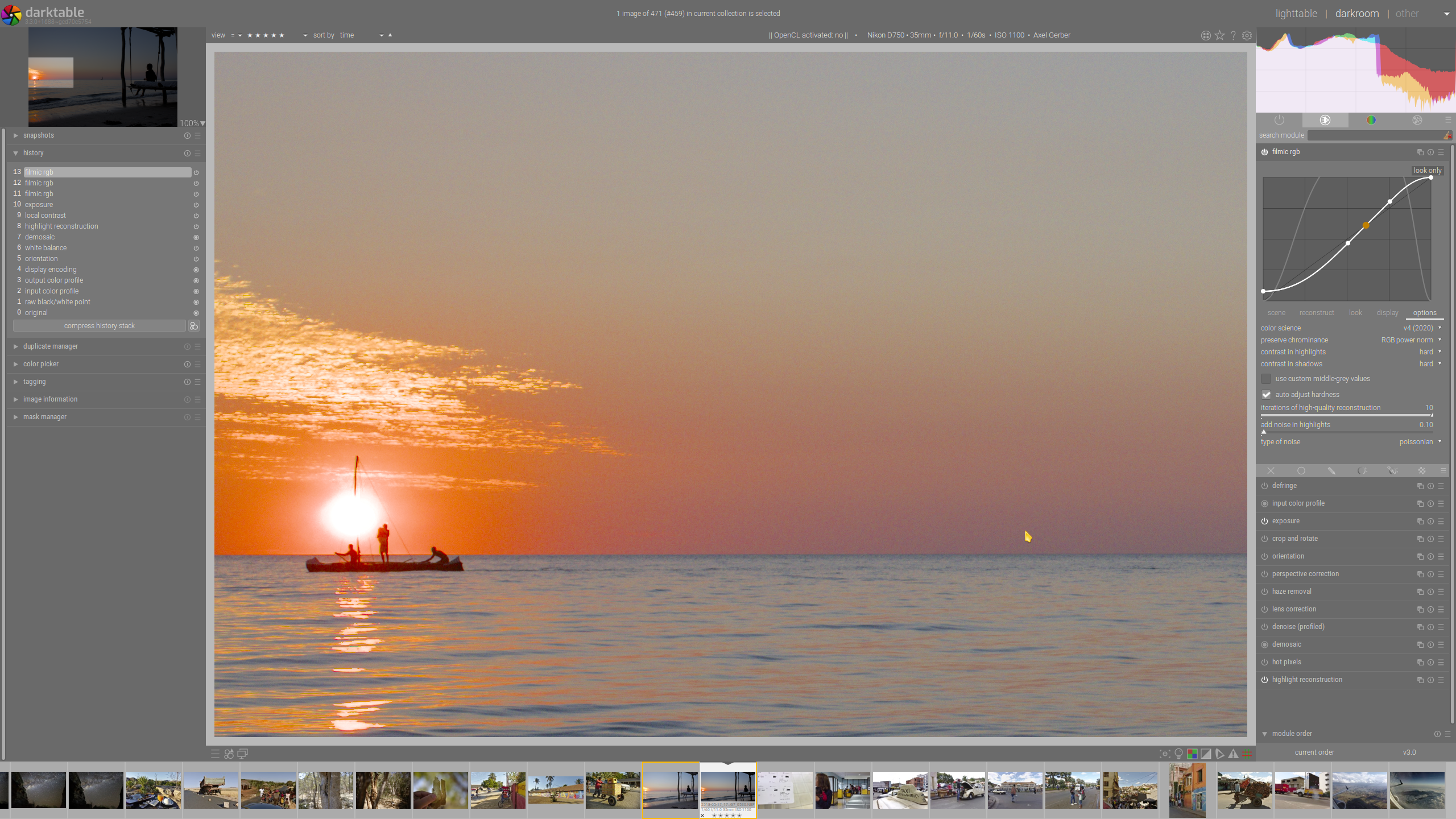
no OpenCL
HQ Resconstr. = 10 _witth_ OpenCL
HQ Resconstr. = 4 _witth_ OpenCL
@aurelienpierre your missus will hate me, but it looks, gotta ping you here :-/
AxelG-DE
on 17 Nov 2020
Confirmed, so indeed an issue on the HQ reconstruction with the OpenCL path.
TurboGit
on 17 Nov 2020
I don't reproduce. What are exactly your settings in the module ?
 aurelienpierre
on 17 Nov 2020
aurelienpierre
on 17 Nov 2020
You need OpenCL, HQ reconstruction (set about 4 to see the strong effect), and this happens only when preserve chrominance is set to no, luminance, RGB power norm.
TurboGit
on 17 Nov 2020
Ok, reproduced. Investigating…
aurelienpierre
on 17 Nov 2020
So, the HQ reconstruction uses a ratio/norm splitting that uses the same method as the filmic chroma-preservation method :
kernel void compute_ratios(read_only image2d_t in, write_only image2d_t norms,
                           write_only image2d_t ratios,
                           read_only image2d_t lut,
                           constant dt_colorspaces_iccprofile_info_cl_t *profile_info,
                           const dt_iop_filmicrgb_methods_type_t variant,
                           const int width, const int height)
{
  const int x = get_global_id(0);
  const int y = get_global_id(1);
  if(x >= width || y >= height) return;

  const float4 i = read_imagef(in, sampleri, (int2)(x, y));
  const float norm = fmax(get_pixel_norm(i, variant, profile_info, lut, 1), NORM_MIN);
  const float4 ratio = i / norm;
  write_imagef(norms, (int2)(x, y), norm);
  write_imagef(ratios, (int2)(x, y), ratio);
}
Now, the "no reconstruction" defaults to the same method as the "luminance Y", so the result is consistent and may indicate an issue with the work profile. However, I don't see why the RGB power norm would break and not the eucliean norm, since the code is essentially the same:
inline float get_pixel_norm(const float4 pixel, const dt_iop_filmicrgb_methods_type_t variant,
                            constant dt_colorspaces_iccprofile_info_cl_t *const profile_info,
                            read_only image2d_t lut, const int use_work_profile)
{
  switch(variant)
  {
    case DT_FILMIC_METHOD_MAX_RGB:
      return fmax(fmax(pixel.x, pixel.y), pixel.z);

    case DT_FILMIC_METHOD_LUMINANCE:
      return (use_work_profile) ? get_rgb_matrix_luminance(pixel, profile_info, profile_info->matrix_in, lut)
                                : dt_camera_rgb_luminance(pixel);

    case DT_FILMIC_METHOD_POWER_NORM:
      return pixel_rgb_norm_power(pixel);

    case DT_FILMIC_METHOD_EUCLIDEAN_NORM:
      return pixel_rgb_norm_euclidean(pixel);

    case DT_FILMIC_METHOD_NONE:
    default:
      return (use_work_profile) ? get_rgb_matrix_luminance(pixel, profile_info, profile_info->matrix_in, lut)
                                : dt_camera_rgb_luminance(pixel);
  }
}
I am a bit clueless here. NaN should be avoided everywhere since we fmax(..., NORM_MIN) at each step.
aurelienpierre
on 17 Nov 2020
aaaaah found it !!!
The C code uses the euclidean norm no matter what, while the OpenCL uses the same as the filmic tone mapping. So the results are normal AND show that the choice of euclidean norm was indeed sane. Fix on the way.
aurelienpierre
on 18 Nov 2020
That was fast, thank you!
jpenala
on 18 Nov 2020
Related issues
 denever
·
4Comments
denever
·
4Comments
 GrahamByrnes
·
3Comments
GrahamByrnes
·
3Comments
 Nilvus
·
5Comments
Nilvus
·
5Comments
 mjut
·
5Comments
mjut
·
5Comments
 Egocentrix
·
5Comments
Egocentrix
·
5Comments
Most helpful comment
aaaaah found it !!!
The C code uses the euclidean norm no matter what, while the OpenCL uses the same as the filmic tone mapping. So the results are normal AND show that the choice of euclidean norm was indeed sane. Fix on the way.