Darktable: DT 3: Strange hard edge on gradient mask
Describe the bug
I’m having a great time with the new Darktable version 3, and especially the new Filmic RGB and other RGB modules which are simply fantastic.
But now I’ve come across an issue which I can’t really explain. In one photo I have a very bright sky and so I want to use the Exposure module with a gradient mask to select the sky and not the ground. I set the gradient to roughly match the horizon and fade into the sky over an area of perhaps 40-50 pixels.
I then dial down the exposure. And I do that quite a bit, I think down to the full range of -3 ev. Mostly just because I wanted to see how much I could recover.
Anyway, what I see is that at the exact point where the gradient part of the mask stops and the “solid mask” begins, there is a very hard edge. The top part of the sky is darkened down by -3 ev, and then it very abruptly goes up to perhaps -1 ev and fades out to 0 ev at the horizon. Right where the actual gradient begins there is a sudden jump in brightness that I can’t explain.
To Reproduce
I have an example image with sidecar to demonstrate the issue:
In the example file, there is an adjustment by the exposure module called "Exposure 1". As you can see the exposure compensation has been dialed down all the way to -3 ev, which demonstrates the problem.
I understand there are sliders to further adjust the gradient mask including contrast (s-shape of the gradient), feathering and other more exotic parameters. Feathering is not useful in this case because it affects other things than just the gradient (the area around the thin branches in the foreground get halos). The mask contrast slider does help somewhat but out past 0.67 the "hard edge" in the gradient just moves to a different place. Frankly I would not expect to have to make adjustments to any of these sliders to achieve the basic functionality of providing a smooth gradient.
I asked over at the dt forum on discuss.pixls.us (link here) and noone there could explain it.
Expected behavior
I expect a gradient mask to provide a smooth gradient from full (100%) to nothing (0%) over a defined distance. In my example, this does not appear to be the case. The gradient falls off much too sharply at the start.
Screenshots
No screenshots but please see the attached example raw file (dng format) and sidecar file.
Platform (please complete the following information):
- Darktable Version: 3.0.0
- OS: Ubuntu 19.10
- OpenCL not activated as far as I know
- No proprietary graphics drivers in use
$ uname -a
Linux michael-kontor 5.3.0-26-generic #28-Ubuntu SMP Wed Dec 18 05:37:46 UTC 2019 x86_64 x86_64 x86_64 GNU/Linux
 mberg2007
All 9 comments
Looks suspiciously like the distribution of the mask values is subject to some nonlinear transfer function, as opposed to being calculated on radiometrically linear ratios.
This could be confirmed applying a sweep from 0 to 100% against a solid emission, and evaluating the response. A betting person might wager the values will correspond to the L transfer characteristic from Lab.
Edit: Dammit. Can’t even make reasoned estimations with this code base.
 sobotka
on 19 Jan 2020
sobotka
on 19 Jan 2020
Found it:
in src/develop/masks/gradient.c, line 1262:
      const float distance = y0 - curvature * x0 * x0;

      const float value = normf * distance / sqrtf(1.0f + steepness * distance * distance) + 0.5f;
The value of the mask is computed by a sigmoid function o(distance^2) but distance is already o(x0^2), so we get a non-linear o(x^4) fall-off, which explains the non-smooth gradient.
@AlicVB could you confirm/clarify ?
 aurelienpierre
on 19 Jan 2020
aurelienpierre
on 19 Jan 2020
The distance is calculated in y direction. The second term allows for a parabolic curvature with a quadratic term dependent on x. The curvature parameter is zero by default. Double-click on the gradient to reset curvature to zero (in case of doubt).
I guess that the issue is a different one. The gradient implements in principle a sigmoidal transition. However, the parameter gradient->steepness defaults to zero and a control element so far has not been implemented. The sigmoidal transition therefore degenerates into a linear ramp determined by gradient->compression.
 upegelow
on 19 Jan 2020
upegelow
on 19 Jan 2020
Frankly I would not expect to have to make adjustments to any of these sliders to achieve the basic functionality of providing a smooth gradient.
Have you tried mask blur with a large radius?
I admit that the sharp transition is strange. We should at least understand why this happens.
upegelow
on 19 Jan 2020
Frankly I would not expect to have to make adjustments to any of these sliders to achieve the basic functionality of providing a smooth gradient.
Have you tried mask blur with a large radius?
Yes but it affects the entire mask, including areas that have been fenced off parametrically. I don't want mask feathering to introduce halos around the dark branches that reach into the sky, or mask blurs that will cause the exposure drop to bleed into areas that should not be affected.
This is a problem that is specific to the actual gradient of the mask. I just want the gradient to be linear like I expect the typical use case calls for 90% of the time.
mberg2007
on 19 Jan 2020
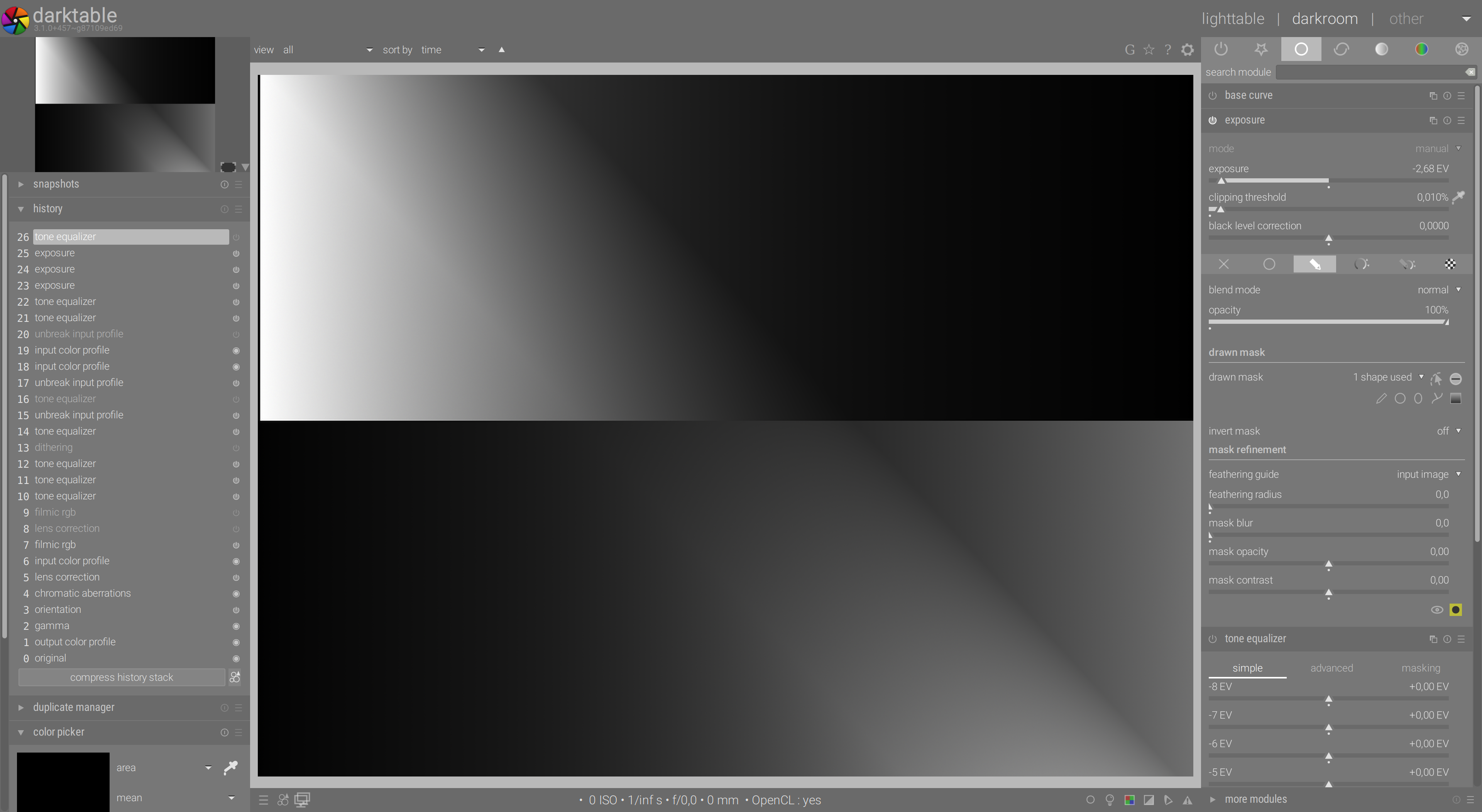
The sigmoidal transition therefore degenerates into a linear ramp determined by gradient->compression.
The result shown is definitely not the result of a linear transition, even with a double click. Here is an example on a continuous (symmetrized) grey gradient (PNG file, exposure moved after input profile so the pipe is linear):
aurelienpierre
on 19 Jan 2020
Apologies if this comment causes the issue to be reopened, but I'm not particulary strong in math and sigmoid functions so I'm not sure what to make of this.
This issue started with me posting a landscape image with a -3 ev exposure gradient in the sky. That image looked bad. Will this fix solve that problem?
Again I ask simply because I don't understand what a sigmoidal transition is.
mberg2007
on 22 Jan 2020
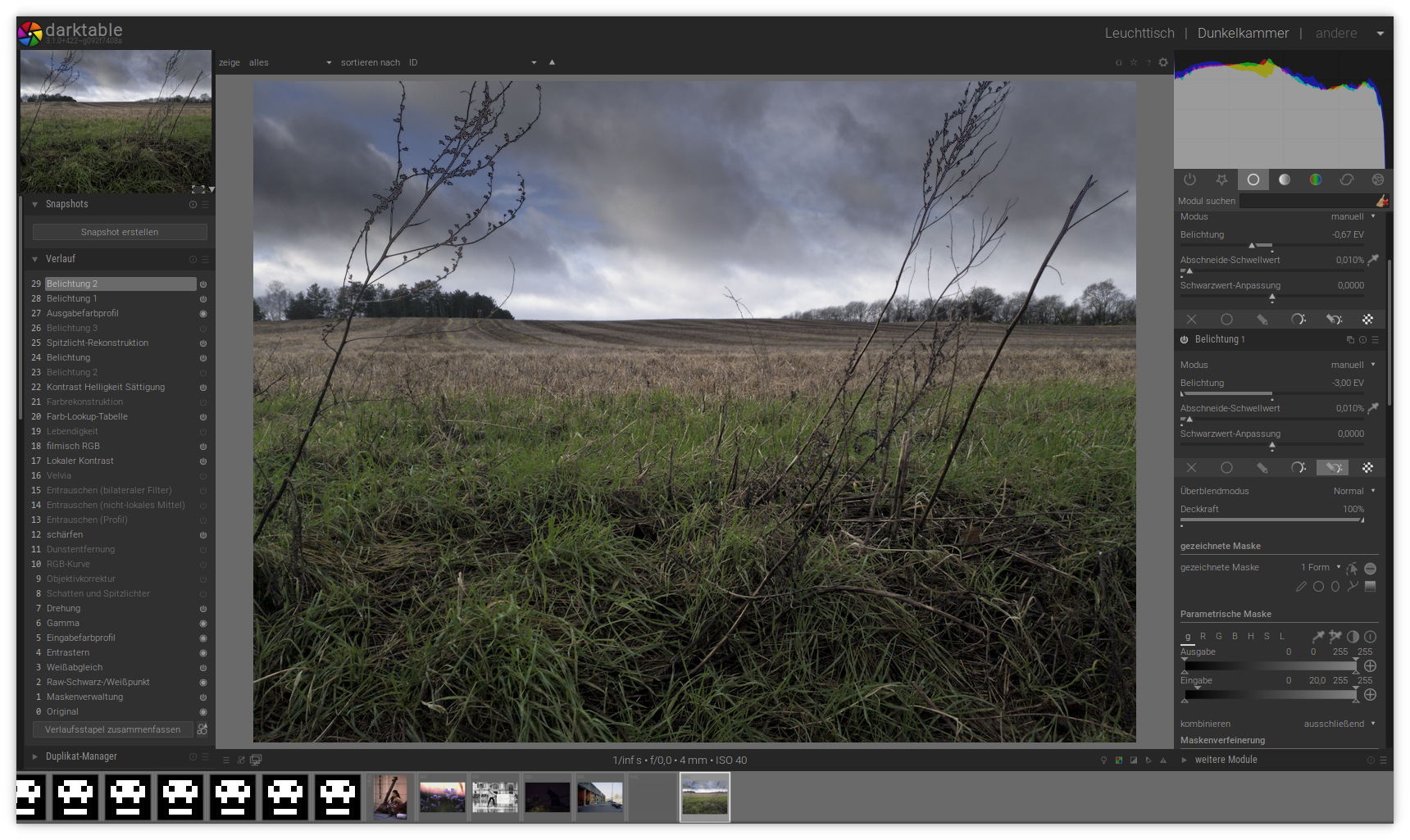
This is the screenshot after converting the one gradient in the "exposure 1" module into sigmoidal mode. No further finetuning has been done.
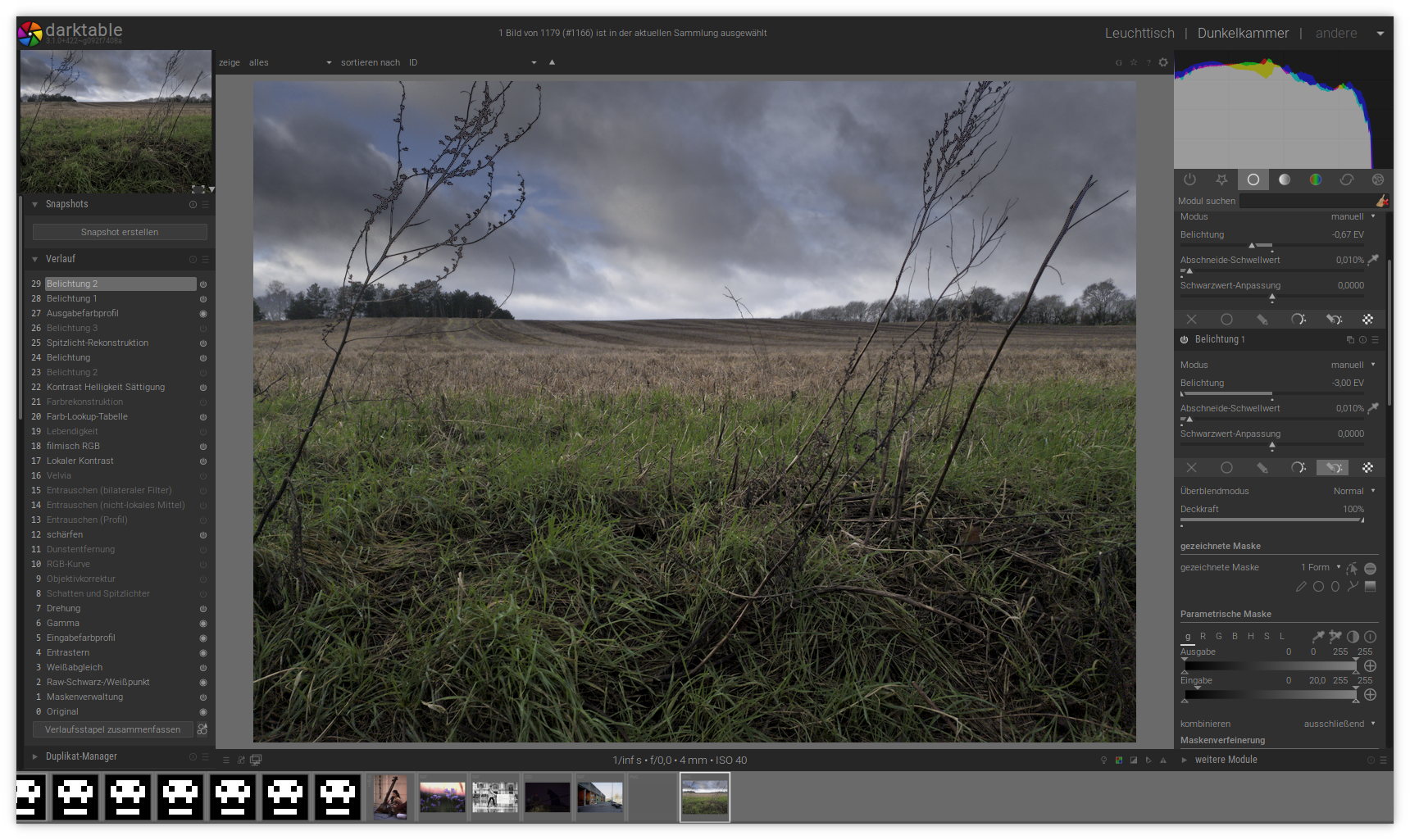
and here with a little bit more tweaking of gradient position and hardness:
upegelow
on 22 Jan 2020
Again I ask simply because I don't understand what a sigmoidal transition is.
It means that the energy level of the RGB is nonlinear. It’s somewhat nonsensical to a system “trying to do the right thing” without making a whole bunch of other things tunable.
Default should be radiometric linear if the goal is to move Darktable in that direction. If no one cares, leave it as default sigmoid.
sobotka
on 22 Jan 2020
Related issues
 Egocentrix
·
5Comments
Egocentrix
·
5Comments
 elstoc
·
4Comments
elstoc
·
4Comments
 mjut
·
5Comments
mjut
·
5Comments
 denever
·
4Comments
denever
·
4Comments
 AxelG-DE
·
5Comments
AxelG-DE
·
5Comments