Darktable: Basecurve → New defaults
@TurboGit and @rawfiner my apologies for insisting and reporting it once again (#3677). Just to illustrate that new default behavior of basecurve can produce messy results. Both pictures are not clipping and dt makes ugly job with new defaults.
New default basecurve settings is on the right:
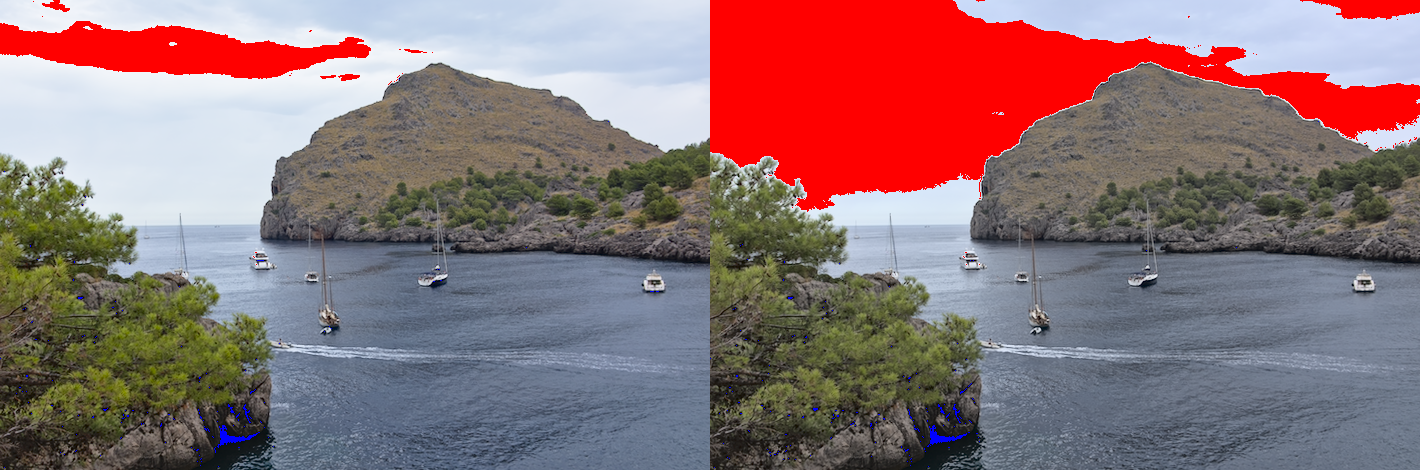
New default basecurve settings is on the left:
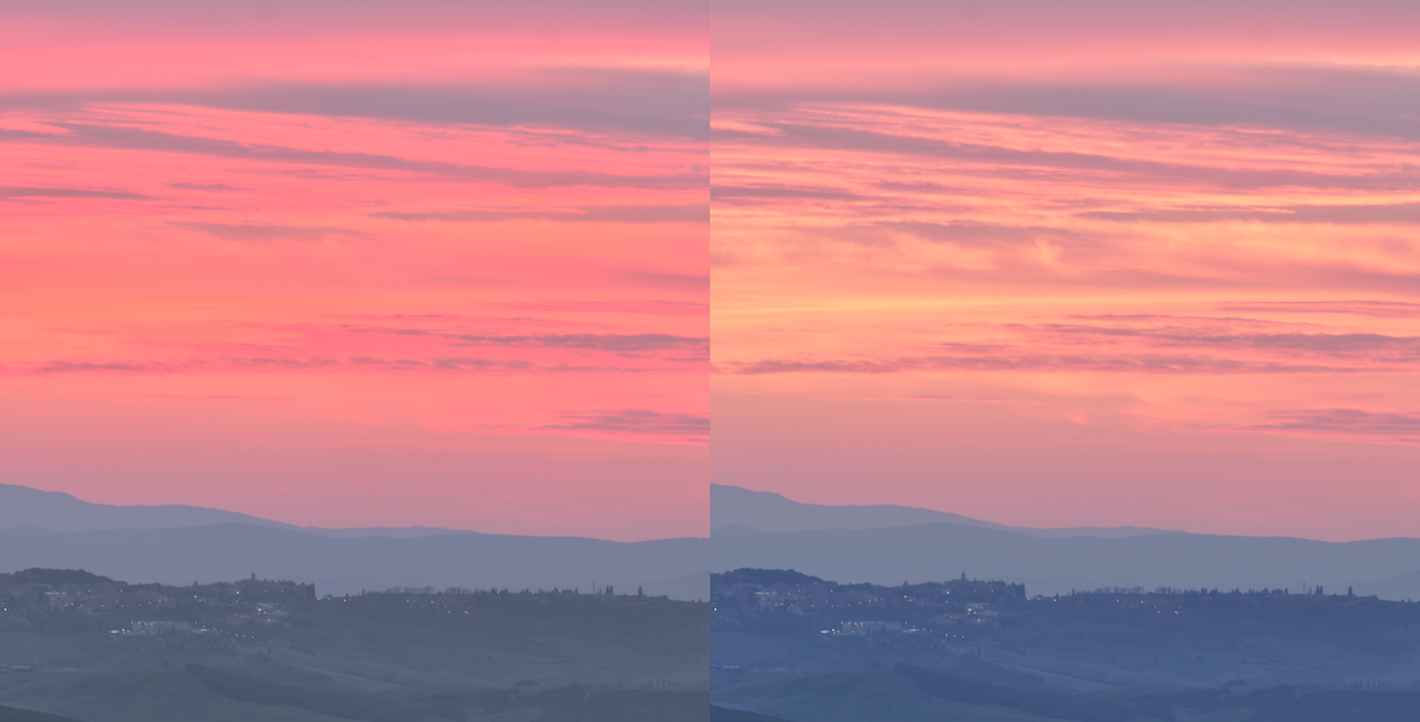
I do find less saturated middletone colors of new defaults more pleasing in some situations but that job in highlights is just bad. It can and it will scare new users off, those who doesn't know what to tweak. Maybe old defaults are not the best but at least they were failsafe.
I tried Rawtherapee for comparison and it makes close to builtin JPEG results for both pictures.
 ghost
ghost
All 41 comments
@timur-davletshin : why not simply make your own automatic preset if you don't like new default one ? darktable allow to do that, simplest way to have the behaviour you want.
 Nilvus
on 8 Dec 2019
Nilvus
on 8 Dec 2019
Nilvus, just like I said in previous report it's not a problem for me to overcome those problems. I just don't understand why small userbase of dt should make more problems for new users. IMO, result of this new default is less universal. I illustrate it with some screenshots. Are they not relevant?
ghost
on 8 Dec 2019
Color preservation set to none desaturates the highlights, that's why you get less clipping: that's just that highlight get desaturated. You just have to lower the exposure to get those highlights unclipped, or desaturate them explicitly.
I don't think this advantage of the "none" mode is worth it, considering the disadvantages of not having color preservation activated.
If you don't look at the clipping indicator, I don't think the result with color preservation is that much different from camera jpg that it would be worth to disable it: just adding a bit of saturation in color balance gives results really close to the camera jpgs on the raws I tested.
If you have several raws where the problem appears more easily, please upload them so that we can test.
But honestly, I think disabling color preservation give user a bad start by hiding some problems. I would prefer encouraging the user to handle the clipping problem the right way than having just the base curve without color preservation.
 rawfiner
on 8 Dec 2019
rawfiner
on 8 Dec 2019
if a new user needs a ‚one click to rule them all‘ solution, darktable might not be the sufficient tool. So it‘s more important to preserve as much as possible color information in the pipe until the user explicitly drops them.
It‘s better a new user can learn from scratch how to do it right...
 MStraeten
on 8 Dec 2019
MStraeten
on 8 Dec 2019
@rawfiner I understand the way it works but results are bad as general purpose. It is less universal.
ghost
on 8 Dec 2019
@MStraeten well... why not to disable basecurve at all? Just following your logic 😄
ghost
on 8 Dec 2019
@rawfiner — https://drive.google.com/open?id=1WDH2-ipgN_yBg2mFLyOjPykdPmcHXYoY, previous images are in previous report. In fact it works with any picture with wide dynamic range. Sky, clouds turn more bluish-magenta and gets more clipping as a result in those channels. Not saying that general saturation of all pictures is a bit washed if compared to competing software.
ghost
on 8 Dec 2019
@MStraeten well... why not to disable basecurve at all? Just following your logic
That the logic and that's why you could deactivate basecurve on preferences dialog. When this option appear on darktable, that was the first thing I use.
Really, this module should be deprecated for me. Using filmic RGB is better and provides more powerful options.
Nilvus
on 8 Dec 2019
@timur-davletshin : I do disable the basecurve by default since Filmic is around :)
 TurboGit
on 8 Dec 2019
TurboGit
on 8 Dec 2019
@TurboGit I doubt that tweaking every photo after a trip can be considered productive. But for selected pictures it can be very useful I agree.
ghost
on 8 Dec 2019
You really can get better results with filmic RGB in darktable 3.0 than in basecurve. Additionally it is much easier to handle.
 pphotography
on 8 Dec 2019
pphotography
on 8 Dec 2019
@pphotography if that is so easy and good why it's not on by default? Maybe it's not that easy at all especially for novice. Otherwise Aurelien wouldn't publish his long videos (they're very good btw) about theoretic background of filmic rgb and how to tweak it.
ghost
on 8 Dec 2019
I really think this is a crazy discussion. For my Olympus 10 basecurve was fine, the penf needed some modification of the basecurve, for the leica it's just bad. So what does this tell? Nothing, exactly!
When filmic rgb appeared some time ago, i tested default basecurce vs filmic on many photos from several cameras. Nothing conclusive. It's just a matter of taste what you like more. It took me maybe a week or so to have nice rgb filmic defaults for my cameras. If you prefer it the other way, just do so and dt allows you all. But what's the "Issue" in this discussion?
 jenshannoschwalm
on 8 Dec 2019
jenshannoschwalm
on 8 Dec 2019
@jenshannoschwalm the issue is in being consistent. Darktable uses Adobe color profiles mostly, base curves are made with aim to achieve what camera producer concidered "correct", people make their own base curves from builtin JPEGs and they expect comparable result.
Imagine, I made my own base curve with darktable-curve-tool or use supplied camera-specific curves. But even those pre-supplied curves now have this new option enabled by default which ruins whole logic. Results of using those curves are no longer comparable with what they were made for.
ghost
on 8 Dec 2019
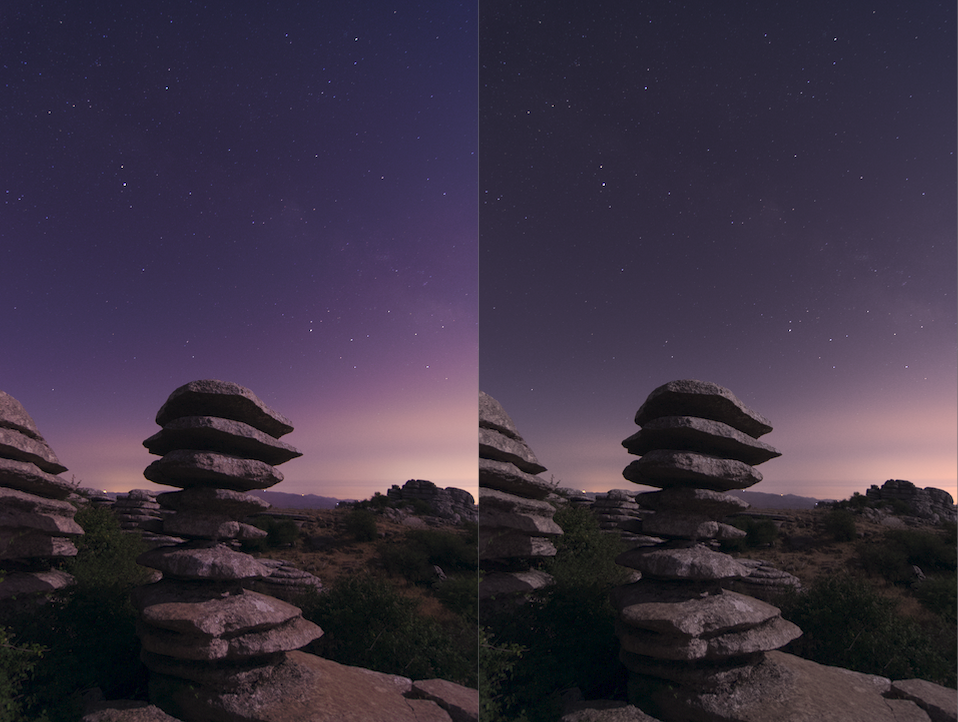
@jenshannoschwalm e.g. result of work of builtin Pentax K-5 basecurve profile:
Left is old behavior, right is new. Left is very close to JPEG tone reproduction and this is why this profile was manually made for. But it no longer works the way it was made. Now you have something on the right which is very different from original aim.
ghost
on 8 Dec 2019
Yes, i/we know. But what's the point?
jenshannoschwalm
on 8 Dec 2019
@jenshannoschwalm I always ask myself this question, what is the point of being consistent and logical? Life seems to have to more fun without it 😅
ghost
on 8 Dec 2019
This is not about being consistent or logical. If something new requires (or let's say suggests) a new workflow to have best results in the end --> we all have to learn.
Image getting yourself an e-bike, would you suggest to switch of the motor to be consistent? :-)))
jenshannoschwalm
on 8 Dec 2019
@timur-davletshin : Given the feedback we will not revert to 2.6 default. this is different in 3.0, sure but after all people will adjust their workflow. there is no truth in all this. The in-camera jpeg is not the truth, it is one proposal from the vendor, different from other camera BTW.
TurboGit
on 8 Dec 2019
@timur-davletshin : Given the feedback we will not revert to 2.6 default. this is different in 3.0, sure but after all people will adjust their workflow. there is no truth in all this. The in-camera jpeg is not the truth, it is one proposal from the vendor, different from other camera BTW.
Yeah, but you just broke all preset basecurves you have in module by changing default behavior. Very strange decision.
ghost
on 8 Dec 2019
This is not about being consistent or logical. If something new requires (or let's say suggests) a new workflow to have best results in the end --> we all have to learn.
Image getting yourself an e-bike, would you suggest to switch of the motor to be consistent? :-)))
Well, if you like metaphors — you just made e-bike with disengaged pedals which renders it unusable for novice users ☺
ghost
on 8 Dec 2019
@timur-davletshin : Nothing broken but different and this is presets for NEW edits we did not change the old one and again we do expect a better overall rendering in most cases. You have shown cases where it works not that good, but we have plenty of case where it is better. Who is right? Who is wrong? No one, just a new default that we feel will be better.
And nothing that can be changed by users using an auto-preset.
So, please let's move on. That's the kind of decision where we can't please all people :)
TurboGit
on 8 Dec 2019
- I made my profile according to https://www.darktable.org/2013/10/about-basecurves/ — It matches to builtin JPEG.
- You changed defaults
- My new edits do not match JPEG and have problems with highlights because your new defaults apply to old profiles too.
- Basecurves do not give expected result — this is what they call broken.
Same can be said about all profiles you have in basecurve module.
ghost
on 8 Dec 2019
Several new modules depends on the new pixel pipe with a more consistent handling of color information, so it doesn't make sense to keep old behaviour. In this sense the module is not to be called broken, it was revised and updated to match the new requirements.
Unless filmic v2 basecurce cant just be deprecated, since there are some users using it for exposure fusing - they profit from the new color handling since colors arent messed up.
A different way to get edits similar to out of cam jpegs is using camera profiling described in https://pixls.us/articles/profiling-a-camera-with-darktable-chart/
MStraeten
on 8 Dec 2019
Several new modules depends on the new pixel pipe with a more consistent handling of color information, so it doesn't make sense to keep old behaviour.
Oh, come on! Can you be more precise? I did take some time to provide whole bunch of situations when new defaults fails.
A different way to get edits similar to out of cam jpegs is using camera profiling described in
More or less similar approach I use on some of my film scans. RGB curves from any editor can be used too.
ghost
on 9 Dec 2019
have a look in several discussion on pixel pipe, filmic and basecurve in github and discuss.pixls.us to get why it was changed ...
and if you think, its broken, then you might continue using 2.6.3 ;)
MStraeten
on 9 Dec 2019
The new default is just horrible for my snowy pictures from Svalbard.
It took me a while to find why they look so bad now. I agree that for new users it would be hard to find the new setting and they may just give up.
For travel photography it is important to get reasonable defaults because yes, I won't be tuning every picture.
 angryziber
on 23 Dec 2019
angryziber
on 23 Dec 2019
@angryziber my main argument was that it breaks logic of presets in basecurve module. Presets are made to match in camera JPEGs with new defaults result doesn't match it. My second argument — it's just less universal.
ghost
on 23 Dec 2019
I totally agree with both points. Really hoping that the decision can be changed before the final 3.0 release...
angryziber
on 23 Dec 2019
@angryziber I doubt. But maybe user feedback will change @TurboGit opinion in future. Third argument — it just looks very different from what you get in other software products. Users perceive it as a fault.
ghost
on 23 Dec 2019
Left is dt3.0 new default, old one is on the right. IMO it's just utter disaster. But at least colors are saved now 😄
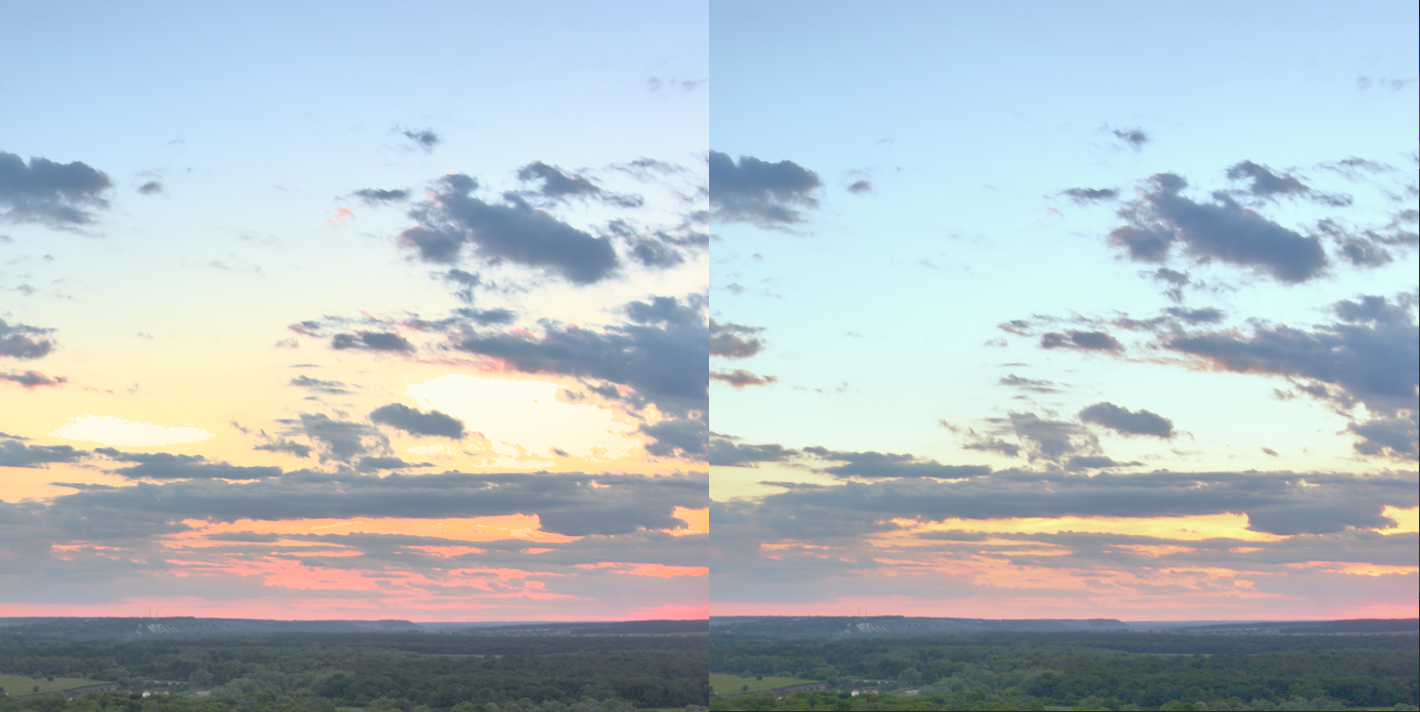
@angryziber what is your disaster picture?
ghost
on 23 Dec 2019
@angryziber I doubt. But maybe user feedback will change @TurboGit opinion in future. Third argument — it just looks very different from what you get in other software products. Users perceive it as a fault.
That's not only @TurboGit opinion and some users asking for the new behavior. Anyway, is it so difficult to take a previously edited image from previous preset you like and save it as a preset ? darktable as the quality to let users choose and edit his presets. darktable 3.0 is a big step with a really better workflow (base curve is even less powerful and good to colors than using new modules). It's impossible to please all people. On all decisions, we will have people happy and other not. So please, don't forget its a free software and have the quality to be flexible. You can elso keep on darktable 2.6. It's already a powerful software...
Other software are also there...
Nilvus
on 23 Dec 2019
@Nilvus I know about presets as I said in original report. Whether you like it or not basecurve is on by default. Advanced users can play with filmic till Jesus's second coming but 95% of users don't edit every shot they take (even if they shoot in raw).
Other software are also there...
With this mindset they lose user base )))
ghost
on 23 Dec 2019
@Nilvus I know about presets as I said in original report. Whether you like it or not basecurve is on by default. Advanced users can play with filmic till Jesus's second coming but 95% of users don't edit every shot they take (even if they shoot in raw).
And that's why presets exists, on base curve, filmic and other modules. They helps to not edit every shot. And darktable 3.0 also add options to deactivate permanently base curve...
With this mindset they lose user base )))
In free software, you simply have free, with all its meaning. This mindset is only that: freedom ! I don't care who use a software or another. But here you already had, on your two issues, many answers explain you why this choice and why this won't change. And how you could anyway continue to use old settings. Ok, that was not what you expect. Just life. That's it, issue closed.
An answer is not necessary to this...
Nilvus
on 24 Dec 2019
They helps to not edit every shot.
Yeah, presets help but one needs to make them for every camera. Basecure tool creates presets for basecurve module not for filmic. Auto mode in filmic doesn't work for most of situations. So... most of users will stick to base curve module.
many answers explain you why this choice and why this won't change
Not convicing enough why new default should ruin shots which were fine before.
An answer is not necessary to this...
Come on! There is no need to take offense when you face facts )))
ghost
on 24 Dec 2019
Basecurve with old default destroys colors: that's also a fact.
We disagree on this issue, and I guess both sides will continue to disagree: all arguments are already here, have already been considered, and now we are just repeating them...
rawfiner
on 24 Dec 2019
all arguments are already here, have already been considered
Can you send a link with original discussion on this matter? I'd like to read it.
ghost
on 24 Dec 2019
I was just speaking about this issue report (#3693) and the other one you previously created (#3677)
rawfiner
on 24 Dec 2019
@rawfiner but I see no proof that new default is better or more universal! To make this decision I would expect that, let's say, 10% of shots which were bad before are good now. To me it looks like 30% of random shots from raw samples are bad now... and they were OK with old settings.
ghost
on 24 Dec 2019
Ok then checkout the code and build your own branch with old basecurve - or simply just continue using the 2.6.3. it doesn’t stop beeing usable when 3.0 is released ;)
MStraeten
on 24 Dec 2019
Ok then checkout the code...
I know what to do, thank you. I'm just asking for logic behind that decision. And I see zero screenshots to prove statement of "better results" with new defaults. Not a single one.
ghost
on 24 Dec 2019
Related issues
Nilvus
·
5Comments
 ChristopherRogers1991
·
6Comments
ChristopherRogers1991
·
6Comments
 GrahamByrnes
·
3Comments
GrahamByrnes
·
3Comments
 bapBardas
·
6Comments
bapBardas
·
6Comments
 denever
·
4Comments
denever
·
4Comments