Cwa-app-ios: Reactivation of Risk Determination
Avoid duplicates
- [ ] Bug is not mentioned in the FAQ
- [ ] Bug is not already reported in another issue
Technical details
- Device name: iPhone XS
- iOS Version: 14.4
- App Version: 1.12.1
Describe the bug
After iOS reinstallation the App gets stuck in a vicious circle when trying to reactivate Risk Determination (please see steps below)
Steps to reproduce the issue
- press button "Risiko-Ermittlung aktivieren" (after App start)

- press button "Geräte-Einstellungen öffnen"
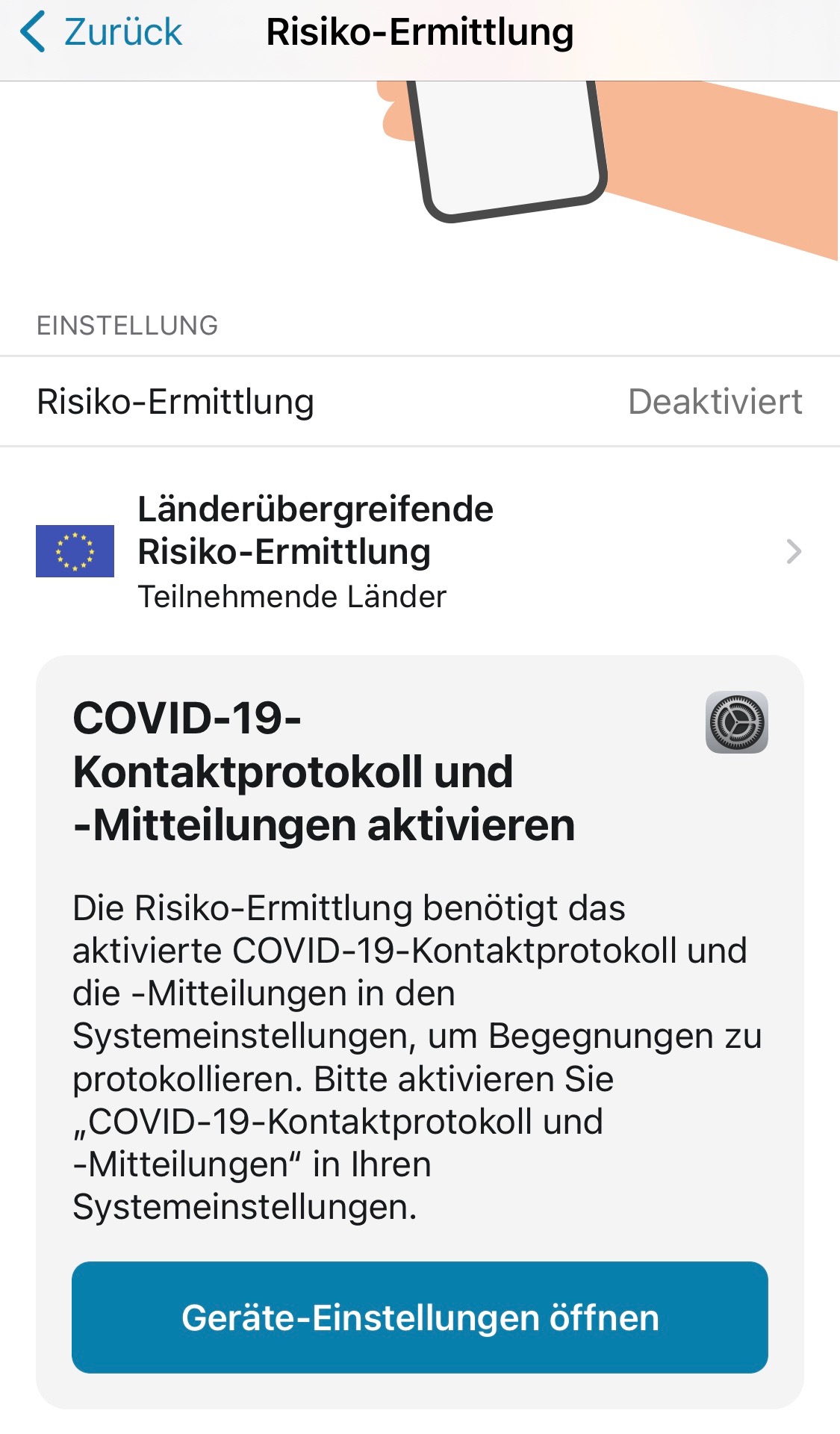
-> this sends you to the setting of the app, No possibility to activate "Risiko-Ermittlung"
other way:
- open iPhone settings
- go to "Begegnungsmitteilungen
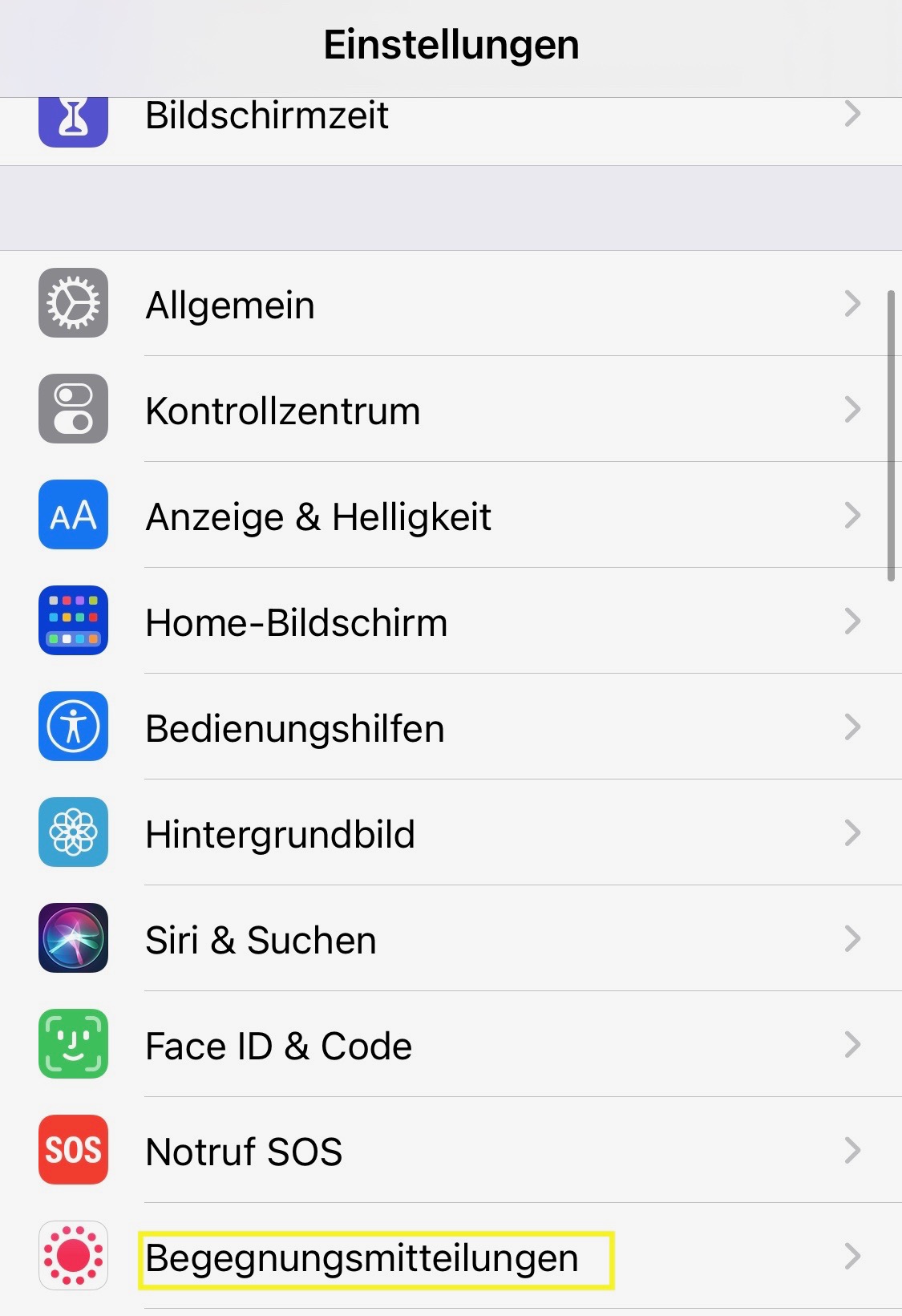
- press button "Begegnungsmitteilungen aktivieren"
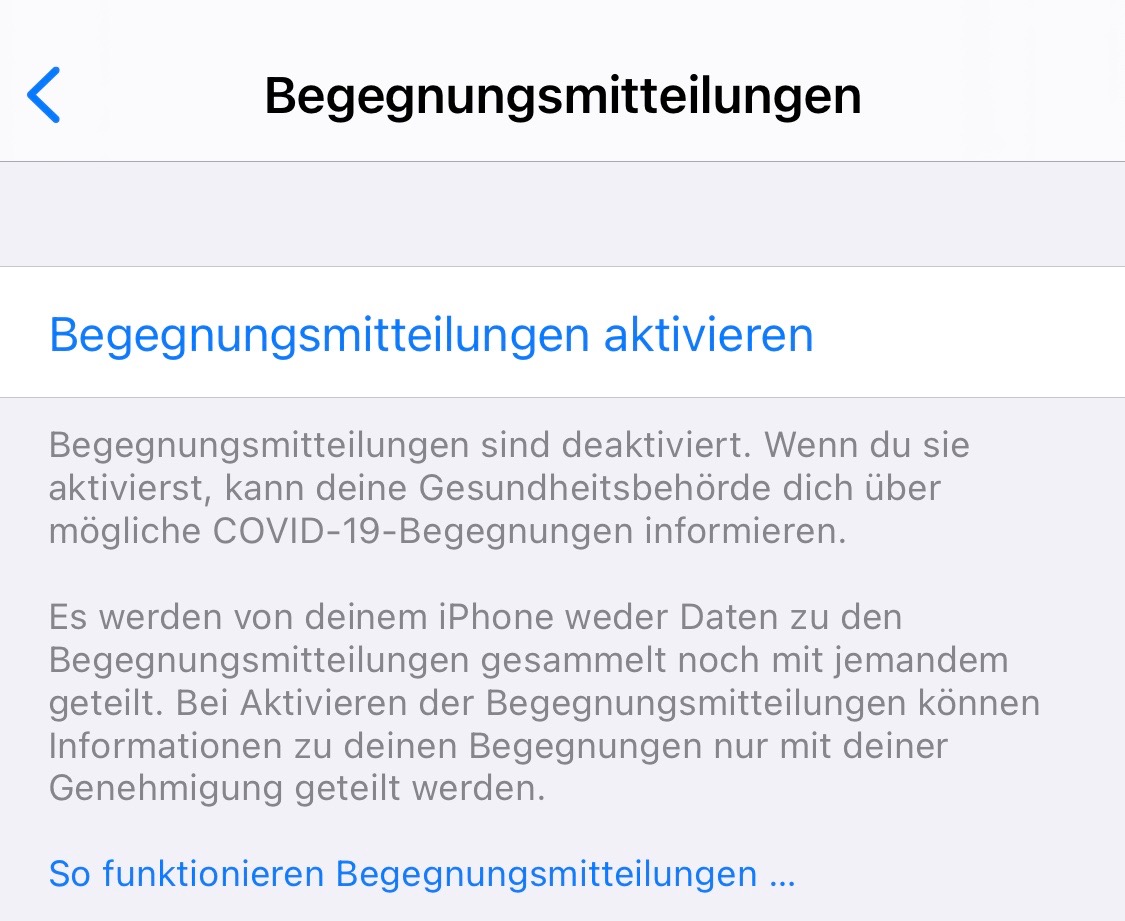
- Choose country "Deutschland" in step 2
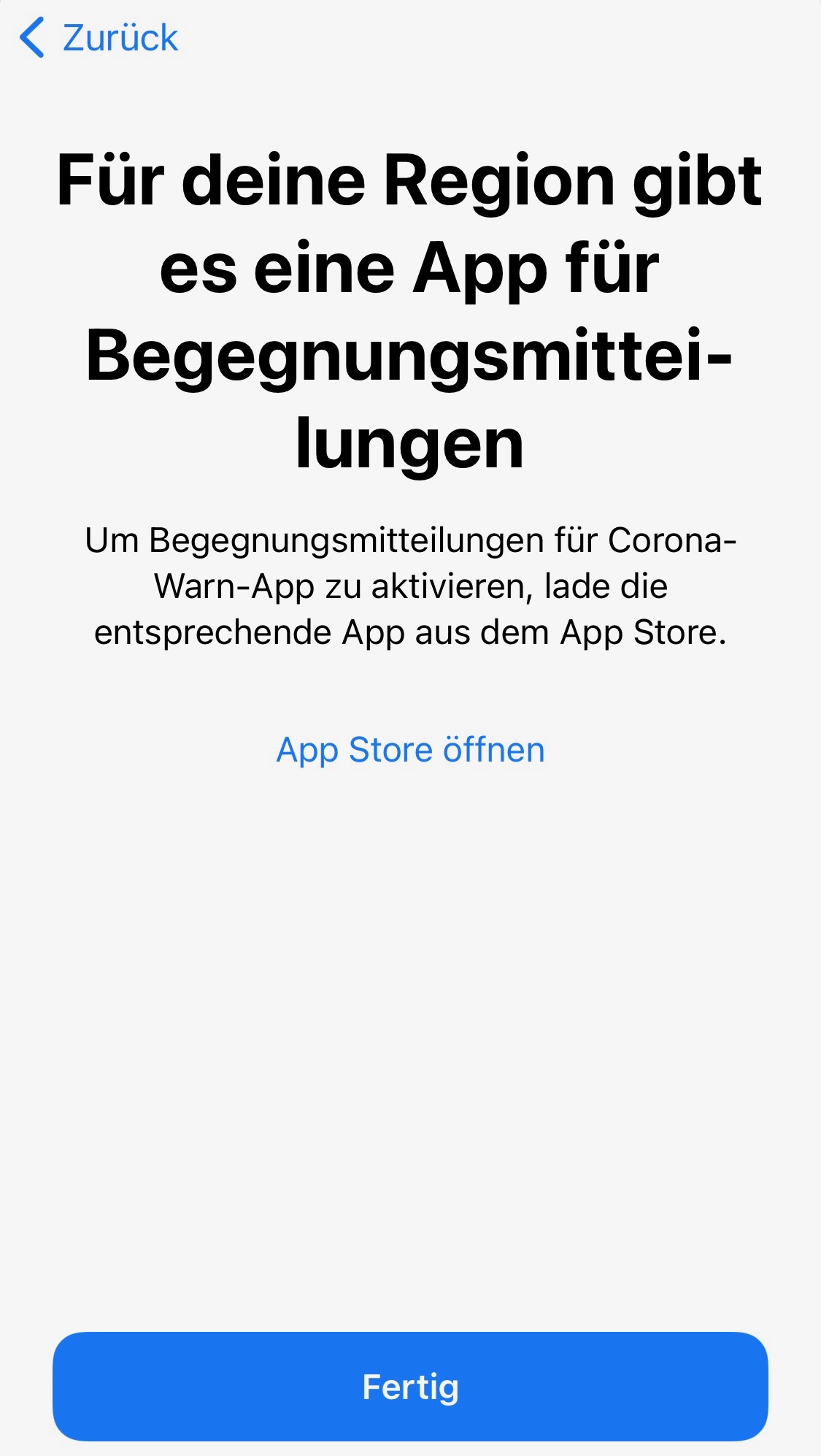
-> this sends you to the AppStore, because there is a App for your region, No possibility to activate "Risiko-Ermittlung"
Expected behaviour
Reactivation of Risk Determination should be possible either via app or via iPhone settings
Internal Tracking ID: EXPOSUREAPP-5224
 BlancoDeMallloca
All 23 comments
@BlancoDeMallloca
Did you delete the App and reinstalled it? Seems like the ENF does not notice that the app was installed.
What do you mean with
After iOS reinstallation
Do you mean you restored iOS from a backup and ran into this issue?
 Ein-Tim
on 16 Feb 2021
Ein-Tim
on 16 Feb 2021
Thank you very much for the fast response.
Yes I needed to restore my iPhone from backup due to other iPhone issues.
Tried to delete/reinstall the app with and without restart of the iPhone in several steps of the delete/installation process. Unfortunately none of it solved issue
BlancoDeMallloca
on 16 Feb 2021
Okay thank you for providing the information.
@thomasaugsten any idea how to quickly fix this?
Ein-Tim
on 16 Feb 2021
@BlancoDeMallloca
I don't expect this to fix it but give it a try:
Reset the app inside of the App:
"Einstellungen" -> "Anwendung zurücksetzten"
Afterwards you are asked to give the app permission to access the ENF, maybe this helps.
Ein-Tim
on 16 Feb 2021
@BlancoDeMallloca Thanks for reporting. Not as a solution, but as part of the fault analysis: Are you able to install and get running another COVID-App, i.e. the Spanish CovidRadar or the Italian Immuni app?
 dsarkar
on 16 Feb 2021
dsarkar
on 16 Feb 2021
Reset the app inside of the App:
"Einstellungen" -> "Anwendung zurücksetzten"
As you expected, this did not solve the problem. This only prompted again the initial setup of the app.
BlancoDeMallloca
on 16 Feb 2021
@BlancoDeMallloca Thanks for reporting. Not as a solution, but as part of the fault analysis: Are you able to install and get running another COVID-App, i.e. the Spanish CovidRadar or the Italian Immuni app?
I installed the Spanish, the Italian and also the US NY app.
Unfortunately I can not enable exposure notifications in any app. So may this seems to be an issue related to iOS. I tried to find a solution to reset Exposure Notification API but did not find anything
BlancoDeMallloca
on 16 Feb 2021
@BlancoDeMallloca Did you back your phone up vie iTunes or did you do a iCloud backup?
Ein-Tim
on 16 Feb 2021
via the iCloud backup after a factory reset to delete all data and settings
BlancoDeMallloca
on 16 Feb 2021
Okay thanks, I'll try to reproduce this now.
Ein-Tim
on 16 Feb 2021
Not at all reproducible on my iPhone 6s running a beta version of iOS 14.5 (18E5140k).
Ein-Tim
on 16 Feb 2021
Mmh. May iOS 15.5 will fix this issue.
May I ask you to turn of "Begegnungsmitteilungen" and reactivate it after few minutes? May this will reproduce the issue
BlancoDeMallloca
on 16 Feb 2021
Done. Still no issue. @dsarkar Somebody should try to reproduce this on a device running iOS 14.4.
Ein-Tim
on 16 Feb 2021
@BlancoDeMallloca Could you please try this: https://www.coronawarn.app/de/faq/#ios_black_screen
Ein-Tim
on 17 Feb 2021
I know someone with the same issue. He transferred his data from an iPhone 6s to an iPhone 12 mini via Quick Start. The Apple support couldn't help, there where no hardware errors. The iOS log was transferred to apple. I hope apple found the problem.
 jucktnich
on 17 Feb 2021
jucktnich
on 17 Feb 2021
@jucktnich Thanks for this report. Let's hope iOS 14.5 fixes this. @thomasaugsten do you want to further investigate this?
Ein-Tim
on 17 Feb 2021
@BlancoDeMallloca @Ein-Tim @jucktnich
I will create an internal ticket.
dsarkar
on 17 Feb 2021
@BlancoDeMallloca Could you please try this: https://www.coronawarn.app/de/faq/#ios_black_screen
To be honest. I do not want to perform this reset. This would cause that I need to set all settings for all apps again. Sorry this is to much effort to be spent just to solve the Warnapp issue.
BlancoDeMallloca
on 17 Feb 2021
Thanks for your support @all
BlancoDeMallloca
on 17 Feb 2021
@BlancoDeMallloca @Ein-Tim
Thanks for reporting and analyzing. Internal Tracking ID: EXPOSUREAPP-5224. Any news on this issue will be published here. Thanks, best wishes, DS
Corona-Warn-App Open Source Team
dsarkar
on 18 Feb 2021
@BlancoDeMallloca
Did you update to iOS 14.4.1 and CWA version 1.14.4?
Ein-Tim
on 12 Mar 2021
@BlancoDeMallloca
Did you update to iOS 14.4.1 and CWA version 1.14.4?
Already updated iOS 14.4.1 and now downloaded the CWA again.
Still CWA sends me to iPhone settings and the settings App states that there is a app for my region. Issue is not solved for yet.
BlancoDeMallloca
on 12 Mar 2021
@BlancoDeMallloca
Sad... Let's wait for iOS 14.5, hopefully it'll fix this issue.
Ein-Tim
on 12 Mar 2021
Related issues
Ein-Tim
·
3Comments
 jonnyfux
·
3Comments
jonnyfux
·
3Comments
 Eisbaerhaar
·
3Comments
Eisbaerhaar
·
3Comments
 rsplaul
·
3Comments
rsplaul
·
3Comments
 rainervonuns
·
3Comments
rainervonuns
·
3Comments
Most helpful comment
@BlancoDeMallloca @Ein-Tim @jucktnich
I will create an internal ticket.