Cwa-app-ios: Check time is unreliable again (iOS issue, I guess)
Avoid duplicates
- [ ] Question is not already answered in the FAQ
- [ ] Question has not already been asked in another issue
Hours instead of minutes
In the last few days, the time when the check occurs has been jumping badly. A few days ago it was reliably in the morning, now it's in the late evening. This is on my iPhone 11 with iOS 14 that I use all the time. Why?

Internal Tracking ID: EXPOSUREAPP-2867
 jwildeboer
All 46 comments
Did you by chance open CWA at any of those times, or are those all automatic background updates?
 daimpi
on 23 Sep 2020
daimpi
on 23 Sep 2020
If these are all automatic updates, respect to your phone. I have way larger gaps in my Check log...
Sometimes even an hole day without checks, see the screenshot:
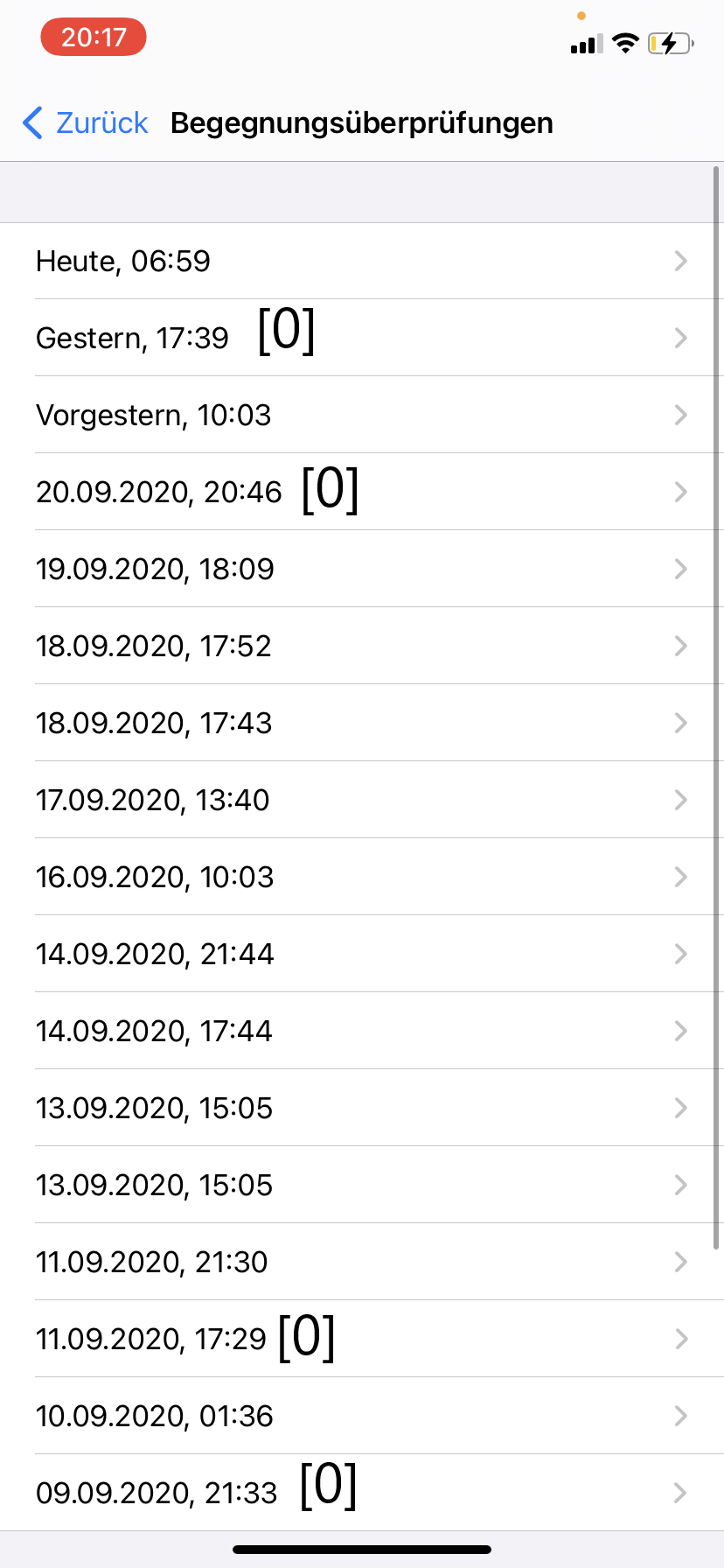
The 0 in the [] means there were no files downloaded. So I think (sorry to say that) it is _normal_ that the checks are like this.
But what is very weird is that it worked correctly before...
More Infos see here
 Ein-Tim
on 23 Sep 2020
Ein-Tim
on 23 Sep 2020
@jwildeboer do you mind to share your exported ENF log file?
I am wondering especially about the duplicate entries on 20 and 21 September.
Oh, and could you please add the cwa version you are currently using?
 ndegendogo
on 24 Sep 2020
ndegendogo
on 24 Sep 2020
So I think (sorry to say that) it is normal that the checks are like this.
@Ein-Tim well - "normal" meaning that we see this pattern often - yes, definitely.
"normal" meaning that it is intended behavior, or acceptable - no!
ndegendogo
on 24 Sep 2020
@ndegendogo
You're definitely right, this is not good, just wanted to add that...
Ein-Tim
on 24 Sep 2020
Yes, I open the app multiple times every day. It's always the newest version as is my iOS (I'm always fast with installing updates).
I'll try to upload the log file in a separate comment when I'm at my desktop machine.
jwildeboer
on 24 Sep 2020
Yes, I open the app multiple times every day.
Is the behavior of CWA under iOS the same as under Android? B/c under Android it seems that phones have a timeframe where they try to perform their automatic update each day, which can be different from device to device. But let's say your device usually performs automatic updates at 21:00, if you open your CWA before that it will perform the update right then.
If this is also the case under iOS those different timestamps could maybe be explained by you opening CWA before your "automatic update timeframe"?
daimpi
on 24 Sep 2020
@daimpi with regard to intended behavior your question should be answered by the devs here.
With regard to observed behavior: I get the check triggered in the background usually after every 24-26 hours, so the timestamp drifts over the day. It is delayed even more (for obvious reasons) if I have no internet connection at that time. Maybe it is also delayed for other reasons, like power saving. And I have seen multiple attempts on the same day if the first was not successfull (retry strategy - which is ok).
Oh, yes, also seen multiple attempts if an irregularity was before - #1141.
I don't see the check triggered by opening the app, except 24h+ after the last check.
Edit: reference to #1141 added
ndegendogo
on 24 Sep 2020
@jwildeboer maybe another question. Do you have internet coverage all the time? Or are you often without internet coverage?
ndegendogo
on 24 Sep 2020
Here is the log file. And @ndegendogo I always have full internet coverage.
jwildeboer
on 24 Sep 2020
@ndegendogo
I don't see the check triggered by opening the app, except 24h+ after the last check.
Thanks for the info, that's quite interesting… After reading this description I was under the impression that opening the app in iOS would trigger an update like under Android, but using CEST/local-time days in iOS instead of UTC days under Android as a delimiter. But seemingly that's not the how it works.
With regard to observed behavior: I get the check triggered in the background usually after every 24-26 hours, so the timestamp drifts over the day. It is delayed even more (for obvious reasons) if I have no internet connection at that time. Maybe it is also delayed for other reasons, like power saving.
Interesting… that also clearly works differently under Android: even if I intentionally delay the checks (e.g. by cutting off internet) or they move forward in time by chance, they will snap back again at the next occasion and there is no drift over time…
daimpi
on 24 Sep 2020
Thanks for the info, that's quite interesting… After reading this description I was under the impression that opening the app in iOS would trigger an update like under Android,[...]
It does, but only if the last check was more than 24h before you open the App.
Example:
Yesterday the check happened at 12:00 am, today you open the App at 09:00 am -> no check will happen.
Only if you open the App after 12:00 am there will be a check triggered.
Ein-Tim
on 24 Sep 2020
It does, but only if the last check was more than 24h before you open the App.
Example:
Yesterday the check happened at 12:00 am, today you open the App at 09:00 am -> no check will happen.
Only if you open the App after 12:00 am there will be a check triggered.
Weird… in the case I linked above this distance was much shorter:
Timestamp |
-- |
2020-09-18 22:52:51 +0200 |
2020-09-19 00:07:08 +0200 |
There was not even 2h distance between the two checks and the only thing I noticed is that a CEST/lokal-time day rollover happened between them, but maybe there was something else going on there 🤷.
daimpi
on 24 Sep 2020
It's always the newest version
@jwildeboer that is cwa v 1.3.0(6), correct?
ndegendogo
on 24 Sep 2020
Hey everyone,
Thanks for your submissions and input. The issue is now tracked in Jira with ticket ID EXPOSUREAPP-2867, so that the developers can notify you if there are any news on this.
Regards,
CH
Corona-Warn-App Open Source Team
 heinezen
on 24 Sep 2020
heinezen
on 24 Sep 2020
@jwildeboer both your short intervals are preceded by an irregularity in the timestamps.
1) Before the duplicate entry on 20 Sept there was an extra delay (24 + 2 + X hours).
2) The first entry on 21 Sept is also exceptional: after 10 files there is a gap of 4 hours.
So, these two are inline with my observations (#1141).
Of course this does not answer the root cause of the delays.
ndegendogo
on 24 Sep 2020
@ndegendogo Yes, I am on CWA v 1.3.0(6). iOS is 14.0.1 since yesterday, I updated to iOS 14 on release day.
jwildeboer
on 25 Sep 2020
What is going on with those "0 files checks"?
IMO that seems so be a regression introduced in iOS 13.7, have not seen it before.
In my case: September 28th was skipped completely by the app, September 29th contained only "broken" checks (0 files). It took until last night that finally a successful check could be made again. For some reason, it was repeated 4 hours later.
In essence, no successful sync was made for over 50 hours. No notification about this whatsoever. I don't know how this is supposed to help us fight this virus... 😞
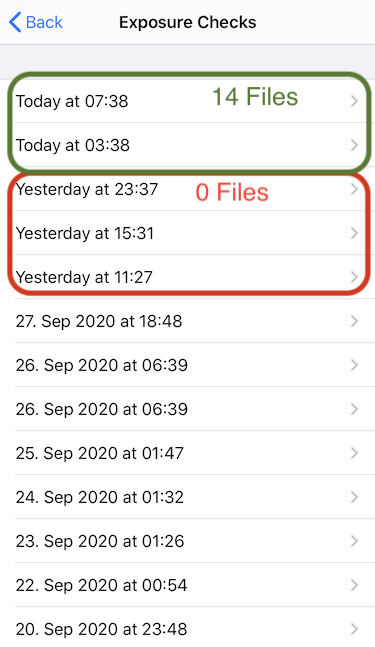
_Edit: Interesting, how it nicely worked in almost 24-h intervals between 20th and 25th, then it stumbled somehow._
 sin-azucar
on 30 Sep 2020
sin-azucar
on 30 Sep 2020
@sin-azucar This seems pretty common with iOS 14/14.0.120 - I have had it a few times the last few weeks and again on 28th. Screenshot attached below. The check on 28/09/20 @ 17.30 was a background check and downloaded no data. I opened the app later in the evening @ 21:30 and it populated with data. Is there a bug with the background check that is generating these blank entires in the Exposure Log? I hadn't though to correlate the earlier instances with when I open the app.
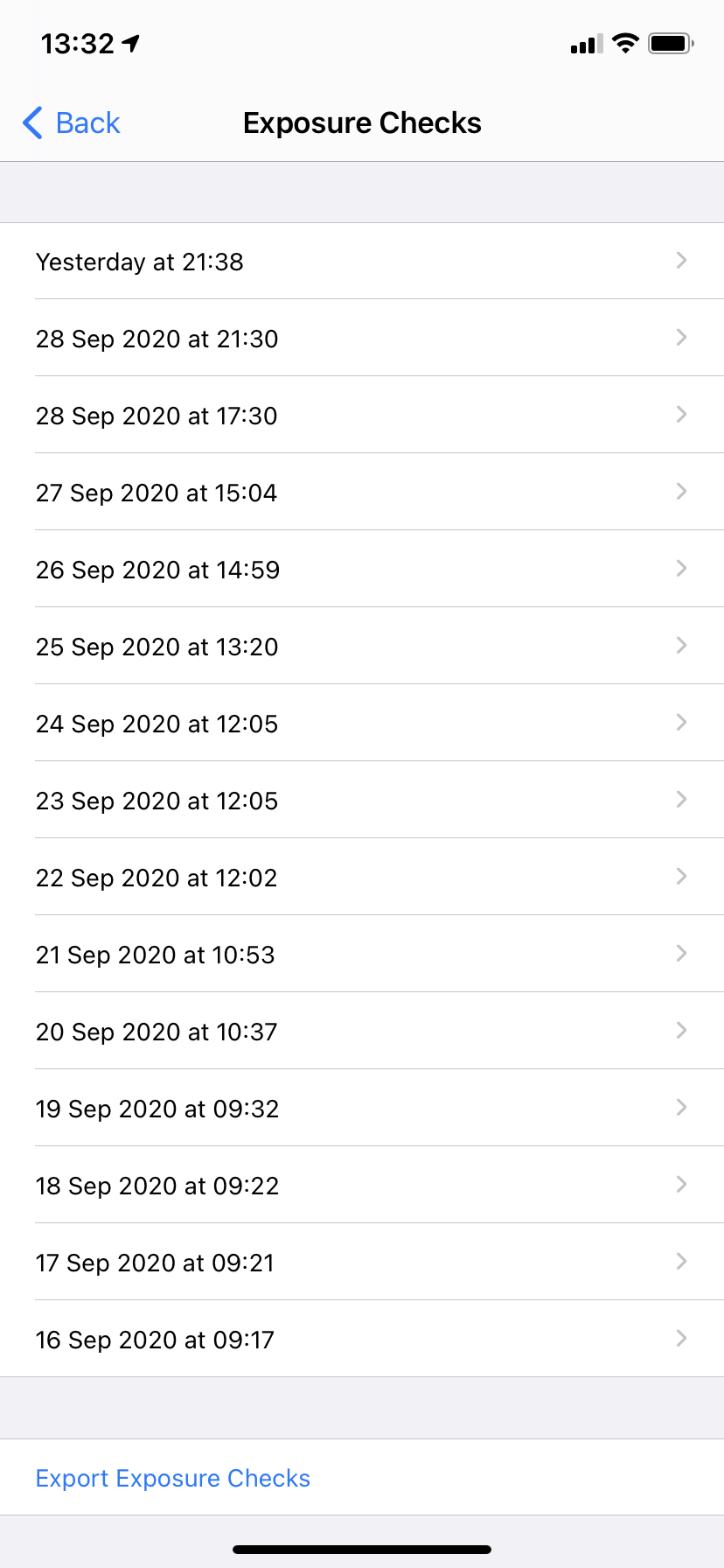
 davidm2781
on 30 Sep 2020
davidm2781
on 30 Sep 2020
The empty entrys are background checks which did run, but didn't download any new Files (iOS stopped the process, for any reason, before it could download any new files).
But it was a "ENF Call" so it is showed to the user.
@sin-azucar I noticed this behavior on iOS 14.0.1 also, after one successful check in the background another background check was performed and downloaded the data again. Maybe a fallback strategy which "thinks" the first check failed?
Ein-Tim
on 30 Sep 2020
@Ein-Tim I was thinking the same thing or maybe the first check was indeed interrupted, even if it looks normal. For example, when interruption happens after files have already been fed into the ENF.
The real question is why it gets interrupted on such a regular basis, this sort of thing didn't seem to happen before iOS 13.7 (or it went unnoticed).
I'm still on iOS 13.7 BTW so that doesn't seem to make a difference 😉
sin-azucar
on 30 Sep 2020
after one successful check in the background another background check was performed and downloaded the data again. Maybe a fallback strategy which "thinks" the first check failed?
@Ein-Tim It might be this issue (#1141). Check if prior to these two successfull checks there was an irregularity that triggered the fallback strategy (like aborted attempt / incomplete / extra large delay).
I have looked at the related PR. It is indeed a fallback strategy that was triggered, and they forgot to stop the original strategy, hence double execution.
ndegendogo
on 30 Sep 2020
@ndegendogo
Yeah sometimes there were empty entrys in "Begegnungsüberprüfungen" before the 2 successful checks...
But sometimes also there were no empty entry in "Begegnungsüberprüfungen" before the 2 checks (but it still could be that there was an attempt in the Background but this was Immediately stopped so there wasn't even an entry in the log but the App still falls back to the Fallback strategy...
So or so I don't think this is a really problematic Issue (but it would still be nice if it would be solved) 👍
Ein-Tim
on 30 Sep 2020
@sin-azucar
see here for a list of events / conditions that can cause the iOS to delay or interrupt the background task.
It may well be that newer iOS versions are more aggressive.
Do you use any kind of power saving modes?
ndegendogo
on 30 Sep 2020
@Ein-Tim definitely, not the highest prio.
When I saw it first I was a bit irritated, and worried if it might involve some kind of race condition (the two checks stepping on each others feet)
But they have already fixed it, and promised for the next releast (1.4).
I guess the fix came too late for 1.3. Last-minute-fixes are always risky. And for a low-prio issue not worth the risk.
ndegendogo
on 30 Sep 2020
Just now saw that your comment was for @sin-azucar and not for me, will still leave my answer here, just if you are interested @ndegendogo :
Thanks for the Link, already read the comment from @thomasaugsten.
Sometimes I go into the iOS own Power Saving mode, but tbh:
I don't see a clear pattern here. Even with my phone connected to a charger, already charged over 80% and a very good Internet Connection there are still some empty gaps in the Log... (Even during the Night-when I was asleep and surely nothing happened on the phone, there are empty entries...)
But then again in a situation where I really use my phone and just activated Mobile Data for like 2 Minutes there was a Check performed... So I think iOS isn't very predictable here 🤷🏻♂️
Also my background checks are always shifted back for more than 2 hours, but this seems ok... 👍
Ein-Tim
on 30 Sep 2020
Do you use any kind of power saving modes?
I don't, and since I'm currently home sick (no Covid 😉), I'm also 99,9% certain that my phone had good WiFi connection during the two problematic days (28th/29th).
BTW, shouldn't the Deadman Notification kick in when for >50 hours the exposure state cannot be successfully updated or am I misunderstanding that feature? 🤔
sin-azucar
on 1 Oct 2020
shouldn't the Deadman Notification kick in when for >50 hours the exposure state cannot be successfully updated
@sin-azucar this is also my understanding!
Maybe one of the developers / project maintainers can try to do a more detailed diagnosis?
@thomasaugsten
ndegendogo
on 1 Oct 2020
The Notification checks at the moment only for the background task. This will be improved.
Unfortunately for a sysDiagnose the problem is too long in the past. If you experience this again please create a sysdiagnose while pressing Volume up, down and power button for 1sec
 thomasaugsten
on 1 Oct 2020
thomasaugsten
on 1 Oct 2020
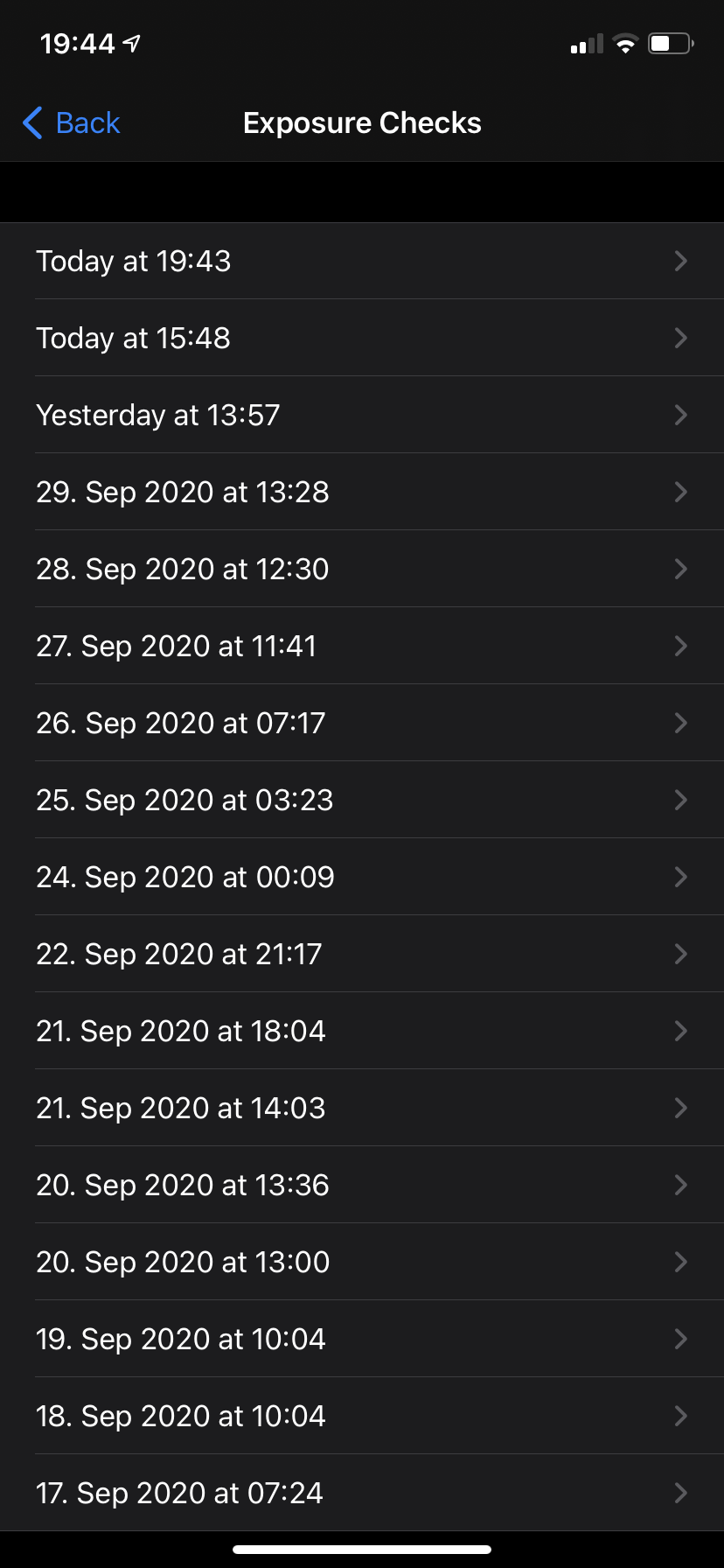
In the last at least 4 days background checks simply don't happen at all, with no change on my side, except for the automatic update to CWA 1.3.2. This is bad IMHO.
The times shown in the screenshot reflect me opening the app and seeing the "performing check" interstitial. This is on my iPhone 11 with a screen time of well over 6 hours a day.
jwildeboer
on 1 Oct 2020
I again have to raise this. No background checks at all. Only when I manually open the app a check is performed. Any update? Fix? 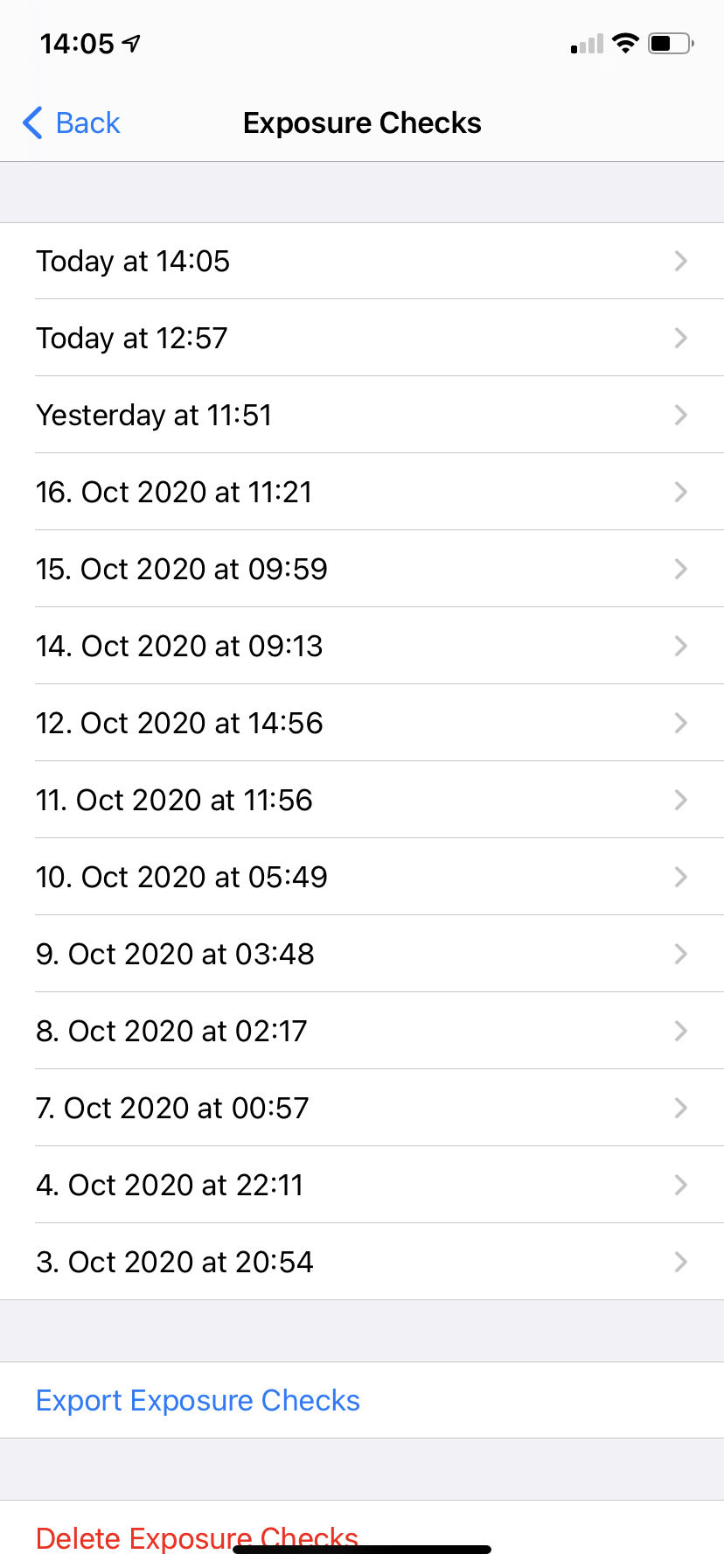
jwildeboer
on 18 Oct 2020
Any update? Fix?
@jwildeboer good question.
916 may be related to this one, but I have not yet seen any statement whether a fix or improvement on this will be in the upcoming v1.5.
For #1144, however, I see such a statement, and I expect this fix also will improve the reliability of the background check a lot. I also see it mentioned in the release notes of v1.5.
improve dead man notification (EXPOSUREAPP-3017) #1285
ndegendogo
on 19 Oct 2020
@jwildeboer can you please contact me directly I need a sysdiagnose to see why is not updating.
thomasaugsten
on 20 Oct 2020
Sysdiagnosis sent. Thank you fir your hard work!
jwildeboer
on 23 Oct 2020
I cannot see any special things. The background task is started every 2hours. Can you publish a screen shot of the current checks
thomasaugsten
on 26 Oct 2020
90% of all checks happens only after I opened the app manually. 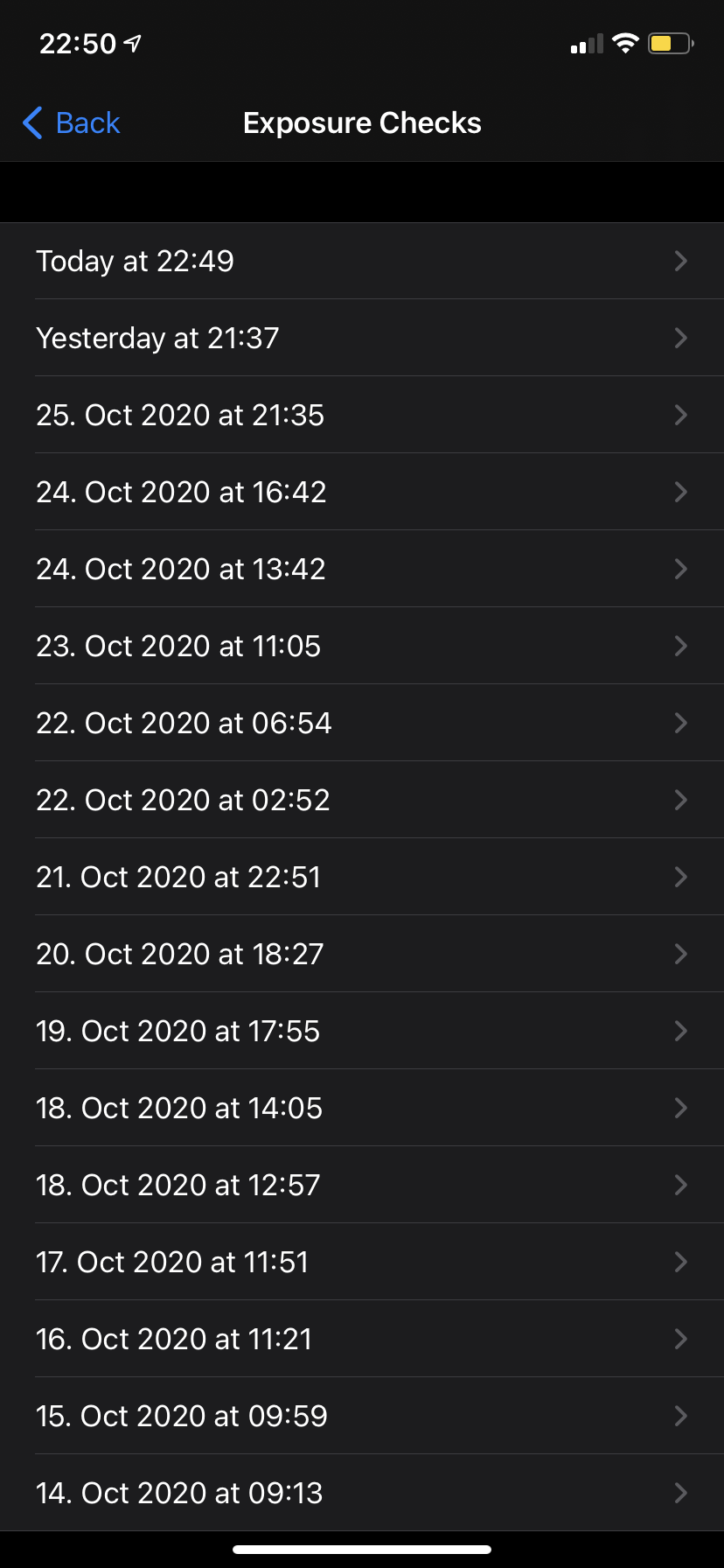
jwildeboer
on 27 Oct 2020
good morning
since ios 14.1 and (now) cwa 1.5.2 refreshing works reliably after 25-26 hrs since last check
Martin Matthey
0151 1577 2237
Am 27.10.2020 um 22:51 schrieb Jan Wildeboer notifications@github.com:
90% of all checks happens only after I opened the app manually.—
You are receiving this because you are subscribed to this thread.
Reply to this email directly, view it on GitHub, or unsubscribe.
 martin-59
on 28 Oct 2020
martin-59
on 28 Oct 2020
after 25-26 hrs since last check
... or slightly longer.
I currently have gaps of ~ 27 - 28 hours.
(Related to night time?)
25 Oct: 20:05
26 Oct: 23:41
28 Oct: 02:40
cwa 1.5.2 (1) / iOS 14.1 / iPhone 8
ndegendogo
on 28 Oct 2020
@jwildeboer can you please don't open the app for 36h?
thomasaugsten
on 28 Oct 2020
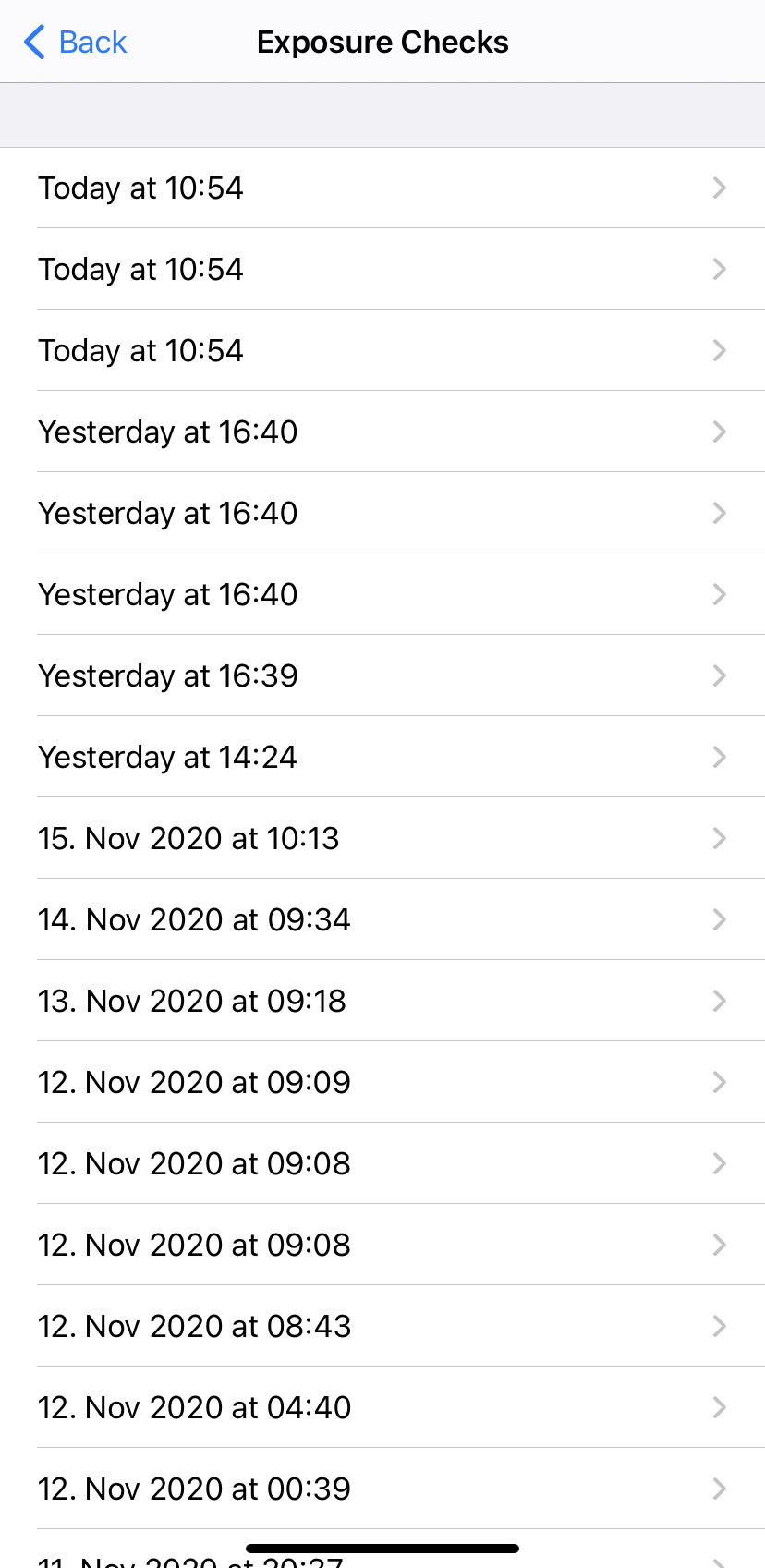
My app is running really crazy now.
This doesn't look good.
jwildeboer
on 17 Nov 2020
Dear @jwildeboer,
Thank you for your post. Your latest post seems a duplicate of actually two issues.
Please, continue any further contribution regarding duplicate checks here #1505.
And if necessary, continue any further contribution regarding checks performed every time the app is opened here #1517.
Best wishes,
DS
Corona-Warn-App Open Source Team
 dsarkar
on 17 Nov 2020
dsarkar
on 17 Nov 2020
@jwildeboer do you already test the new 1.7.1 version?
thomasaugsten
on 28 Nov 2020
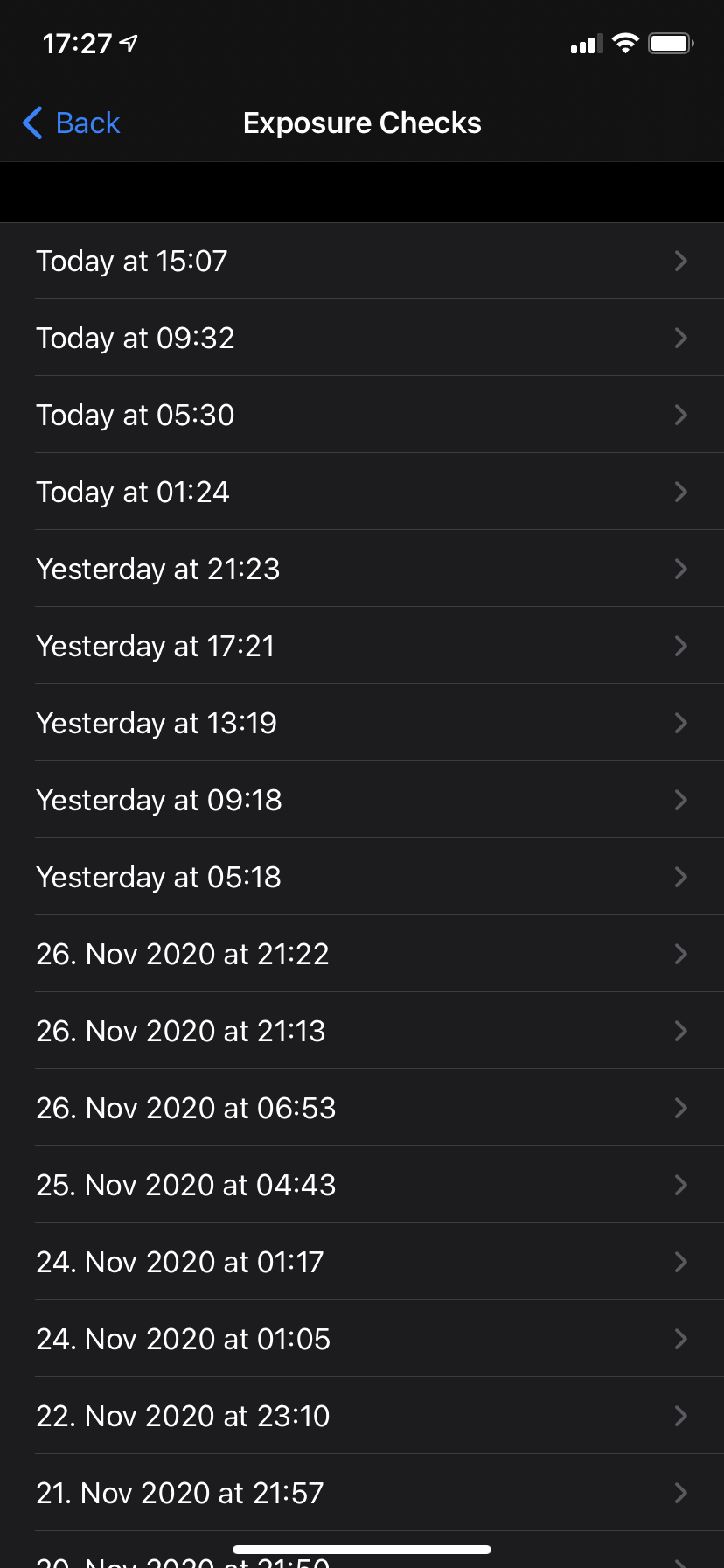
Yes, I've updated to 1.7.1 a few days ago and it seems that the checks are performed 4-5 times a day. Not really every 6 hours, but close enough, I guess :) Thanks!
jwildeboer
on 28 Nov 2020
Dear @jwildeboer and community, thanks for the feedback. We will monitor some more days this issue and, if applicable, close it. Best wishes,
DS
Corona-Warn-App Open Source Team
dsarkar
on 30 Nov 2020
Dear @jwildeboer, and dear community,
We think that this issue can be considered as fixed in CWA version 1.7.1. We close now this issue, but of course, fell free to re-open if necessary. Thanks for contributing here.
Best wishes,
DS
Corona-Warn-App Open Source Team
dsarkar
on 7 Dec 2020
Dear @jwildeboer, @Ein-Tim, @ndegendogo, @martin-59, @sin-azucar, @daimpi, @davidm2781, and community
Thank you for your contributions. We close this issue now. Thanks again.
Best wishes,
DS
Corona-Warn-App Open Source Team
dsarkar
on 9 Dec 2020
Related issues
 Eisbaerhaar
·
3Comments
Ein-Tim
·
3Comments
Eisbaerhaar
·
3Comments
Ein-Tim
·
3Comments
 janberlin
·
3Comments
janberlin
·
3Comments
 pavll
·
3Comments
pavll
·
3Comments
 christianbrb
·
3Comments
christianbrb
·
3Comments
Most helpful comment
Yes, I've updated to 1.7.1 a few days ago and it seems that the checks are performed 4-5 times a day. Not really every 6 hours, but close enough, I guess :) Thanks!