Cwa-app-android: "Android System" warns: "Corona-Warn is draining the battery"
Describe the bug
I've received an "important" notification from "Android System" stating: "Corona-Warn is draining the battery" with suggested actions "Force Stop" and "Ignore for Now"
Expected behaviour
Since all the CWA does is download keys every few hours and submit them to the ENF, no such notification should occur. If I understand it correctly, all the power-consuming activities of receiving/transmitting are handled by Google's ENF. It seems as though the way that background downloads are handled are not in line with Android best practices, otherwise, no such notification should occur.
My worry is that the notification makes a proportion of people force stop or uninstall the app reducing its effectiveness. It should therefore be investigated and measures should be taken to prevent the notification from being triggered in the future, again.
Steps to reproduce the issue
Notification occurred spontaneously. I have used the app on this phone for a couple of weeks and have not registered any tests with it.
Technical details
- Mobile device: Oneplus 8 (IN2013)
- Android version: 11 (Oxygen OS 11.0.2.2.IN21BA)
- Google Play system update: September 1, 2020
- App version: 1.7.1
- Exposure Logging: Active
- Notifications: On
- Prioritized Background Activity: On
Possible Fix
Suggested reading:
- https://developer.android.com/topic/performance/power/network/action-app-traffic
- https://developer.android.com/topic/performance/power/battery-historian
- https://developer.android.com/training/efficient-downloads/regular_updates
- https://developer.android.com/training/efficient-downloads
- https://developer.android.com/topic/performance/power/network
Screenshot of notification:

Internal Tracking ID: EXPOSUREAPP-4053
 corneliusroemer
All 7 comments
Update: After I got rid of the notification earlier by selecting "clear" as opposed to selecting one of "force stop" or "ignore", it has come back a few hours later. This time I tapped the notification and got to the power management screen, where the app is very negatively highlighted as draining your battery heavily with a suggestion of Force Stop - which some users will inevitably select, with the outcome that they may not get warned until they reboot the next time. Doesn't look good.
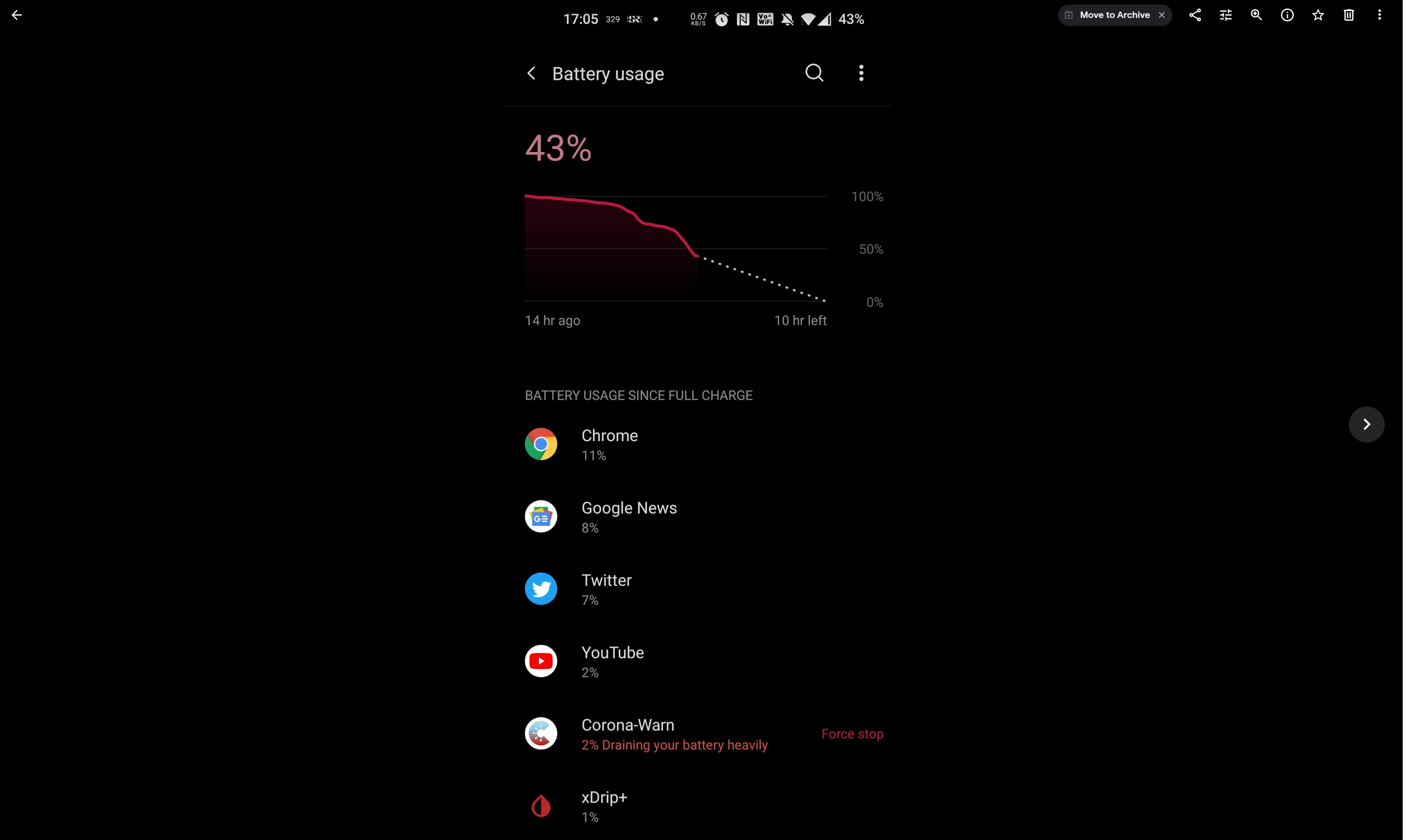
Update 2 [2hr after Update]: 2hr after I tapped Ignore for now, the notification is back! So it's not just something that can be swept under the carpet. I've heard people say the reason for not using the app is that it's draining their battery. I always tried to assuage those concerns as overblown, but when the Android itself issues such persistent notifications, there's not much I can do.
corneliusroemer
on 29 Nov 2020
@corneliusroemer Thanks for the report!
We have created a ticket in our internal Jira system for this (ticket ID: EXPOSUREAPP-4053) and will investigate it now.
Regards,
CH
Corona-Warn-App Open Source Team
 heinezen
on 29 Nov 2020
heinezen
on 29 Nov 2020
Important details on my system settings to help reproduce:
- I use Android 11
- Under Settings > Battery > Battery optimization > (Kebab menu) Advanced optimization > "Turn on adaptive battery" (On / Detecting when apps drain battery) is enabled [Alternative way of getting to this particular setting: search settings for "Battery Manager"]
Here's a screenshot of the setting in question (for the two ways of getting there described above, at least on my OnePlus 8 Android 111). This is presumably the system function that needs to be enabled to generate the warning notification:


corneliusroemer
on 29 Nov 2020
@corneliusroemer
These battery optimization functions seems to be very device / manufacturer specific. I looked on the Google Pixel 3a emulator for Android 11 and it didn't look like your screenshots at all.
Did you try to use the tools you referenced (like https://developer.android.com/topic/performance/power/battery-historian) to look into the battery usage on your device yourself? That might give some clue about what is going wrong.
 MikeMcC399
on 29 Nov 2020
MikeMcC399
on 29 Nov 2020
@MikeMcC399 Sure, it may look different on different OEM versions. Question is, whether the functionality is the same. The fact it's coming from Android System makes me think it's a general Android feature.
No, I haven't done the battery historian thing. Someone with an in-depth understanding of the app, should look at it. The recurrent key downloads seem to be exact alarms, every 4:00hrs or something like that - and that's not best practice.
It's quite remarkable, how a very simple app, doing a few downloads every few hours is one of the number one battery drains on my phone with 200+ apps. Surely this can be done better. Unless Android blames the CWA for what is in fact power consumption of the ENF - in that case nothing can be done other than to inform users.
One more thing that crossed my mind: the key file of positively tested should contain on the order of a hundred thousand keys per 2w period now. And they all need to be checked one by one with each of maybe 10k IDs I collected over the past few weeks (every 20min every phone with ENF within reach). So that's around a billion comparisons, a number that's getting big and should take the processors quite a bit of time (if every check is 1k cycles, that'd be at 1GHz and with 10 codes about 100s at full speed). So if the computation is not cached for keys previously checked, this could account for the battery drain, too. Don't k ow the details, but apart from key download, the only thing that could possibly use battery in the background is the hash computation. Maybe @kbobrowski or @mh- know more about this.
corneliusroemer
on 30 Nov 2020
I have the same battery features enabled on my Pixel5 and don't get this warning :thinking:
Unless Android blames the CWA for what is in fact power consumption of the ENF - in that case nothing can be done other than to inform users.
This is an interesting point. There is a "watchdog" system where GPlayServices wakes our app by binding to it to ensure regular execution windows even on devices with problematic battery saving behavior.
I'm not sure how the "warning" system actually determines when to warn, but maybe it is heuristic, and it now notices the change in regular execution from 1.6 to 1.7 and flags this?
The recurrent key downloads seem to be exact alarms
Good point we should also look into it whether making the alarms more inexact to batch wakeup times is feasible here without compromising reliability.
So that's around a billion comparisons, a number that's getting big and should take the processors quite a bit of time (if every check is 1k cycles, that'd be at 1GHz and with 10 codes about 100s at full speed)
I'll look into getting some concrete numbers.
 d4rken
on 30 Nov 2020
d4rken
on 30 Nov 2020
Just wanted to provide an update 2 weeks on: Since Force stopping the app and reopening I haven't had any reports of excessive battery usage. So this is good news.
corneliusroemer
on 13 Dec 2020
Related issues
 Diapolo
·
3Comments
Diapolo
·
3Comments
 crcsn
·
3Comments
crcsn
·
3Comments
 Magoli1
·
3Comments
Magoli1
·
3Comments
 ironjan
·
3Comments
ironjan
·
3Comments
 tegutistgut
·
3Comments
tegutistgut
·
3Comments
Most helpful comment
I have the same battery features enabled on my Pixel5 and don't get this warning :thinking:
This is an interesting point. There is a "watchdog" system where GPlayServices wakes our app by binding to it to ensure regular execution windows even on devices with problematic battery saving behavior.
I'm not sure how the "warning" system actually determines when to warn, but maybe it is heuristic, and it now notices the change in regular execution from 1.6 to 1.7 and flags this?
Good point we should also look into it whether making the alarms more inexact to batch wakeup times is feasible here without compromising reliability.
I'll look into getting some concrete numbers.