Cwa-app-android: Fehler bei Kommunikation mit Google API(17)
I installed the app and tried to activate "Risiko-Ermittlung Aktivieren". But that throws an error:
Fehler bei Kommunikation mit Google API(17).
As it is not possible to select the error code, I took screenshots of the detailed error description:


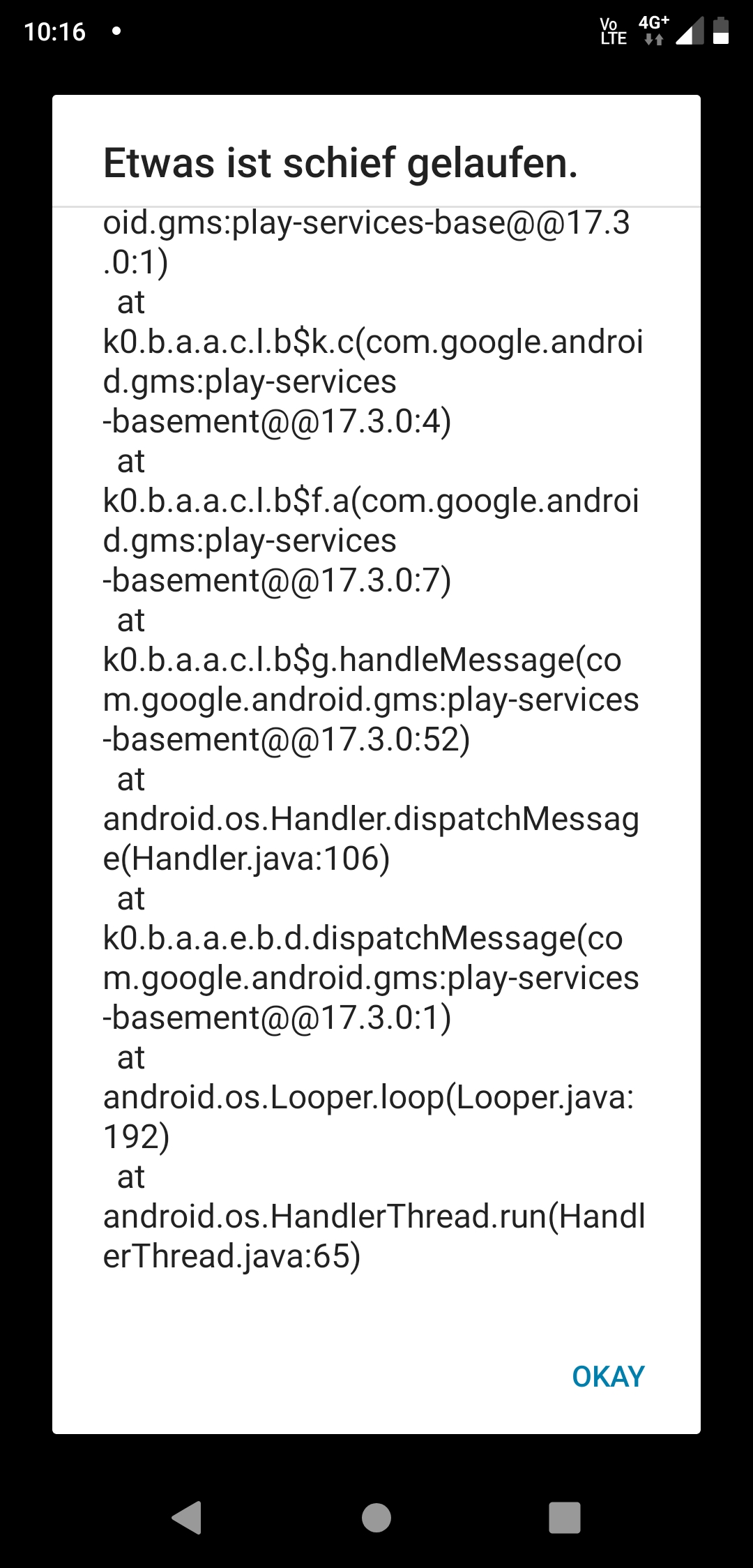
During the installation process, I was promted to update the Google play services, which I did.
I removed the app and reinstalled it, but the problem remains.
My system: Android 9, ZTE Axon 9 Pro
 Jogala
All 62 comments
Hi, i am facing the same error.
Using a Oneplus 7 Pro on Android 10 (OxygenOS 10.0.5) havily debloatet and rooted with Magisk.
I will have a look at how the app handles when I undebloat my device later in the day.
I tried with wifi and mobile internet. So it seems to be a client device problem.
Let me know if I can help troubleshooting.
Best regards
 littleboxis
on 16 Jun 2020
littleboxis
on 16 Jun 2020
Hi, i am facing the same error.
Using a Oneplus 7 Pro on Android 10 (OxygenOS 10.0.5) havily debloatet and rooted with Magisk.
I will have a look at how the app handles when I undebloat my device later in the day.
I tried with wifi and mobile internet. So it seems to be a client device problem.
Let me know if I can help troubleshooting.Best regards
I'm on the 7 Pro with stock OxygenOS 10, the app works fine for me.
Have you removed anything related to Google Play Services? Are you running the latest version of them?
 tomjschwanke
on 16 Jun 2020
tomjschwanke
on 16 Jun 2020
I run into the same error with a Samsung J5 running android 7.1.1.
I also had to remove all cached data from google play services and update the version before installing since I got an "Authentifizierung erforderlich" error from google play.
UPDATE: I just retried and it worked!
 PaulWestenthanner
on 16 Jun 2020
PaulWestenthanner
on 16 Jun 2020
Same problem here too:
OS: Android 8.0.0
Phone Model: LM-G710EM
Google Play Services: updated few minutes ago
I retried it several times. I restart my phone. Every time the same error.
 simhey314
on 16 Jun 2020
simhey314
on 16 Jun 2020
Same problem here too:
APP: Versio 1.0.0
OS: Android 7.0
Phone: m-net Power1
Addition: after updated
- PlayStore to V20.4.18
- Play-Services to V20.18.17
the same!
The second problem is that I can't take a screen shot
(e.g. adb shell screencap -p /sdcard/screen.png) from screens of the app!
 MaxPonozka
on 16 Jun 2020
MaxPonozka
on 16 Jun 2020
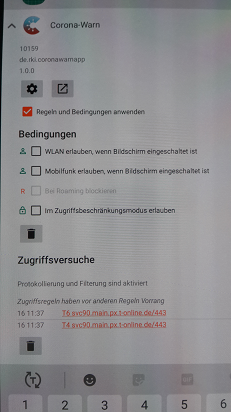
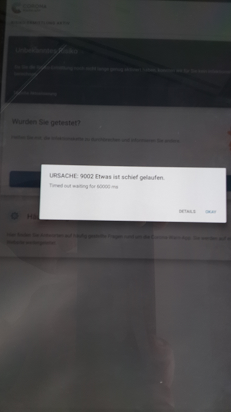
The same 9002 Error with installed and activated NetGuard.
Perhaps an information in App "your are not connected to the internet... but contacts will be recorded" how ever the flow should look
Derselbe 9002 Fehler bei installiertem und aktiviertem NetGuard.
Vielleicht eine Information in der App "Sie sind nicht mit dem Internet verbunden... aber Kontakte werden aufgezeichnet", wie auch immer der Ablauf aussehen soll
edit:smaller images
 JProof
on 16 Jun 2020
JProof
on 16 Jun 2020
Haha i have the same problem, I want to install the app via Android SDK, but later in the app error Google API (17).
I Use Moto G4 with a custom rom android 9 (https://www.aospextended.com)
Ich gehe mal davon aus das ihr auch deutsch könnt ich habe jetzt auchmal versucht die app via apk zu installieren(selberfehler).
 Frieder21
on 16 Jun 2020
Frieder21
on 16 Jun 2020
Country-settings in your Google-Account have to match with corresponding Covid-App!
Change it or create a new one!
https://support.google.com/googleplay/answer/7431675?hl=de
https://support.google.com/googleplay/answer/7431675?hl=en
 Kobold82
on 16 Jun 2020
Kobold82
on 16 Jun 2020
I want to install this app but not from google play, i want to install it from github.
Frieder21
on 16 Jun 2020
I tried it with .apk too and it doesn't work until I set this allocation.
Kobold82
on 16 Jun 2020
Sorry, my country is set to German since account creation. I think the app requires German, so I could not change anyrhing.
simhey314
on 16 Jun 2020
@simhey314
Check: Device settings > Google services & settings > COVID-19 service
You should see the COVID-App installed. If you installed it from .apk uninstall it and reinstall it directly from Google PlayStore: https://play.google.com/store/apps/details?id=de.rki.coronawarnapp
Kobold82
on 16 Jun 2020
Same here, Pixel 3a XL!
 0xbeefbeef
on 16 Jun 2020
0xbeefbeef
on 16 Jun 2020
I dont wan to install it from play store
because I don't want them to have changed the code, so they can spy on me even more easily (I know I am a bit paranoid)
Frieder21
on 16 Jun 2020
I can solve the error/problem:
1) uninstall the app
2) reinstall the app
I guess I it was a problem with an old google play service/update order.
I did:
1) install the corvid19 app
2) start it and get an error
3) update the google play service
4) start it, get the api(17) error
I simply reinstall the app and it works.
simhey314
on 16 Jun 2020
Hi! I have a Honor 9Lite, Android 9.1.0, all updated and reinstalled app several times, same error code!
So @Kobold82 was right, I had to add Germany as my coutnry in the Google Play settings. However Google didnt permit it unless I added a payment method that was based in Germany. So I added my paypal and only thereafter the country setting was approved to Germany. The corona app started working normally, no error codes no more.
Did someone else also have to add a payment method to get the country to Germany?
 finndata
on 16 Jun 2020
finndata
on 16 Jun 2020
@Kobold82:
My Country is Germany & my payment method is voucher.
My PlayStore is V20.4.18 & my Play-Services are V20.18.17.
But I got the API(17) error.
Under Settings > Google: Services: COVID-19 Exposure Notifications On/1app
MaxPonozka
on 16 Jun 2020
I currently experience the same problem! Huawei P20 Pro, Android 1 and Google Play services 20.18.17 and play store country set to Germany.
Even after reinstalling several times, clearing the cache of play services and play store, the same error message is created:
"Cause: 3
Something went wrong.
Error when communication with Google API (17)"
Thanks everyone for helping or fixing the bug :)
 kyleKuz
on 16 Jun 2020
kyleKuz
on 16 Jun 2020
Same error:
Samsung Galaxy S10+
Android Version: 10
One UI-Version: 2.1
Kernel: 4.14.113-1873-1944 - Jun 3 2020
Clearing the cache did not solve the problem!
best regards
dirk
 ghost
on 16 Jun 2020
ghost
on 16 Jun 2020
for me it was solved claering the google play services data. and reinstalling the corona warn app. I tried it 3 or 4 times in different orders until it worked.
 RobbTheBob
on 16 Jun 2020
RobbTheBob
on 16 Jun 2020
Now I have solved:
- clearing cache & data of Play-Store & Play-Services
- turn on wlan & bluetooth manually
- reboot the phone
- waiting 5 minutes
- starting the corona app
MaxPonozka
on 16 Jun 2020
@Kobold82:
...
Under Settings > Google: Services: COVID-19 Exposure Notifications On/1app
I have the same problem and your last line could be a hint. I have two nearly identical Samsung Galaxy A70, both updated before installing the Corona Warn App and one works, the other has this issue. It seems the difference is, that under this setting (Google - Services) the one that works has a German entry called "Benachrichtigungen zu möglicher Begegnung mit COVID-19-Infizierten" and when clicking on the entry, you get to "Corona-Warn".
On the other device that's not working, the entry has the heading "COVID-19 Exposure Notifications" with a smaller sub title "On/1app". When you click it, you get to an empty page.
The language setting of the account was mentioned, but both devices use the same account, and it is set to "Deutschland" from the beginning.
Somehow it seems, one device got an English Notification API which is not compatible with the German app. How do I get rid of it, that is replace it with the German version? Clearing data and cache from Play Store and Play Services didn't help either. At first, the English service "COVID-19 Exposure Notifications" was gone, but came reappeared after some waiting.
Clearing the cache from Google Play Services, reinstalling Covid Warn App and rebooting several times did not help. Covid Warn App was installed from the play store.
In case it matters, one device identifies as SM-A705FN, the other as SM-A705FN/DS, both have Android 10, One UI 2.0, same kernel, same build number, same security patch level. Everything normal, not rooted, etc. There is only one difference: one device was switches off for a longer period of time (maybe 2 month), but I did all the updates before installing Corona Warn App.
 Michael-635
on 16 Jun 2020
Michael-635
on 16 Jun 2020
Yes, you are right:
Not working if you see this:
Settings > Google: Services: "COVID-19 Exposure Notifications On/1app"
And working if you see this:
Settings > Google: Services: "Benachrichtigungen zu möglicher Begegnung mit COVID-19-Infizierten"
My language settings are:
- phone: German, English (US), Czech
- account: German
Try to clear cache & data of Play-Store & Play-Services,
turn on location, wifi & bluetooth, reboot, wait about 5 minutes and then start the corona app.
MaxPonozka
on 16 Jun 2020
The problem is fixed on my device. As I wrote earlier, I had deleted data and cache from Google Play and Google Play Services, then at first the service was gone, but then the English service reappeared after a couple of minutes and I still got the exception. Now I did nothing except wait for about an hour and now I have the German service and it works. I don't know what I did right :-).
By the way, issue #508 seems to be the same bug, but it is speculated that the problem occurs only with self-built versions of the app. This was not the case here. I never did compile the app, it came straight from the Play Store.
And an information for people who might fear, that deleting the data from Google Play might harm you (i.e. the phone might forget it's installed apps): this is not the case. So far I have not found any negative effects.
Michael-635
on 16 Jun 2020
I can solve the error/problem:
1. uninstall the app

2. reinstall the app
I guess I it was a problem with an old google play service/update order.
I did:1. install the corvid19 app 2. start it and get an error 3. update the google play service 4. start it, get the api(17) errorI simply reinstall the app and it works.
don't work...
after remove corona-app (and empty cache) and restart >
"Fehler bei Zugriff auf Google Play-Dienste
Please complete action required by Carrier Services"
So it's a Google-Problem?
 heike-hh
on 16 Jun 2020
heike-hh
on 16 Jun 2020
Same issue here. Clearing Cache and rebooting does not help.
Running Google Play Services v20.18.17, no option in Google Play Store to update this to a newer version.
 C0mmander198
on 16 Jun 2020
C0mmander198
on 16 Jun 2020
Same issue here:
Device: Sonx Xperia XA1+
Android: 8.0.0
No "COVID-19 Exposure Notifications" anywhere in the system setup available
 traut21
on 16 Jun 2020
traut21
on 16 Jun 2020
Same error:
Samsung Galaxy S10+
Android Version: 10
One UI-Version: 2.1
Kernel: 4.14.113-1873-1944 - Jun 3 2020Clearing the cache did not solve the problem!
best regards
dirk
Install Google Play Services v20.21.15 solve my problem. Everything looks fine.
best regards
dirk
ghost
on 16 Jun 2020
Where do you get a new one? My "Google Play-Dienste" is 20.18.75 and there is no update available.
traut21
on 16 Jun 2020
https://drive.google.com/file/d/1KCGH__aTH75nd3kK_1v83iiVFTcyKzuH/view?usp=drivesdk
"Beim parsen des Pakets ist ein Problem aufgetreten"
traut21
on 16 Jun 2020
https://drive.google.com/file/d/1KCGH__aTH75nd3kK_1v83iiVFTcyKzuH/view?usp=drivesdk
Any "official" place to get this from?
C0mmander198
on 16 Jun 2020
As I wrote earlier, I was able to solve the problem and I didn't have to install some obscure APK from a Google Drive (sorry dynamicduo4000 :-). I still have version 20.18.17. I did follow more or less MaxPonozka's advice:
- clearing cache & data of Play-Store & Play-Services
- turn on wlan & bluetooth manually
- reboot the phone
- waiting 5 minutes
- starting the corona app
It didn't work after 5 minutes, but after about an hour, the English Notification Service under settings - google - services changed to German and then the app works.
As it seems to be a Play Services issue, if you have time, I would first try to delete data & cache from Play Services only and wait for some time. Maybe it's not necessary to delete PlayStore data & cache.
Michael-635
on 16 Jun 2020
Okay, I think I just found a fix (at least for me).
- check in your Settings, if your Region and Language are set to German(y) before you install the App.
- if you updated the Google Play Services after you changed you Region/Language, then repeat setting the Region/Language to German(y)
Edit:
I forgot to mention that if the App works after all of this, you can set your language back
 irgendeinenrico
on 16 Jun 2020
irgendeinenrico
on 16 Jun 2020
As I wrote earlier, I was able to solve the problem and I didn't have to install some obscure APK from a Google Drive (sorry dynamicduo4000 :-). I still have version 20.18.17. I did follow more or less MaxPonozka's advice:
- clearing cache & data of Play-Store & Play-Services
- turn on wlan & bluetooth manually
- reboot the phone
- waiting 5 minutes
- starting the corona app
It didn't work after 5 minutes, but after about an hour, the English Notification Service under settings - google - services changed to German and then the app works.
As it seems to be a Play Services issue, if you have time, I would first try to delete data & cache from Play Services only and wait for some time. Maybe it's not necessary to delete PlayStore data & cache.
Clearing cache AND DATA, reboot, wait helped me. Thanks! Still on v20.18.17
C0mmander198
on 16 Jun 2020
Jetzt laeuft es.
Nachdem Update des Google-Play-Service nicht deinstalliert werden konnte ....
war diese Moeglichkeit eben ploetzlich vorhanden (viele Neustarts)
Danach dann wieder geupdatet (Vers. 20.18.17) und nun stand bei Einstellungen/Google auch korret > "Benachrichtigungen zu möglicher Begegnung mit COVID-19-Infizierten"
Und Warn-App kann jetzt auch aktiviert werden.
Hat Google (Play Store) da was geaendert mit Play-Diensten?
P.S. Ohne Ende Cache geleert und neugestartet
heike-hh
on 16 Jun 2020
It didn't work after 5 minutes, but after about an hour, the English Notification Service under settings - google - services changed to German and then the app works.
As it seems to be a Play Services issue, if you have time, I would first try to delete data & cache from Play Services only and wait for some time. Maybe it's not necessary to delete PlayStore data & cache.Clearing cache AND DATA, reboot, wait helped me. Thanks! Still on v20.18.17
Deleting the Play Services DATA and rebooting (finally) deleted the "COVID-19 Exposure Notifications On/1app" under Google Services. Updating Play Services from v20.18.17 to v20.21.17 added the German "Benachrichtigungen zu möglicher Begegnung mit COVID-19-Infizierten".
(Since I had deleted my google account info from my phone, re-installing the app from the CWA on the Play Store website the site DOES require me to register/sign in to install the app. I thought having a Google account was NOT supposed to be necessary for download/installation? What's up with that?)
 piratenkatzerrr
on 16 Jun 2020
piratenkatzerrr
on 16 Jun 2020
@littleboxis any news?
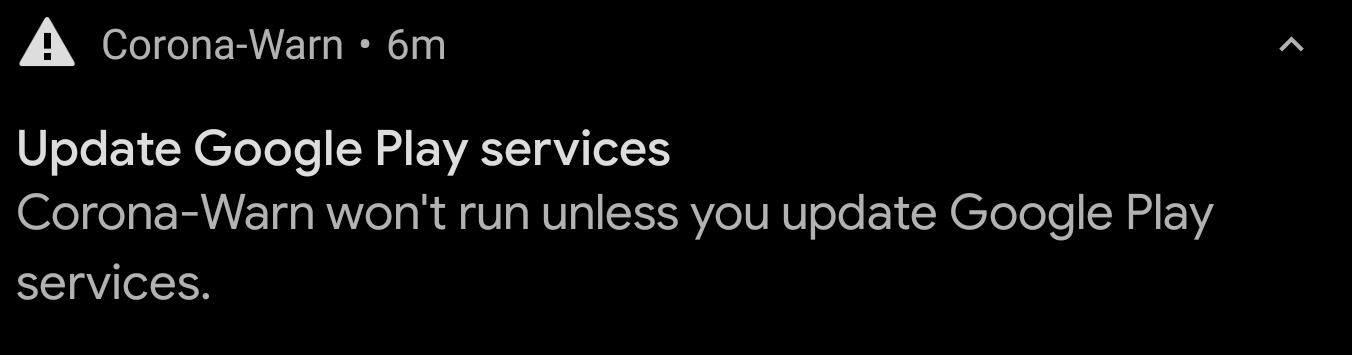
im also on the 7pro, but on a custom rom without any google. i cant use exposure logging and i get a noti saying i need to update play services:
 ristein
on 16 Jun 2020
ristein
on 16 Jun 2020
Updating Play Services from v20.18.17 to v20.21.17 added the German "Benachrichtigungen zu möglicher Begegnung mit COVID-19-Infizierten".
Can confirm. After (manually) updating Play Services to v20.21.17, it's finally started working for me!
 GrieferAtWork
on 16 Jun 2020
GrieferAtWork
on 16 Jun 2020
I can confirm the finding regarding the (really cumbersome and absolutely not straight-forward to resolve!) issue evolving around the language setting.
Having two (older) Huawei devices, both fully up to date and with a seemingly German system running, the one device worked as expected, the other one kept reminding me to update Google Play Services. However, the version of the play services (20.18.17) was the same on both devices. Seeing On/1app in the Play Services settings in comparison to the "right" stuff on the other device was the main difference. HOWEVER: even finding the Play Services settings is a pain. Clearing the cache and the data appears weird: cache is of course the first thing to try out, but clearing all the data without knowing what will actually be wiped is more severe (it claims that accounts and so fourth will be banned). Then I manually tried switching the locale in google play store (BTW: It was never supposed to be anything but the German version and I cannot tell, if it wasn't as there was no evidence, that it was not the German location already). Having to add (and then remove) a payment method is even more annoying plus it is only possible to switch the locale once a year.
In conclusion it appears that there is a language/region incompatibility issue that should be cleared out a.s.a.p. as it affects not just a handful of devices and not just everyday Joe users but also users that keep diving into the matter in order to resolve the issue. It must also be noted that a substantial amount of people from other countries (and I am not referring to refugees only but to many people that are working and living here) will have different locales and they should not be excluded from the usage of the app (which I suppose to happen seeing the reported issues). I spent several hours due to a high personal motivation of getting the thing going but actually most people will just uninstall after the first unsuccessful try, and then they will continue blaming the 20Mio € that went into it (though if the app helps saving a few weeks of intensive care, then this will already be made up for and the 20 Mio are ridiculous in comparison to the economic impact due to other, equally important measures).
Great to have the app (finally after a long journey), but having it work seemlessly across devices (including the use of the novel Huawei Mobile Services API a.s.a.p.) is crucial in order to actually have broad coverage.
 EMMAOpenSource
on 17 Jun 2020
EMMAOpenSource
on 17 Jun 2020
So I had two Google Play Services updates show up. The second one however came in quite late. I assume that it was a fix in my case since after updating a second time the app startet to work (Oneplus 7 Pro, Magisk, debloat).
My language/region settings are english(Germany).
littleboxis
on 17 Jun 2020
One thing to keep in mind: apparently you have to install the app in the main profile, in case you have multiple profiles.
I installed it in my "home" profile on my work mobile, and got the same error as in this report. The hint was that settings doesn't show the "Benachrichtigungen zu möglicher Begegnung mit COVID-19-Infizierten". I've now installed it in my main (work) profile, and it works there.
However, I wonder whether the app will be useful if I'm walking around while the secondary profile is active?
 mbanck
on 17 Jun 2020
mbanck
on 17 Jun 2020
I had the same issue with a Samsung Galaxy J5 (2016, duos), Android 7.1.1,
steps I took to get it running:
- removed the Corona warning app
- cleared the cache of Google Play-Dienste (v20.21.17)
- turned on manually Bluetooth and GPS (Standordtdienste)
- reinstalled the Corona warning app and started
Everything works now fine.
 pemue-git
on 18 Jun 2020
pemue-git
on 18 Jun 2020
Maybe the workarounds should get added more prominently somewhere under workarounds for known issues? FAQs? Or a special page with troubleshooting tips?
 corneliusroemer
on 18 Jun 2020
corneliusroemer
on 18 Jun 2020
One thing to keep in mind: apparently you have to install the app in the main profile, in case you have multiple profiles.
I installed it in my "home" profile on my work mobile, and got the same error as in this report. The hint was that settings doesn't show the "Benachrichtigungen zu möglicher Begegnung mit COVID-19-Infizierten". I've now installed it in my main (work) profile, and it works there.
However, I wonder whether the app will be useful if I'm walking around while the secondary profile is active?
Similar behavior here. App was installed while second user/profile active. Not working. Checked the "main" user: working with no issue.
That should be fixed soon as maybe parents wants their kids phones have running the app while don't giving them full access to the phone - just one use case for the profiles. In my case, the 2nd user is only limited in the way that android is limiting it. I had no additional restrictions enabled when activating it.
Error persistent with app version 1.0.2. from play store.
Device Huawei P20 pro
 MysticMagican
on 19 Jun 2020
MysticMagican
on 19 Jun 2020
Looks like everybody who still sees this issue needs to update Google Play Services to a version > 20.18.17. Unfortunately, Google Play Store does not yet distribute such a version for some affected platform variants, such as for my "100408".
I have therefore checked here: https://android-apk.org/com.google.android.gms/
what the most recent version for my platform variant is - for me, this is 20.21.15 (100408-313409149) and installed this version manually from APK.
After installing from APK, just to be on the safe side, reboot your device, and then start Corona-Warn-App once again - for me, it now started to work :-)
Question to the developers: Why don't you officially document this issue & the minimum version of Google Play Services that is needed to properly run the app for every platform variant?
This type of error is completely unresolvable for any Android newbie!!!
Hope this helps...
awl1
 awl1
on 19 Jun 2020
awl1
on 19 Jun 2020
Looks like everybody who still sees this issue needs to update Google Play Services to a version > 20.18.17.
[...]
Hope this helps...
awl1
Not everybody.
In my case, the app works - just only in the main profile, so it's not only an issue caused by the play services version.
I've version 20.24.13 (100408-316577029) running.
But after all, you're right, no one that's just a user would be able to fix that even if it's solvable by clearing data, reinstall or similar steps.
MysticMagican
on 20 Jun 2020
A more user-friendly message is shown with https://github.com/corona-warn-app/cwa-app-android/pull/648.
There are various reasons listed why this error occurs in https://www.coronawarn.app/de/faq/#cause_3
 friedger
on 20 Jun 2020
friedger
on 20 Jun 2020
It still does not work even after completing all the steps mentioned above and installing the newest play services directly from google. Rebooted, cleared all data and still have no way to get it working. Can somebody from the dev team please help?? And it seems like I'm not the only one...
kyleKuz
on 20 Jun 2020
@kyleKuz Please verify whether any of these reasons explain the error, you might not be able to use the app.
Der Fehler bedeutet, dass Dein Gerät aus einem oder mehreren der folgenden Gründe die Risiko-Ermittlung nicht durchführen kann:
Deine Google Play-Dienste sind veraltet.
Deine Google Play-Landesversion ist nicht Deutschland.
Du hast die Corona-Warn-App nicht über den offiziellen Google Play Store installiert.
Dein Gerät wurde modifiziert (z. B. gerooted).
Du hast mehrere Benutzerkonten auf Deinem Gerät, und die App wird für einen nicht-primären User (ohne Administrationsrechte) ausgeführt.
Der Hersteller Deines Geräts hat die Google Play-Dienste und den Google Play Store für Dein Gerät nicht verfügbar gemacht (betrifft z. B. einige Modelle von Huawei und Xiaomi)
Die Google Mobile Services sind veraltet.
In my case, the app works. (...) I've version 20.24.13 (100408-316577029) running.
How did you get this version? AFAIK, this is a beta version, so you seem to also have installed it by hand. Seems like in the meantime, a non-beta release 20.21.17 is available, but even this is still NOT (at least not for me) auto-updateable via Google Play Store:
https://www.apkmirror.com/apk/google-inc/google-play-services/google-play-services-20-21-17-release/google-play-services-20-21-17-100408-316502805-android-apk-download/
awl1
on 20 Jun 2020
@kyleKuz Please verify whether any of these reasons explain the error, you might not be able to use the app.
Der Fehler bedeutet, dass Dein Gerät aus einem oder mehreren der folgenden Gründe die Risiko-Ermittlung nicht durchführen kann:
Deine Google Play-Dienste sind veraltet.
Deine Google Play-Landesversion ist nicht Deutschland.
Du hast die Corona-Warn-App nicht über den offiziellen Google Play Store installiert.
Dein Gerät wurde modifiziert (z. B. gerooted).
Du hast mehrere Benutzerkonten auf Deinem Gerät, und die App wird für einen nicht-primären User (ohne Administrationsrechte) ausgeführt.
Der Hersteller Deines Geräts hat die Google Play-Dienste und den Google Play Store für Dein Gerät nicht verfügbar gemacht (betrifft z. B. einige Modelle von Huawei und Xiaomi)
Die Google Mobile Services sind veraltet.
- Google Play is updated to v 18.3.13
- Location: Germany
- Of course I installed over the play store
- Phone is not rooted or anything like that.
- Only one (admin) user on the phone.
- Huawei phone was bought before the whole US-China trade war, so it has google play services.
- Those google play services are v 20.18.17
So no none of this seems to be it :/
kyleKuz
on 20 Jun 2020
@kyleKuZ: I had the same situation, only on a Samsung device. Therefore the list from @friedger is not complete. It seems that somehow an English version can get installed, even though the country was always Germany and the device is updated, not rooted, etc. But I was able to fix it.
You said you followed all the steps above, but which ones? Did you delete cache AND data from Google Play Services (and maybe Google Play)? I deleted cache AND data from both and after waiting for about an hour, suddenly it worked. No newer versions necessary.
As it seems to be a Google Play Services issue I think, deleting data AND cache from Google Play might not be necessary, but I had already done it. BTW, all deletions didn't have any negative effect so far (like one could think, the device forgets which apps are installed when deleting Google Play data).
Michael-635
on 20 Jun 2020
@kyleKuz @friedger @Michael-635: To me, it seems as if Google Play Services versions <= 20.18.17 have an issue that - most probably under one or more additional conditions like the ones already discussed - make it impossible to get things resolved.
At least for me, everything only started working after upgrading Google Play Services to a more recent version (current release version: 20.21.17, although this still is not automatically distributed via Play Store)...
@kyleKuz: Try to manually upgrade Google Play Services to a newer release, and immediately after upgrading, reboot your phone. For me, the next attempt to start Corona-Warn-App after the reboot was successful :-)
awl1
on 21 Jun 2020
Thank you all for your input. While we cannot solve this issue directly, the team implemented a more descriptive error description in the latest app version that also links to the FAQ which contain more information than could possible fit into a single mobile screen.
 tkowark
on 22 Jun 2020
tkowark
on 22 Jun 2020
How did you get this version?
Installed via play store
MysticMagican
on 23 Jun 2020
Thank you all for your input. While we cannot solve this issue directly, the team implemented a more descriptive error description in the latest app version that also links to the FAQ which contain more information than could possible fit into a single mobile screen.
So is there still any interest to drive that issue? Or does that mean "tough luck" to all that want to have the devices used with restricted rights. Maybe for their kids?
MysticMagican
on 23 Jun 2020
I don't know what about which kids - but my Sony Xperia XA1 plus still does not work, while even a low budget Honor device within the family now does work.
So I guess it's now more up to Sony whether to fix their products.
traut21
on 24 Jun 2020
Thank you all for your input. While we cannot solve this issue directly, the team implemented a more descriptive error description in the latest app version that also links to the FAQ which contain more information than could possible fit into a single mobile screen.
So is there still any interest to drive that issue? Or does that mean "tough luck" to all that want to have the devices used with restricted rights. Maybe for their kids?
Of course, we‘re interested in ensuring that the app works for as many people as possible. For this particular error 3 issue this is however not that trivial since many solutions are just updates and settings outside the application. That‘s why we expanded the FAQ and provided more descriptive error messages. If the problem still persists despite following the FAQ, it would be great to have a new dedicated issue for your specific problem since in this thread just mixed many different issues over time.
tkowark
on 24 Jun 2020
ok, so I'll move to he proper thread
traut21
on 24 Jun 2020
I have seen this issue too and it got solved by updating to Google Play Services 20.21.17 and CWA 1.0.4.
 genodeftest
on 27 Jun 2020
genodeftest
on 27 Jun 2020
Here I do not see "Google Play-Dienste" within the Google Play Store list of installed apps, but via Einstellungen > Apps & Benachrichtigungen > App-Info > Alle Apps. It there says Version 20.21.17 (040408-316502805), "App installiert vom Google Play Store". CWA 1.0.4 - never a success.
traut21
on 27 Jun 2020
Maybe this will help someone. I used Smart Switch to transfer data to a new Samsung mobile. On the new mobile I couldn't get the warn app to work. I had to delete play store data and cache. Once I had done that I saw the covid service in the Google settings. And when I reinstalled the warn app it finally worked.
 thebia
on 5 Jul 2020
thebia
on 5 Jul 2020
Related issues
 crcsn
·
3Comments
crcsn
·
3Comments
 Teddy265
·
3Comments
Teddy265
·
3Comments
 sdschulze
·
3Comments
sdschulze
·
3Comments
 HuiiBuh
·
3Comments
HuiiBuh
·
3Comments
 Magoli1
·
3Comments
Magoli1
·
3Comments
Most helpful comment
Same error:
Samsung Galaxy S10+
Android Version: 10
One UI-Version: 2.1
Kernel: 4.14.113-1873-1944 - Jun 3 2020
Clearing the cache did not solve the problem!
best regards
dirk