Cwa-app-android: Error Reason: 2001; App does not work anymore
Avoid duplicates
- [X] Bug is not mentioned in the FAQ
- [X] Bug is specific for Android only, for general issues / questions that apply to iOS and Android please raise them in the documentation repository
- [X] Bug is not already reported in another issue
Describe the bug
When I open the App I immediatley get the error message "Ursache: 2001 an error occured while trying to establish a secure connection to the server". This results in a not working App. Deinstalling and restarting did not help. Last confirmed working of the App was on July, 20th, first time I saw the error was on July, 23rd. In between I did not start the App.
Expected behaviour
The App should work
Steps to reproduce the issue
Starting the App is enough, I did not do anything specific and I did not change anything on my own on my Smartphone since the App is not working anymore.
Technical details
- Mobile device: Samsung Galaxy Note 8 SM-N950F
- Android version: 9, July security patch
- CWA version: 1.1.1
Possible Fix
No idea
Additional context
My first thought was that Blokada changed something. Deactivating Blokada did not help. And even if so I am not willing to deactivate it completely (CWA is on the Allowed Apps list) as the App worked with it before.
Internal tracking ID: EXPOSUREAPP-2009 closed
Internal tracking ID: EXPOSUREAPP-3051
 gagamail
All 64 comments
Thanks for the report. We've also been getting similar reports from Play Store comments. Reports from there show that
- it seems to be unrelated from rooting/modifications, personal firewalls or similar measures
- it seems to be independent from the used network (wi-fi or cellular)
- it might be related to the latest update 1.1.1 as some people report that it occurs only since the latest update
Quotes from Play Store:
Initially, but for several days (even after reinstallation) a "Cause 2001" error worked: a secure connection to the server could not be established. EDIT: The error suddenly appeared / without changing the network, is in all WLAN networks, and also in mobile data mode. EDIT 2: the device was not modified and no firewall was installed. Resetting the network settings did not solve the problem
Until the update - all errors correcting - the app ran really well. No error message or similar. However, since the update: Error: CAUSE 2001. Rien ne va plus! No more risk assessment. This is how the app helps me - especially when the number of cases increases again. Please troubleshoot here. Then I also like to upgrade.
Unfortunately now without function. Something has been made worse, now it only shows that something went wrong. Cause of error 2001. Under "Details" there follows a cryptic error message. Android 9, Samsung S8. No blockers active. Own WiFi without restrictions. And before I get any tips like updating: I have installed version 1.5. Theoretically should correct errors, but in practice does the opposite. I uninstalled the app first.
After the update to 1.1.1 only error message 2001 comes. Even a restart of the cell phone brought no improvement. Risk determination is active, risk status is only displayed after the error message. Cause 2001 is displayed. Something went wrong. I am logged in to my own WLAN and have not made any changes to the network. Even a new installation did not bring any improvement. After the risk determination has been switched off, the error message disappears.
A different error after each update. Now after the latest update on 07/25/2020 "Cause 2001" on Huawei P8 Android 6.0. an error occured while trying to establish a secure connection to the server. Tried 3 different WLANs as well as cell phones. All unsuccessful. With another device - Samsung J3 - it works in the same networks.
The following error message appears when the APP is called: CAUSE: 2001 Something went wrong an error occured while trying to establish a secure connection to the server What can I do? Thank you for your help_______________________________ Edit: Unfortunately a restart does nothing to change this behavior. ___________________________________________ Edit: The error has occurred since the update to version 1.1.1. Lenovo Moto G5. Android 8.0.1, Google Play Store 21.0.17-all, services 20.24.14
The following error message appears when the APP is called: CAUSE: 2001 Something went wrong an error occured while trying to establish a secure connection to the server What can I do? Thank you for your help. The device has been restarted several times since it first appeared. The error always comes reliably since the update to version 1.1.1
Reported devices (all on CWA 1.1.1):
- moto g(6) (ali_n), Android 9
- OnePlus5, Android 10
- Huawei P30 Pro (HWVOG), Android 10
- Huawei P8 Android 6.0
- Galaxy S8 (dreamlte), Android 9
- HTC U11 (htc_ocndugl), Android 9
- Moto G (5th Gen) (cedric), Android 8.1
As reports are increasing, we will address this with high priority to product management to prioritize analyses and a fix.
Mit freundlichen Grüßen/Best regards,
SW
Corona Warn-App Open Source Team
 SebastianWolf-SAP
on 4 Aug 2020
SebastianWolf-SAP
on 4 Aug 2020
@gagamail Can you please contact me directly to provide more details about the network setup
 thomasaugsten
on 5 Aug 2020
thomasaugsten
on 5 Aug 2020
@thomasaugsten @gagamail
Hi, gagamail listed Android July Patch for his device settings.
The July Patch also consists of Qualcomm fixes that seem to affect wifi.
May there be any (timely) relation to the July Patch?
https://source.android.com/security/bulletin/2020-07-01?hl=en
 vaubaehn
on 5 Aug 2020
vaubaehn
on 5 Aug 2020
@thomasaugsten @gagamail
Hi, gagamail listed Android July Patch for his device settings.
The July Patch also consists of Qualcomm fixes that seem to affect wifi.
The SM-N950F is the version with the Samsung Exynos Processor and not Qualcomm Snapdragon. So I guess it can't be related?
May there be any (timely) relation to the July Patch?
https://source.android.com/security/bulletin/2020-07-01?hl=en
According to the logfiles I installed the last upgrade (i don't think there was any other upgrade besides the July Patch) on July, 28th which would mean it already did not work without July Patch.
gagamail
on 6 Aug 2020
Hi all,
I am effected by this bug as well (last working was the 20th July as well).
Since the error message gives more details hinting in the direction of the error, I wanted to provide some information from it. Unfortunately I am not allowed to take a screenshot of the error message and will thus not type the whole error stack.
The full error message starts with:
Etwas ist shiefgelaufen.
Ursache:
de.rki.coronawarnapp.exception.CwaWebSecurityException: an error occurred while trying to establish a secure connection to the server
And it ends with:
Caused by: java.securit.cert.CertPathValidatorException: Trust anchor for certification path not found.
I hope this helps :)
Cheers
 DerPlankton13
on 6 Aug 2020
DerPlankton13
on 6 Aug 2020
Hi @gagamail , thanks for clearing up!
According to the logfiles I installed the last upgrade (i don't think there was any other upgrade besides the July Patch) on July, 28th which would mean it already did not work without July Patch.
So, any problems with 2001 related to that patch can be completely excluded then.
And you are right, Qualcomm for that model is US market only. Anyway, there were also some Samsung internal fixes and Android kernel fixes. However, doesn't play any role here.
vaubaehn
on 6 Aug 2020
Hi @DerPlankton13 , thanks for your report!
You mentioned that app was working well until July 20th.
Interestingly, around July 21st/22nd, CWA-server 1.2.0 was released...
May there be any correlation, @thomasaugsten @EvgeniiSkrebtcov ?
vaubaehn
on 6 Aug 2020
Hi,
the issues is the app cannot verify the ssl certificate of the diagnosis key server (Introduced with v1.1.1). This can caused by multiple things.
- Date/Time is not correct.
- Android Root/CA certificates are not up to date
- Antivirus App is breaking the ssl chain
- Network/Firewall tool like pi-hole is breaking the ssl chain
Maybe you can provide a screenshot of
Open Settings
Tap “Security & location”
Tap “Encryption & credentials”
Tap “Trusted credentials.”
thomasaugsten
on 6 Aug 2020
maybe any problem in server certificate pinning?
vaubaehn
on 6 Aug 2020
1. Date/Time is not correct.
Is correct.
2. Android Root/CA certificates are not up to date
I have one certificate which is not up to date. Thats an old Deutsche Telekom Root CA 2 which I needed in the past for WLAN access.
3. Antivirus App is breaking the ssl chain
No Antivirus App installed
4. Network/Firewall tool like pi-hole is breaking the ssl chain
In my home WLAN I have a pi-hole, but the App also does not work outside of this WLAN. On the smartphone I have Blokada which I completely deactivated. Before July 21st the App worked with both activated.
gagamail
on 6 Aug 2020
@gagamail Can you remove the old CA and test again?
thomasaugsten
on 6 Aug 2020
@gagamail Can you remove the old CA and test again?
Looks like I can't. I don't find a possibility to deinstall it, according to what I found with google it is not possible to completely remove a WLAN CA. But it is (and was before) dectivated.
gagamail
on 7 Aug 2020

Redmi Note 7
 kira99
on 7 Aug 2020
kira99
on 7 Aug 2020
Hi Kira,
can you provide a screenshot of
Settings
Tap “Security & location”
Tap “Encryption & credentials”
Tap “Trusted credentials.”
thomasaugsten
on 7 Aug 2020


kira99
on 7 Aug 2020
Hi Kira,
can you provide a screenshot of
Settings
Tap “Security & location”
Tap “Encryption & credentials”
Tap “Trusted credentials.”
Did my screenshots help? If not, can you give me a hint where to find the settings?
kira99
on 7 Aug 2020
@kira99
Settings->Additional Settings->Privacy->Trusted Credentials
Is the button "Clear credentials" active?
thomasaugsten
on 7 Aug 2020
There is no additional settings in the App visible. Only settings. In settings everything is on. My operating system MIUI is in German. But I could not find any similar settings to credentials. Where do I have to look?
kira99
on 7 Aug 2020
I mean the Android Settings not the App Settings
thomasaugsten
on 7 Aug 2020
Sorry, MIUI does not show this. The settings UI is not Android standard. I looked up privacy. There is not setting for credentials and I even have already activated developer mode for MIUI.
kira99
on 7 Aug 2020
Ok maybe you can try
Settings->Privacy & security -> Privacy->Trust agents
Settings->Privacy & security -> Privacy->Encryption Credentials->Trusted Credentials
Settings->Privacy & security -> Privacy->Encryption Credentials->User Credentials
thomasaugsten
on 7 Aug 2020
Or did you mean this?

kira99
on 7 Aug 2020
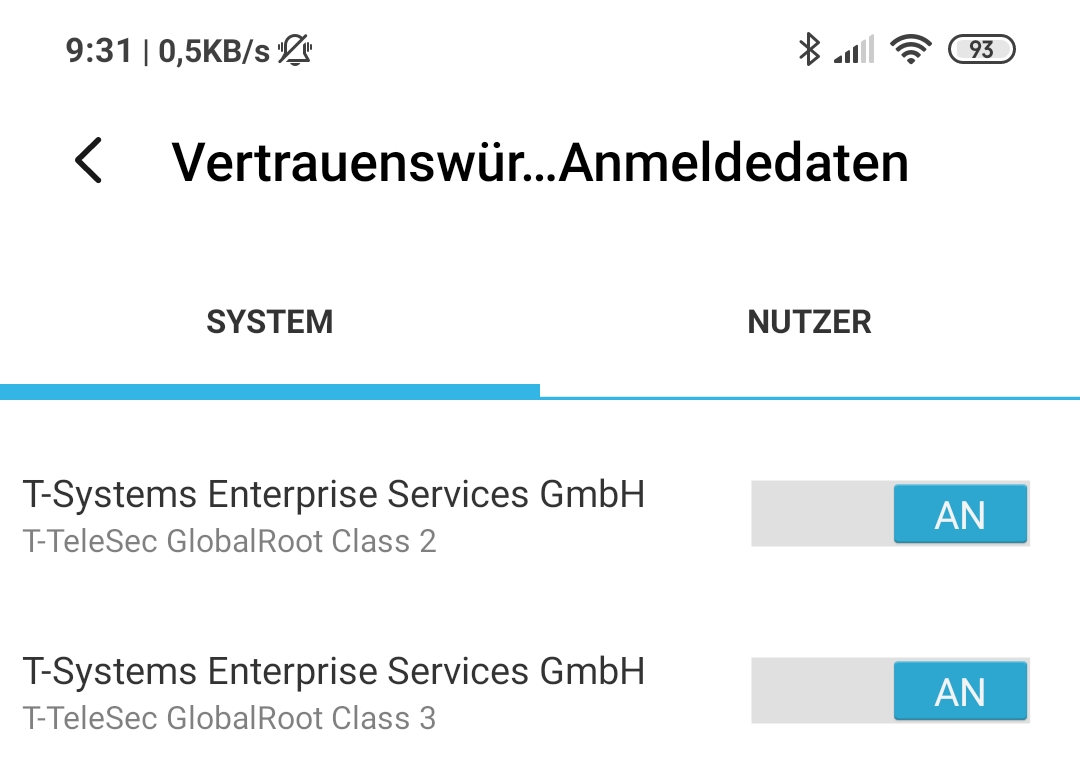
@kira99 "Vertrauenswürdige Anmeldedaten" seems to be what you should look for.
 akuckartz
on 7 Aug 2020
akuckartz
on 7 Aug 2020
Hi thanks for your help.
The setting: Vertrauenswürdige Anmeldedaten is empty?
Ok this helps. I deleted one your screenshots because of privacy reasons
thomasaugsten
on 7 Aug 2020
Vertrauenswürdige Anmeldedaten has a lot of system certificates, but no user certificate.
kira99
on 7 Aug 2020
Can you provide a screenshot of this.
thomasaugsten
on 7 Aug 2020

Left column shows names of certificates.

kira99
on 7 Aug 2020
The screenshots I made show exactly the same error notations as reported by "Kira99".
(Samsung Galayx S8 with Android9).
The error always occurs when I try to activate the warning function. Sometimes also just after opening the app.
It is independent from the connection, or time, or any other apps running. Wifi is working fine, mobile connection too.
I did not exclude anything, since I did not manipulate my security settings up to now.
My mobile provider is Vodafone, maybe they have some firewall function included?
 NixAlsVerdruss
on 7 Aug 2020
NixAlsVerdruss
on 7 Aug 2020
The system certificates would be interesting.
@NixAlsVerdruss Did you check your Date/Time is correct on your phone?
Is the device a private or company device?
Is there any firewall or antivirus app installed?
Because it is not working on wifi and mobile data the issue is on your device.
thomasaugsten
on 7 Aug 2020
- Date/time seems to be correct
- Private device, branded by Vodafone
- No firewall, no antivirus - except the things Vodafone may have
added without telling me.
As there are no problems with anything except this app, I don't think
my device is defect.
It seems the CoronaWarnApp has problems with some devices...
2020-08-07 21:39 GMT+02:00, Thomas Augsten notifications@github.com:
The system certificates would be interesting.
@NixAlsVerdruss Did you check your Date/Time is correct on your phone?
Is the device a private or company device?
Is there any firewall or antivirus app installed?
Because it is not working on wifi and mobile data the issue is on your
device.--
You are receiving this because you were mentioned.
Reply to this email directly or view it on GitHub:
https://github.com/corona-warn-app/cwa-app-android/issues/968#issuecomment-670680833
NixAlsVerdruss
on 7 Aug 2020
You can double check if you have following certificate in Vertrauenswürdige Anmeldedaten/Trusted Credentials
T-Telesec Global Root Class 2
01.10.2033, 23:59:59 GMT
91:E2:F5:78:8D:58:10:EB:A7:BA:58:73:7D:E1:54:8A:8E:CA:CD:01:45:98:BC:0B:14:3E:04:1B:17:05:25:52
thomasaugsten
on 7 Aug 2020
???
I don't want to re-program my Android... It's not me who gets paid for that.
2020-08-07 23:34 GMT+02:00, Thomas Augsten notifications@github.com:
You can double check if you have following certificate in Vertrauenswürdige
Anmeldedaten/Trusted Credentials
>
T-Telesec Global Root Class 2
01.10.2033, 23:59:59 GMT
91:E2:F5:78:8D:58:10:EB:A7:BA:58:73:7D:E1:54:8A:8E:CA:CD:01:45:98:BC:0B:14:3E:04:1B:17:05:25:52
>
>
>
--
You are receiving this because you were mentioned.
Reply to this email directly or view it on GitHub:
https://github.com/corona-warn-app/cwa-app-android/issues/968#issuecomment-670722159
NixAlsVerdruss
on 7 Aug 2020
App seems to work now. There were no changes on my side and also no updates (also no updates for apps) since the last time the app did not work.
gagamail
on 8 Aug 2020
@gagamail Did you change something in your network setup.
thomasaugsten
on 8 Aug 2020
No, nothing changed.
But the last try before was in a different network (I will access it on Monday). Since last try in the current network the following Apps got an update: AndrOpen Office, Quipp, Microsoft OneDrive, Google and Amazon Alexa. So in principal it is possible that it is a combination of the network and one those Apps. I will find out on Monday.
gagamail
on 8 Aug 2020
Hi all,
thanks @kira99 for providing all the screenshots. I followed some of the steps suggested here and I actually found a solution for me. As suggested by @thomasaugsten I double checked that I have the T-Telesec Global Root Class 2 certificate and found that this was deactivated in on my phone. After activating it, the App works as intended!
By deactivating the certificate I could recreate the error.
DerPlankton13
on 8 Aug 2020
@DerPlankton13 Do you have an idea why this certificate was deactivated on your device?
thomasaugsten
on 8 Aug 2020
But it seems the certificate is installed.
I don't have any way to install/ uninstall certificates.(device isn't
rooted).
Does not help
Ingrid L. luzie97@gmail.com schrieb am Fr., 7. Aug. 2020, 23:39:
???
I don't want to re-program my Android... It's not me who gets paid for
that.2020-08-07 23:34 GMT+02:00, Thomas Augsten notifications@github.com:
You can double check if you have following certificate in
Vertrauenswürdige
Anmeldedaten/Trusted Credentials>
T-Telesec Global Root Class 2
01.10.2033, 23:59:59 GMT
>
91:E2:F5:78:8D:58:10:EB:A7:BA:58:73:7D:E1:54:8A:8E:CA:CD:01:45:98:BC:0B:14:3E:04:1B:17:05:25:52>
>
>
--
You are receiving this because you were mentioned.
Reply to this email directly or view it on GitHub:
>
https://github.com/corona-warn-app/cwa-app-android/issues/968#issuecomment-670722159
NixAlsVerdruss
on 8 Aug 2020
@thomasaugsten I am not sure. It may have something to with Eduroam. I had a _Benutzerzertifikat_ for Eduroam, which I deinstalled. I think this certificate was the T-TeleSec Global Root Class 2 certificate as well.
To clarify a little what I did: I first skimmed over all the system certificates (as shown by @kira99's screenshot). I did not notice anything unusual, but I may have overlooked that the one certificate was deactivated. Then I uninstalled all certificates which I found under Einstellungen > Biometrische Daten und Sicherheitsoptionen > Andere Sicherheitseinstellungen > Benutzerzertifikate, which were the certificate from Eduroam and the com.samsung.android.dqagent_SA_SDK certificate. After this I read about the T-TeleSec Global Root Class 2 certificate in your post and rechecked that and found that it was deactivated.
I hope this helps...
DerPlankton13
on 8 Aug 2020
I followed the description of kira99 to see all certificates. Found the
relevant certificates named T-Systems... class 2 and class 3 , which were
installed but deactivated.
I switched them active.
Now the app is going to work! No more connection errors.
The reason may be that the installed certificates are deactivated by
something. Maybe the last Android update, or any security algorithms from
Samsung or Vodafone.
DerPlankton13 notifications@github.com schrieb am Sa., 8. Aug. 2020,
20:45:
I am not sure. It may have something to with Eduroam. I had a
Benutzerzertifikat for Eduroam, which I deinstalled. I think this
certificate was the T-TeleSec Global Root Class 2 certificate as well.
To clarify a little what I did: I first skimmed over all the system
certificates (as shown by @kira99 https://github.com/kira99's
screenshot). I did not notice anything unusual, but I may have overlooked
that the one certificate was deactivated. Then I uninstalled all
certificates which I found under Einstellungen > Biometrische Daten und
Sicherheitsoptionen > Andere Sicherheitseinstellungen >
Benutzerzertifikate, which were the certificate from Eduroam and the
com.samsung.android.dqagent_SA_SDK certificate. After this I read about the
T-TeleSec Global Root Class 2 certificate in your post and rechecked that
and found that it was deactivated.
I hope this helps...—
You are receiving this because you were mentioned.
Reply to this email directly, view it on GitHub
https://github.com/corona-warn-app/cwa-app-android/issues/968#issuecomment-670961015,
or unsubscribe
https://github.com/notifications/unsubscribe-auth/AQQZ3QV56AYNJVNEITYX5YTR7WMNFANCNFSM4PUCDJKQ
.
NixAlsVerdruss
on 8 Aug 2020
I switched them active. Now the app is going to work! No more connection errors.
Are you sure that this is not just a coincidence? Yesterday the App also started to work for me again. But I did not change anything in the certificates and especially the T-TeleSec Global Root Certificates always were activated.
gagamail
on 8 Aug 2020
You can double check if you have following certificate in Vertrauenswürdige Anmeldedaten/Trusted Credentials
T-Telesec Global Root Class 2
01.10.2033, 23:59:59 GMT
91:E2:F5:78:8D:58:10:EB:A7:BA:58:73:7D:E1:54:8A:8E:CA:CD:01:45:98:BC:0B:14:3E:04:1B:17:05:25:52
I do have this certificate and it is activated - has always been.
kira99
on 8 Aug 2020
I don't think it was a coincidence.
A minute before the app did not work. After activating the certificates, it
did.
Mayve you got some update of
gagamail notifications@github.com schrieb am Sa., 8. Aug. 2020, 22:30:
I switched them active. Now the app is going to work! No more connection
errors.Are you sure that this is not just a coincidence? Yesterday the App also
started to work for me again. But I did not change anything in the
certificates and especially the T-TeleSec Global Root Certificates always
were activated.—
You are receiving this because you were mentioned.
Reply to this email directly, view it on GitHub
https://github.com/corona-warn-app/cwa-app-android/issues/968#issuecomment-670970830,
or unsubscribe
https://github.com/notifications/unsubscribe-auth/AQQZ3QTXYDI64HFQMRULFXLR7WYV3ANCNFSM4PUCDJKQ
.
NixAlsVerdruss
on 8 Aug 2020
@kira99 Shows the iPhone in your network also connections errors or only the xiaomi devices?
thomasaugsten
on 8 Aug 2020
It is only my XIAOMI REDMI Note 7, not the other two devices.
kira99
on 8 Aug 2020
The certificates show up as "T-Systems Enterprise Services GmbH"
Alexandra notifications@github.com schrieb am Sa., 8. Aug. 2020, 23:09:
It is only my XIAOMI REDMI Note 7, not the other two devices.
—
You are receiving this because you were mentioned.
Reply to this email directly, view it on GitHub
https://github.com/corona-warn-app/cwa-app-android/issues/968#issuecomment-670974054,
or unsubscribe
https://github.com/notifications/unsubscribe-auth/AQQZ3QVYZAF4RUIUMA7MRFTR7W5HPANCNFSM4PUCDJKQ
.
NixAlsVerdruss
on 8 Aug 2020
Yes, I saw that. T-Systems is printed in bold and then T-Telesec Global Root Class 2 in the next line. I also have T-Telesec Global Root Class 3. Both have always been activated, I did not change anything. My app does not show any errors at the moment.
kira99
on 8 Aug 2020
Maybe there are more certificates which need to be active?
Alexandra notifications@github.com schrieb am Sa., 8. Aug. 2020, 23:21:
Yes, I saw that. T-Systems is printed in bold and then T-Telesec Global
Root Class 2 in the next line. I also have T-Telesec Global Root Class 3.
Both have always been activated, I did not change anything. My app does not
show any errors at the moment.—
You are receiving this because you were mentioned.
Reply to this email directly, view it on GitHub
https://github.com/corona-warn-app/cwa-app-android/issues/968#issuecomment-670975050,
or unsubscribe
https://github.com/notifications/unsubscribe-auth/AQQZ3QXLRF4VY2NVH2WLBN3R7W6VTANCNFSM4PUCDJKQ
.
NixAlsVerdruss
on 8 Aug 2020
@gagamail
I noticed another coincidence, at least one that might apply to you:
Remember https://github.com/corona-warn-app/cwa-app-android/issues/968#issuecomment-669896599 ? CWA-server v 1.2.0 was released on July 22nd, that was the time when problems began for you.
You say, since yesterday it works again without changing anything from your side? CWA-server 1.3.0 was released yesterday... https://github.com/corona-warn-app/cwa-server/releases/tag/v1.3.0
Again, I'm doing an uneducated guess (one day people will throw paper balls at me...), just as a theory what could have happened:
What if during the initialization of CWA-server 1.2.0 a minor flaw somewhere in the certficate chain was occuring? Maybe it was such a small flaw, no one recognized it, and allmost all devices accepted the server certificate. Except a handful of some hypersensible Android OS, that refused the connection for security reasons? And would it then be in the scope of possibility, that some of these OS just deactivated the root certificate due to the certificate chain flaw, while other OS didn't touch the certificate and just refused the connection?
This might explain what is seen now:
In some devices the root certificate was disabled (obviously without user interaction), in some not.
Since August 7th, devices work again, either automatically without user interaction, or after enabling the root certficate again.
If it really was related to a certificate chain flaw, then initialization of CWA-server 1.3.0 somehow did the trick.
May this be? Or completely nonsense?
vaubaehn
on 9 Aug 2020
released doesn't mean deployt I will check the exact date of the deployment.
thomasaugsten
on 9 Aug 2020
@thomasaugsten Ok, if it's not deployed yet, then the option 'nonsense' of my comment above may apply...
vaubaehn
on 9 Aug 2020
v1.3 is still in testing and not deployed. This means cwa-server deployment is stable.
thomasaugsten
on 9 Aug 2020
@kira99 Can you provide a screenshot of your T-Telesec Global Root Class 2 certificate information with the hash visible. This are not private or sensible information.
thomasaugsten
on 9 Aug 2020
@kira99 Can you provide a screenshot of your T-Telesec Global Root Class 2 certificate information with the hash visible. This are not private or sensible information.
kira99
on 9 Aug 2020
Hello @gagamail and community,
to follow up, I like to ask if the error still exists?
Thanks,
LMM
Corona-Warn-App Open Source Team
 GPclips
on 30 Sep 2020
GPclips
on 30 Sep 2020
Hi @GPclips ,
from time to time people are still reporting that error in their reviews in Google Play Store. I was recently in touch about this with @svengabr .
For me it is unclear, if they're still old cases who report late or didn't open CWA for a long time, or if they're new cases.
Anyhow, for future UX improvement would be good to catch the error inside app and present a (link to a) walkthrough on how to resolve, as the resolution would need to be done manually.
Does @thomasaugsten have more information meanwhile, what exactly triggered the error (what led to the deactivation of the root certificates)?
vaubaehn
on 30 Sep 2020
Cryptic error still occurs when the "T-TeleSec GlobalRoot Class 2" is not active. Can you please add a proper test case / error handling? I got the "2001" message today and the app said, last update "Oct 26".
With such a critical error, I would expect that the app can better react to it.
 ascherp
on 1 Nov 2020
ascherp
on 1 Nov 2020
Dear community,
Could you please give some feedback, if this issue still persists with CWA version 1.61.? Thanks!
Best wishes,
DS
Corona-Warn-App Open Source Team
 dsarkar
on 20 Nov 2020
dsarkar
on 20 Nov 2020
Hi @dsarkar ,
I believe the issue might be app independent. My guess is, that problems in the certficate chain could cause this issue, when there is any server re-configuration on T-System's side, which trigger some sensible OS to block the T-System root certificate.
But this is speculation only, and after my last request to @thomasaugsten end of September, we did not get any news about this issue.
My recommendation would be to leave this issue open, until we have more information from devs, and there is any decision on how to handle it (e.g., giving information in FAQ on how to resolve) in case it happens again (last time was obviously not even 3 weeks ago reported by @ascherp ).
vaubaehn
on 20 Nov 2020
By chance I found an article that contains some interesting information about an earlier security issue with the CWA server: https://t3n.de/news/corona-warn-app-sicherheitsluecke-server-1339560/
But it's not the security problem itself, that is interesting in the context of Error 2001, but the timeline of fixing the problem: On October 27, the fix (one part of it) was deployed, in other words the server was re-setup.
@ascherp states:
I got the "2001" message today and the app said, last update "Oct 26".
So, from October 27 on @ascherp 's T-Systems root certificate was blocked.
This congruence of timelines supports the theory that works on server can lead to Error 2001/blocked T-Systems root certificate.
@thomasaugsten , maybe it's interesting enough for you to reach out to T-Systems and gather some information?
How could the problem be avoided in future?
Should a public walkthrough (FAQ?) be provided for users who still might be affected by 2001 on how to re-enable their certificates?
vaubaehn
on 24 Nov 2020
Hi when the server is deployed no certificat is changed. This root certificate is valid since years and there is no way to block this on end user devices.
We will improve the error message to help the enduser
thomasaugsten
on 24 Nov 2020
I can confirm that it is possible to deactivate the certificate on the
device. This reproduces the error.
Thus, the bug can be handled by producing a better error message to the
enduser, as suggested by Thomas, to re-activate the certificate.
On 24.11.20 21:54, Thomas Augsten wrote:
>
Hi when the server is deployed no certificat is changed. This root
certificate is valid since years and there is no way to block this on
end user devices.We will improve the error message to help the enduser
—
You are receiving this because you were mentioned.
Reply to this email directly, view it on GitHub
https://github.com/corona-warn-app/cwa-app-android/issues/968#issuecomment-733227536,
or unsubscribe
https://github.com/notifications/unsubscribe-auth/AD2BQSZDLND2YYAEAJTB24LSRQMPXANCNFSM4PUCDJKQ.
ascherp
on 24 Nov 2020
Hi @thomasaugsten , thanks for your reply.
Neither I question a general problem with the private root/intermediate/server certificate on the server itself, nor do I assume that the server can block the public root certificate on the user's device actively.
The question is: why do some Android derivates block a generally trustful root certificate ("out of the nothing")?
Probably the best answer for now is: there is an issue with the certificate chain and the chain could not be verified to be trustful at some point in time by the client.
I don't know how this can happen, one explanation could be that during the initialization of the server there is a delay (of some seconds) in the provision of intermediate and/or server certificate, and if a client in that short moment accesses the server via port 443, there is a chance that client's OS expects a valid certificate chain, doesn't get one and subsequently blocks the root of the chain.
Would you have a different explanation how this could happen?
vaubaehn
on 24 Nov 2020
The reason is simple: It was (in my case) /deactivated by mistake by
the user/ (me) after I installed certificates and configured the access
to the our university Eduroam Wifi network.
Only after 4 days, I coincidentally recognized that the Corona app
crashed and did not work for days, since I configured Eduoroam. That is
already a problem in itself that the app crashes without notice of the user.
The second part is the error message I got: It was very cryptic and
disappeared after activating the certificate back in.
The issue is now found and can be solved with a better User Interaction,
I would say.
A
On 24.11.20 22:54, vaubaehn wrote:
>
Hi @thomasaugsten https://github.com/thomasaugsten , thanks for your
reply.
Neither I question a general problem with the private
root/intermediate/server certificate on the server itself, nor do I
assume that the server can block the public root certificate on the
user's device actively.
The question is: why do some Android derivates block a generally
trustful root certificate ("out of the nothing")?
Probably the best answer for now is: there is an issue with the
certificate chain and the chain could not be verified to be trustful
at some point in time by the client.
I don't know how this can happen, one explanation could be that during
the initialization of the server there is a delay (of some seconds) in
the provision of intermediate and/or server certificate, and if a
client in that short moment accesses the server via port 443, there is
a chance that client's OS expects a valid certificate chain, doesn't
get one and subsequently blocks the root of the chain.
Would you have a different explanation how this could happen?—
You are receiving this because you were mentioned.
Reply to this email directly, view it on GitHub
https://github.com/corona-warn-app/cwa-app-android/issues/968#issuecomment-733254904,
or unsubscribe
https://github.com/notifications/unsubscribe-auth/AD2BQS7NUYYO6GZBA4JDCDTSRQTRTANCNFSM4PUCDJKQ.
ascherp
on 27 Nov 2020
Related issues
 Teddy265
·
3Comments
Teddy265
·
3Comments
 marceljay
·
3Comments
marceljay
·
3Comments
 egandro
·
3Comments
egandro
·
3Comments
 sdschulze
·
3Comments
sdschulze
·
3Comments
 Magoli1
·
3Comments
Magoli1
·
3Comments
Most helpful comment
Hi all,
thanks @kira99 for providing all the screenshots. I followed some of the steps suggested here and I actually found a solution for me. As suggested by @thomasaugsten I double checked that I have the T-Telesec Global Root Class 2 certificate and found that this was deactivated in on my phone. After activating it, the App works as intended!
By deactivating the certificate I could recreate the error.