Application version
Over several Cura versions.
I am currently on the Cura version of Smartavionik from 10/06/2020
Platform
Windows 10 1909
Printer
No matter what printer
Reproduction steps
The problem only occurs permanently when an old project has been opened. (hopefully with you too)
Screenshot + Video + Project file
Setting Visibility Bug.zip
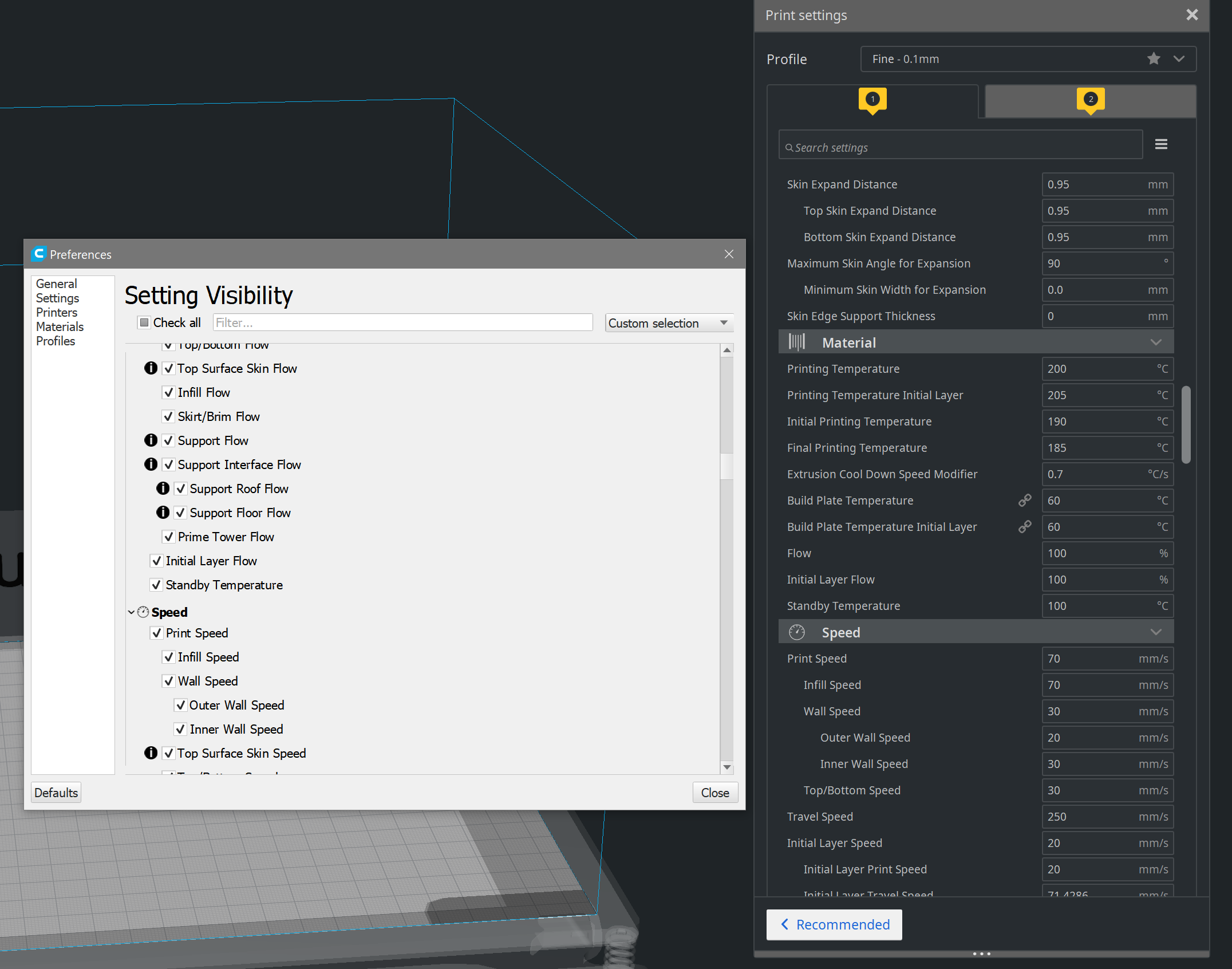
Actual results
Many settings are not shown.
I found the following settings:
Prime Tower Flow
Infill flow
The whole Flow sub-menu
Z Seam X
Z Seam Y
There may be more, these are the ones I noticed.
Expected results
Settings should be displayed immediately.
Additional information
OK I should have opened a new bug report right away, because I found similarity (by searching), I only tried to post here.
https://github.com/Ultimaker/Cura/issues/6414#issuecomment-647181466
Quote from here https://github.com/Ultimaker/Cura/issues/6414#issuecomment-544615125
Hide the shell settings by clicking on "<" and then reopen. For me, that fixes this problem.
That helps, but is not a permanent solution or is it?
I hope you can find the error, only after a long search I was able to find this solution.
Previously I modified the file "fdmprinter.def.json", then it was also displayed. Without hiding and unhiding.
 zerspaner-gerd
All 10 comments
My releases use a different version of Qt (5.13.2) than the UM releases (5.10 ?) so perhaps it's not a problem for the UM releases. In which case, this is a non-issue here.
What I often see is that if some setting is modified that changes the visibility of other settings, those other settings often are not visible until you do the close/open thing mentioned above.
 smartavionics
on 23 Jun 2020
smartavionics
on 23 Jun 2020
No matter which version.
Also installed 4.6.1, same behavior, project file was saved with Cura 4.6.1.
Everything works with Cura 3.6.
zerspaner-gerd
on 23 Jun 2020
@smartavionics : Note that @zerspaner-gerd mentions in the beginning that they _already_ use your version(s).
@zerspaner-gerd :
Many settings are not shown.
Are those the settings with an (i) icon in front of them? Because if so, there's an explanation, hover over that icon to see why. For example, if the (main) 'Prime Tower' is not enabled, the other prime-tower settings aren't shown either (because they'd have no effect). Other settings can be hidden 'by the machine' for various reasons. Those too, are usually conscious decisions either on our part or on those that designed the profile.
 rburema
on 25 Jun 2020
rburema
on 25 Jun 2020
@rburema
Are those the settings with an (i) icon in front of them? Because if so, there's an explanation, hover over that icon to see why.
The "I" symbol is unfortunately also permanently displayed, it would be much better if all settings are set correctly that the "I" symbol is hidden.
But there are also some without!
Then maybe I would have figured out faster that it was "only" a display problem.
I have attached a video + a project file in a ZIP above!
Is this not reproducible with the project file?
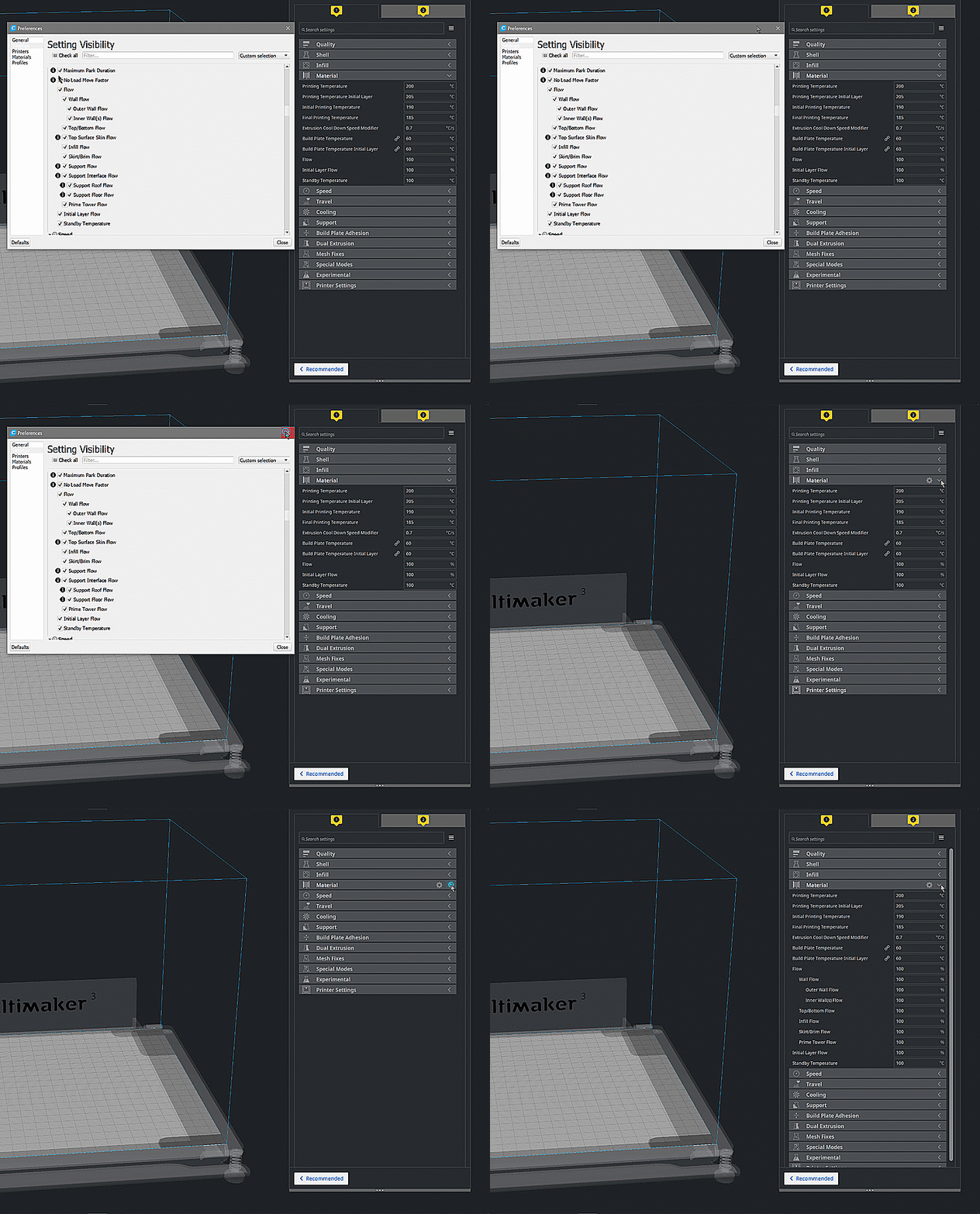
When I reset my Cura, these settings are displayed immediately, but as soon as I open a project file, I first have to do the show and hide trick.
Cura 4.6.1
zerspaner-gerd
on 25 Jun 2020
Looks very similar to this issue: https://github.com/Ultimaker/Cura/issues/6782
 Ghostkeeper
on 29 Jun 2020
Ghostkeeper
on 29 Jun 2020
@Ghostkeeper
I cannot confirm now.
These are shown to me immediately.
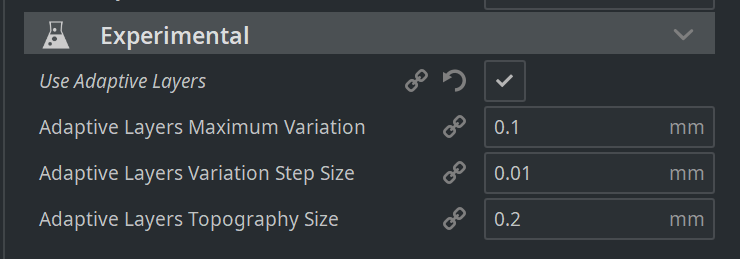
While looking through I noticed the following settings:
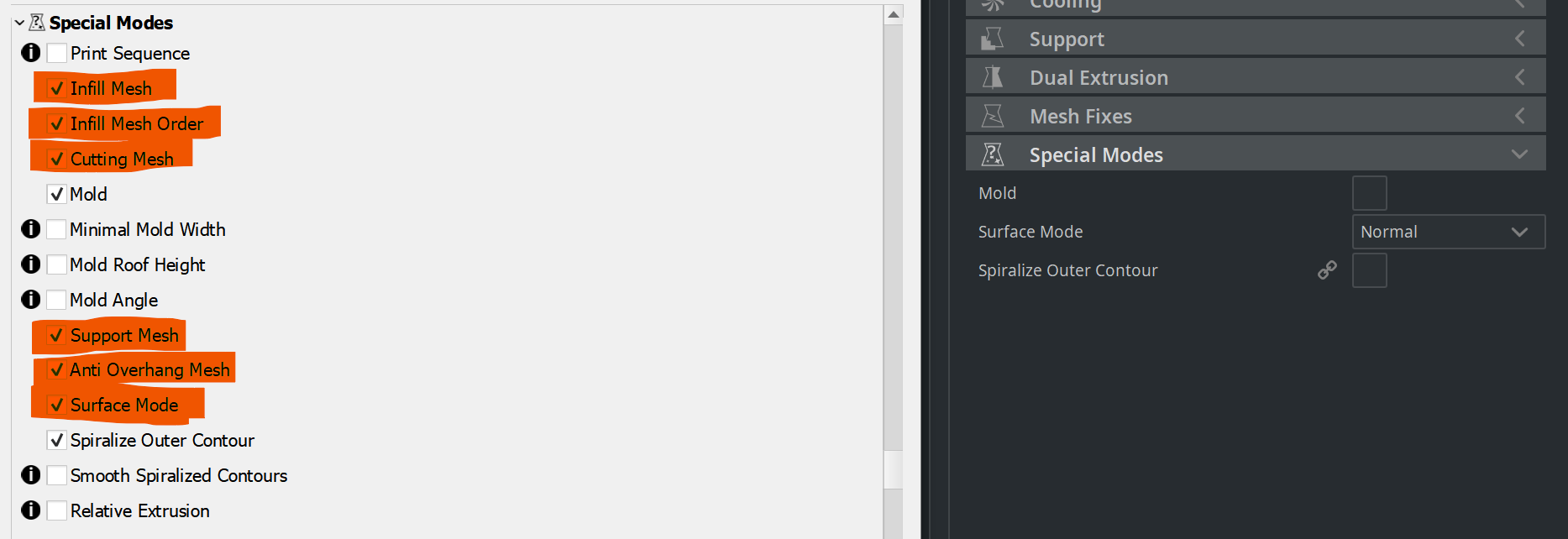
(Not systematically looked through)
Strangely enough, these are not shown at all, no matter what I try.
The trick mentioned above doesn't work either this time.
zerspaner-gerd
on 29 Jun 2020
Found this other issue where someone reported the same bug as well (but back then we weren't able to reproduce the issue): https://github.com/Ultimaker/Cura/issues/6471
Ghostkeeper
on 30 Jun 2020
Infill Mesh, Infill Mesh Order, Cutting Mesh, Support Mesh and Anti Overhang Mesh are all used only as Per Model Settings. They are not meant to show up in the settings floater.
 fieldOfView
on 30 Jun 2020
fieldOfView
on 30 Jun 2020
This was added to our sprint with a timebox of 4 hours. If we're hitting a major roadblock we'll probably defer it, but if it happens to be something small we'll try to get it fixed.
Ghostkeeper
on 1 Jul 2020
Well, that was a bit harder than expected. But I managed to get it working within the 4-hour timebox.
 nallath
on 2 Jul 2020
nallath
on 2 Jul 2020
Related issues
 DamianSepczuk
·
3Comments
DamianSepczuk
·
3Comments
 tomoinn
·
3Comments
tomoinn
·
3Comments
 ferociousdiablo
·
3Comments
ferociousdiablo
·
3Comments
 jornada812
·
3Comments
jornada812
·
3Comments
 Nemernemer
·
3Comments
Nemernemer
·
3Comments
Most helpful comment
Well, that was a bit harder than expected. But I managed to get it working within the 4-hour timebox.