All 31 comments
Hello @battistipaolo,
I have try to play your GCode in Cura and I noticed the nozzle made 2 pass on support ...
Could you made a "save as" in Cura with you current settings ans opened STL file, zip this file and add in this ticket please, it could be easier to see if it's a setting issue ...
Just to be sure,
Did you use a older version of Cura on you computer and made an update to 4.6.1 or is it a fresh new version ?
If you made an update, or have already an older version on your computer, could you go in Cura -> Help -> show configuration folder
and zip the 4.6 folder to add in the ticket too please
Thank a lot
 64Florian
on 21 May 2020
64Florian
on 21 May 2020
Today I see a similar issue when I use the "modify settings for overlapping" and use tree tree support settings ...
I'm pretty sure it's not your case .. but I post just to be sure ...
In my point of view in this case it's not needed to use the "modify settings for overlapping" setting
So, I manage to have a good result (in the preview) with following tree settings:
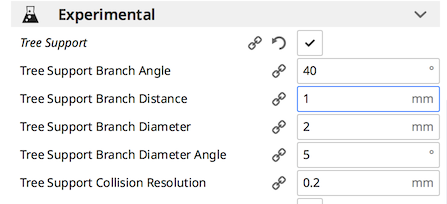
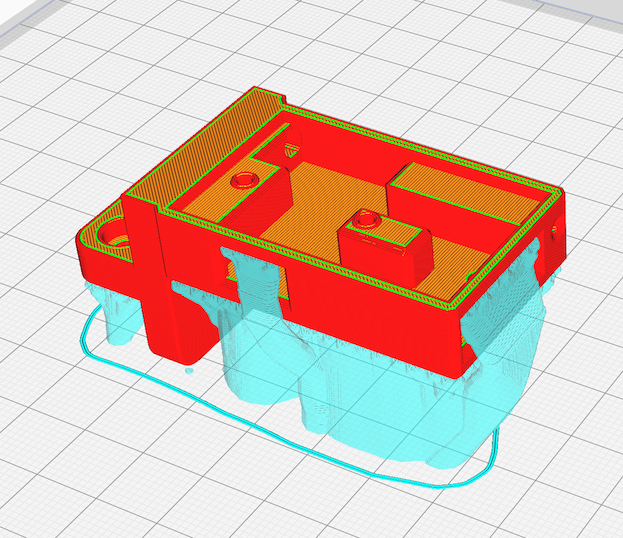
64Florian
on 21 May 2020
Hi ,
I try to send you zipped 4.6.1, it's an update to from 4.6.0.
I try to send you zipped 4.6.1, it's an update to from 4.6.0.
That's 224 megabits how can I send it to you?
thank you for your interest.regards
paolo battisti
 battistipaolo
on 21 May 2020
battistipaolo
on 21 May 2020
this is the current setting
paolo battisti
battistipaolo
on 21 May 2020
Hello @battistipaolo,
Are you really sure it's the configuration folder only (_not all the application_) ?
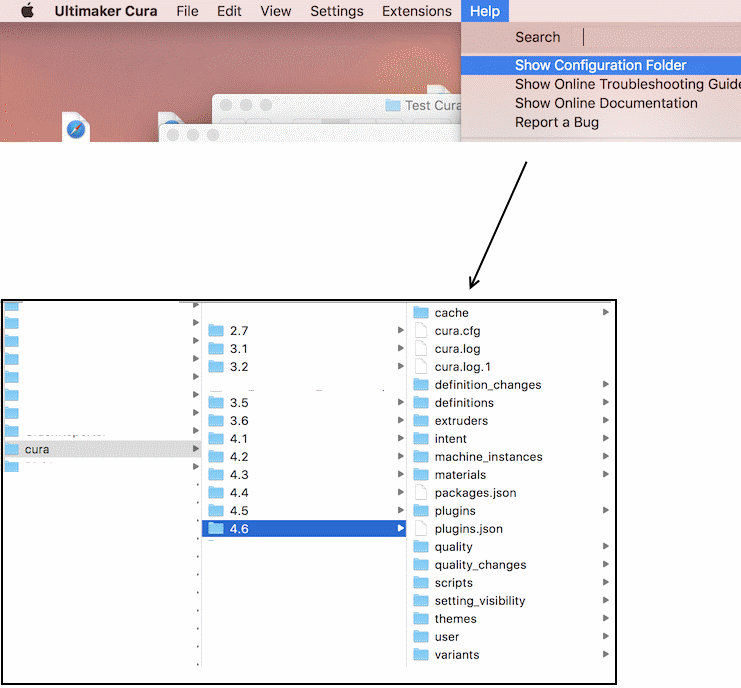
This folder should be more or less 10 MB not more (and even less when zipped)
64Florian
on 21 May 2020
If you use windows:
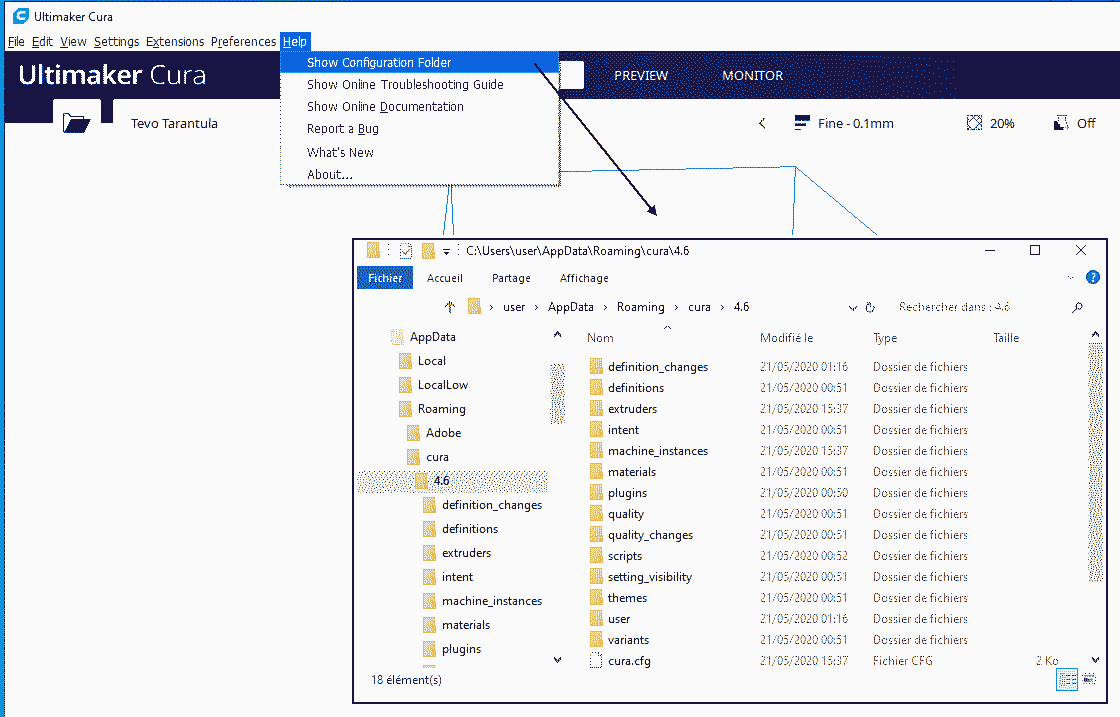
64Florian
on 21 May 2020
Hi,
no no it's the whole folder "Ultimaker Cura 4.6". which folder do you want?
paolo
battistipaolo
on 21 May 2020
do you want this folder?
paolo
battistipaolo
on 21 May 2020
Hi,
I thought it was a problem of an extruder motor defect, but I changed the motor and the whole extruder line (nozzle, tube, head) but nothing changed, at that point I decided to consult you, also because with "kisslicer64" it doesn't .
paolo
battistipaolo
on 21 May 2020
do you want this folder?
- Yes please
- and your save of your project (add your stl in cura select your settings and click on File -> save )
- Are you under windows, Mac or linux ?
- In you 1st message you sayed "only on the supports" and for your object it's OK ?? -> can you share a photo of your print ?
- When you change your extruder have you keep the same "model" (titan / direct) -> please tack a photo of the original and the new one
64Florian
on 21 May 2020
hi,I have problem to tranfer zip file widh you.
in this save I removed from the supports, "the connection of support lines".
the system is windows10.
in the photo on the left, previous print with the same settings, on the right the output part with the redundant supports.
compared to this print in the save (gcode) I removed from the supports, "the connection of support lines".
I had tried a print but had to stop it for the same reason.
as you can see from the photo the piece that does not need the supports has been worked well.
the other photo is the design printed with kisslicer64.
paolo battisti
battistipaolo
on 21 May 2020
hi,
I have problem to tranfer zip file widh you.
in this save I removed from the supports, "the connection of support lines".
the system is windows10.
in the photo on the left, previous print with the same settings, on the right the output part with the redundant supports.
compared to this print in the save (gcode) I removed from the supports, "the connection of support lines".
I had tried a print but had to stop it for the same reason.
as you can see from the photo the piece that does not need the supports has been worked well.
the other photo is the design printed with kisslicer64.
paolo battisti
battistipaolo
on 21 May 2020
Hi,
sorry
here are the configuration files
4.6.zip
battistipaolo
on 21 May 2020
Thank you for those files
For "cura with supports" (in the cura.zip) as I can see you have enable support AND tree support ...
I'm totally lost between the title of this topic and your results but we will try to back to basics ...
1) could you save your workspace (it's a 3mf file extension) with your model and share (as Zip file) in this ticket please ?
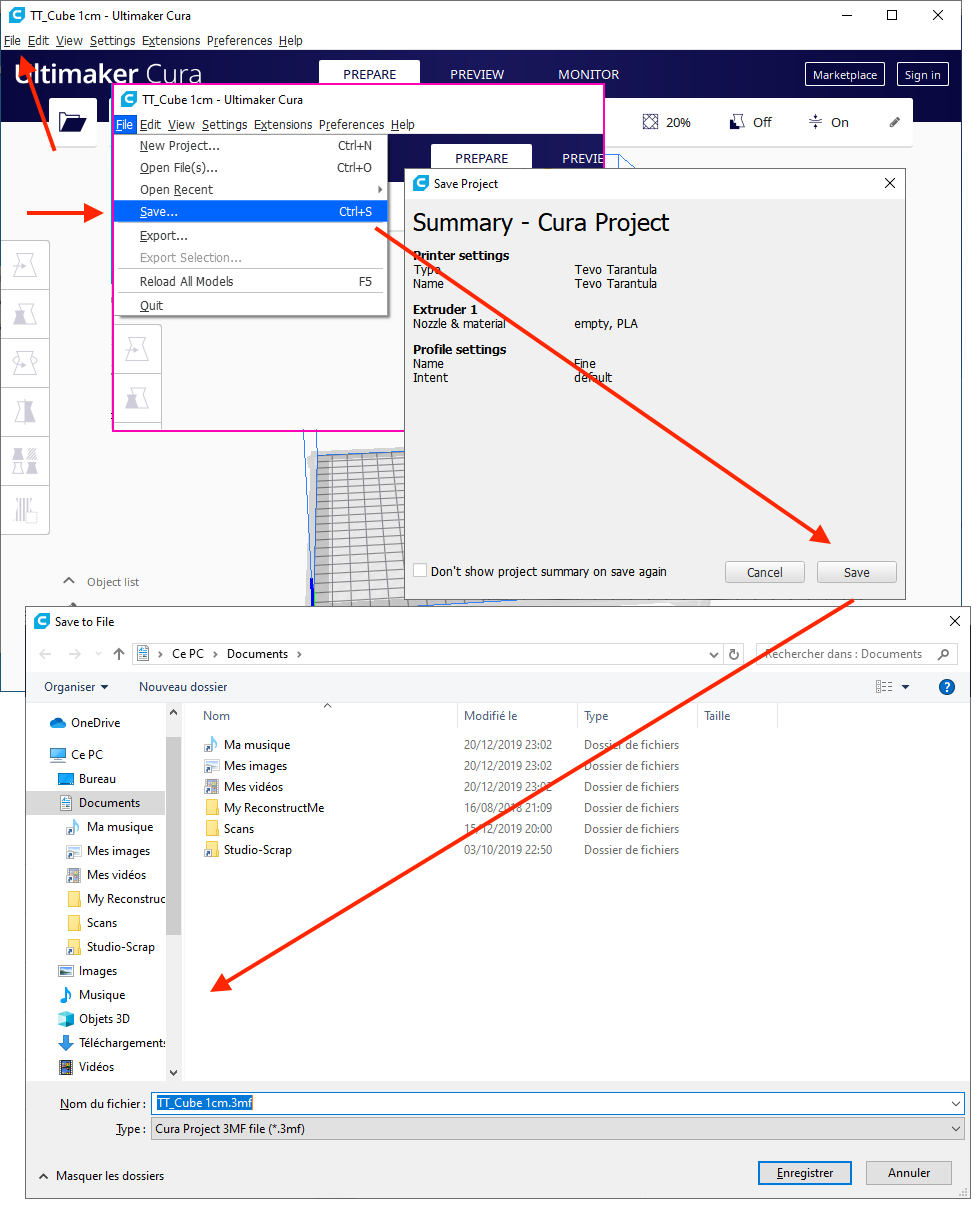
2) In my point of view, you printer is not properly tuned (in the printer side not in software like cura) As I can read in your GCode, your printer is a anycubic_i3_mega Could you try to measure if your extruder is properly set in you printer ?
You have to make a mark with a pen on your filament and measure from the extruder the size of filament you have marked
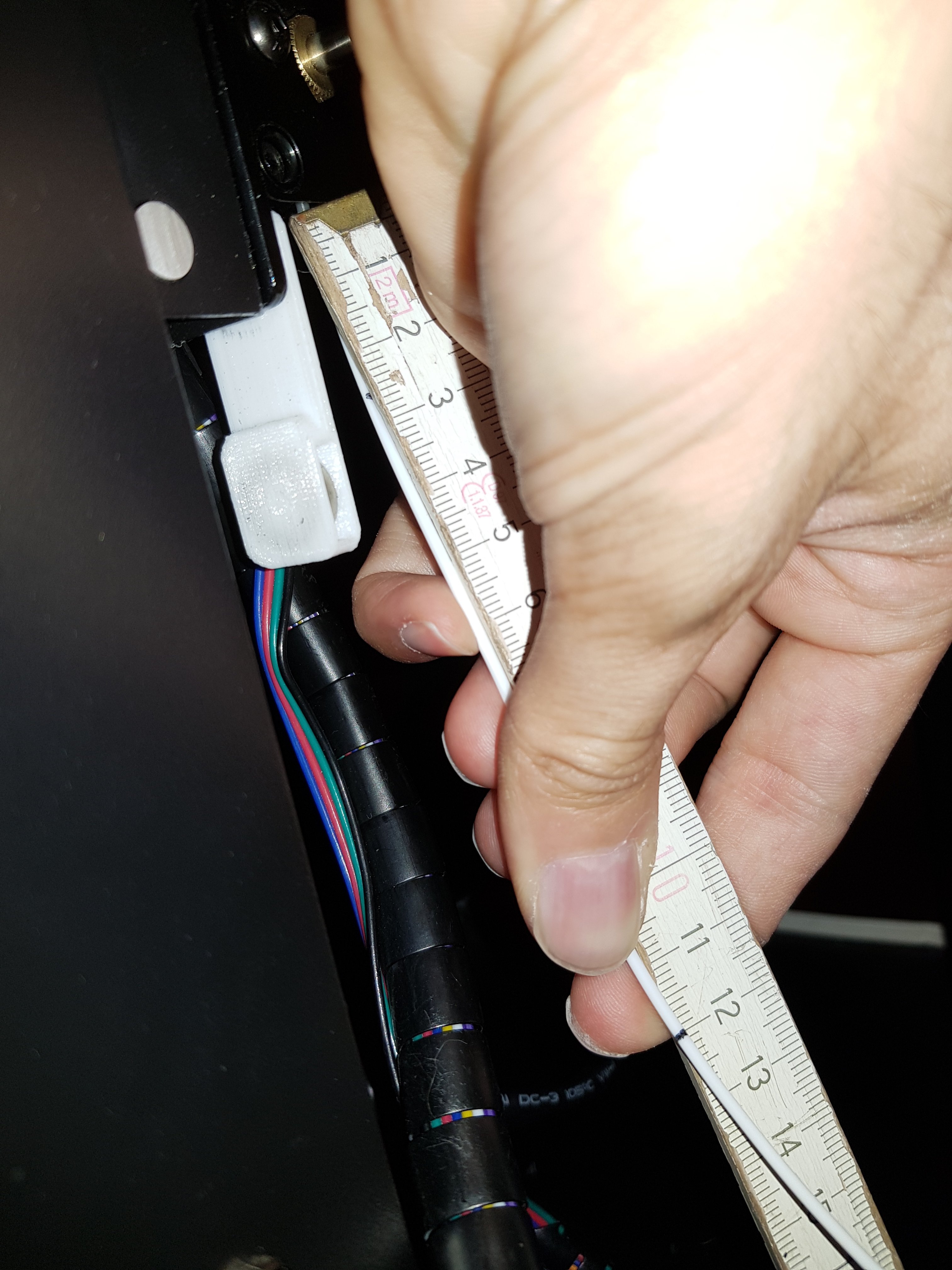
Unplug the output of you extruder (_The extruder must be able to run the filament as fast as he like_)
lunch this sample GCode:
ExtruderTest.gcode.zip
The aim of this gcode is to ask to extract 100mm (10 cm) of plastique, This will allow us to know if motor extruder ration is properly defined in your printer ...
(The code made a Home, move up the nozzle 3mm, then extrude 10cm of plastic - cold bead and cold nozzle )
If all work as expected in your printer, you must have 10cm of plastic in one side and you mark move up by 10cm:
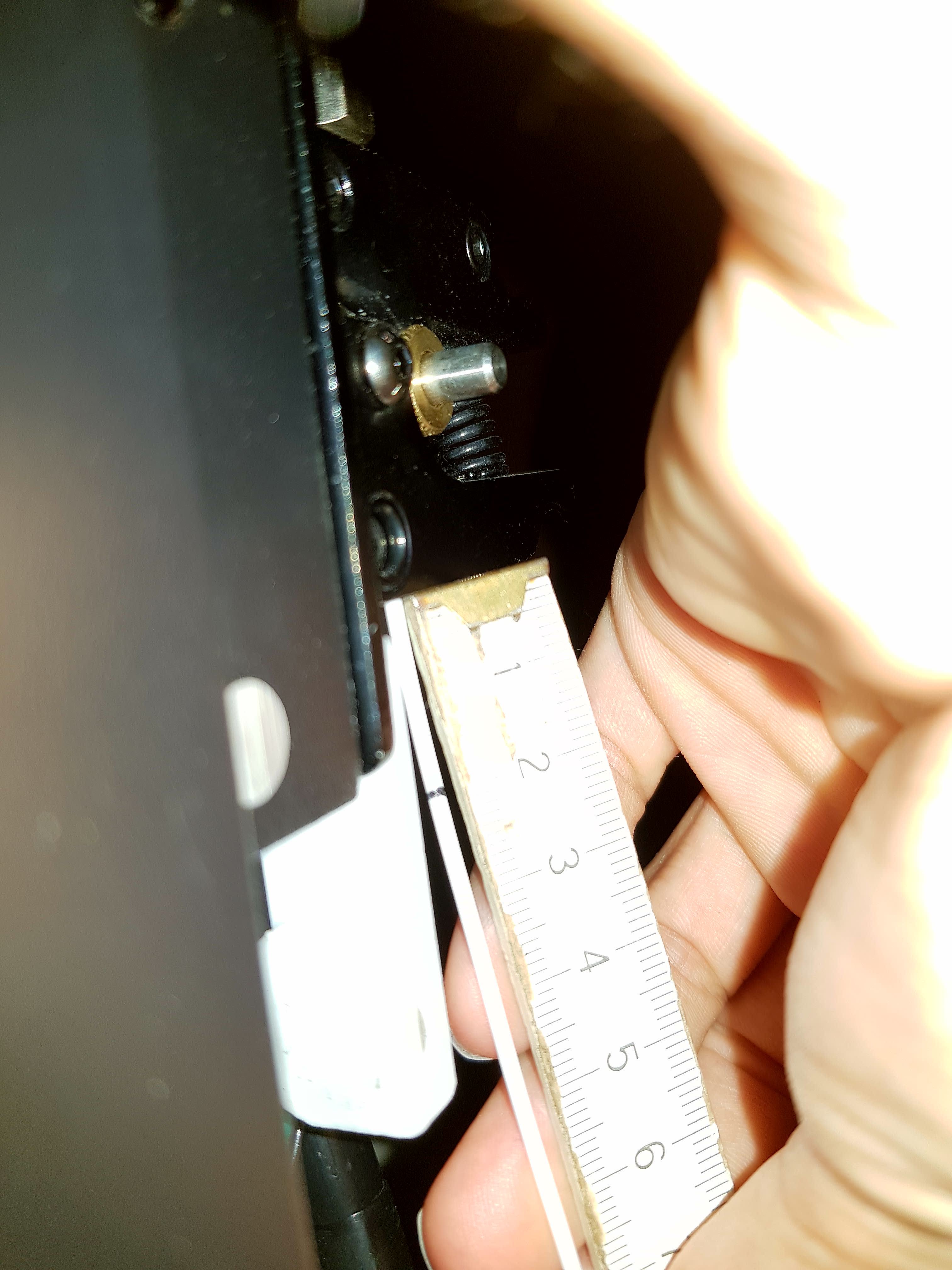
(images from https://www.rctruckstips.com/calibrer-son-extrudeur-pour-ameliorer-la-qualite-dimpression.html )
64Florian
on 22 May 2020
good morning,
I will send you a file. zip with all your requests.
the file you sent (ExtruderTest.gcode) from me doesn't work, I tried to modify it, but it doesn't work.
in every way I have tried with repetier 100mm. = 96.61.
with the modification "M92 X81.6102 Y81.6102 Z400.1320 E95.5738; SET QUOTE XYZ E" that I inserted in my start gcode 100mm. = 100mm. of extrusion spill, so I would say that the extruder quota is right.
regards
paolo battisti
E.zip
battistipaolo
on 22 May 2020
I would say that the extruder quota is right
This is a really good news and a good start
I discovered the "strange" settings ho disturb me so mutch .. it's "support wall line count"
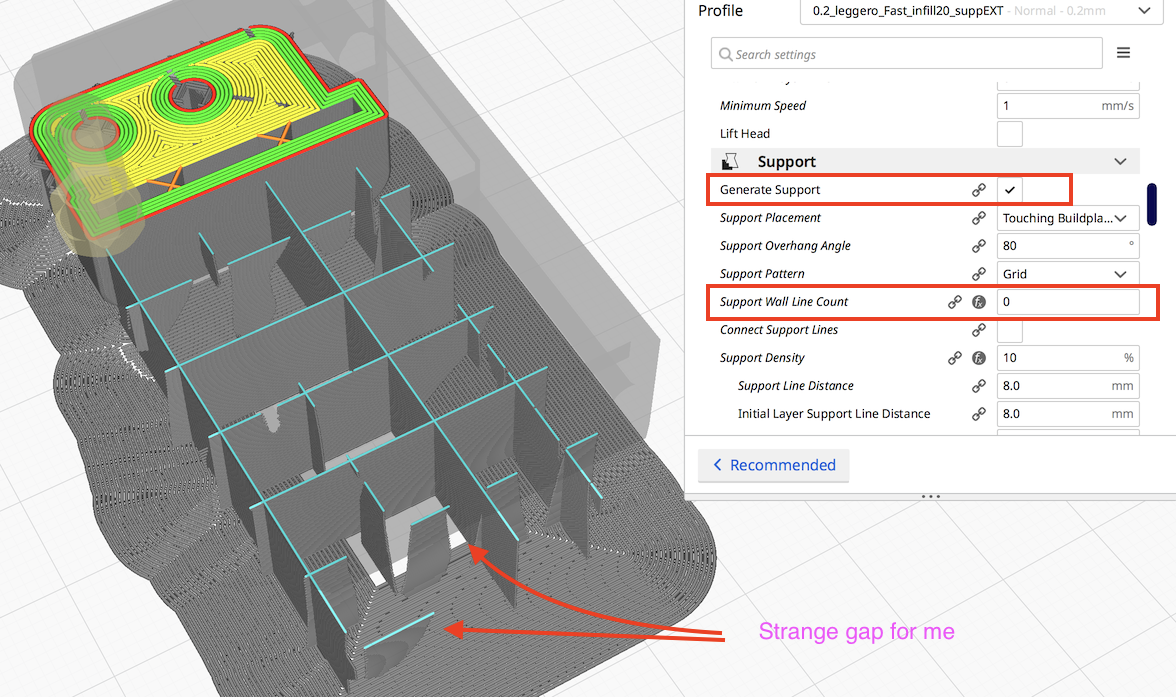
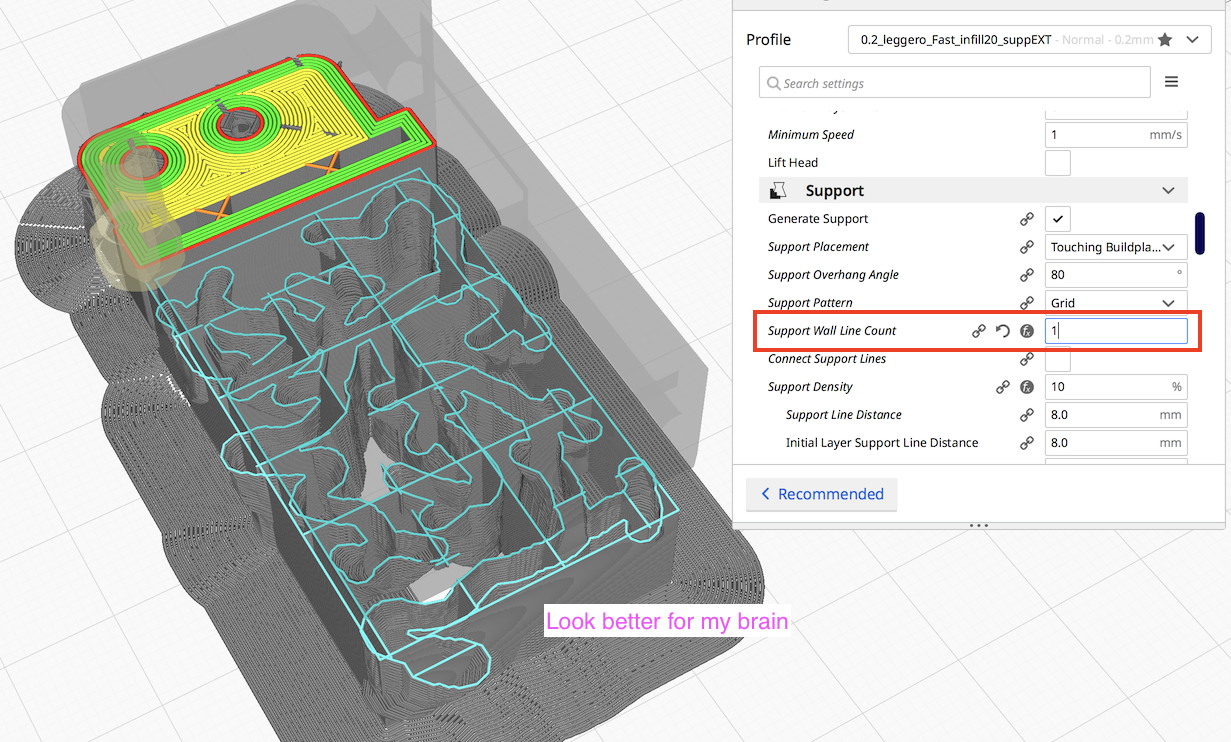
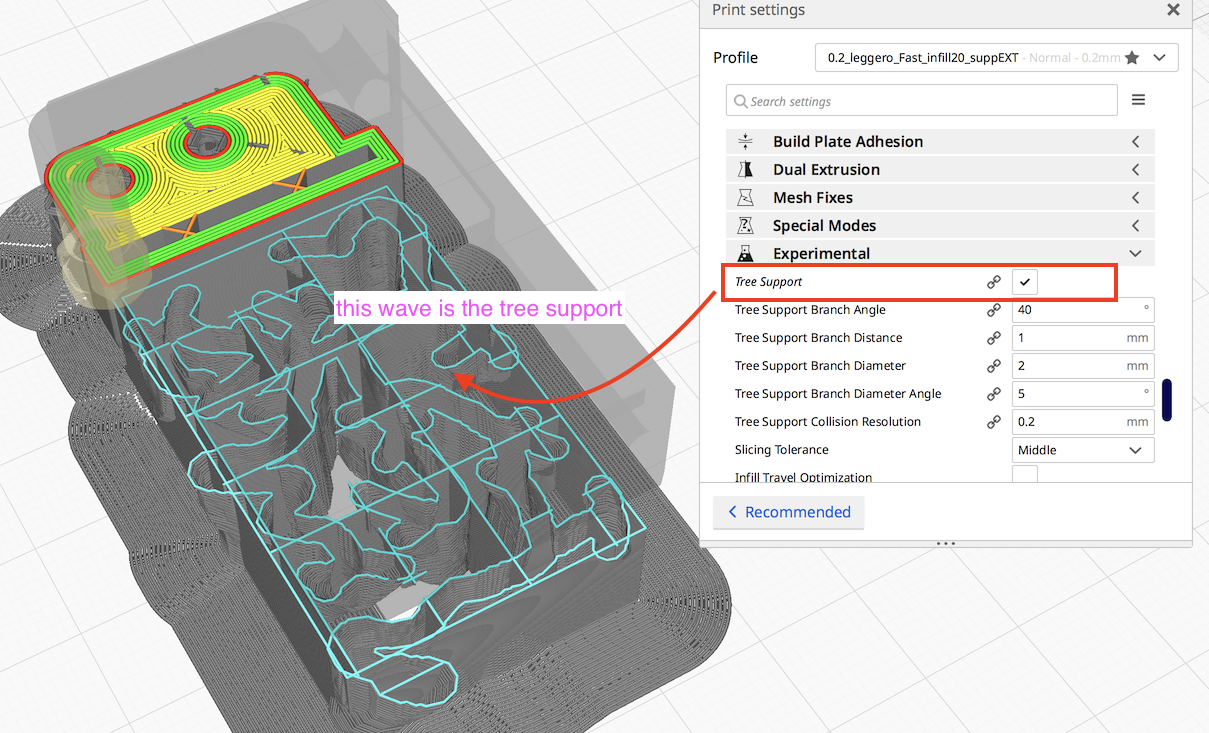

Now back to your bug: over-extrude
In fact when the support wall is disable, Cura seems to make "double" support:
Stat (in blue) the wall is done 1st time
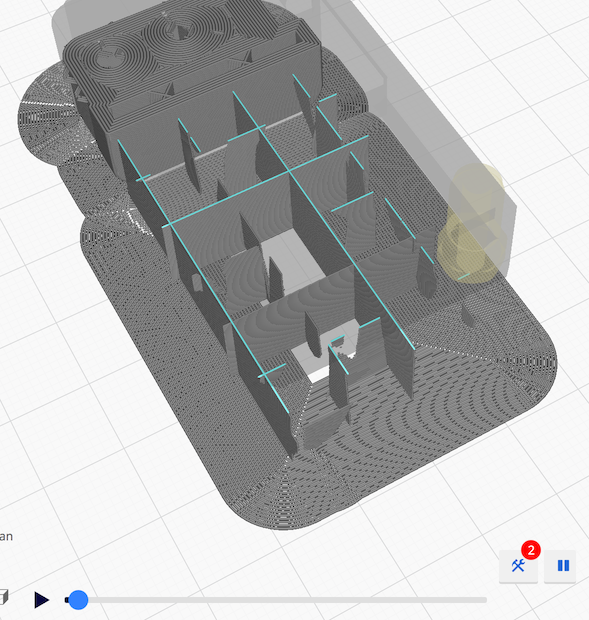
And after the wall is re made a second time
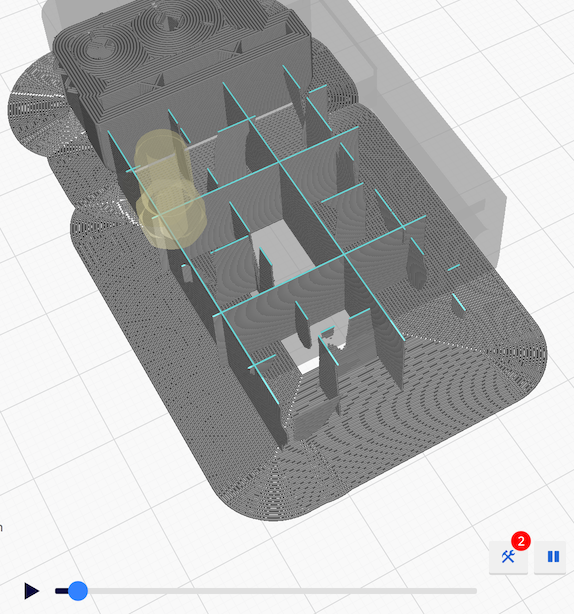
So if you want, enable wall end disable tree mode, you'll have this:
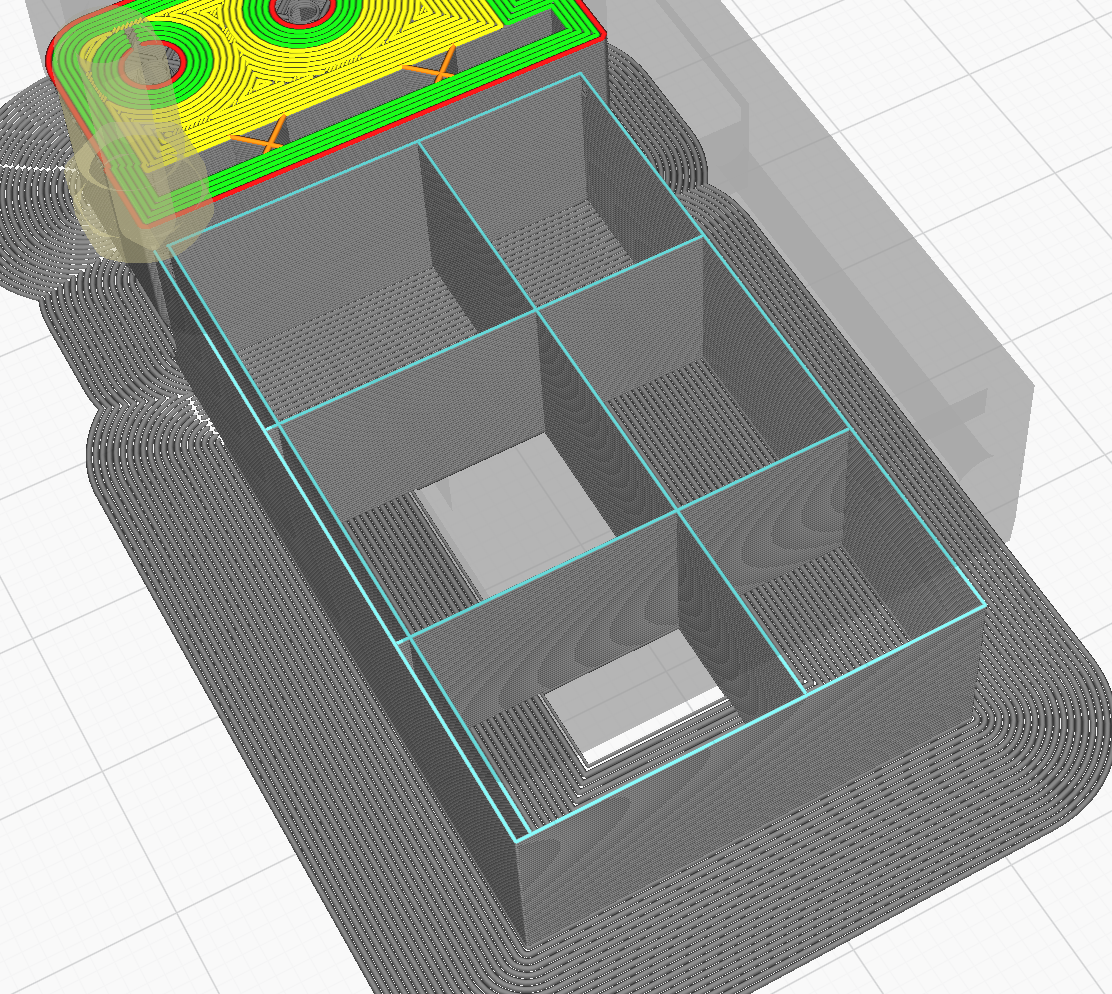
If I tune a bit to have a "better" support:
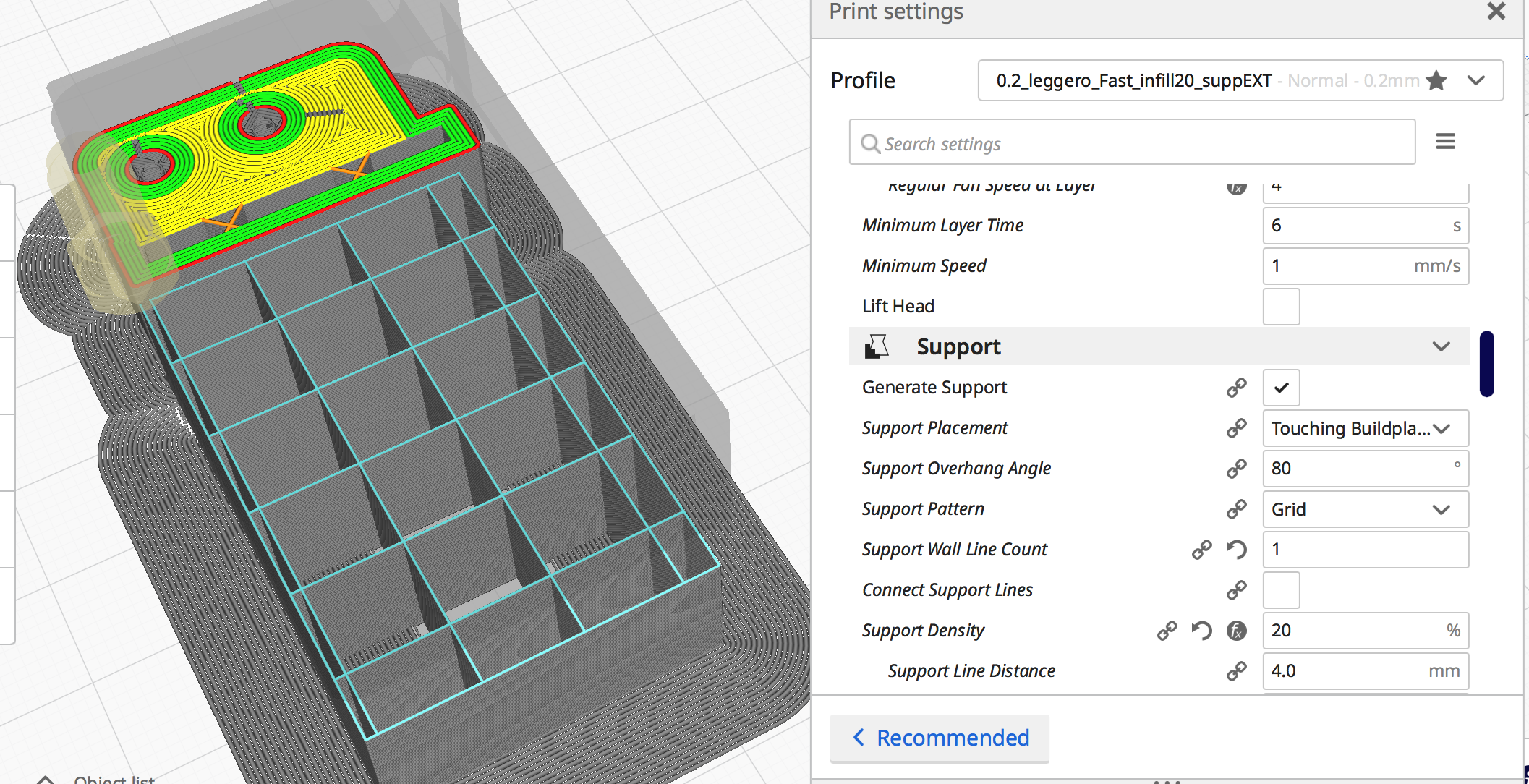
You may need to change support orientation (in fact I didn't find the settings ... but you can rotate your object 45°) to be stronger / cleaner:
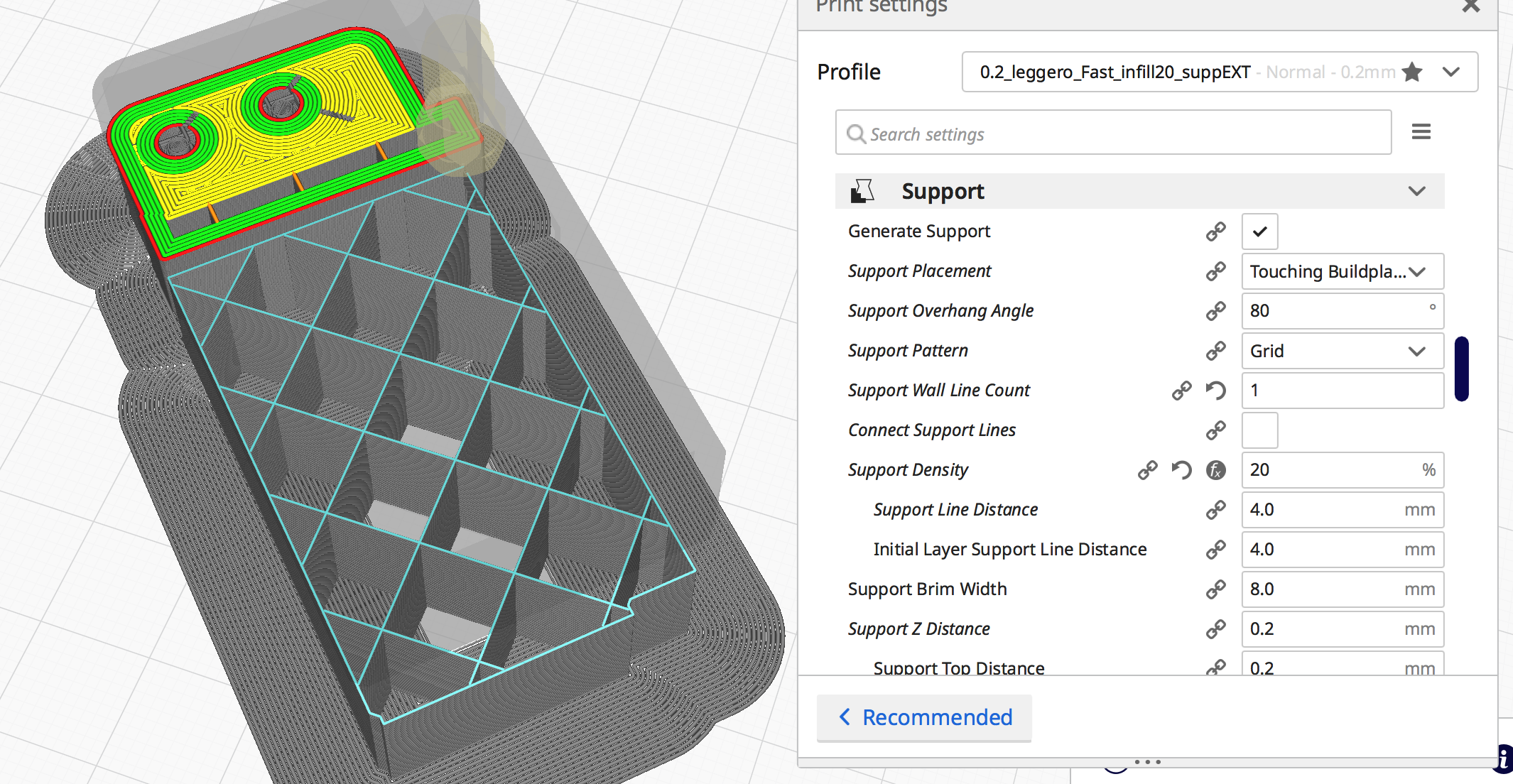
64Florian
on 22 May 2020
HI Florian,
question: when is it possible to eliminate the double extrusion in the media settings that you have gradually modified?
or: what must be eliminated in the support settings to avoid double extrusion?
because at the moment I have many ideas in my head but all confused
regards
paolo battisti
battistipaolo
on 22 May 2020
Hi Florian,
therefore: do use the supports without trees, or use the trees without supports, never both together?
Do I'm on the right track?
regards
paolo
battistipaolo
on 22 May 2020
Hello @Ghostkeeper, In my point of view, tree mode shouldn't be affected by a support wall count defined to 0 ... So it may be interesting to unplug this stetting from "support" and create a new entry "Tree wall line count"
64Florian
on 22 May 2020
therefore: do use the supports without trees, or use the trees without supports, never both together?
not really...
Using both it's really too much ! (in my point of view)
-> in fact, you "can" use both but you Mustn't use "Support wall count" to 0 with tree mode enable
so, as general idea:
- OK for tree + support With "support wall count" = 1
- OK for tree With "support wall count" = 1
- OK for support With "support wall count" = 1
- OK for support With "support wall count" = 0
- bad for tree With "support wall count" = 0
- bad for tree + support With "support wall count" = 0
In your case you need tree to have a good "window"

(Only tree with "support wall count" = 1)
or you have to enable "everyway" support feature like this:
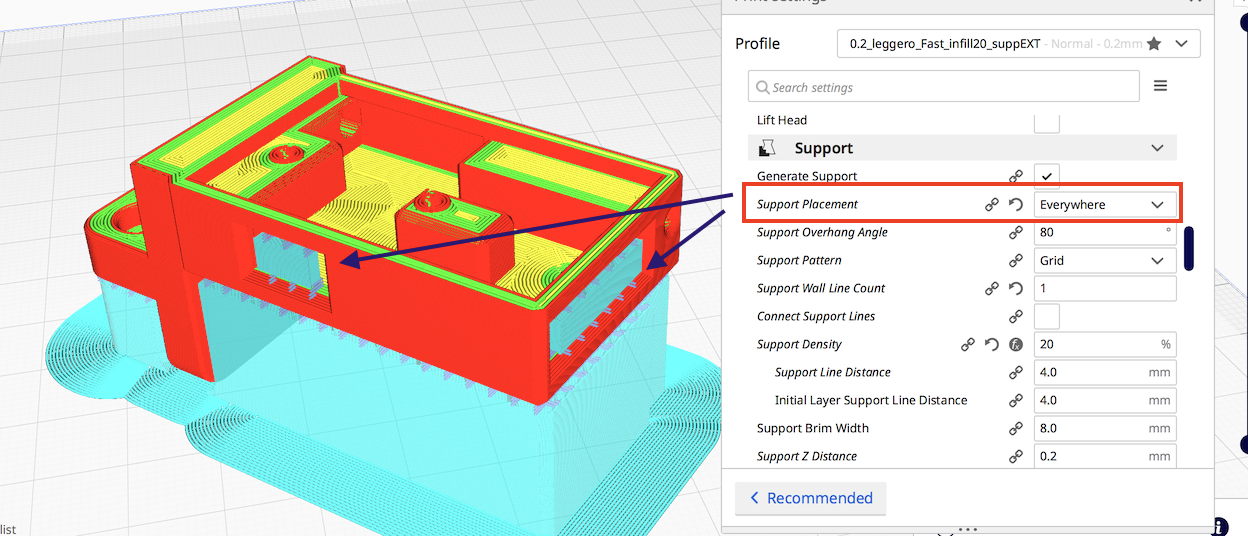
(no tree required)
64Florian
on 22 May 2020
Hi,
ok let's say the base is this:
support wall count "= always at 1 to avoid double extrusion of the supports, and" strange "printing of the supports.
ok I thank you immensely for solving the fix.
perhaps some changes remain in the Cura program to prevent this anomalous situation from being set, but this will in any case be evaluated by the programmers.
I consider the problem closed
thanks a lot.
regards
paolo battisti
battistipaolo
on 22 May 2020
Just for information, I found my setting for support line orientation
-> this is better as turning the product on the build plate (_event more when you need all the size of the build plate to make you object_)

64Florian
on 24 May 2020
Hi Florian,
sorry, if I understand correctly,
which setting do I have to change to have the supports at 45 degrees instead of 90 degrees,
instead of rotating the whole object?
regards
paolo battisti
battistipaolo
on 24 May 2020
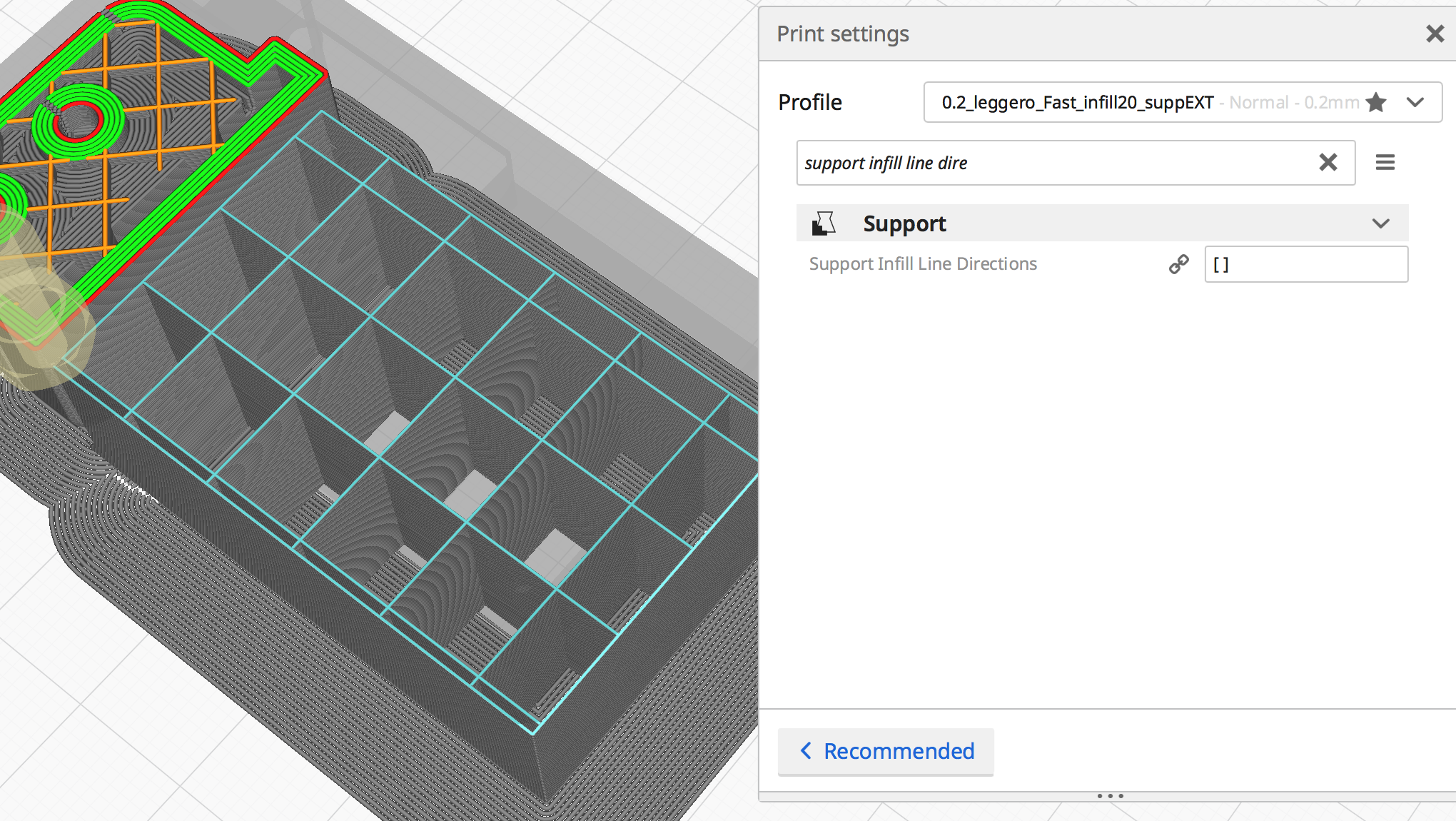
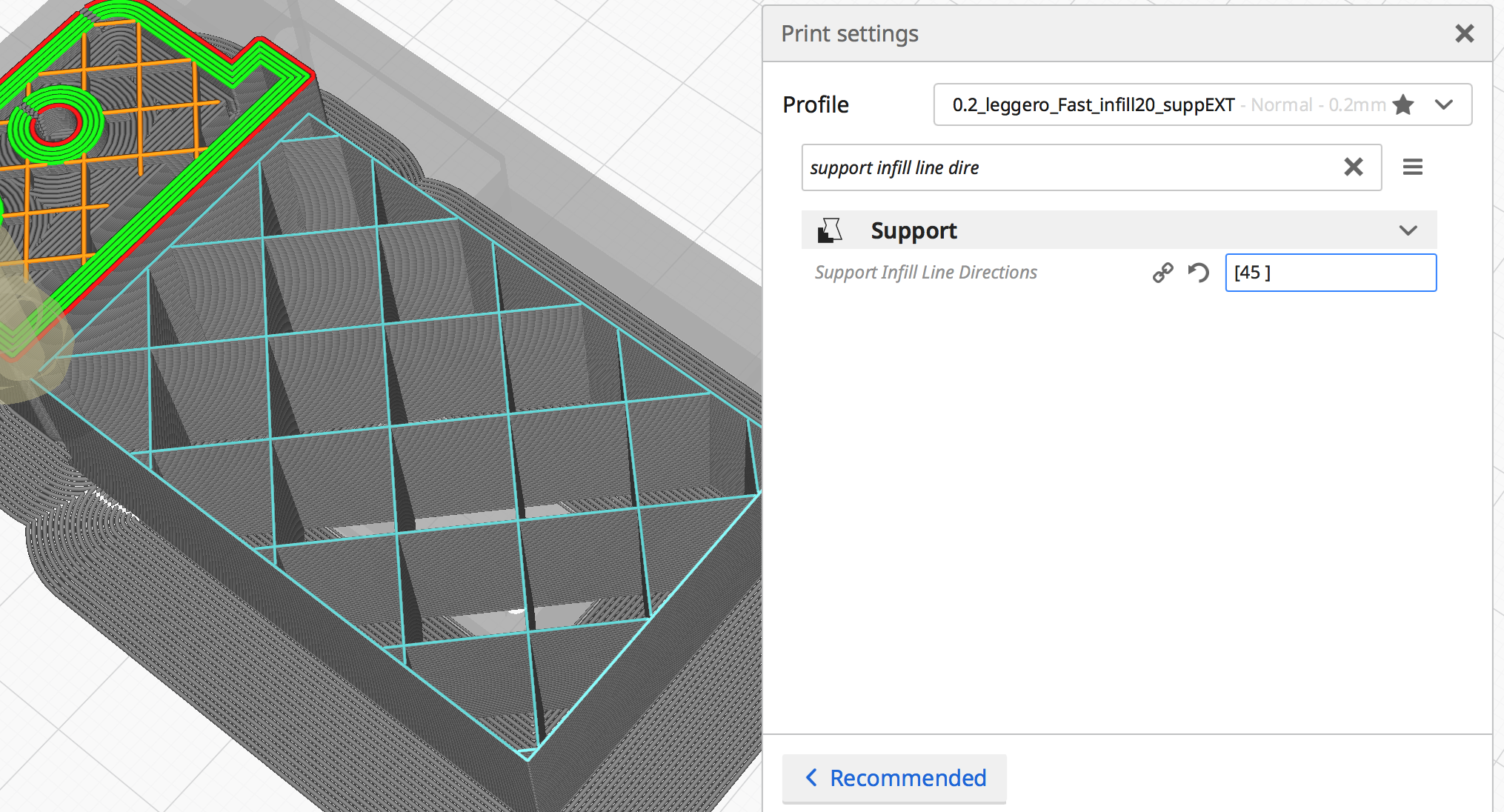
You have to change "Support Infill Line Directions" from [] to [45] (for example)
Have a look:
This time I didn't rotate the piece (as you can see the build plate grid stay in the same orientation)
64Florian
on 24 May 2020
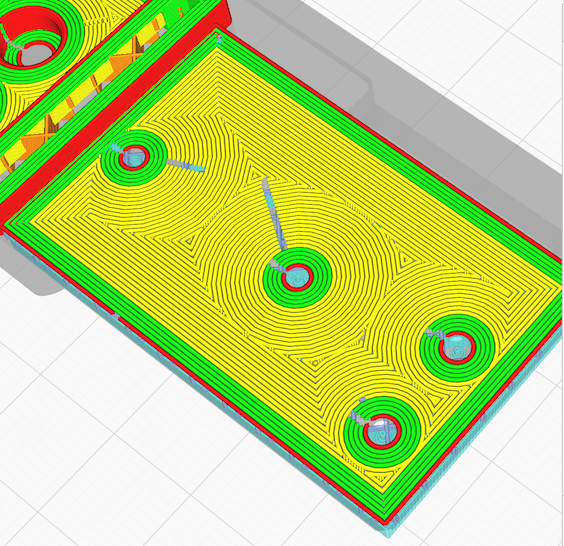
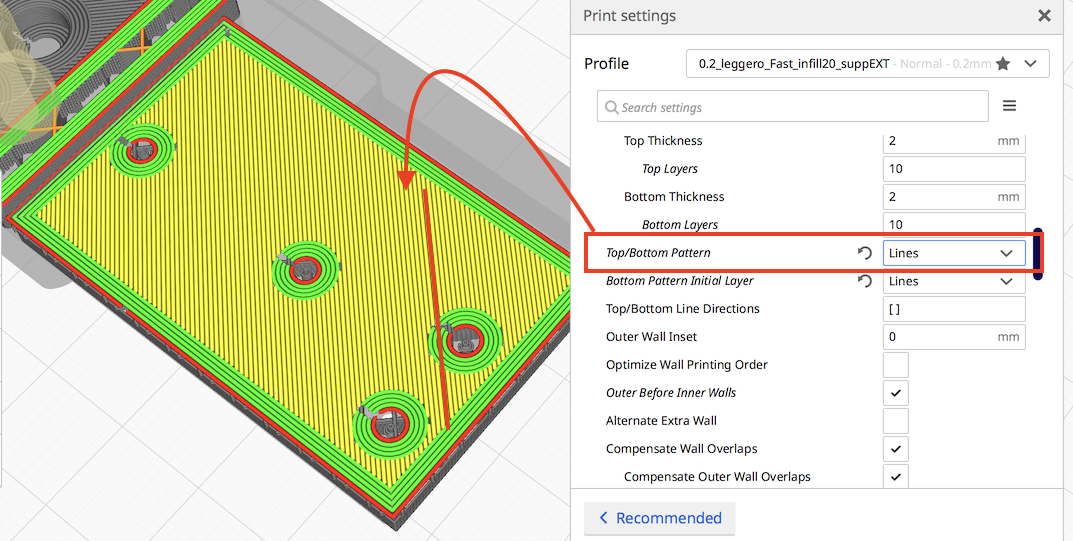
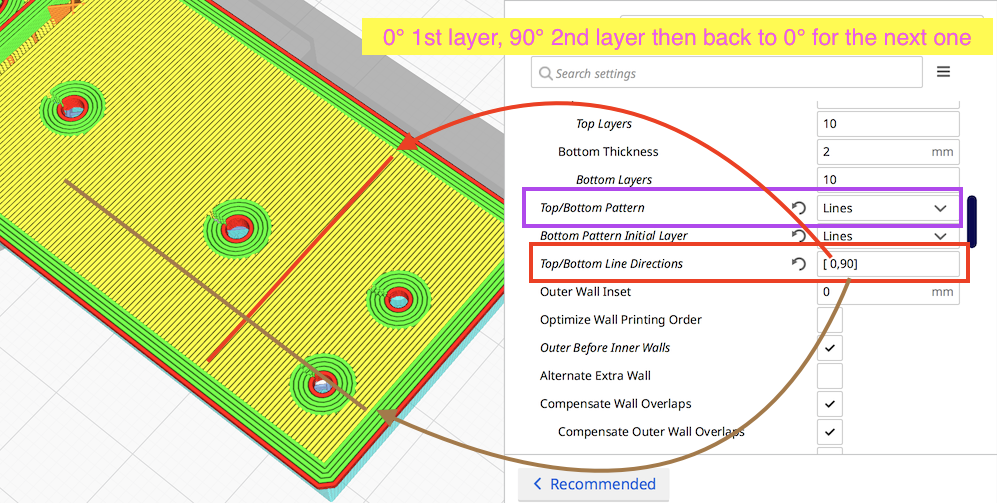
hem, just as tip (if you want a grate piece and didn't care about the orientation of the bottom)
64Florian
on 24 May 2020
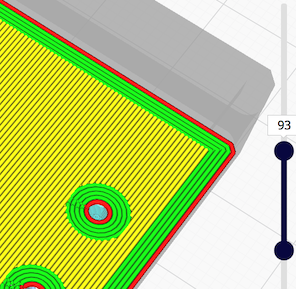
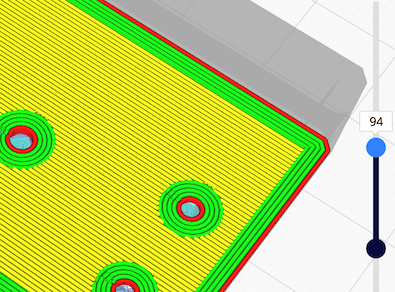
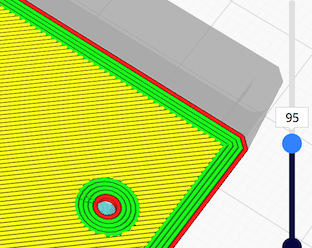
I have edited my last post: when you define an angle, if you want to change on each layers you have to define it (_initially I write to put only 0° angle_)
Floiran_AI3M_portamicrotitan.3mf.zip
Note: for an "Ultimate resistance part" you can use 0°, 90°, 45°,135° (double cross matrix)
64Florian
on 24 May 2020
Hi Florian,
A)-ok perfect, I didn't put "45" inside the square brackets, so it didn't work. you must excuse me but I am a little old man and my brain is no longer like when I was young.
B)-you are a mine of ideas,
to improve the workmanship of the printer, you are truly the best.
Thanks again for all the advice you have given me.
regards
paolo battisti
battistipaolo
on 24 May 2020
For the support,
I didn't put "45" inside the square brackets
In fact you have 2 ways:
- rotate your pice on the build place
- use the "Support Infill Line Directions"
64Florian
on 24 May 2020
Hi,
if I use "Support Infill Line Directions" 45 it doesn't work.
if I use "Support Infill Line Directions" [45] it works
the latter, it seems to me, is an excellent solution.
paolo
battistipaolo
on 24 May 2020
therefore: do use the supports without trees, or use the trees without supports, never both together?
Do I'm on the right track?
Yeah, we plan to enforce that. It's one of the requirements for us to get Tree Support out of the experimental phase. We'd have one button to enable/disable support and a drop-down to select whether you want the straight support or tree. This is actually the same reason as this one:
Hello @Ghostkeeper, In my point of view, tree mode shouldn't be affected by a support wall count defined to 0 ... So it may be interesting to unplug this stetting from "support" and create a new entry "Tree wall line count"
For that same reason, we removed the Tree Support Wall Line Count setting from Cura in 4.5. Once the two are together, it'll be a bit more logical. For us now, this merger of the two settings was an easy and logical way for us to fix Support Meshes when tree support was enabled.
Hi,
if I use "Support Infill Line Directions" 45 it doesn't work.
if I use "Support Infill Line Directions" [45] it works
the latter, it seems to me, is an excellent solution.
Yeah, we're not enforcing the correct syntax with that setting I'm afraid. It's a bit hairy to do that per setting for us, in our code.
 Ghostkeeper
on 25 May 2020
Ghostkeeper
on 25 May 2020
Hi,
A) - I have already modified my default programs, I use the supports or the tree never together.
B) - I have defined at 1 "support wall count" and I have removed the check so it no longer appears selectable, so I avoid the error.
C) - the square bracket is not a big problem, just know that it is mandatory for multiple selections.
otherwise everything is ok, the print quality has improved a lot.
I thank you again for your help.
regards
paolo battisti
battistipaolo
on 25 May 2020
Related issues
 DamianSepczuk
·
3Comments
DamianSepczuk
·
3Comments
 dstulken
·
3Comments
dstulken
·
3Comments
 konvoj
·
3Comments
konvoj
·
3Comments
 jellewie
·
3Comments
jellewie
·
3Comments
 thopiekar
·
3Comments
thopiekar
·
3Comments