Cura: [4.5.0] Running Cura from Source on Windows - CMake Build Error
Hi, I am trying to build Curaengine and then running the engine from Cura front end using this tutorial https://github.com/Ultimaker/Cura/wiki/Running-Cura-from-Source-on-Windows
I have VS2019 but I have included the VS2015 C++ Build Tools as mentioned there. I have followed all the steps in the tutorial and I have errors while Configuring CMake according to "Cura-build CMake workflow". I am confused about the early mention about -
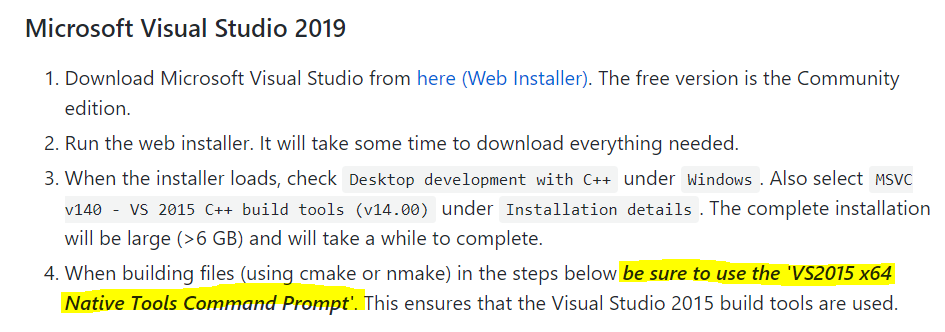
vs this -

I have tried both the ways i.e, choosing VS2015 (I chose x64) and NMake Makefiles from this menu -

But in both the cases I get several errors. For NMake Makefile I get this -
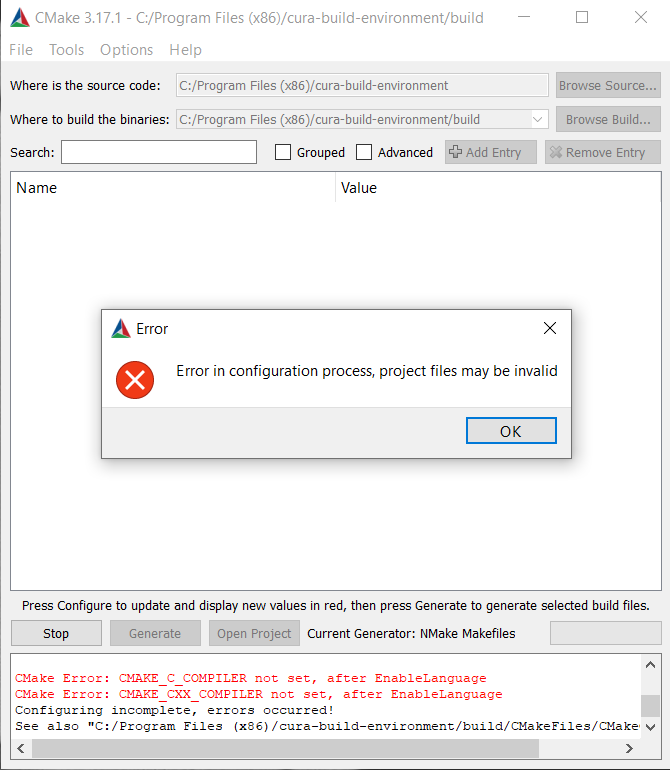
For VS2015 X64 I get this -

What am I doing wrong? Another question is, do the dependency installations end with Uranium in the tutorial? What I mean is, if I choose to manually install the dependencies rather than the Cura Build CMake path then do I have to install from Python 3.5.2 to Uranium? And then Curaengine and Cura I have to run no matter which path I choose (CMake / Manual)?
I am new to this and thank you very much for your help!
Application version
(The version of the application this issue occurs with.)
Platform
Windows 10
(Information about the operating system the issue occurs on. Include at least the operating system and maybe GPU.)
Printer
(Which printer was selected in Cura?)
Reproduction steps
- (Something you did.)
- (Something you did next.)
Screenshot(s)
(Image showing the problem, perhaps before/after images.)
Actual results
(What happens after the above steps have been followed.)
Expected results
(What should happen after the above steps have been followed.)
Project file
(For slicing bugs, provide a project which clearly shows the bug, by going to File->Save. For big files you may need to use WeTransfer or similar file sharing sites.)
Log file
(See https://github.com/Ultimaker/Cura#logging-issues to find the log file to upload, or copy a relevant snippet from it.)
Additional information
(Extra information relevant to the issue.)
 smgmamur
All 29 comments
- With 2015 you may have to run
"c:\Program Files (x86)\Microsoft Visual Studio 14.0\VC\vcvarsall.bat" amd64to set up the vars needed by the MS C++ compiler as your first command in a native prompt session. - Remove the build folder and try again if things become corrupted. CMake stores a lot in caches.
- If all else fails, I see that it can't find the C and C++ compilers. You may have to add that by hand. Dismiss the error and check the advanched checkbox in cmake-gui, then fill in the appropriate compilers and linkers.
 rburema
on 24 Apr 2020
rburema
on 24 Apr 2020
@rburema Thank you for your response. I tried executing the vcvarsall.bat command as you suggested on a cmd window in Admin mode - it didn't give any error but how can I verify that it set up the variables properly? After that I ran the CMake GUI to configure and it failed like before (for both the cases of VS2015 and NMake Makefile options chosen from "Specify Generators Chosen" option). I checked "Advanced" in the GUI which didn't make any difference in the outputs for VS2015 but for NMake Makefile case it showed a lot of details as below.

In that box under CMAKE_CXX_COMPILER and CMAKE_C_COMPILER I entered this path value [C:Program Files (x86)Microsoft Visual Studio2019CommunityCommon7IDECommonExtensionsMicrosoftCMakeCMakesharecmake-3.14Modules] and ran configure again but it failed again. Now this link I provided was under VS2019 but I couldn't find a similar file under VS14 location [C:Program Files (x86)Microsoft Visual Studio 14.0VC]. Is that the main problem?
Now when I check the CMakeError file, I get these two main errors -
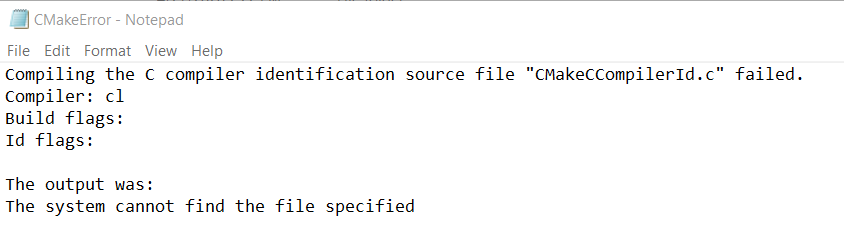
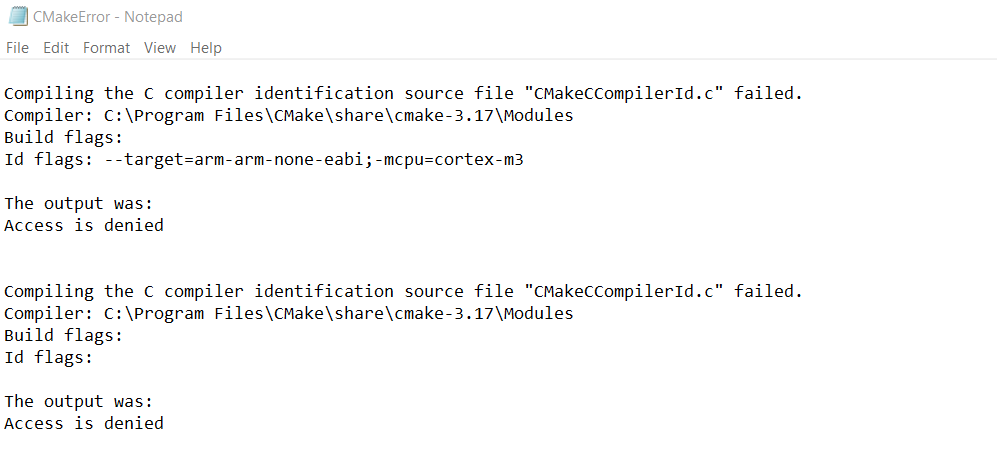
I'm not sure about this "Access Denied" error because I'm running CMake in Admin mode.
I also tried removing the build folder but that didn't change anything. Every time when I hit "Delete Cache" from CMake GUI, it does so.
smgmamur
on 27 Apr 2020
Where did I suggest admin mode? And, like the writeup specifies, you shouldn't do this from a normal command window (admin or not), you should use the 'x64 native tools command prompt' that comes with visual studio.
rburema
on 28 Apr 2020
So this is what I did now -
- Deleted the "build" folder. Created a new "build" folder [under this path - C:Program Files (x86)cura-build-environment].
- Opened VS2015 X64 Native Tools Command Prompt window. Executed this - "c:Program Files (x86)Microsoft Visual Studio 14.0VCvcvarsall.bat" amd64
- Started CMake GUI and set Source location to: C:/Program Files (x86)/cura-build-environment and Build location to: C:/Program Files (x86)/cura-build-environment/build. Checked Advanced, hit "Configure" and chose on first case NMake Makefile (use default native compilers) - it showed similar errors as before. And on second case repeated steps 1-3 choosing VS14 2015 (x64, use default native compilers) which gave this following error -

smgmamur
on 28 Apr 2020
MSBuild.exe is one of those things that changed a lot with VS2019. But I'd expect that with the 2015 build tools this would work correctly.
Can you make sure that MSBuild.exe is on your system PATH? See also this thread for a similar issue.
 Ghostkeeper
on 29 Apr 2020
Ghostkeeper
on 29 Apr 2020
@Ghostkeeper I had MSBuild.exe added to this path already: C:Program Files (x86)Microsoft Visual Studio2019CommunityMSBuildCurrentBin ... but after I added this additional path (I searched for MSBuild.exe and found two files, hence tried to cover both the paths) - C:Program Files (x86)Microsoft Visual Studio2019CommunityMSBuildCurrentBinamd64, I ran CMake again and now had an error of "Windows SDK Version 8.1 Not Found". So I figured that my VS2019 did not have this SDK or an option to install it from VS. I went online to find the SDK and installed it. Then I was able to configure and generate without any error.
Now, as I did not use NMake Makefile (I used VS14 2015), how do I proceed through the further steps (Step 6 onward)? Alternatively I am trying to configure and generate choosing the NMake Makefile option but I get error like this one -

I've been trying to run it now from VS2015 native tools command prompt following this tutorial https://github.com/Ultimaker/cura-build-environment but getting these errors -

smgmamur
on 5 May 2020
Now, as I did not use NMake Makefile (I used VS14 2015), how do I proceed through the further steps (Step 6 onward)?
You can use File -> Delete Cache. Next time you press "Configure" it will ask you again which generator you want to use. This clears all your customisations for CMake variables though.
Ghostkeeper
on 8 May 2020
I did File -> Delete Cache and then made sure build folder was empty. Then ran Configure with NMake Makefile selected. I got the following errors -
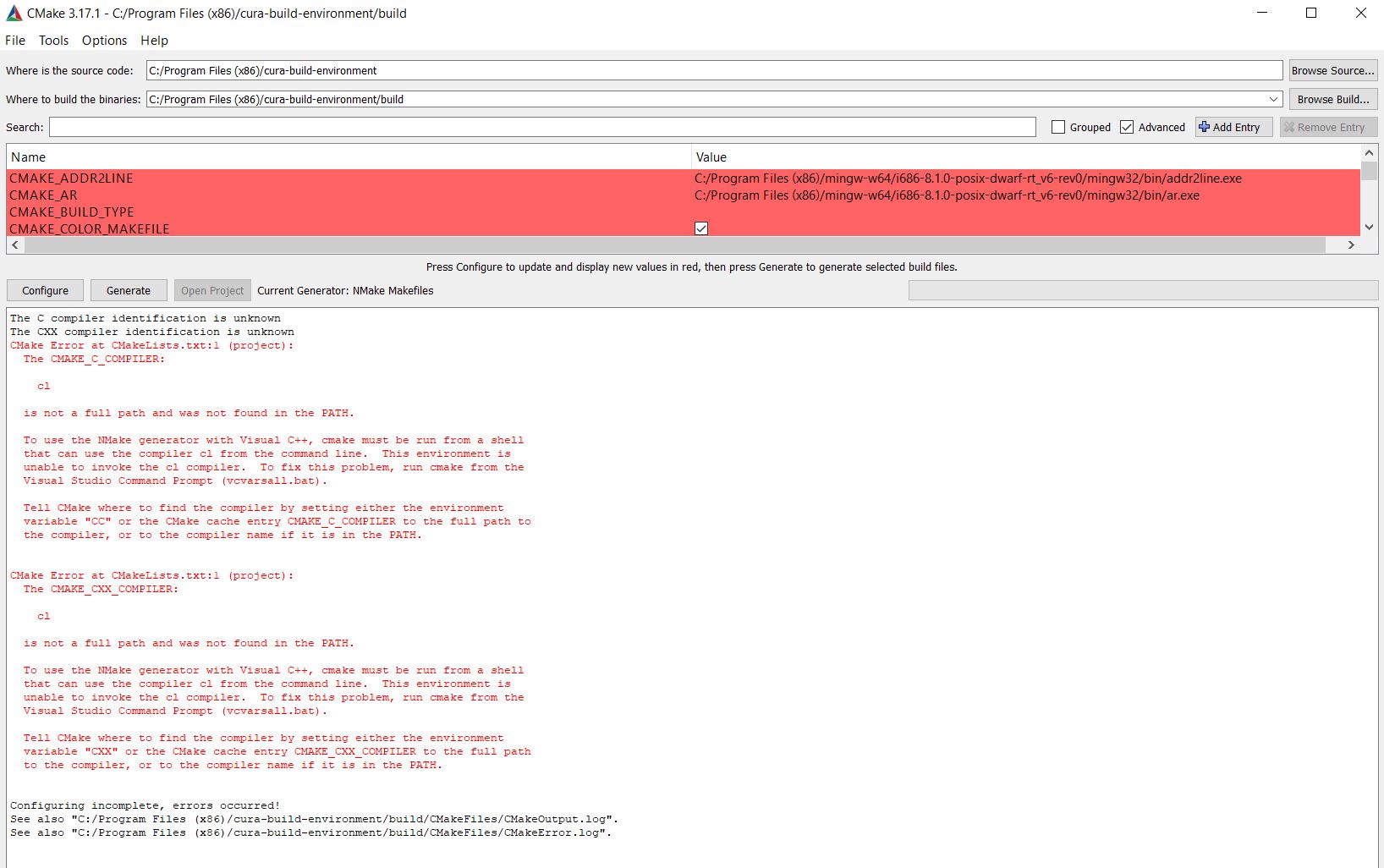
So then I looked for cl.exe path and there were two paths under the VS14.0 that had the file - 1. C:Program Files (x86)Microsoft Visual Studio 14.0VCbinamd64 and 2. C:Program Files (x86)Microsoft Visual Studio 14.0VCbin. Which one would be the correct one to use? Anyway I tried with both - added them to the Path variable and here (also only adding to Path and using "default native compiler") -
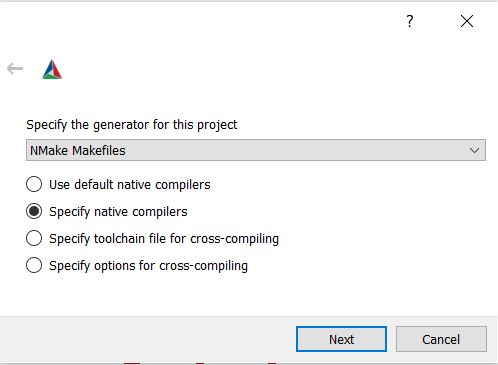
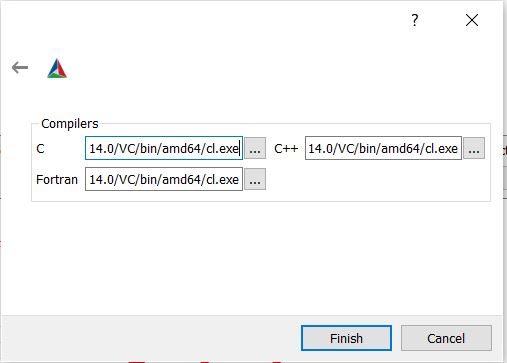
For both of my attempts I get the following error -

Where do I find the required RC file under VS14.0? Note that when I Delete Cache and Configure with VS14.0 2015, I get successful build. But not so with NMake Makefile generator.
smgmamur
on 20 May 2020
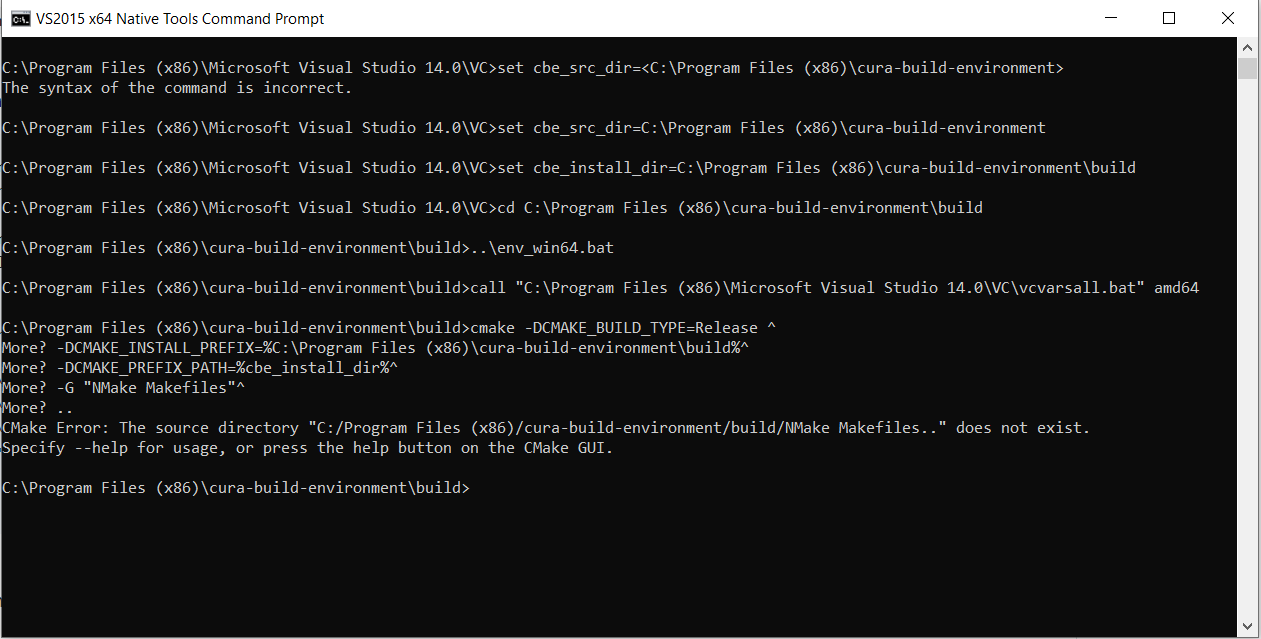
Alternately, I also tried to build from VS2015 X64 Native Tools Command Prompt but getting this error -
smgmamur
on 20 May 2020
So then I looked for cl.exe path and there were two paths under the VS14.0 that had the file - 1. C:Program Files (x86)Microsoft Visual Studio 14.0VCbinamd64 and 2. C:Program Files (x86)Microsoft Visual Studio 14.0VCbin. Which one would be the correct one to use?
The one in amd64 sounds like the one you need, since it builds 64-bit applications.
Maybe it would help to call cmake-GUI also from the Native Tools Command Prompt, so that the correct environment variables are set while it's running?
CMake should find all of this stuff automatically even before really going into Cura's source code. Cura has very little to do with the errors you're getting here.
Ghostkeeper
on 25 May 2020
@Ghostkeeper Good point that the errors are all about CMake-VS. I figured that rc.exe was not in the Microsoft Visual Studio 14.0 folder, it was in the windows kits8.1 and 10 folders. I added the 8.1 location [C:Program Files (x86)Windows Kits8.1binx64] to PATH. Then ran cmake-GUI (from VS 2015 X64 Native Tools Command Prompt), ran the Configure in GUI with NMake Makefile, it configured and generated with no problem.
Now I'm facing problems as I go back the the VS 2015 X64 Native Tools Command Prompt and cd to the Build directory, then run NMake. It gives me the following error -
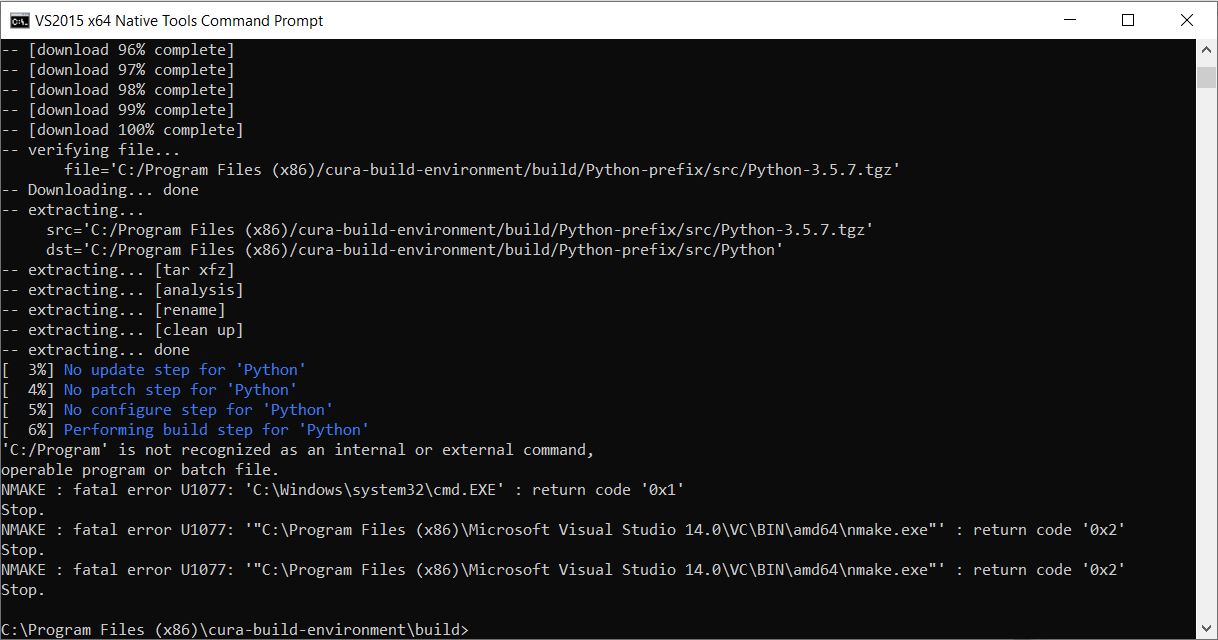
I'm looking for what might have gone wrong, but I would appreciate any suggestion / insights. Thanks!
smgmamur
on 3 Jun 2020
Ugh, looks like something in the Python CMake files (either ours that calls it, or CPython itself) doesn't work well with the space in "Program Files" and needs to have quotes around it. You might be the first one that has his cura-build-environment repository in Program Files...
I've made a change that adds some quotation marks for safety. Can you pull and try again?
Ghostkeeper
on 5 Jun 2020
Putting the build-environment in Program Files is asking for trouble. Unless you run the build process as elevated user, User Account Control (UAC) will prohibit the build system storing its (intermediary and final) result in those folders.
 fieldOfView
on 5 Jun 2020
fieldOfView
on 5 Jun 2020
That, too. But I'd expect it to work properly as well when the development folder has a space in it, so I hope that Smgmamur can test it.
Ghostkeeper
on 8 Jun 2020
@Ghostkeeper Sorry for the snail pace. I have pulled the python.cmake file and replaced and ran again. It gave me the same error as before -
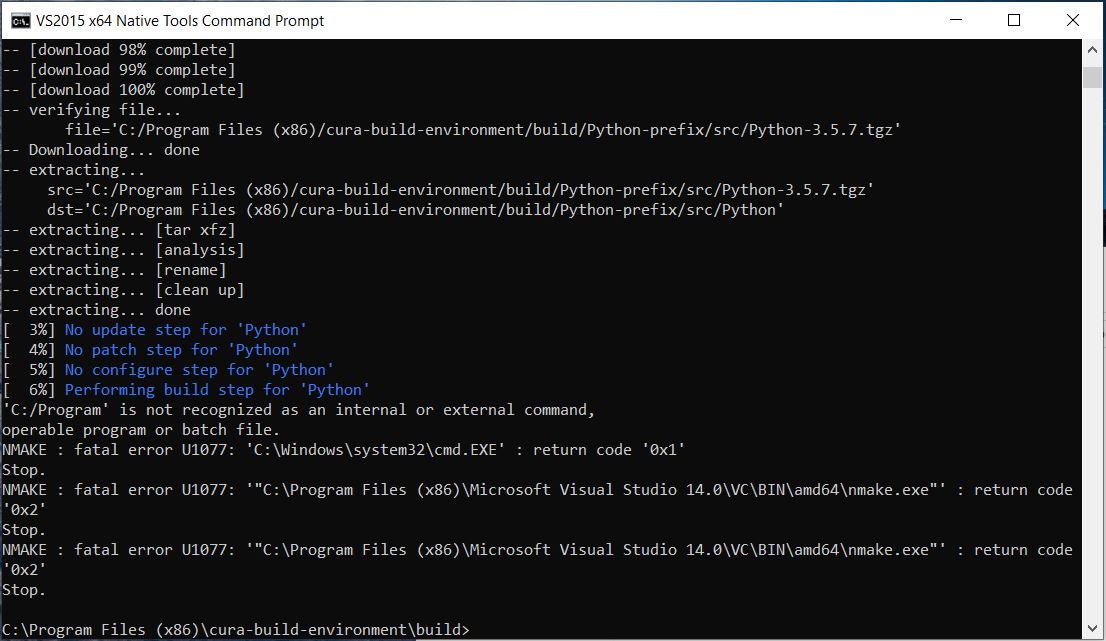
Then I moved my build environment folder out of Program Files X86 and simply placed in C. Then I ran again (I also had to update the path in PATH variables, otherwise gave path not found error). This time it went quite far but I still have the following error -
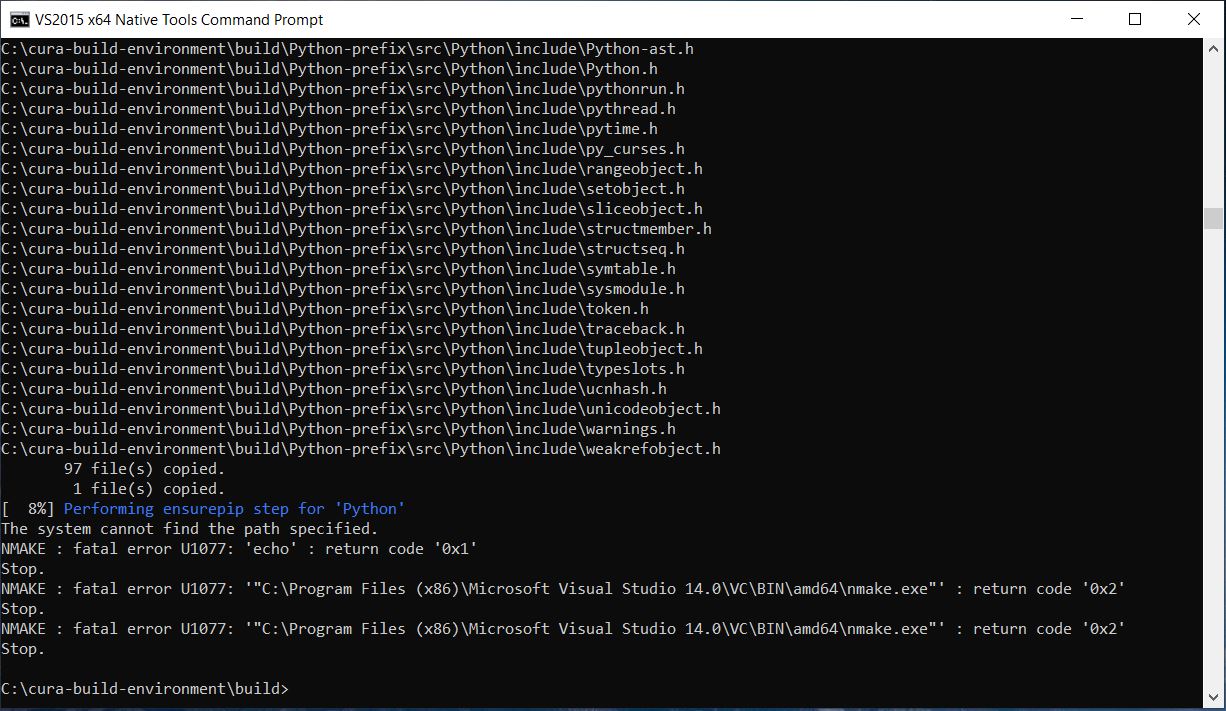
And this looks like a warning -

smgmamur
on 11 Jun 2020
One more a bit up -
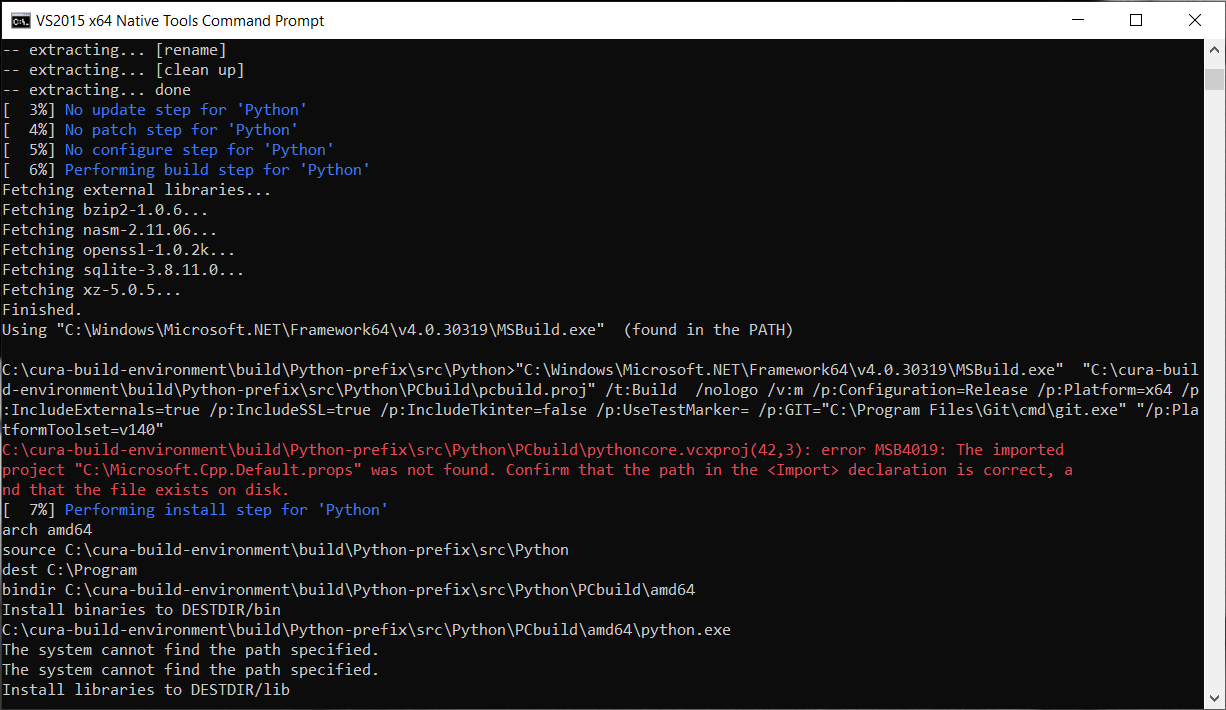
smgmamur
on 11 Jun 2020
Keep in mind that if you move your build directory or source directory, you have to clear CMake's cache or it can still use the old paths to determine where it builds the symbols and where it would find them. I believe newer versions of CMake give you a warning if this happens. This basically forces you to start over.
It's annoying that the error message says that the system can't find the path specified, but then doesn't say which path it's about :(
Ghostkeeper
on 15 Jun 2020
I've made another attempt at fixing this. Could you try the fix_python_installation_spaces_paths branch of cura-build-environment?
Ghostkeeper
on 15 Jun 2020
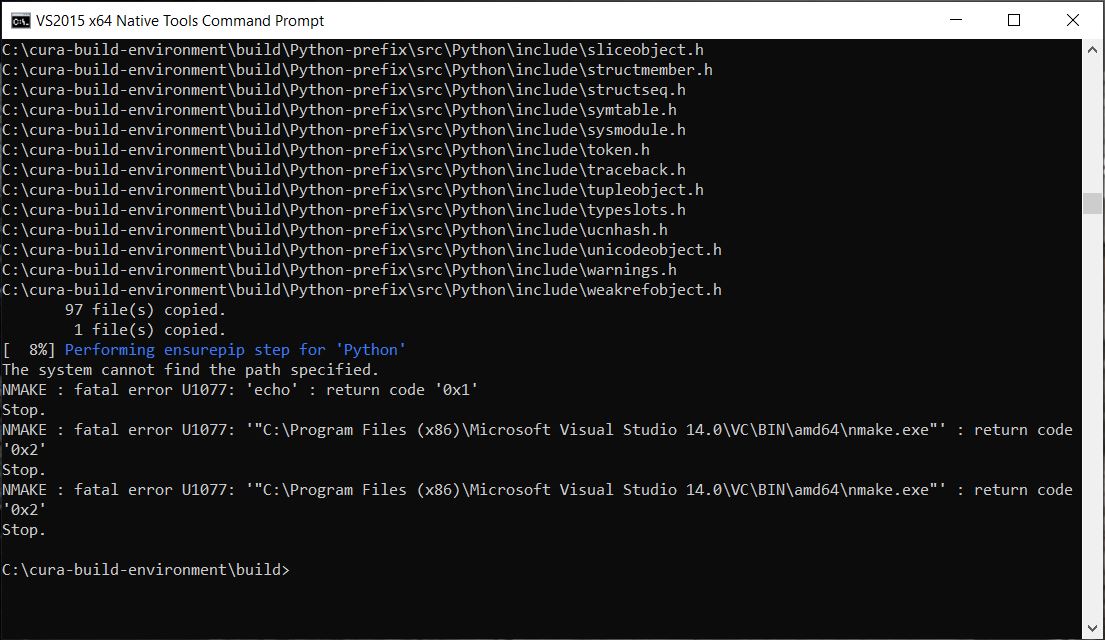
@Ghostkeeper This time I deleted cache from cmake GUI, closed cmake, deleted the entire cura-build-environment folder from C:, downloaded "fix_python_installation_spaces_paths" branch of cura-build-environment, renamed folder as "cura-build-environment" and pasted on C:, created a new build folder, called cmake-GUI from Native Tools cmd, configured then generated from cmake GUI, from Native Tools cmd (from the build folder) called NMake. Now I'm getting these errors -

smgmamur
on 17 Jun 2020
Getting further though! I've made another fix. Could you download the same branch again and try again? You probably won't need to delete the whole cache this time (but it wouldn't hurt if you do).
Note that your installation folder is C:\Program as well, which is a symptom of problems with spaces in the paths.
Ghostkeeper
on 18 Jun 2020
@Ghostkeeper I tried using your latest edits, it gave errors again. But it looked like (and as you suggested) cmake was pointing to a folder C:Program Filescura-build-environmentbuild whereas my folder was C:cura-build-environmentbuild. Figured that in cmake GUI after I configure, the CMAKE_INSTALL_PREFIX was set to the Program Files directory. I changed it in cmake GUI after configuring and then when I generated, I got a white screen there for the first time (usually its red).
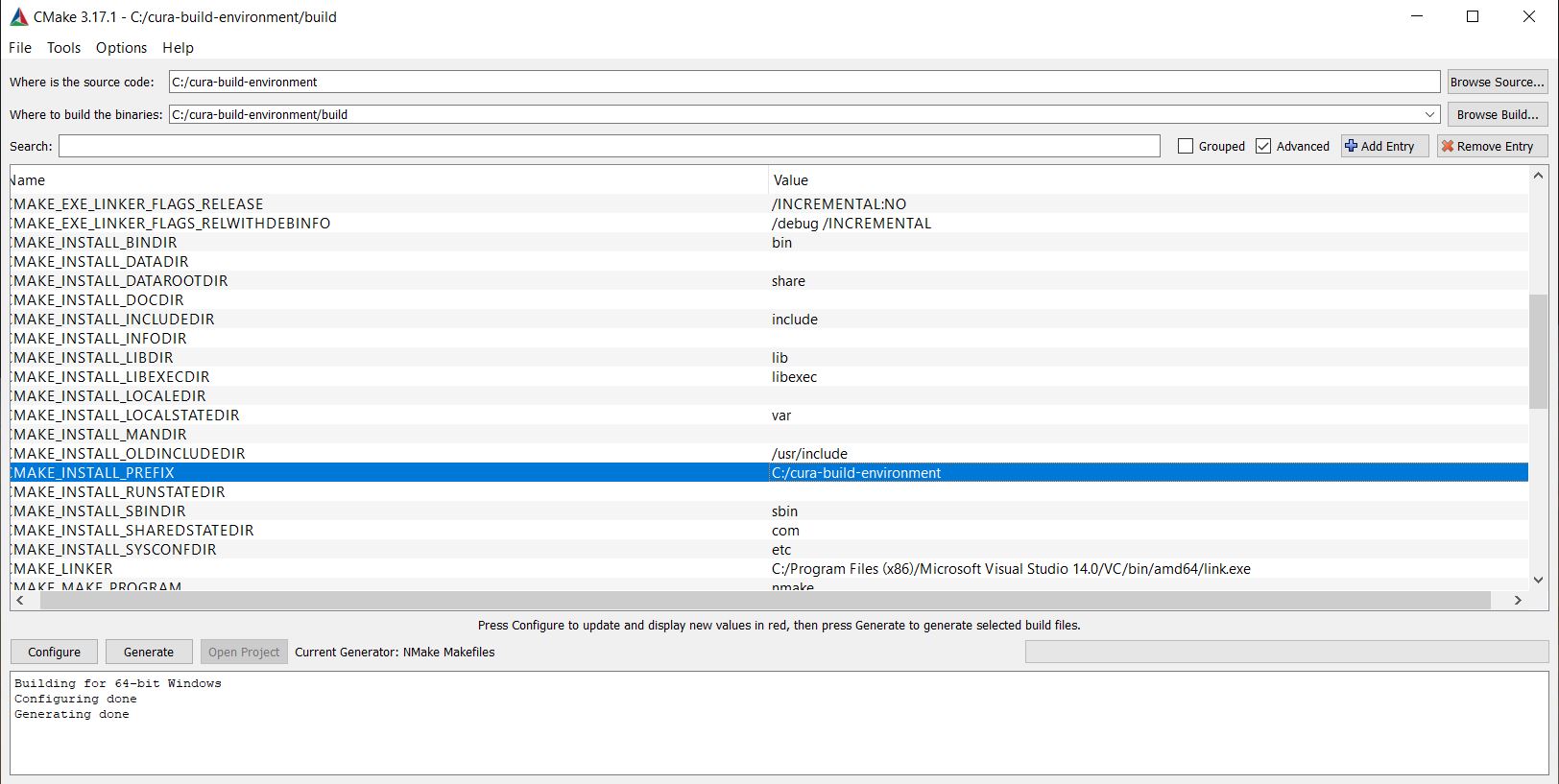
Now when I ran NMake in the Native Tools command prompt, it seemed to have gone much further than ever, but hiccup-stopped here -
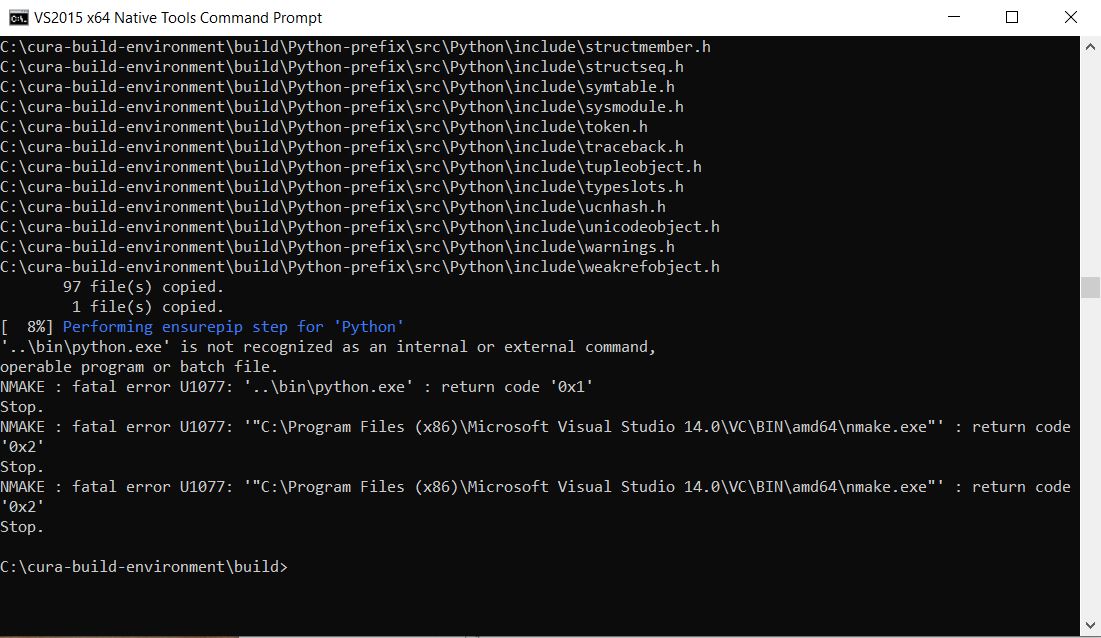
Also had this error a bit up -

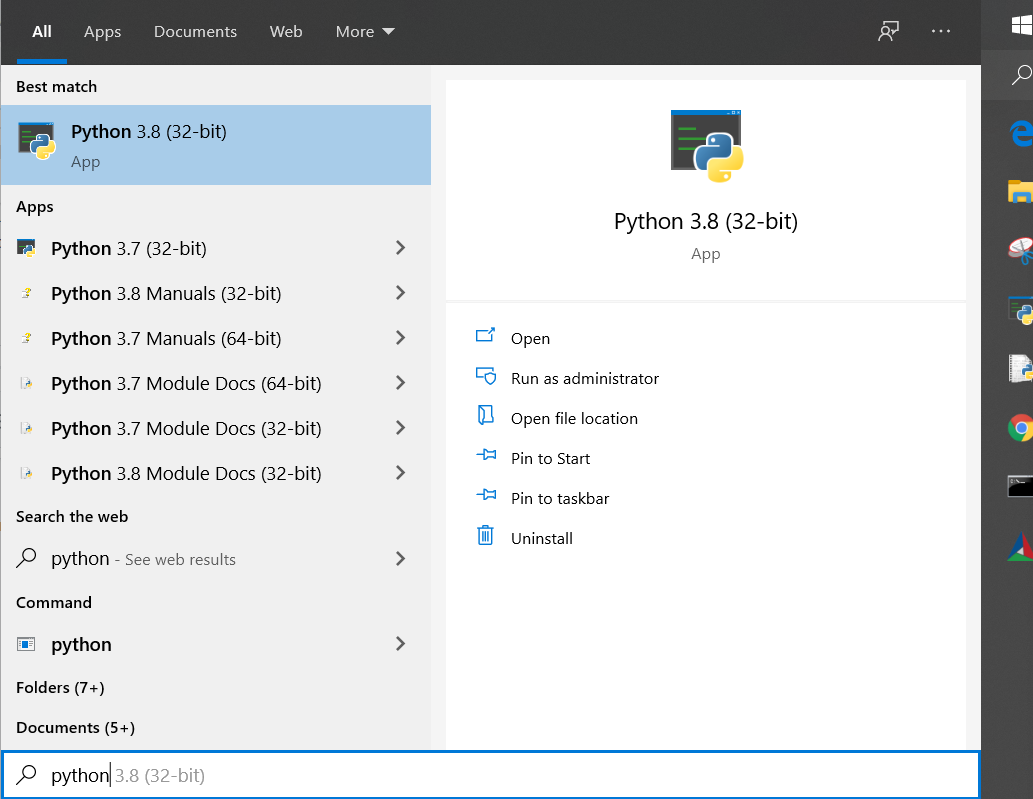
Is it a problem that I have Python 3.8 and 3.7 in my computer? (I just installed 3.8 but it didn't remove 3.7). My computer is X64, not sure how even Python 32 bits is running! I already made some small programs using it.
smgmamur
on 19 Jun 2020
This issue has been automatically closed because there has been no response to our request for more information from the original author. With only the information that is currently in the issue, we don't have enough information to take action. Please reach out if you have or find the answers we need so that we can investigate further.
![no-response[bot] picture](https://avatars2.githubusercontent.com/u/26350515?v=4&s=40) no-response[bot]
on 22 Jun 2020
no-response[bot]
on 22 Jun 2020
@Ghostkeeper not sure what info the 'bot' was looking for, but can you please reopen this? I think we've come quite far and this discussion has been very helpful, will need more help. Thank you.
smgmamur
on 23 Jun 2020
This is a new system we just started to tidy up our issue tracker. As soon as you respond the ticket is reopened, so no worries, we're still listening!
 mahtDFR
on 23 Jun 2020
mahtDFR
on 23 Jun 2020
Yeah I tend to put a "needs info" label on things where we don't really know what the issue is yet, even if the issue author also doesn't know. Should use that more sparingly.
The CMake GUI colours new variables red, so if nothing is red that's maybe not a good sign :stuck_out_tongue: But that you claim it gets further is a good sign.
The whole point of cura-build-environment is that it builds the build environment needed for Cura, which includes Python. So existing installations of Python shouldn't matter, be they 32-bit or 64-bit. It could be that somewhere it found your existing installation though. What is the value of Python3_EXECUTABLE for you?
Ghostkeeper
on 26 Jun 2020
@Ghostkeeper Where to find the value of Python3_EXECUTABLE?
smgmamur
on 20 Jul 2020
It's probably somewhere here:
C:\Users\<username>\AppData\Local\Programs\Python\Python<version>\python.exe
... but replace
rburema
on 21 Jul 2020

I have both versions in that location. :-/
Another thing I did not understand is that every time I configure in cmake, even if I use C:cura-build-environment for source and C:cura-build-environmentbuild for the destination, the parameter CMAKE_INSTALL_PREFIX is nevertheless set to C:Program Filescura-build-environment. I do correct that to simply C:cura-build-environment every time after configuring and before generating but I wonder if I needed to correct that elsewhere before even configuring.
smgmamur
on 21 Jul 2020
I have both versions in that location. :-/
It's important that you use the same Python version every time. If you want to use Python 3.7 for Cura, always link to 3.7. If you want to use 3.8, always link to 3.8 for all of Cura's repositories and builds.
Another thing I did not understand is that every time I configure in cmake, even if I use C:cura-build-environment for source and C:cura-build-environmentbuild for the destination, the parameter CMAKE_INSTALL_PREFIX is nevertheless set to C:Program Filescura-build-environment. I do correct that to simply C:cura-build-environment every time after configuring and before generating but I wonder if I needed to correct that elsewhere before even configuring.
CMAKE_INSTALL_PREFIX should get cached by CMake, so you don't have to change it every time. For me it stays on my customised value, so I can't reproduce your problem.
Ghostkeeper
on 23 Jul 2020
Related issues
 Nemernemer
·
3Comments
Nemernemer
·
3Comments
 mubarak111nsu
·
3Comments
mubarak111nsu
·
3Comments
 probonopd
·
3Comments
probonopd
·
3Comments
 mnswamp1
·
3Comments
mnswamp1
·
3Comments
 DamianSepczuk
·
3Comments
DamianSepczuk
·
3Comments
Most helpful comment
This is a new system we just started to tidy up our issue tracker. As soon as you respond the ticket is reopened, so no worries, we're still listening!