Cura: [4.4.1] Purge tower coordinates don't take into account hotend offset
Application version
4.4.1
Platform
Win10 x64
Printer
Custom dual extrusion
Reproduction steps
- Second hotend +20mm offset
- Enable purge tower
- Try to slice
Screenshot(s)
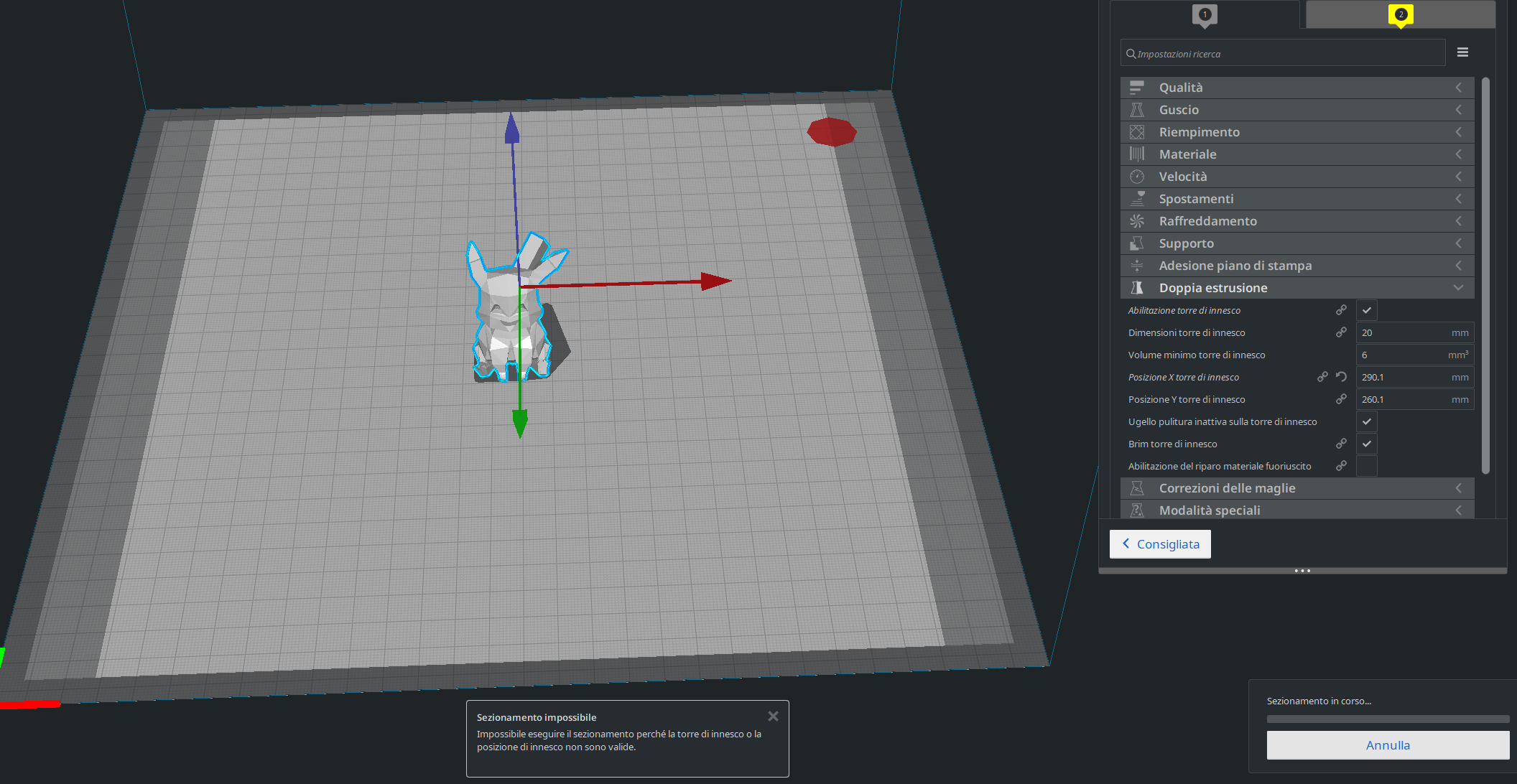
Actual results
The purge tower is calculated on a place that the primary hotend (on the left) can't reach (right side)
Expected results
The tower should be on a printable area
 Liger0
All 7 comments
By the look of it you have altered the default X value, as the circular indicates there's a difference from the default profile value.
As a workaround to get you printing, you can edit the position of the prime tower by inputting custom X and Y positions. It looks as if you need to subtract 20mm or so from the default value of your Prime tower X position (i.e. change 290.1 to 270 so that the prime tower is within the printable area). But perhaps you knew that already. Regardless, it shoudn't be placing prime towers in the non-printable area by default. As stated in the issue template, can you please upload a zipped 3mf of your project and log files too, then I can try to reproduce your issue to see if it is a bug. If so, we can devote some time to it.
 mahtDFR
on 20 Jan 2020
mahtDFR
on 20 Jan 2020
The circular arrow meant that I was using the preset automatically calculated default which is wrong instead of a fixed custom value I did subtract by 20 in the profile.
purge tower outside.zip
Liger0
on 20 Jan 2020
Ah I see. I've reproduced the error successfully, so will investigate further.
mahtDFR
on 20 Jan 2020
Fixed it. It was indeed not taking the nozzle offsets into account for the default value in fdmprinter. We didn't notice this because we override the prime tower position for our printers anyway, due to the bed clips that Ultimaker printers have in that corner.
 Ghostkeeper
on 21 Jan 2020
Ghostkeeper
on 21 Jan 2020
Just to be sure since I have no idea how the software works, but I did read in the change done the line
max(map(abs, extruderValues('machine_nozzle_offset_x'))
and I am unsure what the abs function/variable does, so as I did put a project that was using an ABS material I got to think about it.
This fix will work on all materials, right?
Thank you.
Liger0
on 21 Jan 2020
abs() in most programming languages is a function to calculate the "absolute value" of what you pass to it; abs(-10) = 10, abs(4) = 4. In other words, it remove the minus sign from the value if there is one.
To set your mind at ease: it has nothing to do with the material named Acrylonitrile Butadiene Styrene here.
 fieldOfView
on 21 Jan 2020
fieldOfView
on 21 Jan 2020
I documented the steps in that function in the commit message, since it's not immediately apparent even to a programmer. Basically this abs() function is called on all of the extruder values for the X offset, so they are all positive then. And then it takes the highest of them.
Ghostkeeper
on 24 Jan 2020
Related issues
 mubarak111nsu
·
3Comments
mubarak111nsu
·
3Comments
 jornada812
·
3Comments
jornada812
·
3Comments
 tomoinn
·
3Comments
tomoinn
·
3Comments
 JRRN
·
3Comments
JRRN
·
3Comments
 timherrm
·
3Comments
timherrm
·
3Comments