Cura: Don't ask to override/clone profile when loading project file with colliding profiles that are identical
Is your feature request related to a problem? Please describe.
At the moment (master, 4.4.0), if you save a project that's based on some profile, (e.g. profile Foo) and then you modify Foo in some way and save that profile, when you next load the project that's based on Foo it gives you the option of either overwriting Foo (which loses the change that was made to Foo after the project was saved), or creating a new profile which is no longer based on Foo (I think) so the change to Foo is not visible in the loaded project.
Describe the solution you'd like
What would be good is that when the project that was based on the original Foo profile is loaded, it gives you a further option of using the new Foo profile (unaltered) and with the differences between Foo and the project's settings being visible just as if you had edited the settings (i.e. the profile name box has a * and the settings that differ from the profile are marked as we would expect.) The point here is that a difference in the settings between the project and the profile can come from either the user editing the settings or the profile being edited and saved before the project is reloaded.
Describe alternatives you've considered
None.
Affected users and/or printers
Everyone.
Additional context
Wasn't this how it worked before? I can't remember!
 smartavionics
All 15 comments
The settings that are saved to your profile and the settings which are not are kept separate and I think we all want to keep it that way. The * near the profile drop-down just means that there are setting adjustments that are not saved to the profile, so that part should probably stay the way it is.
The rest of the feature request is still valid though. It never worked that way before.
The details of this feature still need to be thought out though.
A requirement of this feature is that setting modifications are saved with a date, so that Cura can know which setting modifications are made after saving the project file and which are saved before. To illustrate, imagine the following sequence of events:
- On Monday, Suzy sets the Print Speed to 10mm/s and saves this as a profile. She shares this profile with Robin.
- On Tuesday, Robin makes an adjustment to the profile to set the Print Speed to 20mm/s and saves it into the profile.
- On Wednesday, Suzy makes an adjustment to the profile to set the Print Speed to 30mm/s and saves it into the profile.
- On Thursday, Suzy gets the profile from Robin and imports it into Cura.
What happens now? Does it take the adjustment that Robin made, or does it override the value from the profile with the adjustment that Suzy made? Does it matter that Suzy made the changes later even though they were on completely different computers?
Cura has no notion of quality changes profiles being based on other quality changes profiles. When you select that they are not overriding, it copies the profile to a different name.
 Ghostkeeper
on 5 Dec 2019
Ghostkeeper
on 5 Dec 2019
I think I would be happy with the following behaviour...
When you load a project file it would see if the project is based on a profile that already exists. If it isn't, it simply creates a profile with the name used in the project and stores the values currently used in the project into that profile. But if the project is based on an existing profile it compares the values used in the project with the values in the existing profile and if any differ it displays the * and indicates which settings differ from the existing profile. The user then has the same options as they do now to either overwrite the profile using the values in the project or to discard the differences. I don't see why profiles need to have a date/time stamp.
smartavionics
on 5 Dec 2019
We're mixing up some terminology here. A project is a file that contains multiple profiles (as well as some 3D mesh data optionally). One of these profiles is the "user changes profile" or as I prefer to call it the "custom profile". So going through your desired behaviour:
When you load a project file it would see if the project is based on a profile that already exists. If it isn't, it simply creates a profile with the name used in the project and stores the values currently used in the project into that profile.
This should already happen. If there is no profile with the same ID, it will still show the dialogue but there will be no drop-down to change behaviour. It will always create a new custom profile with the values stored in the custom profile from the project.
But if the project is based on an existing profile
Projects are always based on existing profiles, so I think you mean here that "if the project contains a custom profile with an ID that already exists in Cura".
But if the project is based on an existing profile it compares the values used in the project with the values in the existing profile and if any differ it displays the * and indicates which settings differ from the existing profile.
Yeah currently it doesn't display which settings are different (that would make the dialogue appear like a spreadsheet and overloaded with information) but it only indicates that there is a collision.
The user then has the same options as they do now to either overwrite the profile using the values in the project or to discard the differences.
Right, so what you're asking is not any new functionality with overwriting, but still be based on an existing profile. What you're asking is only to display more information in the project open screen. It should say that the colliding profiles are different and which settings are different.
Ghostkeeper
on 6 Dec 2019
Slight confusion, I think. I am not asking for the settings that are different when a project is loaded to be displayed any differently to how they are now. I'm not asking for the project load dialog to show those differences. I simply want Cura to not overwrite an existing profile when a project is loaded that is based on that profile.
I would like Cura to compare the existing profile to the settings that are in the project being loaded (which, I assume, are the combination of the profile that was saved in the project file along with any unsaved changes) and if there are any differences, the * is displayed and those settings that are different are shown in the normal way in the settings pane.
I appreciate that a project is always based on an existing profile but when Bob sends a project file to Alice, she may or may not already have that profile. If she doesn't, Cura can just create it. If she does, Cura should not overwrite her profile as it does now, it should do what I have outlined above.
smartavionics
on 6 Dec 2019
Ah right. Currently Cura checks if there are any colliding profiles (same ID) and when there is one, it'll ask whether to overwrite that profile or create a new one. You're saying that when there is a collision but the profiles happen to be the same (same setting overrides, same values) then Cura should not even ask?
The settings that the user had active when the project was saved are stored separately and restored upon loading it. So if you had a custom profile that changed the infill density and also a changed setting for Enable Support, and then saved a project, then the other person will also get a custom profile that changes the infill density as well as an unsaved setting that enables support (and a star will be displayed).
Ghostkeeper
on 9 Dec 2019
You're saying that when there is a collision but the profiles happen to be the same (same setting overrides, same values) then Cura should not even ask?
That's right it doesn't need to ask if the profile in the project being loaded matches the existing profile with the same id.
So if you had a custom profile that changed the infill density and also a changed setting for Enable Support, and then saved a project, then the other person will also get a custom profile that changes the infill density as well as an unsaved setting that enables support (and a star will be displayed).
Yes, and their custom profile is not automatically overwritten until they decide that they wish to save any unsaved settings that occur when loading the project. And just to make absolutely clear, an unsaved setting can occur when either the .3mf file was written with unsaved settings OR when the .3mf file is loaded into a Cura that already has a profile with the same id and any of the settings in the original profile collide with the profile + unsaved settings that arrived in the .3mf file.
smartavionics
on 9 Dec 2019
For reference, see CURA-7036
 Ellecross
on 10 Dec 2019
Ellecross
on 10 Dec 2019
Cura’s profile handling is confusing and I have several times overwritten stuff I wanted to keep. Then I started allowing projects to create new profiles every time it loads and I don’t know if they are the same or different. And unlike IdeaMaker, Cura has no way to compare profiles.
These two quotes from @Ghostkeeper would be a great step in the right direction and I would like to add a +1:
“It should say that the colliding profiles are different and which settings are different.”
“…When there is a collision but the profiles happen to be the same (same setting overrides, same values) then Cura should not even ask?”
 alsmithson
on 14 Dec 2019
alsmithson
on 14 Dec 2019
(hoping I'm not creating a "XY problem" !)
Maybe I have a workaround : my (tedious) workflow...
The profile management is sometime a bit confusing. So, everytime I work on a new project, I create a new profile for this new project. I then export the .curaprofile, give it the project name and save it along with the 3MF file. When the project is completed, I remove this profile from Cura (otherwisee the profile list would be a mess). If I reopen the project later, I also import the profile form the settings dialog box. The profile then appears with the project name. OK, it's a bit redundant, and really tedious ! (.curaprofile file is saved for display in combo box)
This way it's (more or less) easy to compare the most recent profile with the old project profile, and I can switch easily between old and new profile (this rarely happens as most of my projects need different profiles)
Redundant, somewhat tedious, but _in fine_ handy.
Maybe Cura could offer the option to save/load a .curaprofile with the project (.3MF) name, and/or Cura could create a temp profile when loading a project, and that temp profile would be displayed (as the project name) in the profiles combo box. The project profile being added to the profiles list, it would allow the user to switch/compare. This way, there would be no need to ask for keep/discard. The current profile would remain untouched, the project one would be temporarily added to the list and selected by default.
 yet-another-average-joe
on 20 Dec 2019
yet-another-average-joe
on 20 Dec 2019
The project file contains the .curaprofile in a way. Both the Cura project file and the .curaprofile are actually .zip files that you can open with a zip archiver and everything in the .curaprofile is also in the project file. Loading a project file asks you if you want to save that .curaprofile to a separate profile, or overwrite the existing profile with the same name. So if you save it to a separate profile, that should be the same as when you load in a separate .curaprofile that was created at the time when the project file was saved.
Ghostkeeper
on 20 Dec 2019
Yes, indeed, this is why I wrote that what I'm doing is redundant.
The goal is to have the project profile with the project name in the profile list, and at first let the current profile unchanged : it can be selected later if needed. This also allows to keep trace of multiple profiles for a single common project when testing parameters, without keeping a pile of configurations in the system directory/combo box for the rest of the life. It can also be done at Save time by just saving the 3mf with different names, but in this case, changing "builplate parameters" will do it for the current 3mf file only... I find playing with .curaprofile files on only one buildplate is very usefull.
A pratical example : a model with orientation, rotation, scaling, custom supports, etc, and testing multiple profiles (material, shell, infill, etc.) based on a standard one : only one profile can be saved with the project file. Some CAD softwares can store different configurations for the same model. External .curaprofile files mimics this functionnality, and the "Manage profiles" in the profiles combo box is there ! Probably not the way it was intended to be used, but it makes it possible.
A few months ago, I was about to issue a FQ for Cura to fill the exported profile edit field with the project name, pointing to the project directory (the field is empty and it exports to the last export directory by default). Not an easy subject of discussion, as everyone seems to have a different workflow ! Making things easier for some users could make things more difficult for some others.
yet-another-average-joe
on 20 Dec 2019
For simplicity how about when a project file is opened Cura automatically creates a temp profile and never touches saved profiles EVER. That way opening an older project doesn't destroy months of tuning, because that's exactly what it does in current form due to the seriously [redacted] way the dialogue is worded.
it's simple open project/ new profile is created with project name. If not saved upon close it vanishes and leaves existing profiles untouched. This way if the user has made adjustments to their profile they can simply select that profile. If someone else is opening the project they can just select one of the profiles that they know work well on their machine. No confusing dialogue, just an opened project ready to be sliced with what ever profile the users selects, but also includes the temp profile with project name for instances where someone is remotely helping someone else tune settings.
Also could just change the wording to
Use included profile ( create Temp Profile )
choose existing profile from profile manager * and then the profile manager pops up so user can SAFELY choose the profile they want/need
 iRoc999
on 22 Nov 2020
iRoc999
on 22 Nov 2020
Cura makes the distinction between custom profiles and setting changes that have not yet been saved to a profile.
For custom profiles the behaviour is already what you are asking: It's going to create a new profile for it. To prevent creating hundreds of profiles by re-opening the same project file it'll ask to adjust the existing profile if the profile name is the same, or to create a new profile for it. The difference between the current behaviour and what you're asking is really that the new profile is not temporary. It couldn't be, because you can select that profile in any of your added printers and making it disappear would require those printers to change to a different profile.
Unsaved setting changes will be overridden if you select to re-use an existing printer. They will be retained if you select to create a new printer. Again, similarly, you don't want it to keep creating new printers for every project file that you load. I don't really see an alternative here. Merging them into the custom profile destroys the distinction.
The dialogue is confusing, in part because everyone expects different wordings there. We've adjusted the wording in 4.7 but apparently it still produces expletives from people who expect it to say "temp profile" for profiles that are not temporary. You can SAFELY choose the profile you want or need right now. The problem is user experience.
Ghostkeeper
on 26 Nov 2020
I can feel your pain as through researching the issue i can see it's been an issue for quite awhile. With that said I feel there's a communication issue. It really seems that users are continually asking for a 3rd option of "open project create no new profile and make no changes to existing profile" that just imports the project models on the build plate. We just haven't communicated that well, likely due to the fact that when we encounter the issue it causes damage to tuning progress or causes us to have to do profile clean up. Which in turn causes frustration and that leads to not thinking clearly
Majority of us understand the utility of printer settings being able to be saved, and shared with the project, but printers change. By that I mean printers get altered through necessity or whim, and the profiles also evolve.
Currently one can only update the existing profile wrecking any tuning that's been done or create a new profile and then have to clean up a growing list of unwanted profiles
I guess in summation a 3rd option of "just import models" really seems to be the magical solution
My gut is telling me that if that were included and a tick box for remember these choices and don't show this dialogue again were added you might find that gets done more often that not. That is if there's usage data collected....
This option of "don't show this dialogue again" would need to be able to be turned back on in preferences though as there is a legitimate need for profile importation
iRoc999
on 27 Nov 2020
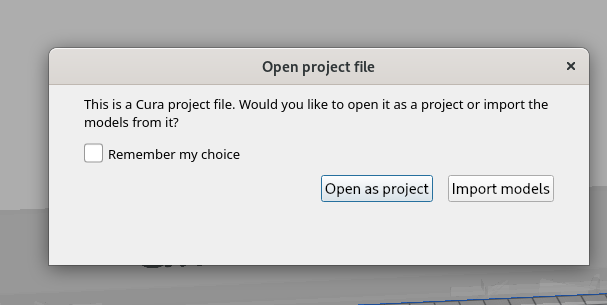
It really seems that users are continually asking for a 3rd option of "open project create no new profile and make no changes to existing profile" that just imports the project models on the build plate.
But that option already exists:
 nallath
on 27 Nov 2020
nallath
on 27 Nov 2020
Related issues
 mubarak111nsu
·
3Comments
mubarak111nsu
·
3Comments
 dstulken
·
3Comments
dstulken
·
3Comments
 DmitryBychkov
·
3Comments
DmitryBychkov
·
3Comments
 rudowinger
·
3Comments
rudowinger
·
3Comments
 Liger0
·
3Comments
Liger0
·
3Comments