Cura: Some values with dual extruders fail to change when adjusted with the active nozzle
Application version
4.3.0
Platform
win 10
Printer
BIBO2
Reproduction steps
Using the BIBO2 provided profiles. Adjusted printing temp but no change in gcode
this failure to change became more obvious with infill. changed infill to 20% sliced and got the 50% default value. changed it again, sliced, no change. repeat, no change.
If I changed the values in the E2 inactive nozzle the values would finally change.
Actual results
values change in the tab for the active E1 nozzle but no actual change happens for gcode output

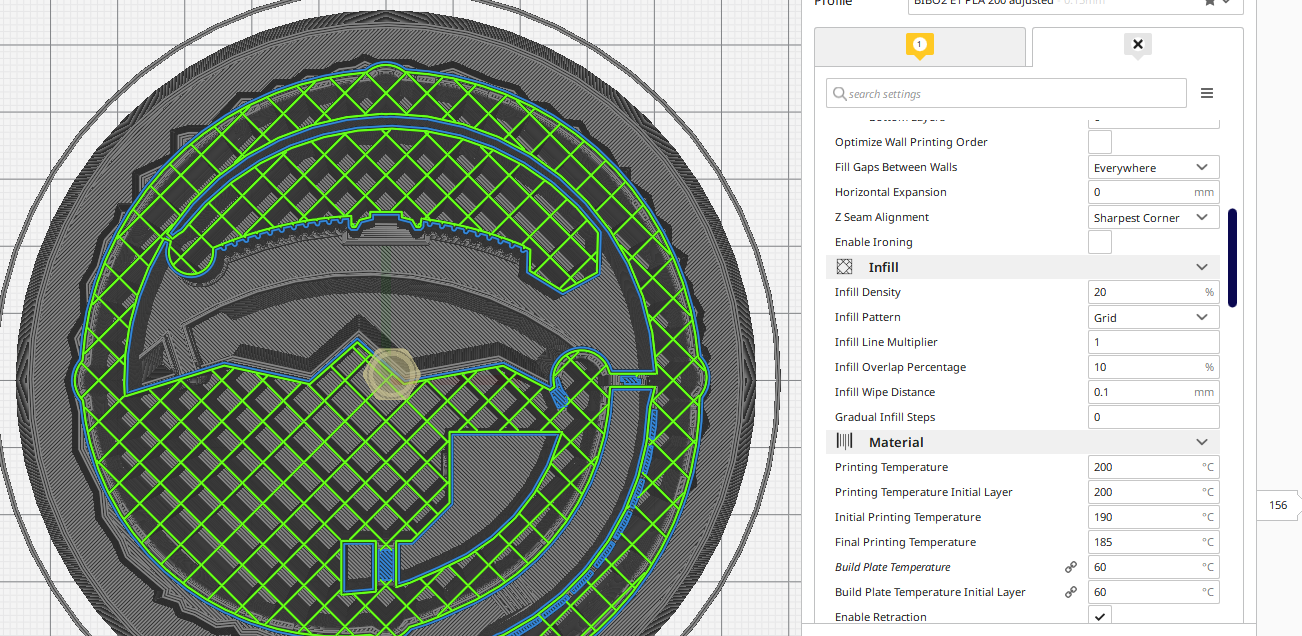
Expected results
Changing the active nozzle values when printing as a single extruder on a dual extrusion machine should be the driving values for print settings. The E2 inactive second nozzle should not be driving the print settings.
i.e. For E1 single nozzle prints if I set E1 to 20% that should be the value driving the slicing setting for the print no matter what the E2 tab is set to as E2 is not active for printing (and vice versa)
Additional information
BIBO2 provided profiles
https://drive.google.com/file/d/0B76TjeOkslHlZ2VBLXBSdzJYdms/view
I've attached my attempt at a custom profile, I still seem to have this issue with the inactive nozzle overriding things. (also the default material print temp for custom PLA does not seem to be being pulled from the material definitions)
BIBO2 E1 PLA 200.zip
My custom material for 3D Solutech white PLA
3D_Solutech_White_PLA.xml.fdm_material.zip
 photodude
All 13 comments
I can't reproduce this. My reproduce steps were:
- Add BIBO2 Dual printer.
- Load 3D Solutech White PLA.
- Disable second extruder.
- Load a cube.
- Change infill density to 50% (up from 20%).
The infill density properly changed to 50%.
From your story it appears as if your model or your infill was set to be printed with the second extruder, even though it was disabled. This should not be possible, since if your model is printed with an inactive extruder it should not be sliced at all and Cura will give an error that models are assigned to inactive extruders. If the extruders of individual features were changed, such as the infill extruder, they should get changed to the first available extruder when you disable the extruder.
What were your exact reproduce steps? Like, in a numbered list?
 Ghostkeeper
on 21 Oct 2019
Ghostkeeper
on 21 Oct 2019
@Ghostkeeper I assume this is what I did
1) load the BIBO provided Printer and extruder definitions
2) load the BIBO provided profiles
3) select the BIBO2 single E1 printer
4) select the 3dSolutecth material for printing
5) load model to build plate (image is of this item on pinshape it's kind of a stock benchy, but a cube should work too as this is not the only model I have had issues with)
6) adjust E1 print temp and infill settings
7) slice (no change for temp or infill, maybe other settings too)
8) change E2 print temp and infill settings
9) slice (see changes in infill)
10) change E1 print temp and infill settings again
11) slice (see no change in infill)
12) repeat as needed
The "BIBO2 single E1" printer configuration should already have the E2 extruder disabled.
This should not be possible, since if your model is printed with an inactive extruder it should not be sliced at all and Cura will give an error that models are assigned to inactive extruders. If the extruders of individual features were changed, such as the infill extruder, they should get changed to the first available extruder when you disable the extruder.
That doesn't seem to be happening. I get no errors, I'm not prevented from slicing, and the changes like infill are not switching to the first available extruder even though there is a disabled extruder.
photodude
on 22 Oct 2019
There is a possibility that I also opened
a model I had previously saved and selected open as project then the "create new" option for open
(maybe it was this model, then deleted the Zlayer temperature changes)
BSE1_TempTower_v2.zip
Sliced Then right-clicked to select the "clear build plate" option before adding a new STL model to the project...
Then followed steps 6 on from above
photodude
on 22 Oct 2019
I just walked through things again, seems the repeated "clear build plate" new STL added, slice, clear, new STL.... does eventually cause this error
that or it was when I hit slice while on the inactive E2 extruder tab after making a change on the E2. Or some combination of those. (sorry it's not overly specific on the replication steps)
photodude
on 22 Oct 2019
Ah yeah when using the "Single E1" printer it reproduces immediately. Simpler reproduce steps are:
- Install the definition files from BIBO's .zip file and start Cura.
- Add BIBO Simple E1 printer.
- Load a cube.
- Set infill density to 50% and let it slice.
I can't pinpoint exactly what is wrong with that printer definition though. From the files everything looks fine. The files are even more or less the same. Maybe it's random chance? But I haven't seen this sort of thing with any other printer. Some things I tried:
- Look through the definition files for any strangeness. Couldn't find any.
Look through the logs for any strangeness. It prints this message which was a little weird to me:
2019-10-22 12:39:02,266 - INFO - [MainThread] cura.Machines.QualityManager.getQualityChangesGroups [179]: Cannot find node for machine def [fdmprinter] in QualityChanges lookup tableThis code path was refactored in version 4.4 though so it won't occur any more there. Not sure if that is normal.
- Use the God Mode plug-in to see if the front end resolved settings wrong. It seems to place everything correctly there (50% density in extruder 1, 20% in extruder 2 and global, 0.8mm line distance in extruder 1, 4.0mm in extruder 2 and global).
- Look up the command to CuraEngine to find the parameters there. There it did give 20% for all extruders, so the problem doesn't seem to be in CuraEngine but in the front-end or the settings.
I'll bring it up to the team to see if we want to investigate this issue further.
Ghostkeeper
on 22 Oct 2019
@Ghostkeeper with the log message
Cannot find node for machine def [fdmprinter]
is that a variable capitalization issue? Maybe it's supposed to be (lowercase should be correct)FDMPrinter not fdmprinter?
not sure if that would be the cause of the root issue.
Glad this issue was able to be reproduced. Hopefully, a cause and solution can be found.
photodude
on 22 Oct 2019
Yeah lowercase should be correct. But I think it's just something that always happened.
We've since determined that this bug also occurs with the current master even though we've refactored a big part of the settings system. But we haven't been able to determine the root cause of this yet. Somehow there is a difference between the BIBO2 dual and this BIBO E1 printer but in the definition files they are more or less the same.
Ghostkeeper
on 23 Oct 2019
@Ghostkeeper I've been looking over the BIBO2 printer and extruder definitions. Could the issue be in the following part of the extruder definitions?
"overrides": {
        "extruder_nr": {
looking at the BIBO E1 printer extruder definitions we have E1a set to
    "overrides": {
        "extruder_nr": {
            "default_value": 0,
            "maximum_value": "1"
        },
and the E1b set to
    "overrides": {
        "extruder_nr": {
            "default_value": 0,
            "maximum_value": "1"
        },
I compared that to another random dual extruder printer from the included cura files (the Ultimaker s3 was selected)
in that one I see ultimaker_s3_extruder_right.def.json
    "overrides": {
        "extruder_nr": {
            "default_value": 1,
            "maximum_value": "1"
        },
and the ultimaker_s3_extruder_left.def.json
    "overrides": {
        "extruder_nr": {
            "default_value": 0,
            "maximum_value": "1"
        },
So it seems that one of the two BIBO2 E1 extruder profiles must be wrong on the "default_value": 0 and needs to change to a 1
Could that be the root cause related to the replication steps issue? (the log message I assume is a separate issue)
photodude
on 29 Oct 2019
Derp, i feel so stupid for having missed that. But yeah, that would explain the issues.
 nallath
on 30 Oct 2019
nallath
on 30 Oct 2019
@nallath I missed it several times too. I'm testing if that profile change is a fix for the reported issue. So far it seems to be working as expected now.
not sure about the other log Cannot find node for machine def issue.
photodude
on 31 Oct 2019
All right, glad that you found it! I suppose that leaves this issue a "fault of the user". Though perhaps we should have a warning of sorts for that. I think it's a good one to put in our CI tests, though that won't affect custom definitions made by users that are not merged into our main code base. I'll put a note down, maybe I can do that on Friday.
Ghostkeeper
on 31 Oct 2019
@Ghostkeeper that sounds like a good plan.
What I found was the extruder definitions were as follows
"metadata": {
"machine": "BIBO2 single E1",
"position": "1"
},
"overrides": {
        "extruder_nr": {
"default_value": 0,
"maximum_value": "1"
},
I changed them to
"metadata": {
"machine": "BIBO2 single E1",
"position": "1"
},
    "overrides": {
        "extruder_nr": {
            "default_value": 1,
            "maximum_value": "1"
        },
a warning for the user and something in the CI to catch that for the main code base would be good.
photodude
on 31 Oct 2019
Ghostkeeper
on 4 Nov 2019
Related issues
 mubarak111nsu
·
3Comments
mubarak111nsu
·
3Comments
 DmitryBychkov
·
3Comments
DmitryBychkov
·
3Comments
 probonopd
·
3Comments
probonopd
·
3Comments
 Liger0
·
3Comments
Liger0
·
3Comments
 jellewie
·
3Comments
jellewie
·
3Comments
Most helpful comment
@Ghostkeeper I've been looking over the BIBO2 printer and extruder definitions. Could the issue be in the following part of the extruder definitions?
looking at the BIBO E1 printer extruder definitions we have E1a set to
and the E1b set to
I compared that to another random dual extruder printer from the included cura files (the Ultimaker s3 was selected)
in that one I see ultimaker_s3_extruder_right.def.json
and the ultimaker_s3_extruder_left.def.json
So it seems that one of the two BIBO2 E1 extruder profiles must be wrong on the
"default_value": 0and needs to change to a1Could that be the root cause related to the replication steps issue? (the log message I assume is a separate issue)