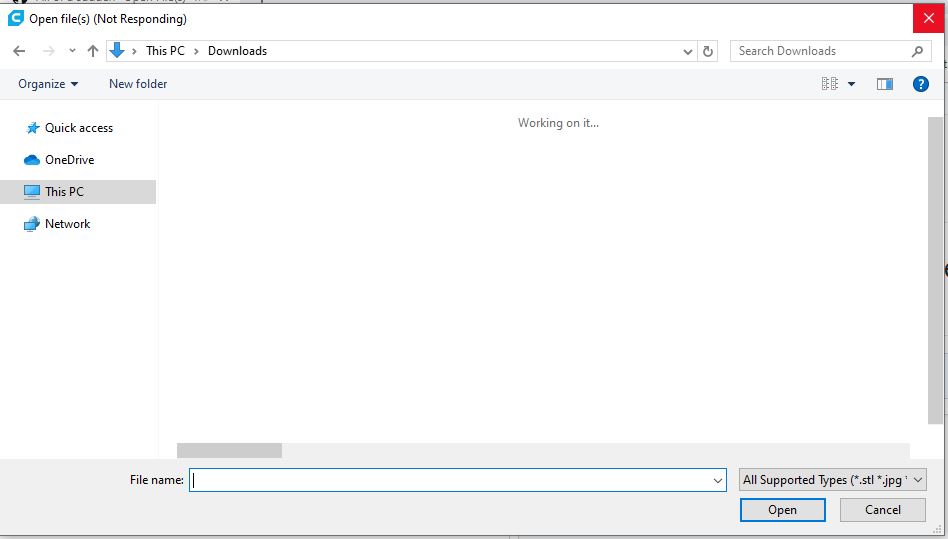
Cura: All of a sudden "Open File(s)" freezes Cura 4.2.1
-->
Application version
4.2.1 or 4.3 Beta. After having the issue, I re-installed 4.2.1 but the problem persisted so I tried installing the 4.3 beta. Same exact problem. It appears that something is corrupted and a clean install does not fix the issue.
Platform
Windows 10 with an NvidiaGTX 1070 and the latest drivers
Printer
Railcore II 300 ZL
Reproduction steps
I can't get it to stop! I can open an STL by double clicking to start Cura, however, starting Cura and clicking Open File will result in an empty file dialog box that says "working on it" forever. Re-installing 4.2.1 did not resolve the issue.
Actual results
Expected results
Had worked properly for weeks.
Additional information
 blibenson
All 5 comments
So it used to work for 4.2.1, but after you installed Cura 4.3 beta both of them stopped working?
 nallath
on 23 Sep 2019
nallath
on 23 Sep 2019
I think this may be specific to the Downloads folder on Windows.
See https://www.laptopmag.com/articles/slow-windows-downloads-folder
 fieldOfView
on 23 Sep 2019
fieldOfView
on 23 Sep 2019
So a couple of things. When I empty the download folder it works fine. I then copied all the .stl files back and it worked as usual. Not sure if a particular file was causing the issue. I will close the thread tonight.
blibenson
on 23 Sep 2019
So it used to work for 4.2.1, but after you installed Cura 4.3 beta both of them stopped working?
Not exactly. It stopped working under 4.2.1 so I tried 4.3 then tried re-installing 4.2.1. Failed both times until I re-created the download folder. I am running 4.3 now.
blibenson
on 23 Sep 2019
I've verified an issue. If Cura's splash/load screen appears on my main monitor ( I have three monitors active) and Cura's interface loads on a different monitor it will freeze. As soon as I disconnected the other two monitors to force Cura to load the splash screen and the main screen on the same monitor it fixed the issue. No problems loading and no freezing. I'm using Cura 4.3.0
 jay-packet
on 14 Oct 2019
jay-packet
on 14 Oct 2019
Related issues
 rudowinger
·
3Comments
rudowinger
·
3Comments
 jellewie
·
3Comments
jellewie
·
3Comments
 timherrm
·
3Comments
timherrm
·
3Comments
 jornada812
·
3Comments
jornada812
·
3Comments
 mubarak111nsu
·
3Comments
mubarak111nsu
·
3Comments