Cura: 4.0.0 BETA 2: Thin Walls / Gap filling broken
Application Version
Cura 4.0.0 Beta 2
Platform
Linux
Printer
UM3
Steps to Reproduce
Enable Print Thin Walls
Load model
(if loaded from image file) Set thickness to 0.3 to 2.0mm
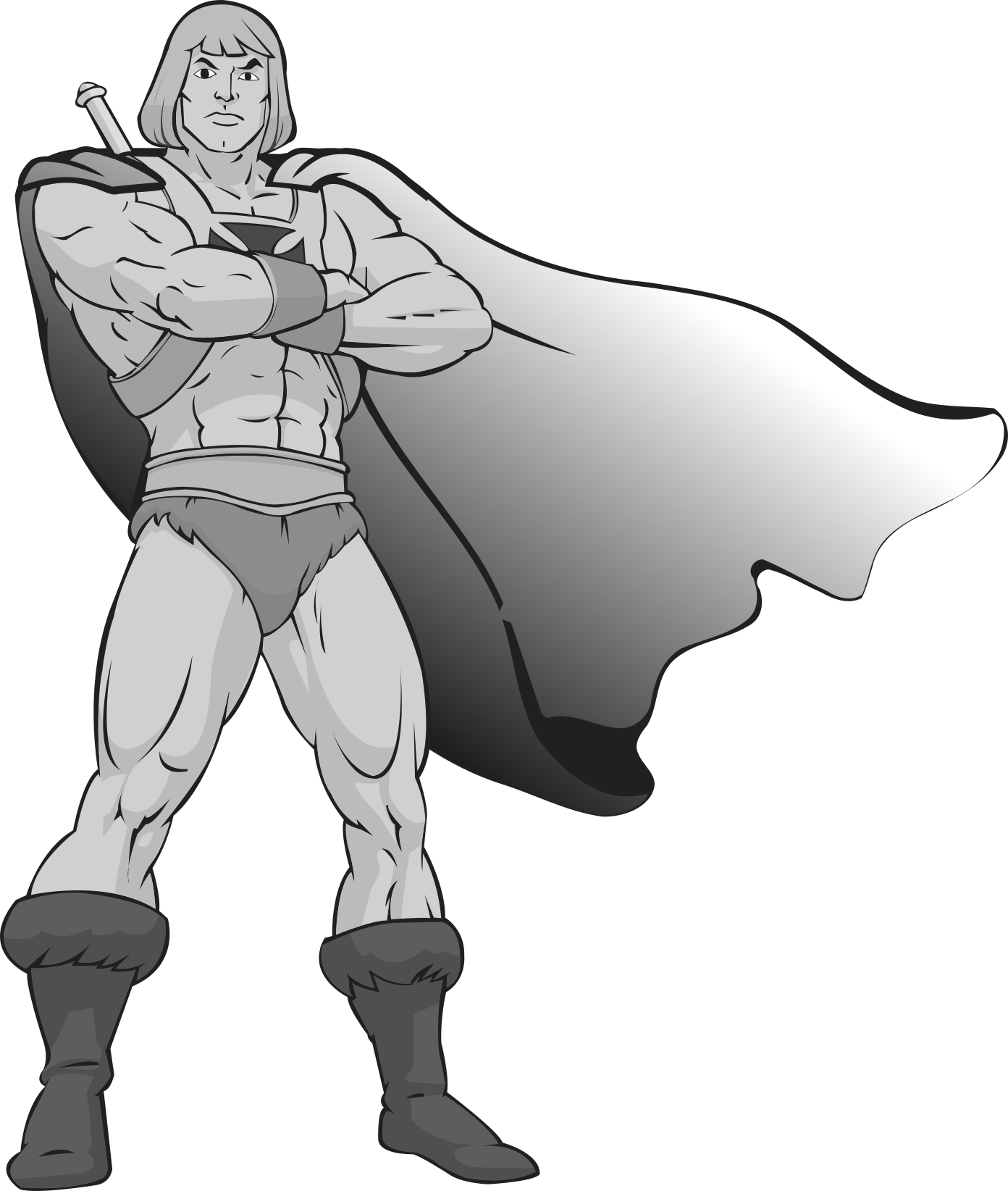
UM3_heman hueman 3__zw.3mf.rename.zip
Actual Results
Thin walls are only jagged lines
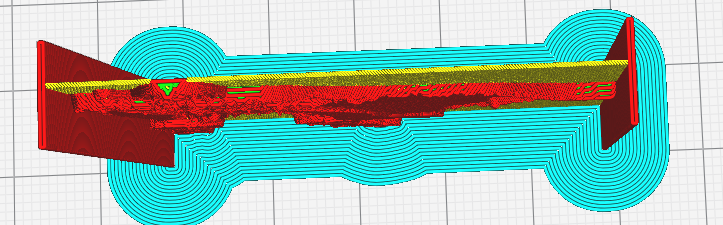
4.0.0-beta2 from attached curaproject
Expected results
Jagged lines are combined into smooth lines
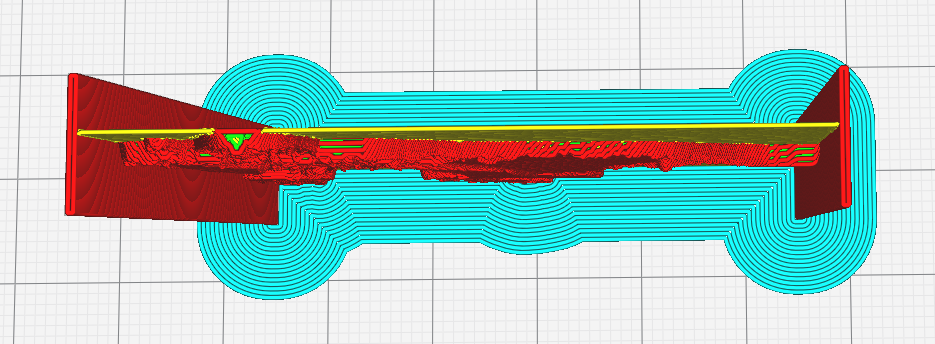
4.0.0-Beta
Additional Information
I have tested and verified that this was not a problem in Cura 3.4, Cura 3.6, or even Cura 4.0.0 BETA 1
 BagelOrb
All 42 comments
Hi Tim, the thin wall (and wall gap filling) in 4.0 under-performs (being polite here). My alternative implementation can do much better (YMMV). If you do try mine and it doesn't work OK, please let me know. Thanks.
https://www.dropbox.com/sh/s43vqzmi4d2bqe2/AAADdYdSu9iwcKa0Knqgurm4a?dl=0
 smartavionics
on 18 Mar 2019
smartavionics
on 18 Mar 2019
I am saying that thin walls in 4.0-beta works as normal, but it is 100% broken in 4.0-beta2
BagelOrb
on 18 Mar 2019
I'm still saying that the thin wall (and gap filling support) in 4.0 under-performs.
smartavionics
on 18 Mar 2019
I am planning on fixing the thin walls within the next year integrally.
I hope my solution will outperform even yours.
I remember we already talked about your gap filling algorithms somewhere. Do you remember which thread?
BagelOrb
on 18 Mar 2019
Can you give a quick recap of the general idea of your implementation of gap filling?
BagelOrb
on 18 Mar 2019
Sorry, I can't remember the issue where we discussed my implementation.
I don't know if I will ever submit it as a PR as I know that in some situations it will not produce nice output and also I think it's quite slow. but for most simple cases it works well.
So, for both thin walls and gap filling, I estimate the points that define the centre line of the region that needs to be filled and I also estimate how wide the region is at those points. I also calculate the area that is drawn so that when the lines are output it avoids drawing over the same region twice.
smartavionics
on 18 Mar 2019
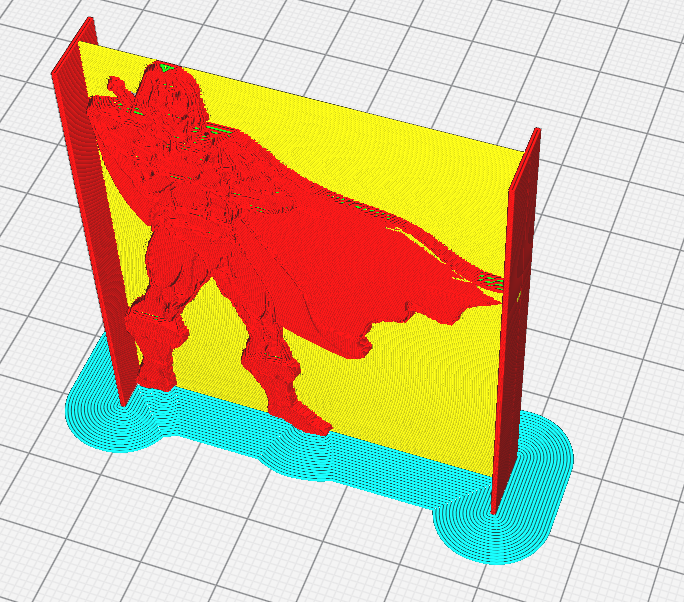
This is what it should look like - a lithophane of my ultimaker forum logo.
BagelOrb
on 18 Mar 2019
I do think that the transitions from fat to thin walls are very tricky to print nicely.
smartavionics
on 18 Mar 2019
Mark Burtons version:
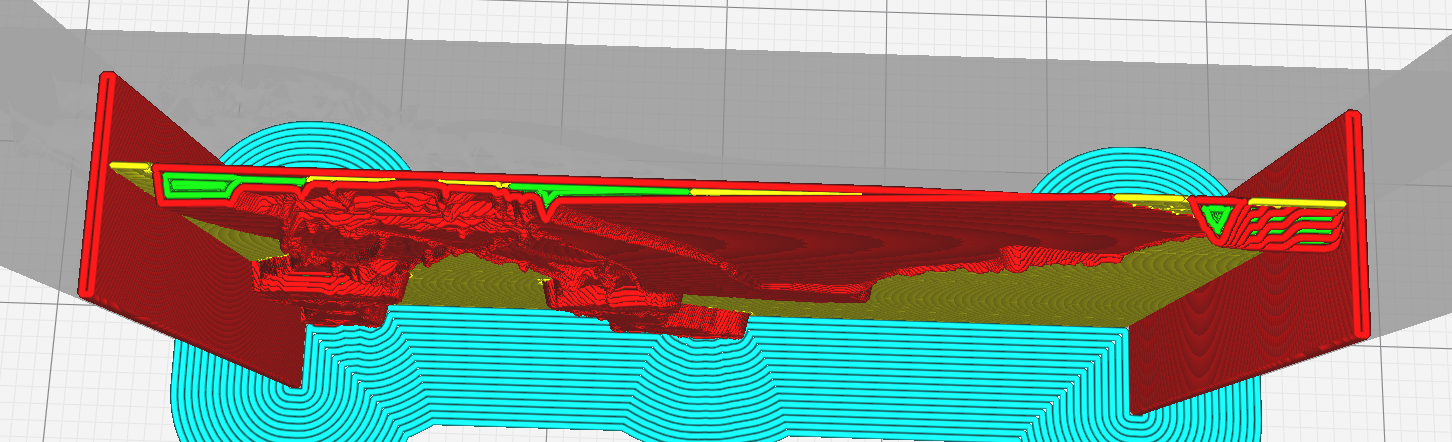
4.0.0-beta:
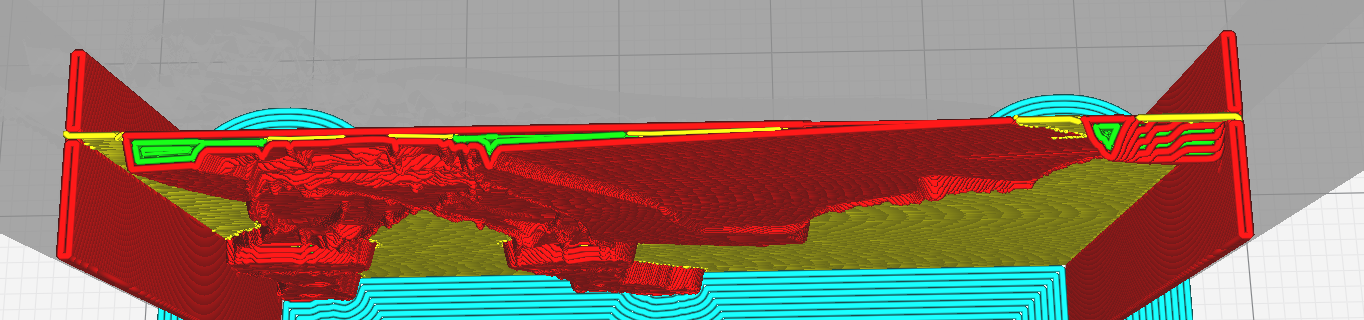
BagelOrb
on 18 Mar 2019
So why did my comments get zapped?
smartavionics
on 18 Mar 2019
Just cleaning up conversation which is irrelevant to this issue.
My misuse of your version of Cura is to no use for anybody.
BagelOrb
on 18 Mar 2019
OK, just worried that it was the thought police erasing my history!
smartavionics
on 18 Mar 2019
 Ghostkeeper
on 18 Mar 2019
Ghostkeeper
on 18 Mar 2019
The first one is unlikely the culprit. The second one is a more likely culprit.
BagelOrb
on 18 Mar 2019
It will definitely be related to the changes they made to MergeInfillLines as that is what is meant to turn the infill lines into beautiful smooth curves.
smartavionics
on 18 Mar 2019
So perhaps it was this one: https://github.com/Ultimaker/CuraEngine/commit/ca9e4ae581658a33a7265aee12e2f7d5f26eea63#diff-cd4c69d037508b392e5eff0749d08c45
BagelOrb
on 18 Mar 2019
That commit was made before the first beta was released though.
Ghostkeeper
on 18 Mar 2019
Ok well, then we should just do a bisect!
BagelOrb
on 18 Mar 2019
One of our QA engineers is doing that right now, using daily builds. Problem is though: The bug reproduces on January 8th, but not on December 18th (the date of the 1st beta). But there have been no commits on CuraEngine in the 4.0 branch in that period.
Ghostkeeper
on 18 Mar 2019
Note that the hack I inserted to disable the path optimization when gyroid infill was used wasn't removed until 23rd Jan.
smartavionics
on 18 Mar 2019
Although, Tim's profile isn't using gyroid infill anyway.
smartavionics
on 18 Mar 2019
Maybe the merge was in that period, while the commit was from earlier ;)
BagelOrb
on 18 Mar 2019
Or maybe a magic evil ghost creeped into the build system.
We all know you tend to keep those around ;)
BagelOrb
on 18 Mar 2019
We found it. It's this one: https://github.com/Ultimaker/CuraEngine/commit/6523774aa453e9dd2476991a671242fb6ba75182
That one was merged on the 18th (the day of the release of the first beta) but after we built the beta release, so we were confused by that.
We also discussed it (with the history in CURA-5776). I actually also found this issue a while ago and raised a ticket because there are certain thicknesses of parallel walls where this happens. We can't control all cases using the current method. We have two tickets open about this:
- One to split up the cases of thin walls from the cases of surfaces ending in a corner, a longer-term fix.
- One to tune the current algorithm better so that it at least works correctly for all parallel walls (like this case).
Neither have made it into 4.0 though.
Ghostkeeper
on 18 Mar 2019
https://github.com/Ultimaker/CuraEngine/commit/6523774aa453e9dd2476991a671242fb6ba75182 contains changes in lots of different files but none are in MergeInfilLines so which of those changes is the culprit?
smartavionics
on 18 Mar 2019
That's a merge commit! Are you saying the merge went wrong or that a bad commit was merged?
Anyway I think the least we should do is to revert the changes which were the culprit, because the intended fix was less bad than the currently broken feature.
BagelOrb
on 18 Mar 2019
I skipped through the merge commit changes, but couldn't find the mistake...
BagelOrb
on 18 Mar 2019
But you can't revert that merge commit as it would trash loads of useful changes.
smartavionics
on 18 Mar 2019
@smartavionics Nice winter design on the top banner, btw ;)
BagelOrb
on 18 Mar 2019
The commit that caused the behavior was merged since the merge commit. Reverting it would fix this issue but it would re-introduce others.
 nallath
on 18 Mar 2019
nallath
on 18 Mar 2019
Then revert it and fix those others.
BagelOrb
on 18 Mar 2019
I'd rather work in the current direction than to revert the 20 commits and re-do essentially the same fixes. As SmartAvionics said, it would throw quite a lot of useful changes away.
We already have three open issues to fix this: The two I mentioned before in this thread and Smartavionics' version. We intend to combine the three. That should be sufficient.
Ghostkeeper
on 18 Mar 2019
Oh that's even better.
As long as it gets fixed before the 4.0 release.
Get Outlook for Androidhttps://aka.ms/ghei36
From: Ghostkeeper notifications@github.com
Sent: Monday, March 18, 2019 5:08:15 PM
To: Ultimaker/Cura
Cc: Tim Kuipers; Author
Subject: Re: [Ultimaker/Cura] 4.0.0 BETA 2: Thin Walls suddenly broken (#5445)
I'd rather work in the current direction than to revert the 20 commits and re-do essentially the same fixes. As SmartAvionics said, it would throw quite a lot of useful changes away.
We already have three open issues to fix this: The two I mentioned beforehttps://github.com/Ultimaker/Cura/issues/5445#issuecomment-473919468 in this thread and Smartavionics' version. We intend to combine the three. That should be sufficient.
—
You are receiving this because you authored the thread.
Reply to this email directly, view it on GitHubhttps://github.com/Ultimaker/Cura/issues/5445#issuecomment-473980047, or mute the threadhttps://github.com/notifications/unsubscribe-auth/AIe9EYOH_6OpiTKWVLUSdOM7rtgYHMpZks5vX7nvgaJpZM4b5Wen.
BagelOrb
on 19 Mar 2019
We will not be able to fix this before the 4.0 stable release (i.e. in about an hour).
Ghostkeeper
on 19 Mar 2019
I think it is not allowable to have this bug in a stable release.
I'm not putting any effort in trying to delay an unstoppable train, though.
D:'
From: Ghostkeeper notifications@github.com
Sent: Tuesday, March 19, 2019 13:53
To: Ultimaker/Cura
Cc: Tim Kuipers; Author
Subject: Re: [Ultimaker/Cura] 4.0.0 BETA 2: Thin Walls suddenly broken (#5445)
We will not be able to fix this before the 4.0 stable release (i.e. in about an hour).
—
You are receiving this because you authored the thread.
Reply to this email directly, view it on GitHubhttps://github.com/Ultimaker/Cura/issues/5445#issuecomment-474350077, or mute the threadhttps://github.com/notifications/unsubscribe-auth/AIe9EZaZVHysLaMWx5c9kpbgFgX4z-C5ks5vYN3UgaJpZM4b5Wen.
BagelOrb
on 19 Mar 2019
Yeah, sorry. If it makes you feel any better, the problem was worse in version 3.6 :sweat_smile: It occurred in different cases, but more frequently.
Ghostkeeper
on 20 Mar 2019
But, but, ... I've tested it to be working in 3.6.
It is 100% broken in 4.0.0-beta2, how could it be worse?
The gap filling now always consists of ragged lines - they are never combined into smooth lines.
BagelOrb
on 20 Mar 2019
Take a better look at my screenshots.
BagelOrb
on 20 Mar 2019
I thought my test case was pretty representative for most cases where people have models with thin walls, but maybe you think my case is an edge-case..?
BagelOrb
on 20 Mar 2019
I discussed it in person and we found that the specific case I present here is indeed not that representative for all thin walls / gap filling cases.
Now I don't consider this issue any different from the general issue that gap filling and thin walls are generally problematic.
BagelOrb
on 20 Mar 2019
We've found that disabling the Fill Small Gaps setting causes the lines from Thin Walls to be joined properly. That may be a workaround for some (but filling small gaps is necessary for this lithophane anyway).
Ghostkeeper
on 11 Aug 2019
 LipuFei
on 14 Aug 2019
LipuFei
on 14 Aug 2019
Related issues
 DmitryBychkov
·
3Comments
DmitryBychkov
·
3Comments
 konvoj
·
3Comments
konvoj
·
3Comments
 mnswamp1
·
3Comments
mnswamp1
·
3Comments
 mubarak111nsu
·
3Comments
mubarak111nsu
·
3Comments
 dstulken
·
3Comments
dstulken
·
3Comments