Cura: Model gets filled completely with skin
Here are two models, sliced together with the same settings:
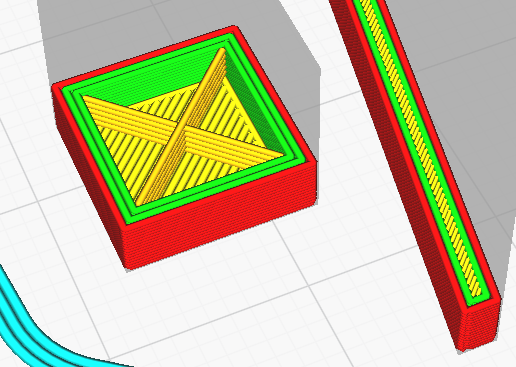
As you can see, the one on the left has a bottom and then the infill starts, as expected.
But the one on the right is filled completely with top/bottom lines.
This is more obvious when I hide the infill in the "Color scheme" box:
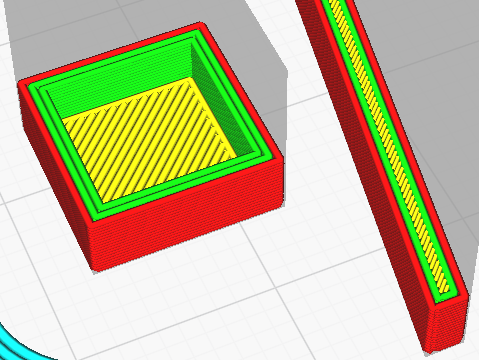
My screenshot shows a certain layer, but the model on the right is much higher than that layer, so this cannot be the top skin.
Any ideas what might be going on?
 AndreKR
All 2 comments
What is going on is that the model on the right has been gap filled. That is controlled by the Fill Gaps Between Walls setting. It looks like skin but it's really more like a wall line in concept.
 smartavionics
on 6 Feb 2019
smartavionics
on 6 Feb 2019
Hopefully the next release is going to connect these gap pieces better. But yeah this is expected behaviour.
Normally there would be another inner wall there.
 Ghostkeeper
on 6 Feb 2019
Ghostkeeper
on 6 Feb 2019
Related issues
 thopiekar
·
3Comments
thopiekar
·
3Comments
 jornada812
·
3Comments
jornada812
·
3Comments
 tomoinn
·
3Comments
tomoinn
·
3Comments
 DamianSepczuk
·
3Comments
DamianSepczuk
·
3Comments
 rudowinger
·
3Comments
rudowinger
·
3Comments
Most helpful comment
What is going on is that the model on the right has been gap filled. That is controlled by the Fill Gaps Between Walls setting. It looks like skin but it's really more like a wall line in concept.